Home Blog Page 1843

PMPL South Asia: Indian teams prohibited by PUBG Mobile

0

PUBG Mobile has prohibited Indian teams from playing into PUBG Mobile Pro League(PMPL): South Asia region. This big step comes after PUBG Mobile shows no sign of getting unbanned in India and PMGC is approaching in a couple of months.

PUBG Mobile was among 118 Chinese apps that were banned by India on September 2 under the pretext of data mining and user privacy concerns. Since then, there was a big question on the future of the blooming PUBG Mobile esports that made India, one of the powerhouses in the world.

According to the reports by AFK Gaming, “all Indian teams have been disallowed from participating in the PUBG Mobile Pro League Fall Split 2020 South Asia.” It further states, “Indian teams cannot play PMPL SA regardless of which country they may be physically present in.”

Future of PUBG Mobile Esports in India:

Most of the part of the above statement is essentially clear but most importantly, the probability that was being considered on how the Indian teams that were invited for PMPL Fall Split: South Asia could be shifted to another country to play the tournament, is now completely blown up. This is a massive revelation for the future of mobile esports and PUBG Mobile itself in India.

Teams that hoisted the Indian flag during the last international event won’t be able to even make it to the regional qualifiers for this edition. This includes the reputed squad of Orange Rock that bolstered the faith of fans from the South Asian region and kept the champions Bigetron RA at the edge till the end of PMWL: East Grand Finals. Orange Rock was the best team to represent South Asia on the global stages but this time, even they will miss the competition.
PMPL South Asia
The big names from India region will miss PMPL Fall: South Asia

Alongside Orange Rock, the veterans like TSM Entity, Nova GodLike, Galaxy Racer, Fnatic, Team SouL, UMumba eSports, and TeamIND and the newcomers in the form of Team XSpark, FutureStation Esports, Stalwart Esports, Fintox Esports, and TEAM iNSANE will not attend this event.

This is a shocking revelation for the entire PUBG Mobile Esports ecosystem in India. The region in itself is among the top competitors in the world. The region has established foreign organizations like TSM, Fnatic, and NOVA Esports venturing into the Indian market through PUBG Mobile, and such actions if repeated in the future could stagnate this expansion process.

If India could not represent itself on the global stages for PUBG Mobile, its esports scenario will completely falter along with the time. Although there is a possibility that a few squads may get an invitation for the PUBG Mobile Global Championship directly, the odds are against them for now. For such an invitation process to take place, the game needs to make a comeback in the Indian market and although there are some positives and negatives regarding this ban, the future of PUBG Mobile is very vague for the time being.
Valorant Rank Distribution And Player Percentage For Every Rank

0

Valorant is a highly competitive game. Players are constantly testing their skills against one another in attempts to earn their place among the best players in the world. Due to this competitive nature of the game, a ranking system is essential for any shooter like this.

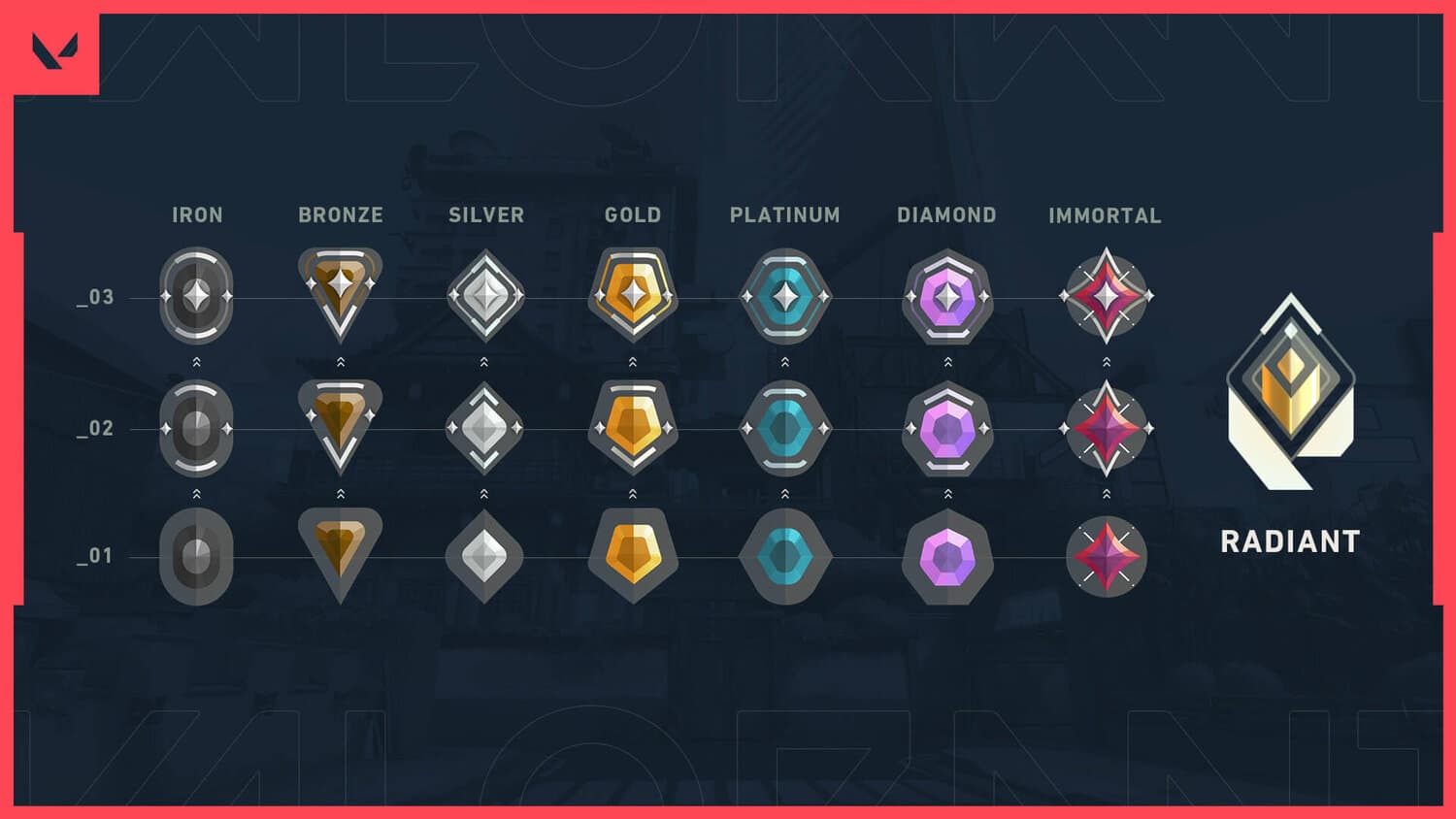
Riot’s ranking system designed for their FPS title Valorant consists of several rank groups. Each rank group is further divided into three subgroups which the players must cross to proceed to the next skill level.

The rank groups consist of Iron, Bronze, Silver, Gold, Platinum, Diamond, Immortal, and Radiant. The Radiant is the highest attainable rank in the game and is the only rank which doesn’t include any sub-ranks.

Completing 20 unrated matches enables a player to queue for the ranked mode. Playing ten games in ranked gives the player their initial rank which generally ranges from Iron 1 to high diamond.

Are you curious to find out how the other players are performing compared to you? That’s why we’re gonna show you a detailed chart showing the rank distribution of Valorant players which you can use to get an estimate of how good you are at the game compared to an average player.

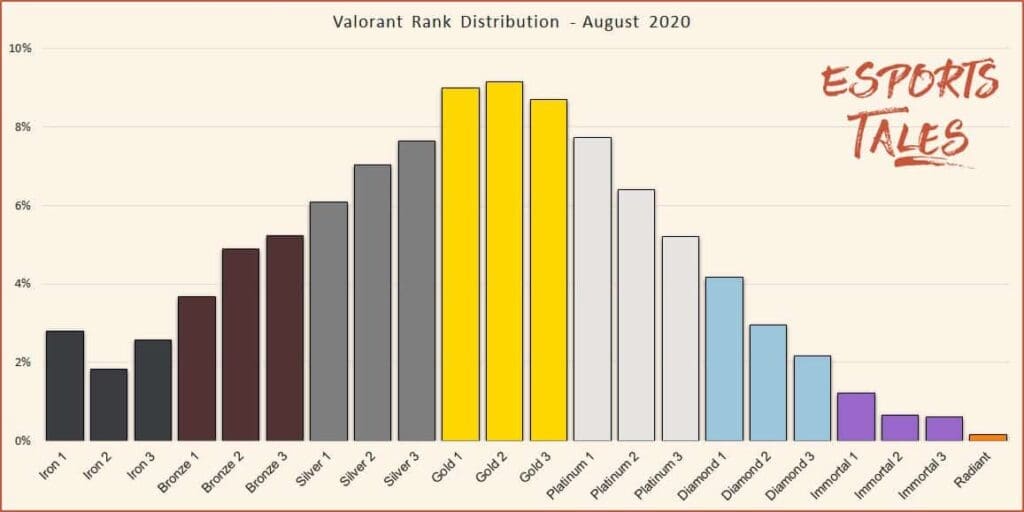
Here’s the rank distribution of Valorant as of August 2020. The data was taken from websites such as Blitz and put together by Esports Tales.

You can see a tabular representation of the data below.

RankPercentageRankPercentageRankPercentage
Iron 12.80%Gold 18.98%Immortal 11.23%
Iron 21.84%Gold 29.14%Immortal 20.66%
Iron 32.58%Gold 38.69%Immortal 30.62%
Bronze 13.67%Platinum 17.74%Radiant0.16%
Bronze 24.89%Platinum 26.39%
Bronze 35.23%Platinum 35.20%
Silver 16.09%Diamond 14.18%
Silver 27.04%Diamond 22.96%
Silver 37.63%Diamond 32.17%

In case you’re looking for what percentile of players you belong to, you can take a look at the following table. For instance, If you’re Gold 1, you’re slightly better than an average player and belong to the 50.80 percentile.

RankPercentileRankPercentileRankPercentile
Iron 12.80%Gold 150.80%Immortal 198.54%
Iron 24.65%Gold 259.95%Immortal 299.21%
Iron 37.23%Gold 368.64%Immortal 399.83%
Bronze 110.91%Platinum 176.38%Radiant100%
Bronze 215.80%Platinum 282.78%
Bronze 321.04%Platinum 387.99%
Silver 127.14%Diamond 192.17%
Silver 234.19%Diamond 295.13%
Silver 341.82%Diamond 397.31%

The data reveals that the density of players in the ranks increases from Iron to Gold, with the exception of Iron 1 which contains more players than its successor. After reaching a peak at around Gold 2, the density steadily falls from Gold all the way to Radiant, which only accounts for less than 0.5% of the players.

Also Read:

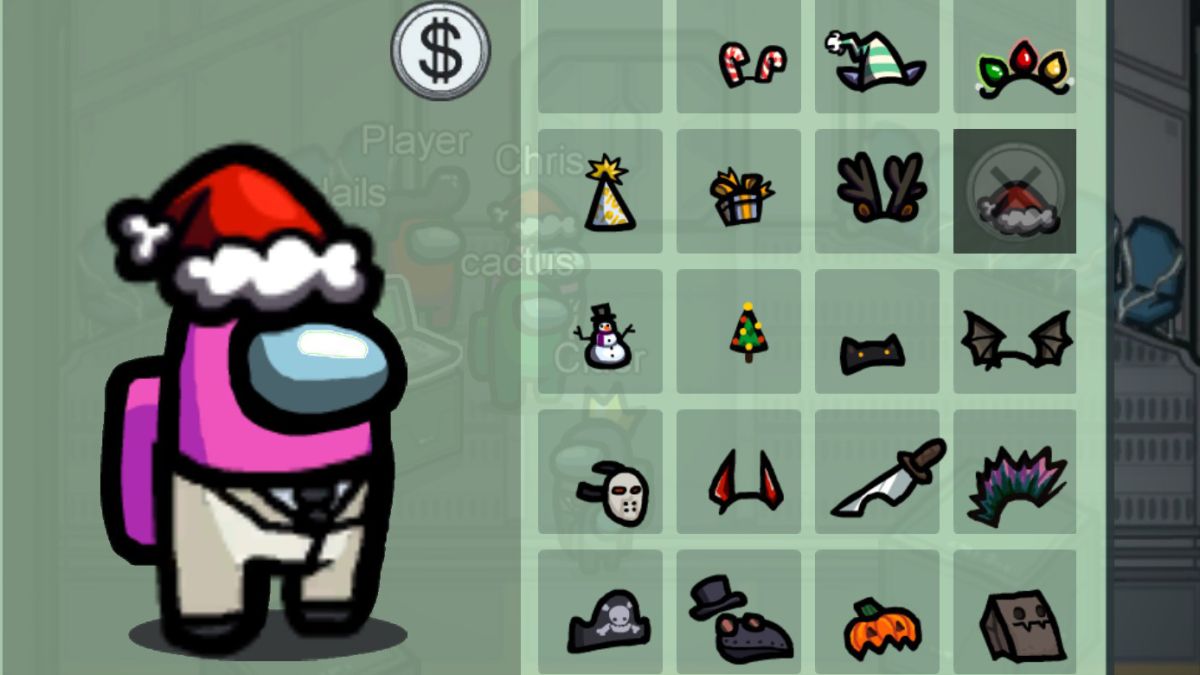
How to get Christmas Hats in Among Us

0

Among Us has completely taken over the gaming industry. The game looks very simple without any quirky graphics but is standing out due to its fun playstyle. Among Us has reached new highs in terms of popularity with the acclaimed faces of streaming industry are choosing this game to entertain their viewers.


Among Us features upto ten players who are spawned in a spaceship. Out of them, there are some impostors who the crewmates have to find out and kick from the ship before they manage to kill everyone. Crewmates have to use their wits to deduce who the impostor is while simultaneously doing tasks scattered across the ship to win.

WHAT ARE ALL THE PLATFORMS SUPPORTED BY AMONG US CROSSPLAY ?

Among Us supports following platforms

  • PC 
  • iOS
  • Android

How to Get All Christmas Hats in Among Us?

  • Open settings on either your phone or computer
  • Select Date and Time
  • Turn off automatic clock
  • Change the date and time to December 25th, 2018 at 01:49
  • Create a game and approach the Computer
  • Press customise and you should see Christmas hats to select

If you don’t see any Halloween hats, you may need to restart the game or restart your device.

That’s all you need to do to get the Christmas Hats in Among Us.

Also Read:

How to get Halloween Hats in Among Us for free

0

Among Us has completely taken over the gaming industry. The game looks very simple without any quirky graphics but is standing out due to its fun playstyle. Among Us has reached new highs in terms of popularity with the acclaimed faces of streaming are choosing this game to entertain their viewers.


Among Us features upto ten players who are spawned in a spaceship. Out of them, there are some impostors who the crewmates have to find out and kick from the ship before they manage to kill everyone. Crewmates have to use their wits to deduce who the impostor is while simultaneously doing tasks scattered across the ship to win.

What are all the Platforms Supported by Among Us Crossplay ?

Among Us supports following platforms

  • PC 
  • iOS
  • Android

How to Get Halloween Hats in Among Us?

You can get Halloween costume hats in Among Us simply by waiting for October to arrive.

Or, you can get Halloween hats in Among Us for free on mobile and PC right now by changing the date and time on your device.

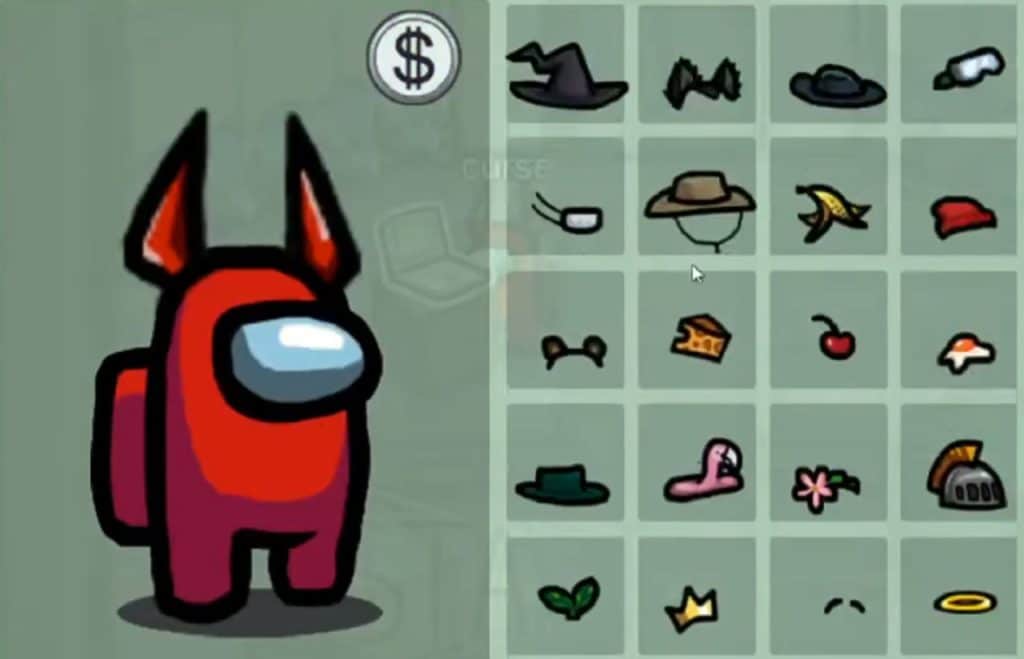
Follow the below steps to get cosmetics such as a Friday the 13th hockey mask and bat wings.

  • Open settings on either your phone or computer
  • Select Date and Time
  • Turn off automatic clock
  • Change the date and time to October 29th, 2019 at 23:59
  • Open Among Us and wait for the time to change to 00:00 on October 31st
  • Create a game and approach the laptop
  • Press customise and you should see Halloween hats to select

If you don’t see any Halloween hats, you may need to restart the game or restart your device.

That’s all you need to do to get the Halloween Hats invisible in Among Us.

Also Read:

Free Fire Name Change Guide: How to change name in Free Fire?

Nicknames are the identity of a player in any game. Free Fire players have a lot of competition in choosing their favorite nickname and some nay enter the wrong one at the start. Here is how you can change your name in Free Fire.


Free Fire is a game with a huge player base, the game has over 500M+ downloads on Google Play Store and hence most of the famous nicknames are confirmed. The players that have entered incorrect name or want to change the name of their Free Fire ID can simply do so by following these steps:

  • Open Free Fire on your Mobile.
  • Go to the top right corner of your screen and click on “Profile”
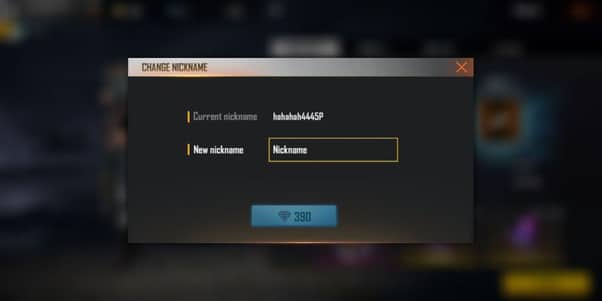
  • Click on a Yellow colored icon present just below your in-game name. A pop-up box will appear.
  • Enter your new nickname and press submit. You will require 380 diamonds to change your name.
Photo via Saravanan

The diamonds are the in-game currency of Free Fire and cost real-life money to purchase. It is advised to type your favorite nickname correctly and not waste the diamonds.

Also Read: How to earn free diamonds in Free Fire

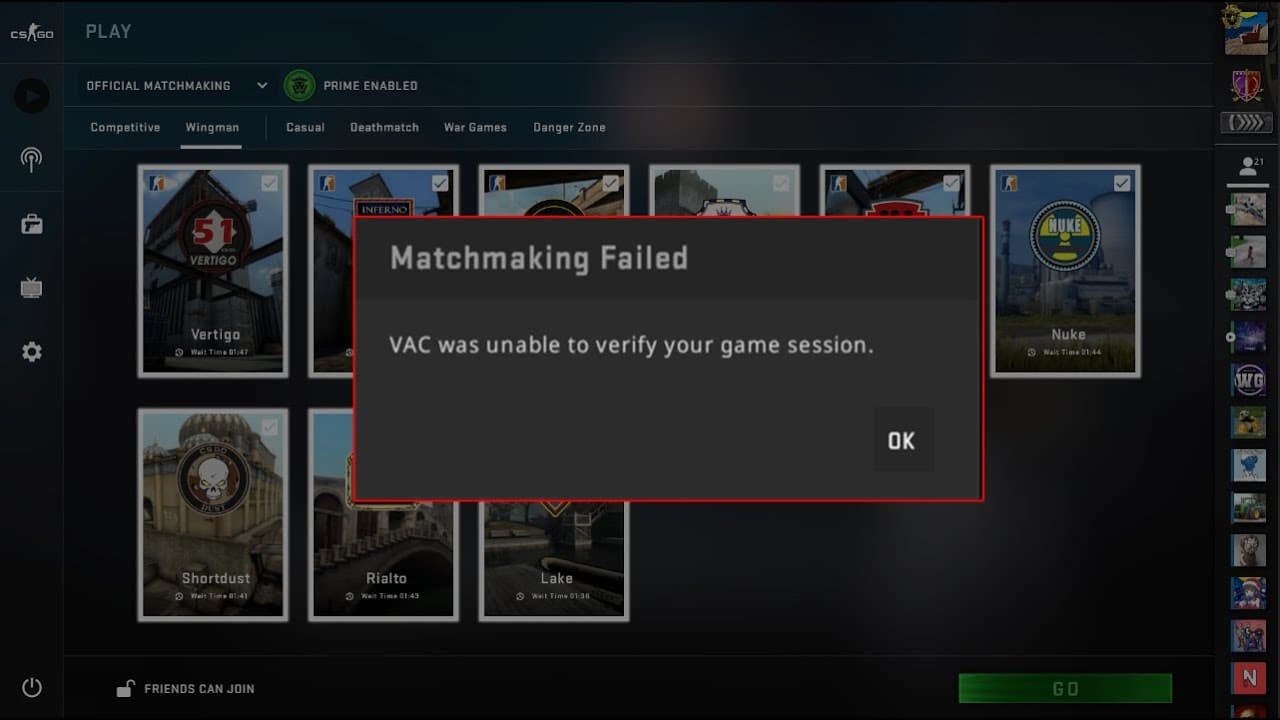
Fix: CSGO VAC was unable to verify your game session error

Valve’s competitive shooter CSGO has encountered a lot of bugs over the years, but not one of them has come even remotely close to annoying the players as much as this error did. Yes, I’m talking about the infamous which has been haunting players for a very long time.

The ‘VAC was unable to verify your game session‘ error is perhaps the most annoying error in CSGO which prevents the player from joining any matches, be it casual, competitive, or even community servers. Restarting your game rarely fixes the issue, and you’re left wondering what you can do to get rid of this monster.

If you’re reading this, chances are that you’ve probably already tried everything in your mind and the nasty bug still won’t succumb to your valiant efforts. Don’t worry, we have you covered. Here are some tips which you can use right now to make the bug disappear and rank up in peace.

  1. Restart Steam Client: You may have already restarted your CSGO, but this error won’t leave you that easily. To fix it, you need to restart your entire Steam client. To do so, first, exit CSGO. Click on steam, then on the top left go to Steam, and exit (or log out). Relaunch the Steam client, then launch CSGO. Your problem is magically fixed. But on the off chance it isn’t, read on.
  1. Restart Your PC: If restarting Steam didn’t fix the issue, restarting your PC might. You probably know how to do that, so let’s not waste time by stating here.
  1. Verify Game Files: There’s a chance that something might be corrupted in your game files. To find the problem, go to your steal library, right click on CSGO, then go to verify local files. Once done verifying, your game will automatically redownload corrupted files and restore the game to its original state.
  1. Reinstall CSGO: Your absolute last resort. Reinstalling the game is almost certain to fix your problem. First, uninstall the game from the control panel or from Steam. Then go to the Steam store and download your fresh copy of CSGO.

via Gfycat

Once fixed, you’ll be able to run CSGO smoothly like before and join servers at will. However, it’s not rare for this bug to return in the future. In case that happens, you can just try these steps once again and it’ll be fixed in no time.

Virtua Fighter x esports Project announced by Sega

0

Sega announced a brand new Virtua Fighter project to honour the company’s 60th anniversary. However, the complete details regarding the project are not out yet, but an official description (translated by Nibel) states: “The gold standard of gaming is finally back in esports. Announcing the Virtua Fighter x esports Project.

“Virtua Fighter was created as the world’s first 3D fighting game in 1993. It will restart as an eSports title in celebration of Sega’s 60th anniversary, starting in Japan,” Sega said. “Details on the project will be announced in a future update.”

The latest entry in the Virtua Fighter series is the 2010-released Virtua Fighter 5: Final Showdown, which is an updated version of the 2006-released Virtua Fighter 5.

Watch the “Virtua Fighter x eSports Project” announcement trailer below.

Check out our news section for more exclusive news.

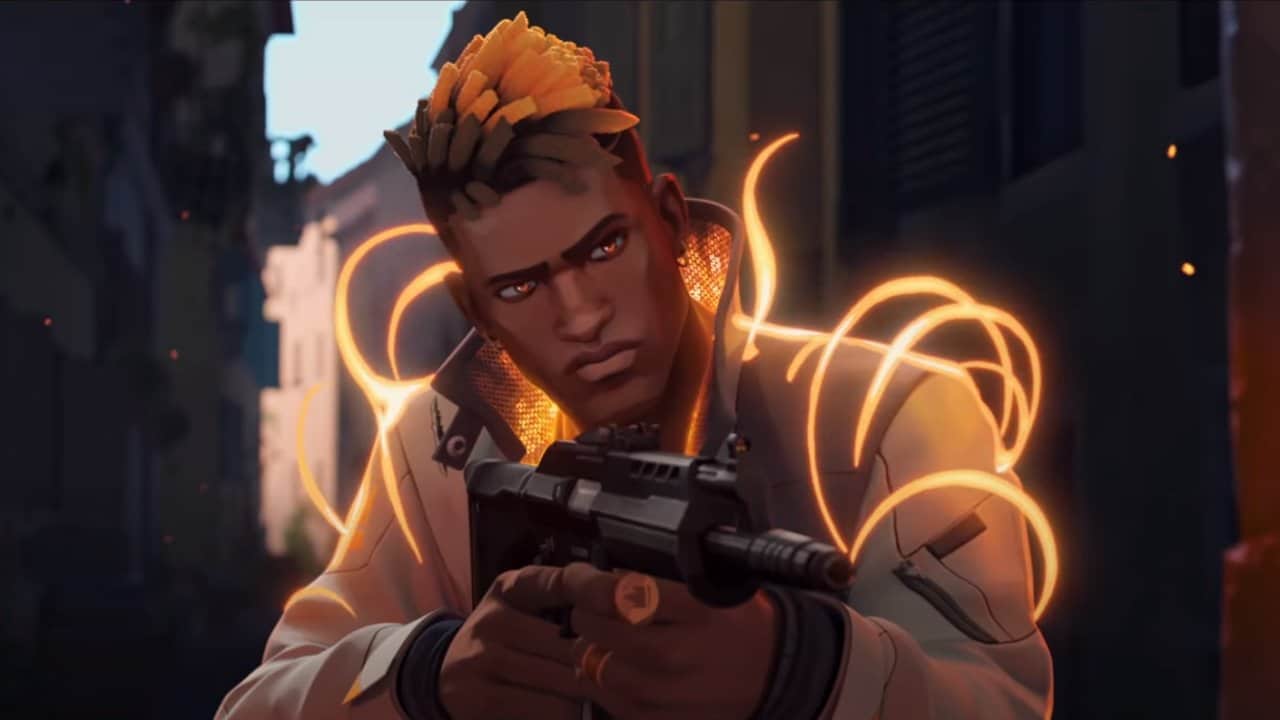
Shannon Williams – Voice actor of Jett in Valorant

0

Jett is one of the most popular agents in Riot’s new FPS title Valorant. The South Korean agent features a unique set of skills which make her the most agile agent in the entire game, and perhaps the deadliest agent in the right hands. Today, we’re taking a look at the voice actress behind Jett – Shannon Arrum Williams. Shannon is a British-South Korean singer and actress who made her debut as a solo artist in December 2014 with her digital single, Daybreak Rain.

Her skillset includes a smokescreen, a dash, an ultimate which gives her a set of perfectly accurate knives, and an ability to lift herself up in the air which can be combined with her passive to make her float for a long duration.

The 22-year-old rose to fame as a K-pop idol in her teens. She also was a part of multiple TV shows including Star King, Hidden Stinger 2 and 3, Immortal Songs 2, My Neighbour Charles, and the hit TV reality show K-pop Star 6: The Last Chance.

Some of her hit singles include Daybreak Rain, Why Why, Love Don’t Hurt (ft. Lil’ Boi), and Hello. Her first live concert happened in 2014.

Some may find it hard to believe that voicing Jett was her first work as a voice actress. Similar to Naomi Yang, who voiced Sage, she had no prior experience as a voice artist whatsoever. It can’t be denied that Shannon brought her agent Jett to life with her voice acting skills.

Shannon Williams was also seen occasionally streaming Valorant on her Twitch channel. She rocks a follower count of over 100k and also streams games like Among Us and Sea of Thieves.

How to surrender in Valorant

0

After weeks of waiting, the much-anticipated ranked competitive mode has finally arrived for VALORANT, featuring an all-new set of rank icons with the peak rank being renamed to Radiant. Alongside this new game mode, VALORANT patch 1.02 also implemented one of the most requested features to the game – the Early Surrender button.


The surrender button enables players to opt out of a VALORANT game before its conclusion. All the remaining players of a team need to agree on the vote for it to be passed and once passed, awards the opposition for all the remaining round wins, while offering the round losses to the team surrendering.

Here’s how you can use this new Early Surrender feature in the next VALORANT game you find unwinnable:

  1. Press the Enter key to open chat.
  2. Type “/ff” or “/forfeit” in the chat box, without the quotation marks.
  3. If a teammate calls up the vote, all you need to do is type “/yes” or “/no” in the chat to register your vote. You can also use the F5 and F6 keys on your keyboard for the same task.
  4. If all the remaining players in your team votes yes, the vote will be passed and the game will end.

Keep in mind that the surrender vote cannot be called before the 8th round, and furthermore, it can only be called once per half. This has likely been done to prevent spamming of the surrender vote and to keep games interesting while also giving the players a chance to surrender if and only when continuing a game would seem futile.

Since surrendering a game is the same as losing all the remaining rounds left to make the enemy team win, the surrender button should only be used when a player of your team has left and the game seems unwinnable through a 4v5. Surrendering when the game is still 5v5 is generally a bad choice unless your team is heavily out skilled by the opposition, and you’re certain that no further round can be won by your team.

Is Free Fire Banned In India?

0

Free Fire is facing a new error due to which players are unable to enter the game. Some players are questioning that “Is Free Fire banned in India?”, The answer is clearly no.

Free Fire is reportedly down for several players in India as some of them face a new game server timeout mm_7 error. The users are not able to enter in matchmaking mode as the game is stuck with this error. So let’s see what exactly is this error.

What is the game server timeout mm_7 error?

The game servers are reportedly down as the players are not able to enter any game mode. This error is reported saying its game server timeout mm_7 error. The error is probably caused due to some server issues which is causing connectivity problems across the game.

As the name suggests, Time-out error points towards a server disconnect issue. When a player can not connect to the game servers, it indicates a server timeout error. Such errors can be from the game’s server-side or from the game client application itself. The game was recently updated to its latest “Booyah Day” patch and this can be a bug that is unintentionally introduced along with the update.

Several Free Fire based content creators have reported that they are facing this “mm_7 error” issue. The game developers have not acknowledged this prevailing bug/error issue yet and may take action soon. While it’s not a global issue that will cause any breakdown in the game, it is safe to assume that the game will be fixed within a few hours or some days so wait patiently.

Free Fire banned in India?

Free Fire is not banned in India and users are just facing some sort of server issue or game bug. The error will be quickly fixed once the developer teams get to know about it and may take a few hours to fix it.

Also Read: How to get Unlimited Diamonds for FREE in Free Fire.