Popular Indian Organisation GodLike have entered the Valorant scene. The organisation that earned fame and notoriety through their highly successful PUBG-Mobile roster has picked up the lineup that represented FaR Esports up until recently.
The lineup consists of former stalwart of the CSGO scene Jigar ‘smx’ Mehta along with prominent members of God Particles Abhay ‘KnightRider_’ Mulchandani and Shivam ‘sh1vy’ Ajmani. Rising star Divyansh ‘Scargod’ Jain also features in the roster, which is completed by Shane ‘whitehorse’ Kariwow, who represented Orange Rock Esports in Valorant for a brief period.
The lineup tasted success in the 1play event, beating Global Esports in the finals.
It will be interesting to see if the lineup can now pick up steam and continuously be a contender for trophies, as has been the trend for rosters under the GodLike banner.
Free Fire is a multiplayer battle-royale game which has a big cosmetic side to it. The skins are available for free via some events but for other rare and unique skins, players need to purchase them via the in-game currency. The in-game currency from Free Fire is known as Diamonds and players are always looking for ways to earn ample amount of diamonds for free.
There are a few ways through which players can earn free diamonds. Though the amount of diamonds vary for each method and some require more time investment than others, you can follow there simple steps to earn some diamonds for free.
Free Free Fire Diamonds: BUG REPORT SYSTEM METHOD
This is one of the best, legit and simple way through which players can earn free diamonds. The amount of diamonds is also pretty big as compared to other method. Players have to report bugs through which a bounty is given based on how big the bug was. This process takes place on advanced servers so make sure you have an account before you begin. Here is how to earn via this method. The steps include account creation on advanced servers.
Register yourself using Facebook. Make sure your Free Fire ID is linked to Facebook.
Fill up the required details and create your account.
Find bugs across the game on the advanced servers and report it on the website by using your account.
Players can earn 100 diamonds for a successful report.
By working in teams, you can report the maximum number of bugs and earn up to 3000 diamonds.
Note: The advanced servers usually get filled very quickly as there are limited slots. If the website shows that the servers are full when you create an ID, wait until the servers reopen.
Free Free Fire Diamonds: GPT APPS METHOD
This is the second method through which players can earn diamonds. It is pretty slow as compared to the first one but assured rewards await for those who do it patiently. What this method basically includes is that, players will have to complete certain tasks and surveys through which they are rewarded for their information output. Here are few apps via which you can try this method:
Among these apps, Google opinion rewards can be trusted the most and players will have to fill up surveys as they come, and once they have enough money earned from it, they can simply buy diamonds via Google Play Store.
Other apps on this list also promise to give away money by doing some tasks so pick only those which are relatively simple and do not affect your privacy or harm you in any way. The rest of these apps are not tested by TalkEsport and readers are advised to check the policies of the third-party apps before opting for any survey or tasks that may expose their private data.
Call of Duty: Mobile players are now getting a more enhanced and smoother game as Activision is ready to roll out 120 frames per second support for the game.
Currently, the game runs on 60 FPS capacity and still feels lot smoother than any other first-person shooter games available on mobile devices and hence, this addition is a game changer.
The 120 FPS support in COD Mobile will be made exclusively available for the players who own Sony Xperia 5 II.
Sony Xperia 5 ii 120 FPS Support For COD Mobile
Sony Xperia 5 ii is the official smartphone for the first Call of Duty: Mobile Championship and hence, making this feature exclusive to that one device seems to be the most viable choice.
The players who own this device will have a far greater advantage than normal COD Mobile players. Also, the teams which qualified for COD Mobile World Championship will be using Sony Xperia 5 II for the rest of this tournament.
120 Frames Per Second is a game changer for a title like COD Mobile. The aim placement and precision are key to winning any mode in COD Mobile and with the game running on double the FPS than normal, players can now play the game more competitively and enjoy a lot smoother experience.
Although the 120 FPS mode is currently available only for a single model, it is possible that this feature will be added to upcoming global updates of COD Mobile after the tournament is concluded.
Also, this mode will be available only to a limited range of very high-end devices which support higher frame rates and hence, players who enjoy the game on lower-end devices will probably be left out from having the higher frame-rate experience.
Overall, the news of this feature getting introduced in COD Mobile a large upgrade to the game mechanics and its rising esports scene.
A higher frame rate mode enables the players to make more smoother movements and aim precisely onto their enemies. The level of competition in terms of COD Mobile is bound to increase when a large number of player base will play the game with 120 FPS.
Touted as the best player in the world Oleksandr “s1mple” Kostyliev has been banned from Twitch for the fourth time, which he suggests is for using homophobic slurs on stream.
s1mple’s relationship with Twitch has been rocky so far as 4 bans are no joke. The streaming platform is yet to release an official statement addressing their decision regarding the ban. Though the Ukrainian superstar believes that the ban has been issued for using a Russian homophobic slur ‘pidor’. He disagreed with Twitch’s decision while showing his frustration in his tweet.
It’s funny that I get banned for aggression towards a person that says the word "Pidor" and specifically tries to ban me on the platform and I try to condemn him for this and say the forbidden word because I have a negative attitude towards it (because of rules)
s1mple’s belief might actually be the case as his previous bans were handed out for similar reasons. His tweet suggests that someone in his stream forced this word out of him while he tried condemning their intentions. s1mple says that person aimed to get him banned on Twitch and somehow they were successful.
Speculations also hint that the ban was handed because of the recent issues troubling Twitch. Scammers are ripping VODs off popular streamers and rebroadcast them on other platforms, mostly YouTube.
These broadcasts are infested with scam links and luring viewers into submitting their Steam credentials. People are more likely to fall into such traps when a legendary figure like s1mple is involved. The channels are setup perfectly to deceive a regular person if they aren’t careful enough.
Whatever may the case be, looks like s1mple was wrongly handed a ban for violations that he didn’t commit intentionally or didn’t commit at all. We can only hope that Twitch reviews the ban soon enough to relieve the 23 year old from his ban.
GTA Online average player count is higher than ever after Epic Games gave it away for free, surprising everyone. GTA V’s online mode still maintains quite a healthy player base for a 7 year old game. When Rockstar dropped the game in 2013, everyone was left in the awe of it as GTA San Andreas raised the expectation which GTA IV failed to deliver on, but GTA V was promising enough to get the fans excited.
GTA Online Winter Update Release Date
One of the many reasons why GTA still boasts their player count is the work Rockstar put in to push updates so players find new ways to enjoy their stay in the game. The next major update for winter is teased by Rockstar yet again this year however, no official release date has been confirmed, yet we can assume judging by previous years that the update will arrive in the early weeks of December.
What Is The Heist For 2020?
The winter update for 2020 will definitely bring a Los Santos covered under the snow, and few minor changes addressing the winter season, but the question that remains unanswered is about this year’s heist. The Dimond Casino Heist released on 12th December 2019 attracted a lot of players back to the game. It was a combination of thrill, synergy, and teamwork, and the players felt engaged in the process.
The 2020 update is presumed to bring new locations to the game which are not available at this point. These new locations will be introduced as a part of the latest Heist which can be inside Los Santos, within the already existing buildings, or onto a totally fresh location altogether.
Nothing can be confirmed as Rockstar keeps their secrets closely guarded, only time can attest our assumptions.
As the holiday season kicks in, Rockstar is to make changes accordingly, gifts like apparels, guns, and discount of several items are given as a part of the winter update. The city goes through a cosmetic change to embrace a Christmas theme and login rewards are handed out.
Now that Rockstar has announced major update to utilize the full potential of the next generation consoles, a visual overhaul is expected with graphics reaching new heights even for Rockstar’s standard. Exciting part being the game is set to be free for consoles in 2021, however it is rumored to be locked in 30FPS which is quite disappointing.
Call of Duty: Mobile is a multiplayer focused first person shooter game. The game has its own battle royale mode but nothing matches the authentic COD experience offered through the multiplayer modes. The game is fairly competitive and as one rises through the ranks and the skill level matters a lot alongside the game knowledge.
While you have to develop your own skills, we can help you in terms of the game knowledge. Refer to this list of top five assault rifles to take into your matches in COD Mobile.
Guns play a very vital role in the functioning of COD Mobile. Having the right weapon at the right time is extremely necessary for the players and those who carry around same guns for each and every combat face a huge disadvantage in certain situations.
For the maps like Nuketown and Raid, it is essential for you to have at least one burst damage loadout like SMG and Shotguns and for maps like Firing Range, the snipers and assault rifles are more preferred in COD Mobile.
No matter what mode you play, it is very important to carry around a minimum of two assault rifles in your loadouts to have better chance at winning. For you to gain that advantage, we will discuss the best five assault rifles you can carry to have an even match for every situation.
Best Ars In COD Mobile // Best Assault Rifles in COD Mobile
Assault rifles play a significant role in COD Mobile for close to mid-range combats and to function correctly, one must consider various factors under which the assault rifle will be used.
The player must understand the map terrain and each location correctly. For example, if you are playing in Nuketown, you need to have an AR that can bring enough burst damage in close range fights and with higher firing rate to melt down your enemies easily.
In this scenario, the ADS accuracy can be compromised to get a better gun with good hipfire accuracy and high mobility. Now if you consider another map like Raid, the combats that mostly take place are in mid range and here, you need to have a gun that matches your opponents.
If you carry the same AR you used in Nuketown, you will be at a bigger disadvantage. You need a gun which has better ADS accuracy, low recoil and enough mobility to quickly disengage after finding the kills. The five weapons mentioned below are picked from each category that will help you in close, mid and even long range fights. It is recommended to at least keep a combination of two guns mentioned below to have better results in each map.
DR-H in COD Mobile
The first gun on our list is DR-H. It is an assault rifle that gives you the highest raw power on this list and is fairly easy to control. Now if you consider the scenarios mentioned above, DR-H can match the power of most SMGs and can give you a fair chance at winning a duel in Nuketown.
Similarly, DR-H is enough stable that you can easily control the gun for mid-range fights but there might be a slight disadvantage against other stable guns with low recoil.
DR-H can be considered as the most stable and best weapon to use in close to mid range combats but the biggest thing that this gun lacks is the mobility. You can win any duel if you aim accurately but if the backup arrives in time, it is extremely difficult to navigate to the safe locations.
The gun also have a base magazine of 20 bullets which is far lesser than its fellow ARs and hence you will have to think before firing.
If you are playing Raid, you can use this DR-H to land a mid-range kill through three open areas and still have enough time to jump-slide to safety behind the walls/doors and even the fountain. We recommend to carry this game with red dot sight, extended magazine and other attachments that will make it more mobile and the gun becomes a beast that can instill terror in your enemies.
KN-44 in COD Mobile
The next gun on our list is named as KN-44. You can consider this gun as the best option for any close range fight. It has an insane fire rate that remains unmatched by any other assault rifles. If you like to play deathmatch mode, this gun is a must to have in one of your loadouts.
If you are not a fan of SMGs, this gun works exactly the same but with a bit more damage. In deathmatch, there are again maps like Firing Range in which this gun will not be effective at all if you can’t convert the combat in a close range fight.
The mobility with KN-44 is perfect and you can just slide in, catch some players off-guard, land some kills and dash out to safety.
Now if you play domination, this is again the go-to pick for you. Domination mode requires you to fight close range and tactically, no matter which map you play and hence make sure to make the full use of this advantage by picking KN-44 over any other guns to dominate your opponents.
We recommend you to use a thermite or landmine alongside the smokes to help you in the dmonation mode. Talking about the attachments, it can be customized to much higher extent and you can create a gun that you like.
Adding extra bullets via extended magazine is always recommended but if you want to increase things like ADS accuracy, hip-fire and mobility around the gun, pick the attachments that match your requirements.
MAN-O-WAR in COD Mobile
As the name suggests, the gun is made for war and is incredibly strong than other weapons. The gun is heavy to carry around but dishes out so much damage that even LMGs can be defeated with this gun.
Man-o-War can be considered as the best AR so far and with more and more weapons getting added to the game, the options are increasing but this gun is still a solid pick against most of the weapons.
It has the capability to even destroy the DR-H users but mastering the gun’s recoil pattern accurately is a very hard task for anybody. If you want to absolutely obliterate your enemies, this is possibly the best choice but it comes with a big catch. You have to practice hard with this gun as the mobility is very low and hence, even with sliding mechanism, you can get easily caught.
For search and destroy mode, Man-o-War is a great choice for aggressive push but consider yourself as a sacrifice in that situation because even if you can easily catch an entry frag, it is almost impossible to run away from the cover fires. These are the game intricacies you will need to learn by experience. This gun should be customized for increasing the mobility and accuracy but you can even add some laser sight and other close range attachments to carry this gun into deathmatch modes.
M4 in COD Mobile
The very first gun that is available when one starts playing COD: Mobile is M4. It is very easy to obtain, master and increase the XP to have a complete set of modifications available right from the start.
Some players can consider this gun as an inferior to the others on this list because of it’s stability but that’s what makes it unique. There are times when you play maps like Firing Range and you require a gun that can accurately hit targets at long range without compromising its damage output.
M4 is absolutely perfect gun for mid to long range fights but is slightly at disadvantage at close range combats. The gun has lesser damage than its competitors and hence it is not wise to choose this weapon for close range.
If you like to play Search and Destroy more, and have some specific positions that you hold which requires you to battle at a long range, M4 with higher scope variant is your perfect choice.
Attaching a 3× scope is ideal for this gun alongside the extended magazine and other attachments can be altered as per your preferences.
This gun can challenge the sniper players if the opponent misses the first shot and can easily beat opponents with unstable guns who have a bad aim. This is recommended gun for entry level players but is a perfect and most recommended AR for long range fights.
AK-47 in COD Mobile
The last weapon on our list is AK-47. This is a very well-known name and its various iterations occur across many titles. This gun can be considered as a double edged sword just because of its unexpected recoil pattern. Ak-47 is one of the finest weapons in COD: Mobile but when you consider it as a go-to weapon, things get tricky.
At lower ranks, you will not face any issues while using AK-47 as it is one of the earliest available weapons and most of your opponents will run the game.
When you climb the ladder and reach to a point where even you have almost all the weapons unlocked and your skills have been honed, that’s the time when this choice begins to become questionable.
Players who will have access to much higher category weapons like DR-H, ICR and M4 will beat you in an instant if you don’t aim correctly and come into open fields for firing.
AK-47 lacks firing rate, mobility but has an insane damage till decent distance. The gun feels shaky even if you combine it with stable attachments hence it is highly recommended to use this weapon by keeping that in mind.
This gun makes it to the top five because of its sheer raw power and if you are willing to sacrifice the stability and opt for risky plays, it can give you the most surprising results time to time. Get ready to lose at the start and learn this weapon good enough to stomp your enemies once you understand the detailed mechanics of how AK-47 works with various attachments in COD: Mobile.
CONCLUSION:
These are our picks for top five assault rifles that COD Mobile has to offer. Now utilising the weapons correctly is what matters. Each and every scenario cannot be included in this article hence you will have to learn from your experiences and become better by playing with those guns regularly. Also, try customising each gun with all the options available till you find your perfect set of attachments.
This is a trial and error method but the time invested in this method is worth it. It is also must for players to keep one short range and one mid to long range AR in their loadout options. You can always carry more than two Assault Rifles but saving slots for SMGs, LMGs and Shotguns is equally necessary in COD Mobile.
We recommend you to carry DR-H and KN-44 if you like domination and Deathmatch, M4 as a long range option and AK-47 and Man-O-War only when you master it. You can use both of these guns in unranked matches before trying them into ranked matchmaking. Let us know if this small guide helped you to improve your choice of assault rifles and made your gameplay slightly better.
Genshin Impact seems to be the bandwagon everyone is hopping in. The online action RPG has is touted to be the greatest video game launch any Chinese developer has ever seen. It has over 17 million downloads and garnered about $60 million from just the mobile platform.
Of all mystical things the game has to offer, Radish is found to be exiguous. Follow through to find out the places known so far that have it:
Vegetable gardens south of the Dawn Winery.
Near the house towards the south east from the waypoint in Stone Gate.
Areas around Teyvat can be investigated for a potential Radish.
The Guyun Stone Forest and Wolvendom area on Liyue and Mondstadt from Expedition.
Radish can be used for cooking Radish Veggie Soup and Fried Radish Balls. Mostly found in the wild, its only application is in cooking, given the fact that it is rich in fiber and nutrients also easy to grow and harvest.
Frames per second, or FPS for short, is one of the most crucial things which can give players an advantage in any competitive video game when optimized correctly. When playing a first-person shooter like CSGO, maximizing your fps count should be your top priority if you’re looking to climb up the ladder of ranks.
Apart from your fps count, there are other aspects like ping, var, or losses that can disrupt or negatively affect your gameplay, but unlike those other factors, you have some control over your fps which you can use to gain a competitive advantage over enemies.
Now there are a bunch of ways through which you can increase fps in CSGO, but many of them are either outdated or do more harm than good. In this guide, we’ll be taking you through series of tips and tricks which you can start using right now to maximize your in-game fps in CSGO. We assure you, you’ll be shocked by the results.
CSGO Video Settings
Starting with the rather obvious one, turn every single one of your video settings without exceptions to ‘very low’ as shown in the image below in order to maximize your FPS. Disable Texture Streaming & anti-aliasing, set texture filtering to bilinear, turn off vsync and motion blur, and if you’re looking to squeeze every single extra frame you can get, keep the resolution as low as you can before it gets uncomfortable to play in. There are varied opinions on this, but enabling multicore rendering generally improves fps if you have more than two cores on your CPU.
CSGO Best Launch Options
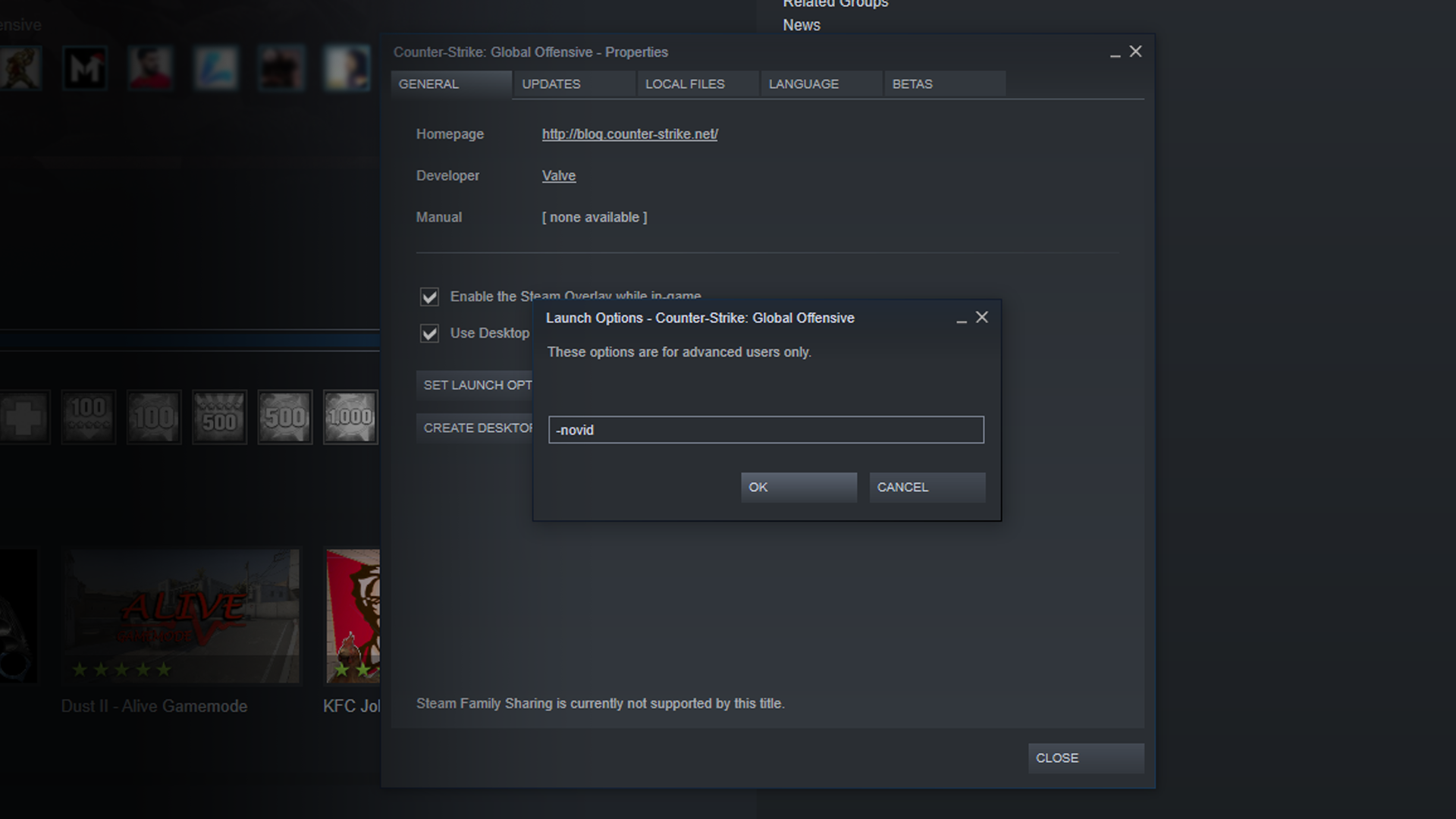
Launch options can help you gain a significant boost in your FPS. To edit your launch options, go to your Steam library, click on CSGO, go to properties and click on ‘set launch options’. Here are the launch options which you should enter there:
“-high -threads x (replace x by the number of cores on your CPU) -novid -freq y (replace y by your monitor’s refresh rate)“
Once done, save the launch options and relaunch CSGO.
Updating Video Drivers:
Depending on which graphics card you have, your video drivers may get outdated from time to time. For instance, if you have an NVIDIA GPU, make sure to regularly check the NVIDIA website to look for driver updates.
Power Options:
Your windows power options may significantly hamper your system’s ability to run CSGO properly. To fix this, go to Hardware and Sound on your Control Panel, click on Power Options, and select High performance.
Graphic Card Settings:
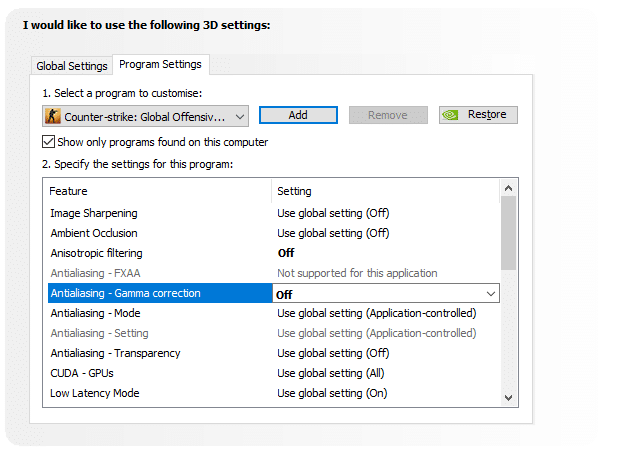
Your graphic cards will allow you to set some advanced settings which can improve either performance or visual quality for your games. You need to maximize the effectiveness of your GPU in terms of performance for increasing FPS.
CSGO NVIDIA Control Panel settings
Anisotropic Filtering: Off
Antialiasing-Gamma Correction: Off
Maximum Pre-rendered Frames: 1
Power Management Mode: Prefer Maximum Performance
Preferred refresh rate: Highest Available
Texture Filtering – Anisotropic sample optimization: Off
Texture Filtering -negative LOD bias: Allow
Texture Filtering-Quality: High Performance
Texture Filtering-Trilinear Optimization: Off
Threaded Optimization: On
Triple Buffering: Off
Verticle Sync: Off
CSGO AMD Control Panel settings
3rd Party Softwares
Let me say this straight, third-party softwares almost never work for improving your fps in CSGO. In fact, they do more harm than good for your system’s performance. Everything those ‘Game boosters’ do can be done manually through the task manager.
Close Other Programs and Services:
Open your task manager by pressing ctrl + shift + Esc, then go to the ‘processes’ tab. Close any processes which you feel are pointlessly draining your system’s resources. Then head over to the ‘services’ tab and disable services that you don’t need. Be wary though, don’t close a service or process unless you’re certain that they’re not crucial for your system.
PUBG Mobile unban is a hot topic in India since the last two months. Players are waiting eagerly to hear some good news regarding the current situation of PUBG Mobile in the country but so far, all the news have been vague and leading in various directions. So, what exactly is the current condition of PUBG Mobile ban and is there any possibility of the game getting unbanned? Let’s find out.
PUBG Mobile was banned by the IT Ministry of India on September 2nd. This ban was imposed during the escalating tension between China and India border along the LAC. This was the third ban-wave in the country where more than 100 Chinese apps alongside PUBG Mobile were banned because of user privacy issues. The official reason stated by the government was that the apps are “prejudicial to sovereignty and integrity of India, Defence of India, Security of State and Public Order.”
Impact of PUBG Mobile ban in India:
The entire player base in the country was caught off-guard due to this ban and it halted the rising mobile esports industry in India. PUBG Mobile pros were confused due to this ban and were forced to give up their invitational slots of PUBG Mobile Pro League: South Asia Fall Split.
The PUBG Mobile content creators were instantly having divided stances on this decision. Some demanded for the reversal of this imposition and some conveyed about their changing future plans. Famous names like Scout and Mortal were among the very first to address their fans where both of them urged their viewers to keep calm and announced their future plans in a short stream.
Impact of ban on Tencent Holdings:
Tencent faced a severe impact of this ban as their share value dropped drastically after the ban was announced. According to Reuters, “Shares of Chinese gaming and social media powerhouse Tencent fell more than 2% on Thursday after India banned 118 mobile apps, including the firm’s popular videogame PUBG.
This reportedly led Tencent to lose over $14 billion. The Chinese conglomerate faced a heavy financial backlash due to India’s decision to ban this game.
PUBG Corporation’s reaction to this ban:
One week after the ban was stated, PUBG Corporation issued a statement where they made some major changes that could be seen as the first step towards lifting this ban. PUBG Corp. severed their ties with Tencent Holdings and assumed complete control over publishing and distribution rights of PUBG Mobile in India.
They also gave assurances that pointed towards localized content and tournaments for the region. This can be compared to Game for Peace; the Chinese variant of PUBG Mobile; or PUBG Mobile Korea, which has its own local variant separated from the global version. This meant that India could get their own separate game with PUBG Corporation as the publishers.
Jio and PUBG partnership
Soon after PUBG Corporation announced about their plans for India, rumors started flying around and various news surfaced on the internet. The major news came within a week where reports suggested that PUBG Corporation were in talks with Indian telecommunication titan Jio for discussing a potential partnership. The distribution and publishing rights were on the table for this partnership but later, these rumors faded away and no further reports were published talking about the developments of this arrangement.
Moves by Indian esports organisations:
Megastars was the first Indian organization to drop their PUBG Mobile and several other teams followed the suit. Other prominent organizations in India are still waiting on their decision about the future of their PUBG Mobile rosters in India. Indian organizations named Stalwart Esports and FutureStation Gaming decided to shift their base from India to other South Asian regions to be able to compete in PMPL: South Asia Fall Split.
“PUBG Mobile Ban in India is going to be permanent”
A major news was released by InsideSport where their sources had revealed that “MeitY is in no hurry to revoke the ban on PUBG or any other banned Chinese app.” It also stated that this “mere announcement” from PUBG Corporation to severe its ties with Tencent Games in India is not enough for the ban to be revoked. The entire statement read:
THERE IS NO DISCUSSION WITHIN THE MINISTRY OFFICIALS TO REVOKE THE BAN ON ANY OF THE APPS LISTED IN THE BAN LIST. WE WILL STAY AWAY FROM MAKING ANY COMMENT ON ANY SPECIFIC COMPANY OR APP
Ministry Source
PUBG Corp. merger with Krafton
PUBG Corporation recently announced a merger with Krafton Inc. This merger took the entirety of PUBG Corp. under the umbrella of Krafton alongside all the distribution and development operations of the company’s famous battle-royale title PlayerUnknown’s BattleGrounds. This is not linked to PUBG Mobile ban or unban in India but can change a few things in the future. As mentioned above, PUBG Corp assumed full control over PUBG Mobile IP in India and now as the company itself has merged with Krafton; its parent company; there may be few changes that can take place with the PUBG Mobile publishing rights in India.
Tencent shuts down operations in India:
This was the final nail in the coffin for the PUBG Mobile story in India. Tencent finally shuts down their operations in the country which rendered PUBG Mobile inaccessible in the country. Despite the ban, most of the casual players were still enjoying the game with various third-party stores but with this announcement, PUBG Mobile servers in India have been shut down and hence, the PUBG Mobile chapter in India is entirely closed for now.
This was the entire story of PUBG Mobile ban and its developments in the past two months. It is clear that all this information pointed in various directions and one count not easily predict if PUBG Mobile could come back in the country or not. The last piece of news is a solid lead to predict the future of PUBG Mobile in India.
Tencent has closed its operations in the country and this could lead to only two big possibilities for the future. Either the game can return in India with PUBG Corp (now Krafton) as the publishers or the PUBG Mobile book has been permanently closed for India. The final verdict is right around the corner and players can expect hear an ending to this story very soon.
Watch Dogs: Legions dropped on 29th October and delivered on the hype it had built. The game is flooded with content, even more so than its previous iterations. One of the areas that Ubisoft has worked hard on is the cosmetic changes that can be done to the character model.
Hiding faces under mask and hoodies make a character look cool right away, however, it is aimed towards concealing the identities of the grey hat hackers in Watch Dogs. WD Legion brings customization options in abundance, with several torsos, trousers, and shoes to choose from but what turned several heads were the masks. An array of masks are available for players to gather from different areas of the game.
Each mask adds weight to the player’s personality while concealing their identity at the same time.” looking cool while doing it” one may say.
List of all the masks discovered so far in Watch Dogs: Legion and how to grab them.
List Of Masks:
Pig Mask – upon arrival at the DedSec hideout, find a mask box on the ground after going up the stairs to reboot Bagley
Gas Mask – available from the beginning
Soldier Mask – available from the beginning
Red and Black Face Mask – available from the beginning
Helm of Sparta – purchasable from Ubisoft Connect
Ubisoft Mask – purchasable from Ubisoft Connect
Union Jack Mask – a reward for story mission
Box Head Mask – comes with Ultimate Edition
Skull Crown Mask – comes with Ultimate Edition
Cat Eyes Mask – comes with Ultimate Edition
Fancy Soldier Mask – comes with Ultimate Edition
Red and White Geometric Mask – comes with Ultimate Edition
Purple Skull Mask – comes with Ultimate Edition
LDN Soldier Mask – in Islington & Hackney’s Museum of the Home, this is one of the few non-restricted areas. Chuck a Spiderbot inside to get it
Golden Soldier Mask – pop on a cargo drone and go to the top of St Paul’s Cathedral for this one
Box Head Mask 2 – found in Camden Market, you’ll have to get to the roof
Box Head Mask 3 – head into St. Pancras International station and find it in a restricted corner
Box Head Mask 4 – head over to The Xcess near Elephant and Castle station
Black Visor Gas Mask – go under London Bridge (a cargo drone is nice and easy) and chuck a Spiderbot on the walkway
White Visor Gas Mask – Albion’s Tidis building in Southwark can be accessed for this mask
Blue Visor Gas Mask – Clan Kelley’s Rotherhithe Docks can be infiltrated with either a Kelley uniform or looking like a standard construction worker
White Gas Mask – as you rescue a freedom fighter in Westminster, fully search the whole building to find this mask
Pink Pig Mask – use a Spiderbot to grab this one near London Bridge
Silver Pig Mask – find it just to the south-west of your DedSec hideout
Golden Pig Mask – found opposite the US Embassy in Nine Elms
Rabbit Cloth Mask – look in the far South West of the map – this one is found in The Battersea
Lipstick Cloth Mask – pop over to Thorne’s Felts, a small, guarded Clan Kelley location
Crown Skull Mask – find this one near Buckingham Palace – recruit an operative who can dress as a Palace Guard to make it easier
Blank White Mask – go to Tower Hamlets’ Helmsmans Tracks, and hack your way through the bypass
Fractured Red Mask – descend the Nexus Tower in Southwark
Lion Gargoyle Mask – find this in the Albion base just north of Waterloo Bridge
White Rabbit Clan Mask – chuck a Spiderbot upstairs at Islington & Hackney’s World of Tomorrow
White Rabbit Clan Mask 2 – find this one on the roof of the Martlet’s Nest pub
£ Sign Gas Mask – found just below the Northside of Golden Jubilee Bridge in New Scotland Yard
Knight’s Helmet – found in Downing Street, just North of your hideout
Black Knight Helmet – in North East Tower Hamlets, head to the corner of Cemetery Park, putting a Spiderbot through the vents
Lion Knight Helmet – use a Spiderbot to reach it in the MI-6 Building
Buckethead-Looking Helmet – get to the roof of The Mix in Southwark
Scratched Knight Helmet – get into the cabin at the bottom of The London Lens by unlocking it with a Spiderbot
White Valve Gas Mask – head to the London Carriage Service and sneak to the bottom floor – Spiderbots are good for this
Orange Valve Gas Mask – found in Albion’s European Processing Centre (the big stadium)
Orange Goggles Gas Mask – you’ll have to sneak deep into the Albion Internment Centre in the North-West area of Camden
Yellow Bulldog Mask – find this one in Clan Kelley’s Southwark Incinerator
White Goggles Gas Mask – get through the vents with a Spiderbot in the Walkie Talkie building in the City of London
Brown Goggles Gas Mask – bring your Spiderbot into Mary Kelley’s Sandstone Residence
Black Goggles Gas Mask – on the roof of the Brixton Barrier Block
Skull Candle Mask – just South of your safehouse, Clan Kelley’s perry Harris Redevelopment area houses this one up on the scaffolding
Scratched Riot Helmet – found in the Brixton Recreation Centre
Scout for a blue boxes with a black top in the aforementioned locations and upon interaction they will giveaway the masks.