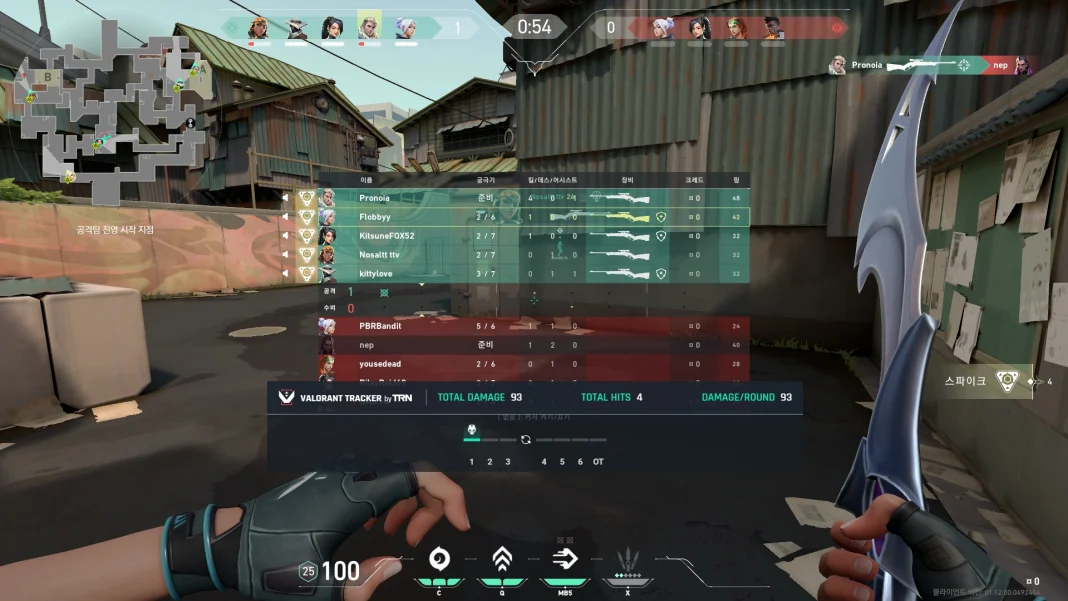
If you want to improve at Valorant, a stats tracker is one of the easiest upgrades you can make. These tools show your win rate, K/D, agent performance, and even reveal teammate and enemy stats during agent select and live matches. Here’s how to get one safely in 2026.
What “Valorant Tracker” Actually Means
There isn’t one single app called “Valorant Tracker.” It’s a category of tools, and two names dominate it:
1. Tracker.gg (Valorant Tracker Network): The original and most widely used option. It works two ways:
- Website: Tracker.gg lets you look up player stats and leaderboards directly in your browser, no install needed.
- Desktop overlay app: an in-game overlay that shows real-time stats while you play on Windows PC, though it isn’t available for console. It shows live match stats, round-by-round insights, and post-match breakdowns in an overlay, and it lets you view teammates’ ranks and stats.
2. Blitz.gg: A competing tracker with a similar feature set. It benchmarks your key stats in real time during matches, checks player ranks and recent competitive history during agent select and on the loading screen, and automatically shows a stat breakdown once your match ends. It also includes agent win-rate/pick-rate data and lineup guides.
Both are free with optional premium tiers that remove ads.
How to Download It (Desktop, Windows)
- Go to the official site: For Tracker.gg, click here. For Blitz, click here. Avoid random APK sites, “mirror” download pages, or third-party app stores. Third-party trackers are a common vector for bundled adware or fake installers, and the ads-and-clickbait ecosystem around gaming tools is large in 2026.
- Run the installer: Tracker.gg’s app is built on the Overwolf platform, and downloading it installs the Overwolf client alongside it. This is normal and expected, not a separate hidden program.
- Log in and link your Riot account: This connects your match history so the app can pull your stats.
- Launch Valorant: The overlay activates automatically once a match starts; you’ll see a small HUD element you can toggle with a hotkey.
- Adjust overlay settings: Both apps let you reposition the HUD, choose which stats to display, and disable features you don’t want cluttering your screen.
Is It Safe and Legal?
Yes, with the caveat that you should only download from official sites. Tracker Network describes itself as the leading network of community-run gaming stats sites, tracking leaderboards and stats for more than 230 million players worldwide across titles like Fortnite, Valorant, Rainbow Six, and Rocket League. It’s an established, above-board service, not a cheat tool. These trackers only read publicly available match data through Riot’s official APIs; they don’t modify game files or give any in-match advantage beyond information, so they don’t violate Riot’s anti-cheat policies.
Mobile Option
If you just want quick lookups on the go rather than an in-game overlay, a “Tracker for Valorant” companion app is also available for Android, covering analytics across Valorant and other competitive titles like R6 Siege, League of Legends, and Apex Legends. It’s useful for checking stats between matches, though it won’t give you live in-game overlays the way the desktop version does.