Home Blog Page 787

How to Find a Ninja Turtle Supply Drop in Fortnite?

0

In the vibrant world of Fortnite, the collaboration with the iconic Teenage Mutant Ninja Turtles has introduced an exhilarating quest: finding and searching Ninja Turtle Supply Drops. This guide will provide you with the insights and strategies needed to successfully locate these coveted drops, brimming with high-tier loot and exclusive Mythic weapons inspired by the turtles themselves.

How to Find a Ninja Turtle Supply Drop in Fortnite?

Finding a Ninja Turtle Supply Drop begins with keen observation and exploration. These special drops are marked by unique icons on your mini-map, symbolizing each of the four Ninja Turtles. Keep an eye out for these icons, as they pinpoint the exact location of the drops.

Typically, the icon won’t appear until at least two rounds into the game, so patience and persistence are key. Once an icon is spotted, head towards it to find a crate suspended beneath a large balloon, which interestingly features the face of the corresponding Ninja Turtle​​.

Upon locating a Ninja Turtle Supply Drop in Fortnite, interacting with it is quite straightforward. Approach the crate and use the same action for opening a normal chest or crate. This action will unleash a plethora of high-tier items, including one red item that corresponds to the Turtle the drop is themed around. For instance, finding Raphael’s drop might reward you with his signature Sai weapons​​.

The true allure of these Supply Drops lies in the exclusive TMNT Mythic weapons. Each drop houses one of four distinct Mythic items: Leo’s Katanas, Mikey’s Nunchaku, Donnie’s Staff, or Raph’s Sai. To maximize your chances of acquiring these Mythics, keep an eye on the skies for hot air balloons delivering the drops and listen for audio cues that can help you locate them more easily​​.

Finding and searching for a Ninja Turtle Supply Drop is a thrilling challenge requiring strategy and alertness. The drops can appear in various locations across the island, from the hotel grounds of Grand Glacier to the mythological landscapes of Ruined Reels, encouraging thorough exploration.

The high ground can offer a tactical advantage for spotting incoming drops. Additionally, prepare for potential confrontations with other players also vying for the drop’s valuable loot. Staying vigilant and ready to defend or build can make the difference in successfully claiming the Mythic weapons​​.

How to Find TMNT Driftboard in Fortnite?

0

Fortnite’s latest collaboration with the Teenage Mutant Ninja Turtles (TMNT) introduces a wave of nostalgia and excitement for players, enriching the gaming experience with a unique blend of action and adventure. The event heralds the return of Driftboards, now adorned with the iconic TMNT green, offering players a thrilling way to explore the game’s expansive map.

The Driftboard, a beloved feature from Fortnite‘s Chapter 1, makes a comeback, allowing players to swiftly navigate the terrain while performing stunts. This TMNT-themed transportation option not only pays homage to the Ninja Turtles’ legacy but also enhances mobility across the game’s diverse landscapes.

How to Find TMNT Driftboard in Fortnite?

The hunt for TMNT Driftboards is an exciting venture, with these items scattered as floor loot across the island. Major Points of Interest (POIs) are hotspots for finding Driftboards, increasing your chances of encountering one. The Driftboards are available in several locations, including Reckless Railways, Lavish Lair, Classy Courts, and more, ensuring players can find them throughout the map​​​​.

Here are the locations:

  • Reckless Railways emerges as a prime location, boasting four Driftboards.
  • Lavish Lair and Classy Courts, each offering two boards.
  • Smaller areas like Rebel’s Roost and Snooty Steps ensure that even less frequented parts of the map have access to Driftboards.

The detailed breakdown of locations such as Rebel’s Roost, Ritzy Riviera, Pleasant Piazza, and more, reveals the widespread availability of Driftboards, facilitating exploration and movement across Fortnite’s dynamic environment​​.

Riding a TMNT Driftboard mirrors the operation of its predecessors, with simple controls for hopping on, accelerating, and performing tricks. These hoverboards glide over various terrains, offering a seamless and exhilarating ride without the need for refueling, enhancing the gameplay experience with their agility and flair.

The TMNT collaboration in Fortnite is a limited-time event, scheduled to conclude on February 27th. Players are encouraged to make the most of this opportunity to explore the map with Driftboards, engage in quests, and enjoy the thematic content before it ends​​.

Mazy Offers Advice to Godlike Esports Amidst Mediocre Performance

0

Zeeshan “Mazy” Alam, a renowned Battlegrounds Mobile India (BGMI) caster, recently shared invaluable insights, addressing the ongoing struggles of Godlike Esports. With a desire to see the team reclaim its former glory, Mazy offered strategic advice aimed at reigniting the fire in Godlike Esports.

Mazy’s Recommendations for Godlike Esports

In a recent livestream, Mazy discussed Godlike Esports’ recent mediocre performance, and emphasized the importance of acknowledging their fanbase. He urged the team to show respect to their supporters and act accordingly. He underscored the pivotal role of fans in shaping a team’s journey, urging Godlike to heed the expectations of their dedicated supporters. “It’s high time you understand that getting disqualified from three official events… getting disqualified from so many events and not being able to play. You are making so much effort just to qualify for third-party events. You can understand how serious the situation is,” he added.

With an understanding drawn from insider knowledge, Mazy made a suggestion revolving around Godlike Esports strategy to emphasize on the performance of Jonathan “JONATHAN” Amaral. “I feel that Jonathan should be playing like a normal player for once. Don’t make him play in a way that he has to become MVP or wants to become one; he’s a universal MVP, he’s a very good player, he’s the best player. Leaving all these things aside, make him play like a normal player, like the other three players, try that. Who knows, maybe that approach might work for them, and Godlike might reach the top once again, like they were during the time of TSM Entity,” he added.

Mazy Explains Why TSM Entity Excelled

“At the time of TSM Entity, one thing was different – all four players were equal, and their hunger was the same,” Mazy reminisced. He pinpointed a key ingredient for success that seemed to have dwindled over time. Rather than resorting to frequent team changes, Mazy proposed that Godlike Esports should try following his advice.

Mazy’s advice comes not from a place of criticism but from a genuine desire to see Godlike Esports soar once more. “If you think I’m saying all this because I don’t like Godlike or Jonathan, then you’re wrong,” he clarified. “People have been watching for a long time, and even they are now saying how can this keep happening repeatedly. Something must be wrong. They have tried changing so many teams, brought in so many good players, but haven’t done one thing. Try what I am saying. Who knows, that might work, and you might reach the top.”

Stay updated with the latest news in gaming and esports by signing up for early access to TalkEsport’s Mobile App. Also, follow us on Twitter and Google News to ensure you never miss the exciting updates.

FaZe Clan dominate G2 to reach Semi-Finals of IEM Katowice 2024

FaZe Clan has taken down the reigning champions of IEM Katowice in G2 in a dominant fashion that will see them take on Mouz in the semi-finals. G2 having dominated Heroic on their way to the quarters fell flat against a FaZe who once again seemed to have gained their infamous lan buff.

VETO

  • G2 removed Mirage
  • FaZe removed Vertigo
  • G2 picked Inferno
  • FaZe picked Ancient
  • G2 removed Overpass
  • FaZe removed Anubis
  • Nuke was left over

Map 1: Inferno

Inferno has been a comfort pick for G2 but FaZe has shown equal proficiency in said map. G2 started their pick dominantly, going 4-0 up off the back of a pistol-round win. FaZe quickly turned the tides with a fast-paced round breaking G2’s streak FaZe upon winning their first round showcased a dominant T side, letting G2 get one more round before swapping sides, edging out G2 by a 7-5 lead.

FaZe started their defense with a pistol win, thus pushing their lead further before G2 got a round of their own. The round win enabled G2 to bag a few more until they leveled the score 9-9. FaZe quickly came back on the board and pushed the map over the line to go 1-0 up in the series. frozen stood out as the best player with 17 kills and a steller impact rating of 1.48IR.

Map 2: Ancient

FaZe got off to a good start on their map pick and while G2 were able to pick up 3 rounds, FaZe ran all over them with a dominant offense. A well-drilled T side, paired with all the players firing on all cylinders rolled over G2 as they failed to find answers on the defence. FaZe closed the one-sided half with a 9-3 scoreline.

G2’s attempt to make a comeback started with a force buy victory which broke the economy for FaZe. G2 took the opportunity to cut down the lead to 4 rounds between the sides before FaZe found their stride once again. G2’s disappointing performance on their first big LAN of CS2 since appointing a new coach saw them bomb out of the tournament after a shaky group stage. FaZe closed the map with a 13-6 scoreline and will play against Mouz in the semi-finals tomorrow.

Stay updated with the latest news in gaming and esports by signing up for early access to TalkEsport’s Mobile App. Follow us on Twitter and Google News to ensure you never miss the exciting updates.

How to Fix Valorant Error Code 51?

0

Facing the Valorant Error Code 51 can be a frustrating experience, disrupting your gameplay and connection to lobbies. Fortunately, several effective solutions have been identified to tackle this issue, rooted in network connectivity problems or conflicts with antivirus programs and Riot Vanguard’s functionality. Here’s a comprehensive guide on how to address and resolve Valorant Error Code 51, ensuring a smoother gaming experience.

Fixing Valorant’s Error Code 51: Solutions for Uninterrupted Gameplay

Disable Your Antivirus

Firstly, consider disabling your antivirus software temporarily before launching Valorant. Antivirus programs can sometimes interfere with Riot Vanguard, the game’s security system, leading to Error Code 51. If you’re using Windows Defender as your primary security measure, you might skip this step and proceed with the other solutions provided here.

Restart Your Computer

A simple yet effective first step is to restart your computer. This action can resolve trivial bugs that might be causing the error. After restarting, check if Valorant launches without displaying Error Code 51.

Check Server Status

Error Code 51 could also stem from issues with Valorant’s servers. It’s advisable to check the official Valorant website or social media platforms for any server-related updates or notices. If the servers are down or undergoing maintenance, you may need to wait until they are fully operational again.

Update Valorant

Ensuring that you’re running the latest version of Valorant is crucial. Outdated versions can lead to various errors, including Code 51. Check for game updates through the Riot Client and install any available patches.

Use a VPN

If the error persists, using a VPN might help, especially if the issue is related to your network connection. A reliable VPN can offer alternative routing paths that might bypass the connectivity issues causing the error.

Restart the VGC Service

The VGC service, essential for running Valorant, may need a restart. Access the Services menu on your computer, locate the vgc service, and restart it. Adjusting its startup type to automatic might also contribute to resolving the issue.

Reinstall Valorant

As a last resort, uninstalling and then reinstalling Valorant can address the problem if none of the above methods work. This process ensures that any corrupt files causing the error are removed and replaced with fresh installations.

Additional Steps

If restarting the Riot Client and checking Riot Servers for issues don’t resolve the problem, consider reinstalling Riot Vanguard. This action is specifically recommended if the error could be related to the party system’s malfunction, possibly caused by Vanguard’s conflict with the game client.

Should these steps not resolve the issue, reaching out to Riot Support is advisable. They can provide further assistance and troubleshooting advice tailored to your situation.

By following these steps, you should be able to resolve Valorant Error Code 51 and return to your gaming sessions without further interruptions. Remember, maintaining your system’s and game’s updates, along with occasional checks on software conflicts, can prevent such errors from recurring.

FTC Files Complaint Against Microsoft Over Xbox Layoffs Post-Activision Blizzard Deal

0

The Federal Trade Commission (FTC) has accused Microsoft of misrepresenting its plans for Activision Blizzard following significant layoffs within the company. This controversy arises shortly after Microsoft laid off nearly 1,900 employees in its video game division, which now includes the recently acquired Activision Blizzard unit. The FTC’s complaint highlights a contradiction between Microsoft’s current actions and its previous assurances to the court that Activision Blizzard would operate independently post-merger. This move has raised eyebrows, especially since Microsoft had indicated that the merger would not result in job losses, a statement now under scrutiny due to the recent layoffs​​​​.

The FTC’s concern extends beyond the layoffs themselves, focusing on the implications these job cuts might have on the broader competitive landscape and the regulator’s ability to enforce remedies. The FTC is still challenging the acquisition on antitrust grounds, fearing that the merger, valued at $69 billion, could stifle competition within the gaming industry. If the FTC’s challenge is successful, it could lead to a range of outcomes, including the potential divestment of parts of Activision Blizzard or even a complete block of the merger​​.

Microsoft, in response, has defended its actions by stating that the layoffs were in line with broader industry trends and partly reflected plans that Activision Blizzard had already been considering independently. The company also emphasized changes to the deal structure required by the UK’s Competition and Markets Authority, which affected the acquisition’s scope, particularly regarding cloud streaming rights in the United States. Furthermore, Microsoft pointed to a binding agreement with Sony to keep the popular Call of Duty series on PlayStation under terms reportedly more favorable than what Sony had previously enjoyed​​.

This unfolding situation marks a significant chapter in the saga of one of the most substantial acquisitions in video game history. It sheds light on the complex interplay between large corporate mergers, regulatory oversight, and the commitments companies make during the merger review process. The outcome of this dispute could have lasting implications for the gaming industry, potentially influencing how future mergers and acquisitions are approached and scrutinized by regulatory bodies​​​​.

How to Unlock RAM-9 in MW3 and Warzone

0

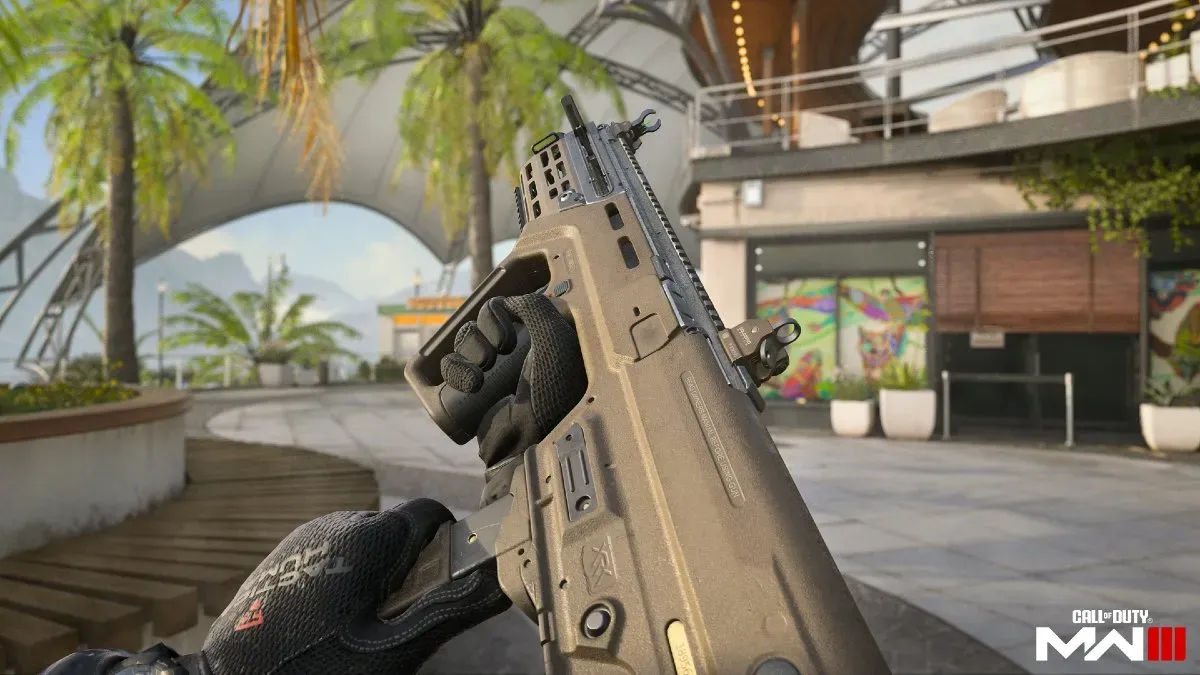
Unlocking the RAM-9, the latest addition to the MW3 and Warzone arsenal, has piqued the interest of gamers eager to enhance their combat efficiency in close-quarters engagements. The RAM-9 submachine gun, lauded for its agility and lethal firepower at close range, can be acquired through a series of accessible steps detailed within the Season 2 Battle Pass framework. This guide is designed to walk you through the process, ensuring a smooth acquisition of the RAM-9, alongside insights into its gameplay impact and strategic use in the dynamic battlefields of MW3 and Warzone.

Unlocking Through the Season 2 Battle Pass

The primary method to unlock the RAM-9 involves progressing through the Season 2 Battle Pass. Specifically, players are required to complete Sector B6, a task that is both free and accessible to all players willing to invest some effort. This sector is conveniently located just two steps away from the starting space, B1, making it an achievable goal without excessive grind​​​​​​.

Alternative Unlocking Methods

For those seeking different paths to unlock the RAM-9, there are alternative methods available. One such method is through the Zombies game mode, where exfiltrating with the RAM-9 in your possession secures it permanently for your arsenal. Additionally, purchasing specific bundles, such as the upcoming Demon GLO Tracer Pack, offers a direct route to acquiring a blueprint of the RAM-9, bypassing the need for Battle Pass progression​​.

Gameplay Impact and Strategic Use

The RAM-9 distinguishes itself as a more maneuverable counterpart to its assault rifle predecessor, the RAM-7, with its bullpup design and 9mm chambering making it a formidable weapon in close-range encounters. Its full-auto and semi-auto firing modes, alongside a high rate of fire and manageable recoil, render the RAM-9 particularly effective in rapid assault strategies and close-quarters combat scenarios​​​​.

Meta Considerations

The RAM-9’s introduction into the game’s ecosystem brings with it considerations for the current meta. Its agility and firepower suggest a potential reshaping of close-range combat dynamics, with the potential to outperform existing SMGs depending on balance updates and player adaptation. As the gaming community explores the full capabilities of the RAM-9, its place within the competitive landscape will become clearer, potentially establishing it as a new favorite among SMG aficionados​​.

How to Find and Catch Relaxaurus in Palworld

0

Discovering and capturing a Relaxaurus in Palworld can transform your gaming experience by adding a unique and powerful Pal to your collection. Known for its chill demeanor and impressive abilities, finding Relaxaurus can be a rewarding challenge for players. Here’s how you can find and catch this sought-after creature in the game.

Relaxaurus Location

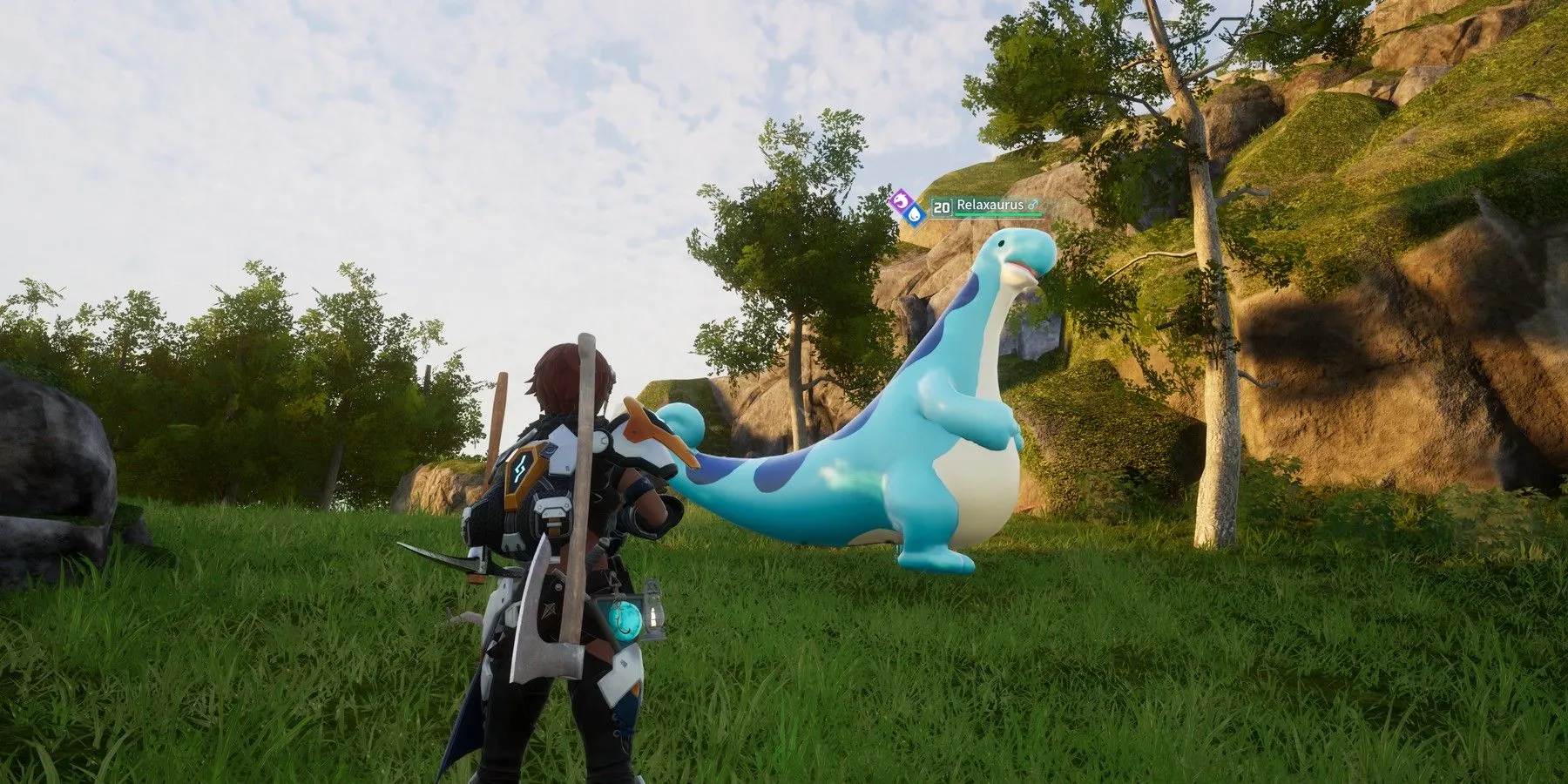
Relaxaurus is predominantly found around the Ascetic Falls and Sealed Realm of the Thunder Dragon regions. While there isn’t a specific pinpoint location due to their tendency to roam, these two areas are your best bet for encountering Relaxaurus. Keep an eye out for their distinctive long necks and height, which make them easier to spot in their natural habitats.

Catching and Battling Relaxaurus

Relaxaurus employs water and dragon-type attacks, like Water Blasts and Dragon Shots, making them a formidable opponent. To successfully catch one, dodging these attacks is crucial. Utilizing grass-type Pals can give you an advantage due to Relaxaurus’s vulnerability to grass-type moves. When it comes to capturing, both Normal Pal Spheres and Mega Spheres are effective, so use whichever aligns with your resource availability.

Additionally, approaching Relaxaurus with higher level Pals and employing better Sphere Types, such as the Mega Sphere or Giga Sphere, can significantly improve your chances. Given that Relaxaurus can range between levels 10 and 20 and possesses strong attacks, preparation is key. Bringing a grass-type Pal for combat can make the encounter more manageable due to the type advantage.

Relaxaurus is not only a formidable Pal in battle but also serves practical purposes, such as transporting goods and aiding with tasks around your base. Whether you aim to capture Relaxaurus for its utility or the challenge it presents, it’s a rewarding addition to any Palworld player’s collection.

By focusing your search around Ascetic Falls and the Sealed Realm of the Thunder Dragon, preparing adequately for battle, and employing the right type of Pal and Sphere, you’ll increase your chances of successfully finding and capturing Relaxaurus. Happy hunting!

Cheapest CS2 Knives List – Counter Strike 2

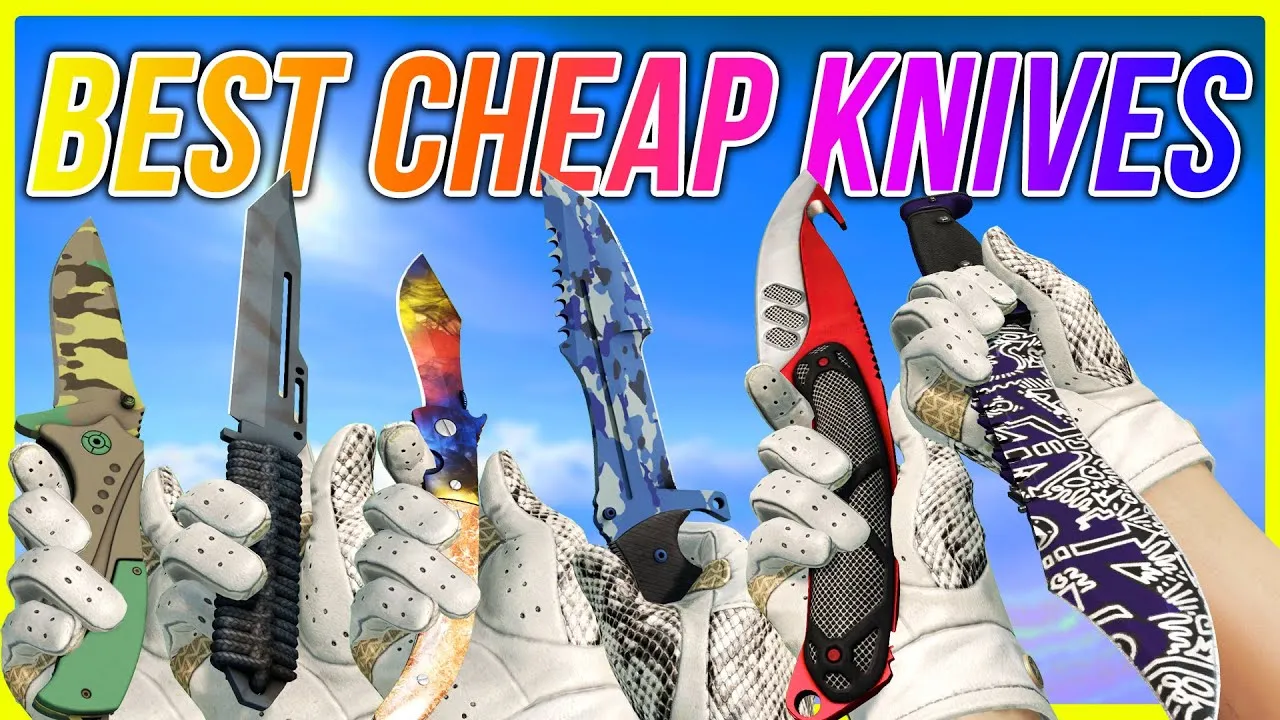
Finding a stylish yet affordable knife in Counter-Strike 2 doesn’t have to drain your wallet. Here’s a curated list of the top cheap knives in CS2, offering great value for money and a touch of flair to your gaming experience.

Top Affordable CS2 Knives

  1. Shadow Daggers | Rust Coat (Battle-Scarred) – With a menacing look that seems ready for a zombie apocalypse, these daggers add a dangerous aesthetic to your inventory.
  2. Gut Knife | Scorched (Field-Tested) – Boasting a unique black-and-grey color scheme, this knife offers an affordable yet stylish choice.
  3. Navaja Knife | Stained (Field-Tested) – Almost appearing vanilla, its metallic sheen provides a subtle yet appealing look.
  4. Gut Knife | Freehand (Field-Tested) – Features a mesmerizing purple and silver pattern, offering great visual appeal at a low price.
  5. Gut Knife | Ultraviolet (Field-Tested) – A classic combination of purple and black, bringing style to the Gut Knife design.

For those diving deeper into the market for economical knife skins, variations like the Navaja Knife | Blue Steel, Shadow Daggers | Ultraviolet, and Gut Knife | Night stand out for their unique designs and accessible price points.

Additional Noteworthy Mentions

  • Kukri Knife Safari Mesh, Shadow Daggers Lore, and Shadow Daggers Gamma Doppler offer distinct designs for under $200, providing more options for players looking to customize their loadout without breaking the bank.
  • Falchion Knife Lore and Huntsman Knife Lore present more intricate designs, while still being accessible for players on a tighter budget.

By exploring these options, you can find a knife that not only complements your playstyle but also adds a personal touch to your CS2 experience without costing a fortune. Whether you prefer the rugged appeal of a Rust Coat or the sleek design of an Ultraviolet skin, there’s a knife for every taste and budget.

Fix Unable to Establish a Connection With the Game Server

0

Facing the “Unable to Establish a Connection With the Game Server” error in Counter-Strike 2 (CS2) can be a major hindrance to your gaming experience. This error prevents you from joining both official and community-made servers, leaving many players searching for solutions. The issue often stems from network-related problems, but can also be caused by Steam download cache issues or corrupted game files.

Here’s a comprehensive guide to resolving this issue, synthesizing advice from multiple sources:

Restart and Reset

  1. Restart Your Computer and Steam: Begin by exiting the Steam client and restarting your computer. This simple step can often resolve temporary glitches affecting your connection to CS2 servers.
  2. Flush DNS and Reset Network Settings: Use Command Prompt (run as administrator) to flush your DNS by typing ipconfig /flushdns, then netsh winsock reset, and finally netsh int ip reset. This can help clear any network-related issues hindering your connection to the game servers.

Check Internet and Server Status

  1. Verify Your Internet Connection: Perform a speed test to ensure your connection is stable and fast enough for online gaming. An unstable connection could be the root of the problem.
  2. Check CS2 Server Status: Use websites like Steamstat.us to check if the CS2 servers are operational. If the servers are down, you’ll need to wait until they’re back online.

Game and Steam Fixes

  1. Clear Steam Download Cache: This can resolve issues caused by corrupted cache files. Open Steam settings, head to the Downloads tab, and click on “Clear Download Cache”.
  2. Change DNS Address: Switching to Google’s DNS addresses (8.8.8.8 for Preferred and 8.8.4.4 for Alternate) can sometimes improve your connection stability.
  3. Verify Integrity of CS2 Game Files: Corrupted or missing game files can cause connection issues. In Steam, right-click on CS2 in your library, select Properties > Local Files, and then click “Verify Integrity of Game Files”.
  4. Reinstall Steam (Without Deleting CS2): If all else fails, you may need to reinstall Steam. Make sure to not delete the Steamapps and Userdata folders to avoid losing your games.

Additional Tips

  • Disconnect from VPN services if you’re using any, as they can sometimes interfere with your connection to game servers.
  • Restart your router: If your internet connection is the issue, rebooting your router can often resolve connectivity problems.

By following these steps, you should be able to overcome the “Unable to Establish a Connection With the Game Server” error in CS2 and get back to playing. If the problem persists, it may be worth reaching out to Steam support for further assistance.