Home Blog Page 1747

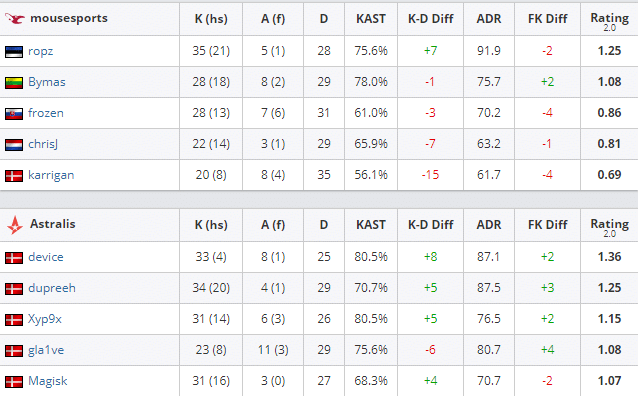
Astralis win DreamHack Masters Winter 2020 Europe

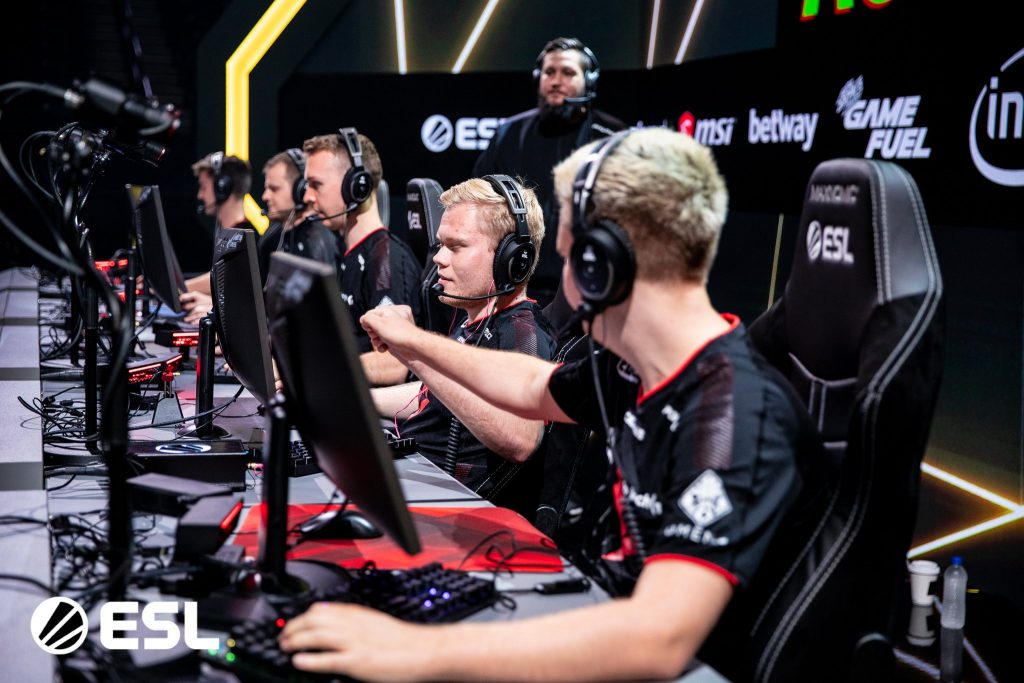
Astralis saw off Mousesports in the Best of 5 grand finale to win the DreamHack Masters Winter.

Astralis vs Mousesports Map Veto

  1. mousesports removed Overpass
  2. Astralis removed Mirage
  3. mousesports picked Train
  4. Astralis picked Inferno
  5. mousesports picked Nuke
  6. Astralis picked Vertigo
  7. Dust2 was left over

ASTRALIS VS MOUSESPORTS MAP 1: TRAIN

Astralis came out of the gate looking scary, winning the pistol round on Train, the first map of BO5 series against Mousesports in the grand finale at the DreamHack Masters Winter 2020 Europe.
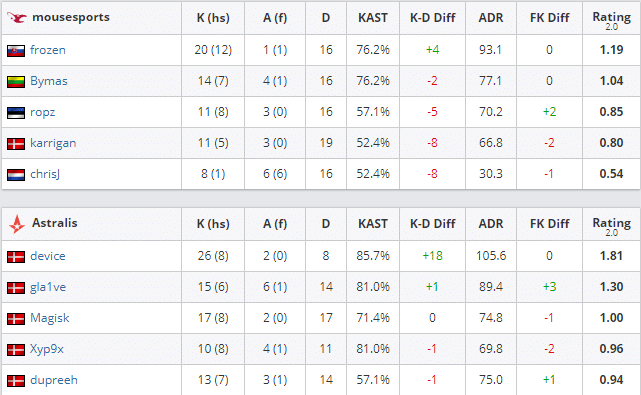
Photo: HLTV

Lukas ‘gla1ve’ Rossander and his men quickly raced off to a mammoth lead of 8-0 after Mousesports showed a lack of ideas on the offense. David ‘frozen’ Čerňanský did try to keep Mouz afloat but the Danes were quick on getting a double digit scoreline at the switch. With Karrigan and his men looking destitute and listless, the map was clinched by Astralis in a one sided affair.

ASTRALIS VS MOUSESPORTS MAP 2: INFERNO

Powered by a red-hot Aurimas “Bymas” Pipiras, Mousesports did manage to turn the sides against the Danish powerhouse and in due course made them regret to Veto in Inferno.
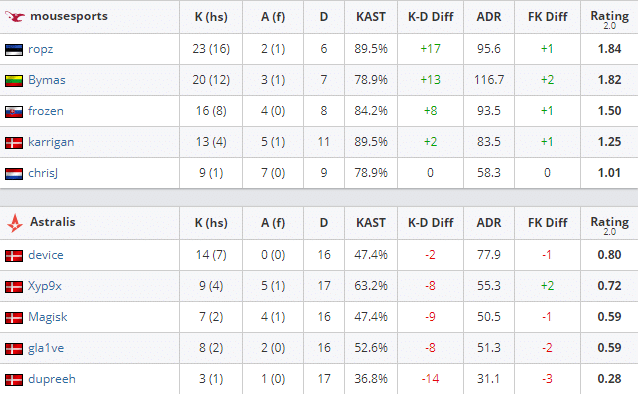
Photo: HLTV

Starting out the map with a stellar defense, the iconic duo consisting of Robin ‘Ropz’ Kool and Bymas locked the Danes out of the Bomb sites with the latter picking up an ace in the 8th round after a potential A hit attempted by Astralis. With no fuel left in the tank, Mousesports clutched out the remainder of rounds in the second half to square off the series 1-1.

ASTRALIS VS MOUSESPORTS MAP 3: NUKE

Lucas ‘Bubzkji’ Andersen replaced Andreas ‘Xyp9x’ Højsleth in the 3rd Map. Nuke saw Astralis once again getting an early 5-1 lead over Chris ‘ChrisJ’ de Jong’s men this time with Bubzkji as their substitute who filled in for Xyp9x.
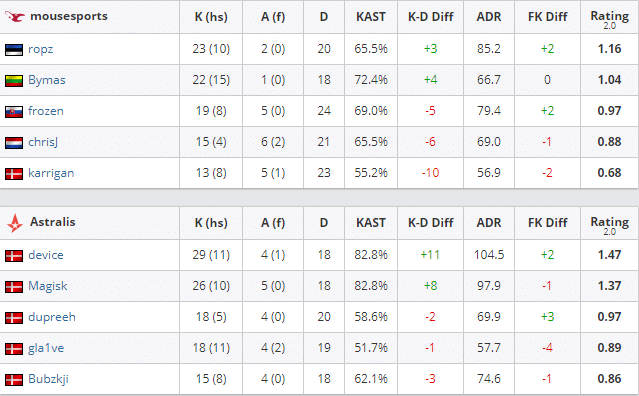
Photo: HLTV

But they were soon silenced by the lurks of Karrigan who did punish his rivals in their own den. Along with Finn’s heroics, we got to witness the likes of Frozen and Bymas who stood up for their team yet another time after they converted a 2v3 in a round win post plant.

This was followed by Mousesports denying the lead in favor of the Danes as they locked it 9-6. But with a little room for error, Astralis quickly recovered from the deficit by winning the pistol round on their offense followed by gla1ve’s 4K with the rifle where they merely escaped from being gunned down by Mouz.

Though Mousesports were able to tie the scoreline 13-13, they couldn’t resist the Danish demolition squad after the map was dropped 16-13 in the favor of Bubzkji and his men.

ASTRALIS VS MOUSESPORTS MAP 4: VERTIGO

The title decider began for Astralis as they got off the line first on Vertigo, picking up a 9-3 lead on the T side, with gla1ve and Peter ‘Dupreeh’ Rasmussen banishing Mousesports out of the sites to secure their C4 plants. The dominance didn’t last long, though, as the European mixture came back with three in a row after of a couple of multikills from ⁠Ropz saved the day for Mouz.

Photo: HLTV

The second half was similar to Nuke’s but it was closely contested by both of the teams, winning the rounds back and forth. After a valiant effort pulled off by Xyp9x who denied the C4 plant which was followed by Magisk getting a 2K on defense, Astralis was one match point away from the DreamHack Title before Karrigan opened up the A site for business and forced overtime.

The overtime saw Mousesports get back in the driver’s seat after frozen clutched out a crisp 1v2 on their offense followed by Karrigan’s aggressive 3K. But this was soon countered by the Danes as they quickly recovered from 15-17 to 18-18, missing on the match point for yet another time.

The second overtime finally saw Astralis taking back control thanks to Dupreeh’s Ninja Defuse in a 1v2 situation which earned them the matchpoint at 21-19. The Danish powerhouse finally managed to close things out after Xyp9x denied the lurk from frozen and dropped the C4 in due course with Bymas running out of time to give Astralis the win along with the DreamHack Title.
Free Fire Down? Free Fire OB25 Update Maintenance Time

0

The much anticipated Free Fire OB25 update will drop on December 7, 2020, with tons of in-game items to get excited about. Therefore, the Free Fire server will be down today.

Why Free Fire server is down today?

During the update, players are to face a server outage keeping them away from the game for a short while. The maintenance will be followed by a fully functional OB25 update which will add new stuff to the game.

Free Fire OB25 Update Maintenance Time

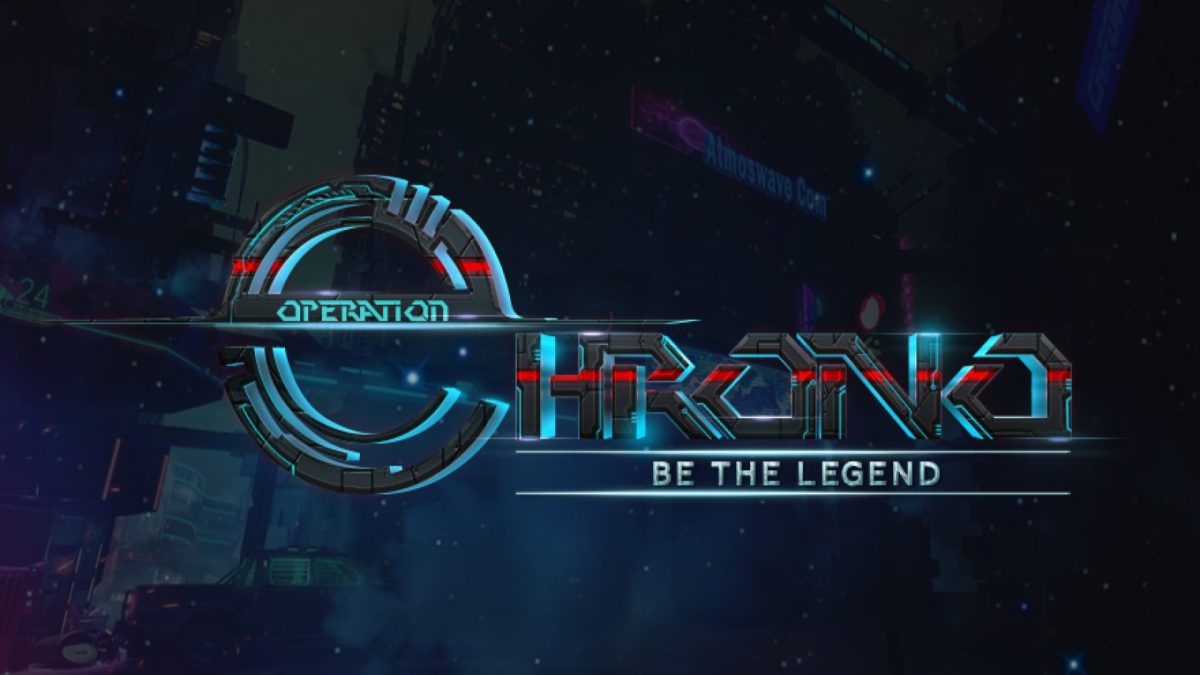
Presumed to be between 9:30 AM IST on 5:30 PM IST on December 7, 2020, the maintenance will ensure the smooth functioning of the game and the severs. After this maintenance time, the Free Fire Operation Chrono will be available as an update in the game.

Start time: 9:30 AM IST on December 7, 2020

End time: 5:30 PM IST on December 7, 2020

Free Fire OB25 Update: Release Date & Time

Free Fire OB25 update will hit the servers at 5:30 PM IST. The game will be available for download from Google Play Store and Apple App Store. The excitement for the update is worth it as Garena promises to bring new exciting stuff, including new weapons, game modes, and many more improvements across the game.

Recommended: Free Fire OB25 patch notes: New ranked season, guns and more

Free Fire Operation Chrono Release Date and Time

0

The much anticipated Free Fire Operation Chrono update will drop on December 7, 2020, with tons of in-game items to get excited about.

During the update, players are to face a server outage keeping them away from the game for a short while. The maintenance will be followed by a fully functional Operation Chrono update which will add new stuff to the game.

Also Read | Free Fire OB25 patch notes: New ranked season, guns and more

Free Fire Operation Chrono Maintenance Time:

Presumed to be between 9:30 AM IST on 5:30 PM IST on December 7, 2020, the maintenance will ensure the smooth functioning of the game and the severs.

Start time: 9:30 AM IST on December 7, 2020.

End time: 5:30 PM IST on December 7, 2020.

Free Fire Operation Chrono: Release Date & Time

Free Fire OB25 update will hit the servers at 5:30 PM IST. The game will be available for download from Google Play Store and Apple App Store. The excitement for the update is worth it as Garena promises to bring new exciting stuff, including new weapons, game modes, and many more improvements across the game.

How to complete the Dark Knight Challenge in BitLife

0

This week BitLife challenge tasks you to live your life as the Dark Knight if you fulfill the criteria. Follow this guide to make your life as a Dark Knight a bit easy:

BitLife Dark Knight Challenge Rules:

Here’s a look at the requirements to completing the Dark Knight Challenge:

  • Be a male
  • Live in New York
  • Become a CEO
  • Own a haunted Victorian home
  • Own a Lamborghini and a helicopter
  • Achieve multiple black belts

Dark Knight Challenge Guide

Start a new life as a male character born and brought up in New York to get the first challenge off the list. For the second step, you must work your way up the corporate ladder to claim the position of CEO. Attend a business school or get into a corporate job. Be the best employee possible and continue rising through the ranks. Gradually you will find yourself as the CEO of the company.  

The position of CEO will give you enough fortune to buy the Haunted Victorian home for this challenge. Besides the house, you’ll also need to buy a Lamborghini and a Helicopter. Finally, you need to get yourself multiple black belts through martial arts lessons. Inside the Mind & Body tab, take the lessons and you’ll have your black belt.

This will be enough to complete this week’s challenge.

New Game Breaking Glitch Found In The New CSGO Update

0

It has only been a few days since the newest CSGO operation has arrived, and players have already managed to find out some game-breaking glitches that crash the game instantly in the new update.

Operation Broken Fang has brought a number of new maps to the competitive shooter, some of which have been added to the Scrimmage map pool in competitive.

Community-created map ‘Engage’ is one such map that has been added to the game in the latest update, but several players are reporting a game-breaking glitch that can instantly crash the CSGO client for everyone involved.

Also Read | Deceased CSGO YouTuber McSkillet’s logo spotted in the new map in Operation Broken Fang

We don’t recommend you to replicate this glitch since it can put your team at a strong disadvantage. But in case you decide to try it, you’ll need a minimum of two other players with you.

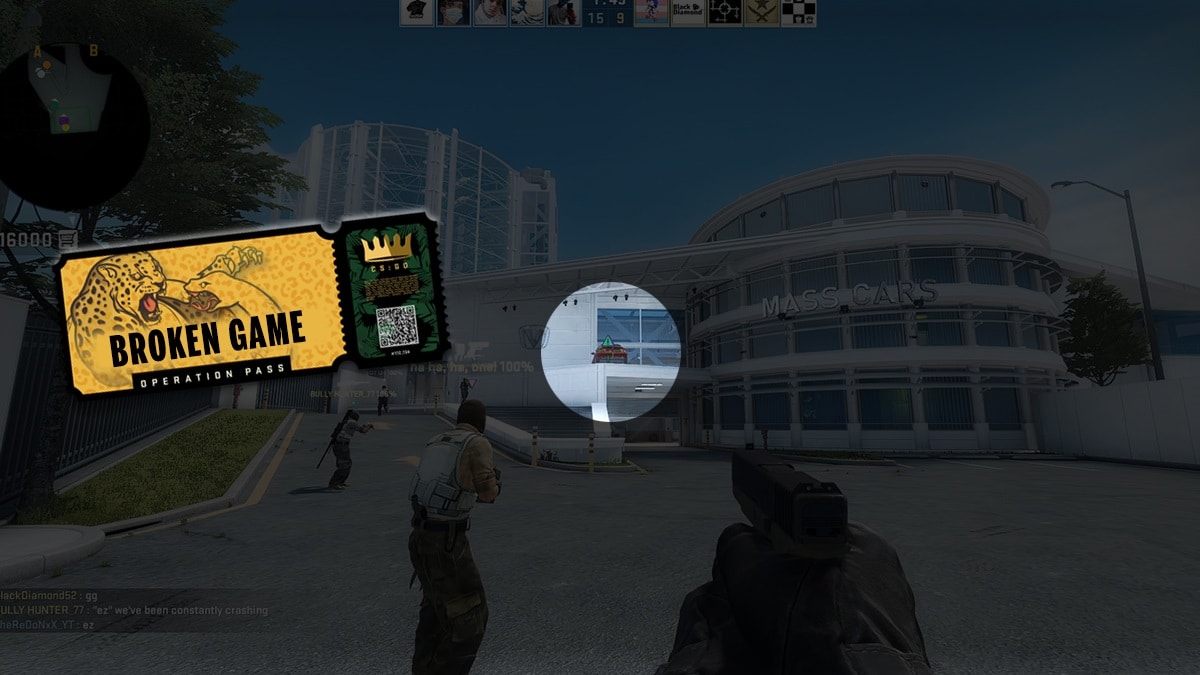
When playing on the T-side of Engage, if three players simultaneously use the new ‘Ping’ function on the rotating car near the T-spawn, the CSGO client instantly crashes for all of the players involved.

Also Read | How To Modify Chat Wheel In CSGO

If you manage to execute it properly, you’ll see your game freezing for a couple of seconds, before eventually showing an error message that the application has stopped responding.

We’re not sure how exactly does this glitch work, but it’s best to avoid pinging the rotating car till Valve comes up with a fix for this nasty bug.

How to customize CSGO chat wheel

0

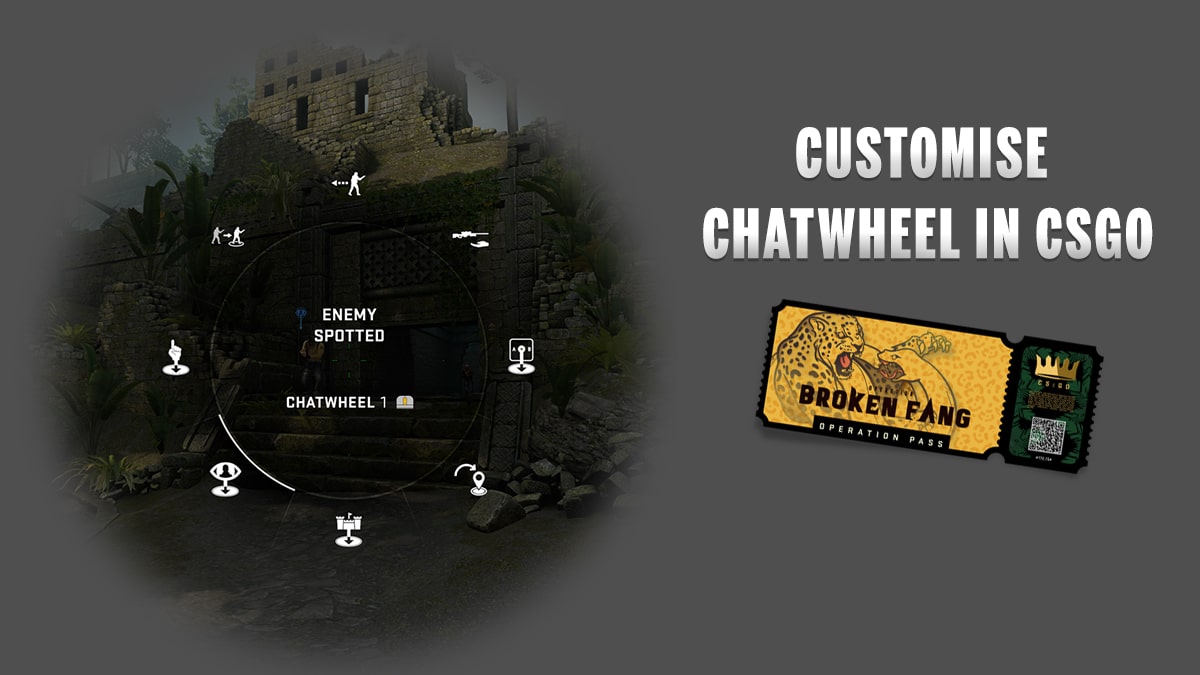
The recently released Operation Broken Fang has brought with it a plethora of new additions to CSGO. Apart from the retake game mode, loads of new weapon skins, agents, and other stuff, another new addition that received immensely positive feedback from the community is the in-game ‘Chat Wheel.’ Let us show you how to customize the CSGO chat wheel.

The chat wheel provides a method for players to communicate with each other with only a single press of a button on the keyboard. Players can ping bombsites, prepare strategies, or provide enemy positions using the new ‘ping’ feature. Needless to say, it’s an extremely useful feature for players without a microphone or those who speak a different language than the rest of their team.

How to Customize the CSGO chat wheel

Valve has also enabled players to modify the chat wheel sounds with only a few clicks on the ‘settings’ menu. Here’s how you do it:

  • Launch CSGO
  • Go to the ‘settings’ tab
  • Go to Keyboard/Mouse > Chat Wheel Keys
  • Select the chat wheel you want to customize (You can have a maximum of 3 chat wheels.)
  • Select the message you wish to replace, then the one you’d like to replace it with
  • Save the changes

Valve release note

Top 5 games coming out in December 2020 other than Cyberpunk 2077

0

From indie hits like Among Us and Fall Guys to big AAA releases like COD Warzone and Doom Eternal, this year saw some of the biggest launches of the gaming industry. While there was a pandemic raging across the globe, the year still didn’t end up with many disappointing game releases like 2019. Rather with the biggest release of the year, Cyberpunk 2077 coming out on Dec 10th, the year 2020 will surely end up being the best year for the gaming industry in the past decade. Let’s check out the top 5 games coming out in December 2020.

While Cyberpunk 2077 is a big-ticket release and is hyped to the point of everyone only talking about it, let’s not forget about other games that are releasing this month. Today we will look over some of the best games that are coming out this month.

1. Empire Of Sin

A turn-based mafia strategy game developed by the legendary OG Doom developer, John Romero. The lets the player live out their gangster fantasies in 1920s Chicago. Players get to take control of a crime boss, recruit gang members, and build their own underground empire and dominate their way through the streets of Chicago in the midst of the Prohibition era.

The game was released on December 1st and since then it has been received quite well among the players, although the game might look complicated at first, but as the game progresses the story gets less complicated and game mechanics become easier to remember. Check out here for the guide about different bosses in the game and their abilities.

2. Chronos: Before the Ashes

A Prequel to the 2019 hit release, Remnant: From the Ashes, the game takes place a month before the Remnant’s timeline where a hero is on a lifelong quest to save his homeland from the great evil.

Initially released as a VR only game in 2016, Gunfire games adapted the game for non-VR users and released the game for PC and Consoles on December 1st.

3. Immortals Fenyx Rising

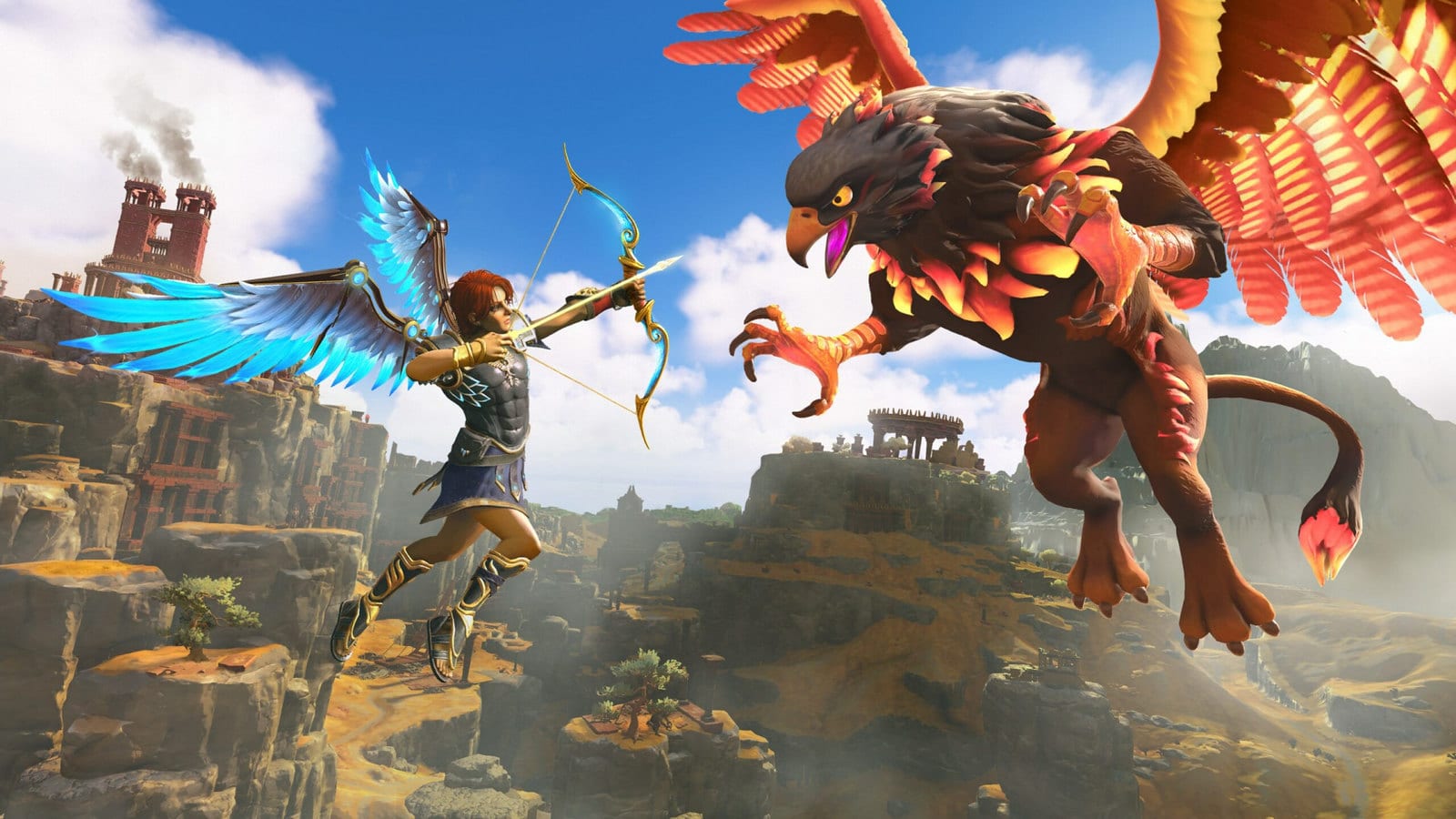
Developed by Ubisoft, the game released on December 3rd. Immortals Fenyx Rising is an action-adventure third-person video game about a Greek soldier named Fenyx who gets stranded on an island known as the Golden Isle.

Fenyx is tasked to rescue the Greek gods and goddesses from the titan Typhon. Zeus banished Typhon to Tartaros, and as revenge, he severs the Olympian Gods of their godly essences and robbing them of their powers.

The story of the game is fun and the pace is good for players looking for a casual game to play that doesn’t require hours of grinding to progress.

4. Red Dead Online

Following the famous formula of GTA Online’s success, Rockstar decided to release Red Dead Online as a standalone game for $4.99, not requiring players to spend $60 to purchase previously released Red Dead Redemption 2 which included the online game before.

Red Dead Online is available starting December 1st for players on the PlayStation 4, Xbox One, and PC via the Rockstar Games Launcher, Epic Games Store, and Steam. While for PS5 and Xbox Series X/S owners the game is playable as a backward-compatible title.

5. Dragon Quest XI: Echoes of an Elusive Age (Definitive Edition)

Dragon Quest XI: Echoes of an Elusive Age was released in July 2017, at that time the game quickly garnered praises from RPG fans and media. While the initial release was praised by fans, many still missed the retro RPG styling of the previous games in the Dragon Quest series.

The Definitive Edition launched on December 3rd especially allows those players wishing for the retro styling to turn on “retro” mode to play the 3D JRPG as a 16-bit 2D game.

The Definitive Edition also adds some cool new things like old 16-bit worlds from previous games to explore, new companion-driven quests, a rad photo mode, the ability to choose between the original synthesized soundtrack and an actual symphonic version, and the option to play with Japanese voices.

The game is only available on PC and can be purchased on Steam, the Epic Games Store, the Microsoft Store for $40. It’ll also be available on Xbox Game Pass for PC.

PUBG Mobile Season 17 Release Date and Time

PUBG Mobile is the famous battle-royale mobile game and it is currently on its sixteenth season. The PUBG Mobile season 16 started on November 17th and as per the usual trend, it is easy to speculate when the next PUBG Mobile Season 17 season will start. The next season will begin in January 2021 and here is why.

Since PUBG Mobile was launched, there has been a seasonal system in the game. A season in PUBG Mobile is usually two months long and has a specific start and end date.

The Royale Pass marks the start of a season and during this time, the ranks reset and players will have to start their journey from the bottom for every season.

The Royale Pass always highlights certain dates and the ending date of an RP can easily be used to determine the launch date of the next PUBG Mobile season.

PUBG Mobile Royale Pass has a certain time period of eight weeks and after it is over, a one-day cooldown takes place before the next season is started.

When will PUBG Mobile Season 17 start?

As we mentioned above, it is easy to speculate on the launch date and time. PUBG Mobile Season 16 will end on 17th January 2021 and the next season can start from 19th January 2021. The new season usually begins at 02:00 UTC which translates to 18:00 PT or 07:30 IST.

This launch date is not official and is speculated based on the usual trend in PUBG Mobile.

Where to Catch Fish in Fortnite Chapter 2 Season 5

0

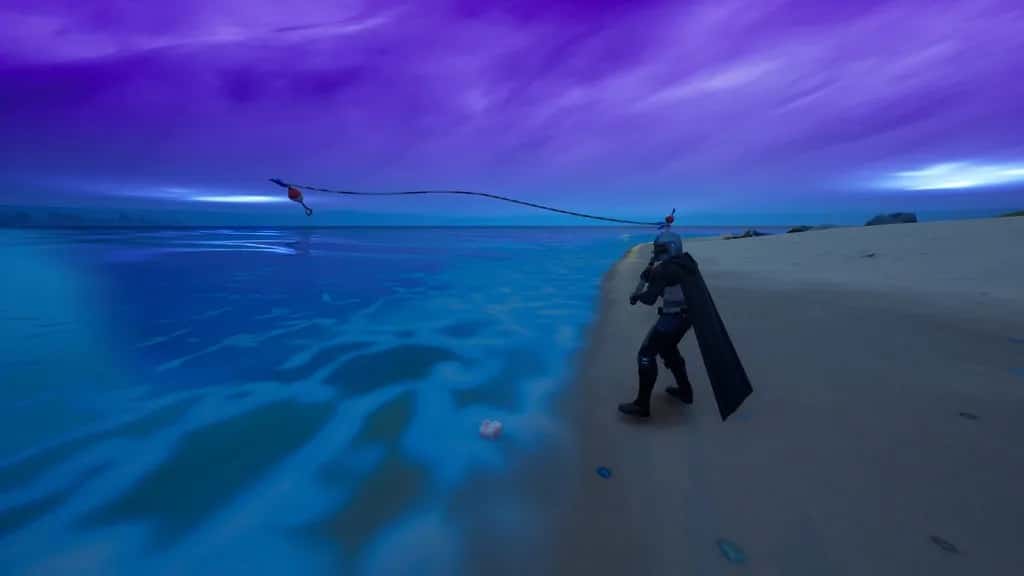
Players are enjoying the fifth season of Fortnite Chapter 2. There are a lot of new things this season. You will get new collection tabs in the quests menu. One of them is there for new characters and the other one is for the Fish collection. You have to catch a total of 40 fish. It isn’t that hard. Just keep going through this article to find out where to catch fish in Fortnite Chapter 2 Season 5.

Among those 40 fish, a few can only be visible in particular areas while the others require the Pro Fishing Rod to catch them. Different fish have different attributes. The Rift fish can teleport you in the sky that will help you to glide literally anywhere. The Slurp Jellyfish can instantly provide health and shields to its nearby players. The Crimson Zero fish will let you teleport in any direction within a short distance. However, it won’t let you teleport through structures.

Where to Catch all the 40 Fish in Fortnite Chapter 2 Season 5:

Atlantic Hop FlopperMountainous Areas (Pro Rod)
Black and Blue ShieldfishAnywhere
Black SlurpfishCoastal Areas at Night
Black Striped ShieldfishCoastal Areas
Blue SlurpfishAnywhere
Blue SmallfryAnywhere
Butterfly Rift FishAnywhere
Chinook Hop Flopper Swampy Areas
Chum Hop FlopperCoastal Areas
Coho Hop FlopperForest Areas
Crimson Zero FishMountainous Areas
Crystal Zero FishAnywhere
Cuddle JellyfishSwampy Areas
Drift Spicy FishForest Areas
Green ShieldfishForest Areas
Green ThermalfishForest Areas
Green FlopperAnywhere
Light Blue SmallfryAnywhere
Molten SpicyfishAnywhere
Peely JellyfishMountainous Areas (Pro Rod)
Purple and Orange Thermal FishAnywhere
Purple JellyfishCoastal Areas
Purple SlurpfishMountainous Areas
Purple Top SmallfryAnywhere
Raven ThermalfishCoastal Areas (Pro Rod)
Red and Green Thermal FishForest Areas
Silver ThermalfishAnywhere
Sky Blue Spicy FishCoastal Areas
Slurp JellyfishAnywhere
Southern Spicy FishSwampy Areas
Regular Flopper-type FishAnywhere
Tan Small FryAnywhere
White SlurpfishSwampy Areas at Night (Pro Rod)
White Spotted Spicy fishMountainous Areas
Yellow SlurpfishSwampy Areas

Recommended: Soon you will be able to play as Kratos in Fortnite Season 5

How to get invitation code for PUBG Mobile Beta version 1.2

PUBG Mobile often rolls out its early patches and updates on the beta version of the game. Although the PUBG Mobile beta version 1.2 is not very stable, players have the curiosity to know what is getting added to the game in the upcoming updates. There is no registration process for enrolling in the PUBG Mobile beta testing as the application is openly accessible but one might need to generate an invitation code to access the game.

The invitation code is the new feature that is added to the beta version of this game. Currently, PUBG Mobile is rolling out their beta version 1.2 update, and to access it, players need to bind their beta version ID with the global version via a unique code. It is very simple to do so and you can follow these steps to complete the process.

Steps to generate invitation code in PUBG Mobile Beta 1.2

Follow these simple steps to generate the invitation code and access the game:

  • Download PUBG Mobile Beta Version 1.2 application.
  • Open the game and click on the ‘Guest’ option on the login screen.
  • A login prompt will appear on the screen, click on ‘Log In’.
  • A pop-up box will ask you to select a game through which you want to log in. Select PUBG Mobile.
  • After PUBG Mobile is launched, click on ‘Test Server’, and a banner with ‘Generate Code’ text will appear.
  • Click on it and you will get a unique code, copy it, and paste it in the dialogue box appearing in the PUBG Mobile Beta application.

Once the verification process is completed, PUBG Mobile will bind your global account to the beta version’s ID and a common login will be used to access both of these games. This function was added to keep a close eye on the beta testers and ban any cheaters that may try to exploit the game in its beta version.

This is the simplest method to generate the code and if you want to download the game, follow the steps given below.

HOW TO DOWNLOAD PUBG MOBILE BETA 1.2

Follow these simple steps to download PUBG Mobile beta version. This link will only work for android users and iOS devices can get the support very soon.

  • Click here and it will redirect you to the official PUBG mobile beta page.
  • Click on ‘Download for Android’ and simply install the game after completing the download.
  • Make sure you have 610MB free storage on your phone and have enabled the third-party app installation toggle from your settings to run the game smoothly.

Also Read | PUBG Mobile India: Timeline