Home Blog Page 1173

How To Enable/Disable Dynamic Render Scale Overwatch 2

0

Overwatch 2 is the latest iteration of the widely popular esport title Overwatch. Having dropped in 2022, the game comes with beefier minimum requirements.

Even though the game has seen little to no visual improvements, what is shocking is that many players are reportedly facing performance hits. Competitive games usually are poor in the graphics department, given having low system requirements allows them to bring in more players.

Dynamic Render Scale was talked about a lot when it came to Overwatch 2 performance. It is safe to say that players with less powerful computers should steer away from it as it reportedly has been causing serious frame drops.

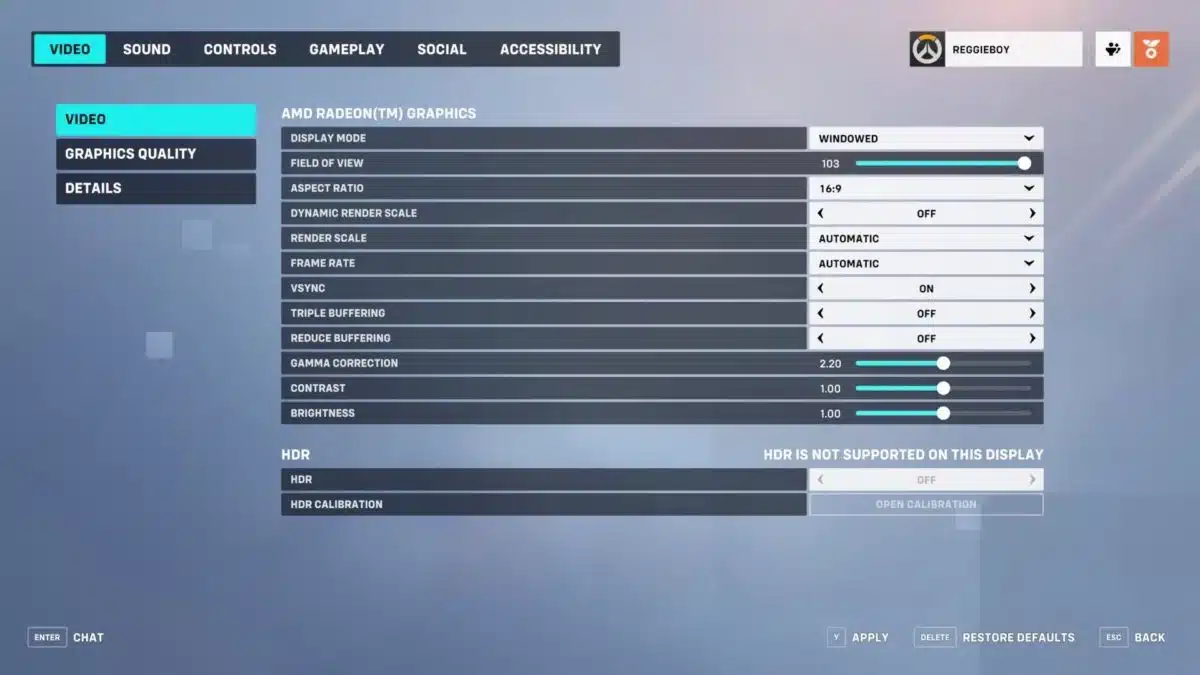
BEST OVERWATCH 2 PERFORMANCE SETTINGS

Widely acclaimed as the best setting for Overwatch 2.

  • Display Mode: Fullscreen
  • Target Display: Best Match
  • Resolution: Choose the native resolution of your monitor
  • Field of View: Personal preference, usually around 103 is the sweet spot
  • Aspect ratio: Relative to your monitor (usually 16:9)
  • Dynamic Render Scale: Off
  • Render scale: Automatic
  • Frame rate: 300
  • V-Sync: Off
  • Triple buffering: Off
  • Reduce buffering: On
  • NVIDIA Reflex: Enabled
  • Gamma Correction: 2
  • Contrast: 1
  • Brightness: 1

Players across communities have chosen to go with the above-mentioned setting as a global standard for Overwatch 2 peak performance across PCs with all sorts of specs. However, do make sure your computer makes it over the minimum requirements to play the game if you want to experience optimal performance.

Best Overwatch 2 Nintendo Switch Controller Settings

Overwatch 2 is one of the best FPS games available in the market and its cross-functional platform helps players use all kinds of hardware to play the game. Players can play Overwatch 2 with their controllers as well as Nintendo Switch and a computer. It is important to precisely control the aim in an FPS game and having the best possible settings on a Nintendo Switch is important.

Blizzard allows players to cross-play between platforms. This means that a player on PC may match up with a player on Nintendo Switch. In this kind of situation, it is crucial to match the mechanical skills of a PC player which is often hard as the latter one is using two peripherals to control the character.

In such cases, players can ensure that they are playing on the best settings to fully gain control of their character and play on par or even better than their team and enemies. To help them do so, here is an optimum set of settings that players can try to become better at Overwatch 2 on Nintendo Switch.

BEST NINTENDO SWITCH SETTINGS FOR OVERWATCH 2

To set up your Nintendo Switch, launch Overwatch 2 and go to the Accessibility tab and edit the settings to the following parameters:

  • Horizontal Sensitivity:  50
  • Vertical Sensitivity: 40
  • Aim Assist Strength: 100
  • Aim Assist Window Size: 80
  • Aim Assist Legacy Mode: Off
  • Aim Assist Ease In: 20
  • Aim Smoothing: 90
  • Aim Ease In: 25
  • Invert Vertical Look: Off
  • Invert Horizontal Look: Off
  • Vibration: Off
  • Switch Movement and Look Sticks: Off
  • Legacy Sticks: Off
  • Aim Technique: Linear Ramp
  • Gyro Aiming: On
  • Gyro Aiming Aim Assist: On
  • Gyro option Presets: Custom
  • Invert Gyro-Aiming Pitch Axis: Off
  • Invert Gyro-Aiming YAW Axis: On
  • Invert Gyro-Aiming Roll Axis: Off
  • Gyro-Aiming Pitch Axis Sensitivity: 0
  • Gyro-Aiming YAW Axis Sensitivity: 80
  • Gyro-Aiming ROLL Axis Sensitivity: 25
  • Disable Gyro While Using Stick: O

There are some other options that you can tweak around but this is the optimum set of settings that one can use to excel at Overwatch 2. Make sure to try them out before jumping into competitive queues with it.

Also Read | Unfortunate Capsule Opening Caused the Csgo Streamer To Lose Thousands of Dollars

LoL Worlds 2022 Group Stage: Results, Teams, Groups, Schedule & More

Riot Games announced the four Worlds 2022 groups during the draw, right after the League of Legends Series 2022 Championship. Following the play-in stage, four teams joined the four groups at Worlds 2022 Group Stage.

The draw showed that regions worldwide had completed their summer splits and determined the groups for this main event. Twelve teams (auto-qualified) were divided into four groups, each consisting of three teams and four from the play-in. Sixteen teams are currently in contention to win the Worlds 2022 Group Stage trophy.

This is everything you need about Worlds 2022 Group Stage, which kicks off on October 7th.

Worlds 2022 Group Stage Guide

Twelve teams qualified directly for Worlds 2022 after performing exceptionally well in their respective summer splittings.

They were joined by four additional teams who made it through the play-in to be seeded in the four groups. The top two teams in each group will decide the knockout stage.

Play-in Stage Teams Are:

  • Fnatic (FNC)
  • DRX
  • Royal Never Give Up (RNG)
  • Evil Geniuses (EG)

Worlds 2022 Format

Group Stage

  • A total of 16 teams participate
  • The teams are drawn into four groups based on seeding
  • It is a double round-robin setup
  • All matches are best-of-one
  • The top two teams from each group advance to the Knockout Stage

Knockout Stage

  • It is a single elimination bracket drawn randomly
  • The first-place teams face second-place teams
  • No two teams from the same group can be placed in the same half of the bracket
  • All matches are best-of-five

Group stage standings and results

Group A

PlaceTeamWL
1Fnatic10
1T110
1Cloud901
1EDward Gaming01

Friday, Oct. 7

  • 4pm CT: Cloud9 0-1 Fnatic
  • 8pm CT: T1 1-0 EDward Gaming

Saturday, Oct. 8

  • 6pm CT: Fnatic vs. T1
  • 7pm CT: EDward Gaming vs. Cloud9

Sunday, Oct. 9

  • 6pm CT: EDward Gaming vs. Fnatic
  • 7pm CT: Cloud9 vs. T1

Thursday, Oct. 13

  • 2pm CT: Fnatic vs. Cloud9
  • 3pm CT: T1 vs. Fnatic
  • 4pm CT: Cloud9 vs. EDward Gaming
  • 5pm CT: T1 vs. Cloud9
  • 6pm CT: Fnatic vs. EDward Gaming
  • 7pm CT: EDward Gaming vs. T1

Group B

PlaceTeamWL
1DWG KIA10
1JD Gaming10
1Evil Geniuses01
1G2 Esports01

Friday, Oct. 7

  • 5pm CT: G2 Esports 0-1 DWG KIA
  • 7pm CT: JD Gaming 1-0 Evil Geniuses

Saturday, Oct. 8

  • 5pm CT: Evil Geniuses vs. G2 Esports
  • 9pm CT: DWG KIA vs. JD Gaming

Monday, Oct. 10

  • 4pm CT: JD Gaming vs. G2 Esports
  • 6pm CT: DWG KIA vs. Evil Geniuses

Friday, Oct. 14

  • 2pm CT: G2 Esports vs. Evil Geniuses
  • 3pm CT: Evil Geniuses vs. JD Gaming
  • 4pm CT: DWG KIA vs. G2 Esports
  • 5pm CT: G2 Esports vs. JD Gaming
  • 6pm CT: Evil Geniuses vs. DWG KIA
  • 7pm CT: JD Gaming vs. DWG KIA

Group C

PlaceTeamWL
1DRX00
1GAM Esports00
1Rogue00
1Top Esports00

Saturday, Oct. 8

  • 4pm CT: Rogue vs. DRX
  • 8pm CT: Top Esports vs. GAM Esports

Sunday, Oct. 9

  • 4pm CT: GAM Esports vs. Rogue
  • 9pm CT: DRX vs. Top Esports

Monday, Oct. 10

  • 5pm CT: Rogue vs. Top Esports
  • 9pm CT: GAM Esports vs. DRX

Saturday, Oct. 15

  • 2pm CT: Rogue vs. GAM Esports
  • 3pm CT: GAM Esports vs. Top Esports
  • 4pm CT: DRX vs. Rogue
  • 5pm CT: DRX vs. GAM Esports
  • 6pm CT: Top Esports vs. Rogue
  • 7pm CT: Top Esports vs. DRX

Group D

PlaceTeamWL
1CTBC Flying Oyster10
1Royal Never Give Up10
1100 Thieves01
1Gen.G01

Friday, Oct. 7

  • 6pm CT: CTBC Flying Oyster 1-0 100 Thieves
  • 9pm CT: Gen.G 0-1 Royal Never Give Up

Sunday, Oct. 9

  • 5pm CT: 100 Thieves vs. Gen.G
  • 8pm CT: Royal Never Give Up vs. CTBC Flying Oyster

Monday, Oct. 10

  • 7pm CT: 100 Thieves vs. Royal Never Give Up
  • 8pm CT: Gen.G vs. CTBC Flying Oyster

Sunday, Oct. 16

  • 2pm CT: 100 Theives vs. CTBC Flying Oyster
  • 3pm CT: CTBC Flying Oyster vs. Gen.G
  • 4pm CT: Royal Never Give Up vs. 100 Thieves
  • 5pm CT: Gen.G vs. 100 Thieves
  • 6pm CT: CTBC Flying Oyster vs. Royal Never Give Up
  • 7pm CT: Royal Never Give Up vs. Gen.G

How to Watch League Of Legends Worlds 2022?

Fans can follow all League of Legends action via Riot Games’ Twitch or YouTube channels.

IEM Rio CSGO: G2 and Astralis to miss Major after RMR upsets

G2 Esports and Astralis were upset by GamerLegion and forZe, respectively. This is the first time in over five years that both teams will not be competing in a CSGO Major.

Both Astralis and G2 Esports lost in the RMR Road to Rio 2022 Europe competition on October 7 and were eliminated from Major qualifying.

G2 lost to Cloud9, 1win, and GamersLegion to miss CSGO Major qualifying at the RMR. During the best-of-one portion of the competition, Astralis was eliminated by both Ninjas in Pyjamas and Bad New Eagles. This was prior to their series setback at the hands of the Russian squad.

Both teams are mainstays at the CS:GO Major tournament series, with G2 Esports having qualified for every Major since it began in 2015, a total of 11 times. Since its debut in 2016, Astralis has not been absent from a single CS: GO Major tournament until now.

With four victories over the course of the previous six years, the Danish organization has established itself as the esports’ most successful Major squad.

G2 and Astralis to miss out on IEM: Rio Major

The most recent Major tournament that G2 Esports competed in was the PGL Major Antwerp 2022, where they finished in the top 11 of the event. A second-place result at IEM Katowice is the team’s best showing this year.

When compared to other bands, Astralis have not had the best year. The Danish team finished in the top 20 at the Antwerp Major tournament.

Astralis, a four-time major winner, did not qualify for the Major. Astralis hasn’t made every major since 2017 after losing a best-of-three series versus ForZe. The following is a rundown of how these games turned out and what it implies for the future of these teams.

Due to the fact that both teams failed to qualify for the major, it is possible that roster adjustments will be made. Changes are less likely to occur now that G2 has recently added HooXi and has had some success at the ESL Pro League Season 16 tournament.

Despite this, the team that Astralis fields have been struggling with a run of poor performance for the better part of two years. The fact that this is the first Major that the Astralis organization has missed suggests that there will likely be upcoming adjustments.

Even though FaZe Clan, NIP, and Sprout have already qualified for the Legends Stage of the RMR Road to Rio, the competition is still going on. There are only three spaces available for teams competing in the qualifying to compete in order to make it to the CSGO Major.

Spower opens up about quitting GodLike Esports

0

Spower is known as one of the youngest BGMI creators to be signed by an esports organization in India. He was under the banner of GodLike Esports for about an year before quitting the organization a few days ago. Spower kept mum for a long time but recently, he addressed this topic on one of his livestreams and here is what he had to say.

SPOWER LEAVES GODLIKE ESPORTS

Those who are familiar with GodLike Esports know that they are known to hire talents irrespective of their age or other such biological factors. Spower was one of their earliest additions as he joined their talent roster in November 2021.

He recently quit the organization and after his fans kept asking the reason behind this move, he revealed that it was his parents’ decision to part ways with the esports organization and he decided to follow it.

WHY SPOWER LEFT GODLIKE ESPORTS

According to the statement given by him on one of his recent livestreams, Spower said that he was in GodLike Esports before stars like Ghatak and Jonathan even joined the team. He added that he was with GodLike Esports for two years without any contract and said “Two years without a contract is not a joke.”

Furthermore, he explained that he could have left the organization whenever he wanted as no contract was signed between the two parties but decided to take a move only when his parents asked him to do so.

Spower was also asked if he cross questioned his parents on why they were asking him to leave the organization but he stated that it was for the first time that his parents asked something from him so he decided to go along with it.

Also Read | FIFA 23: How To Complete OTW Raheem Sterling SBC?

Unfortunate Capsule Opening Caused the Csgo Streamer To Lose Thousands of Dollars

Players of Counter-Strike: Global Offensive are no strangers to losing money as a result of reckless gambling, but this streamer lost over $11,000 in the process.

In the year 2022, there are approximately fifty EMS Katowice 2014 Legends capsules stowed away in various Steam accounts across the world. The game may soon run out of all remaining capsules, making them exceedingly expensive.

Buying a $12,000 capsule is hazardous, but gamers do it in hopes of profiting. However, the majority are let down by their expectations.

Recently, a Twitch streamer by the name of ohnePixel opened a Katowice 2014 Legends capsule, but he ended up losing a significant amount of money. Following the completion of the $12,000 capsule, he was awarded a $300 Ninjas in Pajamas sticker.

CSGO streamer deals thousands of dollars in damage to Katowice capsule

The video of ohnePixel opening his capsule has gone popular in the CSGO community for a reason that will tear your heart. The streamer activated a capsule with a value of $12,000 with the hopes of retrieving an expensive sticker from the legendary, one-of-a-kind object.

Instead, he was left with a cheap NiP sticker, leaving him at the point of tears as the slot machine stalled only an inch shy from the coveted Titan Holo.

Before rolling dice, the streamer said he wanted a $45,000 Titan Holo sticker. If he had gotten the shining sticker, it would have multiplied his investment by three. The fact that the machine was only one slot away from the incredibly desirable Titan Holo makes the situation much more upsetting.

Although it was a huge setback, ohnePixel’s popular video won him the support of gaming icons, including the official CSGO handle. It does not happen frequently that a streamer comes so close to winning $50,000 but ultimately walks away with a $300 sticker as their prize.

Sticker Capsules often headline a specific CS: GO tournament which is dubbed as the “Majors”  They are extremely uncommon, may be stacked, and their value continues to rise over time. The explanation for this is straightforward: Valve distributes these extremely rare items for the duration of a major event.

 After the conclusion of the event, the capsules will no longer be available for purchase in the game’s shop. Players can still get them through trading and Steam, but not at the official rate. The more scarce the capsule is, the higher the price will be.

FIFA 23: How to complete OTW Raheem Sterling SBC?

0

The Ones to Watch or OTW card is one of the most popular FUT cards as it is a dynamic card and gets updated based on the performance of the respective player. The OTW Raheem Sterling SBC is out now in FIFA 23 and we are going to explain how you can complete the SBC.

OTW players can advance through the ‘Wins to Watch’ system, which is dependent on their team’s success. They will be given a one-time upgrade if their team, in this example Chelsea, wins three of their first eight domestic league games beginning September 30th. They do not need to participate in the games to receive improvement. FUT 23 will also enhance OTW cards depending on World Cup results, thus Sterling will be promoted if England wins a single game in Qatar.

How to complete OTW Raheem Sterling SBC in FIFA 23?

It isn’t that hard to complete the OTW Raheem Sterling SBC:

Tactical Emulation

  • Players from Chelsea: Minimum 1
  • Squad Rating: Minimum 85
  • Players in the Squad: 11
  • Reward: Gold Players Pack

Premier League

  • Players from the Premier League: Minimum 1
  • Squad Rating: Minimum 86
  • Players in the Squad: 11
  • Reward: Rare Mixed Players Pack

Note: The SBC is going to cost you around 161k FUT coins on consoles and 165k on PC.

More from TalkEsport:

How To Get Kiriko Skin In Overwatch 2 For Free

The Legendary Sukajan Kiriko, Overwatch 2’s latest support hero is up for grabs, and here’s how you too can get it.

Blizzard dropped a sequel to the massively popular multiplayer FPS title Overwatch and it is an instant hit. Fans are rushing into the game to quickly collect all the items at the earliest. Even though the game had a rough launch with a plethora of issues plaguing it but that did not stop players from being crazy about it.

The skin will be one of the Twitch drops and the contest is rather easy to complete and can be done with little to no effort.

Between the 7th and 16th of October, watch any stream on Twitch under the Overwatch category for a net total of 6 hours, making it rather easy to rack up the hours and collect the said skin. All of this will go in vain unless you have your Blizzard account connected to Twitch, which can be easily done by going over to the settings, and under connections is where it is.

These drops are available for a limited time, post which it is unlikely that these drops ever make it back to the game which makes it kind of a limited edition or rare item in the world of Overwatch 2.

Connect your Twitch account to Blizzard and watch any stream under the Overwatch category for 6 hours and you will have it in your inventory. Make sure to do it before the time expires or miss out.

Karrigan names 5 CS:GO teams that could challenge FaZe at IEM Rio 2022

The international roster of FaZe Clan CS: GO was the first among others to qualify for the IEM Rio Major 2022 through the European RMR Group A. They went undefeated against teams like GamerLegion, Fnatic, and Sprout.

FaZe had a really difficult time winning its matches, despite not playing against opponents of world-class caliber; four out of the five maps they played required extra time to decide the winner. The community as a whole is now concerned about FaZe Clan’s ability to perform effectively in the main event as a result of this.

In a recent interview with Jaxon, Finn “karrigan” Andersen named the five CS: GO teams who pose the greatest risk to FaZe Clan‘s chances of winning the Major. This, of course, is contingent on the teams’ ability to qualify for the competition.


I think there are a lot of teams who have shown great potential during EPL. So, the teams that will be a threat are Vitality, G2, Cloud9, and Team Liquid. There is a smaller gap now than there has been the whole year between competitors and NaVi and us. Maybe there isn’t even a gap anymore. We will find out at the Rio Major.

— Fin “Karrigan” Anderson, FaZe Clan IGL

According to Karrigan, these five CS: GO teams provide the most competition for FaZe Clan during the IEM Rio Major.

  1. Team Vitality
  2. G2 Esports
  3. Cloud9
  4. Team Liquid
  5. Natus Vincere

Despite the fact that FaZe Clan did not have the easiest time winning its qualifier matches, the team was still able to win three games in a row and earn a spot in the IEM Rio Major 2022.

It has been a hectic season for everyone associated with FaZe, from the players to the fans, which has led to the following meme becoming quite popular among the CS: GO community.

With their victory over Sprout, FaZe Clan has ensured that they will compete in the Legends bracket at the IEM Rio Major. As a result of their victory in the last Major, FaZe Clan is considered to be one of the favorites for the IEM Rio Major. Despite the fact that their recent performance has left a lot to be desired, the players continue to have a decent amount of faith in their potential to come out on top.

Are Valorant servers down? How to check

0

Valorant is arguably the most popular multiplayer FPS with an esport scene second to none. The enormous amount of players generate a lot of traffic thus putting an extreme workload on the servers.

It is safe to say that the same server encounters outages for several reasons and may require some time off to get back to its optimal working. However, most of the maintenance sessions are pre-notified by Riot. It is necessary to keep a tab on it given so that players do not mistake a server outage for a clint-sided internet issue.

Server maintenance is common to all multiplayer games and for a title as big as Valorant, it is not surprising that its server requires maintenance at a frequency higher than competing games in the space.

How To Check For Server Outages?

  1. Head over to status.riotgames.com
  2. Select your region under Valorant.
  3. The server situation will be shown.

Riot is always very public about the server situation and they openly declare what is going on. So make sure to check the current situation on their website before you check in on your internet service provider.

However, if everything checks out then it is highly likely that the problem is isolated to your version of the game, in which case make sure it is up to date and raise a ticket with Riot to get proper technical guidance from the developers.