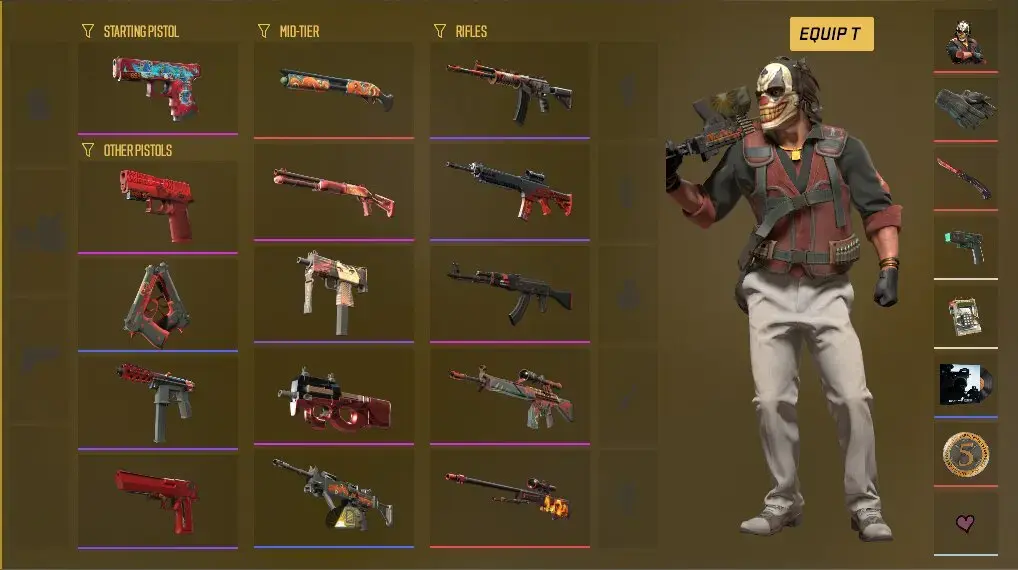
Building a CS2 inventory around one colour does not have to cost a huge amount. The game offers enough weapon finishes to combine cheaper skins across rifles, pistols, SMGs, and other slots while keeping the loadout consistent. The trick is to work with shades of the chosen colour and compare wear levels. A Field-Tested or Minimal Wear skin can fit the theme just as well as a costly Factory New version. Here we explain how to choose matching skins, compare their condition and complete the loadout without overspending.
Decide What the Budget Must Cover
Set a budget before heading to the market. Also, decide whether you want just skins or if you’re interested in stickers, knives, and gloves as well. While stickers aren’t usually very expensive, knives and gloves require a significant investment.
Begin with weapons you use regularly. An AK-47, one M4, an AWP, Glock-18, and USP-S or P2000 appear more often than shotguns and heavy weapons. Give these slots most of the money. You can purchase skins for other weapons later. You can also find suitable stickers, charms, or additional skins for the assembled color collections later.
Choose a Flexible Palette
A theme comes from repeated colours, not a perfect match. Red and black, blue and grey, or white and black allow more choice than a single-colour rule.
A red loadout can begin with Glock-18 | Candy Apple and Galil AR | Signal, using dark skins whenever brighter red options cost too much. USP-S | Ticket to Hell fits its black side. Red stickers can tie in another dark weapon.
For blue, include navy, cyan, and turquoise. MP7 | Cirrus and P250 | Valence use different shades but still look related. Map lighting changes how colours appear, making small differences less obvious during play.
Black is easier to extend. AK-47 | Slate, Glock-18 | Ironwork, USP-S | Ticket to Hell, and MP9 | Featherweight work with grey or white additions. The default knife also fits.
White requires more compromise because fully white skins are limited. Silver, light grey, and black-and-white finishes can fill the gaps. Galil AR | Tuxedo, MP9 | Featherweight, and Dual Berettas | Cartel support the theme without making every weapon completely white.
Inspect Cheaper Wear Levels
Factory New describes condition, not whether a skin suits the loadout. Minimal Wear and Field-Tested versions often preserve the design for less. The difference varies between finishes, so labels alone are not enough. Compare individual float values. Two Field-Tested copies can occupy different parts of the category and show different wear. Some finishes lose paint around the edges; others develop scratches across it. A clean Field-Tested example may look better than the cheapest listing or a far more expensive Factory New version.
Do not reject Well-Worn and Battle-Scarred skins without inspection. Heavy wear can suit dark, military, industrial, or deliberately rough themes. Use an in-game inspect link because a marketplace thumbnail cannot show the first-person appearance under CS2 lighting accurately.
Skip Features the Theme Does Not Need
A colour theme rarely needs StatTrak, an exceptional float, or a rare pattern. Collectors may value them, but they do not automatically improve the set. A blue gem pattern on a Case Hardened skin, for example, can look perfect in a blue inventory, but the premium may be far higher than you need to pay just to keep the colour scheme consistent. Compare ordinary and StatTrak versions, and if the kill counter is unimportant, spend the difference on another weapon skin instead. Pay extra for a pattern only when it noticeably improves the colour distribution. Stickers offer a cheaper way to connect slightly different shades. Preview their placement before applying them, since an applied sticker cannot be returned to the inventory and its full unused price is not automatically added to the skin’s value.
Compare the Final Purchase Price
Choosing the best CS2 marketplace depends on the item: the lowest-priced platform may not have the exterior, float, or pattern you need. Fees for buying, deposits, or withdrawals may also differ. Compare identical versions and calculate the total after conversion and fees. If resale matters, check selling costs too. A saving made during purchase can disappear when the item is sold.
Use independently verified marketplace addresses. Copied domains and private-message links can lead to phishing. Before accepting a trade, confirm the item and recipient through the platform’s official website.
Give the Loadout Time
Place the planned skins together before buying the rest. Inspect links and loadout tools can reveal clashes or unnecessary purchases. There is no need to complete every slot immediately. Prices change, while a convincing screenshot may not reflect how a skin feels during play. Play several matches before deciding what is missing.
A good colour-themed inventory does not need the highest total value. It should look consistent on weapons its owner uses most. Choose a flexible palette, spend more on frequently used weapons, and accept cheaper wear when it preserves the design. Avoiding unnecessary rarity, StatTrak, or a rushed knife purchase leaves more money to complete the rest of the loadout.