
Whether your old Valorant name feels outdated or you just picked a random assortment of letters as your username during a late-night install, you might find yourself wanting to change your name in Valorant. Luckily, Riot Games enables players to change their Valorant name in the matter of a few minutes, albeit with a series of restrictions.
However, unlike what you’d expect, it’s not possible to change your in-game name from inside Valorant itself, as it lives on your Riot Games account as what Riot calls your “Riot ID.” To change your name in Valorant, you’d have to change your Riot ID.
In this article, we’ll go through what you need to know to change your Valorant name, plus the rules that you’ll need to follow and a few things to watch out for.
What Is a Riot ID?
Every Valorant player has an in-game name that consists of two parts:
- Game Name – the text portion that players actually recognize you by.
- Tagline – a short string of characters (usually 3-5) that follows a # symbol beside your name.
Together, they form your Riot ID. The tagline makes sure that two people can use the exact same Game Name without conflict, but the full combination has to be unique.
Note that this Riot ID is separate from your account username. The account username you use to sign in to the Riot Client stays private and is never shown to other players.
How to Change Your Valorant Name
Below, we’ve listed all the steps that you need to follow to change your Valorant name:
- Go to the official Riot Games accounts page.
- Log in with your Riot ID.
- Under the Riot ID section, you should be able to see your current Game Name and Tagline.
- Click into the Game Name field and type your new desired name.
- Select a new Tagline to go along with it, or just keep the same Tagline.
- Hit ‘Save Changes.’
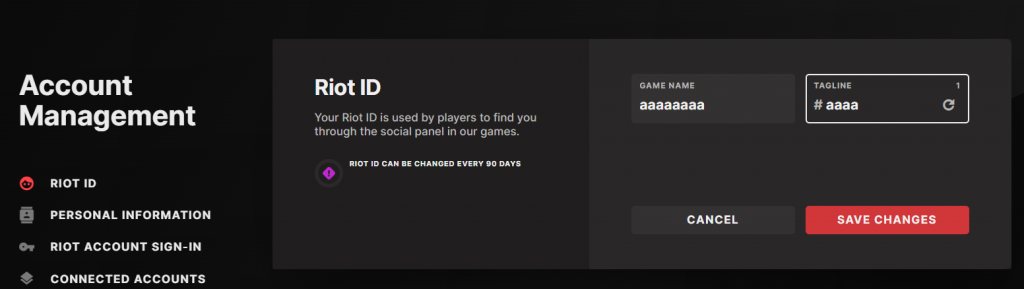
- The system will then check whether that Game Name + Tagline combination is already taken. If it’s free, your Valorant name gets updated right away.
That’s it, your Valorant name should now be updated!
If you can’t see your new name in-game, then you’ll need to exit Valorant, log out of the Riot Client, and relaunch the game.
Valorant Name Change Rules
There are a handful of restrictions that Riot enforces on players when changing names:
- Game Names need to fall between 3 and 16 characters.
- Taglines need to have between 3 and 5 characters.
- Offensive, hateful, or otherwise inappropriate language isn’t allowed, and Riot’s filter will catch most of it automatically.
- You can’t include the word “Riot” anywhere in your name.
- Avoid putting personal information into your Riot ID.
- Impersonating Riot devs, known pro players, or other public figures isn’t allowed.
How Often Can You Change It?
Your Riot ID can only be changed once every 90 days. So once you pick a name, you’re stuck with it for three months.
That’s everything you need to know about how to change your name in Valorant. As mentioned in this article, changing your Valorant name comes down to updating your Riot ID from Riot’s account management page. While you can change your name without spending any money, you’re only limited to one name per 90 days.
So what are you waiting for? Go pick your new Game Name and Tagline that fits Riot’s rules, restart your client, and jump back into ranked with your new identity!