Home Blog Page 1705

Genshin Impact Promo Codes – 31st December 2020

0

The developers behind the open-world RPG title Genshin Impact are often seen rewarding its player base with free in-game rewards. These rewards are given in the form of promo codes.

These promo codes generally reward players with free Primogems, the in-game currency of Genshin Impact. However, other rewards are also not uncommon.

Here’s a list of the promo codes in Genshin Impact as of 31-12-2020

Genshin Impact Promo Code

  • GSIMPTQ125 – 60 primogems, 10,000 mora (new)
  • GENSHINGIFT – 50 primogems, three hero’s wit
  • GSIMPTQ125 – 60 primogems, 10,000 mora (new)
  • GENSHINGIFT – 50 primogems, three hero’s wit

Expired list:

  • 5KVeIbSxDUU – 100 primogems, ten mystic enhancement ore
  • G3tQq6TOqmE – 100 primogems, five hero’s wit
  • eATDgIXLD56 – 100 primogems, 50,000 mora
  • GOLNXLAKC58 – 50 primogems
  • GENSHIN1111 – 60 primogems, 10,000 mora
  • GENSHINZHB30 – 160 primogems
  • GENSHINMYYOI – 30 primogems
  • GENSHINMHYOM – 30 primogems
  • GENSHINMHYOO – 30 primogems
  • GENSHIN0928A – 60 primogems, 10,000 mora
  • GENSHIN0928E – 60 primogems, 10,000 mora
  • GENSHIN0928N – 60 primogems, 10,000 mora
  • GENSHIN1006A – 30 primogems, 5 adventure xp
  • GENSHIN1006S – 30 primogems, 5 adventure xp
  • GENSHIN1006U – 30 primogems, 5 adventure xp

HOW TO REDEEM GENSHIN IMPACT CODES

To redeem the above-mentioned codes in Genshin Impact, simply follow the given steps:

  • Go to the official Genshin Impact website
  • Login to your account
  • Click “Redeem Code” located at the top right of the page
  • Select Country and Character Name
  • Enter a code from the list above
  • Click on ‘Redeem’

How to get Kamera Gadget in Genshin Impact

The camera in Genshin Impact allows players to capture the beautiful sceneries across the wide region of Tevyat. This feature can be accessed by clicking the camera button on the left side of the UI.

However, the old Genshin Impact camera had a number of limitations. For instance, players were unable to click a picture during fights, while gliding or climbing structures.

Luckily, miHoYo has implemented a method for players to upgrade their camera to bypass these limitations. To obtain this newly introduced Kamera, players have to complete a quest titled ‘Snapshots’.

‘Snapshots’ being one of the city reputation missions of Liyue, players need to have a minimum of Adventurer rank 25 to be able to take the quest.

HOW TO UNLOCK THE NEW KAMERA GADGET

If you meet the rank requirements, find Ms. Yu to the east of Liyue Harbor near the docks to get the quest.

Once you’ve accepted the quest, you have to find Xu and speak with him
who’s usually seen standing between the city’s northern waypoint and the Mingxing jewelry store.

In order to complete the quest, you have to deliver photos to two NPCs. The first NPC named Liu Su can be easily found by going up the stairs across the merchant located to the right of the jewelry store.

The next NPC named Granny Shan can be found to the north of the city’s alchemy station and Eastern waypoint. Speak with her then return to Xu to receive your Kamera device.

Players of retaliation: Another made in Inda PUBG Mobile alternative

0

PUBG Mobile has been the game which has secured a special place in the hearts of many mobile gamers as it became one of the biggest hits in India in the recent times. Despite the game being banned, the popularity of PUBG Mobile does not seem to fade away. Until it returns, several Indian PUBG Mobile alternatives are on their way and Player of Retaliation is one of them.

Player of Retaliation or POR is the upcoming ‘Shooting Battle Royale’ game which is under development by Chennai Games. The description of this game is given below.

POR (Players on Retaliation) is a new Shooting Battle Royale with nonstop action pack, thrill & revenge with a strong storyline based Shooter! Coming soon…

– Chennai Games

This new game is going to be a battle-royale title and may fill the void left by PUBG Mobile. Similar to FAUG, which is set to arrive by next year, the announcement of POR has piqued the interest of mobile gamers waiting for an Indian alternative.

The announcement post has also revealed that POR will have everything a successful battle-royale needs. Starting with easy control and realistic graphics, it will have many weapons and characters.

The game will be available in FPS or TPS mode and will also include an online PvP shooter mode. A small hint about a possible zombie mode is also made at the end.

Overall, a potential rival to PUBG Mobile is set to come in the market and it will be interesting to see how the developers live up to the expectations built up by the announcement.

Skyesports Valorant League 2020 concludes with record breaking viewership

0

The Skyesports Valorant League 2020 presented by AMD Ryzen has finally come to an end, with Team Hyderabad crowned champions of the flagship event.

Team Hyderabad represented by Velocity gaming, who have now rebranded into Team Mahi, were part of the group consisting of pro teams and beat a Team Rajasthan, part of the group consisting of influencers and pro players, featuring the likes of Debanjan ‘DeathMaker’ Das, Vishal ‘haiVaan’ Sharma and Mohit ‘mw1’ Wakle, in the Grand Finals of the event to win the trophy and a 400,000 INR purse.

Despite being on the losing side in the Grand Finals, DeathMaker went home with the MVP award and 50,000 INR, thanks to a total of 426/254 in terms of Kills/Deaths over the course of the event.

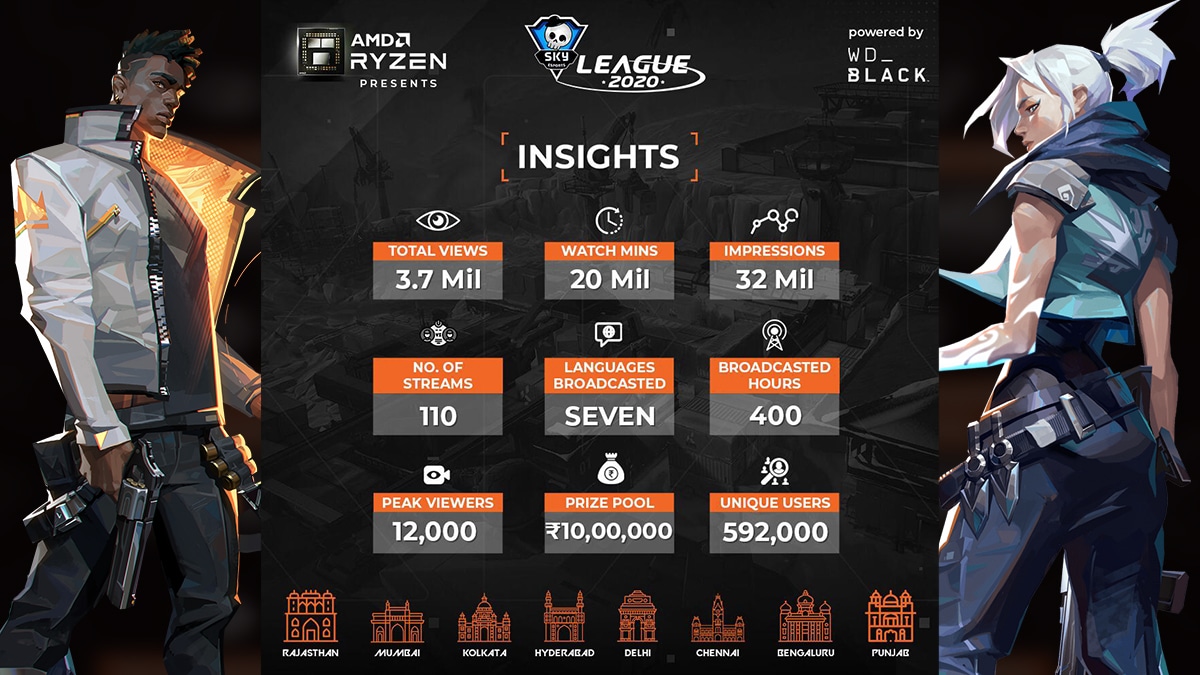
Skyesports Valorant League 2020 was a historic event according to the numbers it managed to produce and attract. In a broadcast spanning over 25 days in 7 different languages, the event attracted more than 32 million impressions and became the most viewed standalone Valorant event in South Asia with more than 3.5 million views garnered on all the streams combined.

The event hit a peak concurrent viewership of 12,000 across all streams, with Skyesports attributing the success in large to their decision to cover the event in such an extensive manner and ensuring the streams are catered to audiences of all languages within India and otherwise.

The main protagonists of the Skyesports League 2020 though, were the players. The seasoned pros continued to shine but Skyesports also saw the spotlight dawning on relatively unknown stars that have managed to go under the radar thus far but ones that deserve every bit of the recognition coming their way.

All in all, all the influencers, pro players and content creators together showed the competitive spirit and hunger to win and were the true reason for the success of the event.

While curtains might have been drawn on the current iteration of the Skyesports Valorant League, a sequel has already been teased, with the new season set to take place between April to June, 2021.

We at TalkEsport are proud to have partnered up with Skyesports for the Valorant League 2020 and the success of the event that was witnessed by a record number of viewers. We eagerly await the new instalment of the series that will go on floors in April, 2021.

PayMoneyWubby banned again by Twitch, the third time within 13 months

0

Dennis Richardson, aka PayMoneyWubby, is a Twitch Streamer who mainly focuses on Comedic content. Many people equate his comedy to figures like iDubbbzTV and CallMeCarson but unlike those, he streams regularly on Twitch.

Yesterday, on December 29th, Wubby received his third strike from Twitch, just 2 days after his latest broadcast. The streamer Tweeted out saying “How not Poggers of them”.

According to him, the latest Twitch strike came on December 29. Similar to his two previous bans, there’s no telling why his account was banned as Twitch hasn’t responded to his query.  However, various comments point towards some explicit content in his last stream being the cause of this third strike.

According to Official Twitch Policy, any individual or account receiving three strikes (bans) will be banned permanently on the platform.

Wubby’s previous dealings with Twitch resulted in great confusion and frustration for him. Twitch had actively ignored his appeals on previous bans, which resulted in Wubby mocking the platform on tweeter and threatening to move to Mixer.

Getting banned for a 3rd time without any explanation, Wubby took to Twitter almost immediately and mocked Twitch by retweeted a tweet from Streamerbans—

“How not Poggers of them”

As a result of his third consecutive strike on Twitch, PayMoneyWubby might permanently be banned from the platform. And with how little Twitch is trying to co-operate with the streamer on 3rd ban, it’s entirely plausible that his account isn’t getting restored anytime soon. 

Free Fire Elite Pass Season 32 ‘Specter Squad’ announced

0

Popular Garena esports title Free Fire has revealed their first Elite Pass for the 2021 season, named the Specter Squad Elite Pass. The pass will have a ghostly theme and revolves around the world of specters.

Users can pre-order the Specter Squad Elite Pass in-game for a special reward, the Specter Heart Grenade, for everyone who purchases it before the official release of the pass, which is scheduled for the first day of the new year.

In the trailer released by Garena for the Elite Pass, two protagonists are shown visiting an empty Laundry Store, perhaps investigating something before the two of them disappear, with the female protagonist shown to be pulled into what can be assumed to be the realm of Specters.

Garena is also set to make an entire backstory and lore for the Specter Squad Elite Pass, which will help players understand the storylines of Enid and Hugo as they venture through the Specter Realm.

How to pre order Free Fire Season 32 Elite Pass

  1. Click on the Store displayed on the main screen.
  2. Then Click On Specter Squad Banner
  3. Click on the pre order now icon.
  4. Then, Click on the button showing the cost of diamonds.

Free Fire Elite Pass Season 32 Price

The Season 32 Elite Pass cost 499 Diamonds and the Elite bundle cost 999 Diamonds. You Can Pre-Order The Elite Pass Bundle For 999 Diamonds.

Free Fire Elite Pass Season 32 Rewards

  • Specter Basher Bundle
  • Specter Raider Bundle
  • Ghost Gamer Loot Box
  • Specter Squad Sufboard
  • Ghost Basher
  • Motor Bike – Specter Squad
  • Thompson – Specter Squad
  • Ghost Trapper
  • Grenade – Specter Mischief
Free Fire Season 32 Elite Pass – Specter Basher Bundle, Photo: TalkEsport via Garena
Free Fire Season 32 Elite Pass – Specter Raider Bundle, Photo: TalkEsport via Garena
Free Fire Season 32 Elite Pass – Ghost Gamer Loot Box, Photo: TalkEsport via Garena
Free Fire Season 32 Elite Pass – Specter Squad Sufboard, Photo: TalkEsport via Garena
Free Fire Season 32 Elite Pass – Ghost Basher, Photo: TalkEsport via Garena
Free Fire Season 32 Elite Pass – Motor Bike – Specter Squad, Photo: TalkEsport via Garena
Free Fire Season 32 Elite Pass – Thompson – Specter Squad, Photo: TalkEsport via Garena
Free Fire Season 32 Elite Pass – Ghost Trapper, Photo: TalkEsport via Garena
Free Fire Season 32 Elite Pass – Grenade – Specter Mischief, Photo: TalkEsport via Garena

As far as the Battle Pass Rewards are concerned, users will receive a Motor Bike skin from the time of purchase at 0 Badges itself. The female skin will be unlocked at 50 Badges, with the highest unlock reserved for the male Skin at 225 Badges. There are different variants of the Backpack available at 200 Badges for Free Pass and Elite Pass users.

Free Fire Elite Pass Season 32 End Date –

Like previous Elite Passes, the Specter Squad Elite Pass is scheduled to run till January 31, 2021, with a new Elite Pass likely to be announced thereafter.

Roblox Promo Codes For January 2021

0

Here is how to pre-register for the Pokemon Unite Closed Beta test

0

Players are totally hyped up about the Pokemon Unite Closed Beta test. The closed beta test is going to start in January 2021 in China. If you are a Pokemon lover, you should definitely pre-register for this closed beta test. Let’s find out how to do it.

How to pre-register for the Pokemon Unite Closed Beta?

  • Log into your account on the official TapTap website.
  • Find out Pokemon Unite using the search bar.
  • After that, you will find out the pre-register option for both iOS and Android.
  • Then click on the pre-register button.
  • You will get the download option once you get selected for the Pokemon Unite Closed Beta testing.

Also Read | Top 5 Among Us Alternatives for Mobile (Android APK Download)

How To Find yourself a team at ESPL Valorant Power Up India

Playing at a tournament with a full-fledged team, going through multiple practice sessions along with the same does you and your teammates an edge over the others.

Over these years, before every gig, players seem unable to make their way to a team where they just spent their time on the spectator side.

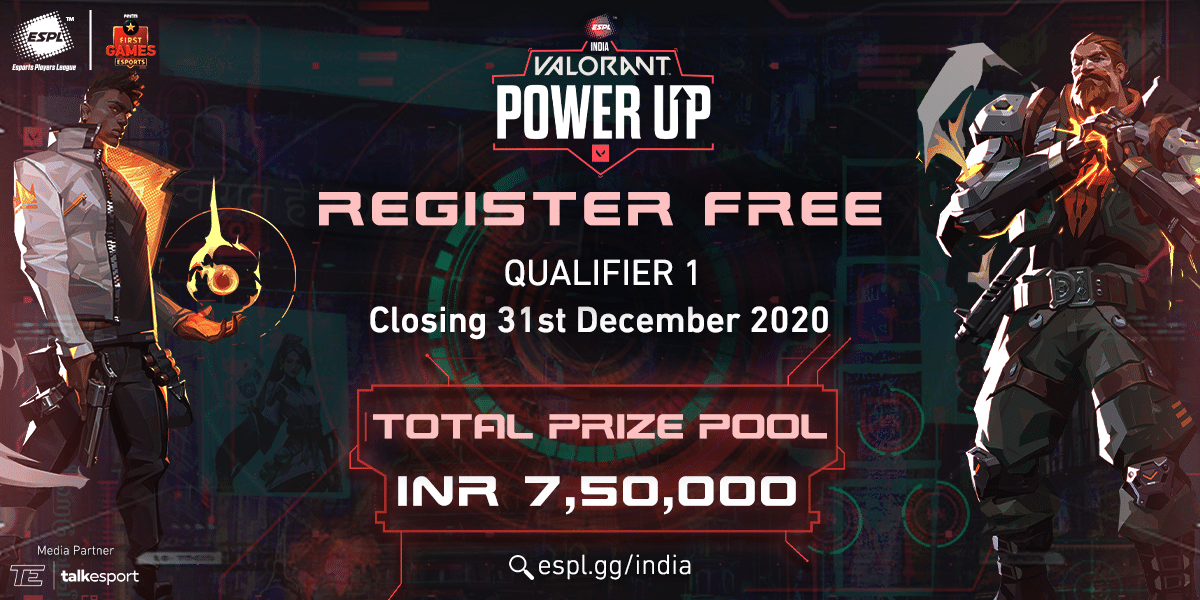
At the upcoming Esports player league Valorant Power Up India tournament, organizers have decided to give every free agent a chance for competing at the same.

They have opened up a portal on their website where you can list your analytics and desire to play only to be shortlisted by other teams if they seek a player. 

Follow these steps to find yourself a new home before the ESPL kick offs. 

  • Visit the official website of ESPL
  • Make sure you sign up and create yourself an ID.
  • Once you’re done, click on the “Team Finder”.
  • Apply the filter for your game, select the desired game you want to compete at.
  • Also, you can create a thread that can help other players revert to you. 
Alternate option
  • Join ESPL’s Discord channel. (https://discord.gg/3UHsz7U)
  • Once you have joined, select the Main Lobby text channel and assign yourself the country role by clicking on the flag which represents your nationality.
  • This would trigger the “Locked Team-Finder” text channel to be available for you.
  • Make sure you enter the correct details of yours including those from the game and your in-game roles.

How to use Valorant Elo Tracker Overlay

0

You can now add a widget on your stream which lets you keep a record of the ELO points while competing at Valorant’s Riot Mode.


Earlier on 23rd December, RumbleMike on GitHub where the 16yo North American revealed the ELO system of Riot’s Valorant Ranked mode. In our last write-up, we discussed the former’s executable and the steps to download the same.

Today RumbleMike is back with yet another workable project “VALOR OVERLAY” where the previously revealed ELO system can now be displayed on your streams (If you do) as an overlay. This widget is refreshed every 10 seconds.

Before setting this up, make sure you download these following files:

https://dotnet.microsoft.com/download/dotnet-core/thank-you/runtime-desktop-3.1.10-windows-x86-installer [x86 Version]

OR

https://dotnet.microsoft.com/download/dotnet-core/thank-you/runtime-desktop-3.1.10-windows-x64-installer [x64 Version]

Let’s look into the steps to download and install the same :

1. Visit RumbleMike’s GitHub over here where the project has been displayed.

2. Hit Download.

3. Extract the .ZIP file to any preferred location.

4. Now open the extracted folder and head over to the references folder. Here you will find a TTF File (Font File) and a Config.Json.

5. Open the “Config.Json” with any text editor.

6. Enter your Login Details along with your region credential.

‘na’ for North America (Players from Latin America CAN USE NORTH AMERICA), ‘eu’ for Europe, ‘ap’ for OCE, Africa, Australia, ‘ko’ for Korea, and ‘br’ for Brazil.

7. Set your delay. This is how often your rank and ranked points update as per the developer. Recommended delay is 10-20 seconds. The file will look like this :

{

“username” : “Username”,

“password” : “Password”,

“region” : “region”,

“refreshtime” : 10

}
Make sure you put a 10+ seconds delay as the executable might avoid any parameter less than 10.

8. Run the Application which then greets you with a pop up, from Windows Smart Screen. This usually occurs as the former is not signed by the code author.

9. After launching it successfully, you will see a window with your gained/lost Rank points parameters based on your last 3 matches. Numbers in green denotes the won match while the ones in Red denotes  a Loss.

10. Capture the windows via OBS, and you’re all good to go.