Saturday, July 25, 2026
Home Blog Page 1206

Valorant Pros Recreate Squid Game During Technical Pause in VCT 

0

Technical pauses are a common occurrence in competitive games. At any point in a high-stakes tournament game, if the participating players or tournament admins feel that something is out of the norm, a pause is called for the admins to resolve the issue.

Usually, in FPS titles like Valorant, players generally use the time from the technical pause to discuss their strats for the next few rounds.

However, Valorant’s Game Changers tournament saw one team turning a technical pause into an entertaining experience for the viewers and casters by portraying an adaptation of the ‘Red Light, Green Light’ game from Netflix’s title ‘Squid Game’.

In a recent Lower Bracket match of the Game Changers EMEA: Series 1 main event, noOrg battled it out against TENSTAR Nova for a shot at the lower bracket finals against Guild X. When a technical pause was called during the game, TENSTAR Nova took the opportunity to replicate Netflix’s ‘Squid Game’ in Valorant.

The clip was then posted to various social media platforms and won the hearts of Valorant fans worldwide. Fans can take a look at the clip here

TENSTAR Nova then proceeded to win the series 2-0 to secure their spot at the lower bracket finals against Guild X, which they lost by a 2-1 margin. 

VCT Game changers team accuse Motif Esports owner of sexual harassment

0

ex-Motif who now play as karmaVALORANT have accused their former organziation’s boss of sexual harassment and unprofessionalism.

After finishing in the 24th position at the Valorant Game Changers EMEA open qualifier in February, the players of Motif Esports decided to call quits on the UK based organization followed by accusations against their boss Jack, known as “Jaws” who has reportedly been reported for a harassment case involving Motif’s female Valorant roster.

One of the ex-Motif players, Joanne told Dexerto that Jack was willing to trade some explicit photos of himself in return if she performed well in their VGC fixture.

Joanne further added that Jack had told her he would “turn her” straight if she wanted to spend a night with him. This indeed continues as Jack on a Discord call screen-shared explicit content while Joanne was present in the call. The allegations also include general poor conduct by the org’s management, including messaging players during official VGC matches to join them for ranked games.

Well it really hurts to write that this fiasco doesn’t have an end yet, as RattieRebecca through a TwitLonger shed more light on the incident where players continued to receive racist remarks due to the fact that they were non-British including their coach Jarda who had a Czech accent.

Racist remarks were passed on to one of their players Mercy on a twitch stream of their organization’s members which in fact broke the TOS of Twitch.

From not having a chat with the team members to the inability of creating a private server for practice, Motif Esports’ management had been very rude and unconventional.

Although when Dexerto reached out to Jaws for a clarification on the above, he turned down the media in the light of “not having enough evidence on both the sides” which was followed by the team’s twitter handle being deactivated and the roster disbanded.

How to Find a Village in Minecraft 1.18

0

Every Minecraft player knows the significance of a village in their world. Finding a village early on massively boosts survivability and helps in settings up the path to endgame build very early on. 

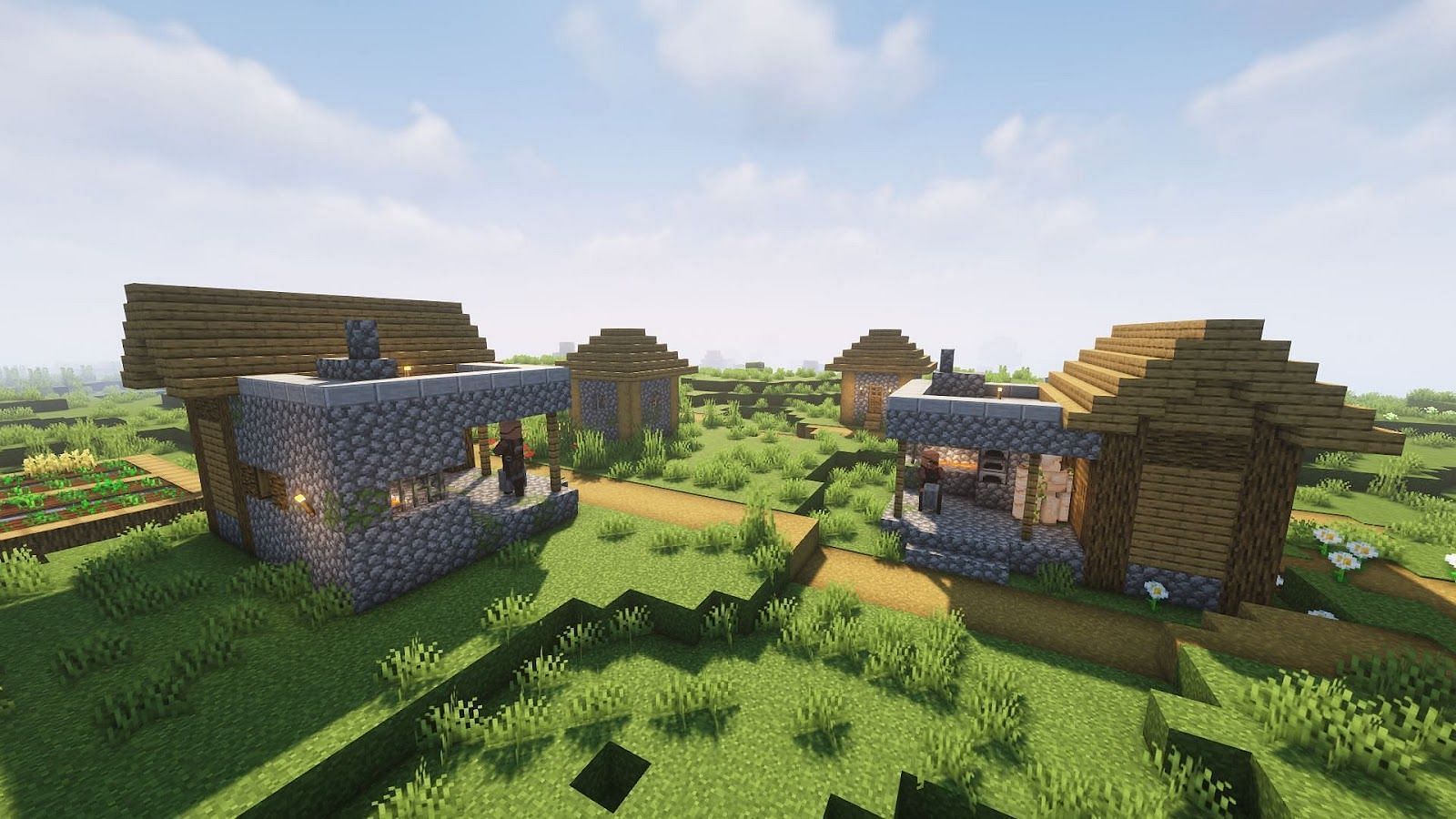
A village is a group of randomly-generated buildings in the Overworld, where Villagers, Cats, and Iron Golems naturally spawn. Wandering Trader also spawns in the village center. While villages offer a massive opportunity to players, it is also very tricky to find a village in your world seed. 

There are a variety of ways to find a village in your world seed. Today we are going to explore some reliable methods that can help you find a village early on in your playthrough without much effort. 

Before we start do note that villages generate naturally in plains, savanna, taiga, and desert biomes. Villages can also generate naturally in ice plains and cold taiga biomes in Bedrock Edition. A village’s layout and style of structures are determined by the biome at the northwest corner of the village well (defaulting to “plains” if it is not one of the other biomes).

1. Find a Village via Custom Seeds

Whenever you start a new game, Minecraft will generate a new world as per your game version and settings. The new world generated will be assigned a unique and random integer called a seed. The seed code can be shared and used endless times to recreate the same world endlessly.

Now back to the topic at hand, you can use a custom seed to start a game in a world where a village has been found. There are many online sources and community forums where you can find a “World Seed” that will suit your style in no time.

  1. Search for a world that suits you online or ask in forums for a well-documented world.
  2. Copy the seed code (generally upto 20 digits).
  3. Now, open your game and click on the “Create New World” button.
  4. Here select the “More World Options” button at the bottom right corner.
  5. Enter or paste the seed code you found (see Step-1) in the textbox at the top of your screen. 
  6. Click on “Create New World” and done!

The only thing while using this method to keep in mind is to make sure you’re running the same version of Minecraft as the seed you found. Otherwise, your seed has a chance of not spawning exactly what you want or being just slightly different. Also, some features are not 100% accurate, i.e., locations can be wrong or missing. These include:

  • Dungeons
  • End Cities on Bedrock Edition
  • World Spawn Positions
  • Amethyst Geodes (near caves, mineshafts, etc.)

2. Analysing Seed World online 

In case you have already started your game in a world of your choice or maybe you are playing online then you can simply use an online analysis tool to view the full map. 

There are many tools available online that can be used to view the map of the world. We will be talking about the “Chunkbase Seed Map” app. The chunkbase seed map app allows you to view the various features of any seed world. The app will mark caves, biomes, villages, mansions, treasures, mineshafts, ruined portals, and much more.

To use the app follow these steps:

  1. Get the seed code of the world you want to play in by typing the /seed command in the game chat. (if it’s an online world then you may need admin privileges to view the seed code)
  2. Now, go to the online Chunckbase Seed Map app here
  3. Type/paste the seed code in the seed text box.
  4. Select the game version and set dimensions to “Overworld”.
  5. Now scroll below to view the map of the world.
  6. Just above the map, you find various filter options to turn on/off various map features and indicators. 
  7. Select the “Village” option and any other option you want to view.
  8. Now, all the villages in the seed world will be marked.
  9. Click on the village nearest to the spawn point to see the position of the village.
  10. Go back to your game and navigate to the position you found online.

3. Find via the in-game command

Before we begin, the command to find the nearest village is marked as a cheat in the game. So you need to turn on cheats in your Minecraft world. (Again for players in an online world you need admin privileges to use cheats).

  1. Go to the lan settings in Minecraft Java or world settings in Bedrock edition.
  2. Now under the cheats option turn on the “Activate Cheats” option.
  3. Now, open the chat option in your Minecraft world and type “/locate village” and press Enter.
  4. The position of the nearest village to your current location will be displayed in chat. 
  5. Now, you can either walk to those coordinates, or you can use the “/tp X Y Z” command to teleport to that location. Make sure to keep the value of “Y” above 100.


Pokimane Staying on Twitch, Giving Away Tesla to Celebrate

0

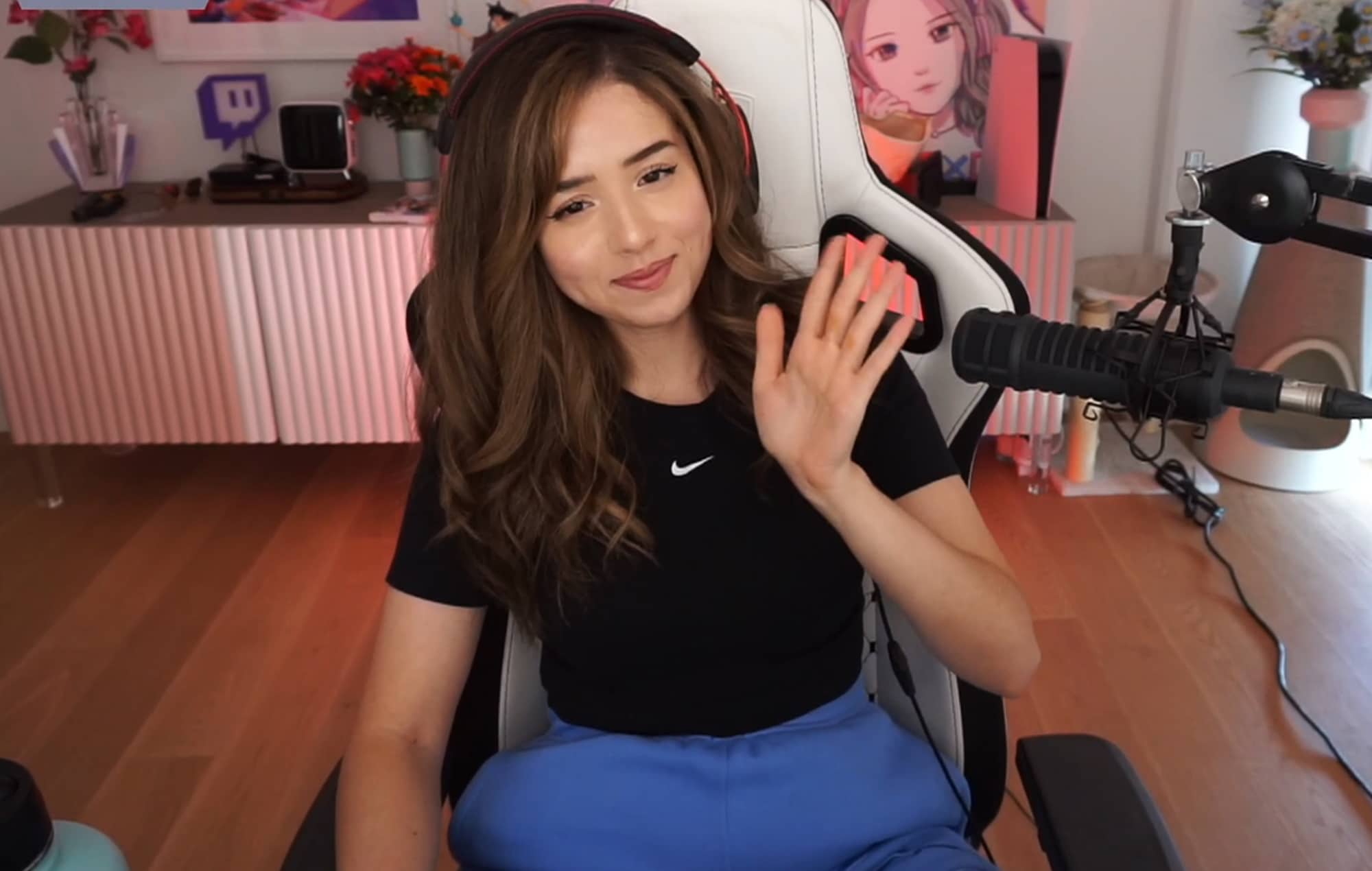
Following her recent announcement that her contract with Twitch has come to an end, Imane “Pokimane” Anys has confirmed that she’d be sticking with the streaming platform once again instead of switching to a different one.

Pokimane’s Tweet on January 31 got her fans talking, when she stated that her contract with Twitch had ended. Several rumors sparked about her potential move to YouTube Gaming or other streaming platforms. However, it seems like that wont be the case. 

Through a Tweet on February 8th, Poki confirmed her “next chapter” and announced that she’d continue streaming on Twitch. She’s also giving away a Tesla to her fans to celebrate the occasion. 

“About that platform announcement… Instead of choosing between a red or purple car, I’m GIVING ONE AWAY,” Pokimane said. 

This announcement comes only a few weeks after Poki found herself amid some heavy drama involving her, Jidion and Ninja. The controversy escalated to an extent that Ninja even considered suing Pokimane for “defamation of character”.

Fans of Pokimane throughout the world will be eagerly looking forward to her next stream to celebrate the event alongside her. 

How to Pre-Register for Apex Legends Mobile

Apex Legends Mobile is the next big thing in the mobile gaming market. Last year in April 2021, Electronic Arts announced the launch of the first closed beta test for Apex Legends Mobile the same month. Soon, the soft launch of the game is coming for the selected countries. The pre-registration is only available in Argentina, Mexico, Peru, Indonesia, Malaysia, Philippines, Singapore, Australia, and New Zealand via the google play store.

So, if you want to try out Apex Legends Mobile on your Android phones, read the complete article. In this article, you will learn how to pre-register for the Apex Legends Mobile.

Requirements to Pre-Register for Apex Legends Mobile

Before Pre-Registering for the game, you need to know the minimum requirements to access the game.

  • Processor: Snapdragon 625 or above
  • RAM: at least 4GB (rumors suggest it has been optimized for 3GB phones)
  • Storage space: up to 2GB
  • Android version: Android 6.0 and above

How to Pre-Register for Apex Legends Mobile

The player needs to sign up for a new Google account and change the region through a VPN service. Now follow the below steps to pre-register in the game.

Step 1 – Open the Google Play store and select the new google account to proceed.

Step 2 – Search for Apex Legends in the Play Store and click on the game’s icon. Now, tap on the “Pre-register” button to sign up for the game ahead of its upcoming soft launch.

Now you have successfully pre-registered for the game. To automatically download the game, you can click on the “Install when available” option from the pop-up that appears after choosing the “Pre-register” option.

How to complete FIFA 22 Mid or Prime Icon Upgrade SBC?

0

EA Sports is introducing a lot of new SBCs these days while running the Future Stars promo. The developers have just launched the FIFA 22 Mid or Prime Icon Upgrade SBC and we are going to explain how to complete this SBC in FIFA 22.

Don’t stop! Keep reading as we are going to describe how to complete the FIFA 22 Mid or Prime Icon Upgrade SBC.

FIFA 22 is a football simulation video game developed by EA Sports. The game is powered by the Frostbite engine and it is available on almost every platform.

Completing this SBC without wasting money is kind of tricky, but we’ve got your back.

How to complete FIFA 22 Mid or Prime Icon Upgrade SBC?

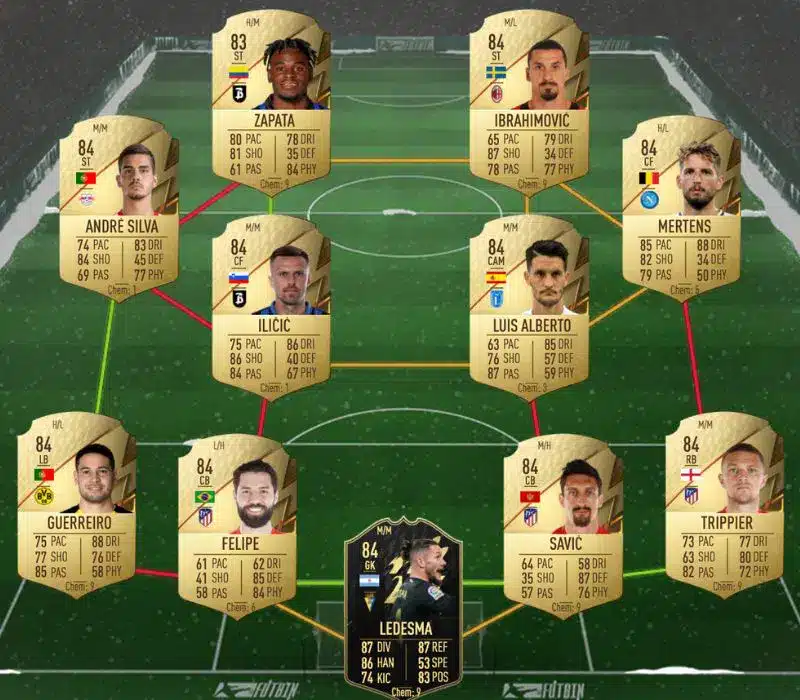
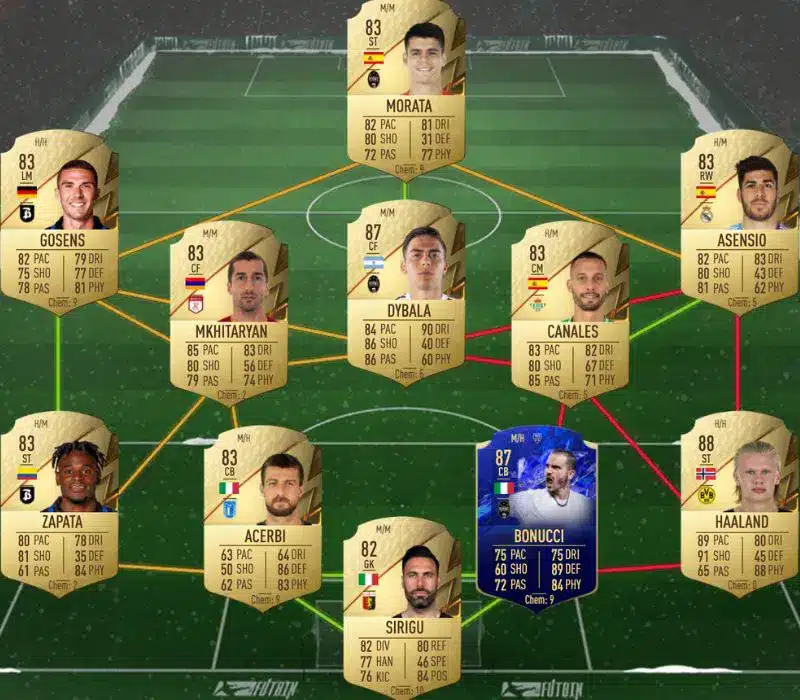
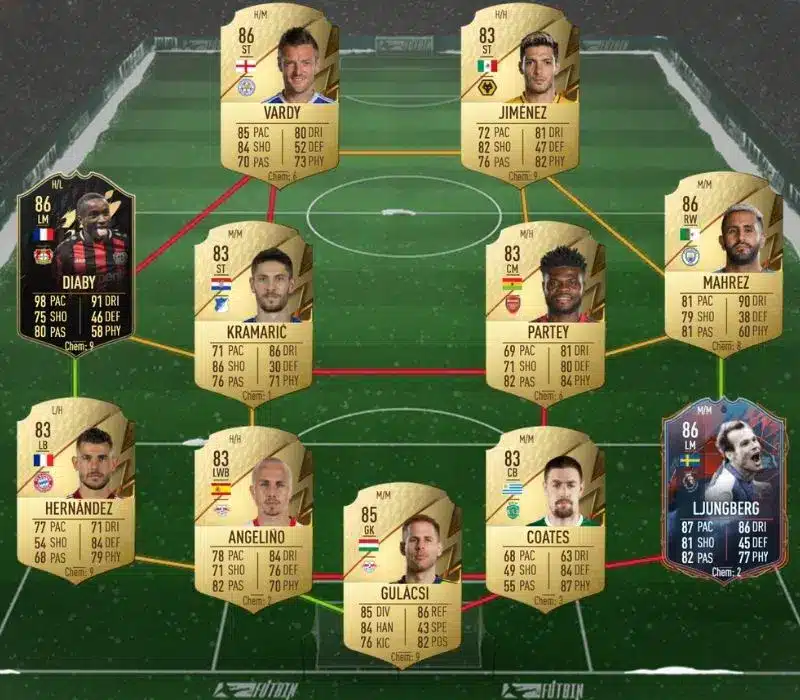
There are four different squads to turn in for the challenge. Let’s check out the requirements along with the solutions:

84-Rated Squad

  • In Form Players: Min 1
  • Squad Rating: Min 84
  • Team Chemistry: Min 70
  • Number of players in the Squad: 11
  • Reward: 1 Rare Gold Pack

Solution

84-Rated Squad

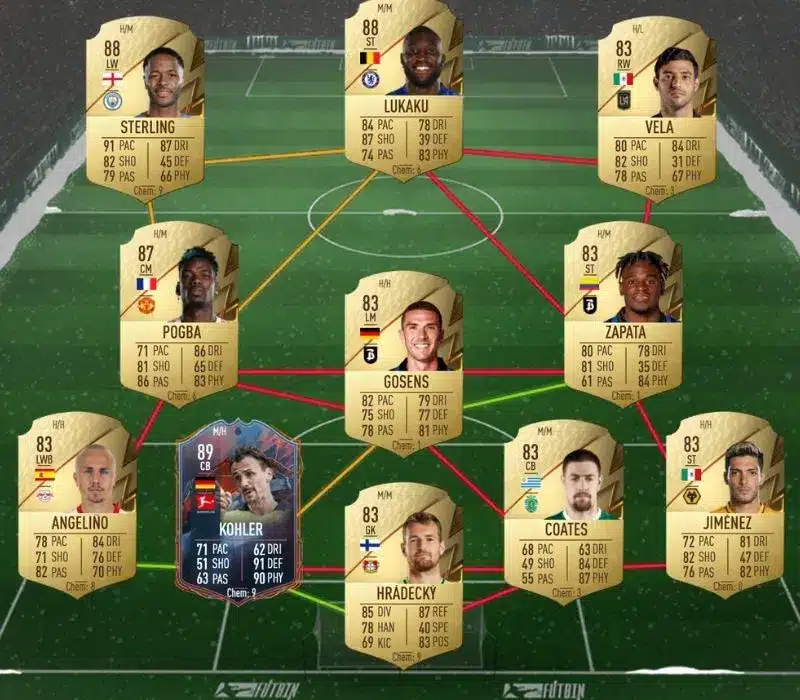
85-Rated Squad

  • Squad Rating: Min 85
  • Team Chemistry: Min 65
  • Number of players in the Squad: 11
  • Reward: 1 Rare Mixed Players Pack

Solution

85-Rated Squad

85-Rated Squad

  • In Form Players: Min 1
  • Squad Rating: Min 85
  • Team Chemistry: Min 60
  • Number of players in the Squad: 11
  • Reward: 1 Prime Electrum Players Pack

Solution

85-Rated Squad

86-Rated Squad

  • Squad Rating: Min 86
  • Team Chemistry: Min 55
  • Number of players in the Squad: 11
  • Reward: 1 Premium Gold Players Pack

Solution

86-Rated Squad

FIFA 22 Mid or Prime Icon Upgrade SBC cost

This SBC is definitely a costly one just like the previous SBCs. The FIFA 22 Mid or Prime Icon Upgrade will cost you 420000, 410000, and 419000 FUT coins on PlayStation, Xbox, and Origin respectively.

Note: The market prices can change at any time.

Recommended | FIFA 22 GUIDE – PRO PLAYER TIPS AND THE 5 BEST FORMATIONS

Top 5 Best Free Fire players in the world

Free Fire is one of the best mobile games in the world. Its fan base is very wide as the active players range in millions every day. To be the best at this game is very hard and yet, there are few individuals who are just better at this game than the others. Here is the list of top five Free Fire players in the world.

1. Sultan Proslo (Dylan Pros)

The list starts off with Sultan Proslo. He is an Indonesian Free Fire content creator and possibly the best Free Fire player in the world. He has impressive statistics and his rank points remain unmatched till date. He has a massive fan following with a whopping number of 15 million subscribers on his YouTube channel named Dylan Pros.

2. SK Sabir

SK Sabir is a household name in Indian Free Fire community as he is a popular content creator. He has amassed a big fan following and is close to hitting 5 million mark on his YouTube channel. He is from a well known Free Fire guild called BOSS.

3. Sudeep Sarkar

Sudeep Sarkar is also a popular name from India. He hails the tag of being one of the best close combat players in India. He is known to play for kills and survival goes hand in hand with this strategy. He has a YouTube channel with 1.4 million subscribers.

4. Raistar

Raistar has gained fame in the Indian Free Fire community due to his accuracy and precision while playing Free Fire. He is also known as one of the quickest players in the world and this makes him a lethal opponent to face in game. He has a total of 6.5 million subscribers till date.

5. TSG Jash

TSG Jash is the part of famous TSG clan that has its origins in India. They are well known for their team gameplay and Jash definitely stands out among the rest. TSG stands for Two Side Gamers and is owned by TSG Ritik and TSG Jash. It has a huge fan base of 10 million subscribers.

These are the top five Free Fire players in the world. The rankings might change with time but each of them is known due to their own style of playing the game.

Also Read | Free Fire TopUp Centre: Get double diamonds for purchases

How to Permanently Unlock Upgrades in Sifu

0

Sifu is a mixed-martial-arts beat ‘em up game that features deep and satisfying combat with over 100 unique combat moves as players can chain their attacks and use a large variety of weapons and objects to aid them in combat.

While it may sound easy on paper, Sifu requires a ton of skill and practice to play through despite its main story being under 5 hours long, according to HowLongToBeat. Unless you want to unlock the True Ending, which might take several playthroughs.

But beating the game isn’t a simple task as you’ll need a lot of skill points to level up and upgrade your skills. However, if you reach the age of 70, which is the maximum age in the game, you’ll lose all your progress including any obtained skills.

How to Permanently Unlock Upgrades in Sifu

You can unlock skills in three following ways:

  • At Jade Dragon statues.
  • After dying.
  • At the tree in Wuguan.

To unlock a skill permanently, you must purchase it five times. Buying a skill multiple times is always recommended since it’ll be helpful for any consecutive runs which will make it easier to progress.

You will lose all your XP if you replay a level, but it will carry over once you’ve beaten it, which is why you should spend your XP as soon as you can.

Where to find Chamomile in Dying Light 2

0

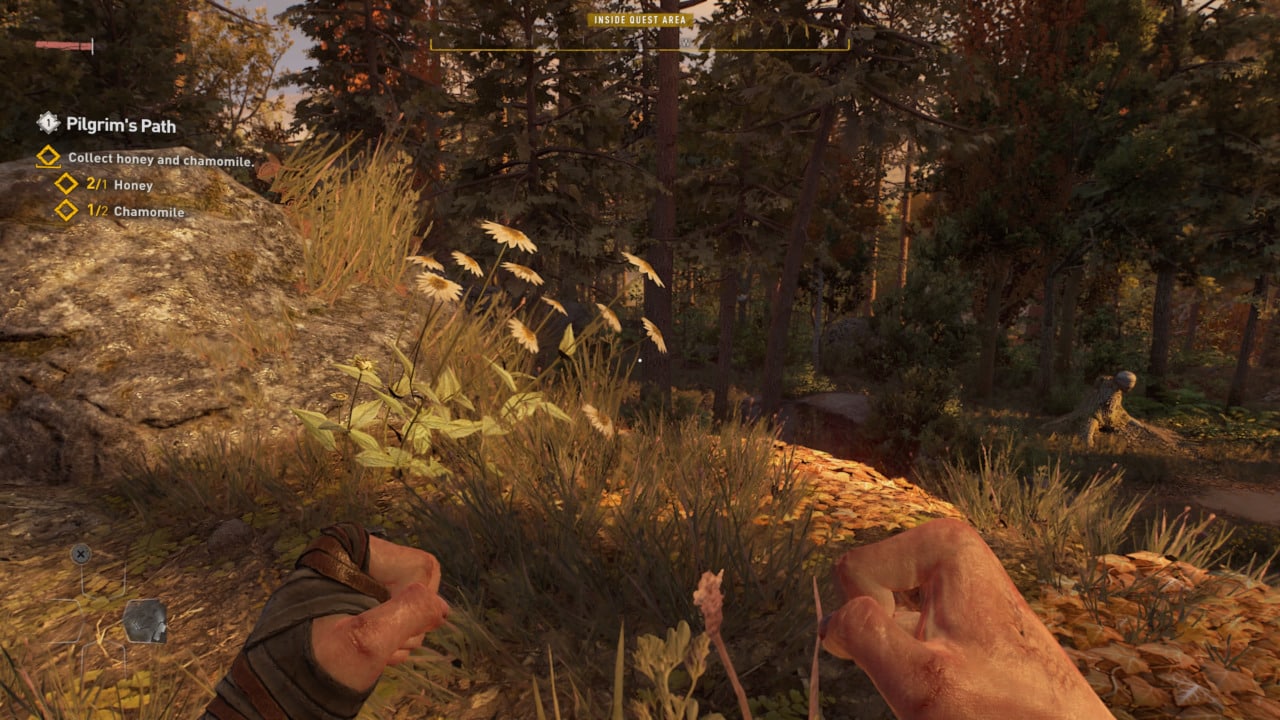
Chamomile is an important ingredient in Dying Light 2 and is used alongside Honey to craft Medicine. This ingredient is first introduced early in the game during the Pilgrim’s Path quest where Spike requests you to gather some Honey and Chamomile found throughout the forest.

Chamomile can also be found on the Roof Groves in Villedor and is easy to spot thanks to its white petals and is surrounded by Beehives, UV Shroomz, Lavender, Cordyceps, and weapons.

Roof Groves are usually surrounded by Red/Yellow trees and are fairly easy to spot since you can use your Binoculars to find them from a high vantage point.

You can also explore other areas in Villedor to find Chamomile, you can also use your Survivor Sense to find it along with any other ingredients or quest items that you might need.

JustaMinx banned from Twitch for using racial slur

0

Rebbeca Becca better known online as JustaMinx has been banned for using racial slurs, making this her second ban, leaving her one violation away from a permanent suspension.

Despite being a lesser-known streamer, JustaMinx boasts over 2000+ concurrent viewers on average with 1.8 million followers. She’s a variety streamer who mostly dabbles in Overwatch, Minecraft, and occasionally VR chat sessions.

Becca’s previous ban was the result of her using the word ‘simp’ which violates the latest community guidelines under which the said word is categorized as offensive.

Her current ban is likely due to her using the word ‘cracker’ which is considered as a racial slur towards the rural white people in the south of the USA.

In typical Twitch fashion, the duration and the cause of the ban were not revealed from their side nether has JustaMinx shed light on it. In the worst of cases, the ban won’t last for more than a month, but the following strike may result in a permanent suspension.