Thursday, July 16, 2026
Home Blog Page 1101

When is next BGMI Lan Event? ESPL BGMI Lan

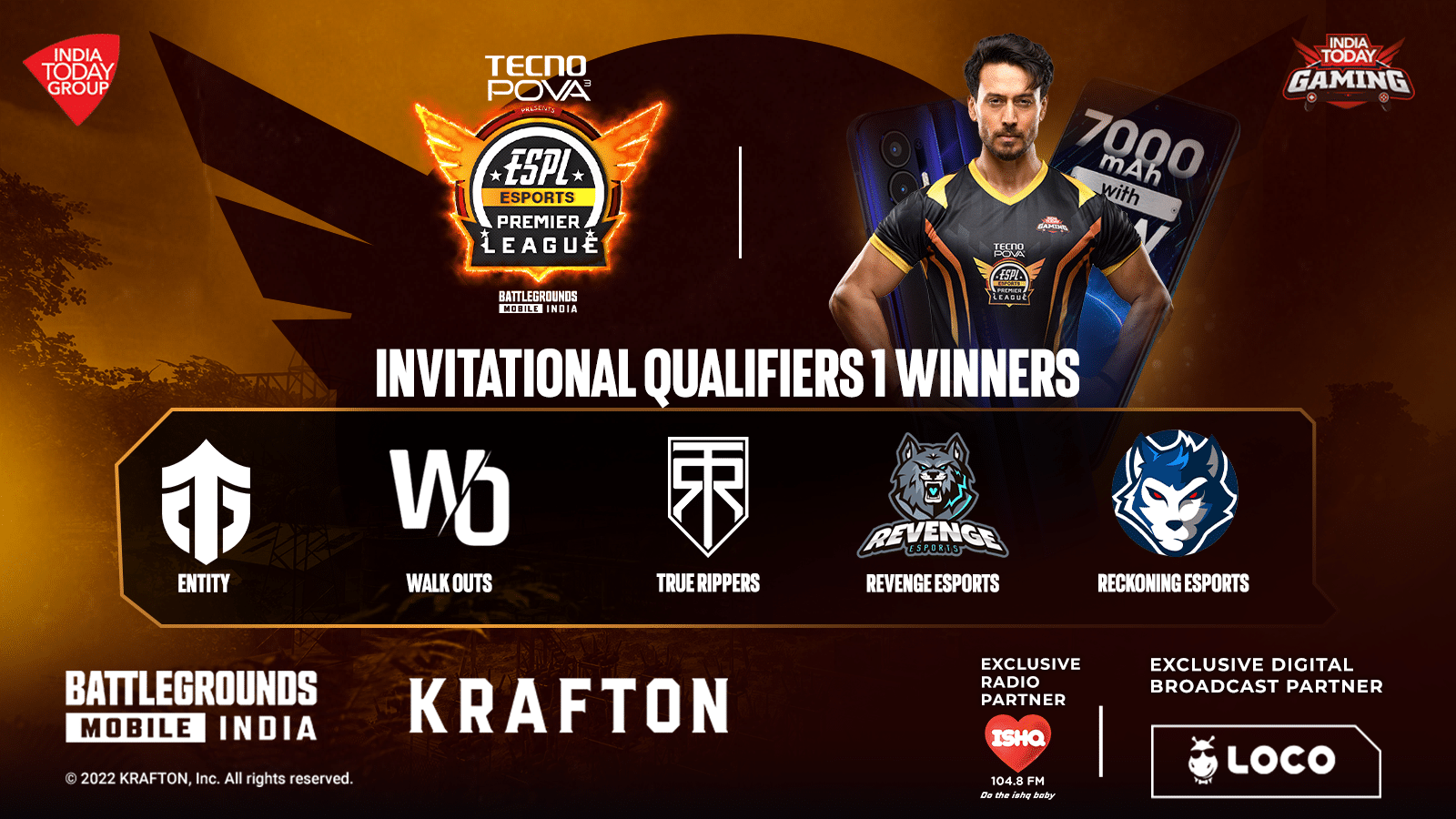
Team Revenge Esports emerged winners, while True Rippers and Entity bagged the second and third spots respectively in the first round of Invitational Qualifiers of the second edition of ESports Premier League to book their spots in the ESPL LAN Finals.

Besides, Team Reckoning and Walkouts comfortably secured fourth and fifth positions respectively to seal their berths in the ESPL LAN Finals.

Teams Qualified For ESPL BGMI Lan Event

ESPL Invitational Qualifiers 1 Winners:

  • Entity Gaming
  • Walkouts
  • True Rippers
  • Revenge Esports
  • Reckoning Esports

The top 16 of India’s highly talented teams competed in the first invitational round from July 9 to 17, playing a total of 20 matches each. The round witnessed multiple nail-biting and exciting matches between these top teams.

Revenge Esports, winners of PUBG Mobile India Tour (PMIT) 2019, finished at the top of the table with a total of 230 points (Finish Points – 99 + Position Points – 131) and 4 Winner Winner Chicken Dinners (WWCD). The team’s star assaulter Akshay was the top performer on the final day with 44 finishes as well as the top fragger overall in the first invitational round.

True Rippers, who finished third in the MediaTek BGMI Gaming Masters last year, bagged second place with 216 points (Finish Points – 95 + Position Points – 121).

Entity finished third with 200 points (Finish Points – 97 + Position Points – 103). The Mumbai-based esports team had previously won the Mafia Cup in 2019 and the PUBG Mobile Club Open – Fall Split: South Asia.

Reckoning Esports, who parted ways with their previously successful BGMI roster earlier this year, contested with their new lineup and were in first place after an outstanding performance in Week 1. However, they failed to sustain their performance in Week 2 and fell down to 10th place to finish fourth overall with 182 points (Finish Points – 83 + Position Points – 99).

Team Walkouts were the final team to make it to the LAN Finals after accumulating 169 points (Finish Points – 67 + Position Points – 102). They were level on points with Gravity Esports but finished above as they had three WWCDs compared to Gravity’s two.

“After the Open Qualifiers, we were happy to see the top teams fight so fiercely in the first round of Invitational Qualifiers. These teams raised the level of competition as most of them have been successful in the past in various other tournaments.

This attracts a lot of viewers eager to see their favourite teams and players in action. I wish all of these 5 teams the very best and will be looking forward to seeing them play against the other qualified teams in the LAN Finals.” said Vishwalok Nath, director of ESPL after the Invitational 1 results.

The league is being played in two separate stages in the initial phase — online qualifiers and invitational qualifiers — to shortlist the top 16 teams. The Online Qualifiers saw two underdog teams; GOG Esports and Dragon Esports make it to the LAN finals in what was their first major tournament appearance.

The second phase of invitational qualifiers is underway since July 18 and will end on July 27. The final eight teams will progress to the Finals from this round of invitational qualifiers.

Recently, ESports Premier League (ESPL) extended its association with youth icon and renowned Bollywood actor Tiger Shroff as the face of India’s first-ever franchise-based Esports league for the second consecutive year. India Today Gaming has also roped in global smartphone brand, TECNO Mobile as Presenting Sponsor for the tournament.

The smartphone maker is committed to supporting and helping the esports community with its gaming-focused smartphones like the latest, Tecno Pova 3. Esports fans can also watch the BGMI action live on India’s leading streaming platform, LOCO, the exclusive digital broadcast partner for ESPL Season 2.

The tournament organizer has also signed Ishq FM as the exclusive radio partner for the ongoing tournament.

BGMI Showdown: Top 10 Players

India’s first-ever official BGMI Lan event ended with a blast. 7Sea Esports emerged as the champions of BGMI Showdown 2022. It was a four-day-long event where a total of 24 teams competed in the league stage whereas the top 16 teams qualified for the grand finals.

Spraygod from 7Sea Esports won the MVP award whereas Fierce from Team XO won the grenadier award. Battlegrounds Mobile India is a multiplayer mobile game where players fight to win the chicken dinner. Being a team game, individual performances also matters to win the game.

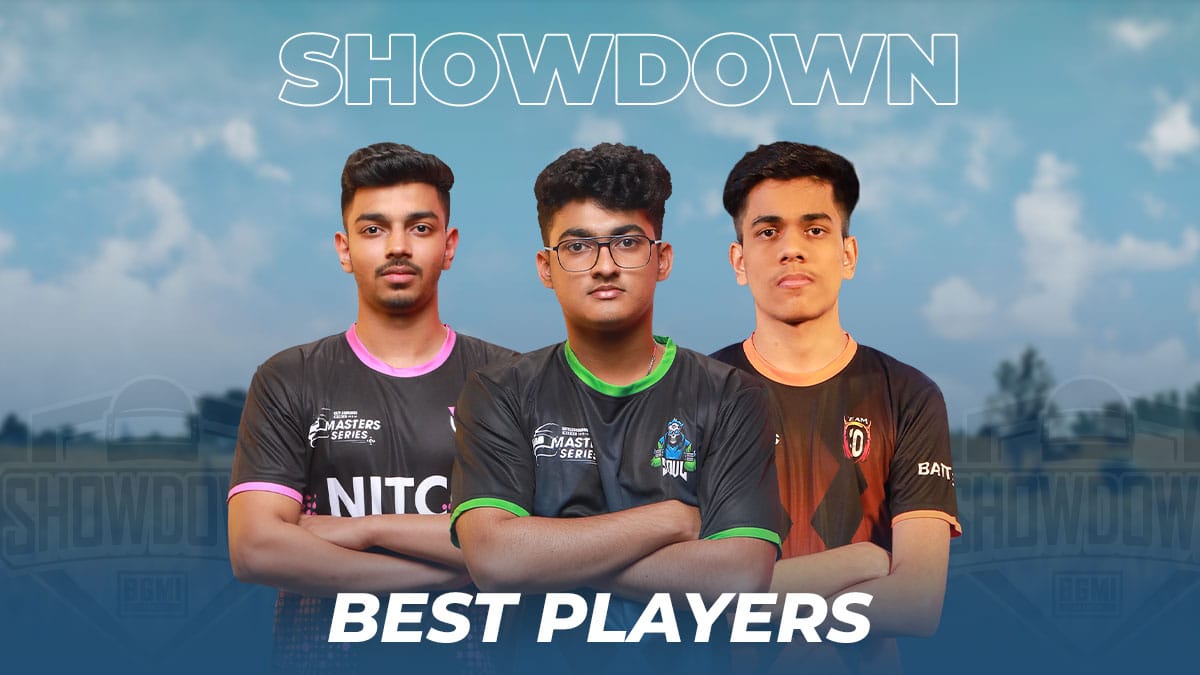
We have brought you the top 10 players from BGMI Showdown 2022 Grand Finals that helped their teams reach the top of the leaderboard standings.

BGMI Showdown Best Players:

7Sea Spraygod

  • Total Finishes – 15
  • Average Finishes – 2.5
  • Finish Contribution – 36.6%

7Sea Sarang

  • Total Finishes – 12
  • Average Finishes – 2
  • Finish Contribution – 29.3%

Enigma Rexx

  • Total Finishes – 12
  • Average Finishes -2
  • Finish Contribution – 34.3%

Enigma Savitar

  • Total Finishes – 12
  • Average Finishes – 2
  • Finish Contribution – 34.3%

Orangutan Wizzgod

  • Total Finishes – 10
  • Average Finishes – 1.67
  • Finish Contribution – 34.5%

XO Fierce

  • Total Finishes – 10
  • Average Finishes – 1.67
  • Finish Contribution – 43.5%

Soul Goblin

  • Total Finishes – 10
  • Average Finishes – 1.67
  • Finish Contribution – 37%

Kinetic Daljit

  • Total Finishes – 10
  • Average Finishes – 1.67
  • Finish Contribution – 45.4%

Godl Shadow

  • Total Finishes – 10
  • Average Finishes – 1.67
  • Finish Contribution – 58.8%

Soul Akshat

  • Total Finishes – 9
  • Average Finishes – 1.50
  • Finish Contribution – 33.3%

BGMI Showdown 2022 also featured a prize pool of ₹15,00,000 INR. Besides this, it is speculated that the winning team will get a direct invite to the upcoming PMWI 2022 After Party Showdown.

PMWI 2022 After Party Showdown

A total of 12 teams will be competing in the event where the top 5 teams from the PMWI 2022 main event along with 7 invited teams will compete for $1M USD. The event is scheduled to take place on 18th-20th August 2022.

VCT APAC Last Chance Qualifier: Format and Schedule

With FunPlus Phoenix lifting the Valorant Champions tour Masters Copenhagen trophy, we have all the circuit point regional representatives needed for Valorant Champions. From APAC, we have Paper Rex and Xerxia as the circuit point representatives.

With only six more slots left to fill, the LCQ for each region is closer than you think, with the VCT APAC LCQ just around the corner. Starting on 1st August, The VCT APAC LCQ would feature the top nine teams from the APAC region, excluding Korea and Japan, and one from Oceania.

These ten teams would compete in a double-elimination bracket tournament, with the top two teams getting a bye in the first round. Only one of these ten teams would make it to Valorant Champions and book their ticket to Istanbul.

Only one of these ten teams would qualify for the Valorant Champions and book their ticket to Istanbul.

VCT APAC Last Chance Qualifier Teams

These Eight teams are:

  • Bleed Esports (Malaysia/Singapore)
  • Onic G (Indonesia)
  • BOOM esports (Indonesia)
  • Made in Thailand (Thailand)
  • Team Secret (Philipines)
  • Fancy United (Vietnam)
  • Griffin Esports (Hong Kong/Taiwan)
  • Cerberus Gaming (Vietnam)
  • Alter Ego (Indonesia)
  • Order (Oceania)

VCT APAC Last Chance Qualifier Schedule

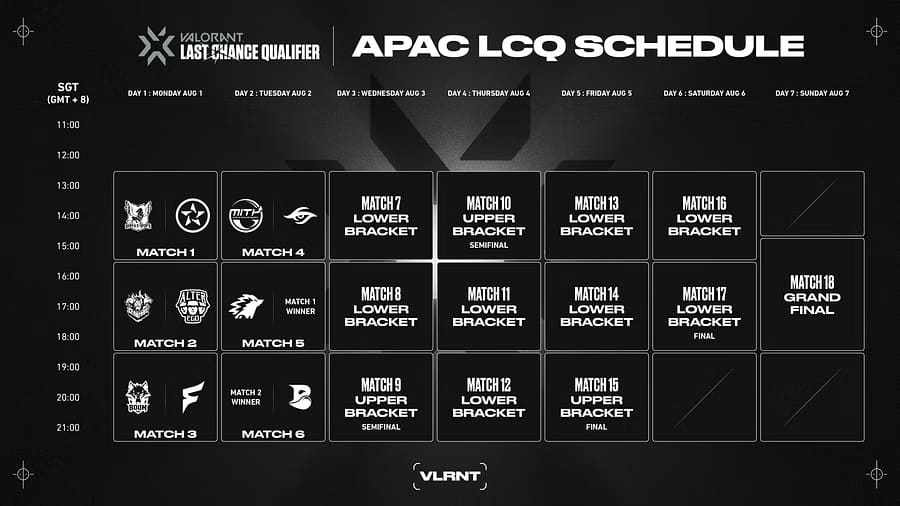
The Schedule for VCT APAC LCQ would be as follows:

  • 1st August 12:30 SGT (GMT+8): Griffin Esports vs. Order
  • 1st August 15:30 SGT (GMT+8): Cerberus Gaming vs. Alter Ego
  • 1st August 18:30 SGT (GMT+8): Boom Esports vs. Fancy United
  • 2nd August 12:30 SGT (GMT+8): Made In Thailand vs. Team Secret
  • 2nd August 15:30 SGT (GMT+8): ONIC G vs. Match 1 Winner
  • 2nd August 18:30 SGT (GMT+8): Bleed vs. Match 2 winner
  • 3rd August 12:30 SGT (GMT+8): Lower Bracket
  • 3rd August 15:30 SGT (GMT+8): Lower Bracket
  • 3rd August 18:30 SGT (GMT+8): Upper Bracket Semifinals
  • 4th August 12:30 SGT (GMT+8): Upper Bracket Semifinals
  • 4th August 15:30 SGT (GMT+8): Lower Bracket
  • 4th August 18:30 SGT (GMT+8): Lower Bracket
  • 5th August 12:30 SGT (GMT+8): Lower Bracket
  • 5th August 15:30 SGT (GMT+8): Lower Bracket
  • 5th August 18:30 SGT (GMT+8): Upper Bracket Finals
  • 6th August 12:30 SGT (GMT+8): Lower Bracket Semifinals
  • 6th August 15:30 SGT (GMT+8): Lower Bracket finals
  • 7th August 15:00 SGT (GMT+8): Grand Finals

You can watch the event on Twitch and Youtube with the regional streams available in Tagalog, Bahasa, Thai, Vietnamese, and Mandarin. 

What is APAC In Valorant?

APAC stands for Asia-Pacific Region (A-sia PAC-ific). 

Read about the latest patch, latest map, professional scene, and more..  

PRX Jinggg Valorant Crosshair and Valorant Settings Revealed

It’s no secret that Paper Rex (PRX) is currently one of the finest Valorant teams in the world. Following a commendable top-four finish in the VCT Masters Reykjavik, the clan managed to land second place in the recently concluded VCT Copenhagen.

Jinggg, a member of team PRX, is one of the prime reasons behind the continual success of the org over the past few months. If you’re a Valorant player who’s having trouble climbing through the ranking spectrum of the shooter, what better way to improve at the game than by learning from the best?

Today, we’re gonna take a look at the crosshair and in-game settings of PRX Jinggg.

PRX Jinggg Valorant Crosshair Settings

  • Color: Cyan
  • Outlines: On
  • Outline Opacity: 1
  • Outline Thickness: 1
  • Center Dot: Off
  • Center Dot Opacity: 0
  • Center Dot Thickness: 1
  • Show Inner Lines: On
  • Inner Line Opacity: 1
  • Inner Line Length: 2
  • Inner Line Thickness: 1
  • Inner Line Offset: 2
  • Movement Error: Off
  • Firing Error: Off
  • Show Outer Lines: Off
  • Outer Line Opacity: 0
  • Outer Line Length: 0
  • Outer Line Thickness: 0
  • Outer Line Offset: 0
  • Movement Error: Off
  • Firing Error: Off

PRX Jinggg Valorant Keybinds

  • Walk: L-Shift
  • Crouch: L-Ctrl
  • Jump: SpaceBar
  • Use Object: F
  • Equip Primary Weapon: 1
  • Equip Secondary Weapon: 2
  • Equip Melee Weapon: 3
  • Equip Spike: 4 
  • Use/Equip Ability – 1: E
  • Use/Equip Ability – 2: Q
  • Use/Equip Ability – 3: C
  • Use/Equip Ability – Ultimate: X

PRX Jinggg Valorant Video Settings

  • General Resolution: 1280×960
  • Aspect Ratio: 4:3
  • Aspect Ratio: Letterbox
  • Display Mode: Fullscreen 
  • Multithreaded Rendering: On
  • Material Quality: Low
  • Texture Quality: Low
  • Detail Quality: Low
  • UI Quality: Low
  • Vignette: Off
  • VSync: Off
  • Anti-Aliasing: None
  • Anisotropic Filtering: 1
  • Improve Clarity: On
  • Bloom: Off
  • Distortion: On
  • Cast Shadows: Off

These were all the Valorant settings of PRX Jinggg. If you see something that you like, feel free to implement these settings in your game and see whether they help you improve.

Ange1 Valorant: Ex CSGO Pro Ange1 wins Valorant Masters Copenhagen from FPX Gaming

0

The Valorant Champions Tour Masters Copenhagen Grand Finals had the EMEA giants of Ange1’s Valorant Team FunPlus Phoenix taking on the Kings of APAC regions Paper Rex. 

FPX has been looking insanely strong, beating DRX, Fnatic, and Optic to reach the finals. Paper Rex themselves look strong and have qualified for finals by beating Guild, Fnatic, and Optic Gaming. 

It was one of the first times an APAC team had such a strong showing in an FPS event, and Paper Rex is here to win it all. 

PRX vs FPX

Summary of VCT Masters Copenhagen Grand Finals:

  • Paper Rex – FunPlus Phoenix

VCT Masters Copenhagen Grand Finals Map Veto:

Paper Rex, the top seed of the two, had the advantage of banning two maps. Paper Rex banned Split and Ascent with their bans and chose to Play Bind and Fracture, and FPX chose to play Icebox and Haven.

VCT Masters Copenhagen Grand Finals Map 1 Bind:

The first map was a solid map for Paper Rex, and they brought the unconventional Yoru to pick to play while FPX stuck to their default and reacted to the Paper Rex aggression with absolute ease. 

FPX completely shut down Paper Rex and won eleven rounds in the first half. Paper Rex answered back in the second half, but a well-timed orbital strike stopped the Paper Rex train at 13-3. FPX now is at a map advantage going into their map pick.

Player of the Map: Shao KDA - 18/7/9 ACS - 296 

VCT Masters Copenhagen Grand Finals Map 2 Icebox:

The second map was crucial for Paper Rex as losing the map would mean they would be 0-2 down, while the map pick being FPX’s puts Paper Rex in an unfortunate situation. 

Paper Rex displayed their strong psyche, starting with winning the pistol round and the follow-up round. FPX did win back the bonus, but Paper Rex, spearheaded by Jinggg’s Battle Sage, managed to find openings in

FPX’s defense limited FPX to only two more rounds to close the half 9-3. 

The second half started with Paper Rex winning the pistol, but FPX responded immediately to win the next round the back and forth continued, but the lead of six rounds was too much for FPX to comprehend, and they lost the map 13-7

Player of the Map: Jinggg KDA - 20/18/6 ACS - 290

With this victory, Paper Rex equalized the series at 1-1 and would play fracture next.

VCT Masters Copenhagen Grand Finals Map 3 Fracture:

The map started with Paper Rex winning the first two rounds, but FPX didn’t fumble and made Paper Rex sweat to win the rounds and hold off the dual-wielded Paper Rex attack with Neon and Raze. With back-and-forth rounds, both teams secured six rounds. 

The second half started with FPX winning the pistol and the follow-up. Paper Rex won the bonus round, but their aggression on defense was read perfectly by FPX, and they closed down the map 13-7, getting to the series point. 

Player of the Map: Suygetsu KDA - 22/12/5 ACS - 289

VCT Masters Copenhagen Grand Finals Map 4 Haven:

The FPX’s pick was a must-win for Paper Rex, and they must win to force a third map. 

The third map started with both teams exchanging thrifty and rounds to start with a natural back and forth which continued till the end with Paper Rex edging out FPX with a round lead. 

The second half started with Paper Rex converting the third round bonus to reach ten. FPX on the back of Shao’s 1 v 3 answered back with two rounds, and paper Rex stopped the bleeding and closed the map 13-7 to reset the series 2-2.

Player of the Map: Jinggg KDA -25/17/1 ACS - 343

VCT Masters Copenhagen Grand Finals Map 5 Breeze:

The fifth map had Paper Rex pulling up an unusual composition with Yoru and Neon, and it was a rocky start, and it seemed the pick wouldn’t work with FPX starting with a 3-0 start. 

But Paper Rex managed to pull rounds back, winning five rounds in a row. FPX adjusted well to the Paper Rex aggression and won the half 7-5.

Player of the Map: Ardiis KDA - 21/16/6 ACS - 270
Player of the Series: Shao KDA - 82/64/40 ACS - 247

Player of the event: Shao KDA – 422/357/170 ACS – 218.6 Clutch – 21/83

The second half started with Paper Rex winning the first four rounds, but FPX completely turned around and answered with absolute dominance to win the required six rounds to win the series 3-2. 

FunPlus Phoenix became the champions of Copenhagen and had one of the most incredible runs of all time. Paper Rex themselves displayed what they are capable of by having one of the most impactful runs. 

You can read about the results, format and schedule for the tournament, venue, ticketing, and the teams participating and where to watch the stream here. 

Read about the latest patch, latest map, professional scene, and more..  

How to check Mobile Legends Purchase History

Mobile Legends allows you to place order or make immediate purchases online. When you want to make a purchase in your comfort, this comes in handy. While you perform transactions on Mobile Legends, it keeps a record of your purchases and orders. 

Many consumers want to remove or archive their Mobile Legends purchase history for a variety of reasons. It’s possible that they don’t want a third party to see their Mobile Legends transactions.

Perhaps you want to check or hide an occasional purchase from your history so that it remains a surprise when you finally reveal them, or perhaps you buy something you don’t want others to see when they use your account. Alternatively, you may wish to keep your personal purchases hidden from a third party.

Although Mobile Legends doesn’t show your purchase history directly, you can check all the transactions in a tricky way explained here.

How to Check Mobile Legends Purchase Status 

You can check your order on both the desktop and mobile versions of the site.

On a desktop:

To check your order on the desktop website:

1. Go to the Mobile Legends website and log in, if needed.

2. Hover over the Account and Lists tab and click “Order History Reports” 

3. Select the report type from the drop-down menu. Fill in the start date, end date, and report name

4. You can also click the drop-down next to orders you placed, and select “My Order” and you’ll see orders completed.

On the mobile app:

You can’t hide order history on the mobile app, but you can check your transaction activities. Here’s how:

1. Open the Mobile Legends app and log in, if needed.

2. Tap the three-line icon to open the menu.

3. Select “My Orders or Orders.

4. Tap the Filter option and select purchased Items or “Filled Orders”.

As you keep on reading, you’ll discover whether you can truly delete or, better yet, hide your order history.

Can Someone Delete Purchase History on Mobile Legends?

To be honest with you, there is no way to delete your order history permanently. Even if you delete your account, Mobile Legends will keep a record of everything you’ve bought.

You do, however, have a way to come out of this. By archiving your purchases and orders history, you can keep it hidden from others.

How to Hide Purchase History on Mobile Legends

It’s simple to hide or delete any or all of your Mobile Legends purchase history if you wish to keep your Mobile Legends activity hidden.

If you are using a desktop or the mobile app, here’s how to hide your Mobile Legends order history.

Hide Mobile Legends Purchase History on Desktop

  1. Log in to your Mobile Legends account by going to the Mobile Legends website in your browser.
  2. In the upper right corner of the screen, select My Orders.
  3. You’ll find a list of the items you’ve ordered in the last three months here. After you’ve located the order you want to hide or remove, click View Order Details.
  4. To hide it, click Archive Purchase. Note that you’ll still be able to see them in your account’s Archived Purchase area.
  5. If the item you’re looking for isn’t available for your selected months, modify the setting to show orders from a different time period.

How to Delete/Hide Purchase History on Mobile Legends App

  1. Log into the Mobile Legends app on your smartphone or tablet.
  2. Scroll to Your Orders and find the item you wish to hide.
  3. To hide it, tap “View Order Details” and then Archive Order.

Remember that none of the orders you hide from your account will be completely deleted. You may still see them by going to your account page and selecting Ordering and Preferences and Archived Orders from the menu.

By selecting the Unarchive Order button next to the product, you will be able to examine all of your previously hidden orders and, if you want, return them to the main list.

Use Incognito Mode When Browsing Mobile Legends

You’ve definitely noticed that when you browse Mobile Legends, the site retains your browsing history and suggests additional things based on your previous searches.

If you’re the only one who uses your account, this can be useful. However, if you use a shared account to make orders or other private purchases, your browser history will reveal your secret to anybody who logs in.

Using an incognito or private browser window is one of the simplest ways to hide your browsing. There is nothing you do that will be saved in this manner.

However, if you’ve already accumulated browsing history on Mobile Legends, there is still a way to clear your data:

How to Delete Mobile Legends Search History

  1. Go to the Mobile Legends and sign in using your account information.
  2. In the top left corner of your screen, select Browsing History.
  3. To remove a specific item from your browser history, select “remove from view” beneath the product.
  4. Alternatively, select the Manage History menu and click Remove all things from view to erase the entire list.
  5. Put the slider next to “Turn Browsing History on/off” in the off position if you don’t want the Mobile Legends to collect your browsing history.

Meanwhile, not until now, there hasn’t been a way to check the total spent on Mobile Legends, but there is a workaround on how to find how much has been spent

You can know how much you have spent on Mobile Legends from the purchase history tab when you sign in to your account.

How to Check Mobile Legends Purchase History

Click on the purchase history to see all your completed payment. You can add the amount together, that is the amount you’ve spent on your Mobile Legends purchases.

You can find out how much money you’ve spent on Mobile Legends when you:

1. Navigate to your purchase history.

2. Click on order history to see your completed transactions.

3. You’ll see details of your purchases including their prices. From here you can calculate the amount you have spent.

That’s it on how to delete or hide purchase history on Mobile Legends from those who share the same account or device with you.

How to check how much you spent on Mobile Legends

0

Mobile Legends allows you to place order or make immediate purchases online. When you want to make a purchase in your comfort, this comes in handy. While you perform transactions on Mobile Legends, it keeps a record of your purchases and orders. 

You may want to check or delete your Mobile Legends purchase history for a variety of reasons. Perhaps you want to conceal a one-time purchase so that no one will know about it or check your purchase history to keep a record of your transactions.

Whatever the reason, here will explain all you need to know on how to check, delete or hide your Mobile Legends orders or purchases history. It’s straightforward to delete or hide any or all of your order history if you wish to keep your Mobile Legends transaction activities hidden.

Many consumers want to remove or archive their Mobile Legends purchase history for a variety of reasons. It’s possible that they don’t want a third party to see their Mobile Legends transactions.

Perhaps you want to check or hide an occasional purchase from your history so that it remains a surprise when you finally reveal them, or perhaps you buy something you don’t want others to see when they use your account. Alternatively, you may wish to keep your personal purchases hidden from a third party.

Although Mobile Legends doesn’t show your purchase history directly, you can check all the transactions in a tricky way explained here.

How to Check Mobile Legends Purchase Status 

You can check your order on both the desktop and mobile versions of the site.

On a desktop:

To check your order on the desktop website:

1. Go to the Mobile Legends website and log in, if needed.

2. Hover over the Account and Lists tab and click “Order History Reports” 

3. Select the report type from the drop-down menu. Fill in the start date, end date, and report name

4. You can also click the drop-down next to orders you placed, and select “My Order” and you’ll see orders completed.

On the mobile app:

You can’t hide order history on the mobile app, but you can check your transaction activities. Here’s how:

1. Open the Mobile Legends app and log in, if needed.

2. Tap the three-line icon to open the menu.

3. Select “My Orders or Orders.

4. Tap the Filter option and select purchased Items or “Filled Orders”.

As you keep on reading, you’ll discover whether you can truly delete or, better yet, hide your order history.

Can Someone Delete Purchase History on Mobile Legends?

To be honest with you, there is no way to delete your order history permanently. Even if you delete your account, Mobile Legends will keep a record of everything you’ve bought.

You do, however, have a way to come out of this. By archiving your purchases and orders history, you can keep it hidden from others.

How to Hide Purchase History on Mobile Legends

It’s simple to hide or delete any or all of your Mobile Legends purchase history if you wish to keep your Mobile Legends activity hidden.

If you are using a desktop or the mobile app, here’s how to hide your Mobile Legends order history.

Hide Mobile Legends Purchase History on Desktop

  1. Log in to your Mobile Legends account by going to the Mobile Legends website in your browser.
  2. In the upper right corner of the screen, select My Orders.
  3. You’ll find a list of the items you’ve ordered in the last three months here. After you’ve located the order you want to hide or remove, click View Order Details.
  4. To hide it, click Archive Purchase. Note that you’ll still be able to see them in your account’s Archived Purchase area.
  5. If the item you’re looking for isn’t available for your selected months, modify the setting to show orders from a different time period.

How to Delete/Hide Purchase History on Mobile Legends App

  1. Log into the Mobile Legends app on your smartphone or tablet.
  2. Scroll to Your Orders and find the item you wish to hide.
  3. To hide it, tap “View Order Details” and then Archive Order.

Remember that none of the orders you hide from your account will be completely deleted. You may still see them by going to your account page and selecting Ordering and Preferences and Archived Orders from the menu.

By selecting the Unarchive Order button next to the product, you will be able to examine all of your previously hidden orders and, if you want, return them to the main list.

Use Incognito Mode When Browsing Mobile Legends

You’ve definitely noticed that when you browse Mobile Legends, the site retains your browsing history and suggests additional things based on your previous searches.

If you’re the only one who uses your account, this can be useful. However, if you use a shared account to make orders or other private purchases, your browser history will reveal your secret to anybody who logs in.

Using an incognito or private browser window is one of the simplest ways to hide your browsing. There is nothing you do that will be saved in this manner.

However, if you’ve already accumulated browsing history on Mobile Legends, there is still a way to clear your data:

How to Delete Mobile Legends Search History

  1. Go to the Mobile Legends and sign in using your account information.
  2. In the top left corner of your screen, select Browsing History.
  3. To remove a specific item from your browser history, select “remove from view” beneath the product.
  4. Alternatively, select the Manage History menu and click Remove all things from view to erase the entire list.
  5. Put the slider next to “Turn Browsing History on/off” in the off position if you don’t want the Mobile Legends to collect your browsing history.

Meanwhile, not until now, there hasn’t been a way to check the total spent on Mobile Legends, but there is a workaround on how to find how much has been spent

You can know how much you have spent on Mobile Legends from the purchase history tab when you sign in to your account.

How to Know How Much You Spent on Mobile Legends

Click on the purchase history to see all your completed payment. You can add the amount together, that is the amount you’ve spent on your Mobile Legends purchases.

You can find out how much money you’ve spent on Mobile Legends when you:

1. Navigate to your purchase history.

2. Click on order history to see your completed transactions.

3. You’ll see details of your purchases including their prices. From here you can calculate the amount you have spent.

That’s it on how to delete or hide purchase history on Mobile Legends from those who share the same account or device with you.

LEC 2022 Results, Schedule, and More

As the LEC 2022 Summer Split kicks off, League of Legends across the globe are eager to know more about the tournament, its schedule, results, standings, and much more.

The LEC 2022 Summer Split is the most important season ahead of the big World Championship, and will see some of the best League of Legends teams throughout the entire world battle it out for a shot at the crown.

If you’re an avid fan of the competitive MOBA by Riot Games and want to see your favorite teams in action, but you’re unable to catch the Summer Split live for some reason, we have you covered.

In this article, we’re gonna take a look at the LEC 2022 Summer Split schedule, standings, results, and everything else that you need to know to keep up with the competitive LoL scene.

LEC 2022 Summer Split Format

The LEC 2022 Summer Split will see ten teams participate in it to duke it out in a double round-robin setup. Each match will be a best-of-one, and the top six teams will find themselves qualifying for the LEC Summer Playoffs.

LEC 2022 Summer Split: Participating Teams & Standings

S. NoTeamRecord
1Rogue (RGE)8-3
2MAD Lions (MAD)8-3
3Excel Esports (XL)7-4
4Team Vitality (VIT)6-5
5G2 Esports (G2)6-5
6Fnatic (FNC)5-6
7Astralis (AST)5-6
8Misfits Gaming (MSF)4-7
9SK Gaming (SK)4-7
10Team BDS (BDS)1-10

LEC 2022 Summer Split: Schedule

Week 1

DateMatchTime (CET)ScoreWinner
17/06/2022VIT vs MAD6.00 pm0-1MAD
BDS vs SK7.00 pm1-0BDS
MSF vs XL8.00 pm1-0MSF
G2 vs AST9.00 pm1-0G2
RGE vs FNC10.00 pm0-1FNC
18/06/2022BDS vs AST5.00 pm1-0BDS
SK vs MAD6.00 pm0-1MAD
VIT vs MSF7.00 pm0-1MSF
FNC vs XL8.00 pm1-0FNC
RGE vs G29.00 pm1-0RGE
19/06/2022MSF vs AST5.00 pm1-0MSF
VIT vs BDS6.00 pm1-0VIT
SK vs FNC7.00 pm1-0SK
G2 vs XL8.00 pm0-1XL
RGE vs MAD9.00 pm1-0RGE

Week 2

DateMatchTime (CET)ScoreWinner
24/06/2022SK vs AST6.00 pm0-1AST
VIT vs XL7.00 pm0-1XL
RGE vs MSF8.00 pm1-0RGE
BDS vs G29.00 pm1-0BDS
MAD vs FNC10.00 pm1-0MAD
25/06/2022SK vs MSF5.00 pm0-1MSF
MAD vs XL6.00 pm0-1XL
RGE vs AST7.00 pm1-0RGE
BDS vs FNC8.00 pm0-1FNC
VIT vs G29.00 pm0-1G2

Week 3

DateMatchTime (CET)ScoreWinner
1/7/2022BDS vs MSF6.00 pm0-1MSF
VIT vs SK7.00 pm1-0VIT
RGE vs XL8.00 pm1-0RGE
FNC vs AST9.00 pm1-0FNC
MAD vs G210.00 pm1-0MAD
2/7/2022BDS vs XL5.00 pm0-1XL
SK vs RGE6.00 pm0-1RGE
VIT vs AST7.00 pm1-0VIT
MSF vs MAD8.00 pm1-0MSF
G2 vs FNC9.00 pm0-1FNC

Week 4

DateMatchTime (CET)ScoreWinner
15/7/2022XL vs AST6.00 pm0-1AST
BDS vs MAD7.00 pm0-1MAD
MSF vs FNC8.00 pm1-0MSF
SK vs G29.00 pm1-0SK
VIT vs RGE10.00 pm0-1RGE
16/7/2022SK vs XL5.00 pm1-0SK
MAD vs AST6.00 pm1-0MAD
BDS vs RGE7.00 pm0-1RGE
MSF vs G28.00 pm1-0MSF
VIT vs FNC9.00 pm1-0VIT

Week 5

DateMatchTime (CET)ScoreWinner
22/7/2022BDS vs SK6.00 pm0-1SK
MSF vs XL7.00 pm0-1XL
VIT vs MAD8.00 pm0-1MAD
G2 vs AST9.00 pm1-0G2
RGE vs FNC10.00 pm1-0RGE
23/7/2022BDS vs AST5.00 pm0-1AST
SK vs MAD6.00 pm0-1MAD
VIT vs MSF7.00 pm1-0VIT
RGE vs G28.00 pm0-1G2
FNC vs XL9.00 pm0-1XL

Week 6

DateMatchTime (CET)ScoreWinner
29/7/2022SK vs AST6.00 pm0-0TBD
VIT vs XL7.00 pm0-0TBD
RGE vs MSF8.00 pm0-0TBD
BDS vs G29.00 pm0-0TBD
MAD vs FNC10.00 pm0-0TBD
30/7/2022SK vs MSF5.00 pm0-0TBD
MAD vs XL6.00 pm0-0TBD
RGE vs AST7.00 pm0-0TBD
BDS vs FNC8.00 pm0-0TBD
VIT vs G29.00 pm0-0TBD

Week 7

DateMatchTime (CET)ScoreWinner
5/8/2022MSF vs AST6.00 pm0-0TBD
VIT vs BDS7.00 pm0-0TBD
SK vs FNC8.00 pm0-0TBD
G2 vs XL9.00 pm0-0TBD
RGE vs MAD10.00 pm0-0TBD
6/8/2022VIT vs AST5.00 pm0-0TBD
BDS vs XL6.00 pm0-0TBD
MSF vs MAD7.00 pm0-0TBD
SK vs RGE8.00 pm0-0TBD
G2 vs FNC9.00 pm0-0TBD

Week 8

DateMatchTime (CET)ScoreWinner
12/8/2022BDS vs MSF6.00 pm0-0TBD
FNC vs AST7.00 pm0-0TBD
RGE vs XL8.00 pm0-0TBD
VIT vs SK9.00 pm0-0TBD
MAD vs G210.00 pm0-0TBD
13/8/2022BDS vs RGE5.00 pm0-0TBD
MAD vs AST6.00 pm0-0TBD
SK vs XL7.00 pm0-0TBD
VIT vs FNC8.00 pm0-0TBD
MSF vs G29.00 pm0-0TBD
14/8/2022BDS vs MAD5.00 pm0-0TBD
XL vs AST6.00 pm0-0TBD
VIT vs RGE7.00 pm0-0TBD
SK vs G28.00 pm0-0TBD
MSF vs FNC9.00 pm0-0TBD

LEC 2022 Summer Split: Where to Watch

Interested fans can catch all the ongoing League of Legends action live on the official LEC channel on Twitch while the VODs are regularly posted on the LoL Esports VODs and Highlights channel.

FPX Wins Valorant Masters Copenhagen

The Valorant Champions Tour Masters Copenhagen Grand Finals had the EMEA giants of FunPlus Phoenix taking on the Kings of APAC regions Paper Rex PRX vs FPX

FPX has been looking insanely strong, beating DRX, Fnatic, and Optic to reach the finals. Paper Rex themselves look strong and have qualified for finals by beating Guild, Fnatic, and Optic Gaming. 

It was one of the first times an APAC team had such a strong showing in an FPS event, and Paper Rex is here to win it all. 

Summary of VCT Masters Copenhagen Grand Finals:

  • Paper Rex – FunPlus Phoenix

VCT Masters Copenhagen Grand Finals Map Veto:

Paper Rex, the top seed of the two, had the advantage of banning two maps. Paper Rex banned Split and Ascent with their bans and chose to Play Bind and Fracture, and FPX chose to play Icebox and Haven.

VCT Masters Copenhagen Grand Finals Map 1 Bind:

The first map was a solid map for Paper Rex, and they brought the unconventional Yoru to pick to play while FPX stuck to their default and reacted to the Paper Rex aggression with absolute ease. 

FPX completely shut down Paper Rex and won eleven rounds in the first half. Paper Rex answered back in the second half, but a well-timed orbital strike stopped the Paper Rex train at 13-3. FPX now is at a map advantage going into their map pick.

Player of the Map: Shao KDA - 18/7/9 ACS - 296 

VCT Masters Copenhagen Grand Finals Map 2 Icebox:

The second map was crucial for Paper Rex as losing the map would mean they would be 0-2 down, while the map pick being FPX’s puts Paper Rex in an unfortunate situation. 

Paper Rex displayed their strong psyche, starting with winning the pistol round and the follow-up round. FPX did win back the bonus, but Paper Rex, spearheaded by Jinggg’s Battle Sage, managed to find openings in

FPX’s defense limited FPX to only two more rounds to close the half 9-3. 

The second half started with Paper Rex winning the pistol, but FPX responded immediately to win the next round the back and forth continued, but the lead of six rounds was too much for FPX to comprehend, and they lost the map 13-7

Player of the Map: Jinggg KDA - 20/18/6 ACS - 290

With this victory, Paper Rex equalized the series at 1-1 and would play fracture next.

VCT Masters Copenhagen Grand Finals Map 3 Fracture:

The map started with Paper Rex winning the first two rounds, but FPX didn’t fumble and made Paper Rex sweat to win the rounds and hold off the dual-wielded Paper Rex attack with Neon and Raze. With back-and-forth rounds, both teams secured six rounds. 

The second half started with FPX winning the pistol and the follow-up. Paper Rex won the bonus round, but their aggression on defense was read perfectly by FPX, and they closed down the map 13-7, getting to the series point. 

Player of the Map: Suygetsu KDA - 22/12/5 ACS - 289

VCT Masters Copenhagen Grand Finals Map 4 Haven:

The FPX’s pick was a must-win for Paper Rex, and they must win to force a third map. 

The third map started with both teams exchanging thrifty and rounds to start with a natural back and forth which continued till the end with Paper Rex edging out FPX with a round lead. 

The second half started with Paper Rex converting the third round bonus to reach ten. FPX on the back of Shao’s 1 v 3 answered back with two rounds, and paper Rex stopped the bleeding and closed the map 13-7 to reset the series 2-2.

Player of the Map: Jinggg KDA -25/17/1 ACS - 343

VCT Masters Copenhagen Grand Finals Map 5 Breeze:

The fifth map had Paper Rex pulling up an unusual composition with Yoru and Neon, and it was a rocky start, and it seemed the pick wouldn’t work with FPX starting with a 3-0 start. 

But Paper Rex managed to pull rounds back, winning five rounds in a row. FPX adjusted well to the Paper Rex aggression and won the half 7-5.

Player of the Map: Ardiis KDA - 21/16/6 ACS - 270
Player of the Series: Shao KDA - 82/64/40 ACS - 247

Player of the event: Shao KDA – 422/357/170 ACS – 218.6 Clutch – 21/83

The second half started with Paper Rex winning the first four rounds, but FPX completely turned around and answered with absolute dominance to win the required six rounds to win the series 3-2. 

FunPlus Phoenix became the champions of Copenhagen and had one of the most incredible runs of all time. Paper Rex themselves displayed what they are capable of by having one of the most impactful runs. 

You can read about the results, format and schedule for the tournament, venue, ticketing, and the teams participating and where to watch the stream here. 

Read about the latest patch, latest map, professional scene, and more..  

7Sea Esports wins BGMI Showdown 2022

7Sea Esports has emerged victorious in the grand finale of BGMI Showdown 2022. This tournament gave the coveted invite to PMWI Afterparty and 7Sea Esports will represent India at this event.

The grand finale of BMSD 2022 was very compact as only six matches were played on a single day in a LAN format. As the points table was reset, each team had a fair chance to show their best performance and 7Sea Esports did exactly that to win the tournament.

Skylightz Gaming kickstarted the BMSD 2022 grand finale with a dominating win and 7Sea was just getting warmed up. They won the second map but Skylightz was on their tail with the second finish.

Orangutan entered the fray on the third map and came very close to snatching the victory from the hands of 7Sea Esports but the latter on the last map and secured their victory.

Here is the prize pool distribution of this tournament and the top three placements:

  1. 7Sea Esports – ₹5,00,000
  2. Orangutan – ₹2,50,000
  3. Enigma Gaming – ₹1,00,000

As mentioned before, 7Sea Esports has now locked their place at PMWI Afterparty and will play at this massive event with $1 million prize pool to represent India there.

Also Read | S8UL Sid talks about BGMI Orgs teaming up in BMSD 2022