Home Blog Page 1102

Phasmophobia: All Cookie Location Of Holiday Event 2022

0

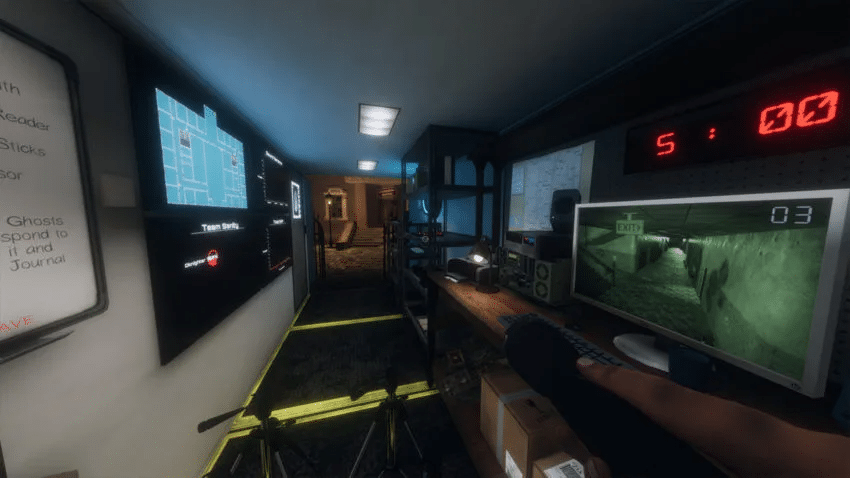
Where to find Phisophobia Christmas cookies is crucial for completing the holiday event successfully. You should encounter six cookie locations on each map, include them on a plate in your van and then feed them to the troll ghost. It may not be easy to locate these cookies, so that’s where this guide comes in!

Bleasdale

  • Living Room: on a small table with a tablecloth
  • Dining Room: on one of the chair seats
  • Workshop: near a red heater
  • Kitchen: next to the sink
  • Upstairs Hallway: on a table next to the attic stairs
  • Upstairs Hallway: on the chair where voodoo spawns

Camp Woodwind

  • Food Tent: next to the yellow bowl
  • Yellow Tent: table next to the door
  • Lovers Bench: two cookies are on the bench
  • Red Tent: pick up the frying pan to get the cookie
  • Campfire: on the wooden seat with two s’mores sticks on it

Edgefield

  • Entrance: on a table next to the tarot spawn
  • Kitchen: on the kitchen table
  • Dining Room: on the dining room table
  • Basement: on a wooden table in the hallway
  • Upstairs Hallway: on the table next to the stairs
  • Upstairs Hallway: on the table next to the master bedroom

Grafton

  • Workshop: on the stool
  • Dining Room: on the dining room table
  • Master Bedroom: on the vanity beside the bed
  • Nursery: on a desk behind the phone
  • Upstairs Bedroom: on a desk behind the radio
  • Kitchen: on the kitchen counter next to the workshop door

Ridgeview

  • Living Room: on the coffee table
  • Hallway: found on the desk in the room with a computer
  • Garage: on a shelf found in the back with spray paint cans
  • Teenager’s Bedroom: on the dresser shelf
  • Boy’s Bedroom: on the computer desk
  • Basement: on the chair to the left as you enter the basement

Tanglewood

  • Entrance Table: in front of the lamp
  • Kitchen: found on the island
  • Dining Room: dining room table on the vase
  • Garage: in the red tool chest furthest from the door
  • Basement: on the ouija board table
  • Utility Room: on the washing machine

Willow

  • Garage: on the wooden table opposite corner from the door
  • Kitchen: on a cutting board on the kitchen counter
  • Boy’s Room: on the computer desk
  • Basement: on the floor near the left storage room
  • Living Room: on the coffee table
  • Master Bedroom: on the small table with a plant

How to Fix Phasmophobia Game Does Not Exist Error

0

Phasmophobia is the newest talk of the town in the world of video games. The psychological horror title by Kinetic Games has steadily grown in player count over the past few weeks and has been picked up by some big YouTubers and streamers which led to a further increase in its popularity.

Due to a sudden surge in popularity of the game, it isn’t rare for Phasmophobia to experience frequent server issues. If you find yourself unable to connect to the servers, there’s a good chance that the servers are down, unless there’s a problem with your internet connection.

How to Fix the Game Does Not Exist Error in Phasmophobia

  • Update Phasmophobia
  • Join Random Lobbies
  • Set Correct Region
  • Verify Game Cache On Steam.

List of New Cars in GTA Online Drug Wars

0

Players are taking advantage of everything the Los Santos Drug Wars DLC has to offer since it was just published by Rockstar. The GTA Online servers now have a tonne of new content thanks to the Drug Wars DLC, giving gamers plenty to do. What you can obtain with the DLC is one of the most crucial facts of this upgrade.

The Drug Wars update included several additional vehicles, increasing the number of vehicles you may gather. Here, we’ll discuss the vehicles included in the newest DLC release.

New Cars in GTA Online Drug Wars

  • Declasse Tulip M-100 – $1,658,000 from Southern San Andreas Super Autos
  • Overflod Entity MT – $2,355,000 from Legendary Motorsport
  • Zirconium Journey II – $592,000 – $790,000 from Southern San Andreas Super Autos
  • Annis 300R – $2,075,000 from Legendary Motorsport
  • BF Surfer Custom – $442,500 – $590,000 from Southern San Andreas Super Autos
  • Declasse Tahoma Coupe – Free, coming to all players later this month.
  • MTL Brickade 6×6 – Mission Unlock
  • Maibatsu Manchez Scout C – Mission Unlock

We are aware that many upcoming automobiles for GTA Online are the result of the laborious efforts of the game’s data miners. A number of brand-new future automobiles that will gradually be added to the game over the following weeks have been showcased by Twitter user @TezFunz2.

That basically implies that not all of the cars will be made available at once. With each new event week, they will gradually be added to GTA Online.

The following cars from the Los Santos Drug Wars will soon be available in GTA Online:

  • Taxi – $487,500
  • Ocelot Virtue – $2,235,000
  • Declasse Tahome Coupa – $1,500,000
  • Toundra Panthere – $2,170,000
  • Weeny Issi Rally – $1,835,000
  • Classique Broadway – $925,000
  • Karin Hotring Everon – $1,342,000
  • Western Powersurge – $1,605,000
  • Willard Eudora – $1,250,000
  • Karin Boor – $1,280,000

For more exclusive esports and gaming content, please follow TalkEsport on Google News.

How to contact Free Fire Help Centre for Ban Appeal

Free Fire is a popular mobile battle-royale game which has garnered millions of players worldwide. Garena are the developers of this game and they always look for ways to help and support their community. Players can face different kinds of issues concerned with the operations of Free Fire. These issues can vary from in-game bugs, payment failures, hackers and account recover as well.

Garena set up a special website to help players solve the problems they may face while playing Free Fire. There are many troubleshooting methods which are self-explanatory. You can directly visit the website and make a quick search about your problem. Find the relevant solution and it will help you solve various things.

Players can also report hackers they encounter in the matches. There is a report system where players can provide description, user ID and proofs about hacking as well to help developers tackle with the hacking problem.

HOW TO RECOVER BANNED ACCOUNT IN FREE FIRE

One of the prominent issues in Free Fire is losing your account. Players who do not access their accounts for longer period of time may face issues while logging in to their account or some accounts might get banned. There are some methods enlisted on the help desk which can help you protect and recover your account.

Players can recover their Free Fire ID by following the steps given below and submitting a request.

  • Visit Free Fire Help Centre and login with your Free Fire Account.
  • Click on the “Submit a Request” tab and open the form.
  • In the type of request, select “Ban Appeal” and upload the screenshot of your ban message as a reference.

This is how you can recover your Free Fire banned account by uploading a request. Players should note that only accounts that have received a ban by mistake can be recovered by this method.

Also Read | BGMI vs PUBG New State Mobile: Major Differences Revealed

How to fix Valorant Blue Screen Error “page fault in nonpaged area”

0

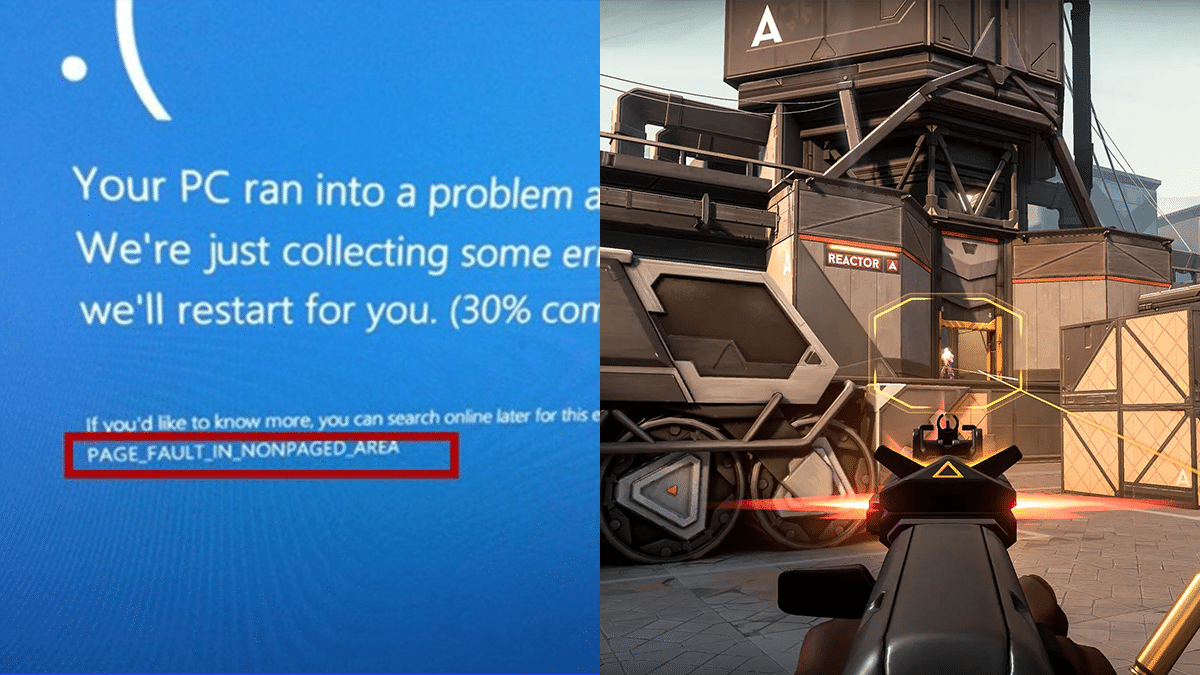
PAGE FAULT IN NONPAGED AREA is the closest that Windows has to a blue screen of death error that reads “invalid memory reference.” Paged memory, which splits accessible memory space into a collection of memory pages of varying sizes, is essential for a full comprehension of the current situation.

The operating system has access to a huge number of pages, but only a subset of those pages will be stored in memory at any given time.

When an application or the operating system makes use of a certain memory page that isn’t existent in RAM, the page management typically issues a “page fault” status.

Fix “page fault in nonpaged area” Error In Valorant

In the end, this means that the page file is accessed to retrieve the requested page. If there is a requirement for additional storage space, an older, less frequently used memory page will be changed out for the newer one.

Check your Computer’s RAM

Since problems with computer memory and drivers are usually at the root of this issue, checking this out should be your first step. If you can’t inspect it, take the computer to an approved engineer.

Removing dust from the RAM or reconnecting it is a common workaround for this problem.

If booting into safe mode does not resolve the BSOD (blue screen of death) after testing the RAM, continue with the other solutions detailed in this article.

Certain pages used often by the operating system are “locked-in” to RAM. Thus, they are not part of the RAM paging process and must be immediately available whenever they are needed.

The OS has requested a locked-in page but has received a page fault instead, which causes the PAGE FAULT IN NONPAGED AREA blue screen of death. Because this issue is not supposed to happen and directly impacts the operating system, Microsoft treats it as a stop code and causes a BSOD.

Update all Outdated Drivers

One of the most common reasons for page fault in nonpaged area problems is a driver that is either out of date or corrupt. In this case, updating any out-of-date drivers may be the answer.

  1. Right-click “Start” and select “Device Manager” to update your computer’s drivers:
  2. Upon viewing the drivers, a caution icon will appear next to any driver who is more than two years old.
  3. Expand the device that has an outdated driver:
  4. If you right-click on a driver that is out of date and choose “Update driver,”
  5. So that Windows can check online for updated drivers, you should choose “Search automatically for drivers.”
  6. When a new driver becomes available, it should be installed and the computer restarted.

Perform an SFC Scan

  1. In Windows, if you suspect that any of your system files are damaged, you can run a system file checker (SFC) scan to repair them. As a result, it can assist in eliminating the page fault in nonpaged area issues.
  2. To run the SFC scan, launch the command prompt while logged in as an administrator and enter sfc/scannow.
  3. Run the Windows Disk Checker Scan
  4. To run CMD with administrative privileges, type “CMD” into the search bar and click “Run as Administrator” in the results
  5. Type chkdsk C: /f /r into the command prompt and hit ENTER to run the process.
  6. If you receive the “Cannot run because the volume is in use by another process” error notice, press Y to have the scan executed after the next system restart.

For more guides, make sure to follow TalkEsport on Google News.

How to fix Valorant Page Fault In Nonpaged Area Error

0

PAGE FAULT IN NONPAGED AREA is the closest that Windows has to a blue screen of death error that reads “invalid memory reference.” Paged memory, which splits accessible memory space into a collection of memory pages of varying sizes, is essential for a full comprehension of the current situation.

The operating system has access to a huge number of pages, but only a subset of those pages will be stored in memory at any given time.

When an application or the operating system makes use of a certain memory page that isn’t existent in RAM, the page management typically issues a “page fault” status.

Fix “page fault in nonpaged area” Error In Valorant

In the end, this means that the page file is accessed to retrieve the requested page. If there is a requirement for additional storage space, an older, less frequently used memory page will be changed out for the newer one.

Check your Computer’s RAM

Since problems with computer memory and drivers are usually at the root of this issue, checking this out should be your first step. If you can’t inspect it, take the computer to an approved engineer.

Removing dust from the RAM or reconnecting it is a common workaround for this problem.

If booting into safe mode does not resolve the BSOD (blue screen of death) after testing the RAM, continue with the other solutions detailed in this article.

Certain pages used often by the operating system are “locked-in” to RAM. Thus, they are not part of the RAM paging process and must be immediately available whenever they are needed.

The OS has requested a locked-in page but has received a page fault instead, which causes the PAGE FAULT IN NONPAGED AREA blue screen of death. Because this issue is not supposed to happen and directly impacts the operating system, Microsoft treats it as a stop code and causes a BSOD.

Update all Outdated Drivers

One of the most common reasons for page fault in nonpaged area problems is a driver that is either out of date or corrupt. In this case, updating any out-of-date drivers may be the answer.

  1. Right-click “Start” and select “Device Manager” to update your computer’s drivers:
  2. Upon viewing the drivers, a caution icon will appear next to any driver who is more than two years old.
  3. Expand the device that has an outdated driver:
  4. If you right-click on a driver that is out of date and choose “Update driver,”
  5. So that Windows can check online for updated drivers, you should choose “Search automatically for drivers.”
  6. When a new driver becomes available, it should be installed and the computer restarted.

Perform an SFC Scan

  1. In Windows, if you suspect that any of your system files are damaged, you can run a system file checker (SFC) scan to repair them. As a result, it can assist in eliminating the page fault in nonpaged area issues.
  2. To run the SFC scan, launch the command prompt while logged in as an administrator and enter sfc/scannow.
  3. Run the Windows Disk Checker Scan
  4. To run CMD with administrative privileges, type “CMD” into the search bar and click “Run as Administrator” in the results
  5. Type chkdsk C: /f /r into the command prompt and hit ENTER to run the process.
  6. If you receive the “Cannot run because the volume is in use by another process” error notice, press Y to have the scan executed after the next system restart.

For more guides, make sure to follow TalkEsport on Google News.

How To Get Saints Row 4 For Free On Epic Games

0

To celebrate its release, Epic Games is giving away Saints Row IV for PC until December 15 at no cost.

Fans of Saints Row may get their hands on Saints Row IV: Re-Elected for free via the Epic Games shop, where they can also find some fantastic bonuses.

After nine years, developers of Deep Silver Volition have given Saint Row fans a new cause to fall in love with and return to the series. Saint Row, famed for its enormous downloadable content (DLC), has published an all-in-one PC game with all of its DLC for free until Dec. 15, 2022.

How to get Saints Row IV: Re-Elected for free

The PC version of the game can be downloaded for free from the Epic Games store until 11 a.m. on December 15, 2022. The Epic Game Launcher is a central portal for managing your library of purchased games and the required software for playing games purchased from the Epic Games store.    

The best part about the free games on the Epic Games Store is that anyone can sign up for an account and immediately start playing. Because of this, it’s easier for people who aren’t already members to join. The signup process is straightforward, and the service offers integration with external platforms. 

Where does Saint Row IV: Re-Elected stand in terms of PC updates?

The latest PC release of Saints Row IV: Re-Elected includes cross-play amongst players who use different launchers, which is one of the nicest elements of the game.

Players may rest easy knowing that their progress from the game’s initial release nearly a decade ago will be imported into the updated edition. It is expected that all PC versions will be upgraded automatically, and that earlier versions would be removed from sale.

Many gamers will find Saints Row IV Re-elected entertaining because of how much pure fun it provides. Before the reboot came out earlier this year, this was the final big movie to come out.

All 25 downloadable content packs that have been released for the game are included in the Re-elected edition as well. Thanks to the Epic Games Store, the whole experience provided by the special edition can now be enjoyed at no cost to the player.

For more coverage on Epic Games and its free services, make sure to follow TalkEsport on Google News. 

Valorant EMEA Challengers 2023: Schedule, Teams and Format

0

Valorant Challengers League EMEA 2023 has had its format and preliminary schedule released by Riot. Twenty-five partnered teams from the Americas, Europe, and Asia will compete in the VCT’s main tournament.

There will be other professional teams from these three regions competing in the VCL to earn a berth in the Ascension event. Those that succeed in the Ascension competition will be offered an opportunity to compete in the 2024 VCT. 

Riot Games recently made an announcement in which they detailed the strategy that would be used for the VCL EMEA tournament. 

When does the VCL EMEA tournament commence?

According to the official blog post published by Riot Games, the number of leagues in the EMEA region will increase from seven to nine. This action is being taken in order to give due consideration to each of the EMEA’s constituent regions. Meanwhile, Portugal and Italy will each have their very own leagues to compete in.

Leagues will begin on the following dates:

  • Spain : January 8
  • Eastern Europe : January 12
  • DACH : January 14
  • France : January 14
  • Portugal : January 14
  • Türkiye : January 14
  • Northern Europe : January 16
  • Italy : January 21
  • MENA : January 28

The entire league is split into two groups for the tournament portion of the VCL EMEA. First-round playoff games across all leagues are scheduled to begin in late February or early March and last through March 12.

Riot previously said that the schedules for these leagues will not conflict with any major international competitions. For this reason, the Stage 1 playoffs for each league will begin in late February and end on March 12 so that they do not conflict with the LOCK//IN event in Sao Paulo, Brazil.

Assuming the VCT goes smoothly within the first week, the next phase will launch on April 1. On a weekly basis, from Saturday through Tuesday, you can catch one of these contests.

The second round of playoffs will take place between the end of May and the beginning of June, with a conclusion date of June 11 being the most likely scenario.

The Ascension league, consisting of the best clubs from each of the regional leagues, is scheduled to begin to play in July. The league’s top team will represent EMEA in the VCL championship game in 2023. 

In addition, for the following two years, they will be able to fight against the greatest teams in the world on the biggest platform possible, the VCT EMEA tournament.

Stage 2 will take place from Saturday, April 1, to Tuesday, April 3, after the VCT split has taken place for the first week. The best teams from each EMEA Challengers League division will then advance to the EMEA Ascension League in July.

The victorious team will be recognized as the top Challengers squad of 2023 and will be invited to participate in the VCT EMEA International League for the following two seasons.

For more updates on Valorant Challengers League EMEA 2023, make sure to follow TalkEsport on Google News. 

BGMI Unban: Everything Announced So Far

BGMI was recently banned by the government under the Section 69(A) of IT Act. Sources close to TalkEsport initially stated that this ban order is concerned with data privacy issues and BGMI’s links with China. Let’s Look at all the BGMI unban news we have right now.

The ban was put into action few months ago as BGMI was removed from Google Play as well as Apple App Store. TalkEsport was the first to break the news of BGMI ban in India and Krafton being in contact with the officials to resolve this issue. A report by Reuters soon confirmed it and mentioned that the game was banned under IT Act Section 69(A).

The BGMI makers, Krafton Inc., was given a time of 14 days by the authorities to prove their innocence. Sources close to TalkEsport disclosed that Krafton is in the process of providing evidence that clears the data privacy issues and its links with China.

WHY AND HOW WAS BGMI BANNED?

Indian government blocked the access to BGMI under the Section 69(A) of IT Act. Our preliminary report disclosed that the authorities have concerns over data migration policies and its Chinese connections. The official action was taken soon and Krafton has been working with the authorities since then to bring the game back in India.

Some major events took place following the BGMI in India. There has been a constant back and fourth between the authorities and Krafton officials. The BGMI developers have received a time window of 14 days to prove their innocence. The changes with no definitive conclusion has painted a very hazy picture about BGMI’s future in the country.

WHAT IS SECTION 69(A) OF IT ACT

  • It confers on the Central and State governments the power to issue directions “to intercept, monitor or decrypt any information generated, transmitted, received or stored in any computer resource”.
  • The grounds on which these powers may be exercised are:
    • In the interest of the sovereignty or integrity of India, defence of India, the security of the state.
    • Friendly relations with foreign states.
    • Public order, or for preventing incitement to the commission of any cognizable offence relating to these.
    • For investigating any offence.

The law reads:

69A. Power to issue directions for blocking for public access of any information through any computer resource

(1) Where the Central Government or any of its officer specially authorised by it in this behalf is satisfied that it is necessary or expedient so to do, in the interest of sovereignty and integrity of India, defence of India, security of the State, friendly relations with foreign States or public order or for preventing incitement to the commission of any cognizable offence relating to above, it may subject to the provisions of sub-section (2), for reasons to be recorded in writing, by order, direct any agency of the Government or intermediary to block for access by the public or cause to be blocked for access by the public any information generated, transmitted, received, stored or hosted in any computer resource.

(2) The procedure and safeguards subject to which such blocking for access by the public may be carried out; shall be such as may be prescribed.

(3) The intermediary who fails to comply with the direction issued under sub-section (1) shall be punished with an imprisonment for a term which may extend to seven year and also be liable to fine.

Sources close to TalkEsport had informed us that Krafton has presented its case to the government on the independence of its operations and data from Chinese influence. They have further emphasized that the company’s data and other privacy matters and that the data are not handled irresponsibly.

Krafton met with MeitY officials in the provided time period to present such evidence and prove their innocence in this case but ever since then, no clearance have been given by the government on this impending issue.

KRAFTON RESPONDS TO THE BAN ORDER

Krafton India had released an official statement addressing the current issue of BGMI ban in India. In a statement addressed to every BGMI player, the CEO of Krafton India has made some assurances and confirmed that they are working with the authorities to resolve this matter.

The entire statement reads as follows:

Dear Patron of BGMI, We are committed to the Indian market and are positive about the opportunities in the country. At KRAFTON, Inc. the security and privacy of our user data is of utmost importance to us. We have always been compliant with all laws and regulations in India including data protection laws and regulations and will continue abiding by them. We thank you for all the love and support you have shown us in our journey uptill here and hope to continue our association in the future as well. There may be questions in your minds regarding the current situation about the country's most loved game- BGMI. In line with this, we have been working hard to communicate our sincerity with the concerned authorities and resolve the issues. We kindly request you to wait to hear from us. We will keep you informed about further updates. We look forward to strengthening our partnerships and collectively fostering the gaming ecosystem in India. Thank you - Sean Hyunil Sohn CEO, KRAFTON, Inc India

KRAFTON HOSTS ACTIVITIES IN BGMI DESPITE BAN

Krafton was recently seen doing some activities on their BGMI servers even though the game is officially banned. Recently, the servers were taken down for maintenance break and after that, two new in-game events were added to the game, which should not happen if a game is banned in the country.

POSSIBILITY OF BGMI UNBAN IN INDIA

Krafton has already assured its fan base that they are engaging with authorities and will be working to solve any issues that may linger around the game. If they are able to prove their innocence that the game has no Chinese connections, the game will easily return in to the market.

The future of BGMI in India is very unpredictable right now. There are a lot of things happening and with Krafton launching minor but new content in the game, one can say that the game will make its return but no official statement has been provided till date.

Also Read | GameAway: New Cloud Gaming Platform Better Than Jio Cloud Gaming?
How to Sign Up for Omega Strikers Mobile Beta?

0

An entertaining and challenging 3-on-3 football-style game featuring anime characters is called Omega Strikers. It may seem straightforward, but playing PONG-style with teams of three characters going head-to-head is a lot of fun. After a lengthy Early Access phase, the entire PC version was made available on September 17, 2022, giving many PC Steam users the chance to play it.

Omega Strikers is now available on mobile devices; the beta test for this version began on December 13 and will remain until January 1. Here is our guide to finding out how to register for the Omega Strikers Mobile Beta. You may play against players from both the PC and mobile platforms in Omega Strikers thanks to crossplay compatibility.

How to Sign Up for Omega Strikers Mobile Beta on Android?

  • Launch the Google Play Store.
  • Look for “Omega Strikers” online.
  • Tap on the game and then select install.

How to Sign Up for Omega Strikers Mobile Beta on iOS?

  • The TestFlight app must first be added.
  • On your mobile device, open the invitation you received via email and click the “public link.”
  • Choose “Start Testing” or “View in TestFlight.”
  • On the Omega Strikers Mobile app, click “Install” or “Update.”

For more exclusive esports and gaming content, please follow TalkEsport on Google News.