Home Blog Page 1070

How To Fix the Fortnite ‘Successfully Logged Out’ Error Easily

0

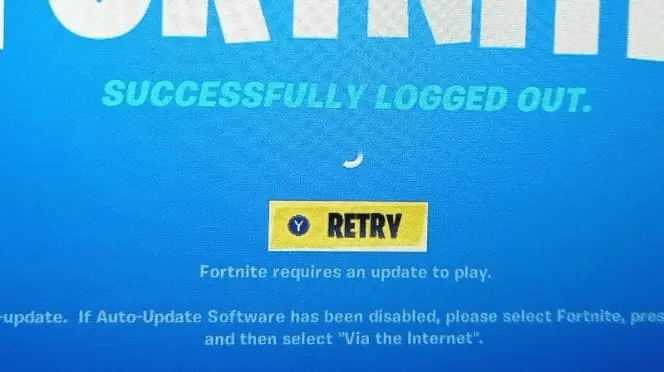
The game “Fortnite” is widely considered one of the most popular, which can lead to technical difficulties. These issues are often caused by server updates, but can also be more complex. Recently, players have reported encountering a “successfully logged out” message when trying to access the game.

How to fix Fortnite Error ‘successfully logged out’

To resolve this error, it is important to check the status of the Fortnite servers and be patient, as updates will likely be made in the near future. Additionally, there are a few steps you can take to ensure the issue is not related to your own device or internet connection.

  • Step 1: Verify that your Fortnite game is up to date by regularly updating it to have the latest version installed on Fortnite servers.
  • Step 2: Exit Fortnite and restart the launch application.
  • Step 3: Reboot your gaming platform.
  • Step 4: If the problem persists, contact Fortnite support for further assistance.

The “successfully logged out” error in Fortnite is often related to server issues, and therefore cannot be fixed by the player. The best course of action is to check the status of the servers and be patient, as updates will likely be made in the near future. However, there are several things you can do to ensure the issue is not related to your own game or device.

To fix the “successfully logged out” error in Fortnite, it is important to check the status of the servers and be patient, as updates will likely be made in the near future.

Additionally, there are a few steps you can take to ensure the issue is not related to your own game or device. You can always check the status of Fortnite game servers to know if the issue is global or if you just have technical difficulties at home.

Elden Ring Soft Caps 2023: All Stat Caps in Patch 1.08 – Build Your Character to the Max

0

Every Elden Ring soft caps for each stat remain unchanged from the last patch and every player should be aware of it given they come in handy at multiple points in the game.

In Elden Ring, a soft cap is a point at which a quality arrives where it increases your stats per level. So while you could see critical additions toward the beginning of the game, your profits will start to reduce You’ll ultimately arrive where it’s at this point not worth the effort to put Runes into an investment.

Each attribute comes with a few soft covers, which slowly decline how many evenings out them raise their connected stats. Nonetheless, whenever you first level EnerVigor, it’ll give you +25 HP followed by 1 or 2 points of Vigor which gives you +48 at level 40, the primary soft cap. From that point forward, it diminishes by 1-2 HP at each level till you reach +13 HP and level 60.

Elden Ring soft cap cheat sheet 2023

Vigor

Vigor increases total health points, physical defense, and immunity.

  • First Cap: Level 40
  • Second Cap: Level 60
  • Third Cap: Level 90

Mind

Mind increases FP and Focus.

  • First Cap: Level 20
  • Second Cap: Level 50
  • Third Cap: Level 55
  • Fourth Cap: Level 60

Endurance

Endurance increases stamina.

  • First Cap: Level 12
  • Second Cap: Level 18
  • Third Cap: Level 32
  • Fourth Cap: Level 50

Strength

Most heavy melee weapons scale at least partially with Strength.

  • First Cap: Level 20
  • Second Cap: Level 55
  • Third Cap: Level 80

Dexterity

Dexterity reduces fall damage, increases casting speed, and many lighter weapons and bows scale to this stat at least partially.

  • First Cap: Level 20
  • Second Cap: Level 55
  • Third Cap: Level 80

Intelligence (Attack)

Increasing intelligence improves spell damage and magic resistance in Elden Ring. These caps affect weapons that scale with intelligence.

  • First Cap: 20
  • Second Cap: 50
  • Third Cap: 80

Intelligence (Sorcery)

These caps affect spell damage.

  • First Cap: 60
  • Second Cap: 80

Faith (Attack)

These caps affect weapons that scale with Faith in Elden Ring.

  • First Cap: 20
  • Second Cap: 50
  • Third Cap: 80

Faith (Incantation)

Incantations that calculate damage based on Faith are affected by these caps.

  • First Cap: 60
  • Second Cap: 80

Arcane (Attack)

Arcane raises discovery in Elden Ring, and these caps affect weapons that scale with this staff.

  • First Cap: 25
  • Second Cap: 45
  • Third Cap: 60

Arcane (Incantation)

Arcane also has a unique set of soft caps when scaling a few things. For example, the Albinauric Staff and Dragon Communion Seal fall under these caps.

  • First Cap: 15
  • Second Cap: 30
  • Third Cap: 45

The Top Esports Events 2023

0

Esports has grown exponentially in recent years, with more and more people tuning in to watch professional gamers compete in all of the top eSports titles. As the industry continues to grow, so too does the number of events that take place each year. So, let’s take a look at the top esports events to watch… and bet on in 2023.

BLAST Paris Major 2023 – CS:GO

The BLAST Paris Major is one of the most highly-anticipated events in the Counter-Strike: Global Offensive 2023 calendar. With a prize pool of over $1 million and some of the best teams in the world competing, this will be one for the diaries.

The tournament is organised by BLAST, a premier esports tournament organiser and is held in Paris. It brings together the top CS:GO teams from around the globe who all want to compete for the title of champion.

With top teams such as Fnatic, Na’Vi, and Faze Clan expected to compete, the BLAST Paris Major 2023 is definitely worth getting excited about.

League of Legends World Championship

It may be just the beginning of 2023, but we’re already looking forward to what is going to happen at the League of Legends Championship. It looks set to take place in South Korea and although it hasn’t yet been given an official date or time, it is likely to happen towards the end of the year – around October or November.

This may seem like a long way away, but it certainly won’t be long before online sports betting and esports betting sites will be offering their odds on the winners… Although trying to predict a winner so soon might not be an easy task.

So, get ready to follow the teams and players, see how they perform and pick your winner.

Overwatch League

The Overwatch League attracts top teams from cities around the world and it features some of the best players and most exciting matches in competitive Overwatch.

Firstly, the league features a regular season, where teams compete in a round-robin format, followed by a playoff bracket to determine the league champion. This format means that every team has the opportunity to showcase their skills and compete for the top spot.

Held in various cities around the world, it brings together the top Overwatch teams who compete in a gruelling season filled with action and excitement. Usually running between February and August, it is organised by Activision Blizzard, the developer of Overwatch and is one of the biggest events on the eSports calendar every year.

With top teams such as the San Francisco Shock, the Dallas Fuel and the Los Angeles Valiant expected to compete, the Overwatch League 2023 is shaping up to be one of the most exciting events of the year.

Intel Extreme Masters Katowice 2023 – CS:GO

The Intel Extreme Masters Katowice is one of the most prestigious events on the Counter-Strike: Global Offensive 2023 calendar. With a prize pool of over $1 million and some of the best teams in the world competing, this year’s tournament is sure to be exciting and filled with action.

Held in Katowice, Poland, it brings together the top CS:GO teams from around the globe to compete for the title of champion. The tournament is organised by ESL, one of the biggest esports organisations in the world. 

The Intel Extreme Masters Katowice is known for its high-energy atmosphere, with thousands of fans packing the Spodek Arena to watch the action live. It will also be broadcast live on various streaming platforms, allowing fans from around the world to tune in and watch their favourite teams compete.

With top teams such as Astralis, Evil Geniuses, and Team Vitality expected to compete, the Intel Extreme Masters Katowice 2023 will certainly attract lots of fans – and plenty of betting action.

Conclusion

Esports is becoming ever more popular – and the events are attracting more players, more fans, more bettors and ever bigger prize pools. Year after year the competition gets stiffer as the top teams all up their games to be crowned the best. This year looks set to be better than ever – and with action running through from February until November, there’s plenty to keep us enthralled!

Valorant 6.01 Update Adds Lotus To Competitive Queue: Patch Notes Inside

0

Valorant patch 6.01 is here, and it has added Lotus to the official map pool for Unrated and Competitive game modes. The newly-introduced Valorant map has also received an important change, which has been revealed by the devs in the official patch notes of the new Valorant update.

Another notable change that Valorant patch 6.01 has brought to the shooter is the removal of the ‘Replication’ game mode. The Lotus-only queue has also been removed from the game.

The primary change Lotus has received is the reduction in volume for the rotating doors. Once the update has been shipped, the rotating doors near the bombsites will be much quieter when rotating. In addition to these changes, the 6.01 patch for Valorant focuses on important bug fixes and addressing map exploits on the new map Lotus.

Valorant 6.01 Patch Notes:

1) Map Updates

Lotus

  • The volume for the rotating doors has been reduced while rotating.
  • The Lotus-only queue has been removed.
  • Lotus will now be included in the map rotation for Unrated and Competitive.

2) Mode Updates

Replication

  • Replication has been removed from

Modes queue.

  • Although the Valorant developers are shelving Replication temporarily, it is still available via the custom game option.

3) Bug Fixes

Gameplay Systems

  • Fixed a bug where occasionally the third-person flashed visual indicator on an Agent’s head wasn’t in sync with the actual flash duration. (i.e. Omen’s Paranoia [Q], Phoenix’s Curveball [Q]).
  • Fixed a bug where the Spike would be invisible and attempting to equip the Spike would fail after changing from Defender to Attacker in a Custom Game and picking up the Spike.
  • Fixed a bug where you were unable to plant the Spike after reconnecting to a match where they died while disconnected.
  • Fixed a bug that, while using the Marshall, prevented full reloading between shots if auto-scoping is enabled.

4) Maps

Lotus

There are several bug fixes for Lotus.

  • The boost exploits in the back of B Site have been removed.
  • Players can no longer get themselves stuck in the rotating doors (we’re pretty sure anyway, let us know if you find a way—also, you’re all very creative!)
  • Breach can now use abilities on both rotating doors.
  • The destructible door located at A Link now has working vision cones.
  • The Spike can no longer get lost in the back of A Site. Fixed a broken Spike plant spot on A Site.

How To Complete One Piece Odyssey More Important Than Berries Quest

0

The More Important than Berries side quest in One Piece Odyssey is a task that players can initiate by conversing with the Irritated Man, who can be found on the east side of Nanohana. To finish the quest, players must gather two photographs, one of which can be tough to discover. This guide aims to assist players who may be having difficulty finding that particular photo, and a detailed guide to the More Important than Berries side quest in One Piece Odyssey can be found in the following paragraphs.

One Piece Odyssey: More Important Than Berries Quest Guide:

Accept the Quest

As mentioned earlier, players can initiate the More Important than Berries side quest by speaking to the Irritated Man (Pompous Tam) located in Nanohana. The NPC’s location has been marked on the map, and players of One Piece video games should visit him when they are ready to begin the quest.

Collect the Picture of 2 Children

Once the More Important than Berries quest is initiated, players must make their way to the Desert Near Nanohana. Once there, players should focus on the camp located at the center of the area. A small passage can be found just west of the camp, which players can access with One Piece’s Chopper and continue traveling towards the northwest corner of the Desolate Valley after crossing it.

Eventually, players who continue in this direction will reach a broken bridge, and the blue object lying on the ground next to it is the Picture of 2 Children.

Take the Picture to the Irritated Man

Players should now head back to Nanohana and interact with the Irritated Man.

Collect the Picture of 1 Adult

The second photograph can be found in the Ravine of No Return, which can be accessed by following the path that leads north from the Desert Near Nanohana. Unfortunately, a map cannot be used to indicate the precise location of the photograph within the Ravine of No Return. Players of JRPGs with turn-based combat will need to carefully follow the instructions provided.

  • Step 2: Take a right and follow the mine cart tracks into the cave
  • Step 3: Take a right after the tracks end and follow the corridor
  • Step 1: Enter the Ravine of No Return
  • Step 4: Reach a room with a stone head in its center
  • Step 5: Take a right, pass by a man that is on the ground and enter a room with scorpions
  • Step 6: The blue item in this room is the Picture of 1 Adult.

Take the Picture to the Irritated Man

Players must now return to Nanohana and interact with the Irritated Man once more to complete the More Important than Berries side quest in One Piece Odyssey and receive the associated rewards.

Valve’s 2022 Dota 2 battle pass made roughly $300 million as TI11 prize fund hit 7-year low

For 2022, Valve overhauled the Dota 2 battle pass system significantly, separating it into two sections for the first time and distributing the content across five months. 

Reports show that the corporation made approximately $293,024,922 from September 1st through January 12th, suggesting that the choice to charge for content was successful.

With the format of last year’s Battle Pass varying significantly from those of its predecessors, many were left confused about several features of the TI 2022 Battle Pass, the TI11 prize pool, and more.

Multiple data aggregators, including Team Secret and STRATZ, estimate that Valve made approximately $293 million in revenue from the battle pass over the course of those five months.

The Dota community has been dissatisfied with the firm as a result of its high profit margin and low reinvestment in the competitive scene.

25% of all battle pass revenue is returned to the game by Valve every year, which is added to the overall prize fund for The International. Consequently, TI has surpassed every other esports competition in terms of prize money every year since 2015. 

Every TI tournament since the first one in 2011 has had a larger prize pool than the one before it, with the exception of TI11, which broke a streak of ten years.

However, Valve’s customary 25% kickback to TI11’s prize pool only applied to Part I of the battle pass. After that, every dollar made from the battle pass went straight to Valve’s coffers.

Taking a different approach from previous years, Valve has decided to try out something new with this year’s Battle Pass, and it’s not necessarily bad. The splitting of the Battle Pass duration into two parts enables the community to enjoy it for an extended period of time, but it has its downsides. 

The prize pool of the TI11 undoubtedly took a hit in this new format. Generally, 25% of all the purchases made through sales of the Battle Pass go directly into the prize pool of The International.

As the Part 2 of the 2022 Battle Pass went beyond the conclusion of The International 2022, the purchases made by the community during that period didn’t fund its prize pool. 

The Part 1 of the Battle Pass was the same as the Battle Passes of any other year’s, where fans can pay to purchase the Battle Pass and then grind or spend their way through the levels and earn various rewards. But some rewards, features, and game modes are locked till the release of Part 2 of the Battle Pass. 

The total amount of money up for grabs at TI11 after the first day’s play was $18,930,775, thanks to the $17,330,775 raised through crowdfunding and the standard $1.6 million that Valve adds. 

That was a far cry from TI10’s record-breaking $40,018,400, and it only managed to finish above TI5 by a hair. This broke the historic streak and left the community wondering what may have been.

Having Ti have the largest annual prize pool is great, but making it so rich while not supporting the rest of the scene more substantially could be harmful to Dota, as several players and personalities in the competitive scene have pointed out.

After hearing that Valve would not be contributing any of the money from the Part II battle pass to the TI prize pool, many prominent players were hoping the company would find another method to reintroduce itself to the scene. 

However, judging by the current listings and projected prize pools for each regional league on the Dota Pro Circuit and the Majors in 2023, it appears that this will not occur.

Valve may change this approach in the future, but given its free TI11 Swag Bag and more material, it’s unlikely. This is especially true in October, when, for the first time since March of this year, Dota 2 surpassed one million participants.

For more updates on DOTA 2, make sure to follow TalkEsport on Google News. 
What Does ‘The Waffle House Has Found Its New Host’ Meme Mean On Tiktok and Youtube

0

‘The Waffle House Has Found Its New Host’ Meme has flooded the internet and everyone is looking for inner meaning. The phrase has found its way to Twitter, Reddit, Instagram and most notably TikTok and everyone is trying to read between the lines to understand the true meaning behind it.

It is normal for weird phrases to go viral, previously we have come across the same many times but each one of them has an interesting backstory to boast. However, there is a new phrase that has riled up gen z i.e.‘The Waffle House Has Found Its New Host’.

What does ‘The Waffle House Has Found Its New Host’ mean?

Truth be told, this is a bogus trend with no legitimate meaning behind it. The whole purpose of this was to start a new trend and this is all there is to it. No underlying or deeper meaning can be found so your digging ends here.

YouTuber Jonny RaZer is taking credit for the meme and we have nothing that points otherwise. According to him, RaZer flooded this phrase in the comment section across social media and it quickly gained traction eventually becoming a meme.

One doesn’t need a reason to start a trend like this and much like most trends with no backbone, this meme will fall out of favour in no time. Unfortunately like a lot of memes, this one has nothing to offer besides a meaningless phrase and there is no chance that this survives longer than a few days.

Thank you for reading, For more exclusive esports and gaming content, please follow us on Google News.

What Does The Lucky Girl Syndrome Meme Mean on Tiktok?

0

The Lucky Girl Syndrome TikTok meme is trending and has the potential to officially make it to the meme calendar for 2023. If you are wondering what is the inner meaning behind this trend then you have come to the right place. Here’s everything there is to know about the Lucky Girl Syndrome Tiktok meme.

Lucky Girl Syndrome Tiktok meme explained

Participants of Lucky Girl Syndrome believe that their positive thinking will manifest good luck that will drive them for the rest of 2023. While manifesting has become a topic of interest among millennials with more and more people dabbling in it and now there is a whole meme template about it.

“One of the first #LuckyGirlSyndrome Tiktok videos to explain the concept was from user bymichellediaz back in August 2022 and has garnered 3.4 million views and 715,000 likes. In the video she explains that by believing she is the luckiest girl ever and that amazing things now happen to her. It’s a form of manifestation where if you think something, it will come, although she even mentions how the thinking can be “delusional”.” according to GAMEREVOLUTION.

These videos are getting more and traction as time passes and fans are having a good time making them. As content creators are taking the opportunity to manifest goodness in their lives, said meme is believed by pop culture to be a medium to do so.

Thank you for reading, For more exclusive esports and gaming content, please follow us on Google News.

Is Rocket League Cross-Platform

It’s no secret that Rocket League is a popular esport, but the game is also great for those just looking for a good time. Thankfully, cross-platform play in Psyonix makes it possible for anyone to join a team.

Rocket League is a popular choice among a wide variety of video game players. Rocket League, then, is the perfect choice whether your goal is to compete or to take a break from intense shooters. 

Players on consoles, PCs, and Switches are all committed to Rocket League, and the game never slows down because of cross play. There is always a sizable group of active players around the clock.

As your device’s screen size and response time affect your aim and reflexes, cross-play can be problematic in first-person shooters. On the other hand, this is not the case in games that involve vehicles. 

Console players may have an advantage when it comes to controlling their bullet cars, but the gap isn’t that wide. This is why the game’s creators implemented cross-play between all platforms.

Having the most recent version of Rocket League is a prerequisite for playing it across platforms. The platform’s store or launcher is where you should look for updates. Once you have the most recent patch installed, you can begin a new match or join an existing one.

You can either create a private match with your friends or join an existing public match when setting up a game. In order to play with friends who are using different platforms, you must send them an invitation to the match using their Rocket ID.

Every player in the game has a special number called a Rocket ID, which can be changed in the options menu. It’s also accessible from the main menu by pressing the “options” button on your controller. If you want to play with your friends across platforms, you’ll need to invite them with their Rocket ID rather than their platform-specific username.

When you and your friends have been invited to a match, you can all play on different platforms at the same time. Pick “cross-platform matchmaking” from the matchmaking menu if you want to join a public match. This will open the door to playing against players from other platforms.

Keep in mind that not all platforms support Rocket League’s cross-platform play features. Sony has not enabled cross-play on the PlayStation 4, so PS4 players cannot compete with Xbox One users.

Be aware that there may be some subtle differences in controls and gameplay when competing across platforms. 

Before you can play with friends on different platforms, you must activate cross play. Now, head into the game’s configurations and hunt down the gameplay tag. A cross-play option is available here. Check to see if it’s checked.

After it has been activated, go to the main menu and select Custom Games in Play from the drop-down menu. At this point in the game, you will be given three different options to choose from. 

If you have to choose between a “Exhibition”, “Season”, and a “Private Match”, go with the latter. 

Create a join, private lobby, or local lobby will then become available to you. Go with one of the first two possibilities. Select “Create” if you want to host a private match for your followers, or “Join” if one has already been set up. Friends can join a private lobby after it’s created.

It’s also worth noting that cross-platform play in Rocket League is limited to online multiplayer games. Because of this, offline modes like exhibition matches, training modes, and special event modes cannot be played with friends on different platforms.

Rocket League may have bright colors and toy-like cars, but don’t be fooled. As much fun as the game appears to be visually, the steep learning curve can be attributed to the game’s focus on car handling and tricks like the aerial.

For more updates, make sure to follow TalkEsport on Google News. 

Roblox False Ban 2023: How To Stop Your Account From Getting Banned

0

Roblox has implemented its own set of rules, known as the Terms of Use and Community Rules, for its users to follow in order to avoid being temporarily or permanently banned. According to recent statistics, the platform had over 54.1 million daily active users in Q1 2022.

Roblox’s moderation policies aim to protect and create a positive and safe environment for all members of its community.

If you are currently reading this blog, it is likely that your Roblox account has been banned and this article will provide information on how to address this issue.

A ban on a player’s account is a suspension resulting from a violation of the platform’s Terms of Use or Community Standards.

Severe violations, such as sharing adult content, hacking, scamming, game theft, or breaking federal or international laws, can result in a player’s account being deleted without warning.

What does getting banned from Roblox mean? Why?

A game moderator may only ban a player from a specific game, in which case the player’s account is not suspended and they can still access other games and places on the Roblox website.

Typically, accounts are not banned unless a serious violation has been committed. Users generally have to wait until the ban period is over to regain access to their account.

The Roblox moderation system allows users who have been banned to submit an appeal to the support team within 30 days of the ban, but it does not guarantee that the account will be unbanned after the appeal.

Reasons that usually moderation system shows in the content section of the moderation screen:

  • Real-Life Tragedy
  • Real-Life Threats
  • Unauthorized payments / charges (or refunding)
  • Scamming
  • [filtered] Content
  • Spam
  • Extortion and Blackmail
  • Privacy: Asking for Personal Information
  • Illegal and Regulated Content
  • Doxing or leaking personal info
  • Sexual Content
  • Adult Content
  • Ban Evasion
  • Cheat and Exploits
  • Exploiting children
  • Encouraging Dangerous Behavior
  • Dating and Romantic Content
  • Directing Users Off-Platform/Off-site links
  • Discriminatory/Discriminatory Content
  • Harassment
  • Inappropriate
  • Misusing Roblox Systems
  • Phishing/Scam
  • Privacy
  • Profanity
  • False Bans
  • Mass Reporting
  • Personal/IRL Photos

Levels of Roblox Ban

Ban Ban Duration and Level
In-experience banUser is kicked from an experience and is not able to rejoin.
WarningUser’s account is disabled and can be reopened immediately by agreeing to the Terms of Service.
1-day banUser’s account is disabled for 1 day or 24 hours from when the moderation action was initiated, after which the account can be reopened.
3-day banUser’s account is disabled for 3 days or 72 hours from when the moderation action was initiated.
1-week banUser’s account is disabled for 1 week, 7 days or 168 hours from when the moderation action was initiated.
Custom BanUser’s account is disabled for an unknown amount of time. These bans can even be 30 days or 48 years.
Account deletion/terminationUser’s account is permanently closed. It may not be reopened automatically. These ban(s) happen typically unfairly, without good reason. it can happen for said “scamming” when in reality, the user did nothing. This is the second most common ban, the most common being Warning.
Poison ban (1 year/Permanent)User’s account(s) is/are permanently closed. The user is blocked from creating a new account.
MAC Address ban (Error 0x1)A device is blocked from using Roblox Player or publishing with Roblox Studio.
IP ban (7 days)IP address is blocked from accessing Roblox for 1 week (7 d or 168 hrs).
Invalid Credentials ban (Permanent IP ban)IP address is blocked from accessing Roblox permanently.

How to Get Unbanned from Roblox in 2023

Roblox’s moderation system typically does not ban accounts unless a significant violation has occurred. Users typically have to wait until the ban period is over to regain access to their account.

The moderation system allows users who have been banned to submit an appeal to the support team within 30 days, but there is no guarantee that the account will be unbanned after the appeal.

The Roblox support team usually responds to appeals via email within 24 hours.
If you believe your account was banned in error, or for an unclear or minor violation, you can submit an appeal to the Roblox support team in the appropriate manner.

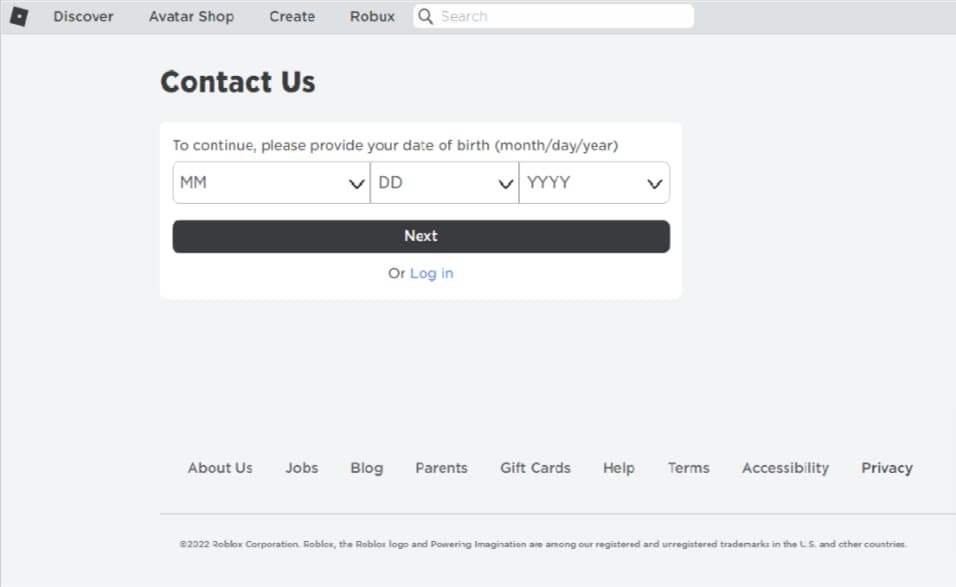
To begin the appeal process, navigate to the Roblox Support Page and enter your date of birth before proceeding to the next page.

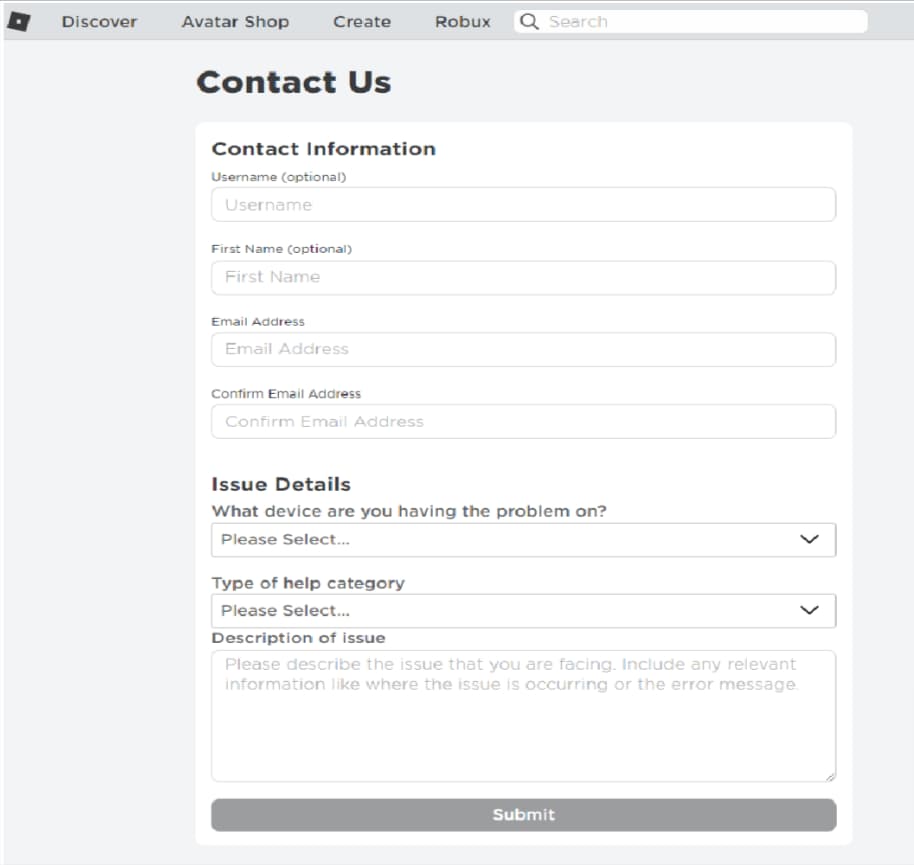
On the second page, input your contact information and provide specific details about the issue in the “Description of issue” field. Be sure to clearly and concisely state your reasons for the appeal in a convincing manner, as multiple appeals for the same issue will not be considered.

  • “Username” field: Enter your Roblox username. 
  • “First Name” field: Enter your first name.
  • “Email Address” field: Enter your email address.
  • “Confirm Email Address” field: Confirm your email address.
  • “What device are you having the problem on?” dropdown box: Select the device that you’re having the problem with.
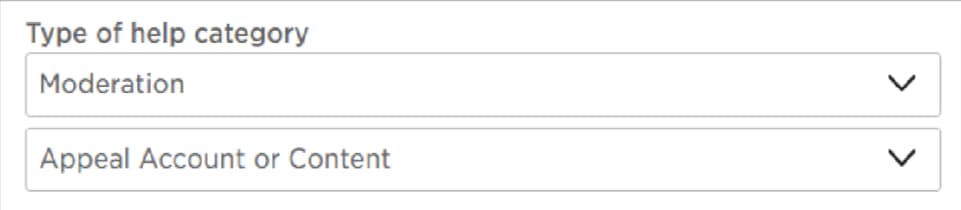
  • “Type of help category” dropdown box: You need to select “Moderation”, and in the next dropdown box, select “Appeal Account or Content”.

After submitting the appeal, wait for 24 hours to receive an email from the Roblox support team. If your account is unbanned, you will be notified via email. If not, you will have to wait until the end of the ban period as further appeals for the same action will not be reviewed.