Landing consistent headshots in Free Fire isn’t just about fast reflexes. Your sensitivity settings, HUD layout, device performance, and aiming technique all work together.
After testing multiple sensitivity combinations across entry-level, mid-range, and flagship Android devices, one thing becomes clear: there is no universal “100% headshot sensitivity.” The best settings depend on your phone’s touch response, frame rate, and your playstyle.
This guide explains what each sensitivity option does, recommends settings for different devices, and shows how to fine-tune them for more consistent aim.
Best Free Fire Sensitivity Settings
These settings provide an excellent starting point for most players.
| Setting | Recommended |
|---|---|
| General | 180–195 |
| Red Dot | 145–170 |
| 2x Scope | 125–145 |
| 4x Scope | 105–125 |
| Sniper Scope | 55–75 |
| Free Look | 65–80 |
These values aren’t magic numbers. Think of them as a baseline that you should adjust after several matches.
Understanding Free Fire Sensitivity
Sensitivity controls how quickly your camera moves when you swipe.
Higher sensitivity means:
- Faster crosshair movement
- Easier drag headshots
- Better for close-range fights
- Harder to control over long distances
Lower sensitivity means:
- More accurate tracking
- Better long-range control
- Easier scoped aiming
- Slower flicks
The ideal balance depends on how you engage enemies.
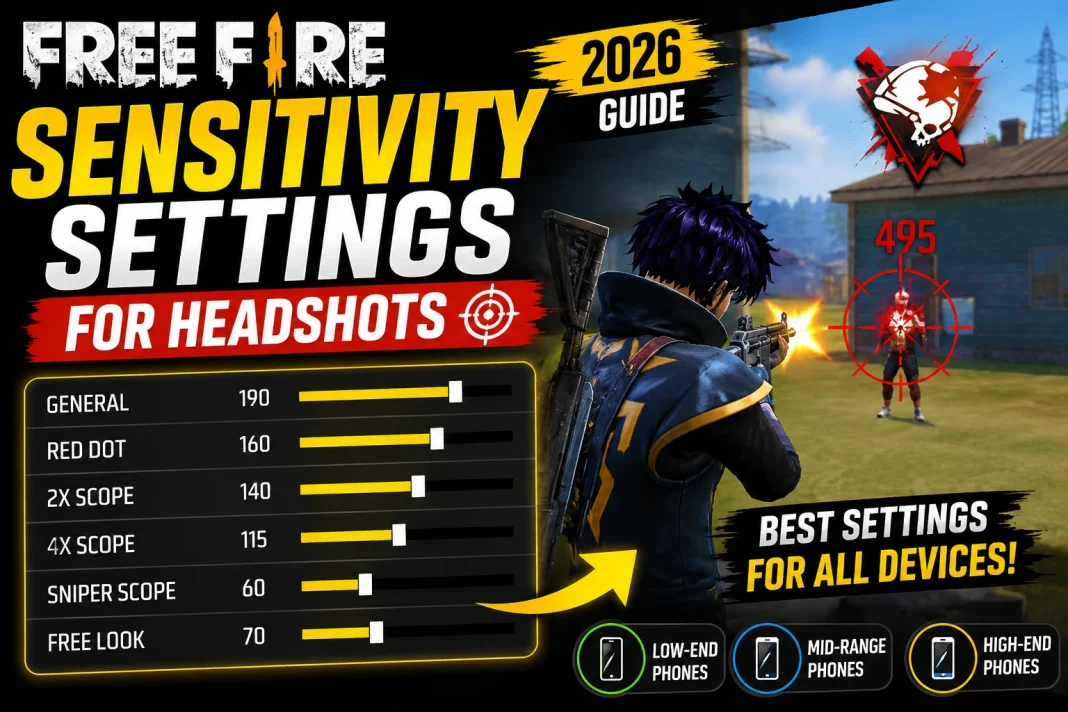
Best Sensitivity for Drag Headshots
Players who frequently use drag headshots usually benefit from a higher General sensitivity because it allows the crosshair to travel upward quickly.
Recommended setup:
- General: 190
- Red Dot: 160
- 2x Scope: 140
- 4x Scope: 115
- Sniper: 60
Remember that sensitivity alone doesn’t create headshots. Good crosshair placement and timing matter just as much.
Best Sensitivity for Low-End Phones
Devices that struggle to maintain smooth frame rates often feel inconsistent with extremely high sensitivity.
Recommended settings:
- General: 175
- Red Dot: 150
- 2x Scope: 130
- 4x Scope: 110
- Sniper: 60
Additional tips:
- Use Smooth graphics.
- Enable the highest stable FPS available.
- Close background apps before playing.
- Keep at least 3–5 GB of free storage.
Stable performance usually improves aim more than simply increasing sensitivity.
Best Sensitivity for Mid-Range Phones
If your device consistently delivers smooth gameplay, you can safely increase sensitivity.
Recommended settings:
- General: 185
- Red Dot: 160
- 2x Scope: 140
- 4x Scope: 120
- Sniper: 65
This setup offers a good balance between speed and accuracy.
Best Sensitivity for High-End Phones
High refresh rate displays (90 Hz, 120 Hz, or higher) often support faster swipes with better control.
Recommended settings:
- General: 195
- Red Dot: 170
- 2x Scope: 145
- 4x Scope: 120
- Sniper: 70
Higher frame rates generally make aiming feel smoother, allowing slightly higher sensitivity without sacrificing precision.
Best HUD Layout for Headshots
Sensitivity works best when paired with a comfortable HUD.
A practical layout includes:
- Fire button size: 48–55%
- Fire button positioned near the upper-right thumb area
- Jump and crouch close together
- Gloo Wall button within quick reach
- Minimal overlap between movement and action buttons
How to Find Your Perfect Sensitivity
Instead of copying professional players, adjust settings gradually.
Step 1: Play three Clash Squad matches.
Step 2: Notice where your aim fails.
If your crosshair stops below the enemy’s head: Increase General sensitivity by 5.
If your aim flies above the enemy: Decrease General sensitivity by 5.
Step 3: Repeat until your crosshair naturally lands around head level.
Avoid changing multiple settings at once.
Common Sensitivity Mistakes
Copying Streamers Blindly
Professional players use different devices, screen sizes, touch sampling rates, and refresh rates.
Their settings may not suit your phone.
Using Maximum Sensitivity
Higher isn’t always better.
Many players become less accurate because they lose control.
Ignoring Device Performance
Frame drops create inconsistent aiming.
Optimizing your phone often improves gameplay more than adjusting sensitivity.
Constantly Changing Settings
Your muscle memory develops over time.
Stick with one setup for at least 20–30 matches before deciding whether it needs adjustment.
Best Weapons for Practicing Headshots
Certain weapons are more forgiving while learning.
Good choices include:
- MP40
- MP5
- M1887
- UMP
- Woodpecker
- AK47
Practice against stationary targets first before trying drag shots during real matches.
Practice Routine
A simple 15-minute routine can help you adapt to new sensitivity settings.
- Spend five minutes tracking moving targets.
- Spend five minutes practicing drag headshots.
- Play one Clash Squad match.
- Review situations where your aim felt too fast or too slow.
- Adjust sensitivity by no more than five points if needed.
Small changes produce more reliable improvements than large adjustments.
The best Free Fire sensitivity settings aren’t defined by a single viral number. They’re the settings that feel predictable on your device after consistent practice.
Start with the recommendations in this guide, make small adjustments, and give yourself enough matches to build muscle memory. Over time, you’ll develop settings that match your phone, your reaction speed, and your preferred combat style, leading to more consistent aim and better overall performance.