The Witcher 3: Wild Hunt Remastered came out on September 29, 2026, as a free upgrade for people who already own the game. The PC version adds path tracing, DLSS 4.5, FSR 4 and ray-traced HairWorks. Since launch, many PC players have reported low frame rates, stuttering and graphical bugs. Here are the fixes that are working right now, starting with the one CD Projekt Red recommends.
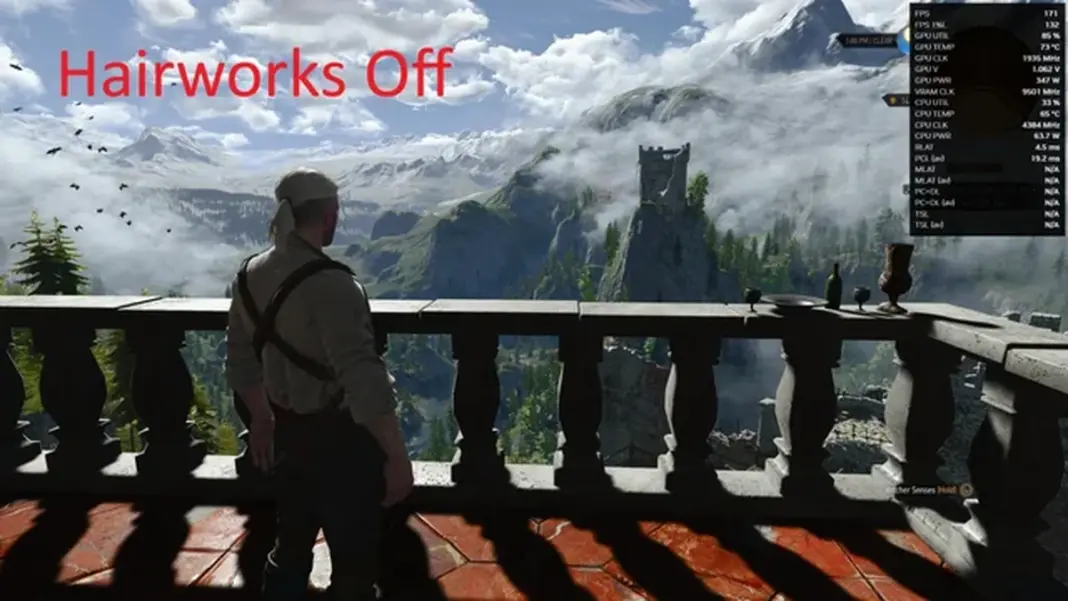
Fix 1: Turn off NVIDIA HairWorks
On September 30, CD Projekt Red posted on X that it had found a problem with NVIDIA HairWorks that can seriously hurt performance. It recommended turning the setting off until a patch is released.
- Open Options > Graphics in the game.
- Find NVIDIA HairWorks and set it to Off.
- Apply the change and reload your save.
With HairWorks off, Geralt’s hair and the fur on some monsters use the standard hair rendering. Players say this gives the biggest single boost of any setting right now.
Fix 2: Try the path tracing optimization mod
If you play with path tracing or ray tracing on, a mod called “Path Tracing and Ray Tracing Optimization (Remastered)” by HourLines can help. It’s available on Nexus Mods for The Witcher 3. The mod author says it improves performance by up to 30 percent in some areas.
There are trade-offs:
| Change | Effect |
|---|---|
| Performance | Up to 30% better in some areas (according to the mod author) |
| Indoor lighting | Some rooms and buildings look darker |
| Global illumination | Lighting takes longer to react to changes |
Always back up your game files before installing a mod. Mods can also stop working after an official patch.
Fix 3: Update your GPU driver (important for AMD)
AMD users have reported serious graphics bugs, including black textures, missing trees and grass, glowing hair, flickering and crashes. The RX 7000 and RX 9000 series seem to be the most affected.
CD Projekt Red recommends AMD Adrenalin 26.9.2 for the Remastered. That driver wasn’t out when the game launched, but it’s available now from the AMD driver download page. Players say installing it fixes the black textures and missing plants.
If the problems don’t go away after you update:
- Remove your old driver completely with Display Driver Uninstaller (DDU).
- Delete the shader cache.
- Install Adrenalin 26.9.2 fresh and launch the game again.
NVIDIA users should also install the latest Game Ready Driver before playing.
Fix 4: Turn off or lower bloom
Some players say the new bloom effect makes the image look washed out. Lowering or turning off bloom in the graphics settings makes the picture clearer, and it can also help frame rates a little.
Fix 5: Use upscaling and frame generation
The Remastered supports all three major upscaling tools on PC. Choose the one that matches your graphics card:
| GPU | Option | Notes |
|---|---|---|
| NVIDIA RTX | DLSS 4.5 with Ray Reconstruction | Best choice if you use ray tracing or path tracing |
| AMD Radeon | FSR 4 with Frame Generation and Anti-Lag 2 | Needs an RX 7000 series card or newer |
| Intel Arc | XeSS 2.0 with Frame Generation | Includes Low Latency mode |
Set the upscaler to Quality or Balanced mode. This usually raises frame rates a lot, and the loss in image quality is small at 1440p and 4K. You can read the full list of new PC features in the Witcher 3 Remastered launch patch notes.
Fix 6: Turn down ray tracing and path tracing
Path tracing is the most demanding setting in the Remastered. If you’re not using an RTX 40 or 50 series card, turn path tracing off and use regular ray tracing, or switch ray tracing off completely. On AMD cards, turning ray tracing off also makes the graphics bugs described in Fix 3 less severe.
Will CD Projekt Red release a patch?
Yes. CD Projekt Red has said a patch for the HairWorks problem is coming, but it hasn’t given a date. Until then, turning off HairWorks and keeping your drivers up to date are the most reliable fixes.
Performance problems have been common in PC releases this year. Marvel Tokon had performance issues on PC too before its developer responded. For more on upscaling tech, read our coverage of NVIDIA’s DLSS 5 launch and NVIDIA’s claims about future path tracing performance.