Home Blog Page 517

A Beginner’s Guide to Free Fire Redeem Codes in 2024

If you’re just getting started with Free Fire and want to make the most of your gaming experience, knowing about redeem codes is a must. These codes are your ticket to unlocking a world of free rewards, from cool skins to extra currency. But how do you get these codes, and more importantly, how do you use them?

This guide will walk you through everything you need to know about Free Fire redeem codes in 2024, so you can start collecting those goodies without a hitch.

Key Takeaways

  • Redeem codes are free and offer exclusive in-game rewards.
  • Always use official sources to get your Free Fire redeem codes.
  • Be quick—codes are time-sensitive and limited in usage.
  • Link your account to avoid missing out on rewards.
  • Stay updated through official channels for the latest codes.

Understanding Free Fire Redeem Codes

Free Fire Redeem Codes

What Are Redeem Codes?

In the world of Garena Free Fire MAX, redeem codes are a bit like golden tickets. They’re special 12- or 16-character alphanumeric strings that players can use to snag exclusive in-game items. These might be anything from unique skins to those much-coveted diamonds or even powerful weapons. The catch? These codes are often time-sensitive, meaning they can expire pretty quickly. So, if you get your hands on one, you better act fast!

How Do Redeem Codes Work?

Redeem codes are straightforward to use, but they come with a few rules. Players need to log into the official Free Fire rewards redemption site using their game-linked accounts. Once there, you just pop the code into the designated box, hit ‘Confirm,’ and if everything checks out, you’ll get a notification about your loot. The rewards usually show up in your in-game mail, so keep an eye on that.

Benefits of Using Redeem Codes

Using redeem codes is like getting a little bonus for your gameplay. They offer players a chance to access premium items without spending real money. This can be a game-changer, especially for those who want to enhance their gaming experience but are on a budget. Plus, these codes often include items that aren’t available through regular play, giving you a bit of an edge or just making your character look cooler. Collecting these codes not only boosts your inventory but also keeps the game exciting by adding an element of surprise and reward.

How to Obtain Free Fire Redeem Codes

Official Sources for Redeem Codes

Getting your hands on Free Fire redeem codes is easier than you might think. The most reliable way is through official sources. Garena, the game’s developer, regularly releases codes during events and through their official social media channels. Keeping an eye on their announcements can give you a head start.

Community Events and Giveaways

Another great way to snag some redeem codes is by participating in community events and giveaways. These are often hosted by popular Free Fire streamers and gaming influencers. They might hold contests or random draws where you can win codes.

  • Follow popular Free Fire streamers on platforms like YouTube and Twitch.
  • Join Free Fire community groups on social media.
  • Participate in official Garena events and challenges.

Avoiding Scams and Fake Codes

With the popularity of Free Fire, there are unfortunately some scams out there. It’s crucial to be cautious and avoid fake codes. Here are some tips to keep you safe:

  1. Always use the official Garena website for code redemption.
  2. Be wary of websites or individuals promising free codes in exchange for personal information.
  3. If a code seems too good to be true, it probably is.

Remember, staying informed and cautious is key to enjoying Free Fire without falling prey to scams. Keep your gaming experience safe and fun by sticking to trusted sources for redeem codes.

Step-by-Step Guide to Redeeming Codes

Accessing the Redemption Website

To start off, you need to head over to the official Garena Free Fire Rewards Redemption site. It’s crucial to use the official site to avoid any potential scams. Guest accounts can’t redeem codes, so make sure your game account is linked to a platform like Facebook, Google, or Apple ID.

Entering and Confirming Your Code

Once you’re logged in, you’ll see a box where you can enter your 12-digit code. Carefully type or paste the code into the box and hit ‘Confirm’. If everything checks out, you’ll see a confirmation message. Remember, these codes are time-sensitive and can only be used a limited number of times.

Claiming Your In-Game Rewards

After successfully redeeming a code, hop back into the Free Fire game. Your rewards should appear in the in-game mail section within 24 hours. If they don’t show up right away, give it a bit of time. Sometimes, it just takes a little while for the system to process everything.

Redeeming codes is a straightforward process, but it requires attention to detail. Always double-check the code and ensure your account is properly linked to avoid any hiccups. Enjoy your new in-game items and boost your gameplay!

For more on keeping your gaming account safe, be aware of cheating issues in games like Apex Legends, which highlight the importance of using official channels and maintaining account security.

Maximizing Your Rewards with Redeem Codes

Timing Your Code Redemptions

Getting the most out of your Free Fire redeem codes is all about timing. Codes are often released during special events or updates, so keep an eye on esports news to catch them as soon as they drop. Most codes are time-sensitive, meaning they expire if not used quickly. A good strategy is to redeem them as soon as you get them, ensuring you don’t miss out on exclusive rewards.

Combining Codes for Greater Benefits

If you’re lucky enough to snag multiple codes, you can combine them for bigger rewards. This means more in-game currency, skins, or items. Try to collect codes from different sources like social media, game events, and newsletters. Here’s a simple approach:

  1. Collect Codes: Gather as many valid codes as possible.
  2. Plan Redemptions: Use them strategically to maximize benefits.
  3. Watch for Expiry: Make sure none of your codes go to waste.

Understanding Code Limitations

Not all codes are created equal. Some might only work for specific regions or accounts linked to certain platforms. Guest accounts usually can’t redeem codes, so ensure your account is linked to Facebook, Google, or another supported platform. Also, remember each code might have a usage limit, often capped at a few hundred uses. Always read the fine print to understand these limitations and make the most of your codes.

Redeeming codes in Free Fire can significantly boost your gaming experience, but it requires a bit of strategy and awareness. Stay informed and act fast to enjoy all the benefits these codes offer. Happy gaming!

Common Issues and Troubleshooting

Code Expiry and Validity

One of the most common issues players face is redeeming codes that have already expired. Each code comes with a specific validity period, and once this period lapses, the code becomes useless. It’s crucial to redeem your codes as soon as possible to avoid missing out. Keep an eye on the official announcements to ensure you’re using the codes within their active period.

Account Linking Problems

Sometimes, players encounter difficulties when their Free Fire account isn’t properly linked to the redemption platform. This can lead to failed redemption attempts. To avoid this, double-check that your account is linked correctly. Here’s a quick checklist:

  1. Verify that your Free Fire account is linked with the same platform you are using for redemption.
  2. Ensure that your game account is logged in and active.
  3. If using Facebook or Google, make sure the accounts are synced.

Contacting Support for Help

When all else fails, reaching out to customer support might be your best bet. They can provide guidance and possibly resolve issues that you can’t fix on your own. Here’s how you can prepare before contacting them:

  • Gather all relevant information about your issue, including screenshots if possible.
  • Be clear and concise in explaining your problem.
  • Check the official Free Fire support page for contact details and further instructions.

Troubleshooting can be frustrating, but with a bit of patience and the right approach, most issues can be resolved. Remember, the key is to stay informed and act quickly when problems arise.

Enhancing Gameplay with Redeem Codes

Unlocking Exclusive Skins and Items

In Free Fire, redeem codes are your golden ticket to get those rare skins and items that everyone else is chasing. These codes can give you access to exclusive outfits, weapon skins, and other in-game items that are usually hard to come by. Having unique skin not only makes your character look cool but also sets you apart in the game. Imagine stepping onto the battlefield with a rare costume that makes other players do a double-take. That’s the power of redeem codes!

Boosting Your In-Game Currency

Redeem codes can also help you top up your in-game currency without spending a dime. Whether it’s diamonds, coins, or any other currency used in Free Fire, these codes can give you a nice little boost. This means you can buy more items, participate in more events, or simply save up for something special. It’s a great way to keep your gaming experience fresh and exciting without breaking the bank.

Improving Your Battle Strategies

With the right skins and items unlocked through redeem codes, you can actually enhance your battle strategies. Some skins and items offer slight advantages, like faster reload times or increased accuracy. While these perks might seem small, they can make a significant difference in a heated battle. Plus, having a variety of items and skins at your disposal means you can switch up your strategies and keep your opponents guessing.

Using redeem codes is like having a secret weapon in your gaming arsenal. They provide opportunities to explore new strategies and enjoy the game in a whole new way. Don’t underestimate the impact of a well-timed code redemption on your gameplay.

Participating in events like the COBX Indian Esports Championship can also provide opportunities to earn redeem codes, adding another layer of excitement and rewards to your Free Fire experience. Keep an eye out for such events and make the most of them to enhance your gameplay.

Staying Updated on New Redeem Codes

Free Fire redeem codes

Staying on top of the latest Free Fire redeem codes can really boost your gaming experience. These codes can offer you exclusive rewards, so knowing how to get the freshest codes is key. Here’s how you can keep yourself updated:

Following Official Social Media Channels

Garena Free Fire’s official social media channels are a goldmine for the latest redeem codes and updates. Keep an eye on their Facebook, Twitter, and Instagram pages. They often post about new events, updates, and of course, those precious redeem codes. Make sure to turn on notifications so you don’t miss out on any posts.

Joining Free Fire Communities

Being part of Free Fire communities, whether on Reddit, Discord, or Facebook groups, can be incredibly beneficial. These communities are full of other players who share their findings and tips about new codes. You might even find some exclusive codes shared only within these groups. Plus, it’s a great way to connect with other players and share strategies.

Subscribing to Newsletters and Alerts

Subscribing to newsletters is another effective way to stay informed. Many gaming websites offer newsletters that include news about game updates and redeem codes. Signing up for these can ensure you get the latest codes delivered straight to your inbox. Also, consider setting up alerts for any new articles or announcements related to Free Fire.

Staying updated on redeem codes not only enhances your gameplay but also connects you with a vibrant community of players. Don’t miss out on the chance to unlock exclusive rewards and make the most of your Free Fire experience. Remember, keeping up with the latest codes can give you an edge over other players.

To keep up with the latest redeem codes, make sure to check our website regularly. We provide updates on new codes that can help you unlock exciting rewards in your favorite games. Don’t miss out on the chance to enhance your gaming experience! Visit us now for the latest information!

Wrapping Up Your Free Fire Redeem Code Journey

So there you have it, folks! Navigating the world of Free Fire redeem codes might seem a bit tricky at first, but once you get the hang of it, it’s a breeze. These codes are a fantastic way to snag some cool in-game goodies without spending a penny. Just remember, they’re time-sensitive, so don’t dawdle! Keep an eye out for new codes, and make sure your account’s all set up to grab them. Whether you’re after shiny new skins or extra diamonds, these codes can give you a nice little boost. Happy gaming, and may your Free Fire adventures be ever-exciting!

Frequently Asked Questions

What exactly are Free Fire redeem codes?

Free Fire redeem codes are special sets of letters and numbers that players can use to get cool stuff in the game for free. These might include things like new outfits, weapons, or even currency for the game.

How can I find Free Fire redeem codes?

You can find redeem codes through Free Fire’s official social media pages, during special events, or from trusted gaming communities. Always be careful of fake codes and only use codes from reliable sources.

What should I do if a redeem code doesn’t work?

If a code doesn’t work, it might have expired or been used too many times. Check the expiry date and try again. If it still doesn’t work, you can contact Free Fire’s support for help.

Can I use a redeem code more than once?

No, each redeem code can only be used once per account. If you’ve already used a code, it won’t work again.

Why are my rewards not showing up after redeeming a code?

Sometimes it takes a little while for the rewards to show up in your game. Check your in-game mail after a few hours. If they still don’t appear, you might need to reach out to support.

Are there any risks in using redeem codes?

As long as you get your codes from official or trusted sources, there shouldn’t be any risks. Avoid clicking on suspicious links or sharing your personal details to stay safe.

How To get Lionel Messi Skin In Fortnite

0

Fortnite has officially launched a highly anticipated collaboration with soccer legend Lionel Messi, allowing players to embody the spirit of the game in a unique way. The Messi skin, along with a variety of themed items, is now available for fans eager to score big in the battle royale arena.

Key Takeaways

  • Lionel Messi skins available in Fortnite as of December 13, 2024.
  • Two distinct Messi outfits included in the bundle.
  • The bundle features 10 items, including emotes and pickaxes.
  • Available for purchase until December 28, 2024.

The Messi Bundle Overview

The Fortnite x Messi bundle is a treasure trove for fans, featuring a total of 10 items that enhance the gaming experience. Here’s what you can expect:

  • Lionel Messi Outfit (with two styles: Stealth Lion and Gold Lion)
  • Streetwear Spark Messi Outfit
  • The Mane Event Emote
  • Number 10 Back Bling
  • Portable Playmaker Back Bling
  • Fancy Futbol Pickaxe
  • Goated Glave Pickaxe
  • #1 Fan Llama Emote

The entire bundle is priced at 2,800 V-Bucks, a significant discount from its original price of 5,800 V-Bucks. Players can also purchase individual items separately if they prefer.

How To Purchase The Messi Skin

To get your hands on the Messi skin, follow these simple steps:

  1. Open Fortnite through the Epic Games launcher.
  2. Navigate to the game’s homepage.
  3. Click on the Shop button located at the top left of the screen.
  4. Look for the Fortnite x Messi collection, which will be prominently displayed.
  5. Click on view offer to either purchase or gift the bundle.

Availability and Pricing

The Messi skins and bundle became available on December 13, 2024, at 7 PM ET. Players can enjoy these exclusive items until December 28, 2024, at 7 PM ET. Here’s a breakdown of the pricing for individual items:

ItemPrice (V-Bucks)
Lionel Messi Outfit1,800
Streetwear Spark Messi Outfit1,500
Fancy Futbol Pickaxe800
Goated Glave Pickaxe800
#1 Fan Llama Emote400

Messi’s Thoughts on the Collaboration

Lionel Messi expressed his excitement about being featured in Fortnite, stating, “It’s amazing to see myself represented in Fortnite. Growing up, I never imagined something like this would be possible. Soccer has always been about joy and connection, and now fans can experience that through my own outfits in a way that goes beyond the field. I hope they have fun!”

The Fortnite x Messi collaboration is a thrilling addition for both soccer fans and gamers alike. With the chance to play as one of the greatest footballers in history, players can now enjoy a unique blend of sports and gaming. Don’t miss out on this limited-time offer to grab the Messi bundle and show off your skills on the battlefield!

What is a Free Fire Redeem Code and How Does It Work?

Ever wondered how some players seem to have all the cool stuff in Free Fire without spending a penny? It’s all thanks to redeem codes. These magic strings of letters and numbers can unlock a treasure trove of in-game items, from snazzy outfits to powerful weapons. But how do they work, and where can you find them?

Let’s dive into the world of Free Fire redeem codes and see how they can give you an edge in the game.

Key Takeaways

  • Free Fire redeem codes are special codes that grant players access to exclusive in-game items and rewards.
  • These codes can be found through official channels, community events, and social media updates.
  • Redeeming a code involves visiting the official redemption website and entering the code there.
  • Common issues with redeem codes include expiration, regional restrictions, and account linking problems.
  • Staying updated with the latest codes can enhance your gaming experience with new items and strategic advantages.

Understanding Free Fire Redeem Codes

What Are Free Fire Redeem Codes?

Free Fire Redeem Codes are special 12-character alphanumeric codes that players can use to unlock various in-game rewards without spending real money. These codes often include a mix of capital letters and numbers. They are your ticket to obtaining exclusive items like skins, outfits, and even premium in-game currency. Once redeemed, these codes can enhance your gameplay by providing unique advantages that are otherwise hard to come by.

Types of Rewards Available

The rewards you can get from Free Fire Redeem Codes are diverse and exciting:

  • Skins and Outfits: Transform your character’s look with unique skins and outfits.
  • Weapons: Gain access to powerful weapons that can give you an edge in battles.
  • In-Game Currency: Sometimes, codes offer diamonds or gold, which you can use to purchase other items in the game.

These rewards not only enhance the visual appeal of your game but also provide strategic benefits.

Importance of Redeem Codes in Gameplay

Redeem codes are more than just freebies; they play a crucial role in enhancing the overall gaming experience. They allow players to access exclusive content that might not be available through regular gameplay. By using these codes, players can experiment with different strategies and styles without the need to invest money. This encourages a more inclusive and engaging environment for all players, regardless of their financial capacity.

Unlocking rewards through redeem codes can significantly boost your gameplay, making each match more exciting and rewarding. For Garena Free Fire Max players, these codes are a vital tool for staying competitive and enjoying all the game has to offer.

How to Obtain Free Fire Redeem Codes

Official Sources for Redeem Codes

Getting your hands on Free Fire redeem codes can be a game-changer. Official sources are your best bet for snagging these codes. Check out the official Free Fire social media pages, like Facebook and Instagram, where they often drop new codes. The game’s official website also occasionally lists codes during special events or updates. Don’t forget to keep an eye on the Garena Free Fire forums and announcements within the game itself.

Community Events and Giveaways

Another great way to score redeem codes is through community events and giveaways. These are often hosted by popular gaming influencers or streamers who collaborate with Free Fire. Participating in these events not only gives you a chance to win codes but also connects you with the gaming community. Keep an eye on YouTube channels and Twitch streams dedicated to Free Fire for these opportunities.

Tips for Finding Valid Codes

Finding valid codes can sometimes feel like searching for a needle in a haystack, but it doesn’t have to be that hard. Here are a few tips:

  1. Stay Updated: Regularly check official channels and community forums for the latest codes.
  2. Verify the Source: Make sure the code is coming from a reputable source to avoid scams.
  3. Act Fast: Redeem codes quickly as they often have limited validity.

Remember, players can redeem codes to access rewards in Garena Free Fire Max through the in-game mail section. However, these codes are not applicable for guest accounts, requiring players to link their accounts for redemption.

Step-by-Step Guide to Redeeming Free Fire Codes

First things first, you’ll need to head over to the official Garena Free Fire Max redemption site. The process is straightforward. Once there, you’ll see a login page. Use your credentials from platforms like Facebook, Google, Apple, VK, or Huawei to access your account. Guest accounts won’t work here—you must be logged in with a linked account.

Entering and Confirming Codes

Now that you’re logged in, it’s time to enter your redeem code. Here’s how you do it:

  1. Locate the text box on the redemption page.
  2. Carefully type or paste your 12-digit code into the box.
  3. Double-check the code for any typos.
  4. Click on ‘Confirm’ to submit the code.

If everything is correct, you’ll get a confirmation message. Your rewards will be sent to your in-game mail.

Troubleshooting Common Issues

Sometimes things don’t go as planned. Here are some common problems and solutions:

  • Expired or Invalid Codes: Double-check the validity of your code. Codes have expiration dates and are often region-specific.
  • Login Issues: Make sure your account is linked and you’re using the correct credentials.
  • Delayed Rewards: If you don’t see your rewards immediately, give it 24 hours. Sometimes there’s a delay in processing.

Redeem codes are a great way to get freebies, but they come with their quirks. Always stay updated with the latest codes and ensure your account is properly linked to avoid any hiccups.

Maximising Benefits from Free Fire Redeem Codes

Strategic Use of Redeem Codes

Timing is everything when it comes to using Free Fire redeem codes. Using them wisely can significantly boost your gaming experience. Think about what you need most in the game—whether it’s skins, weapons, or other items—and redeem codes that align with your goals. For example, if you’re gearing up for a big tournament, focus on codes that enhance your arsenal.

Combining Codes for Greater Rewards

Sometimes, the real magic happens when you combine codes. While one code might give you a cool skin, pairing it with another could unlock a full set or additional bonuses. Keep an eye on updated redeem codes to see if any combinations could work in your favor. It’s like piecing together a puzzle for the best rewards.

Timing Your Redemptions

Timing your redemptions can really make a difference. Some codes have limited-time offers or are only valid during specific events. Plan your redemptions around these times to maximize your haul. For instance, during a special event, you might get double the rewards or exclusive items not available elsewhere.

Redeem codes offer a fun challenge, almost like a treasure hunt, where the right timing and combination can lead to unexpected rewards. It’s not just about what you get, but how you get it that makes the game more engaging.

Common Issues with Free Fire Redeem Codes

Free Fire characters with redeem codes and rewards

Expired or Invalid Codes

One of the most frustrating things about Free Fire redeem codes is when they don’t work. You might be all set to unlock some cool gear, only to find out that the code you have is expired or invalid. It’s super important to double-check the expiration date before you get your hopes up. Sometimes, codes are shared without mentioning when they expire, so they might be useless by the time you try them. Also, make sure you enter the codes exactly as they are given because they’re case-sensitive. A simple typo can mean the difference between snagging a new skin and going home empty-handed.

Regional Restrictions

Another issue players run into is regional restrictions. Not all codes work everywhere, which can be a bummer if you’re trying to redeem a code from another country. Codes might be region-specific, meaning a code working in the US might not be valid in Europe or Asia. Always check if the code is meant for your region to avoid any hassle. If you’re traveling or using a VPN, this can also affect your ability to redeem codes.

Account Linking Problems

Lastly, make sure your game account is properly linked. Free Fire codes can’t be redeemed with guest accounts, so you need to be logged in through platforms like Facebook, Google, or VK. If your account isn’t linked, you’ll face issues trying to redeem anything. Sometimes, even if your account is linked, there might be hiccups with the server or connectivity issues, so double-check your internet connection and try again if things don’t work out initially.

Remember, while redeem codes are a great way to get free stuff, they come with their own set of challenges. Staying informed and attentive to these common issues can save you a lot of time and frustration.

Staying Updated with the Latest Free Fire Redeem Codes

Following Official Channels

Keeping up with Free Fire’s latest codes is a bit like staying on top of your favorite TV series – you don’t want to miss an episode! The most reliable way to get new codes is by following official channels. Garena regularly posts updates on their social media platforms and official website. Make sure you’re tuned into their Facebook, Twitter, and Instagram accounts. They often announce codes during special events or updates, so it’s worth keeping an eye out.

Joining Gaming Communities

Being part of a gaming community is like having a bunch of friends who always know what’s going on. Whether it’s on Discord, Reddit, or other gaming forums, these groups are goldmines for information. Players often share codes, tips, and tricks here. Plus, it’s a great way to meet fellow gamers who are just as passionate about Free Fire as you are.

Utilizing Social Media for Updates

Social media is a treasure trove for gamers looking for the latest redeem codes. Follow influencers and content creators who specialize in Free Fire. They often share codes and might even have exclusive ones from time to time. Don’t forget to check out YouTube channels dedicated to Free Fire; they sometimes post redeem codes in their video descriptions.

Staying proactive in these areas means you won’t miss out on discovering the latest working redeem codes for Garena Free Fire. Whether it’s through official announcements or community whispers, being in the loop is key to unlocking those sweet in-game rewards.

The Impact of Free Fire Redeem Codes on Gaming Experience

Free Fire game logo with dynamic character graphics

Enhancing Gameplay with Exclusive Items

Free Fire redeem codes open the door to a treasure trove of exclusive in-game items. Players can snag everything from unique weapon skins to rare emotes, which not only spice up the gameplay but also allow for a personalized gaming experience. These codes transform ordinary gameplay into something extraordinary, offering players a chance to stand out on the battlefield. The thrill of obtaining a rare item can be a game-changer, providing not just aesthetic value but also potential strategic advantages.

Building a Competitive Edge

In the fast-paced world of Free Fire, having the right gear can make all the difference. Redeem codes often include powerful weapons and gear that can give players a significant edge over their opponents. This isn’t just about looking good; it’s about gaining the upper hand in intense battles. Players who regularly utilize these codes can find themselves better equipped and more prepared, leading to more victories and a more satisfying gaming experience.

Fostering Community Engagement

Redeem codes aren’t just about individual gain; they also play a significant role in the Free Fire community. Sharing codes and tips on where to find them fosters a sense of camaraderie among players. Community events and giveaways often revolve around these codes, encouraging players to engage with one another. This shared excitement over new and exclusive items strengthens the bonds within the gaming community, making the game not just a solo endeavor but a shared adventure.

The integration of redeem codes in Free Fire is more than just a clever marketing tool; it’s a way to deepen player engagement and enhance the overall gaming experience. Whether you’re in it for the exclusive loot or the community spirit, these codes offer something for everyone.

In the end, Free Fire redeem codes are a nifty way to snag some cool in-game items without spending a penny. They’re like little gifts from the game developers, giving players a chance to enhance their gaming experience with new skins, characters, and more. Just remember, these codes don’t last forever, so it’s a good idea to use them as soon as you can. Whether you’re a seasoned player or just starting out, these codes can give you a bit of an edge in the game. So, keep an eye out for new codes, and happy gaming!

Frequently Asked Questions

What exactly are Free Fire redeem codes?

Free Fire redeem codes are special codes provided by game developers that players can use to unlock free rewards like skins, characters, and in-game currency.

Where can I find Free Fire redeem codes?

You can find Free Fire redeem codes from official sources like the game’s social media pages, special events, and collaborations. Keep an eye on gaming forums and community groups for shared codes as well.

How do I use a redeem code in Free Fire?

To use a redeem code, visit the official Free Fire redemption website, log in with your game account, enter the code in the provided box, and confirm. Your rewards will be sent to your in-game mail.

Why is my redeem code not working?

Your redeem code might not work if it has expired, is region-locked, or has already been used. Double-check the code for any typing errors and ensure it’s valid for your account.

Can I use redeem codes on a guest account?

No, redeem codes cannot be used on guest accounts. You need to link your game account to a platform like Facebook or Google to redeem codes.

How often are new redeem codes released?

New redeem codes are released during special events, collaborations, or updates. Following the game’s official channels and community pages can help you stay updated with the latest codes.

How To Disable Animated Avatars in CS2?

Since the transition from Global Offensive to Counter-Strike 2, players now have the ability to view animated avatars when playing the shooter. The animated avatars for every player in a server are displayed at the top of your screens—a feature that was absent in the CS:GO days.

However, not every CS2 player is a fan of viewing animated avatars when trying to play the game, and understandably so. Animated avatars in CS2 can not only be incredibly distracting at times, but they can also negatively impact your FPS (frames per second), which is a major concern for most players.

Luckily, Valve has included an option for players to disable animated avatars in CS2 should they wish to do so.

If you wondering how to disable animated avatars in CS2, look no further.

How To Disable Animated Avatars in CS2 Explained

How To Disable Animated Avatars in CS2

Disabling animated avatars in CS2 is extremely easy and takes no more than a few seconds once you know how to do it.

If you want to turn off animated pictures in CS2, follow these steps:

  • Launch CS2.
  • Go to ‘Settings’.
  • Under the ‘Game’ tab, go to the ‘Communication’ section.
  • Find ‘Allow Animated Avatars’, and set it to ‘No’.

And that’s it! You have now successfully disabled animated avatars in CS2.

If you wish to re-enable animated avatars in the future, you can simply come to this section and set it to ‘yes’.

How to Fix VAN9001 and VAN9003 Errors in Valorant?

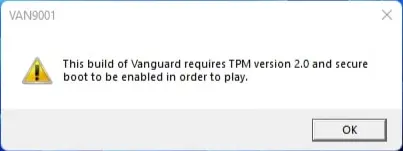
Secure Boot and TPM 2.0 go hand-in-hand with VALORANT’s basic system requirements, especially when it comes to Vanguard. Riot’s reliable anti-cheat system won’t let you jump into VALORANT unless these Windows 11 security features are enabled.

In simple terms, it’s just not going to happen. So, how do you enable Secure Boot, fix those annoying VAN9001 errors, and tackle the TPM issues that are blocking VALORANT on Windows 11? 

So be another normie on the internet and go through this guide and you should be back in VALORANT in no time.

What is Secure Boot?

Secure Boot and TPM (Trusted Platform Module) 2.0 are security features built into Windows 11. Think of them as guardians that ensure every program your computer runs meets high standards of reliability and security. VALORANT needs Secure Boot and TPM to function because they play a crucial role in how Vanguard checks that your system is a trustworthy and secure environment. Essentially, they are part of Vanguard’s strategy to combat most cheaters. 

van9001 valorant

If that’s not all the tech jargon you need for now, Windows 11 usually has Secure Boot and TPM 2.0 enabled by default, but if you run into a VAN9001 or VAN9003 error while trying to play VALORANT, it’s time to get to work. 

But don’t worry! Fixing a Secure Boot issue is usually quite straightforward…

Here’s How to Turn On Secure Boot and TPM

Don’t worry, we’re about to take you through some parts of your computer that might feel a bit daunting if you’re not tech-savvy. Just follow our steps, and you’ll be just fine… 

First, find the BIOS key assigned to your computer. It’s usually one of these: F1, F2, F10, F12, Del, or Esc. Here’s a handy list to help you identify your BIOS key.

ALSO If your mouse isn’t working in the BIOS menu, don’t panic – that’s completely normal; just use the arrow keys on your keyboard to navigate.  

Follow the steps mentioned below:

  • Restart your computer. 
  • Press your BIOS key as your system starts up (it’s a good idea to tap it repeatedly since you have a short window to press it, and it’s easy to miss!). 
  • In the BIOS menu (check the image example above), go to the Boot Options tab. 
  • Then, select Secure Boot and turn it on.
  • Make sure the Boot Protocol/BIOS Mode is set to UEFI and that Secure Boot is enabled. 
  • Next, head to the Security tab and confirm that the TPM State is enabled. 
  • Great job! You’ve just activated Secure Boot and TPM. 

You’re just one reboot away from jumping into VALORANT on Windows 11!

Let your system restart, launch the game, and go out there and blame your teammates for your losses!

But, What if You Still Can’t Enable TPM?

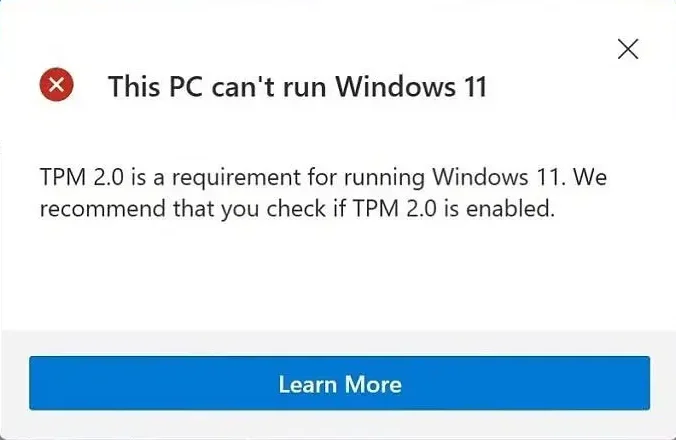
TPM

This situation typically arises if you somehow installed Windows 11 while bypassing the TPM verification. Downgrading to Windows 10 might help you avoid this frustrating issue. 

However, since Windows 11 has been out for over two years, the chances of this occurring are slim. A factory reset could be beneficial, but make sure to back up your files first!

If that doesn’t resolve the problem, you might want to try uninstalling and reinstalling VALORANT. With those two steps, you’ve essentially performed the classic customer support advice of “turn it off and on again.”

We hope this guide helps you start playing Valorant on your windows 11 machine. If it did, keep watching this space for much guides!

Best Marvel Rivals Mods to Boost Performance and Gameplay

0

Marvel Rivals has quickly become a fan favorite in the world of hero shooters. With its fast-paced gameplay, a lineup of iconic Marvel characters, and thrilling combat mechanics, it’s no wonder gamers are hooked. But let’s be honest—no game is perfect right out of the box.

That’s where mods come in.

Whether you’re looking to boost performance, tweak visuals, or add a bit of fun chaos, the modding community has you covered. Here are some of the best mods for Marvel Rivals that’ll make your gameplay even better.

1. FPS Boost Mod – Smooth Moves, No Lag

Let’s face it—Marvel Rivals can be a bit demanding on your hardware. If you’ve been dealing with stutters, lag spikes, or low frame rates, the FPS Boost Mod is here to save the day.

This mod tweaks the game’s settings to prioritize performance, giving you a much-needed FPS boost. Sure, you might have to sacrifice some visual details, but trust me—it’s worth it for that buttery-smooth gameplay.

Why You’ll Love It:

  • Fixes stuttering and lag issues.
  • Makes the game run better on mid-range and even older systems.
  • Comes with a handy tutorial for extra tweaks if needed.

Pro tip: Pair this mod with FSR 3.1 (if your hardware supports it) to maximize performance and keep things looking sharp.

2. Pochita Jeff Mod – Because Sharks with Chainsaws Are Awesome

Sometimes, you just need to add a little chaos to the battlefield. That’s exactly what the Pochita Jeff Mod does.

Inspired by Chainsaw Man, this mod gives Jeff—a shark-like character—a chainsaw strapped to his head. Yes, you read that right. A chainsaw. On his head. It’s as ridiculous as it sounds, and it’s an absolute blast.

Why You Need It:

  • Turns Jeff into a hilarious, terrifying killing machine.
  • Adds an extra layer of fun and absurdity to battles.
  • Perfect for fans of over-the-top character designs.

If you’re the kind of player who loves making opponents laugh before wiping them out, this one’s for you.

3. Custom HUD Mods – Make It Yours

Let’s be honest—sometimes default HUDs just don’t cut it. If you want more control over your interface, Custom HUD Mods let you tweak everything from layout to colors.

Whether you want to declutter your screen or highlight important info, these mods make it easy to personalize your experience.

What Makes It Great:

  • Streamlines your screen for better visibility.
  • Helps competitive players react faster.
  • Adds visual flair to match your style.

4. Sound Mods – Change How Your Game Sounds

Tired of the same old voice lines? Sound Mods let you swap them out for custom recordings, funny memes, or even classic superhero catchphrases.

Highlights:

  • Replace sound effects with retro or meme-based options.
  • Customize voiceovers for characters.
  • Add more personality to your game.

Whether you want Iron Man quoting Tony Stark’s best one-liners or your enemies crying out in meme-worthy defeat, sound mods are a fun way to keep things fresh.

Marvel Rivals is already an epic game, but mods give you the power to make it even better. Whether you’re boosting FPS for smoother gameplay, adding ridiculous fun with chainsaw-wielding sharks, or customizing your HUD and sounds, there’s something for everyone.

So why settle for the default experience? Dive into these mods, experiment with new features, and make Marvel Rivals truly your own.

More Articles From Marvel Rivals:

Marvel Rivals Crossplay and Cross-Progression: What You Need to Know

0

Marvel fans, gear up! Marvel Rivals is here, and it’s packed with your favorite superheroes and villains ready to brawl. But if you’re wondering whether you can squad up with friends on different platforms—or carry your hard-earned progress between devices—there’s good news and bad news.

Marvel Rivals Crossplay? Yes, But With Rules

Let’s start with the good news. Marvel Rivals does support crossplay—meaning you can play with friends whether they’re on PC, PlayStation 5, or Xbox Series X/S.

But there’s a catch.

Crossplay only works for non-competitive modes like:

  • Quick Match
  • Conquest
  • Custom Games (non-ranked)
  • Practice vs. AI

If you’re looking to climb the ranks in competitive modes, the rules change. Ranked matchmaking keeps players grouped by platform to keep things fair. So:

  • PC players stick with Mac players
  • PlayStation players stick with Xbox players

Why the split? It’s all about balancing mouse-and-keyboard setups against controllers—especially when aim assist enters the chat.

Cross-Progression? Not Yet

Now for the bad news—Marvel Rivals doesn’t support cross-progression.

If you’re playing on PC and decide to jump to your console later, you’ll have to start over. That means no carrying over your favorite skins, unlocked heroes, or progression.

For players who like to game across multiple platforms, that’s a letdown. And as of now, NetEase hasn’t confirmed if this feature will ever be added. But hey, there’s always hope for a future update!

Why It Matters

Crossplay and cross-progression aren’t just buzzwords—they’re features players have come to expect. Crossplay makes it easier to connect with friends no matter what console they own, while cross-progression means you can pick up right where you left off, no matter the device.

By offering crossplay—at least in casual modes—NetEase is meeting players halfway. It’s not perfect, but it’s a start.

What’s Next for Marvel Rivals?

For now, Marvel Rivals is sticking to PC, PlayStation, and Xbox with no word yet on a Switch or mobile version. But with Season 1 on the horizon, who knows what updates might be coming?

In the meantime, players can dive into epic battles, explore the character roster, and see what this superhero showdown has to offer.

More Articles From Marvel Rivals:

Chess Joins the Esports World Cup 2025 with Magnus Carlsen as Global Ambassador

0

Chess is set to make its debut at the Esports World Cup (EWC) 2025, marking a historic moment for the ancient strategy game as it integrates into the modern competitive esports arena. With a $1.5 million prize pool and the participation of top players worldwide, the tournament promises to elevate online chess to new heights.

The event will take place from July 31 to August 3, 2025, in Riyadh, Saudi Arabia, and will feature a rapid 10-minute time control format with no increments.

Magnus Carlsen Named Global Ambassador

Legendary chess Grandmaster Magnus Carlsen, widely regarded as one of the greatest players of all time, has been named the Global Ambassador for the Esports World Cup Chess category.

Carlsen expressed his excitement about the event, stating:

“I’m thrilled to see chess join some of the biggest games in the world at the Esports World Cup. This partnership is an incredible opportunity to grow the game, by introducing chess to new audiences and inspiring the next generation of players.”

Carlsen’s involvement is expected to bridge the gap between traditional chess fans and the esports community, further fueling the growing popularity of online chess.

Tournament Format and Qualification

The competition will feature 12 players selected through the Champions Chess Tour, which will host two online qualifying events in February and May 2025.

A Last Chance Qualifier in Riyadh will determine the final four players, opening doors for both amateur and professional participants. This inclusive approach aims to attract a diverse pool of talent, creating thrilling matchups for chess enthusiasts worldwide.

The Rise of Online Chess as an Esport

Online chess has surged in popularity over recent years, driven by platforms like Chess.com and streaming platforms such as Twitch and YouTube. The 2020 Netflix hit “The Queen’s Gambit” also played a pivotal role in boosting interest.

Esports organizations have recognized this trend, signing chess streamers like Hikaru Nakamura and the Botez sisters, underscoring the game’s potential as a mainstream esport.

Ralf Reichert, CEO of the Esports World Cup Foundation, stated:

“Bringing chess, the mother of all strategy games, to the Esports World Cup is a truly exciting moment. Partnering with Chess.com and Magnus Carlsen allows us to showcase chess on a massive stage while fostering growth within its vibrant ecosystem.”

What’s Next?

As the countdown to EWC 2025 begins, fans can look forward to updates on qualifiers, player lineups, and match schedules. The inclusion of chess in the Esports World Cup highlights its evolution from a traditional board game to a dynamic, fast-paced online sport fit for a global stage.

Mark your calendars—July 31 to August 3, 2025—and prepare to witness chess make history in the world of esports!

BGMI LolzZz Gaming Controls & Sensitivity Settings – Pro Tips

0

Are you looking to dominate Battlegrounds Mobile India (BGMI) like a pro? Yash Thacker, popularly known as LolzZz Gaming, has emerged as one of the most entertaining and skillful streamers in the BGMI community. As a content creator for Godlike Esports, LolzZz has captured the attention of fans with his impeccable gameplay and engaging streams.

For those aspiring to level up their BGMI performance, we break down LolzZz Gaming’s control settings and sensitivity preferences, enabling you to replicate his setup. However, remember that practice is key to mastering these configurations.

BGMI ID and Control Setup

LolzZz Gaming employs a three-finger claw setup for precise controls and faster reflexes. If you’re keen to match his style, here’s his Control Code and BGMI ID:

  • Control Code: 7008-3648-7157-7241-574
  • BGMI ID: 526040141

This setup offers optimized button placements for smooth movement and quick responses.

Sensitivity Settings

Camera Sensitivity (Free Look):

  • TPP (Character/Vehicle) – 100%
  • FPP (Character) – 70%
  • Camera – 95%

ADS Sensitivity (Aim Down Sight):

  • TPP No Scope – 75%
  • FPP No Scope – 88%
  • Red Dot, Holo, Iron Sight – 1%
  • 6x Scope – 12%
  • 8x Scope – 10%

Gyroscope Sensitivity:

  • TPP/FPP No Scope – 300%
  • 2x Scope – 300%
  • 4x Scope – 270%
  • 6x Scope – 60%
  • 8x Scope – 60%

ADS Gyroscope Sensitivity:

  • 2x Scope – 300%
  • 6x Scope – 183%
  • 8x Scope – 43%

These fine-tuned settings ensure better aiming precision, recoil control, and faster movements, giving players an upper hand during intense battles.

Key Features in Settings

Fire Settings:

  • Left-Side Fire Button – Always On
  • Shotgun Firing Mode – Tap

Peek Settings:

  • Peek – Enabled
  • Peek Mode – Hold

Advanced Controls:

  • Mark Assist – Enabled
  • Jump/Climb – Separate
  • Quick Scope Switch – Enabled

Aim Settings:

  • Aim Assist – Off (for advanced aiming)
  • Aim Camera Rotation Feature – Enabled

Why Practice Matters

While adopting LolzZz Gaming’s settings can give you an edge, becoming a BGMI expert requires dedication and practice. LolzZz Gaming has spent countless hours perfecting his skills, and replicating his setup is only the first step.

It’s essential to spend time in BGMI’s training grounds to customize these controls further to your comfort. This will help you adapt faster and refine your gameplay strategies.

LolzZz Gaming’s control and sensitivity settings have undoubtedly contributed to his dominance in BGMI, making him a fan favorite. If you aspire to enhance your skills and gameplay, his configuration offers an excellent foundation. However, constant practice and experimentation are crucial to finding what works best for you.

BGMI 3.6 Update: Release Date, Features, and New Desert Theme

0

The much-anticipated Battlegrounds Mobile India (BGMI) 3.6 update is set to deliver a thrilling new experience with its desert-inspired theme, upgraded weapons, and enhanced gameplay mechanics. Here’s everything players need to know about the upcoming update.

BGMI 3.6 Update Expected Release Date

The BGMI 3.6 update is expected to roll out in January 2025. Fans are eagerly counting down the days to explore the new features and improvements in one of India’s most popular battle royale games.

Golden Moon Theme

The update introduces a “Golden Moon” theme, transporting players to a desert landscape filled with golden sands and intense sandstorms. Inspired by the Ramadan season and previous themes like Aladdin Mode, this update promises visually captivating environments and exciting new challenges.

Key Features

1. New Weapons and Skins

  • A11 Royal Pass Gun – An exclusive weapon available in the update.
  • Upgradable Skins – Premium skins for weapons will be added, offering aesthetic upgrades for players.
  • Inflatable Boat – A portable boat that fits in backpacks, allowing for quick water traversal. Its speed increases with more players onboard, making it perfect for coordinated strategies.

2. Map Updates

  • Miramar Map Enhancements – The desert-themed Miramar map is getting a makeover, featuring:
    • Urban Ruins – Dense areas ideal for intense firefights.
    • Oasis Zones – A new terrain to add more strategic depth.
    • Sandstorms – Visibility challenges that create dynamic and unpredictable gameplay.
    • Racing Tracks – High-speed action areas for players looking for adrenaline-pumping sequences.

3. Tactical Pack

The Tactical Pack allows players to carry extra weapons, helmets, or vests. This feature will be especially helpful for reviving teammates using looted supplies.

4. Character and Vehicle Improvements

Players can expect:

  • Smoother Animations – Enhanced character movement for a more realistic experience.
  • Vehicle Controls – Better handling and responsiveness.
  • Weapon Attachments – Improved attachments for precision combat.

5. Creation System

A Creation System has been introduced, enabling players to customize their gameplay experience with new items and personalization options.

Final Thoughts

With its immersive Golden Moon theme, new weapons, and dynamic environmental challenges, the BGMI 3.6 update is set to keep the gaming community engaged and excited. The combination of visual enhancements, strategic tools, and gameplay innovations ensures that BGMI remains at the top of India’s gaming charts.