




Instagram has added a way to blur people on Instagram Stories without leaving the app. The new Pixel effect uses a text prompt to hide someone’s face, so you can post a photo with a friend or partner in it without showing who they are.
What is Instagram’s Pixel effect?
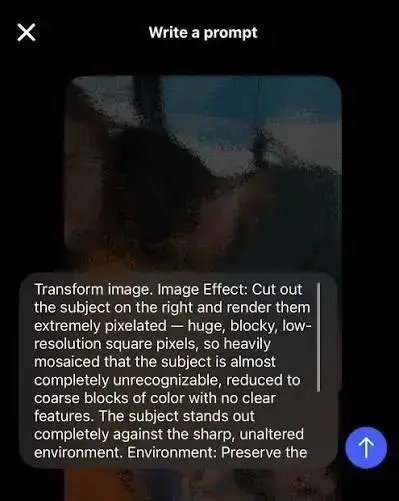
The Pixel effect is an AI tool inside the Stories editor. Meta has launched new AI effects that allow you to pixelate things in your story posts. All you have to do is select the Pixel effect in Stories and then give it a prompt to blur what you want to hide.
Instagram showed how it works with its own sample post. In Instagram’s own example, they gave the prompt of making a man “extremely pixelated,” so you can’t see his face, but you can tell that somebody else is in the photo.
The feature was first reported on September 24, 2026, and has already been nicknamed a “soft launch” tool. A soft launch is when someone hints at a new relationship online, often by showing a hand or the back of a head, before they reveal the person.
How to blur people on Instagram Stories
The process takes a few taps:
- Open Instagram and start a new Story.
- Pick the photo you want to post.
- Open the effects menu and select Pixel.
- Type a prompt that says who or what to blur, for example “make the man on the left extremely pixelated.”
- Check the result, then post the Story or change the prompt and try again.
The wording of the prompt decides how strong the blur is. If you want the person to be a little more recognizable, then you simply adjust the prompt so it doesn’t blur them as heavily as it could. Because the edit is generated by AI, it can take a few tries to get the exact result you want. Zoom in before posting to make sure no part of the face is still visible.
Pixel effect at a glance
| Detail | What we know |
|---|---|
| Feature name | Pixel effect |
| Where to find it | Effects menu in Instagram Stories |
| How it works | You type a text prompt describing what to blur |
| Blur strength | Controlled by how you word the prompt |
| Cost | Meta’s Muse Image tools are free for everyday creation, but heavy users may need a Meta AI subscription |
| Paid option | Meta One Core costs $7.99 a month and lets users restyle more Stories on Instagram |
Who can use it right now
Instagram has not listed a country-by-country rollout for the Pixel effect. It sits in the same Stories effects area that Meta has expanded several times this year. Instagram merged the “Effects” and “Restyle” sections in Stories into one section called “Effects.”
In July, Meta announced more than 30 new AI effects for Stories. Those effects, powered by Meta’s Muse Image model, started rolling out in the US before a wider release. If you do not see the Pixel option yet, update the app and check again over the coming weeks.
Instagram has added several AI tools for creators and influencers in 2026, and the Pixel effect is the newest one.
Why streamers and esports players may use it
Pro players, streamers and content creators often post from LAN events, bootcamps, meetups and trips. Those photos can include family members, friends or fans who never agreed to appear on a public account with thousands of followers.
Blurring bystanders also cuts down on doxxing risk. Doxxing is when someone collects and shares your personal information online, like your location, workplace, or phone number, without your permission. For streamers, this can happen when viewers piece together details from your live content. The privacy guidance for IRL streamers from Streamlabs also advises against showing street signs, addresses and number plates. The Pixel effect can be prompted to hide those too, though results should be checked each time.
Early reaction to the feature
Responses so far are split. Some users have already called it a “pretty cool” idea from Instagram, but a dating expert told the Post that they are “not a fan” and people should hold off until they’re ready to post the other person anyway. Other commenters on Instagram’s announcement post questioned why a prompt is needed for something a simple blur brush could do.
Privacy settings to check alongside the new effect
Meta’s AI photo tools have faced pushback this year. Meta pulled the @mention image feature after criticism in July. The feature let users generate images using public Instagram accounts, and it drew days of criticism over its opt-out policy, including from talent agencies.
That feature is gone, but the related setting is still worth checking. If you don’t want anyone to create with your Instagram content using AI features at Meta, you can turn it off by going to Instagram Settings > Sharing and Reuse. This setting is currently available on mobile only.
The Pixel effect is one of many social media and entertainment updates this month that change how people share photos online.
Frequently asked questions
Can I blur someone’s face on Instagram Stories without another app? Yes. Select the Pixel effect in the Stories editor and type a prompt describing the person you want to blur.
Can I control how blurry the person looks? Yes. The wording of your prompt sets the strength. “Extremely pixelated” hides the face fully, while a lighter prompt leaves the person more recognizable.
Why can’t I see the Pixel effect? Meta’s newer AI effects have rolled out in stages, starting in the US. Update Instagram and check the Effects menu again later.
Does the Pixel effect work on Instagram feed posts? The feature has only been shown working in Stories so far.
