Home Blog Page 412

Genshin Impact 5.6 Livestream: Date, Time & Where To Watch

With the end of Genshin Impact Version 5.5 approaching rapidly, fans of the open-world action RPG are eagerly looking forward to the upcoming Version 5.6 update.

The highly anticipated Genshin Impact 5.6 update is expected to bring with it tons of new content to the HoYoverse title, including new characters, fresh banners, map updates, events, and much more.

From the leaks and official confirmations surrounding the Genshin Impact 5.6 update we’ve seen so far, it’s safe to say that it’s set to be one of the biggest patches the game has seen recently.

Fans looking to know more about what the next update has in store for them can tune into the Genshin Impact 5.6 livestream and get a sneak peek at the contents of the new patch.

Genshin Impact 5.6 Livestream Date & Time

HoYoverse has yet to shed light on the Genshin Impact 5.6 livestream date and time. However, upon analysing the Genshin Impact update schedule, we can safely make an educated guess about the potential date of the Version 5.6 preview livestream.

The Genshin Impact Version 5.5 update launched on March 26, and given HoYoverse’s consistent six-week update cycle, the Version 5.6 update is expected to go live on May 7, 2025.

Generally, the devs organize the preview livestreams for Genshin Impact two weeks before the patch goes live. As a result, it’s safe to say that the Genshin Impact 5.6 livestream will be organized around April 25, 2025, at 8 pm UTC+8.

Genshin Impact 5.6 Livestream: Where To Watch?

Fans looking to catch the Genshin Impact 5.6 preview livestream can do so by tuning into the game’s official Twitch handle on the day of the stream.

We’ll be sure to keep you informed on further updates regarding the Genshin Impact 5.6 livestreams.
How to Get the Cody Rhodes Skin in Fortnite?

0

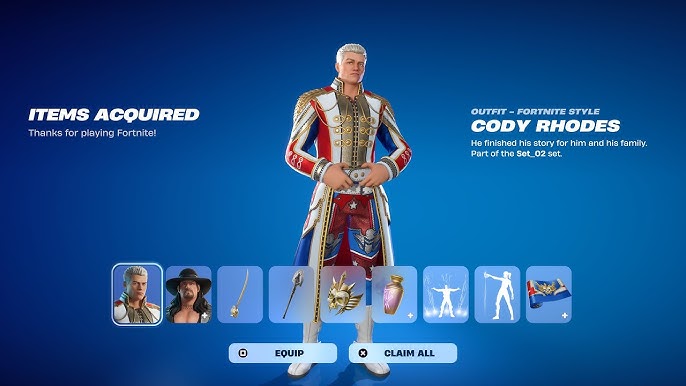
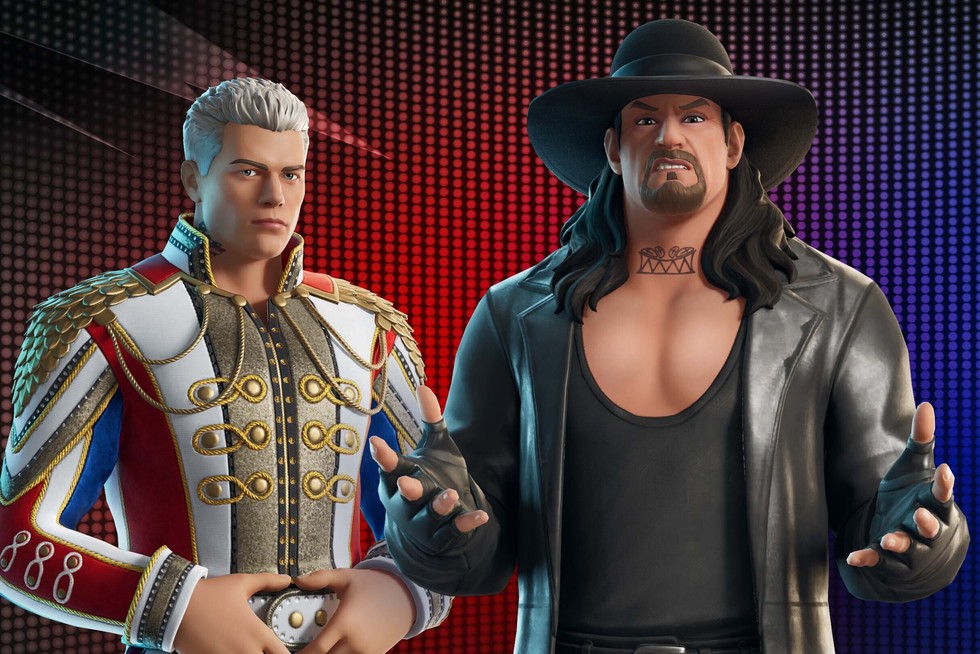
Fortnite has introduced WWE legend Cody Rhodes into the game as a part of the new crossover. Surnamed “The American Nightmare,” Cody Rhodes’ foray into Fortnite arrives at the perfect time to create hype for WrestleMania 41. Epic Games has a rich tradition of incorporating pop culture figures into their battle royale space, and this partnership is another prime exemplar of the trend.

In this article, we will explain how you can purchase the Cody Rhodes skin in Fortnite. Keep reading till the end to find out.

How to Get the Cody Rhodes Skin in Fortnite?

How to Get the Cody Rhodes Skin in Fortnite

Right now, players can purchase the Cody Rhodes skin directly from the Fortnite Item Shop. The skin is available for 1,500 V-Bucks. For those looking to expand their collection, there’s also a special WWE bundle priced at 2,800 V-Bucks. This bundle features not only the Cody Rhodes attire but also iconic wrestler The Undertaker, as well as a range of themed items. These comprise the Nightmare Mantle Back Bling, Cody’s Cutlass Pickaxe, an American Nightmare weapon wrap, and the “WOOOAAHH!” emote, which captures Cody’s in-ring signature energy.

All of these also come as singles. Back Blings are $300 V-Bucks, Pickaxes are priced at $800 V-Bucks, emotes are $300 V-Bucks, and the weapon wrap is $500 V-Bucks. These cosmetics won’t be sticking around in the Item Shop much longer than that, as they’ll only stay until April 25, 2025, so this one is a time-limited release that WWE fans and Fortnite followers won’t be able to miss.

All that players have to do is open up Fortnite, navigate to the Item Shop from the home menu, scroll over to locate the WWE collaboration section, and click the Cody Rhodes skin or pack. When purchased, the skin and any other cosmetics will be delivered to the player’s locker for equipping and use within the game.

Wuthering Waves 2.3 Livestream Codes List, Rewards & Expiration Dates

The highly anticipated Wuthering Waves version 2.3 preview livestream has recently concluded, offering fans a sneak peek at what the next update will bring to the game.

The Wuthering Waves 2.3 livestream, which took place on April 19th, showcased a bunch of exciting new content coming to the Kuro Games title with its upcoming patch, including new playable characters, weapons, events, and much more.

In addition to the aforementioned stuff, fans were also able to get a number of redeem codes that they can use to grab some free in-game rewards.

If you’re here to know more about the redeem codes given away in the Wuthering Waves 2.3 livestream, look no further.

Wuthering Waves 2.3 Livestream Codes & Rewards

Below, we have listed all the redeem codes that were given away during the Wuthering Waves 2.3 preview livestream, alongside their respective rewards:

  • 1STANNIVERSARY – Astrite x 100, Premium Resonance Potion x 3, Advanced Energy Core x 3
  • EVERFLOWING – Astrite x 100, Forgery Premium Supply x 2, Shell Credit x 40,000
  • WITHYOU – Astrite x 100, Premium Tuner x 20, Advanced Sealed Tube x 5

Players are suggested to redeem these new Wuthering Waves codes as soon as possible, since you may not have a lot of time left to grab the rewards before they expire.

When Do the Wuthering Waves 2.3 Livestream Codes Expire?

As confirmed by the devs, the aforementioned Wuthering Waves 2.3 livestream codes are only available to claim until April 21, 2025, at 8:59 am PT.

Be sure to redeem your code before then if you don’t wanna miss out on the free stuff.

How To Redeem Codes in Wuthering Waves?

Now that you have the Wuthering Waves 2.3 livestream codes list, it might be a good time to check out how to redeem them in-game.

Here’s how you can redeem codes in Wuthering Waves:

  • Launch Wuthering Waves
  • Go to the Pause Menu
  • Head to Settings
  • Select ‘Other Settings’
  • Go to the ‘Redeem’ tab
  • Paste the code that you have copied
  • Hit ‘Confirm’

And that’s it! You have now successfully redeemed your first code in Wuthering Waves.

Now all you need to do is repeat the process for every code you have, and you’ll find yourself receiving tons of free Wuthering Wave goodies in no time!

How to Purchase Skins from Valorant Night Market?

0

Valorant is famous for its fashionable and colorful cosmetic skins that enable players to customize their gameplay. Of all the methods through which these skins can be obtained, the Valorant Night Market is perhaps the most thrilling and eagerly awaited in-game event. It provides players with an opportunity to buy weapon skins at a reduced price, but the mechanism and availability are slightly different from the standard Valorant store.

Here is a step-by-step guide on how to buy Valorant skins from the Night Market.

What is the Valorant Night Market?

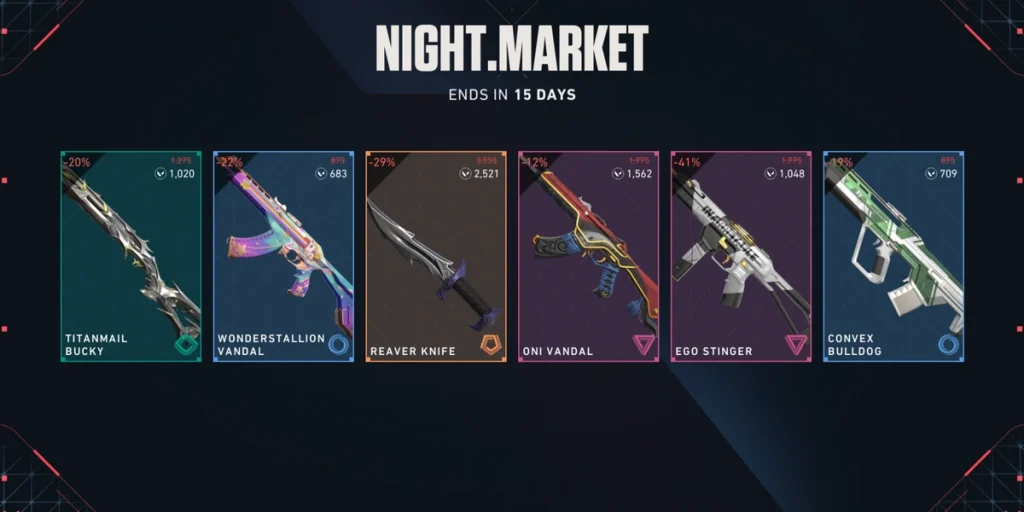
Night Market is a temporary event that occurs about every two months in Valorant. It has six random gun skins available to the player at discounted prices, and each player gets a different choice. These skins are picked from a set of qualifying cosmetics, typically not including recently released bundles, ultra-premium, and exclusive-tier skins.

How to Purchase Skins from the Valorant Night Market?

How to Purchase Skins from Valorant Night Market

Purchasing skins from Valorant Night Market is quite straightforward. Follow the steps mentioned below:

  • Look for the Night Market Availability
    • First, confirm if the Night Market is currently live. You’ll see a special icon, a card with colorful lights in the top-right corner of the main menu. Riot usually announces the event in advance on Valorant’s social media channels and in-game notifications.
  • Open Your Night Market
    • Click on the icon of Night Market. You can see six cards face down. Click on them to reveal your Night Market skins. These are fixed for the whole length of the event, and rerolls or refreshes cannot be done.
  • Look Over Your Offers
    • Carefully examine the skins you’ve gotten. Such promotions normally have skins from Select, Deluxe, and Premium bundles. Beside each product, there is a reduced VP (Valorant Points) price displayed, which tends to be between 20% and 50% reduced from the standard cost.
  • Check Your Valorant Points (VP) Balance
    • Ensure that you have sufficient VP before proceeding with a buy. If insufficient, visit the in-game Store, choose VP purchase, and select the intended quantity. Various modes of payment like credit cards, UPI, etc., can be availed based on your location.
  • Purchase the Skin
    • After selecting your preferred skin, click on it and purchase using your VP. Once you’ve confirmed the purchase, the skin will be stored in your inventory and can be worn from the Collection tab.

Currently, the Valorant S25 Act 2 Night Market is going on and if you are thinking about purchasing a skin, do it before the Night Market gets expired. What’s the best skin you have seen on your Night Market till now? Let us know in the comments below.

How To Get Peni Parker Yatsukahagi Skin in Marvel Rivals

NetEase has added the new Peni Parker Yatsukahagi skin to Marvel Rivals with the game’s latest update, and players are currently able to grab it via the store.

Drawing inspiration from Peach Momoko’s Demon Days, the Peni Parker Yatsukahagi costume will change the appearance of both Peni and her mech SP//dr.

In this guide, we will take a look at how you can unlock the Peni Parker Yatsukahagi Costume in Marvel Rivals.

How To Unlock Peni Parker Yatsukahagi Skin in Marvel Rivals

At the time of writing, the Peni Parker Yatsukahagi costume is up for grabs in the Marvel Rivals store.

Here’s how you can unlock it:

  • Launch Marvel Rivals
  • Go to the ‘Heroes’ tab
  • Click on Peni Parker
  • Click on the Yatsukahagi bundle
  • Hit ‘Acquire’

Once you finish the checkout process, the Peni Parker Yatsukahagi costume will be added to your inventory.

Before you try purchasing the skin, make sure you have enough Units to be able to get it.

Peni Parker Yatsukahagi Skin Price

Players who want to grab the complete Yatsukahagi bundle will need to spend 1600 units, while those only interested in the costume can pick it up separately for 1400 units.

Below, we have listed the contents of the Peni Parker Yatsukahagi bundle in Marvel Rivals:

  • Peni Parker Yatsukahagi costume
  • ‘Bonded in Battle’ MVP animation
  • ‘Jump Scare!’ Emote
  • ‘Yatsukahagi’ Nameplate
  • ‘Yatsukahagi’ Spray

That’s everything you need to know about the Peni Parker Yatsukahagi skin in Marvel Rivals. Alongside this new Peni Parker skin, the Marvel Rivals April 17 update has also brought with it an exciting new outfit for Doctor Strange, alongside the costume customization feature.

How To Get Unstable Molecules in Marvel Rivals: Costume Customization Guide

The newly introduced Marvel Rivals April 17 update has brought some exciting new additions to the hero shooter, including a couple of new bundles and the highly anticipated costume customization feature.

For the uninitiated, the new costume customization feature in Marvel Rivals enables players to spice up their skin collection by adding a personal touch to the character costumes that they own. However, this process isn’t free, and you require a special currency to be able to customize your skins in Marvel Rivals: Unstable Molecules. 

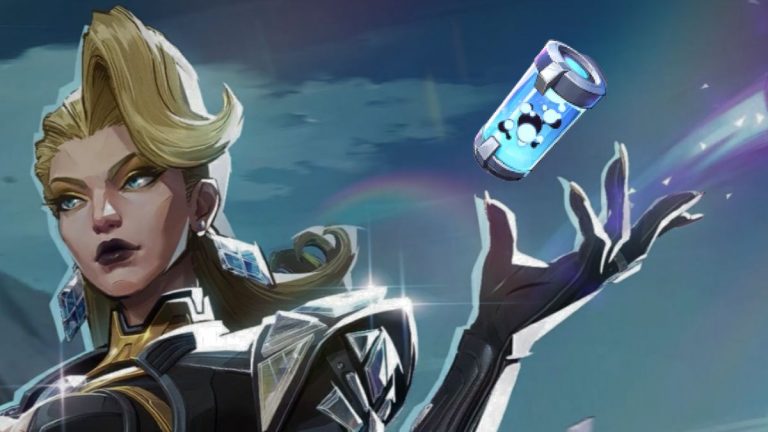
Unstable Molecules is the newest form of currency to be added to Marvel Rivals, and it’s exclusively used to customize skins that you already own with new color palettes.

In this guide, we will check out how to obtain Unstable Molecules in Marvel Rivals and how you can use them to customize your costumes. 

How To Get Unstable Molecules in Marvel Rivals

At the time of writing, Unstable Molecules can only be obtained by exchanging Lattice, which is a premium currency in Marvel Rivals.

Upon exchanging your Lattice, you will get Unstable Molecules in a 1:1 ratio.

With that being said, NetEase has confirmed that they will introduce additional ways to obtain Unstable Molecules starting Season 3. So if you’re short of Lattice in Marvel Rivals, you’ll have to wait for a few more months.

You can get Lattice in Marvel Rivals by purchasing it with real money.

Marvel Rivals Costume Customization Guide

Each costume customization in Marvel Rivals will set you back 600 Unstable Molecules, which means you have to spend 600 Lattice per skin.

Once you have acquired enough Unstable Molecules in your Marvel Rivals wallet, simply follow these steps to customize your skin:

  • Launch Marvel Rivals
  • Go to the ‘Heroes’ tab.
  • Select the hero and their skin that you wish to change
  • Hit ‘Customize’
  • Pick your preferred color pattern
  • Click on ‘Acquire’

Once you’ve finished the checkout process, you’ll be able to unlock your new colored skin in Marvel Rivals.

Discord to Check Age With Facial Scanning

0

A new feature devised to verify the age of users is getting tested for Discord, where users will now have to upload a photo or scan their faces to verify their account.

Discord is no longer a voice chat software; it has turned into a social media platform of its own, boasting communities, lobbies, and a plethora of features. As more features are introduced, moderation efforts have also increased, and Discord is getting more stringent as the platform continues to battle sensitive content.

“For Face Scan, the solution our vendor uses operates on-device, which means there is no collection of any biometric information when you scan your face. For ID verification, the scan of your ID is deleted upon verification,” they explained.

As the number of unverified accounts continues to rise, we must see a change in the dynamic, and Discord’s approach to keep its users safe is commendable. This would require users to go through an additional step before logging in, but it is worth it, given that it makes Discord a safer place to be.

Users with underage IDs will have their accounts revoked, while users who were wrongly banned will have the chance to appeal to have their accounts reinstated. We do not have any idea when this feature will come to Discord, but this feature will cause a lot of sensitive content to get removed from the software.

How To Get Doctor Strange Zombie Skin in Marvel Rivals?

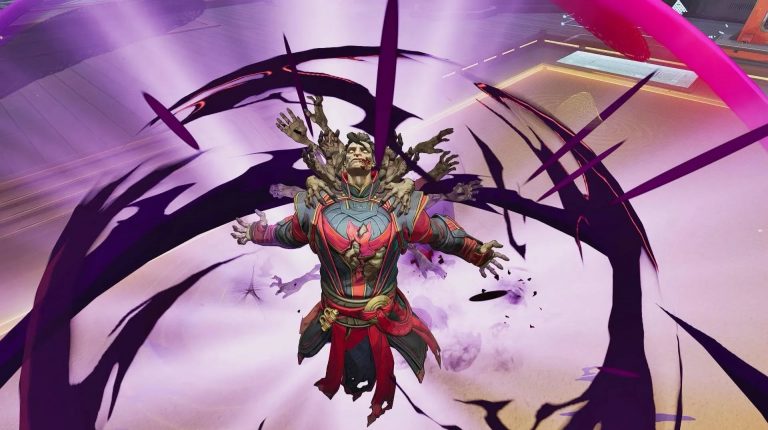
NetEase has just introduced a brand new Doctor Strange Zombie skin to Marvel Rivals with the game’s April 17 update, and players are able to grab the costume right away, along with another newly added Peni Parker outfit.

The new Doctor Strange Multiverse of Madness costume, which has taken inspiration from Marvel Studios’ Doctor Strange in the Multiverse of Madness movie, brings a unique look for the fan-favorite Vanguard in Marvel Rivals.

In this guide, we will walk you through the steps you need to follow to unlock the Doctor Strange zombie skin in Marvel Rivals.

How To Unlock the Doctor Strange Zombie Skin in Marvel Rivals

Unfortunately, the Doctor Strange zombie skin isn’t free to grab.

Marvel Rivals players can unlock the new Doctor Strange Multiverse of Madness costume by heading to the in-game store and purchasing it directly using Units.

Doctor Strange Multiverse of Madness Skin Price & Bundle Contents

The full Multiverse of Madness bundle for Doctor Strange will set you back 2,400 units. If you’re only eyeing the costume, it’ll cost you 2,000 units on its own

Purchasing the whole bundle will net you the following bonus cosmetics alongside the character skin:

  • ‘Dreamwalking’ MVP Animation
  • ‘Doctor Strange in the Multiverse of Madness’ Nameplate
  • ‘Arcane Undead’ Emote
  • ‘Doctor Strange in the Multiverse of Madness’ Spray

In addition to the new character costumes for Doctor Strange and Peni Parker, the Marvel Rivals April 17 update has also implemented customizable skin colors to the hero shooter, giving players even more ways to personalize their gameplay experience.

IEM Melbourne 2025: Everything We Know

IEM Melbourne is the next big tier-1 event all fans of CS2 are looking at, while there will be all the top teams, barring Team Spirit, present, this event will also mark the debut of m0NESY in Falcons’ colours. Here is everything we know about IEM Melbourne 2025.

Six teams from two groups advance to the playoffs, where 16 teams will be in a double-elimination group stage. Each group’s top seed advances directly to the semi-finals, while the second and third seeds are placed in a quarterfinal with four teams.

Teams

Group A

  • MOUZ
  • FaZe
  • The MongolZ
  • 3DMAX
  • GamerLegion
  • Complexity
  • paiN
  • BIG

Group B

  • Vitality
  • Natus Vincere
  • Falcons
  • Virtus.pro
  • Liquid
  • SAW
  • MIBR
  • FlyQuest

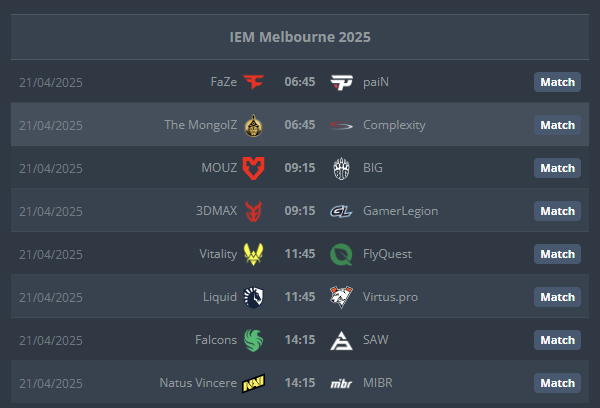
Opening Day

Image via HLTV

While there is no one match to highlight from opening day, fans will be keeping their eyes on Falcons vs sAw to witness m0NESY’s debut, while MongolZ vs Complexity will be another well-matched affair.

Prize Pool

1st. $125,000 + Club share: $160,000

2nd. $50,000 + Club share: $100,000

3-4th. $25,000 + Club share: $80,000

5-6th. $12,500 + Club share: $60,000

7-8th. $7,000 + Club share: $40,000

9-12th. $5,000 + Club share: $20,000

13-16th. $4,000

Vitality comes into the tournament as the clear favourite, but they won’t have an easy path with the likes of FaZe, MOUZ, and Falcons in contention. Tune in on Twitch and YouTube to see the best players fight it out for the big prize.

Marvel Rivals Season Length Reduced to Two Months: Insights From Director

GuangGuang – who is otherwise well known in the community as the creative director of Marvel Rivals has now revealed a significant paradigm shift in the structures of the seasons – beginning with the current season which is 3rd of the series with a new two-month season model, where changing this would help with easier introduction of newer elements within the game and will also keep the players engaged continuously. Moreover, this announcement was made during Dev Vision Vol. 05, where GuangGuang discussed the reasons behind this decision and what lies ahead. 

A shift in season duration

One of the most notable updates coming to Marvel Rivals is the reduction of each season’s length, where instead of the previous long seasons, there will be a new two-month cycle that will maintain the game’s space and ensure players are always hooked to the latest updates within the game. 

During the presentation, he also went on to say that the length of each season was carefully considered to build a sense of engagement and urgency, where with shorter seasons, the players will be more hooked, thereby increasing the amount of their anticipation towards the next update. This will not only provide more content cycles but also improve update timelines for the development teams for the game. 

Development hurdles and possibilities

Like we said towards the end of the previous section, the two-week framework would not only help the gaming community, but also the development teams at NetEase Games, who can now be tasked with regular update cycles within tighter deadlines, which was something not that easy just a short while ago. A slew of new features, balancing game elements, and enhancing the overall player experience. 

This, however, also came with his confidence that the development team could tackle this situation only because of how the team has been built, due to their proven history of delivering high-quality content for live games, and also how the team has been well-positioned to keep pace with their accelerated milestones for updates. GuangGuang also mentioned that internal discussions and testing have validated how the new direction could merge with the management’s overarching vision for the game. 

Here’s what to expect beyond Season 2

Marvels Rivals Season 2 has also been live for a long time, up until April 11, 2025. Throughout this season, however, players can also look to newer and faster updates thanks to the now announced update cycle. Additionally, Season 2.5 is also expected to announce Ultron as a playable character, expanding the game’s content. 

The shift to a new two-month format will be launched with season 3, and Marvel Rivals is now well-equipped to be at the forefront of IP games, meaning the future only becomes more exciting.

Keep watching our space here on Talkesport for the latest updates to get the latest updates from the esports industry.