Home Blog Page 1807

Best Assault Rifles in COD Mobile – Season 11

Call of Duty: Mobile is a multiplayer focused first person shooter game. The game has its own battle royale mode but nothing matches the authentic COD experience offered through the multiplayer modes. The game is fairly competitive and as one rises through the ranks and the skill level matters a lot alongside the game knowledge.

While you have to develop your own skills, we can help you in terms of the game knowledge. Refer to this list of top five assault rifles to take into your matches in COD Mobile.

Guns play a very vital role in the functioning of COD Mobile. Having the right weapon at the right time is extremely necessary for the players and those who carry around same guns for each and every combat face a huge disadvantage in certain situations.

For the maps like Nuketown and Raid, it is essential for you to have at least one burst damage loadout like SMG and Shotguns and for maps like Firing Range, the snipers and assault rifles are more preferred in COD Mobile.

No matter what mode you play, it is very important to carry around a minimum of two assault rifles in your loadouts to have better chance at winning. For you to gain that advantage, we will discuss the best five assault rifles you can carry to have an even match for every situation.

Top Five Assault Rifles for every situation in COD: Mobile

Assault rifles play a significant role in COD Mobile for close to mid-range combats and to function correctly, one must consider various factors under which the assault rifle will be used.

The player must understand the map terrain and each location correctly. For example, if you are playing in Nuketown, you need to have an AR that can bring enough burst damage in close range fights and with higher firing rate to melt down your enemies easily.

In this scenario, the ADS accuracy can be compromised to get a better gun with good hipfire accuracy and high mobility. Now if you consider another map like Raid, the combats that mostly take place are in mid range and here, you need to have a gun that matches your opponents.

If you carry the same AR you used in Nuketown, you will be at a bigger disadvantage. You need a gun which has better ADS accuracy, low recoil and enough mobility to quickly disengage after finding the kills. The five weapons mentioned below are picked from each category that will help you in close, mid and even long range fights. It is recommended to at least keep a combination of two guns mentioned below to have better results in each map.

DR-H

The first gun on our list is DR-H. It is an assault rifle that gives you the highest raw power on this list and is fairly easy to control. Now if you consider the scenarios mentioned above, DR-H can match the power of most SMGs and can give you a fair chance at winning a duel in Nuketown.

Similarly, DR-H is enough stable that you can easily control the gun for mid-range fights but there might be a slight disadvantage against other stable guns with low recoil.
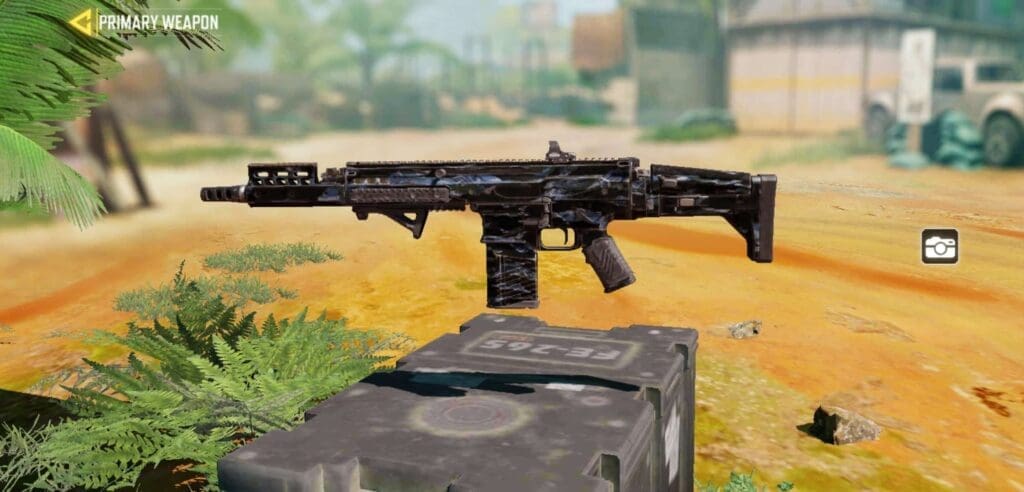
COD Mobile Assault Rifle DRH

DR-H can be considered as the most stable and best weapon to use in close to mid range combats but the biggest thing that this gun lacks is the mobility. You can win any duel if you aim accurately but if the backup arrives in time, it is extremely difficult to navigate to the safe locations.

The gun also have a base magazine of 20 bullets which is far lesser than its fellow ARs and hence you will have to think before firing.

If you are playing Raid, you can use this DR-H to land a mid-range kill through three open areas and still have enough time to jump-slide to safety behind the walls/doors and even the fountain. We recommend to carry this game with red dot sight, extended magazine and other attachments that will make it more mobile and the gun becomes a beast that can instill terror in your enemies.

KN-44

The next gun on our list is named as KN-44. You can consider this gun as the best option for any close range fight. It has an insane fire rate that remains unmatched by any other assault rifles. If you like to play deathmatch mode, this gun is a must to have in one of your loadouts.

If you are not a fan of SMGs, this gun works exactly the same but with a bit more damage. In deathmatch, there are again maps like Firing Range in which this gun will not be effective at all if you can’t convert the combat in a close range fight.

The mobility with KN-44 is perfect and you can just slide in, catch some players off-guard, land some kills and dash out to safety.
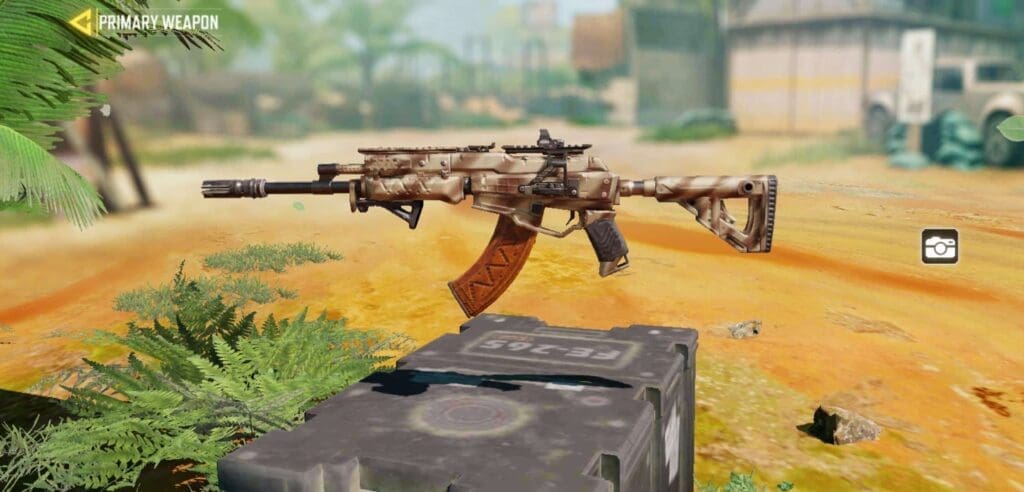
COD Mobile Assault Rifle KN 44

Now if you play domination, this is again the go-to pick for you. Domination mode requires you to fight close range and tactically, no matter which map you play and hence make sure to make the full use of this advantage by picking KN-44 over any other guns to dominate your opponents.

We recommend you to use a thermite or landmine alongside the smokes to help you in the dmonation mode. Talking about the attachments, it can be customized to much higher extent and you can create a gun that you like.

Adding extra bullets via extended magazine is always recommended but if you want to increase things like ADS accuracy, hip-fire and mobility around the gun, pick the attachments that match your requirements.

Man-o-War

As the name suggests, the gun is made for war and is incredibly strong than other weapons. The gun is heavy to carry around but dishes out so much damage that even LMGs can be defeated with this gun.

Man-o-War can be considered as the best AR so far and with more and more weapons getting added to the game, the options are increasing but this gun is still a solid pick against most of the weapons.

It has the capability to even destroy the DR-H users but mastering the gun’s recoil pattern accurately is a very hard task for anybody. If you want to absolutely obliterate your enemies, this is possibly the best choice but it comes with a big catch. You have to practice hard with this gun as the mobility is very low and hence, even with sliding mechanism, you can get easily caught.
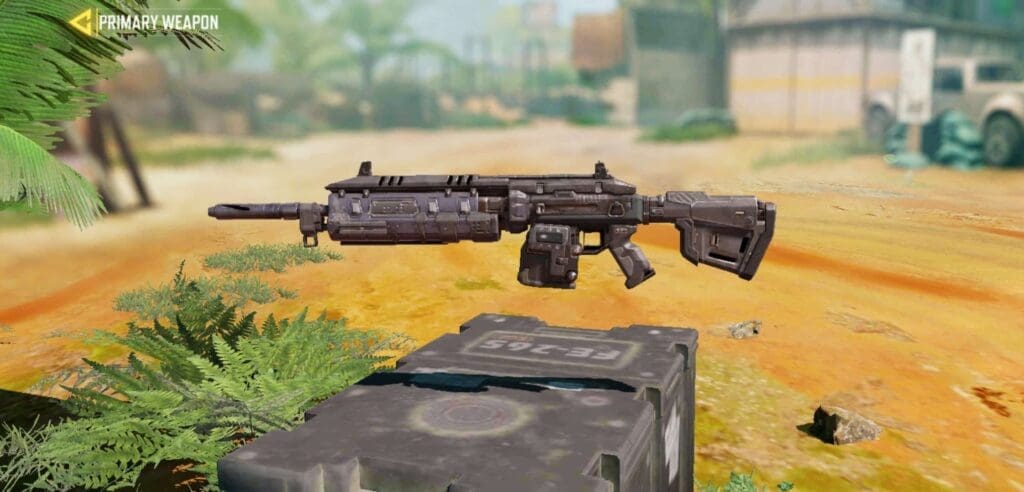
COD Mobile Assault Rifle Man-o-War

For search and destroy mode, Man-o-War is a great choice for aggressive push but consider yourself as a sacrifice in that situation because even if you can easily catch an entry frag, it is almost impossible to run away from the cover fires. These are the game intricacies you will need to learn by experience. This gun should be customized for increasing the mobility and accuracy but you can even add some laser sight and other close range attachments to carry this gun into deathmatch modes.

M4

The very first gun that is available when one starts playing COD: Mobile is M4. It is very easy to obtain, master and increase the XP to have a complete set of modifications available right from the start.

Some players can consider this gun as an inferior to the others on this list because of it’s stability but that’s what makes it unique. There are times when you play maps like Firing Range and you require a gun that can accurately hit targets at long range without compromising its damage output.

M4 is absolutely perfect gun for mid to long range fights but is slightly at disadvantage at close range combats. The gun has lesser damage than its competitors and hence it is not wise to choose this weapon for close range.
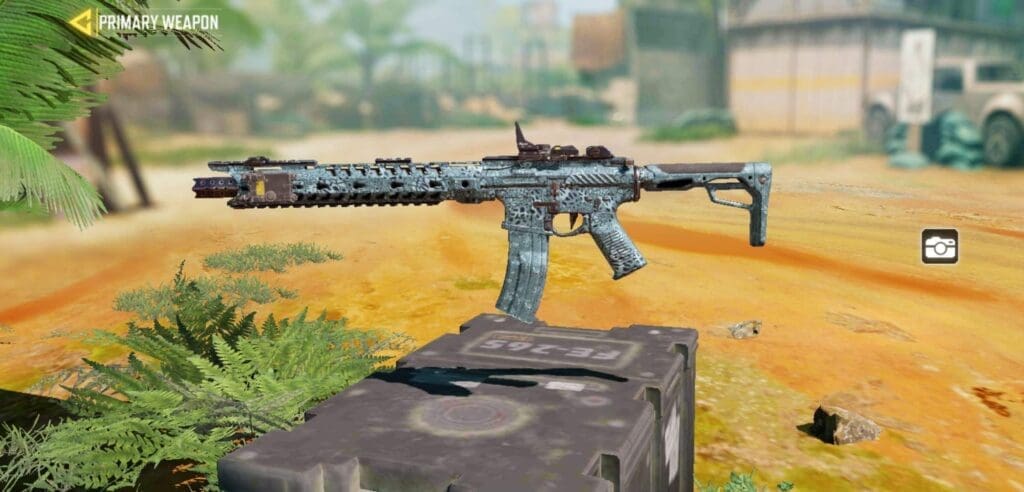
COD Mobile Assault Rifle M4

If you like to play Search and Destroy more, and have some specific positions that you hold which requires you to battle at a long range, M4 with higher scope variant is your perfect choice.

Attaching a 3× scope is ideal for this gun alongside the extended magazine and other attachments can be altered as per your preferences.

This gun can challenge the sniper players if the opponent misses the first shot and can easily beat opponents with unstable guns who have a bad aim. This is recommended gun for entry level players but is a perfect and most recommended AR for long range fights.

AK-47

The last weapon on our list is AK-47. This is a very well-known name and its various iterations occur across many titles. This gun can be considered as a double edged sword just because of its unexpected recoil pattern. Ak-47 is one of the finest weapons in COD: Mobile but when you consider it as a go-to weapon, things get tricky.

At lower ranks, you will not face any issues while using AK-47 as it is one of the earliest available weapons and most of your opponents will run the game.

When you climb the ladder and reach to a point where even you have almost all the weapons unlocked and your skills have been honed, that’s the time when this choice begins to become questionable.
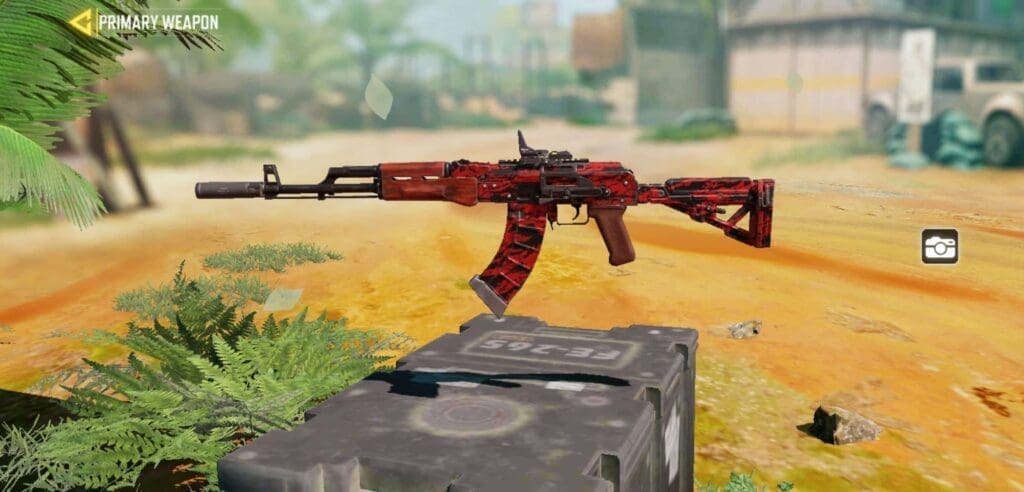
COD Mobile Assault Rifle AK47

Players who will have access to much higher category weapons like DR-H, ICR and M4 will beat you in an instant if you don’t aim correctly and come into open fields for firing.

AK-47 lacks firing rate, mobility but has an insane damage till decent distance. The gun feels shaky even if you combine it with stable attachments hence it is highly recommended to use this weapon by keeping that in mind.

This gun makes it to the top five because of its sheer raw power and if you are willing to sacrifice the stability and opt for risky plays, it can give you the most surprising results time to time. Get ready to lose at the start and learn this weapon good enough to stomp your enemies once you understand the detailed mechanics of how AK-47 works with various attachments in COD: Mobile.

Conclusion:

These are our picks for top five assault rifles that COD Mobile has to offer. Now utilising the weapons correctly is what matters. Each and every scenario cannot be included in this article hence you will have to learn from your experiences and become better by playing with those guns regularly. Also, try customising each gun with all the options available till you find your perfect set of attachments.

This is a trial and error method but the time invested in this method is worth it. It is also must for players to keep one short range and one mid to long range AR in their loadout options. You can always carry more than two Assault Rifles but saving slots for SMGs, LMGs and Shotguns is equally necessary in COD Mobile.

We recommend you to carry DR-H and KN-44 if you like domination and Deathmatch, M4 as a long range option and AK-47 and Man-O-War only when you master it. You can use both of these guns in unranked matches before trying them into ranked matchmaking. Let us know if this small guide helped you to improve your choice of assault rifles and made your gameplay slightly better.

Also Read: How to find your sensitivity in COD Mobile.


Follow Us

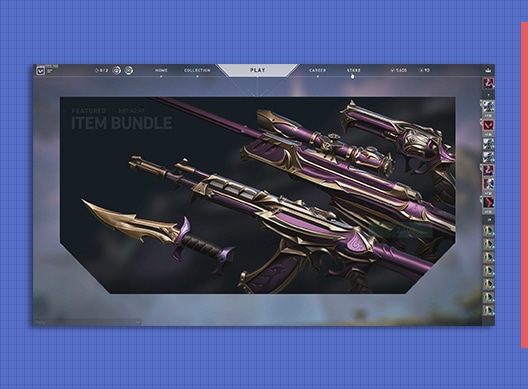
Riot teases the return of Reaver skin collection to Valorant

0

It appears like the Reaver collection is about to make its return to Riot’s tactical shooter Valorant. The skin bundle was originally available for purchase during the closed beta but was removed from the store later.

A recent tweet by the Valorant devs including a cryptic message seems to hint towards the return of Reaver collection to the game.

In the Tweet, Riot asked fans to “Decode this” while attaching the post with a mysterious picture with some words written on it in multiple languages.

When translated, the words seem to say, “I’m coming back.”

What further fuels the speculation is that the picture includes the same scope that is observed when aiming down sights with the Reaver Vandal.

According to Valorant Leaks on Twitter, the Reaver collection will come as a Halloween surprise for the fans, and they will even be “new and improved.”

Aside from this collection, the next update will also introduce the new agent Skye to Valorant.


Follow Us –

Agile Perk in COD Mobile – How To Use It

0

COD: Mobile is a portable version of Call of Duty which the franchise enthusiasts can play on the go. A simple and easy game allows the users to experience the thrilling experience of playing COD on a mobile phone. A big update added multiple features and events to COD Mobile.

Players have to complete some tasks to earn rewards respectively but some players are facing difficulties while completing Agile perk in COD Mobile.

Activision always provides its community with rich content and to mark their anniversary, the scale of events has been increased. This time, the featured, seasonal and daily task rewards are increased and hence players are finding ways to complete each and every task.

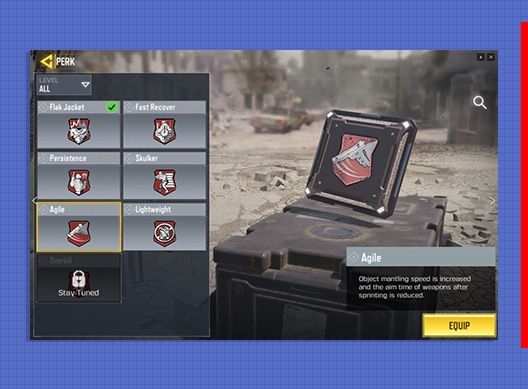
The Agile perk task requires players to kill their opponents by equipping the mentioned perk. It is a no-brainer to kill the enemies but the tricky part is to assign the perks correctly. This task marks the beginning of the Elite Marksman event and is very crucial for players trying to complete it.

ELITE MARKSMAN EVENT DETAILS:

Players have to complete the following list of tasks to earn the final reward. Rewards are offered at each step of completion and the final reward is the new NA-45 sniper rifle along with tons of battle pass experience points.

  • Kill 10 enemies with Agile perk equipped
  • Kill 5 enemies with a sniper rifle
  • Earn long shot medal five times
  • Kill 15 enemies with a sniper rifle equipped with 2 attachments.
  • Kill 20 enemies with a sniper rifle equipped with 5 attachments
  • Kill 20 enemies with an Outlaw sniper rifle equipped with laser attachment
  • Kill 20 enemies with an Outlaw sniper rifle equipped with an optic attachment
  • Kill 20 enemies with an Outlaw sniper rifle equipped with four attachments

HOW TO COMPLETE AGILE PERK TASK IN COD MOBILE

Steps to complete Agile Perk tasks are very simple and the task can be completed within a single match. The only tricky part is to assign the perks correctly and once you do so, it is just about killing your enemies. Here is how to complete the task:

  • Launch Call of Duty: Mobile and select the loadout column.
  • Select any weapon of your choice and we recommend you choose an SMG.
  • Below the Perk section, tap on the column which has flashy reddish cards on display.
  • Select Agile Perk from that section and save the loadout.
  • Enter multiplayer matches, like deathmatch, and mostly play maps like Nuketown which has more close-quarters combats.
  • Use that gun to destroy your enemies and make sure to secure 10 kills in a match.
  • After finishing the match, your task will be completed.

This is the method to equip Agile perk and dominate your enemies. We recommend to take an SMG like PDW with Agile Perk and extended magazine and play Nuketown. Use the slide-jump mechanism and surprise your enemies and land some swift kills.

After completing your match by dominating the opponents, you can savor the sweet taste of victory by visiting the Seasonal events tab and collecting the rewards which will be awarded after you complete this task. We wish you good luck.

Also Read: How to get a Nuke in COD: Mobile


Follow Us On Our Socials –

COD Mobile redemption center not working – how to fix it?

Call of Duty: Mobile launched a wide array of events on the occasion of the game’s anniversary. These events are mostly user interactive and hence require the players to finish certain tasks to unlock the rewards. Recently, the Pawn Takes Pawn event offered COD Mobile players with free redeem codes and due to server overload, the redemption center website was not working.

Players were trying to redeem the rewards but after entering the UID and coupon code, the website was stuck on loading screen or did not respond at all. The reward codes were rendered useless for the time being and players spammed the website which may have increased the user load. Although the website was stuck, there is a possible solution to this problem.

COD Mobile Redemption Center fix

Players who are constantly failing at redeeming the free rewards can try the following method to fix their problem. The first fix is the most common solution to the problem but if that does not work for you, try the other solution.

  • Visit the COD Mobile Redemption Center website.
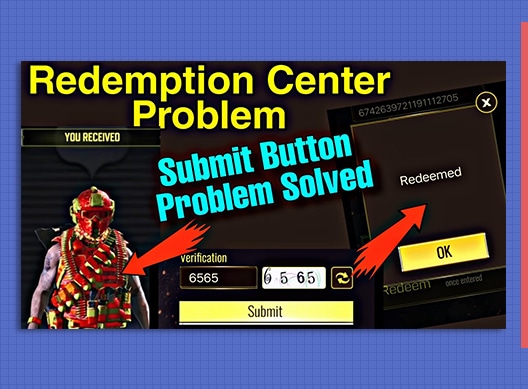
  • Type in the UID and voucher code. Before entering the Verification code, check if the box displays “6199”.
  • If that is the case, refresh the code by clicking the button provided next to the display box and enter the new code. Click on submit
  • If the website displays any other code, try submitting directly and if the website is stuck, follow the step given above.

By refreshing the verification code, several players were able to solve this problem. The problem was not much serious and a simple refresh could solve the problem.

If your problem still persists, try to open the website from a different browser or a different device and follow the steps given above. These two solutions can fix this problem for most of its user but if you still face it, wait patiently for few hours and try again. We hope that all your problems will be fixed by this method.

Also Read: How to earn Long Shot medal in COD Mobile.


Also Read –

Thumbnail Via: Shanuji Gaming

How to surrender in Valorant

0

After weeks of waiting, the much-anticipated ranked competitive mode has finally arrived for VALORANT, featuring an all-new set of rank icons with the peak rank being renamed to Radiant. Alongside this new game mode, VALORANT patch 1.02 also implemented one of the most requested features to the game – the Early Surrender button.


The surrender button enables players to opt out of a VALORANT game before its conclusion. All the remaining players of a team need to agree on the vote for it to be passed and once passed, awards the opposition for all the remaining round wins, while offering the round losses to the team surrendering.

Here’s how you can use this new Early Surrender feature in the next VALORANT game you find unwinnable:

  1. Press the Enter key to open chat.
  2. Type “/ff” or “/forfeit” in the chat box, without the quotation marks.
  3. If a teammate calls up the vote, all you need to do is type “/yes” or “/no” in the chat to register your vote. You can also use the F5 and F6 keys on your keyboard for the same task.
  4. If all the remaining players in your team votes yes, the vote will be passed and the game will end.

Keep in mind that the surrender vote cannot be called before the 8th round, and furthermore, it can only be called once per half. This has likely been done to prevent spamming of the surrender vote and to keep games interesting while also giving the players a chance to surrender if and only when continuing a game would seem futile.

Since surrendering a game is the same as losing all the remaining rounds left to make the enemy team win, the surrender button should only be used when a player of your team has left and the game seems unwinnable through a 4v5. Surrendering when the game is still 5v5 is generally a bad choice unless your team is heavily out skilled by the opposition, and you’re certain that no further round can be won by your team.

CSGO Source 2 String Found In Latest Artifact Update

After months of ongoing rumors about the massive Source 2 update for CSGO, it appears as its release date might be drawing near.

In a recent leak by ‘Gabe Follower’ on Twitter, he seems to have found some strings in the newest Artifact update hinting towards the upcoming Source 2 engine update for CSGO.

While nothing much can be conclusively deciphered from the aforementioned strings, fans are suspecting that the strings might refer to a real-time lighting and shadow system for the competitive shooter being in the works.

The Source 2 update has been veiled in uncertainty over the past few months. While no official confirmation has been made by Valve on the arrival of Source 2 in CSGO, multiple leaks seem to point otherwise. Only a few days ago, a series of leaks suggested that the Source 2 port is nearly done. So don’t be surprised if it arrives to the FPS title in the next few weeks.

Also Read | CSGO Will Have Open Beta For Source 2: Leaks Suggest

Apart from Source 2, the leaks also hint at CSGO receiving three additional game modes in near future including Retake, Heist (Inspired by PAYDAY), and 1v1/2v2 versus modes.


Follow Us On Our Socials –

Is Phasmophobia down? How to check the server status

0

Phasmophobia is the newest talk of the town in the world of video games. The psychological horror title by Kinetic Games has steadily grown in player count over the past few weeks and has been picked up by some big YouTubers and streamers which led to a further increase in its popularity.

Due to a sudden surge in popularity of the game, it isn’t rare for Phasmophobia to experience frequent server issues. If you find yourself unable to connect to the servers, there’s a good chance that the servers are down, unless there’s a problem with your internet connection.

To find out for certain what’s causing the problem, just take a peek at the Photon Engine website. The servers of Phasmophobia are shown on this website and if you see an issue with the servers in your region, then you’re unlikely to be able to play the game. You can also check the downtime over the past day on the website.

Also, be sure to check the pinned Steam thread focusing on server issues in Phasmophobia. If you see a lot of players commenting about similar issues, then the servers are probably down.

There’s nothing you can do to fix these server problems. Your best bet in this scenario is to wait it out. The devs are generally swift to fix these problems and you’ll likely be able to reconnect to the game in a couple of hours.

How to Use UAV Control Terminal to Win in PUBG Mobile Payload 2.0 Game Mode

PUBG Mobile has added an updated version of Payload Mode within the recent patch. The new Payload 2.0 comes with different and upgraded features like armored vehicles, helicopters, UAVs and Radars that enhance the hardcore battle experience. UAV Control Terminal and Radars are very limited in this mode and we will discuss how to use both of them correctly to get an easy win with lot of kills in PUBG Mobile.

Uav control terminal pubg
Guns and Skills in Payload Mode

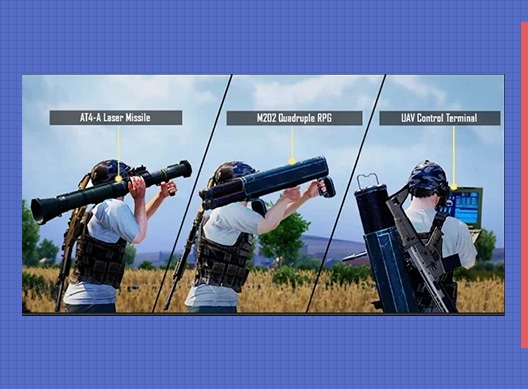
Payload Mode is a special time-limited game mode in PUBG Mobile. The players can avail a wide range of technologically upgraded utilities like missile ammunition weapons, sustainable vehicles and helicopters and two operator skills.

Operator skills indicate towards a unique possession which gives a slight advantage to its users. Players can use them in various strategic ways to outplay their enemies and grab the win pretty easily.

How to win using UAV Control Terminal in PUBG

There are many ways and combinations through which players can gain a big advantage than their enemies by using UAVs and Man Portable Radars. Here we will discuss about the most easy way with specific set of steps that will help you get a sweet victory much easily than your opponents.

  • Enter Payload Mode and decide your drop location. Keep in mind that you need to drop near locations that have UAVs nearby so jump near Yasnaya Polyana, Pochinki or School.
  • It is highly recommended to start at School because a Helipad is already provided on rooftop where you an easy access to a helicopter.
  • Burst down the steel door in the basement of the school and grab the UAV and portable Radar.
  • Now if you want some action, head towards hotspots but to ensure a victory, we suggest you to relocate towards a more safer, higher altitude and centralised location in the map.
  • Once you find such a spot, get ready to set up your operator skills. Firstly deploy the Man Portable Radar which will scan the nearby area for enemies and armored vehicles.
  • Once you know the location, set up traps to catch your enemies off-guard and easily wipe them.
  • During the final stages of the circle, continue the steps given above but now, deploy the UAV and mow down your enemies with the missiles provided inside them.
  • An UAV is equipped with eight missiles, so use it carefully because it can be fired only once. Spot the enemies and rain down the missile barrage on them.
  • By using this method, you can easily grab high amount of kills and a relatively easy win over your opponents.

This method can be tweaked as per your play style. If you like to be more patient and lay strategic traps, then you can follow the steps given above.

If you are willing take more risks and like rush gameplay then navigate your helicopter and travel to other locations that have UAVs and grab all of them. Be cautious as there might be enemies in your way and hence you will have to fight for stacking more than one UAV. The more UAVs you equip, the better are your chances to dominate battlefields in Erangel and grab higher number of kills, Good luck!

Also Read: PUBG Mobile Beta 1.1 : Metro Royale Details.

How to Use The UAV Control Terminal Once in PUBGM Event Mission

PUBG Mobile recently upgraded its Payload Mode and launched a “2.0” version of it. This upgrade brought back the highly wanted payload game mode alongside some new features, vehicles, utilities, operator skills and more. Players who have tried this mode must have spotted a small plane flying around and shooting on enemies. This new operator skill is called UAV control Terminal and we will discuss how to complete the missions related to it in PUBGM.

UAV stands for Unidentified Aerial Vehicle and is mostly seen in games like Call of Duty: Mobile. This feature is added for the first time in PUBG Mobile and there are lots of features that come inside a single skill.

How to use UAV Control Terminal in PUBGM

UAV Control Terminal is an operator skill that aids in the surveillance of nearby enemies and also helps in open field combats. It is very essential to understand how the UAV works to use it perfectly as they are very limited in numbers and can only be located in selective places.

Using UAV Control Terminal once inside Payload Mode 2.0 is a mission currently ongoing in the featured events. Players who complete this mission are awarded with a free RP mission card. Here is how to complete this mission very easily.

  • Start Payload 2.0 mode and drop in Pochinki, School or Yasnaya and locate the exact spots.
  • Grab the UAV after bursting through the locked doors and do not use it instantly.
  • Roam around the map and wait until you fight in open fields. Remember to engage in a mid range or long range combat.
  • After starting a fight, hide in a safe spot and launch UAV towards your enemies. Use the missile option to kill your enemies but remember not to spam it as only 8 missiles are available per UAV.
  • After annihilating your enemies, continue to play the match like any regular game. When the game ends, you will see that the mission has been completed.

This is the simplest way to complete the mission and remember to use the UAV in only open spaces to gain full advantage of this operator skill. The mission is easy to complete but killing your enemies with missiles when they have no clue what happened gives a satisfactory feeling. Make sure to flaunt your advantage by fully utilising the potential offered by UAV Control Terminal in PUBGM.

How To Find UAV Control Terminal in PUBG Mobile

PUBG Mobile is the battle-royale game which established its dominance in the mobile gaming market since its launch. The game is a survival shooter to the core and comprises of several modes that fit in the genre. Payload Mode was one of these in-game modes that gained popularity and the game revamped it to add more features within the new update. The new features include UAV control terminal and we will discuss where to find them in PUBG Mobile.

PUBG Mobile changed the entirety of game UI and UX with slight changes to the mechanisms itself in their “New Era” update. The smoother game increased the standards of PUBG Mobile experience and to live upto them, several in-game modes were receiving tweaks. Payload Mode, which was basically a slight switch from traditional battle-royale to a warzone with upgraded technology and weapons.

UAV Control Terminal in PUBG Mobile

UAV stands for Unarmed Aerial Vehicle and it was in Payload Mode 2.0 as a surveillance station through which players can earn vital information about their enemy location and gain an edge over them. Players have to go to various locations in Erangel to find out the UAV drones.

There are three specified locations where UAV control terminal is present alongside the man portable radar. These operator skills are locked behind steel doors and players need to break them down in order to access it. Here is the list of locations you need to visit in order to find UAV control terminal in PUBG Mobile.

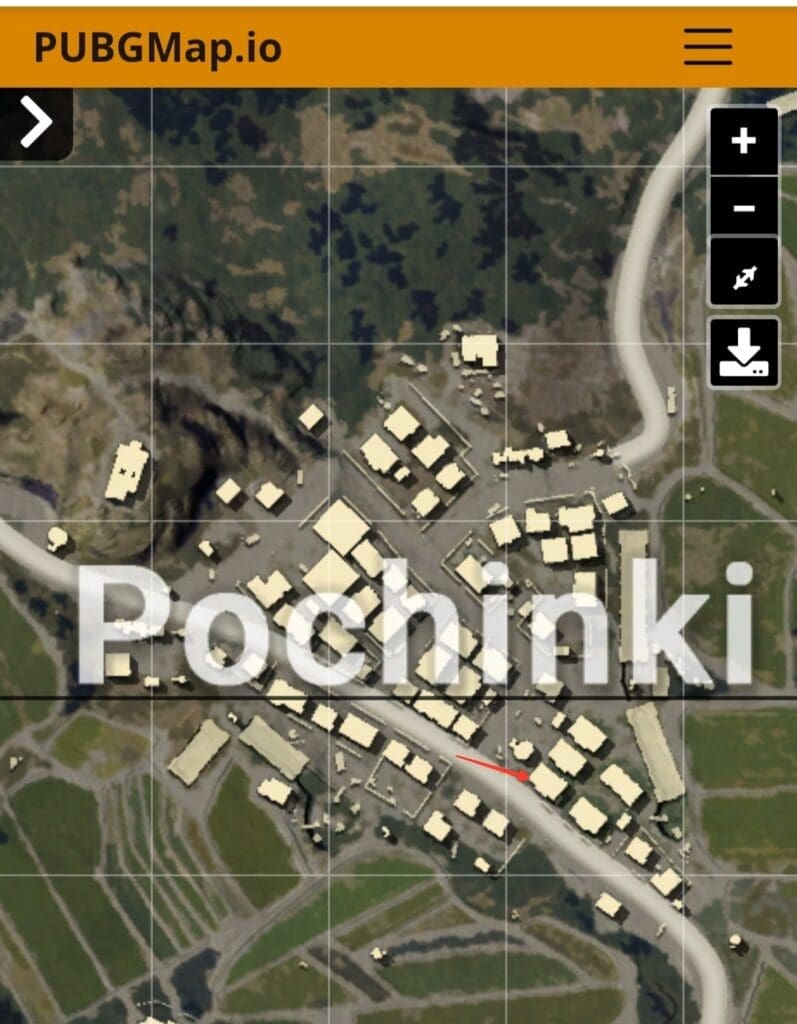
Pochinki

Credits : PUBGMap.io

First location where the UAV is accessible is located in Pochinki. In the eastern part of this city, a house has a steel door on the second floor. Players need to break it in order to access the UAV. The exact location of this building is shown above.

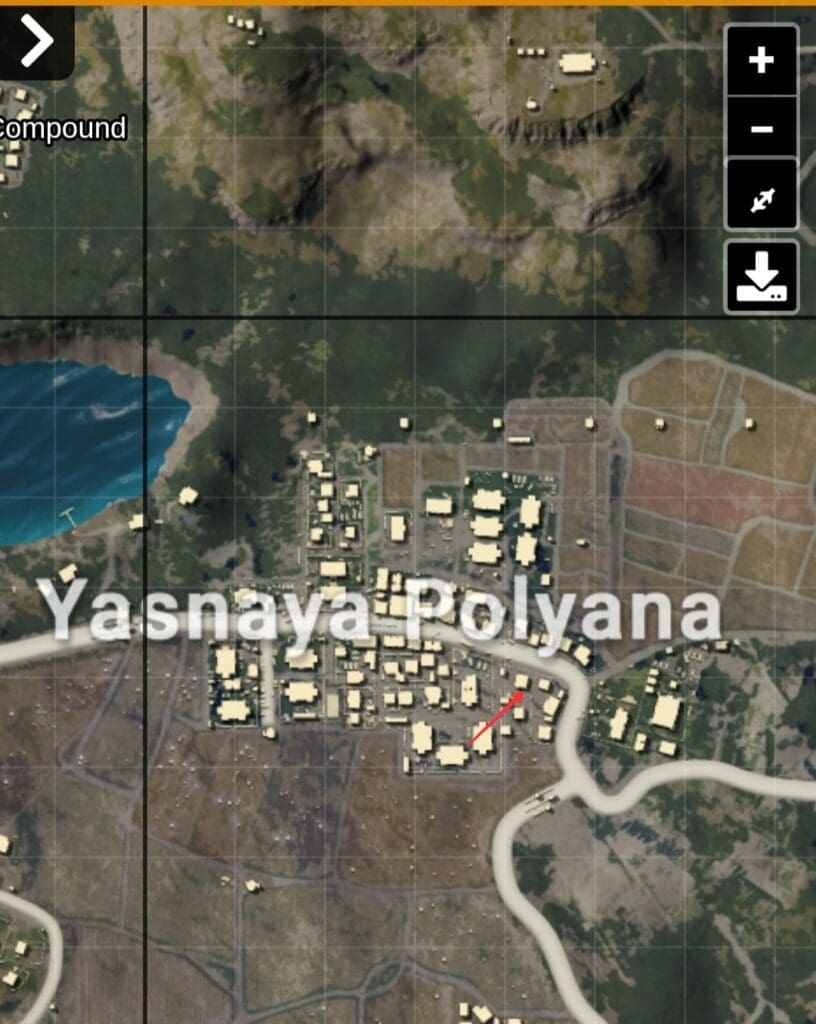
Yasnaya Polyana

It is slightly tricky to find this house in Yasnaya Polyana as it is a big city. Remember to locate a shack near the mark as shown in the image. The building next to shack has UAV controller hidden inside it.

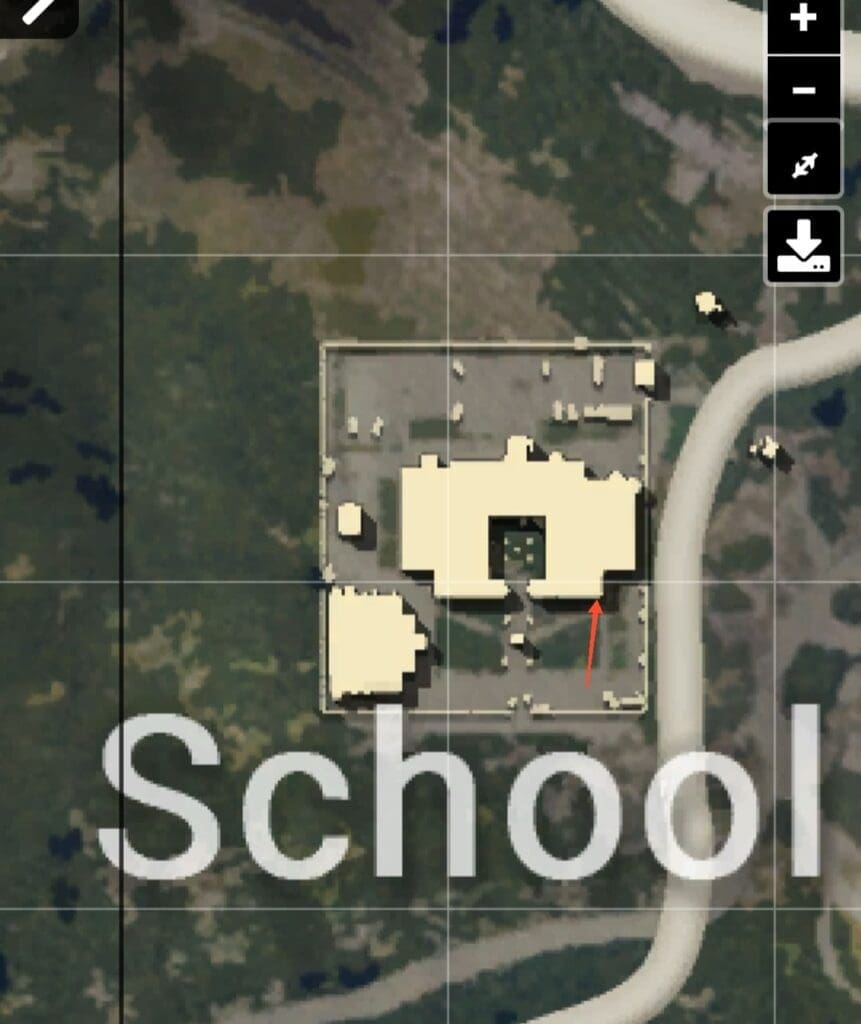
School

The most tricky building to show on a map is School. It is a single infrastructure with many rooms and it can be difficult for players to find it correctly. An easy way to locate the room is to enter from the right hand side entrance and the first locked room indicated in the image has UAV.

These are the locations where you can UAV control terminals. Now get ready to drop exactly at the locations mentioned above and get your hands on the UAV before anyone else does. We wish you good luck.

Also Read: PUBG Mobile Man Portable Radar and how to use it.