Home Blog Page 1128

Valorant Night Market Today: Start Time & Date For All Regions

0

When is night market in valorant: If you’re an avid Valorant player who’s also into collecting weapon skins, make sure that you have your wallets ready, as only a few hours remain before the heavily anticipated Episode 5 Act 3 Valorant Night Market is all set to hit the live servers of the competitive shooter.

As already confirmed by Riot Games, the Valorant Night Market will come to the game on December 2022, and it will once again provide a great opportunity for players to expand their Valorant skin collection. 

Before the Night Market lands, let’s take a look at what you need to know about this upcoming Valorant Night Market – its start date, end date, and more.

Valorant Episode 5 Act 3 Night Market: Start Date & Time

The Valorant Night Market for Episode 5 Act 3 is all set to arrive on December 7, 2022. However, depending on which part of the world you reside in, the specific timings may vary.

Valorant Night Market across all regions:

  • North America, South America, and EMEA: December 7
  • APAC: December 8
  • North America, South America: 17:00 PDT
  • EMEA: 2:00 CEST
  • India and neighboring regions: 5:30 IST

Valorant Episode 5 Act 3 Night Market: End Date

The Valorant Night Market for December 2022 is set to continue for nearly a month before closing shop on January 4th. Make sure that you’ve grabbed all the items that you want before then.

Valorant Night Market Countdown For All Regio

For the unaware, the Valorant Night Market enables players to buy various skins at a discounted rate, which is generally much cheaper than the original prices of the skins. However, it isn’t available in-game throughout the year. It’s only introduced by Riot at specific times and usually goes away in two weeks.

Valorant Update Today Size December 2022

0

Valorant Update Today Size: Valorant patch 5.12 is nearly here, and only a few hours remain before the heavily anticipated Valorant update is shipped to the live servers.

As fans are getting ready to welcome the new update filled with Agent changes, weapon updates, and more, many players are wondering what the expected file size of the next Valorant update will be.

If you’re looking to know more about the expected file size of Valorant 5.12, we have you covered.

Valorant Patch 5.12 Expected File Size

Valorant updates are generally about 1-2 GB in size. However, patch 5.12 is set to feature a number of new changes to the competitive shooter including the new game mode ‘Swiftplay’, which means the patch size may be more than usual.

Valorant players can expect patch 5.12 to take up just under 2 GB of your hard drive space. The exact size of the patch may still vary.

That’s everything you need to know about the expected file size of Valorant patch 5.12. If you wish to know more about the 5.12 update and everything that it’ll bring to the game, you can check out the changes here.

Start following Talkesport on Google News to keep yourself updated on all Valorant updates.

Why was HasanAbi banned from Twitch?

0

HasanAbi Ban: One of the most controversial yet unique Twitch streamers “HasanAbi” Pike has been banned from the Amazon-owned streaming service for a 48-hour period which he has disclosed on Twitter.

For those unaware, HasanAbi is a political Twitch streamer who discusses political, geo-political, historic and several communal topics with his audience. At times, his opinions and ideologies got him into trouble with viewers sharing a different opinion.

According to him, the ban was nothing but a copy strike from Censored.tv. A platform that specializes in the promotion of free speech and anti-censorship laws. He was banned from trying to cover an event while commentating on its proceedings.

HasanAbi Twitch Ban

Over on Twitter, he explained that the CTO of the platform that promotes free speech has himself issued the ban on his channel personally. “lmao the free speech defenders own CTO himself issued the takedown (just for my channel btw)” he wrote on Twitter.

Censored.TVs ideologies align with HasanAbi so it is strange and weird at the same time to see the advocates of free speech take down someone trying to promote the same. While he enjoys his 48 hours ban from streaming on Twitch, Censored.tv continued the Georgia Runoff Senate race on December 6 2022.

The community further picked on the point that he alone had to face the penalty for unauthorized streaming of Censored.tv’s content, however, Asmongold who did the same walked away without any consequences.

Thank you for reading, For more exclusive esports and gaming content, please follow us on Google News.

Valorant Patch 5.12 Update Expected File Size

0

Valorant patch 5.12 is nearly here, and only a few hours remain before the heavily anticipated Valorant update is shipped to the live servers.

As fans are getting ready to welcome the new update filled with Agent changes, weapon updates, and more, many players are wondering what the expected file size of the next Valorant update will be.

If you’re looking to know more about the expected file size of Valorant 5.12, we have you covered.

Valorant Patch 5.12 File Size

Valorant updates are generally about 1-2 GB in size. However, patch 5.12 is set to feature a number of new changes to the competitive shooter including the new game mode ‘Swiftplay’, which means the patch size may be more than usual.

Valorant players can expect patch 5.12 to take up just under 2 GB of your hard drive space. The exact size of the patch may still vary.

That’s everything you need to know about the expected file size of Valorant patch 5.12. If you wish to know more about the 5.12 update and everything that it’ll bring to the game, you can check out the changes here.

Start following Talkesport on Google News to keep yourself updated on all Valorant updates.

When Is Night Market In Valorant Coming For All Regions Today?

0

When is night market in valorant: If you’re an avid Valorant player who’s also into collecting weapon skins, make sure that you have your wallets ready, as only a few hours remain before the heavily anticipated Episode 5 Act 3 Valorant Night Market is all set to hit the live servers of the competitive shooter.

As already confirmed by Riot Games, the Valorant Night Market will come to the game on December 2022, and it will once again provide a great opportunity for players to expand their Valorant skin collection. 

Before the Night Market lands, let’s take a look at what you need to know about this upcoming Valorant Night Market – its start date, end date, and more.

Valorant Episode 5 Act 3 Night Market: Start Date & Time

The Valorant Night Market for Episode 5 Act 3 is all set to arrive on December 7, 2022. However, depending on which part of the world you reside in, the specific timings may vary.

Valorant Night Market across all regions:

  • North America, South America, and EMEA: December 7
  • APAC: December 8
  • North America, South America: 17:00 PDT
  • EMEA: 2:00 CEST
  • India and neighboring regions: 5:30 IST

Valorant Episode 5 Act 3 Night Market: End Date

The Valorant Night Market for December 2022 is set to continue for nearly a month before closing shop on January 4th. Make sure that you’ve grabbed all the items that you want before then.

For the unaware, the Valorant Night Market enables players to buy various skins at a discounted rate, which is generally much cheaper than the original prices of the skins. However, it isn’t available in-game throughout the year. It’s only introduced by Riot at specific times and usually goes away in two weeks.

Valorant Night Market Start Date For Philippines Server Today

0

If you’re an avid Valorant player who’s also into collecting weapon skins, make sure that you have your wallets ready, as only a few hours remain before the heavily anticipated Episode 5 Act 3 Valorant Night Market is all set to hit the live servers of the competitive shooter.

As already confirmed by Riot Games, the Valorant Night Market will come to the game on December 2022, and it will once again provide a great opportunity for players to expand their Valorant skin collection. 

Before the Night Market lands, let’s take a look at what you need to know about this upcoming Valorant Night Market – its start date, end date, and more.

Valorant Episode 5 Act 3 Night Market Start Time For Philippines

Valorant Episode 5 Act 3 Night Market: Start Date & Time

The Valorant Night Market for Episode 5 Act 3 is all set to arrive on December 7, 2022. However, depending on which part of the world you reside in, the specific timings may vary.

Valorant Night Market across all regions:

  • North America, South America, and EMEA: December 7
  • APAC: December 8
  • North America, South America: 17:00 PDT
  • EMEA: 2:00 CEST
  • India and neighboring regions: 5:30 IST

Valorant Episode 5 Act 3 Night Market: End Date

The Valorant Night Market for December 2022 is set to continue for nearly a month before closing shop on January 4th. Make sure that you’ve grabbed all the items that you want before then.

For the unaware, the Valorant Night Market enables players to buy various skins at a discounted rate, which is generally much cheaper than the original prices of the skins. However, it isn’t available in-game throughout the year. It’s only introduced by Riot at specific times and usually goes away in two weeks.

Is BGMI Coming Back? Krafton is Trying to Resume BGMI services in India

0

Krafton Inc, the developers of PUBG and Battlegrounds Mobile India recently released the following statement in the month of October 2022. It is believed that the rough meaning of the statement is a reference to the reasons why BGMI was banned and also how the company is working to get the ban lifted.

A recent press release, which announced the Q3 results, stated a few things regarding BGMI. The release concluded with developers saying that they’re working to revive BGMI solutions in India.

BGMI has been banned from India at the end of July at the request of the Indian government due to concerns about the privacy of its users being violated and also being linked to China in some way.

The ban has affected the distribution system of BGMI since the game continues to be played with its old version, but the newer version of content can’t be added and its marketplace listings for Apple as well as Google Play Store have been removed too.


Also Read: BGMI Pro Snax talks about PC Gaming and BGMI, life and career goals


This ban was officially recognized a few weeks ago as an RTI query confirmed that BGMI is blocked in India.

Krafton had stated earlier that they were working with the Indian government to bring back the game and players were expecting that BGMI could come back by 15th August but no announcement was made since that time.

KRAFTON SAYS IT IS TAKING EFFORTS TO BRING BACK BGMI

Now, this press release is the first new official source of information that has confirmed that Krafton is still involving the unblocking activity. The concluding statement made in the report is as follows:

“Finally, KRAFTON is continuing its efforts to resume services for BGMI and will continue investing in the Indian gaming market.”

Adding to this, the recent statement made in October 2022 states the following; identifying the root cause as to why the game was banned. The spokesperson also mentioned that PUBG Mobile was earlier linked with Chinese publishers; implying Tencent; and same has been implied for BGMI release as well.

“India stated concerns about breaches in cyber security along with violence in games as reasons for blocking [the game].“

This is a statement of reassurance for the entire BGMI community as the developers are still working on the comeback and there is a lingering possibility that BGMI unban can be a reality soon.


Also Read: 5 Things You Need To Know Before BGMI Unban


Follow Us On Google News For All Updates Regarding BGMI Unban.

Valorant Episode 5 Act 3 Night Market Start Date For Indian Server

0

If you’re an avid Valorant player who’s also into collecting weapon skins, make sure that you have your wallets ready, as only a few hours remain before the heavily anticipated Episode 5 Act 3 Valorant Night Market is all set to hit the live servers of the competitive shooter.

As already confirmed by Riot Games, the Valorant Night Market will come to the game on December 2022, and it will once again provide a great opportunity for players to expand their Valorant skin collection. 

Before the Night Market lands, let’s take a look at what you need to know about this upcoming Valorant Night Market – its start date, end date, and more.

Valorant Episode 5 Act 3 Night Market: Start Date & Time

The Valorant Night Market for Episode 5 Act 3 is all set to arrive on December 7, 2022. However, depending on which part of the world you reside in, the specific timings may vary.

Here are the start times for Valorant Night Market across all regions:

  • 5:30 AM IST (8th December For India)
  • 5:00 PM PDT
  • 7:00 PM CDT
  • 1:00 AM BST

Valorant Episode 5 Act 3 Night Market: End Date

The Valorant Night Market for December 2022 is set to continue for nearly a month before closing shop on January 4th. Make sure that you’ve grabbed all the items that you want before then.

For the unaware, the Valorant Night Market enables players to buy various skins at a discounted rate, which is generally much cheaper than the original prices of the skins. However, it isn’t available in-game throughout the year. It’s only introduced by Riot at specific times and usually goes away in two weeks.

List Of CSGO All Talk Commands You Should Use Daily

When playing online multiplayer games like Counter-Strike: Global Offensive, communication is of the utmost importance. While the aim is often cited as crucial to success in CS:GO, any top player will tell you that communication is key to success at the highest levels.

Here are the most commonly used commands for communicating in CS:GO, because even casual players need to practice their communication abilities.

TEXT CHAT TALK COMMANDS IN CSGO

Players commonly take advantage of CSGO’s text chat, which allows them to communicate with either their own team or with everyone in the game, including the other team. People may also prefer using text chat over voice chat if they don’t want to utilize their microphones.

Helpful commands are available for both the “All Chat” and the “Team Chat.” To use these commands, you must first activate the developer console.

ALL CHAT COMMANDS IN CSGO

Since you don’t need to issue calls to the other team in CS:GO, the All Chat isn’t particularly practical. However, you can assign a key to send an unpleasant message that can skew the opposition team and give you an advantage.

bind k “say <MESSAGE>”

TEAM CHAT COMMAND IN CSGO

You should communicate pertinent round-related information in the team conversation. Some possible chat commands for communicating with your group are listed below.

bind k “say_team RUSH B!.”

VOICE TALK COMMANDS IN CSGO

If you want to get information to your teammates as quickly as possible without stopping to type, using the audio chat option is your best bet. In this way, verbal orders can be preferable to radio commands.

Unfortunately, there are occasions when teammates tend to jam up voice chat with unnecessary chatter. Here are some helpful voice commands that you should utilize to make the most out of your time spent engaging in a voice conversation.

  • 1. voice_enable
  • 2. voice_modenable
  • 3. voice_system_enable
  • 4. voice_scale
  • 5. voice_threshold

For more guides on CS:GO, make sure to follow TalkEsport on Google News. 

Best CSGO Demo Commands You Can Use Right Now

In Counter-Strike: Global Offensive, the console is an extremely useful piece of equipment. It is able to perform fundamental tasks, such as modifying a player’s crosshair, but it is also capable of a great deal more than that.

The console is a tool that good players need to be familiar with on a deep level. This includes knowing how to jump-throw binds for smoke grenades and how to remove distracting blood spatters and bullet holes.

Remember if players are not utilizing an autoexec.cfg file, then they should type these commands into the console and conclude by running the “host writeconfig” command. This is only necessary if players are not utilizing an autoexec.cfg file.  

Instead of inputting these commands into the game’s console, players who are utilizing an autoexec.cfg file should insert inside the autoexec.cfg file instead.

In Counter-Strike: Global Offensive, the term “demo” is used to describe studying Overwatch evidence or viewing downloaded match replays. Players may have trouble altering the commands, such as pausing or changing the time scale, when watching demos, for whatever reason.

CSGO DEMO COMMANDS BEST

In this article, we’ll go over some of the greatest demo commands in general that help streamlines your demo review processes. Remember that in order to put these commands into effect, you must first launch the developer console. Check out our console guide for more information.

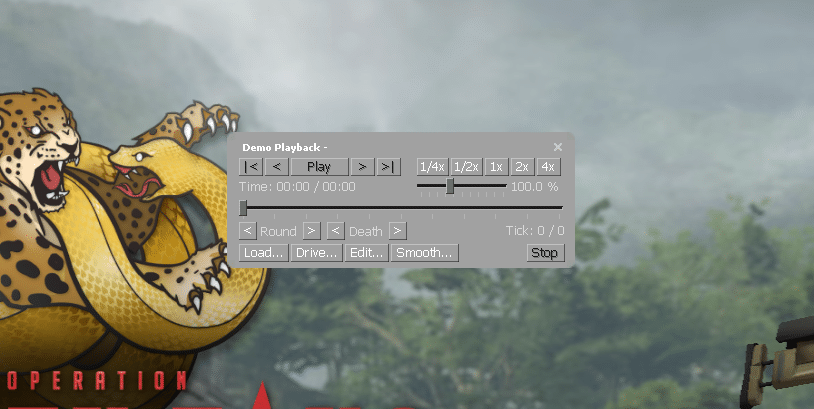
DEMOUI

The demoui command brings up a panel that is very helpful for viewing demos. In the panel, you’ll find options to play, pause, rewind, skip, and fast-forward the demo.

To disable the demoui command, simply retype it into the terminal. This command has the potential drawback of covering up your screen when recording, so you may want to disable the panel.

DEMO_PAUSE

This command merely halts the currently playing demo until the “demo resume” command is used to pick up where the former left off.

DEMO_RESUME

The demo can be resumed once it has been interrupted by utilizing the demo resume command, as was discussed above. Because pausing the demonstration is a prerequisite for this command’s execution, it will be necessary to combine it with the “demo pause” command in order for it to be used.

DEMO_TOGGLEPAUSE

The demo can be resumed once it has been interrupted by utilizing the demo resume command, as was discussed above. Because pausing the demonstration is a prerequisite for this command’s execution, it will be necessary to combine it with the “demo pause” command in order for it to be used.

DEMO_TIMESCALE 2

Modifying the demo’s playback speed is done with the demo_timescale command. By using this command, you can bypass uninteresting segments and get right to the part of the match you wish to see.

This command’s default value is “1,” however adjusting it might quicken or slow down the demonstration. Changing the value to “5” will make the demo run five times faster. The demo can be run at a slower pace by entering decrementing it by “0.5,” which will result in a slowdown of half the normal speed

DEMO_GOTOTICK 10MIN

The demo_gototick command can be used to directly go to a specified moment in the demo. Just by typing demo_gototick 15min, you can skip the first 15 minutes of the game.

SPEC_SHOW_XRAY 1

As the name implies, the spec shows xray command grants X-ray vision, or wallhacks, to the user. You’ll be able to see exactly where other players are, even if they’re behind walls.

This isn’t a really helpful command, but it could be beneficial in certain circumstances. Swap over the “1” for a “0” to disable the command.

CSGO_DOWNLOAD_MATCH 1234567

To get a preview of a particular game on your computer, just use this command. The match you want to download may have a unique ID, and you’ll need to find it. When you locate the match ID, you can change the command’s value to that number, at which point the download will begin.

BEST DEMO COMMANDS FOR RECORDING FRAGMOVIES

SV_CHEATS 1

The sv_cheats command doesn’t improve demos, but it’s needed for some of the following commands. Only your own server will be able to use the sv_cheats instructions.

MAT_POSTPROCESS_ENABLE 0

This command is great for clearing screen clutter. Your game will lose particles and fog. This will improve the game atmosphere and frag movies.

FOG_ENABLE 0

This command removes all game fog. CS:GO’s default fog makes skies more realistic. It’s distracting in highlight videos, but it’s realistic. This command removes fog, making your game smoother.

FOG_OVERRIDE 1

Following the fog_enable 0 command with the fog_override 1 command will produce the desired results. You won’t notice much of an effect from using this command, but what it does, essentially, is give you the ability to alter the fog settings for a certain map.

When you turn this off, the map will use its default fog settings, which are typically very unattractive to look at.

CL_DRAW_ONLY_DEATHNOTICES 1

For frag videos, the cl_draw_only_deathnotices 1 command is required. The command will hide all UI elements, including the minimap, HUD, scoreboard, and weapon selection screens for both teams.

The CS:GO console is capable of several unique features, and these examples are just the tip of the iceberg in terms of the possibilities available to players.

Because professional players’ point-of-view demos frequently highlight instructions like cl_righthand and r_cleardecals, casual competitive players who don’t use these commands are placing themselves at a disadvantage in comparison to those players who do.

For more guides on CS:GO, make sure to follow TalkEsport on Google News.