NVIDIA has sent shockwaves throughout the Indian gaming community with the launch of GeForce Now in the country on April 16, 2026.
The iconic cloud gaming service enables users to stream games at high resolution from NVIDIA’s servers directly to their devices. This means gamers are able to run AAA titles on modest PCs, laptops, and even on mobile devices, without needing to commit to a high-tier gaming rig. All you need to get started is a screen and a decent internet connection.
If you’re interested in trying out NVIDIA GeForce Now, but you’re not sure where to get started, we’ve got you covered.
NVIDIA GeForce Now Pricing Details
While gamers can try out NVIDIA GeForce Now for free, they can also pay for a subscription to get premium features like priority access, longer gaming sessions, and better rigs.
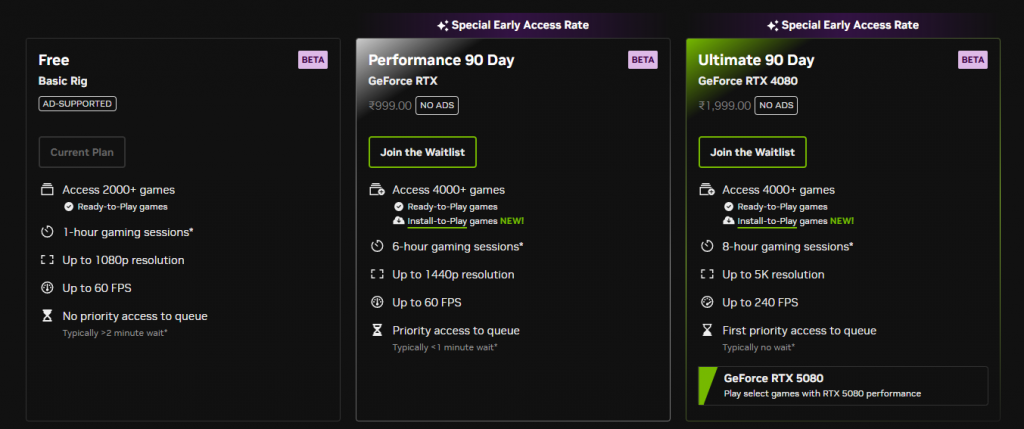
At the time of writing, GeForce Now offers three separate membership tiers in India on a special 90-day subscription period to celebrate its launch. Users can either play games on the Free Tier, or pay for the Performance Tier or the Ultimate Tier.
The Performance tier is priced at INR 999 and provides access to over 4,000 games, up to 6-hour gaming sessions, 1440p at 60 FPS streaming, and priority queue access. Meanwhile, the Ultimate tier will cost you INR 1999, but it offers 8-hour sessions, up to 5K at 240 FPS, and top-priority server access, which typically results in little to no waiting time
How to Play Games on NVIDIA GeForce Now
Gamers are able to select from a library of over 2000 ready-to-play games on NVIDIA’s GeForce Now. Here’s how you can get started on the platform right away:
- Create an NVIDIA account: Head over to the official GeForce Now website and sign up for a free account.
- Choose your membership tier: You can stick to the Free tier when starting, or upgrade to Performance or Ultimate to skip the queue times.
- Connect your game library: GeForce Now only lets you play games that you already own on other platforms. To connect your game libraries with GeForce Now, go to your account settings and link your Steam, Epic Games, GOG, or other supported storefronts.
- Download the GeForce Now app: While you can play games on GeForce Now directly from your browser, users are recommended to download the app for a smoother experience.
- Select a game and launch it: Browse the vast library of games and pick one you like. Simply hit ‘Launch Game’ to join the queue.
- Wait for a rig and get started: Once a rig is available, the game will launch automatically, and you can begin playing instantly through the cloud.
That’s everything you need to know about how to play games on GeForce Now. Note that the aforementioned prices are all introductory prices and may change once the service exits its early access period.