
Home Blog Page 931

yay Valorant Settings 2023: Crosshair, Sensitivity, Keybinds & More

If you’ve been following the competitive scene of Valorant for a while, then there’s not a chance that you’re unfamiliar with the face of Jaccob “yay” Whiteaker. The 24-year-old star rose to fame over the past year following back-to-back exceptional performances during VCT 2022.

Yay is widely acclaimed as one of the greatest Valorant players of all time, primarily attributed to his exceptional skill in effortlessly winning gunfights and executing seemingly impossible clutches under the most tense of situations. The former Disguised Esports star also earned recognition as the Best Esports Athlete of 2022 by the Game Awards.

Due to his popularity in the world of esports, many aspiring Valorant pros might want to take a look at the in-game Valorant settings of yay in hopes of uncovering the secrets behind his exceptional and consistent performance. If you’re looking to check out the Valorant settings of yay, including his crosshair settings, sensitivity, mouse settings, keybinds, and more, then we have you covered.

In this article, we take a look at everything you need to know about yay’s current Valorant settings in 2023.

yay Valorant Settings 2023: Crosshair Settings

Primary

  • Color: White
  • Outlines: Off
  • Center Dot: Off

Inner Lines

  • Show Inner Lines: On
  • Inner Line Opacity: 1
  • Inner Line Length: 4
  • Inner Line Thickness: 2
  • Inner Line Offset: 0
  • Movement Error: Off
  • Firing Error: Off

Outer Lines

  • Show Outer Lines: Off
  • Movement Error: Off
  • Firing Error: Off

yay Valorant Settings 2023: Sensitivity, eDPI, & Mouse settings

  • DPI: 800
  • Sensitivity: 0.27
  • eDPI: 216
  • Zoom Sensitivity: 1
  • Hz: 1000
  • Windows Sensitivity: 6
  • Raw Input Buffer: On

yay Valorant Settings 2023: Keybinds

  • Walk: L-Shift
  • Crouch: C
  • Jump: L-Ctrl/ Mouse Wheel Down
  • Use Object: F
  • Equip Primary Weapon: 1
  • Equip Secondary Weapon: 2
  • Equip Melee Weapon: 3
  • Equip Spike: 4
  • Use/Equip Ability 1: Mouse 5
  • Use/Equip Ability 2: Z
  • Use/Equip Ability 3: V
  • Use/Equip Ability (Ultimate): X

yay Valorant Settings 2023: Video Settings

General

  • Resolution: 1920×1080
  • Aspect Ratio: 16:9
  • Aspect Ratio Method: Letterbox
  • Display Mode: Fullscreen

Graphics Quality

  • Multithreaded Rendering: On
  • Material Quality: Low
  • Texture Quality: Low
  • Detail Quality: Low
  • UI Quality: Med
  • Vignette: On
  • VSync: Off
  • Anti-Aliasing: MSAA 4x
  • Anisotropic Filtering: 4x
  • Improve Clarity: On
  • Experimental Sharpening: Unknown
  • Bloom: On
  • Distortion: Off
  • Cast Shadows: Off

yay Valorant Gear 2023

Peripherals

  • Monitor: ZOWIE XL2546
  • Mouse: Logitech G Pro x Superlight
  • Mousepad: Artisan Hayate Otsu XSoft
  • Keyboard: Wooting 60 HE
  • Headset: HyperX Cloud ll

PC Specs

  • Processor : AMD Ryzen 9 5950X
  • Graphics Card : NVIDIA GeForce RTX 3090

That’s everything you need to know about yay’s Valorant settings in 2023. Stay updated with the latest news in gaming and esports by signing up for early access to TalkEsport’s Mobile App. Follow us on Twitter and Google News to ensure you never miss the exciting updates.
How to Go to Hueco Mundo in Type Soul

0

Embarking on the journey to discover Hueco Mundo in Type Soul is an adventure filled with intrigue and challenges. This mystical location, known as the Hollow Sphere in Japanese, is a pivotal part of the game’s narrative and gameplay. As per the lore of Bleach, Hueco Mundo is a realm teeming with Hollows of all kinds and is the home of the Arrancar. In Type Soul, this location plays a crucial role in your Hollow Progression, offering a unique gaming experience that mirrors the anime’s narrative.

How to Reach Hueco Mundo in Type Soul

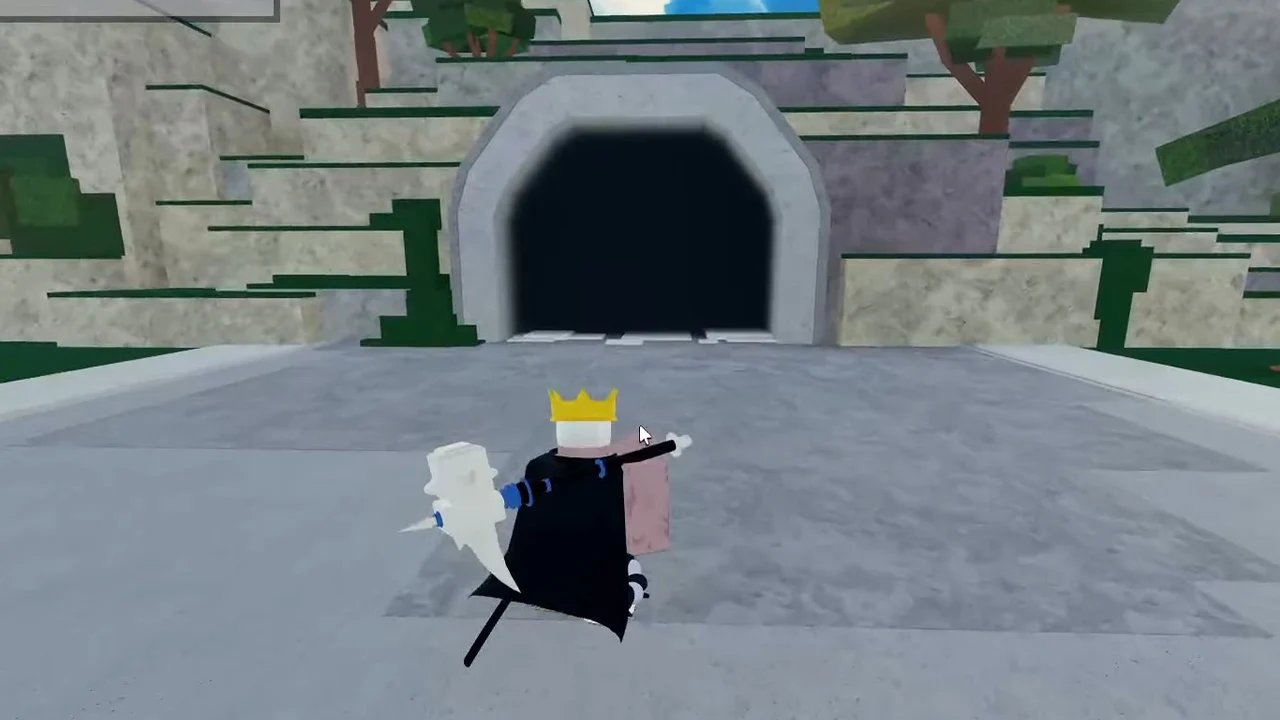
Reaching Hueco Mundo is a task that requires keen observation and a sense of adventure. The key to this journey lies in the Tunnel in Karakura town. Unlike the Quincy Tunnel, which is characterized by blue and white tiles, the Tunnel to Hueco Mundo is adorned with all-white tiles. As you venture into the tunnel, you’ll notice an unusual sight – the sky in the distance, giving an illusion of a bug. Fear not, for this is part of the journey. Ensure your blue bar is filled as you’ll need it for the run to the other side. Upon reaching the end, use the entrance to step into the world of Hueco Mundo.

Hueco Mundo is more than just a location; it’s a realm of opportunities. One of the primary reasons players venture here is to achieve Partial Resurreccion. An NPC residing in the Hueco Mundo castle, specifically on the left side of the throne, offers a quest for this. However, she’s not always found in the same place and has multiple spawn points.

Hueco Mundo in Type Soul is a fascinating location that offers players a chance to delve deeper into the game’s lore and mechanics. Whether you’re seeking to progress your Hollow or aiming for Partial Resurreccion, Hueco Mundo is a destination that promises a unique and engaging gaming experience.

Stay updated with the latest news in gaming and esports by signing up for early access to TalkEsport’s Mobile App. Follow us on Twitter and Google News to ensure you never miss the exciting updates.
How To Uninstall Valorant? Answered

Are you feeling overwhelmed by the fast-paced, high-stakes world of Valorant? Perhaps you’ve hit a plateau in your gaming skills, or other commitments are preventing you from reaching the top of the ranks. Whatever the reason, you’ve decided it’s time to uninstall Valorant from your PC. But, it’s not as straightforward as you might think. This guide will walk you through the process, step-by-step, ensuring a smooth and successful uninstallation.

Valorant, the popular tactical shooter game by Riot Games, is not for everyone. It demands a high level of commitment, with players needing to constantly hone their skills in deathmatch and range, and practice their abilities in custom matches. The game’s meta seems to change daily, and the competition is fierce. It’s no wonder that some players decide to hang up their hats and uninstall the game.

How to uninstall VALORANT: step-by-step guide

Uninstalling Valorant is not as simple as clicking ‘uninstall’ in your control panel. There are a few more steps involved, primarily due to Vanguard, the anti-cheat system created by Riot Games. Here’s a step-by-step guide to uninstalling Valorant:

  1. Uninstall Vanguard: Start by closing Vanguard. You can do this by opening your system tray, right-clicking on the red Vanguard icon, and selecting ‘exit’. A message will pop up asking if you want to ‘turn off’ Vanguard. Click ‘Yes’.
  2. Uninstall Valorant: Once Vanguard is closed, you can uninstall Valorant as normal. Press the Windows Key or click the Windows icon on your taskbar, type ‘Add or remove programs’ in the search bar, and press enter. Scroll down to ‘Riot Vanguard’, right-click, and uninstall. Finally, uninstall Valorant using the same method.

And there you have it! Valorant is no more on your PC. If you ever feel the urge to dive back into the competitive world of Valorant, you can easily download both Vanguard and Valorant from Riot’s website.

Remember, gaming is meant to be fun. If a game is causing more stress than enjoyment, it’s okay to step away. You can always return when you’re ready. Happy gaming!

Stay updated with the latest news in gaming and esports by signing up for early access to TalkEsport’s Mobile App. Follow us on Twitter and Google News to ensure you never miss the exciting updates.
How to Rank Up in BGMI Fast: Tier Ranking System Explained

0

Battlegrounds Mobile India (BGMI) has taken the Indian mobile gaming scene by storm, boasting a player base of over 100 million. With such fierce competition, rising to the top is no small feat. The game’s tier ranking system plays a crucial role in distinguishing the best players, with the coveted Conqueror Tier reserved for the elite. This article provides an in-depth look at BGMI’s tier ranking system, helping you understand how it works and how to climb the ranks effectively.

Understanding BGMI’s Tier System:

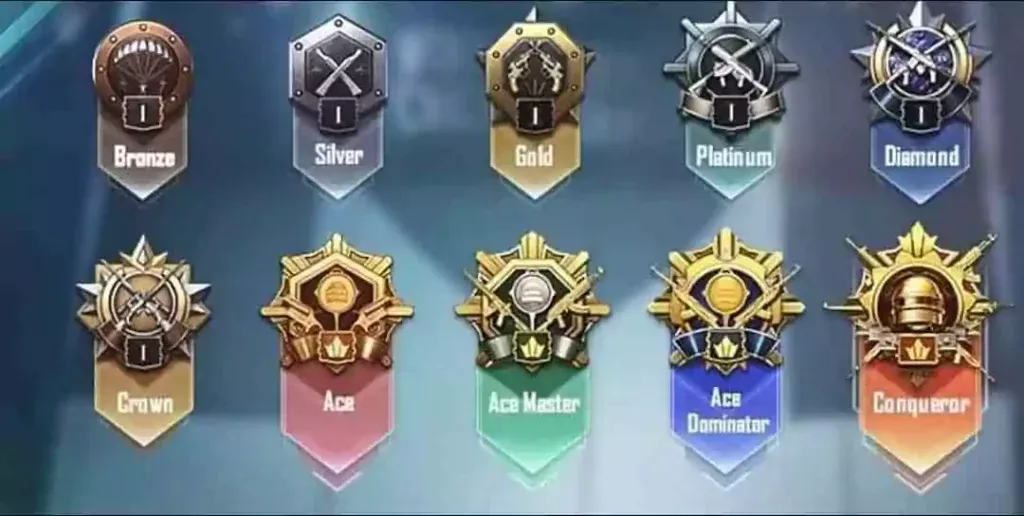
BGMI’s tier system is divided into ten distinct classes, each representing a different level of skill and experience. Players earn points through their performance in classic matches, with higher points leading to higher ranks. The tiers, from lowest to highest, along with their corresponding points range, are as follows:

  1. Bronze Tier: 1000-1700 points
  2. Silver Tier: 1701-2200 points
  3. Gold Tier: 2201-2700 points
  4. Platinum Tier: 2701-3200 points
  5. Diamond Tier: 3201-3700 points
  6. Crown Tier: 3701-4200 points
  7. Ace Tier: 4201-4700 points
  8. Ace Master Tier: 4701-5200 points
  9. Ace Dominator Tier: 5201 points and above
  10. Conqueror Tier: Top 500 players in the game

Each tier, except the last four, is further divided into five sub-ranks, starting from V (lowest) and ending at I (highest). For instance, in the Bronze Tier, Bronze V is the lowest rank, while Bronze I is the highest.

Seasonal Reset and Tier Progression:

With the commencement of each new season, the tiers are reset to a lower level, allowing players to compete for the top ranks once again. The higher your rank, the more points are deducted before the start of a new season. This tier reset is consistent across all seasons.

Factors Influencing Point Accumulation:

Several factors influence the number of points you earn at the end of each match. These include:

  1. Finishes: Higher kill counts yield more points.
  2. Damage: Inflicting more damage results in more points.
  3. Healing: Using healing utilities earns you additional points.
  4. Airdrop Supplies: Looting airdrops can boost your points, but it’s a risky move as these drops are often contested.
  5. Revives: As BGMI is a team game, helping your teammates survive earns you more points.
  6. Distance Covered: The more you roam around the map, the more points you earn.

To rank up faster, it’s crucial to engage actively in the game rather than resorting to camping.

Understanding and effectively navigating BGMI’s tier ranking system can significantly enhance your gaming experience. By considering the factors that influence point accumulation and adapting your strategy accordingly, you can climb the ranks and maybe even reach the coveted Conqueror Tier. Happy gaming!

Stay updated with the latest news in gaming and esports by signing up for early access to TalkEsport’s Mobile App. Follow us on Twitter and Google News to ensure you never miss the exciting updates.
How to Get Gold in Naraka Bladepoint Easily Step By Step Guide

0

The world of Battle Royale games has been revolutionized by the introduction of Naraka: Bladepoint, a game that transcends the traditional boundaries of the genre. With its unique focus on close-quarter combats and a plethora of characters with distinct abilities and spells, Naraka: Bladepoint has carved a niche for itself in the gaming community. One of the game’s unique features is the use of in-game currencies, particularly gold, which players can use to customize their characters and purchase cosmetics and skins. This article provides a comprehensive guide on how to accumulate gold in Naraka: Bladepoint.

The Best Ways to Get Gold in Naraka Bladepoint (2023)

Gold is a prominent in-game currency in Naraka: Bladepoint, and there are several ways to earn it. For those willing to spend real money, gold can be purchased directly from the game’s store. However, for free-to-play enthusiasts, there are alternative methods to amass this valuable resource.

For new players, the battle pass feature is a goldmine. As you play, you earn gold, although the maximum you can obtain is 1280, which may not be enough to unlock most skins. However, it’s a good starting point for saving up. Once you’ve exhausted the free battle pass, you can use your accumulated gold to purchase the paid version, which costs 1360 gold. To bridge the 80 gold gap, you might consider buying the cheapest gold package option in the store, costing less than $2. This investment yields a significant return in gold.

If you’re determined to avoid paying for in-game items, there are other ways to earn gold. One method is to use the in-game currency Tae to purchase immortal treasure loot boxes from the Tae store. Each box costs 4,000 Tae and could reward you with some gold. Additionally, Naraka: Bladepoint offers daily and weekly challenges. Completing these missions rewards players with gold, and winning matches also adds to your gold stash, especially if you play well.

New Features and Game Modes: Naraka: Bladepoint is now free to play across all platforms, including PS5, and has introduced new features, game modes, and content. The new game mode, Capture the Spirit Well, is a 12v12 gang wars conflict where players can conquer sites to earn points. The game has also introduced a new hero, Tessa, a 1000-year-old fox demon, and a new weapon, the Dual Haldberd, a combination of spear and dagger.

Naraka: Bladepoint offers a unique gaming experience with its focus on close-quarter combat and character customization. Understanding how to accumulate gold in the game can significantly enhance your gaming experience, allowing you to unlock new features and characters. Whether you’re a new player or an experienced gamer, this guide provides valuable insights into maximizing your gold accumulation in Naraka: Bladepoint.

Stay updated with the latest news in gaming and esports by signing up for early access to TalkEsport’s Mobile App. Follow us on Twitter and Google News to ensure you never miss the exciting updates.
Naraka: Bladepoint Goes Free-to-Play on All Platforms

0

In a thrilling turn of events, the popular battle royale game, Naraka: Bladepoint, is breaking the chains of purchase and stepping into the realm of free-to-play games. This significant shift, which comes two years after the game’s initial release, is set to take effect from July 13th, marking a new chapter in the game’s history.

Naraka: Bladepoint, renowned for its intense 60-player PVP mythical melee battles, has already garnered a player base of over 20 million unique players. This transition to a free-to-play model is expected to further expand its reach, inviting a new wave of gamers to experience the thrill of its unique combat system. The game will be available for free download not only on PC and Xbox consoles but also on the much-anticipated PS5.

To commemorate this milestone, the game developers are rolling out a slew of new content, features, and updates. Among these exciting additions is a new 12v12 mode named ‘Capture The Spirit Well’, a Dual Halberd weapon, and exclusive items for PlayStation 5. Moreover, the game’s character roster will be expanded with the introduction of Tessa, a 1000-year-old fox demon hero.

For those who have supported the game by purchasing it in the past, the developers have a special surprise. Veteran awards will be given out, providing players with in-game gold equivalent to the edition they currently possess and more.

Earlier this year, Naraka: Bladepoint made headlines with its crossover event with the ARPG, Wo Long: Fallen Dynasty. This event, touted as the “first major crossover event of 2023”, saw 24 Entertainment partnering with Koei Tecmo to reward Naraka players with exclusive rewards for logging in and completing challenges.

As Naraka: Bladepoint embarks on this new journey, it continues to redefine the battle royale genre, offering a unique blend of action and strategy that keeps players coming back for more. With its free-to-play model, the game is set to reach new heights, further solidifying its place in the gaming world.

Stay updated with the latest news in gaming and esports by signing up for early access to TalkEsport’s Mobile App. Follow us on Twitter and Google News to ensure you never miss the exciting updates.
How To Get Dot Crosshair in Valorant?

Among the plethora of different crosshairs available to use in Valorant, the dot crosshair is undoubtedly one of the top choices for many avid players of the competitive shooter.

The dot crosshair is ideal for players who wish to improve their precision since it can help them land better headshots. However, if you’re a spray-and-pray kind of player, the dot crosshair might not be a good choice for you.

While getting a dot crosshair in Valorant is extremely easy, newer players may find the in-game crosshair changer quite confusing at first.

In this guide, we will explain how you can get a dot crosshair in Valorant in just a few seconds. We will provide you with crosshair codes that you can simply copy and paste to get the exact kind of dot crosshair that you want in the game.

Valorant Dot Crosshair Guide

To get the dot crosshair in Valorant, all you need to do is copy one of the crosshair codes we’ve listed below and paste them into your game.

Before we get to the crosshair codes, it’s crucial for you to know how to paste the codes into Valorant.

How To Import Dot Crosshair Codes in Valorant

dot crosshair valorant code

Valorant players can follow these simple steps to import the dot crosshair codes from our list:

  • Launch Valorant.
  • Go to the “Settings” menu in the top-right corner.
  • Go to “Crosshair.”
  • Hit “Import Profile Code”
  • Paste the crosshair code in the field.
  • Hit “Import”.

Valorant Dot Crosshair Codes List

Without further ado, let’s take a look at the list of dot crosshairs in Valorant alongside their codes:

  • Black dot crosshair code: 0;P;o;1;d;1;z;1;a;0;f;0;s;0;0b;0;1t;1;1l;1;1o;0;1a;0;1m;0;1f;0
  • Scream dot crosshair code: 0;s;1;P;o;1;d;1;z;3;0t;1;0l;2;0o;0;0a;1;0f;0;1b;0;S;c;0;s;0.909;o;1
  • Cyan dot crosshair code:  0;P;c;5;h;0;d;1;z;1;m;1;0b;0;1t;3;1o;0;1a;1;1m;0;1f;0
  • White dot crosshair code: 0;P;h;0;0t;3;0l;2;0o;0;0a;1;0f;0;1b;0
  • Red dot crosshair code: 0;p;0;s;1;P;c;7;o;1;d;1;z;3;f;0;0t;1;0l;1;0o;1;0a;0;0f;0;1b;0;A;o;1;d;1;0b;0;1b;0
  • Green dot crosshair code: 0;P;c;1;h;0;d;1;z;3;0b;0;1t;3;1l;1;1o;1;1a;1;1m;0;1f;0
  • Blue dot crosshair code: 0;c;1;s;1;P;c;8;u;3D05D6FF;h;0;d;1;b;1;f;0;m;1;0l;1;0o;1;0a;1;0e;0.375;1b;0;S;c;5;s;1.2;o;1
  • Pink dot crosshair code: 0;P;c;6;o;1;d;1;z;3;f;0;m;1;0t;1;0l;1;0o;1;0a;1;0f;0;1b;0

This wraps up our list of the best crosshair codes in Valorant. Now all that’s left for you to do is launch Valorant, follow the steps outlined above to paste your chosen code, and you’re all set!

Regaltos Explains Why He’s Not Playing with Team Veterans

0

In the dynamic world of esports, change is the only constant. One such change has recently been witnessed in the Battlegrounds Mobile India (BGMI) community, with the popular streamer and content creator Parv “Regaltos” Singh making headlines. Known for his association with S8UL Esports and his impressive fanbase, Regaltos’ recent decisions have sparked curiosity and speculation among fans and fellow gamers alike.

Regaltos, who had recently joined Team Veterans after a brief hiatus from competitive BGMI, has now stopped playing with the team, leaving fans puzzled. The sudden shift in his esports journey led to a flurry of questions during a recent livestream, where he addressed the concerns and revealed his future plans.

Regaltos’ Response to Fans:

Contrary to the speculations of him leaving esports, Regaltos clarified that he remains committed to the competitive scene. He emphasized the dedication required to excel in BGMI esports and dismissed the notion of treating it as a temporary venture. His statement, “There must be a reason why I am not playing with them,” hinted at deeper reasons behind his decision to stop playing with Team Veterans.

Regaltos revealed that Team Veterans, which includes players SyedOP, Darklord, Shadow07, and himself, is seeking sponsorship. Despite the potential for the entire team to be sponsored, Regaltos chose not to continue with them. He candidly stated, “I am not a player who can play under someone’s contract, and I cannot sponsor the lineup myself.”

This decision, however, does not mark the end of Regaltos’ esports journey. He assured fans that he is considering playing with another team and is preparing for potential participation in upcoming events.

Before his stint with Team Veterans, Regaltos was associated with renowned esports organizations like Team 8bit and Team Soul. During the temporary ban on BGMI, he kept his audience engaged by streaming games like VALORANT and GTA RolePlay. With the return of BGMI, he has resumed streaming on his YouTube channel, which boasts over 2.2 million subscribers.

As Regaltos navigates his esports journey, fans eagerly await his next move. His commitment to the game and his dedication to his fans remain unwavering, promising an exciting future in BGMI esports.

Stay updated with the latest news in gaming and esports by signing up for early access to TalkEsport’s Mobile App. Follow us on Twitter and Google News to ensure you never miss the exciting updates.

S8UL Esports Gaming Festival: All the Details You Need to Know

In a groundbreaking move, S8UL Esports is set to redefine the Indian gaming landscape with the launch of the much-anticipated S8UL Festival.

S8UL Festival 2023: Dates, Tickets, and Venue

The S8UL Esports Gaming Festival is the biggest gaming event in India, and it’s coming to Bangalore on July 29-30, 2023. With over 100,000 attendees expected, this is the ultimate gaming experience for fans of all ages.

The S8UL Festival is not just another gaming event; it’s a celebration of the gaming culture that has been steadily growing in India. The festival is set to take place at the Manpho Convention Centre in Bengaluru, Karnataka, from 10 AM to 7 PM on both days. This immersive experience is designed to captivate attendees with a rich blend of gaming and entertainment.

Open to All: A Festival for Every Gaming Enthusiast

In an unprecedented move, the S8UL Gaming Festival is opening its doors to everyone, free of charge. This inclusive approach ensures that every gaming enthusiast, regardless of their financial capabilities, can partake in this grand event. However, pre-event registration is mandatory, and minors under the age of 16 must be accompanied by their legal guardians.

Meet the Stars of the Indian Gaming Community

The festival offers a unique platform for fans to interact with their favorite content creators, including renowned names like Naman “Mortal” Mathur, Payal “Payal Gaming” Dhare, Tanmay “Scout” Singh, and Raj “Snax” Varma. This is a golden opportunity to meet these gaming icons and gain insights into their journey and success.

Compete, Play, and Win

The S8UL Gaming Festival is also hosting daily community tournaments featuring popular games such as FIFA 23, Mortal Kombat, and Valorant. This is a chance for participants to demonstrate their gaming prowess and compete for exciting prizes. The festival promises a plethora of games and activities to keep attendees engaged and entertained throughout the event.

Exclusive Merchandise and Offers

In addition to the gaming competitions and interactions with content creators, attendees can look forward to exclusive offers and merchandise. This allows fans to take home a piece of the S8UL Esports experience, a memento to remember this landmark event.

The S8UL Gaming Festival is more than just an event; it’s a milestone in the Indian gaming landscape. With its diverse range of activities and free entry, the festival is set to provide an unforgettable experience for attendees, marking a new era in the Indian gaming community.

Stay updated with the latest news in gaming and esports by signing up for early access to TalkEsport’s Mobile App. Follow us on Twitter and Google News to ensure you never miss the exciting updates.

How to Catch Komala in Pokemon Go: The Ultimate Guide

0

Pokémon Go, the popular augmented reality game, has introduced a new character to its roster – Komala, the Drowsing Pokémon. This adorable creature, inspired by a koala, has sparked interest among players worldwide. This guide will walk you through the process of catching Komala, offering tips and strategies to increase your chances of success.

Komala is Finally in Pokemon Go! Here’s How to Get It

Komala made its grand entrance into the Pokémon Go universe during the “Catching Some Z’s” event, which was organized to celebrate the release of the new Pokémon Go Plus+ device. Contrary to some speculations, Komala is not region-exclusive to Australia, despite its koala-inspired design. Instead, it’s available for capture globally, adding a new layer of excitement to the game.

How to Catch Komala

Catching Komala is a bit of a challenge due to its rarity. The key to finding Komala lies in the timing of your search. The “Catching Some Z’s” event, which runs from July 15 at 10 AM to July 16 at 8 PM local time, is your golden opportunity to encounter this elusive Pokémon. During this period, Komala appears as a rare wild spawn, making it a prized catch for dedicated players.

Remember, Komala won’t show up in Raids or Eggs, so your best bet is to explore as much as possible during the event. Keep an eye on the ‘Nearby’ feature on your map and look out for Komala-like shadows. Using Incense can also increase the number of wild Pokémon that spawn near your location, enhancing your chances of finding Komala.

Shiny Komala and Evolution

As of now, Shiny Komala is not available in Pokémon Go. While it’s not uncommon for new Pokémon to debut alongside their Shiny variants, players will have to wait for a future event to catch a Shiny Komala.

In terms of evolution, Komala is a standalone character with no known evolutions in Pokémon Go or any other game. This means you don’t need to stockpile its Candy. Once you’ve caught Komala, you can move on to your next target.

Catching Komala in Pokémon Go is a thrilling experience that requires a blend of strategy, timing, and a bit of luck. While Komala may not offer much beyond completing your Pokedex and providing bragging rights, the joy of catching this rare Pokémon is a reward in itself. So, gear up and get ready to add this adorable creature to your collection!

Stay updated with the latest news in gaming and esports by signing up for early access to TalkEsport’s Mobile App. Follow us on Twitter and Google News to ensure you never miss the exciting updates.