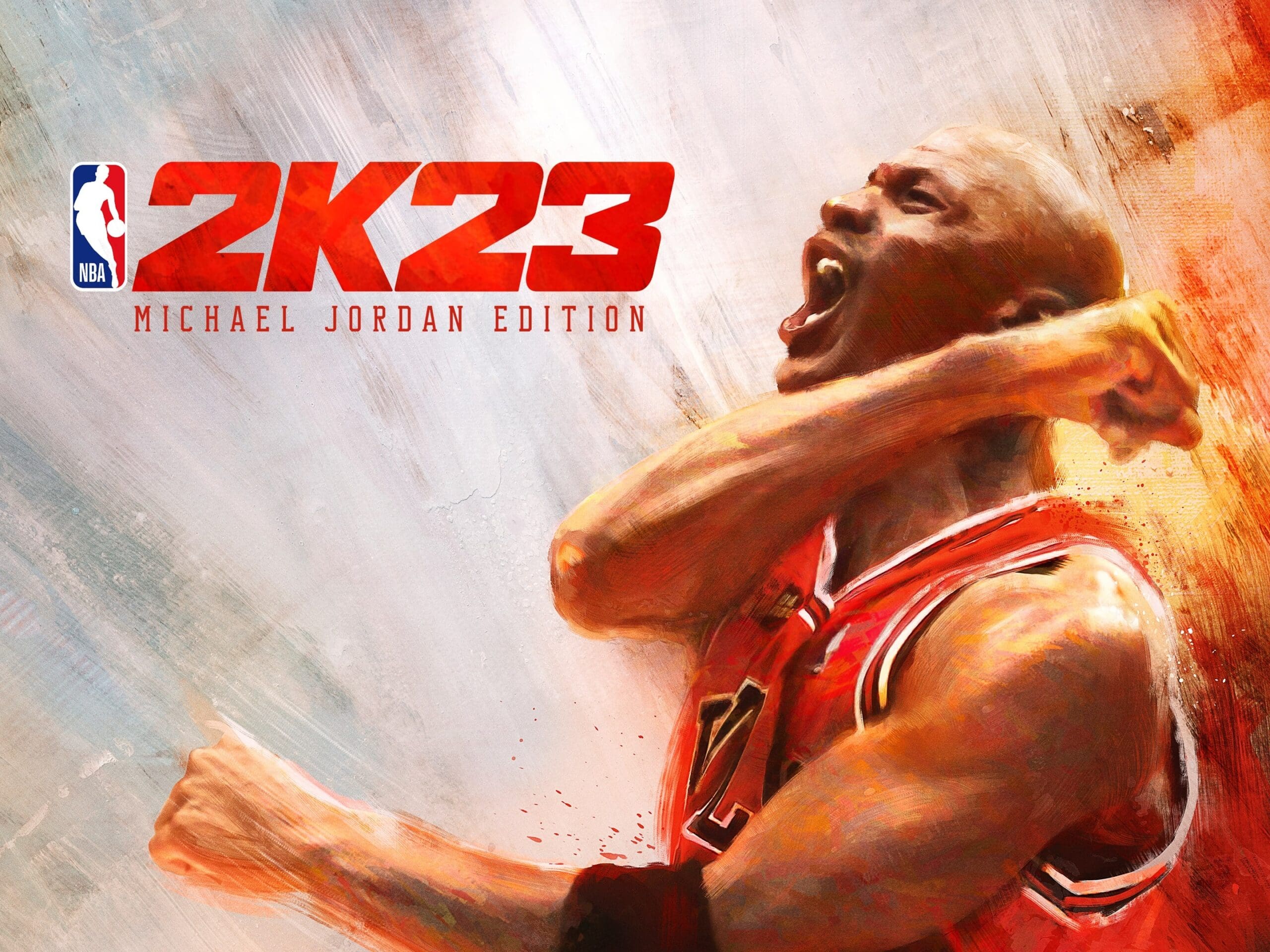
NBA 2K23’s third seasonal update brought winter to The City and The G.O.A.T. Boat.
Prior to that, Season 2 introduced Dark Matter cards and 20 new tracks selected by J. Cole.
Long-term support for the popular sports game isn’t stopping anytime soon, either. As such, players can look forward to the launch of new content in the forthcoming Season 4 rollout.
NBA 2k23 Season 4 Release Date and Time
Visual Concepts plans to unleash Season 4 on Friday, January 13 at 8:00 AM PT.
The new season, headlined by Chicago Bulls’ Zach Lavine, will prepare users for the All-Star game and let loose a few new challenges.
NBA 2k23 Season 4 Patch Notes:
When Zach LaVine takes flight, it’s like watching a rocket burst into the atmosphere, streaking toward the stars. Through the years, LaVine has proven to be more than just a Slam Dunk Contest Champion, maturing into a bonafide All-Star, and now Season 4’s featured hero.
Headlined by LaVine and his meteoric talent, Season 4 of NBA 2K23 features a star-studded ensemble of rewards and content available on New Gen and Current Gen consoles. With the holidays in the rearview mirror, it’s time to shift our focus ahead to the All-Star game, which takes place February 19, 2023. Prepare for the superstar showdown by chasing All-Star caliber rewards in The City and on The G.O.A.T. Boat!
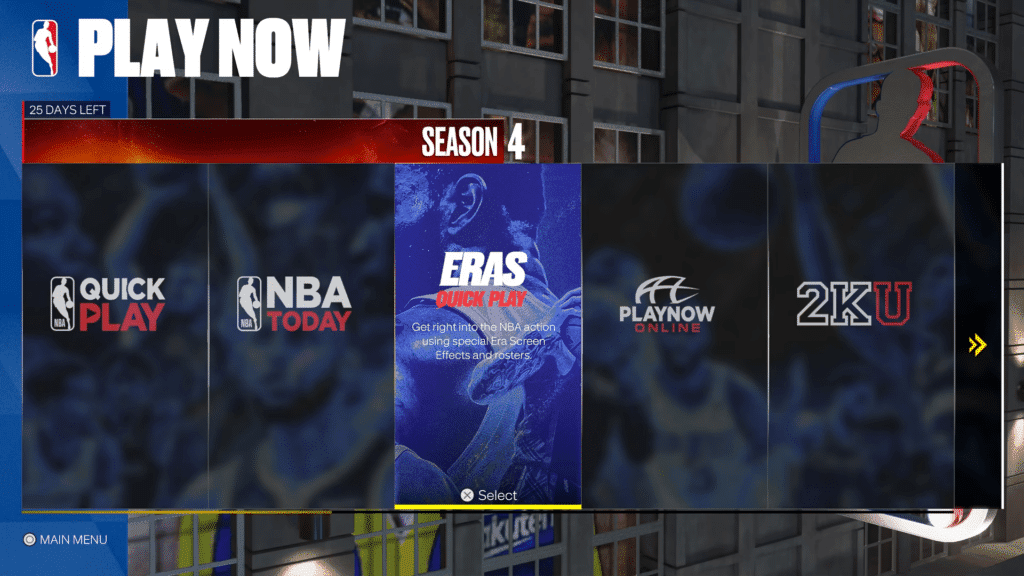
Before we dive into all the new updates to Season 4, we’re excited to introduce a Eras Quick Play to New Gen. When Season 4 arrives, players will be able to jump into a quick game featuring one of three historic Eras— Magic vs. Bird, Jordan, or Kobe—and play with a legendary team.
All of the era-specific broadcast elements and video filters will be present, making it feel true to the time. Pick from the Showtime Lakers, Iverson’s Sixers, Isiah Thomas’ Bad Boy Pistons, and more. Going back in time has never been easier.
This is just a sample of what’s to come in Season 4. Continue reading to learn more about the other new developments on the way!
You Can Read Rest Of The Patch Notes By Clicking Here.
The MacBook is Apple’s premier laptop, designed to be lightweight and versatile. It offers an array of features that make it a great choice for the modern user.
From long battery life to high-end performance capabilities, the MacBook is an ideal companion for everyday use.
Its sleek design, powerful processor and Retina display make it perfect for productivity.
For those looking to stay connected on-the-go, the MacBook features fast Wi-Fi connectivity and Bluetooth capabilities allowing you to connect with a variety of devices.
But performance-wise, many people are wondering if the sleek thin aluminum device is as elegant and seamless when it comes to delivering a great gaming experience as well – let’s look deeper into its traits with this in mind.
Not All Games are Compatible with Macs
Yes, you can play games on a Macbook. In fact, many of the top PC games are now available for Macs as well. However, it is important to do your research and make sure that the games you want to play are compatible with your Mac before purchasing them or downloading them.
For starters, check the game’s requirements to see if it has a Mac version. To make sure that the game meets your computer’s specifications, check Apple’s System Requirements page before you purchase or download the game.
The System Requirements page will list all types of Macs (iMacs, MacBook Pros, etc.) along with their minimum requirements.
You can also utilize the App Store to find compatible games. You can browse through thousands of games and apps made specifically for Macs. Additionally, you can check out Steam, which is a popular platform that offers tons of compatible PC titles for Macs as well.
Take Advantage of Cloud-Based Gaming Services
Services like Google Stadia, Apple Arcade or GeForce NOW to get the best gaming experience on your Mac. You can also buy and download games from Apple’s App Store and stream them directly to your Macbook without worrying about compatibility issues with Windows-based PCs.
Just make sure you have an internet connection so you can access these services whenever you want. Additionally, there are websites like Steam and EA Origin that offer a Mac-compatible selection of games.
And for an even more immersive experience, consider buying an external GPU to power up your gaming sessions even further.
Top 5 Games for Mac in 2023
While some Mac games aren’t as polished or as feature-rich as PC games, they can still provide a great gaming experience.
Fistful of Frags
Fistful of Frags is an action-packed first-person shooter for Mac that lets players take part in a team-based deathmatch and quick battle royale mode. It’s a Western themed game that can be played on almost any computer that has been manufactured after 2015. In addition to the single player mode, players can also participate in multiplayer modes.
Firewatch
Firewatch is another Mac game that’s worth checking out. It’s a beautifully crafted open world game that takes place in a parallel universe, which means you can play the game with different choices and watch the story change depending on your actions.
There aren’t many Mac games on the market with the kind of detail that Firewatch brings. It’s a complex, twisty rabbit hole that’s also full of true-to-life characters.
Life is Strange
If you’re looking for a game with a more serious storyline, Life is Strange is one of the best choices. Set in a parallel universe, you can lead a group of Jedi through a series of challenging missions.
Featuring realistic simulation and detailed transfers, this game requires a lot of scouting and negotiation to make it work.
Paladins
If you like strategy games, Paladins is a good choice. The base game is solid and you can buy endless expansion packs to further expand the game’s scope.
You can even get the free Canabalt, which is an endless runner that involves jumping across rooftops to avoid obstacles.
League of Legends
League of Legends is another popular game for Mac. This multiplayer game lets players work on the map and choose from over 150 champions and champion sets.
The game is available in 12 different leagues, allowing you to compete with other players from around the world. However, you’ll need certain hardware and software to play this game on a Mac.
To play this game on a Mac, you’ll need a Mac with Mac OS 10.8.2, 4GB of RAM, and an Intel HD 3000 graphics card.
Best Mac for Gaming
It’s not all bells and whistles on macbooks, as the best Mac for gaming in 2023 is still the 27in iMac. This model features a powerful graphics processor and is retina-equipped, meaning it handles intensive 3D graphics very well.
Takeaway
MacBooks are perfectly capable of gaming, especially with the right additional hardware and software.
With access to a wide variety of games on Apple Arcade, Steam, and other digital stores, as well as the ability to install Windows on your Macbook for even more options, you won’t be lacking in choice.
Of course, it’s important to make sure you have the right specs and hardware before starting out, but with an optimized setup and some extra patience, gaming on a Macbook should be no problem.
Esports is one of the most exciting and fast-growing competitive ecosystems in the world. In 2023, some of the biggest and most anticipated esports tournaments will be taking place around the globe. These tournaments will draw in millions of viewers and bring together the best professional players from all over the world.
The esports industry has come a long way in the past few decades and shows no signs of slowing down. So, without further ado, let’s take a look at some of the biggest and best esports tournaments in 2023!
The current state of the esports industry
The esports industry has seen incredible growth in recent years, being valued at over $1.38bn in 2022. It’s expected to grow even more in the next few years, with research group Statista estimating that revenue will exceed $1.87bn by 2025.
This huge growth has been driven by the rise of online streaming services and the growth of mobile gaming. Esports’ popularity has also been fueled by increased investment from brands and the emergence of new and exciting games.
The industry is also growing in terms of the number of people taking part. There are hundreds of thousands of players who participate in esports across the world. These players range from part-time competitors to full-time professionals.
With ever-increasing prize pools, sponsorships, and media coverage, the world of esports gets more and more interesting every year. These tournaments are also great opportunities to place bets and make some money if you feel you have a good grasp on what outcomes might be, or if you just love the thrill of watching when there’s something on the line.
If you want to make things a little more interesting while you watch, be sure to read through some sportsbook reviews and choose the best platform for your needs.
Continue reading to learn more about the biggest esports tournaments that are lined up for us to enjoy in 2023.
League of Legends World Championship
The League of Legends World Championship is the biggest event on the League of Legends calendar. Each year, the best teams from around the world compete in this tournament to win their share of the massive prize pool.
In 2023, the tournament will be streamed across all major online platforms and networks such as Twitch and YouTube.
It’s likely that the tournament will be heavily promoted by Riot Games, the developer behind League of Legends, as well as their sponsors. This event runs from September to November.
Dota 2 International
The Dota 2 International is the biggest and most lucrative annual tournament in the industry. Each year, teams compete in regional qualifiers to earn a place in the main event. This takes place at a huge event during the summer season, attracting thousands of attendees and millions of viewers online.
The tournament has a huge prize pool, with $25m being awarded to the winning team. This prize pool is the biggest in all of esports and has grown every year since the tournament began.
Tundra Esports won the 2022 International in the summer of 2022. 2023’s event will take place in August.
Counter-Strike: Global Offensive Major Championships
The Counter-Strike: Global Offensive Major Championships are some of the biggest events in the industry and boast a $2m prize pool. The most recent winning team was the Outsiders, having taken their first championship ever.
This tournament will be streamed across a range of different online platforms, as well as broadcast on television in some regions. In 2023, it will take place at BLAST Paris in May.
Fortnite World Cup
The Fortnite World Cup is another huge and highly anticipated annual esports tourney. The event will feature some of the world’s best Fortnite players, with millions of people expected to watch the tournament online.
It will be hosted across several different regions and will feature a variety of different competitions. These include solo, duo, and squad competitions, as well as creative competitions. The prize pool will be the biggest in the industry, with a massive $50m being awarded to the winning team.
Conclusion
Esports has exploded over the past several years. Nowadays, watching esports is an extremely popular form of entertainment that rivals even traditional sports such as football and basketball.
Esports is just as strategic as the most popular team sports – if not even more so. Its growing popularity is a testament to that, and to the fact that people love competitive gaming of all kinds.
If you want to start streaming your games or have already done so, you will need to understand how to do so well.
In this article, we’ll look at how you can get the sound right on your videos and how to use a few tools to make your game streaming experience smoother.
Game Streaming Quick Tips
If you’re going to be streaming games, you need to make sure you’re doing it right. For starters, you need to record your voice before you begin streaming. Alternatively, you can stream a pre-recorded video.
You should also drink a lot of water before you begin streaming. This helps hydrate your vocal cords and keep your voice from getting dry.
Also, you should make sure you’re drinking at least two glasses of water after you get up in the morning. Avoid eating snacks and fast food beforehand because they can negatively influence your voice.
You should avoid moving around during your stream. This will help you get a better audio signal.
You should also try to be as close to your microphone as possible. However, remember that you don’t want to turn up your gain too high. Otherwise, you may clip the signal.
When streaming, you should always check to make sure your chat is working properly.
Most of the top recording software is equipped with built-in filters and noise reduction tools, but you can use third-party extensions as well. Whenever you start a session, you should test the volume settings first.
Practicing regularly will also help you improve your voice control. You should warm up your voice and do pitch glides before you begin a stream.
Streaming games on Twitch can be fun, but you need to keep your voice in top shape to ensure you deliver a great performance.
How Hard Is It to Stream Games?
One thing you want to keep in mind is that the video quality of a stream may suffer from dropped frames. This can be a problem with any type of live streaming, but it is especially noticeable with video game streams. To avoid this, you will need a strong internet connection, preferably a high speed fiber line.
The most important part of a successful video game stream is not the technology you are using, but rather the content you are putting out there. You should show off your skills and entertain your viewers, not just display your gaming abilities.
For this purpose, you should consider using a live streaming program. Not only is this the most convenient method of broadcasting your game, but you can also save space on your hard drive.
Some people even use two computers to stream their games. While this sounds like a lot of work, you can get super-high quality streams if you have the proper equipment.
How to Improve Your Voice for Streaming
If you want to improve your voice during streaming, there are a few things to keep in mind.
Warm Up
The first thing is that you must warm your voice up before you start streaming. You can do this by practicing your message.
Once you have a recording, you can edit the audio to enhance the frequency range, remove the unwanted reverb, and level your voice.
Use a High-Quality Microphone
You can use an external microphone. But it is important to choose a microphone that is appropriate for the type of content you will be creating. This will ensure that the quality of your audio is high.
Try Out a Signal Processor
Another option is to use a signal processor. These devices contain a number of noise reduction tools such as an equalizer and compressor. They are useful for reducing background noise and adding professional polish to the voice.
There are multiple programs that can route and balance different audio sources, and generally help you with capturing the ideal sound of your voice. Some of them let you mute or control the sound bytes. Some of these come with a browser extension, which allows users to access a resource from anywhere.
Conclusion
Streaming audio software is a great tool to help you create live or pre-recorded broadcasts.
Using this service, you can easily communicate with your subscribers or collaborators. With the right platform, you can boost your listener base, enhance your brand, and increase your revenue.
When choosing the best streaming software, look for features that promote your brand. For example, the program should have a search bar that helps users find your tracks. It also should have customizable controls. This will enable listeners to control the volume and bytes of the sound they hear.
Before you start recording, it’s important to choose the correct hardware and software. In addition, you need to configure the system to record. Best solutions are the ones which can be used by Windows PC, Mac, or Linux.
Another important feature is the ability to create playlists. If you have multiple tracks to stream, you can create a playlist that allows listeners to select the ones they want to play. Some top-notch streaming software also has an offline mode.
Even though there are lots of helpful voice-recording/enhancing software available these days, never forget that your gaming skills will be the main reason why people join your streams and listen to what you have to say, so always strive for improvement and keep polishing your abilities.
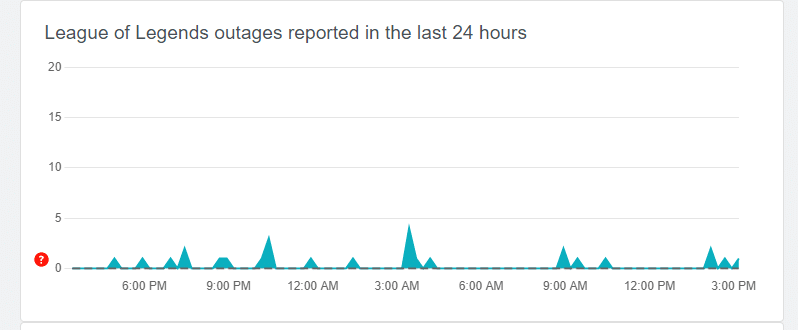
League of Legends have built a reputation for expected server outages at this point, with players getting disconnected at random times mid-game on multiple occasion, Riot has been rained down upon with reports suggesting server issue.
For the past years, there was no way of knowing about server outages, often leading players to think that the issue is on their end. However, as the game has grown, so has the world around it with ample methods available now to check for server outages.
Downdetector is an independent website that keeps a tab of server status across multiple online games with a region-based sorting system. It also provides the number of players who reported the issue and facing server-related troubles with the game.
It helps users to figure out the location of the affected servers and the number of players facing similar issues with a given game.
Other than third-party websites which are reliable enough, players can look for any server-side issues with the developer as they post a message regarding registered reports in real-time. “No recent issues or events to report.” will be displayed in case of no reported issues which can be co-related by players through Downdetector. If the server load exceeds a certain limit, outages might occur forcing the server to shut down to avoid a crash.
Creating a unique and memorable gamertag is an important part of successfully joining the gaming community.
A gamertag is a username that represents a player in the gaming world and it can be the first impression that others have of you. A good gamertag is unique, memorable and representative of your personality as a gamer.
We will explore some tips and tricks on how to create a catchy and creative gamertag that will help you stand out in the gaming world.
Use Puns or Wordplay
Using puns or wordplay in a gamertag is a great way to make it stand out and be memorable.
A pun is a play on words that can create a humorous effect, while wordplay can be used to create clever or catchy phrases. Both are effective in catching the attention of other players.
For example, a gamertag like “KillerKitten” uses alliterative wordplay to create a catchy and memorable gamertag. It’s light and playful, but also showcases your confidence in your attack skills.
Using puns or wordplay can also make it easier for other players to remember your gamertag, which can be useful in building notoriety in competitive gaming environments.
Use a Gamertag Generator
If you’re not feeling creative and you’re struggling to come up with a fun name, you can get some help online.
Using a gamertag generator can be a great way to create a unique gamertag. Many generators come equipped with a variety of options and features that can help you generate a gamertag that is tailored to your specific needs.
Some generators allow you to input keywords and phrases that are relevant to you, such as your favorite games or hobbies, and then generate a list of potential gamertags based on those keywords.
Others use a combination of algorithms and randomization techniques to generate a list of unique and creative gamertags. This can save you a lot of time and energy, as you don’t have to come up with a gamertag on your own, which can be hard and time-consuming.
It can also give you a lot of ideas for a gamertag that you may not have thought of before.
Overall, using a gamertag generator is a great way to quickly and easily create a unique and memorable gamertag that represents you as a gamer.
Incorporate Numbers
Adding numbers to a gamertag can be a great way to make it unique and memorable. Numbers can be used in various ways to create a creative gamertag.
One way is to use numbers that have personal significance to you, such as your birth year or lucky number. This can add a personal touch to your gamertag and make it more meaningful to you.
The numbers can also be used as a way to create a different version of an existing word or name, such as “ShadowShooter7” or “FireFury69”.
Consider Your Favorite Game or Character
Consideration of your favorite game or character can be a great way to create a creative and unique gamertag. This is because it allows you to draw inspiration from something that you already have an interest in and are passionate about.
Using the name of a game or character in your gamertag can make it stand out and be memorable. For example, “MarioMaster” or “ZeldaZealot” are examples of gamertags that reflect the player’s favorite game.
Additionally, you can also use references or quotes from your favorite game or character in your gamertag. It can be a great conversation starter and can help you connect with other players who share your interests.
Keep it Short and Simple
Keeping a gamertag short and simple is important. Long and complicated gamertags can be difficult to remember and pronounce, which can make it hard for other players to identify and remember you.
A shorter and simpler gamertag is more likely to stick in people’s minds, making it easier for them to identify and remember you.
Short and simple gamertags are also easier to read and type, which can be useful in fast-paced games where quick communication is important. This can be especially important in competitive gaming environments where time is of the essence.
Short and simple gamertags can also be more versatile, as they can be used across a variety of platforms and games. These can also be easier to design and personalize with additional characters or symbols, it can make it more unique and memorable.
Conclusion
Coming up with a creative and memorable gamertag is an important aspect of being part of the gaming community. A gamertag represents you as a player, and it can be the first impression that others have of you.
To create a catchy and creative gamertag, it’s important to be original, use puns or wordplay, incorporate numbers, incorporate your favorite game or character, and keep it short and simple.
Additionally, using a gamertag generator can also be a great way to come up with unique and creative gamertags quickly and easily.
By following these tips and tricks, you can create a gamertag that stands out and helps you make a great first impression in the gaming community.
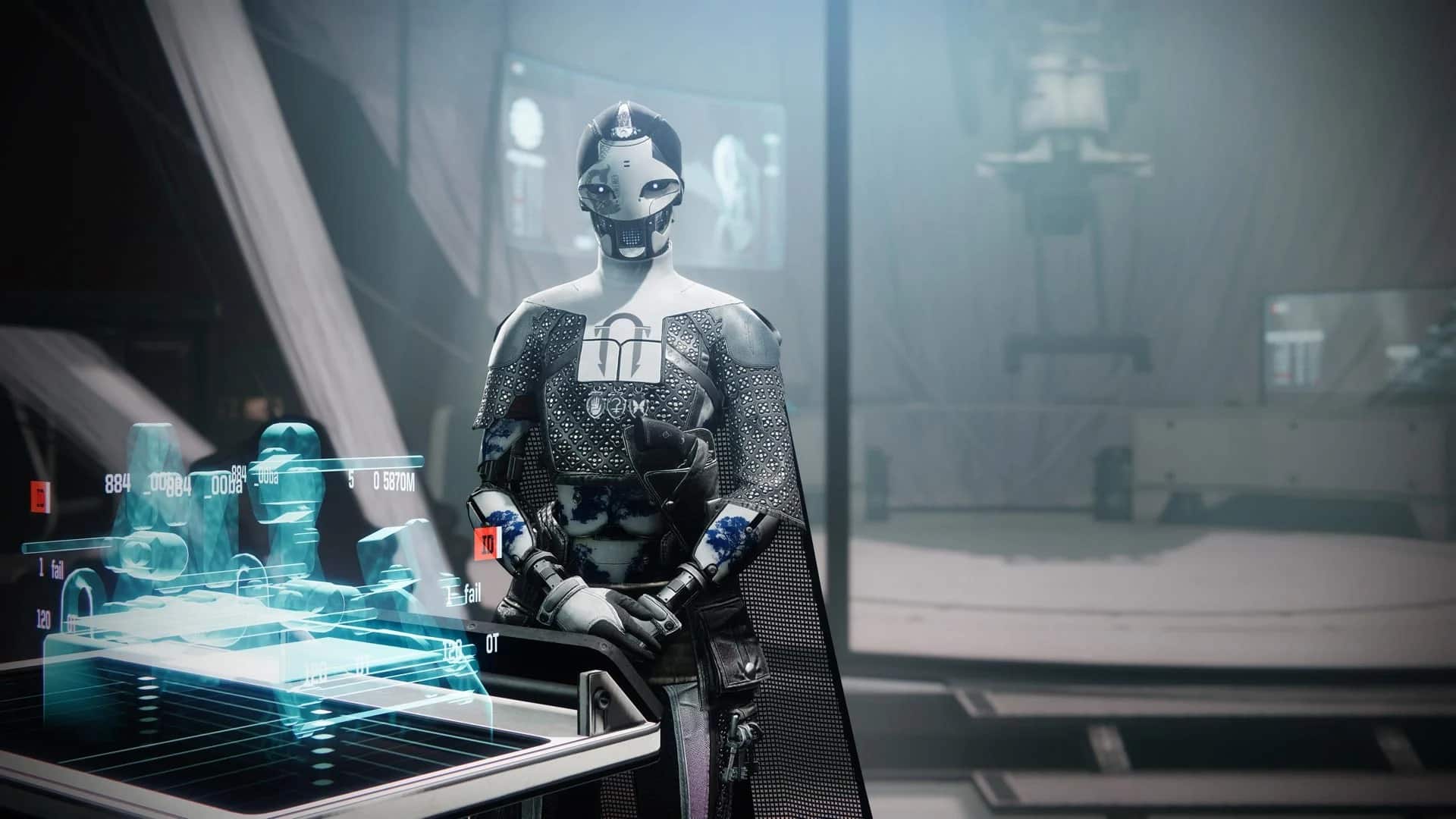
After a prolonged hotfix that led to several players encountering the “cat error code” and other server-related issues, Bungie has released the official patch notes for Destiny 2 hotfix 6.3.0.3. In addition to the updates to the free mods, the patch also includes a variety of other changes to the game. The following are the Destiny 2 hotfix 6.3.0.3 patch notes.
Destiny 2 Hotfix 6.3.0.3 Patch Notes
Though there are still bound to be issues even after this most recent hotfix, Bungie has tried their best to focus on fixing a handful of reoccurring issues. Here are all of the updates that are live now thanks to the Destiny 2 6.3.0.6 hotfix:
Heist Battlegrounds
Fixed an issue where the game would crash when depositing an Arc charge while the boss is immune in Heist Battlegrounds.
Players can now join in progress during the boss encounters in the Heist Battlegrounds playlist.
Fixed an issue where the Heist Battlegrounds: Legend node would sometimes display incorrect activity details, such as matchmaking.
Strikes
Fixed an issue where the Devil’s Lair strike boss did not count as a Fallen boss for certain objectives.
Fixed an issue where the rank reputation booster modifier icon would not display on activity launch screens.
Gambit
Fixed an issue where the rank reputation booster modifier icon would not display on activity launch screens.
Crucible
Competitive
Fixed an issue that caused Promotion and Relegation series director dialogs to display at the wrong time.
Reduced round score limit in Showdown to 10 from 15.
Adjusted the match score limit for 3v3 Rift and Survival to 3 rounds to win.
Quickplay
Adjusted the quitter penalty system to be more lenient before triggering the quitter warning message and suspension timer.
Game History
Competitive
Fixed an issue that caused Promotion and Relegation series director dialogs to display at the wrong time.
Reduced round score limit in Showdown to 10 from 15.
Adjusted the match score limit for 3v3 Rift and Survival to 3 rounds to win.
Quickplay
Adjusted the quitter penalty system to be more lenient before triggering the quitter warning message and suspension timer.
Game History
Fixed an issue where Season 19 Competitive Crucible and Iron Banner matches were missing from Bungie.net Game History APIs.
Dungeons
Spire of the Watcher: Fixed an issue that allowed the Warlock Stasis Super to activate Arc node circuits without line of sight.
Armor
Unstoppable Hand Cannon perk now activates more quickly and no longer plays its audio cue when using a non-Hand Cannon weapon.
The Energy Diffusion Substrate mod now correctly stacks up to three times.
The Candescent armor sets now appear correctly in the Appearance Customization screen.
Crown of Tempest will no longer provide ability energy when using a non-Arc subclass.
Weapons
Fixed an issue where Wish-Ender’s additional hits were disabled when the Anti-Barrier Bow mod was equipped.
Fixed an issue where Kill Clip wasn’t correctly being refreshed when already active.
Fixed an issue where Revision Zero’s weapon glint wasn’t consistently visible when in the alternate high damage mode.
Fixed an issue where Rapid-Fire Shotguns didn’t have the intended bonus reserves.
Fixed an issue where Jade Rabbit’s Exotic perk applied its damage buff to all outgoing damage.
Fixed an issue where the lights on Witherhoard’s Exotic ornament Drowned in Strife operated in reverse (they were lighting up when the weapon was empty, now they light up when it’s full).
Abilities
Fixed an issue where Spark of Frequency was not consistently granting its reload speed bonus on melee hit when paired with some Arc melee abilities.
Bounties and Pursuits
Fixed an issue preventing players from progressing the intro mission for Season of the Seraph on characters that had not completed the intro for The Witch Queen. To access Season of the Seraph, complete the “Hierarchy” activity on Europa.
Updated the Crucible Threader bounty for capturing Control Points, now requires 15 captures (down from 30).
Vendors
Xûr will now sell the v1.0.3 version of the IKELOS weapons rather than the v1.0.2 versions he sold before.
General
UI loader has been optimized to improve snappiness when switching between multiple screens quickly.
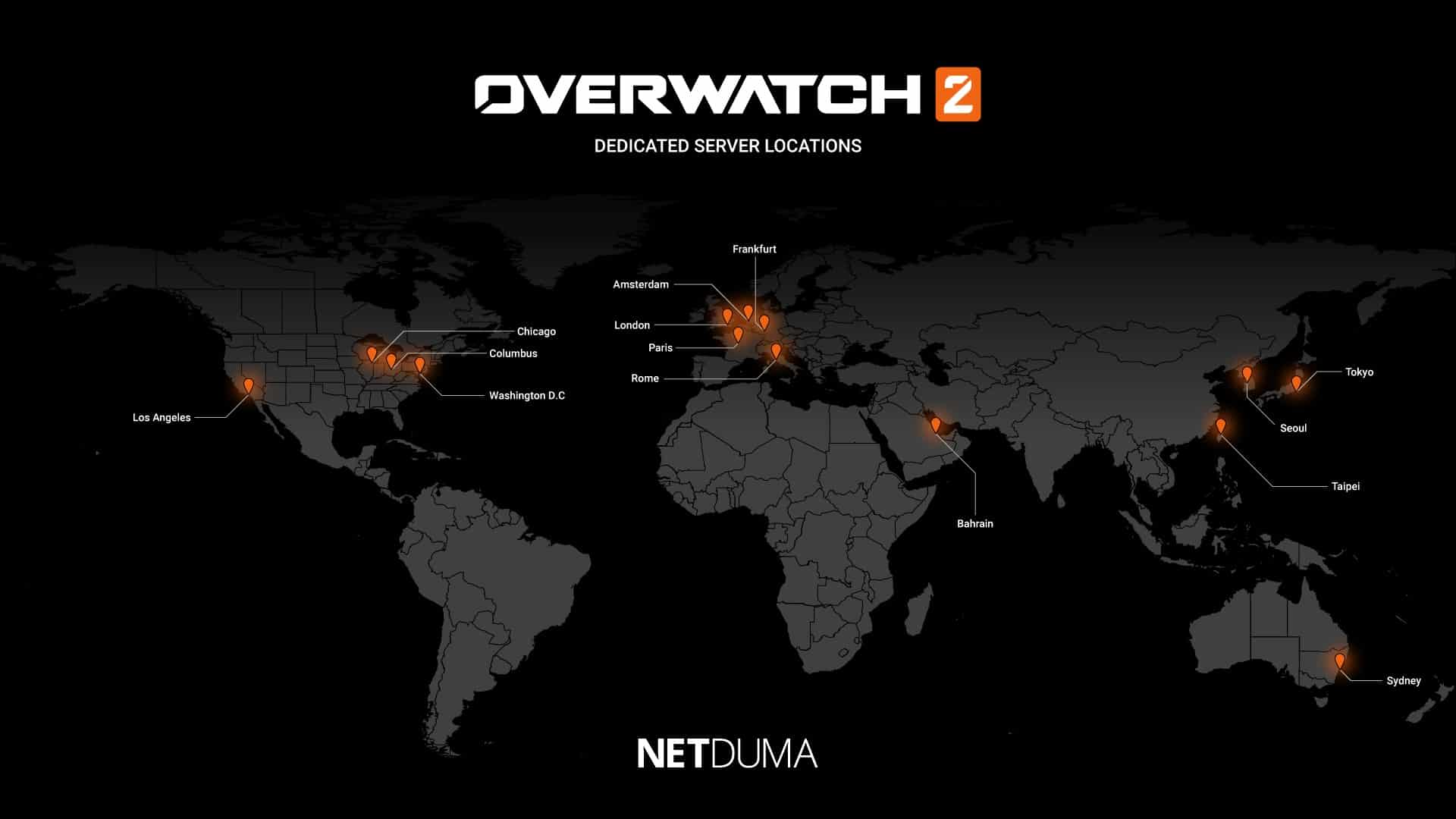
Overwatch 2 Down: As a popular online multiplayer game, Overwatch 2 may experience some server issues from time to time. While outages may be infrequent, new updates or bugs can sometimes lead to connection problems.
The high influx of players attempting to access the game at the same time, particularly during the launch of the game or updates, can lead to high traffic on the servers, making server outages and connection issues more prevalent.
Determining when exactly servers may experience outages can be difficult, but fortunately, there are tools available such as Overwatch 2 server trackers that can give you information about the current status of the servers, and if there are any issues that could impact your connection.
Overwatch 2 Server Status:
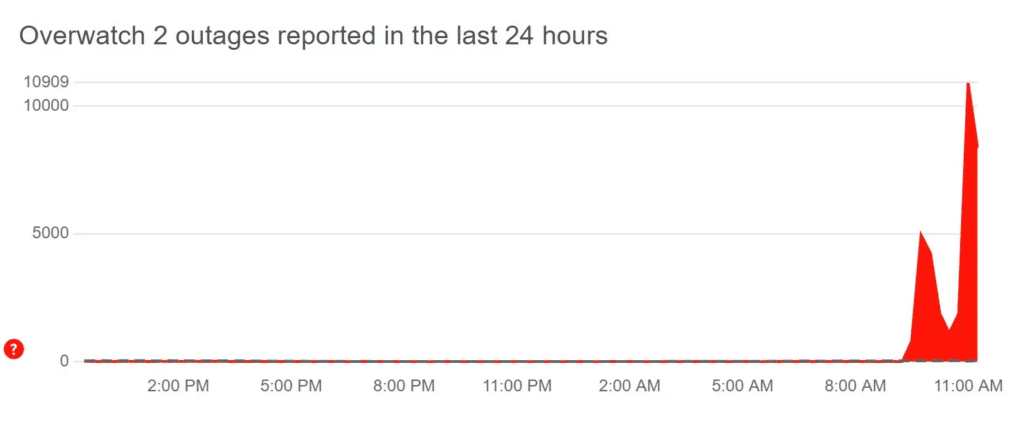
While Overwatch 2 is currently available on consoles, players on PC have reported widespread outages on January 11. This issue seems to have affected all games on BattleNet, meaning that none of Blizzard’s games are currently accessible.
Blizzard has not yet issued any statement regarding the server outages, but we will update you with any further information as it becomes available.
The Plague Doctor skins have returned to Fortnite after a long absence. Initially, new skins were not as frequently released into the Item Shop, but as the game gained popularity and more demand for skins, Epic Games began to release more collaborations and crossovers.
Now, there are even competitions for players to create their own skins to be added to the game.
With the increasing number of skins available in the Item Shop, it becomes harder for them to rotate and come back as frequently. This can be a disappointment for players who don’t have enough V-Bucks at the right time and have to wait months for their favorite skins to return.
This is all part of the fun, however; if all skins were available all the time, the excitement of looking at the Item Shop and unlocking V-Bucks with the Battle Pass wouldn’t be the same.
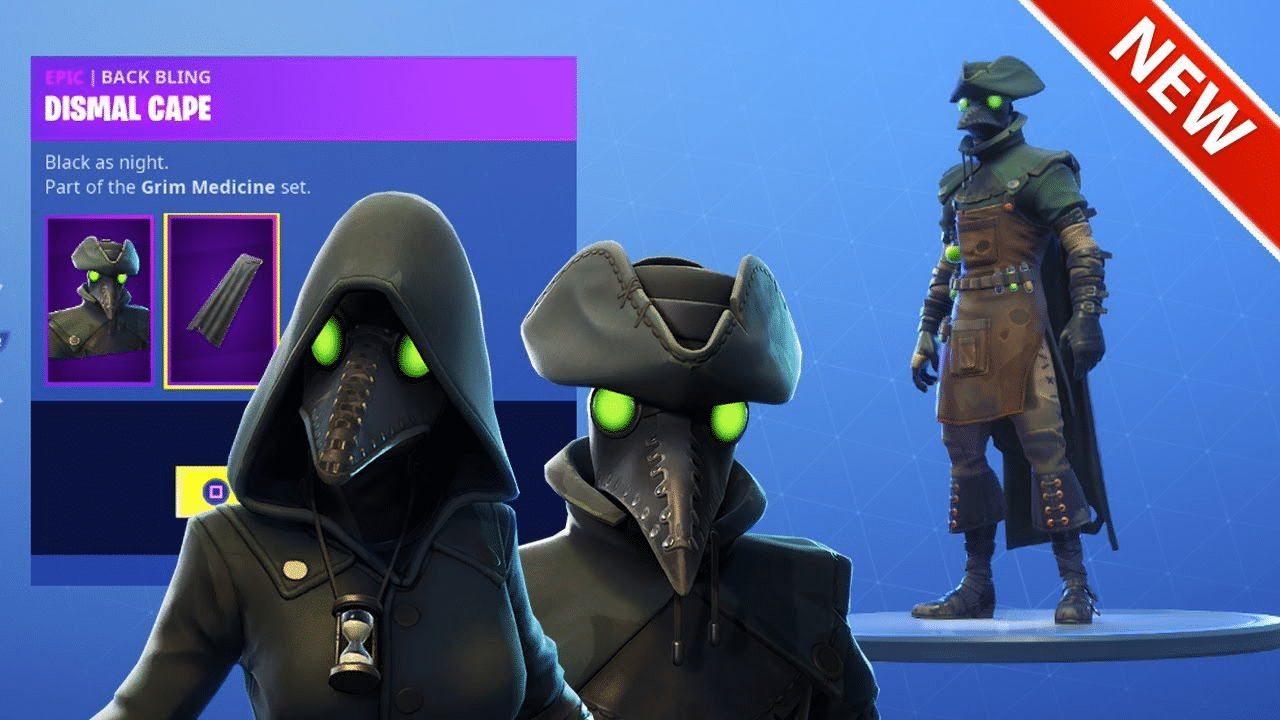
The return of skins that haven’t been available for a long time is a big deal for the Fortnite community. Recently, the Grim Medicine set made a comeback and the Plague Doctor skins were put back into the game. Some fans had been waiting for these skins for months, and they have now been available again after being inaccessible for 1,080 days.
It’s unclear how long the skins will be available in the Item Shop, as the selection changes daily.
They are likely to be on the Item Shop for a couple of days since they are in the Feature section instead of the Daily section. Although these skins were pretty rare since they hadn’t been around for nearly three years, they are not as rare as some older Fortnite Battle Pass skins such as Renegade Raider.
It’s not known why Epic Games decided to add the Grim Medicine set to the Item Shop at this specific point in time, but it may have been a way to lift the spirits of the Fortnite community after the controversy with the Shockwave Hammer.
It may also be a way of giving back to the players after the overpowered and unbalanced nature of that weapon caused arguments and controversy.
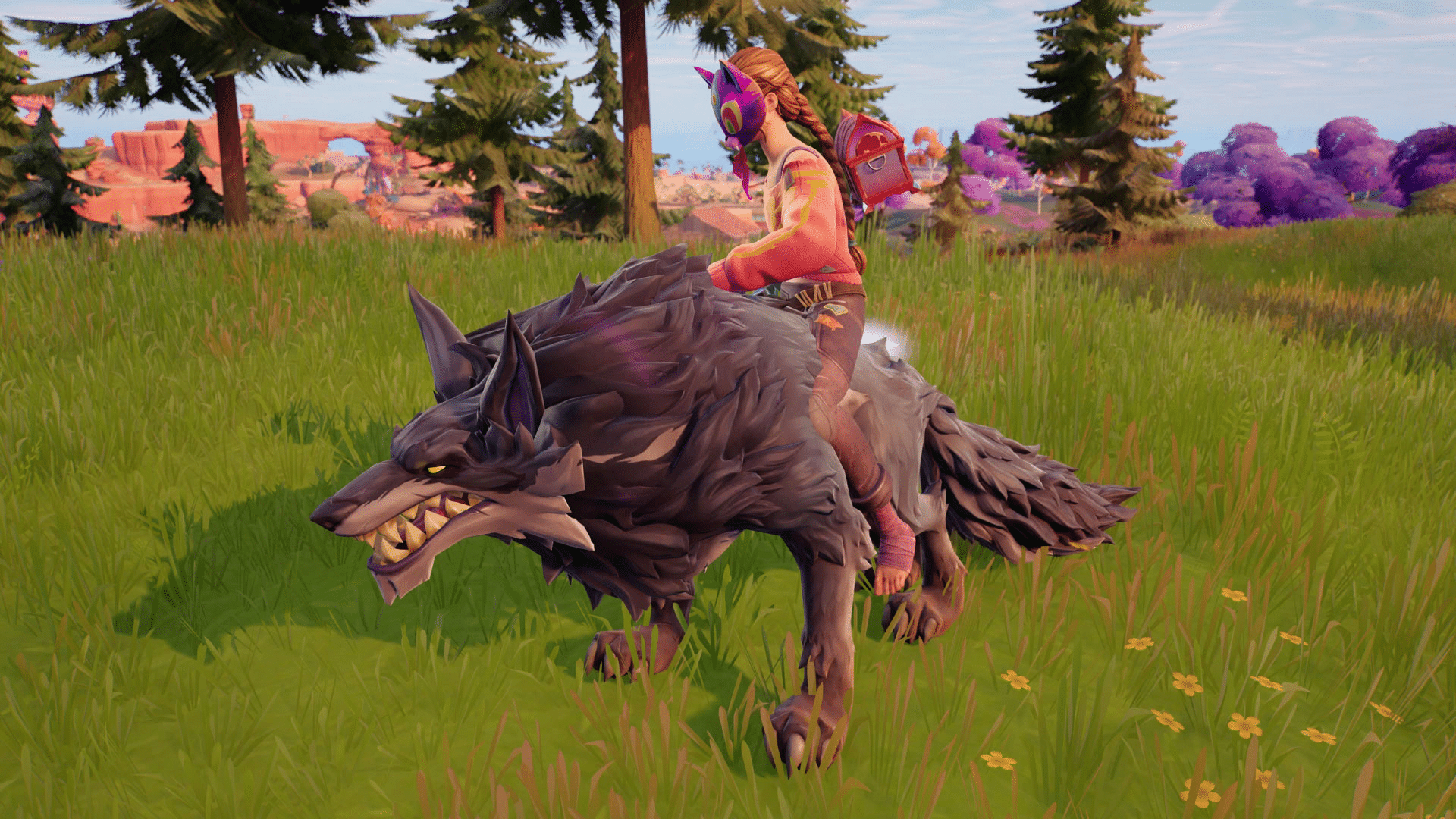
Fortnite wolves can be found in specific spawn locations, but they tend to roam beyond those areas as the match progresses. They will attack players who get too close, but players can also ride the wolves by leaping on their backs and instantly taming them. This can be useful for completing Fortnite quests or as a faster mode of transportation.
Riding Fortnite wolves has a unique advantage over regular vehicles, they don’t require fuel, allowing players to travel long distances without stopping. However, they are less durable and can be easily killed if an opponent opens fire on them. Information on where to find Fortnite wolf spawn locations and how to ride them is available.
How To Tame Wolves In Fortnite
Taming Fortnite wolves is a simple process. Simply jumping on the animal’s back will automatically tame them. It’s not necessary to distract the wolf first with food, as long as the jump is made squarely on their back.
While riding, players can charge by clicking the left stick, jump, and dismount by holding the appropriate button or double jumping. Once dismounting the wolf will continue to follow players around.