

Friday, June 12, 2026
Home Blog Page 749

BGMS Season 2 Launch Week: Overall Standings, Most Wicked Players, and More

0

The Battlegrounds Mobile India Masters Series (BGMS) Season 2 has completed its inaugural phase – the Launch Week. The Launch Week, which took place from 4th to 6th August, provided a glimpse into the competitive prowess of the participating teams. OR Esports has emerged as the frontrunners on the overall leaderboard, closely trailed by Team iNSANE and Revenant Esports. As for the Most Wicked Players list, Enigma Gaming’s Daljit “Daljitsk” Singh has risen to the top 

BGMS Season 2 Launch Week Overall Standings

The leaderboard after the Launch Week showcases the early frontrunners in the BGMS Season 2 tournament. OR Esports took the lead with a remarkable performance, amassing 76 points, comprising 46 placement points and 30 finish points. Team iNSANE secured the second spot, trailing closely behind with 69 points, comprising 35 placement points and 34 finish points. Revenant Esports secured the third position with 64 points, comprising 28 placement points and 36 finish points. Medal Esports and Team Soul rounded out the top five with 63 points each.
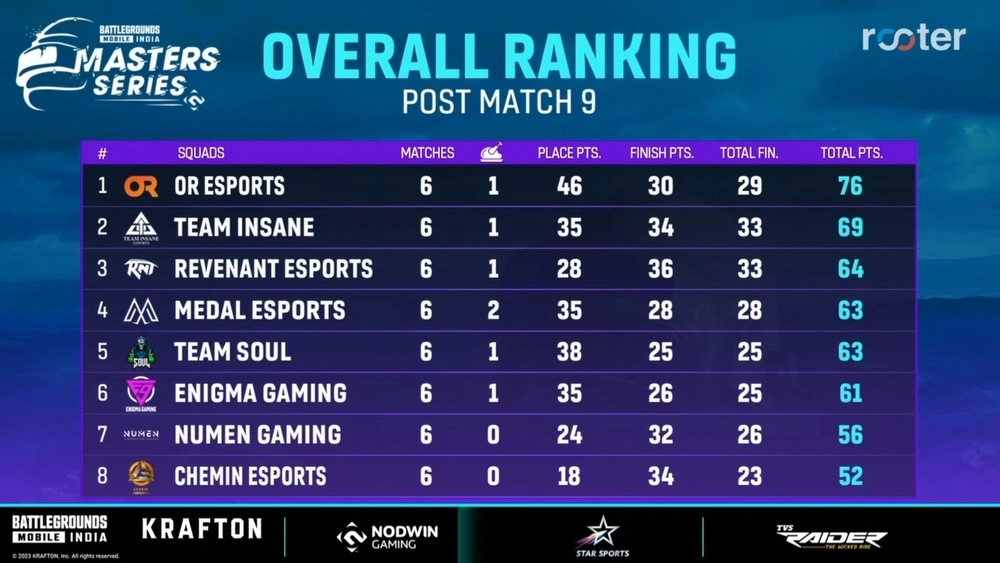
BGMS Season 2 Post Launch Week

Click here to access the BGMS Season 2 Live Tracker for the overview of overall standings and stay connected with real-time scores and updates.

BGMS Season 2 Launch Week Most Wicked Players

Individual brilliance also shone brightly during the Launch Week, as some players showcased exceptional skills. Enigma Gaming’s Daljitsk has risen to the top of the Most Wicked Players list with 12 finishes. Interestingly, Orangutan’s Ankit “AKop” Shukla, OR Esports’ Tanishk “ADMINO” Singh, and Team iNSANE’s Harsh05 have secured the second, third, and fourth positions, respectively, with the same number of finishes as Daljitsk’s – 12. Their remarkable performances not only contributed to their respective teams but also added an extra layer of excitement to the tournament.
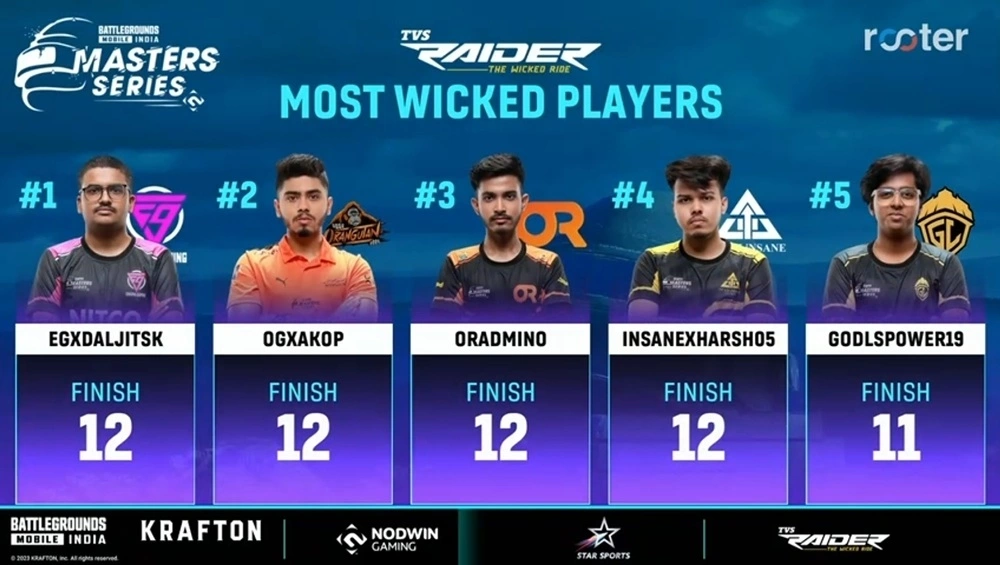
BGMS Season 2 Launch Week Most Wicked Players

What’s Next

As the BGMS Season 2 progresses, the battle for supremacy promises to intensify. The upcoming weeks will see the teams competing in League Weeks and Super Weekends, vying for a spot in the Grand Finals. With the unique scoring system introduced this season, which rewards aggressive gameplay, every kill becomes a strategic move to climb the leaderboard.

Also read: BGMS Season 2: Everything You Need to Know

Fans can expect nail-biting clashes, unpredictable twists, and moments of sheer brilliance from the best teams from the Indian BGMI esports scene. As the competition unfolds, the pressure will mount, and strategies will evolve, making this tournament a must-watch for BGMI enthusiasts

Stay updated with the latest news in gaming and esports by signing up for early access to TalkEsport’s Mobile App. Follow us on Twitter and Google News to ensure you never miss the exciting updates.
How to Get Aim Assist on Fortnite?

0

In the ever-competitive realm of Fortnite, clinching those highly sought-after Victory Royales while utilizing a controller requires a tactical advantage: the activation of aim assist. Worry not if you’re grappling with uncertainty about the procedure or the profound implications of this game feature, as we’re here to offer you comprehensive guidance that will undoubtedly enhance your gaming experience.

It’s no secret that dedicated Fortnite players who employ a mouse for precision aiming often enjoy an accuracy advantage over their counterparts wielding a controller’s thumbstick. Recognizing this discrepancy, Epic Games has ingeniously introduced a game-changing tool known as aim assist. This tool equips controller users with a unique advantage, helping to level the playing field.

How to Get Aim Assist on Fortnite?

Should uncertainty shroud your controller-based endeavors, especially in the domain of PC gaming, where the aim assist feature’s activation might be a cause for concern, we’ve got your back. Here’s a seamless, step-by-step method to restore your aim assist prowess:

  • Launch Fortnite on Your Preferred System: Dive headfirst into the captivating world of Fortnite on your chosen gaming platform.
  • Access the Settings Menu: Seamlessly navigate through the game’s interface to locate the settings menu—an avenue to tailor your gameplay experience to perfection.
  • Journey to Controller Settings: Embark on a journey toward optimizing your aim assist capabilities. The summit of your screen houses a conspicuous controller icon donned with a gear, beckoning you to explore.
  • Unveil the Sensitivity Section: Delve into the labyrinthine menus to uncover the “Sensitivity” section—an enclave of personalization that holds the key to unlocking your aiming prowess.
  • Harness Advanced Options: Within the sensitivity settings, a game-altering option, “Use Advanced Options,” awaits your invocation. Activate this setting to unleash the latent potential of your aim assist.
  • Maximize Aim Assist Strength: Continue descending through the menu labyrinth until you unveil the “Aim Assist Strength” setting—the heart of your quest. Elevate this parameter to an unwavering 100 percent to amplify your aiming capabilities to their zenith.

In the expansive tapestry of Controller Settings, you’ll find various parameters influencing the intricacies of your aim assist and camera movement. Many of these settings are flavored with personal preferences. By activating “Advanced Options” and cranking “Aim Assist Strength” to its maximum, you’re poised to reclaim your aim assist prowess and conquer the digital battlefield with renewed vigor.

Stay updated with the latest news in gaming and esports by signing up for early access to TalkEsport’s Mobile App. Follow us on Twitter and Google News to ensure you never miss the exciting updates.
FAQ

How does aim assist benefit controller players in Fortnite?

Aim assist provides controller users with enhanced aiming accuracy, leveling the playing field against mouse users.

Can aim assist be adjusted according to personal preference?

es, aim assist settings can be tailored to individual preferences, allowing players to fine-tune their aiming experience.

Is aim assist exclusive to certain platforms?

No, aim assist is available across different platforms where Fortnite is accessible.

Can aim assist be turned off if desired?

Yes, players have the option to adjust or disable aim assist based on their preferences.

Does aim assist affect other aspects of gameplay?

While primarily focusing on aiming assistance, aim assist settings might impact camera movement as well, contributing to an overall enhanced gaming experience.

How to Play Fortnite on Computer?

0

If even a passing familiarity with the gaming realm exists, Epic Games’ triumphant sensation, Fortnite, is a name that resonates. The echoes of its success reverberate across platforms, catering to an array of avid gamers. Although its canvas extends to various devices, the PC emerges as the battlefield of choice for those aiming to harness its competitive essence.

The allure of Fortnite transcends its gameplay; it thrives on its adaptability across diverse platforms. However, among the gaming elite, the PC stands as the pinnacle for experiencing Fortnite’s immersive prowess. The precision controls and unparalleled experience entice enthusiasts seeking the ultimate gaming voyage. For those venturing into Fortnite’s captivating universe on their PCs, a comprehensive guide awaits.

How to Play Fortnite on Computer?

Embarking on your Fortnite expedition involves a simple, guided journey that unlocks hours of camaraderie and excitement with kindred spirits worldwide. Navigate this sequence to download Fortnite on your PC seamlessly:

Create Your Epic Games Account

Before setting foot in Fortnite’s realm, securing an Epic Games account is paramount. Utilize the available sign-up methods on the platform’s account registration page to commence your journey.

Download Fortnite through Epic Games Launcher

Advance toward Fortnite’s digital shores via the Epic Games Launcher using these steps:

Step 1: Open your preferred web browser and access Epic Games’ official Fortnite landing page.

Step 2: Gaze upon the conspicuous “Download” button at the page’s top-right corner.

Step 3: As you embark on the PC path, click “PC/MAC.”

Step 4: Grace the subsequent page with your Epic Games account credentials.

Step 5: Once the virtual gates open, select “Windows” to initiate the download of Fortnite’s PC version.

Step 6: Upon the completion of Epic Games Launcher’s download, embrace the installation file. Oblige any permissions if they beckon.

Step 7: Within the software launcher’s sanctuary, bestow a click upon “Install.” The guardian of updates will awaken, ushering you through yet another login to your Epic Games realm.

Step 8: Venture into the heart of the Epic Games Launcher interface. Therein, discover the coveted page of Fortnite, either nestled within the Store tab or unveiled through the magic of search.

Step 9: The launcher, akin to a storyteller, narrates the ongoing symphony of Fortnite’s download. Maintain patience as the narrative unfolds.

Step 10: As the virtual tapestry concludes its download saga, navigate to your gaming haven by clicking “Library” on the left sidebar. A world of epic adventure beckons; launch Fortnite and be consumed by the digital tapestry.

Stay updated with the latest news in gaming and esports by signing up for early access to TalkEsport’s Mobile App. Follow us on Twitter and Google News to ensure you never miss the exciting updates.
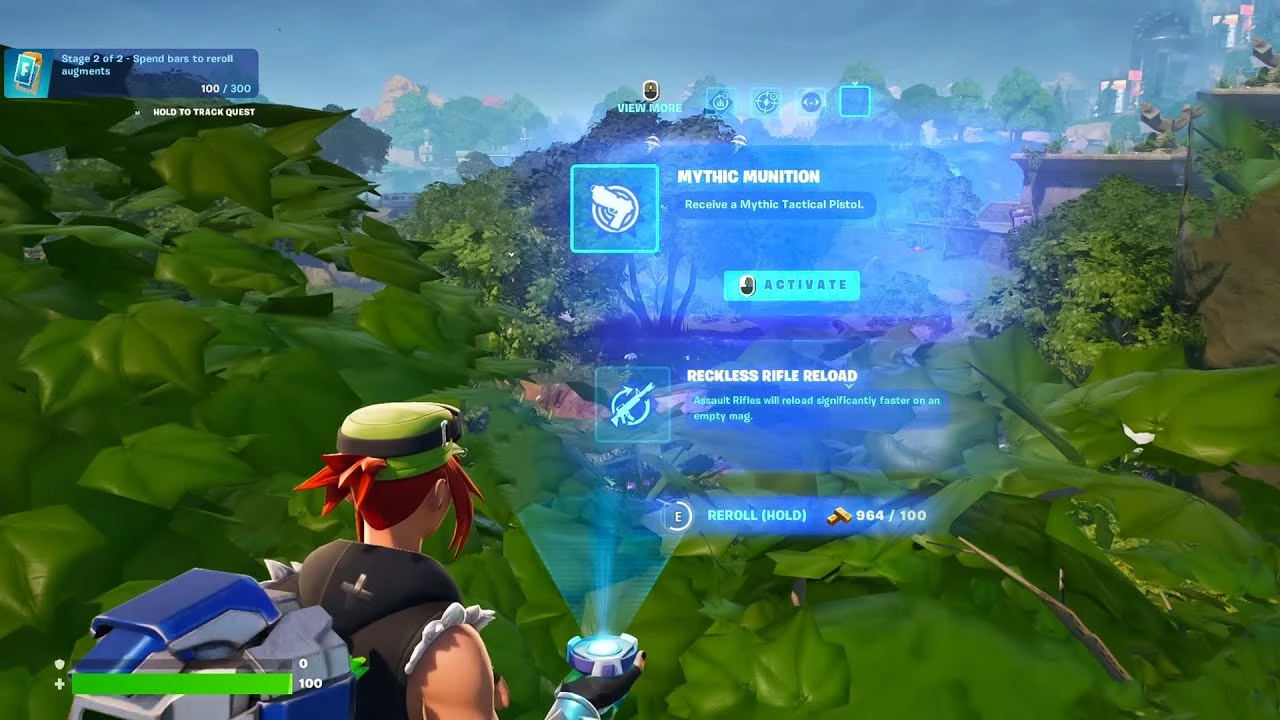
How to Reroll Augments in Fortnite?

0

Fortnite, the exhilarating gaming universe, has once again unleashed a wave of anticipation with its latest update. With a medley of thrilling novelties on the horizon, including the triumphant resurgence of Deku’s Smash and the futuristic allure of a drone-like contraption, players across the globe are primed for adventure. But amid the exhilaration lies a subtle yet intriguing facet: the world of Augment rerolls.

As some enthusiasts plunge headlong into the realm of immersive story quests, others deftly navigate weekly challenges, all in pursuit of Battle Pass glory. Today, we embark on a journey to demystify the process of augmenting rerolling in Fortnite—a crucial tool that offers a strategic edge.

How to Reroll Augments in Fortnite?

Within the dynamic milieu of Fortnite, the ability to make rapid decisions can sway the course of battle. Recognizing this, the game introduces a feature that could redefine your strategies—the Augment reroll. This ingenious mechanism empowers you to reshape your tactical arsenal, a boon when your initial Augments fail to resonate with your strategic vision.

  • Acquiring the Foundation: As you plunge into the adrenaline-soaked mayhem of a match, stay vigilant for the moment when the initial set of Augments comes into play.
  • Navigating the Crossroads: Direct your gaze to the screen’s lower echelon at a pivotal juncture in the game. There, a life-altering option beckons—the Augment reroll, your gateway to a fresh suite of tactical tools.
  • Seizing Destiny: With unwavering resolve, trigger the chosen button in accordance with your gaming platform. PlayStation adherents, look to the square button; Xbox aficionados, target the X button; and so forth.
  • Harvesting the Fruits: A mere press of that button unfurls a realm of potential. Augments, once stagnant, undergo a judicious reshuffle, offering renewed avenues for tactical prowess.

Stay updated with the latest news in gaming and esports by signing up for early access to TalkEsport’s Mobile App. Follow us on Twitter and Google News to ensure you never miss the exciting updates.

FAQ

Can I reroll Augments anytime?

Augment rerolls can be performed at specific points within a match, enhancing the strategic flow.

What benefits do new Augments offer?

Fresh Augments inject novelty into your gameplay, potentially providing more tailored tactical options.

Are there any limitations to rerolling?

While the reroll option grants tactical flexibility, it’s subject to constraints based on game mechanics.

How often can I perform rerolls?

The frequency of rerolls is dictated by the game’s design, ensuring a balanced gaming experience.

Can Rerolled Augments be worse?

Rerolled Augments introduce diversity, and while some may align better with your strategy, others might present new tactical challenges.

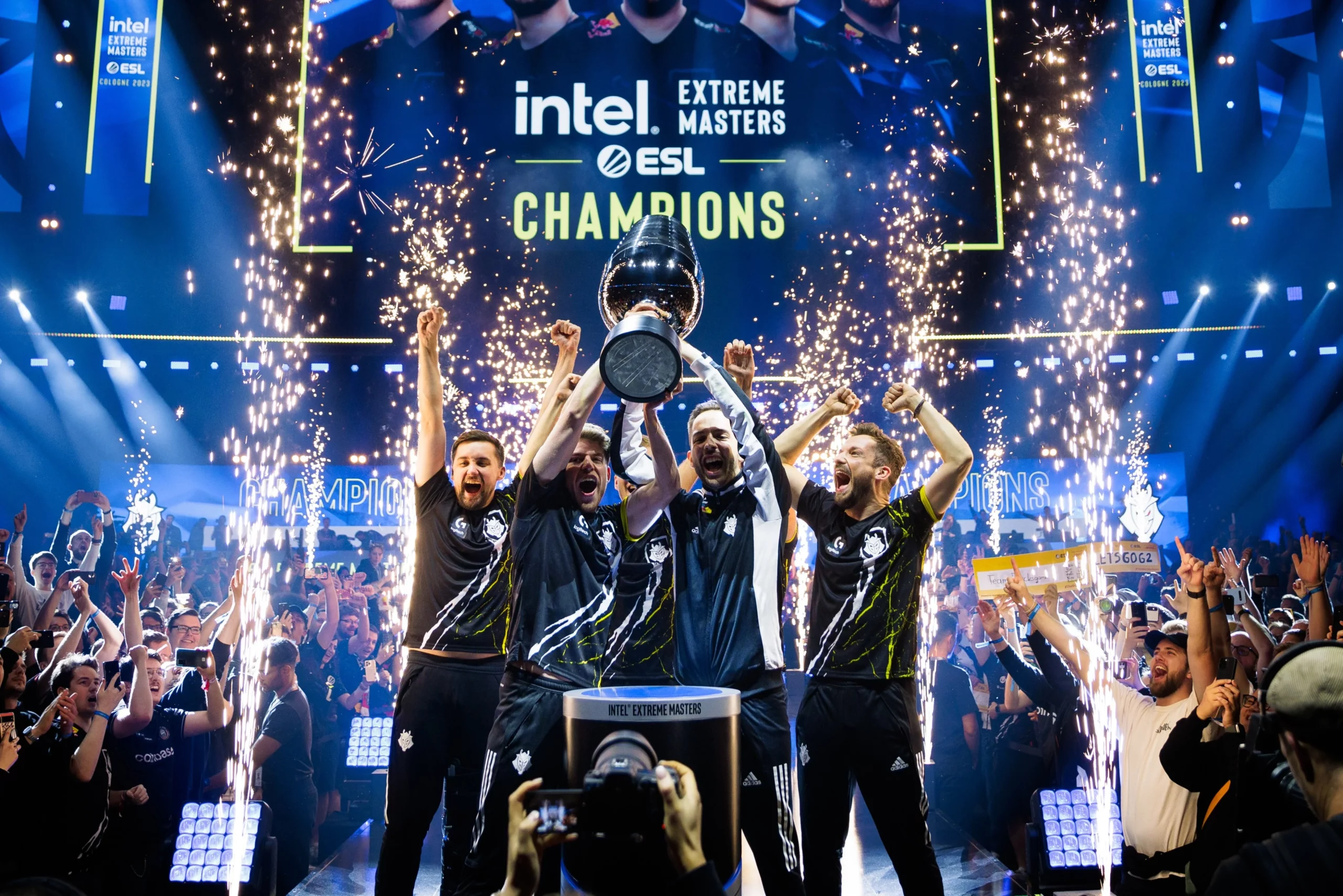
G2 Esports Wins IEM Cologne 2023 CSGO Tournament Against Ence

IEM Cologne, often equated with the prestige of a Major, has been the battleground for the greatest teams and players in esports history. This year, G2 and ENCE vied for the coveted Cologne crown. ENCE, fresh from a roster overhaul and an IEM Dallas triumph, faced G2, struggling to regain their IEM Katowice form.

The Showdown: G2’s Impressive Victory

The series concluded with G2 securing a 3-1 victory over ENCE. G2 took an early 2-0 lead, winning on both Nuke (ENCE’s map pick) and Mirage (their own pick), dropped a game on Anubis, but swiftly retaliated, closing the series on Ancient.

Nuke: G2’s Surprise Win

Despite Nuke being ENCE’s comfort pick, G2 shocked everyone with a dominant performance. Starting on the CT side, G2 secured 11 rounds, with Jks leading the scoreboard. The second half was a blur, with G2 dismantling ENCE’s defense and securing the map.

Mirage: A Nail-Biting Battle

Mirage saw ENCE start strong on the CT-side, but G2 soon found their footing. The teams traded rounds, keeping fans on edge, with the half ending 8-7 in ENCE’s favor. However, G2 regained momentum in the second half, eventually winning the map 16-10.

Anubis: ENCE’s Last Stand

Facing elimination, ENCE fought hard on Anubis. Despite G2 winning the pistol round, ENCE managed to secure a few early rounds. However, G2’s offensive prowess proved too much, and ENCE could only secure 5 rounds in the first half. Despite a late comeback attempt by G2, ENCE closed the map 16-13.

Ancient: G2’s Final Triumph

The final map, Ancient, saw G2 take an early lead. Despite ENCE tying the score at 9-9, G2 retaliated and closed out the game 16-9, securing their first IEM Cologne title.

G2’s Momentous Victory

With this win, G2 Esports not only takes home the IEM Cologne 2023 title but also a whopping $400,000 prize. Despite their loss, ENCE walks away with a respectable $180,000. This tournament serves as a testament to the intense competition and thrilling gameplay that defines esports.

Stay updated with the latest news in gaming and esports by signing up for early access to TalkEsport’s Mobile App. Follow us on Twitter and Google News to ensure you never miss the exciting updates.
KSI Calls Jake Paul’s Performance Against Nate Diaz “Terrible”

0

KSI has labelled Jake Paul’s display against former UFC standout Nate Diaz as “terrible” in his latest Tweet while promoting his own fight set to take place in October.

In a ten-round clash held at the American Airlines Center on Saturday, Paul emerged victor despite Diaz’s determined resistance, Paul exhibited his boxing skillset, showcasing both superior power and technique, which ultimately propelled him to secure a unanimous decision victory.

Given KSI’s own journey from online content creation to the boxing ring, his perspective carries weight within both communities. KSI’s critique adds a layer of insight and credibility to the discourse surrounding the fight. Furthermore, his candid commentary underscores the passion and investment that individuals, even those from outside the professional fighting world, have for the sport and its standards.

KSI is set to face Tom Fury in October to which Jake Paul has predicted the YouTuber to go down. His prediction comes after his own loss at the hands of the same opponent. While KSI has promised it to be an exciting clash, only time can tell if can go toe to toe with the heavyweights of boxing.

Stay updated with the latest news in gaming and esports by signing up for early access to TalkEsport’s Mobile App. Follow us on Twitter and Google News to ensure you never miss the exciting updates.
xQc and Hasan Clash Over Kai Cenat’s Arrest During NYC Riot

0

A recent altercation between popular Twitch streamers xQc and Hasan has sparked significant attention within the online entertainment sphere. The incident revolves around the arrest of Kai Cenat in connection with a New York City riot where a fan meetup turned into a place of violence.

The fan meeting rapidly descended into disorder, characterized by both law enforcement and media as a riot due to the escalating violence. Incidents included store raids, vehicle destruction, and even confrontations among fans. As the situation escalated uncontrollably, the New York Police Department (NYPD) intervened with a substantial reaction, leading to the apprehension of Kai. He now confronts accusations of unlawful assembly and incitement of a riot.

“Local media talking about f**king three dollars worth of Doritos like there was a bank run or some sh*t. Also, want to make it seem like this was a riot that was completely out of control,” he said. “It’s tragedy p*rn met with also like black unruly teenagers.” said Hasan to which xQc replied the following.

“Wait, some buildings were raided, cars destroyed, people are throwing f**king fireworks. Look at the image being shown on the screen,” He added: “There’s dog sh*t everywhere on the ground. Look at this sh*t. Like, how is this not a riot or out of control? It’s both! Look at this sh*t. Like what the f**k.”

It is evident that xQc and Hasan view this incident differently while xQc considers this a serious violent mishap, Hasan believes that the incident has been blown out of proportion by the media and authorities.

At the time of writing, Kai Cennat is released from custody but the authorities are certain about taking some or the other action in the near future given a riot of this magnitude cannot go unnoticed.

Stay updated with the latest news in gaming and esports by signing up for early access to TalkEsport’s Mobile App. Follow us on Twitter and Google News to ensure you never miss the exciting updates.
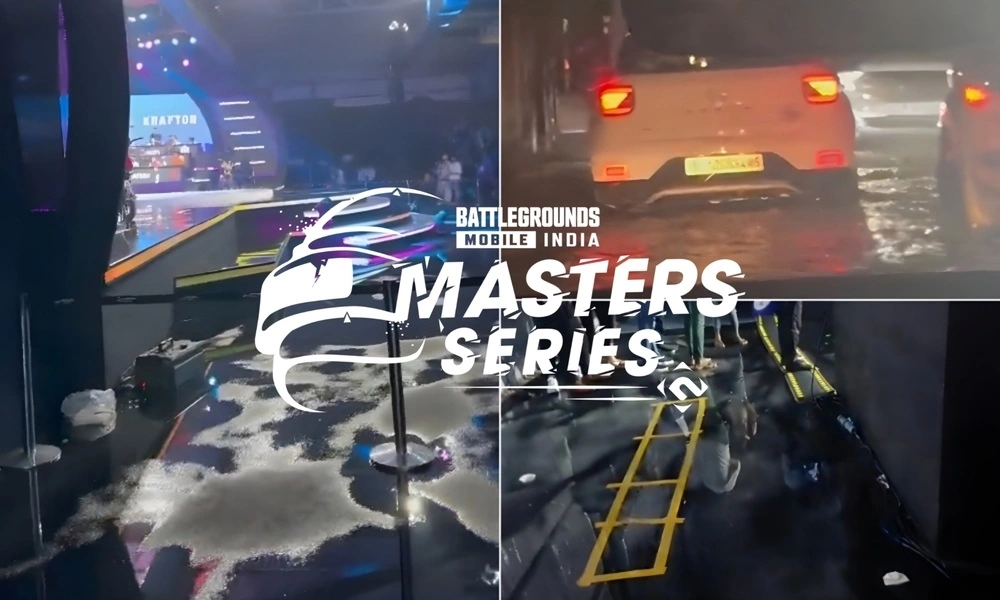
Weather Woes: Wet Floors and Flooding near BGMS Season 2 Launch Week Venue

0

The highly anticipated BGMS Season 2 Launch Week kicked off with a bang. However, as the day concluded, Twitter was flooded with visuals showcasing the challenges posed by adverse weather conditions. The event encountered an unforeseen hurdle as the venue floor experienced moisture due to rain. This challenge extended beyond just wet floors; it was also accompanied by flooding on roads near the venue.

Adverse Weather Casts a Shadow on BGMS Season 2 Launch Week Venue

As the curtain fell on the day, Twitter users shared pictures and videos, showcasing the impact of the adverse weather. Pictures of the venue’s wet floors circulated widely, giving a glimpse of the moisture-laden conditions that participants and attendees had to navigate. The dampened floors not only posed logistical challenges but also raised legitimate worries about the safety of delicate gaming equipment and the well-being of players in these less-than-ideal conditions.

However, it wasn’t just the venue that bore the brunt of the rain. A video shared on the platform showed flooded roads near the venue. It clearly depicted the extent of the rainfall’s impact on the event’s surroundings. The flooding on nearby roads added an extra layer of difficulty for both participants and spectators, potentially impacting the overall experience of the event.

Many users on Twitter criticized organizers for poor contingency planning, whereas others extended understanding. The incident also sparked discussions about the importance of having contingency plans in place for future events to mitigate the impact of unforeseen weather conditions.

The inaugural day of BGMS Season 2 may have concluded, but the event’s journey is far from over. Twenty-three days of competition is yet to take place. It will be interesting to be see how the organizers adapt to the weather challenges and ensure that the event continues smoothly. 

Stay updated with the latest news in gaming and esports by signing up for early access to TalkEsport’s Mobile App. Follow us on Twitter and Google News to ensure you never miss the exciting updates.
BGMS Season 2 Launch Week Day 1 Recap

0

The action-packed journey of the Battlegrounds Mobile India Masters Series (BGMS) Season 2 unfolded with the commencement of Launch Week Day 1. The first two matches of the day witnessed riveting clashes between teams from Group A and Group B, while the last match was played between Group A and Group C. 

In the opening battles, Team Revenant Esports claimed the first chicken dinner, while the ever-popular Team Godlike secured victory in the second match. Not to be outdone, Team Soul showcased their prowess by emerging triumphant on the challenging terrain of Miramar during the third map. Here is the recap of all three matches of BGMS Season 2 Launch Week Day 1.

Match 1 – Erangel: Group A vs Group B

Revenant Esports demonstrated an incredible performance in the first match ofBGMS Season 2 Launch Week. In a nail-biting final circle showdown, Nishant “Apollo” from Revenant Esports showcased remarkable skills in a 1v1 battle against OR Esports’ Manraj “MAX” Kohli, ultimately securing the team’s triumph. The victory earned them 27 crucial points, with a well-balanced blend of finish and position points. 

Match 2 – Sanhok: Group A vs Group B

The second match on Sanhok, Team GodLike showed a dominant performance to emerge as the winners. A spectacular 11 finishes propelled them to the forefront of the competition. The match’s Most Wicked Player, Rudra “Spower” B, solidified their lead with an impressive 6 finishes. A Winner Winner Chicken Dinner added to their impressive tally, amassing a total of 27 points.

Match 3 – Miramar: Group A vs Group C

Miramar witnessed Team Soul’s entry into the battlefield in the third match, and they swiftly claimed victory. With 13 finishes under their belt, Team Soul showcased their experience and consistency as one of India’s top teams. Their single match performance spoke volumes, securing them a chicken dinner and an impressive 28 points. 

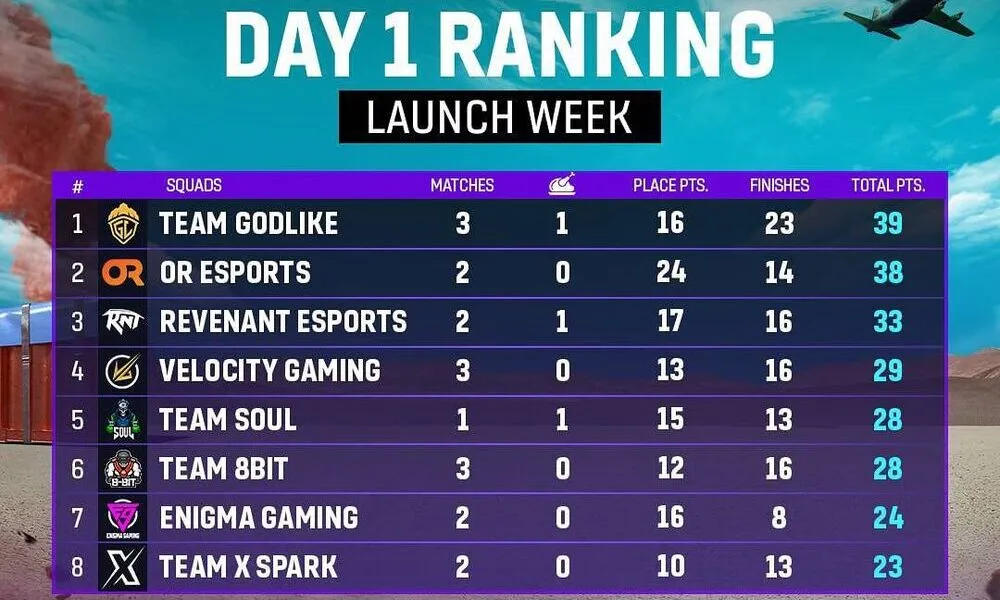
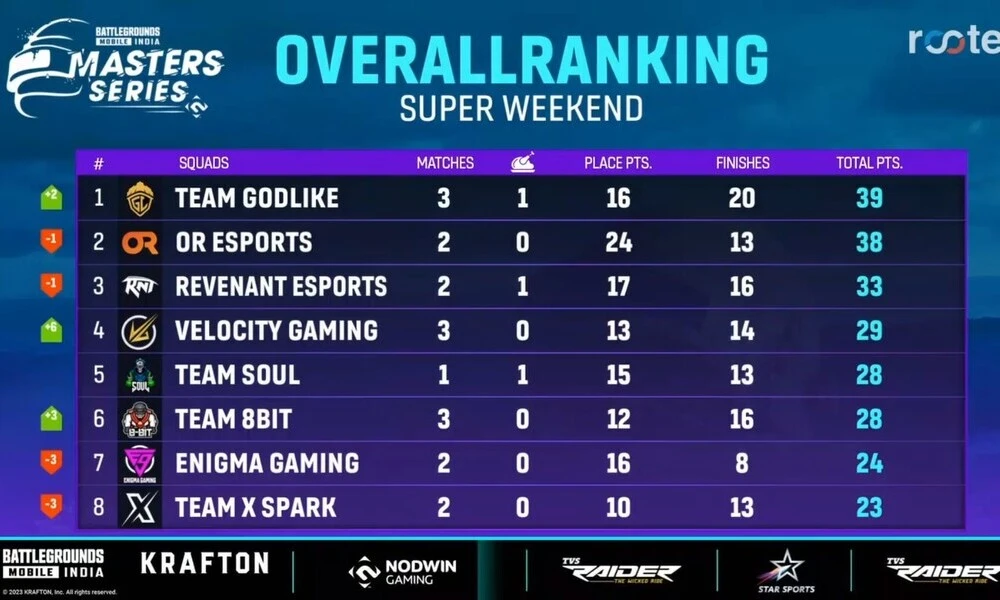
As the curtains fell on Day 1 of the BGMS Season 2 Launch Week, the leaderboard saw a dynamic shuffle. Godlike Esports emerged as table-toppers, riding high with 39 points from 3 matches. The closely trailing OR Esports, with 38 points from 2 matches, showcased their determination to compete at the highest level. Revenant Esports held a solid third place, accumulating 33 points from 2 matches, emphasizing their early consistency.

BGMS Season 2 Launch Week Day 1: Most Wicked Players

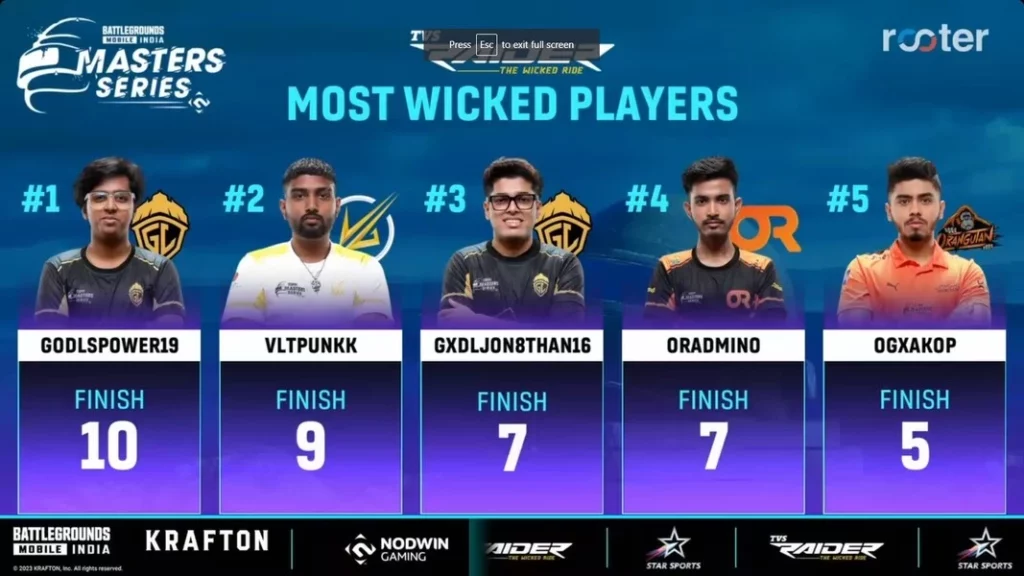
The Most Wicked Players ranking of the day showcased outstanding individual performances, with Spower leading the pack with an impressive 10 finishes. Velocity Gaming’s Ashutosh “Punkk” Singh followed closely with 9 finishes, leaving a significant impact on the matches. Meanwhile, Jonathan “JONATHAN” Amaral and OR Esports’ Admino secured 7 finishes each, contributing significantly to their respective teams’ success. Orangutan’s Ankit “AK” Shukla comes in fifth place with 5 finishes. 

Stay updated with the latest news in gaming and esports by signing up for early access to TalkEsport’s Mobile App. Follow us on Twitter and Google News to ensure you never miss the exciting updates.
How to Type in All Chat Valorant?

0

In the fast-paced world of competitive shooters, the thread that binds victory often lies in effective communication. For players immersed in the realm of Valorant, the significance of this connection cannot be overstated. While voice chat emerges as the dominant mode of interaction, not all players wield a microphone of quality, if at all. This brings to light the importance of mastering text communication within Valorant. Furthermore, the ability to broadcast messages to all players via all chat is a valuable skill. The process, fortunately, is straightforward and hassle-free.

How to Type in All Chat Valorant?

To seamlessly immerse yourself in all chat conversations in Valorant, the process is as simple as pressing and holding the Shift key while simultaneously tapping the Enter key. Alternatively, a different method involves hitting the Enter key, followed by typing “/all” before formulating the core of your message. The beauty lies in the fact that regardless of the path you choose, your message will effortlessly reach every participant locked in the ongoing match.

Arguably, the most intuitive maneuver to initiate all chat within Valorant is by executing the Shift+Enter combination. Yet, don’t disregard the power of chat modifiers. By prefacing your message with “/all,” you can make your words universally accessible. However, if the need arises, you can also employ “/party” to direct your message exclusively to fellow party members.

For those acquainted with other offerings from Riot Games, this communication structure will strike a familiar chord. The chat system in League of Legends mirrors that of Valorant, with the Enter key serving as a gateway to general conversations and Shift+Enter facilitating all chat. While the foundation remains the same, it’s worth noting that League of Legends boasts additional chat commands that have yet to integrate into the Valorant landscape.

Mastery over all chat in Valorant can be distilled to a simple keystroke combination: Shift and Enter, a gateway to a world of collective communication. Alternatively, a dash of vintage flair can be infused by appending “/all” to your message. Yet, a word of caution is warranted – straying into excessive banter territory might unfurl consequences beyond expectation.

Stay updated with the latest news in gaming and esports by signing up for early access to TalkEsport’s Mobile App. Follow us on Twitter and Google News to ensure you never miss the exciting updates.
FAQ

    Is voice chat the only means of communication in Valorant?

    No, text chat provides an essential alternative for players without access to a microphone.

    Can I send private messages to my team members during a match?

    Absolutely, using “/party” before your message ensures it’s exclusively seen by your party members.

    Are there more chat commands in Valorant’s future?

    While the existing system draws from Riot Games’ other titles, the addition of new chat commands remains uncertain.

    Does the League of Legends chat system mirror Valorant’s?

    Yes, both games share a similar chat foundation, but League of Legends incorporates some unique commands.

    Why should I be cautious with all chat banter?

    Engaging in excessive banter may lead to unforeseen consequences and disrupt gameplay dynamics.