Home Blog Page 528

How To Get Candy Cane, Dappermint Skin In Fortnite

0

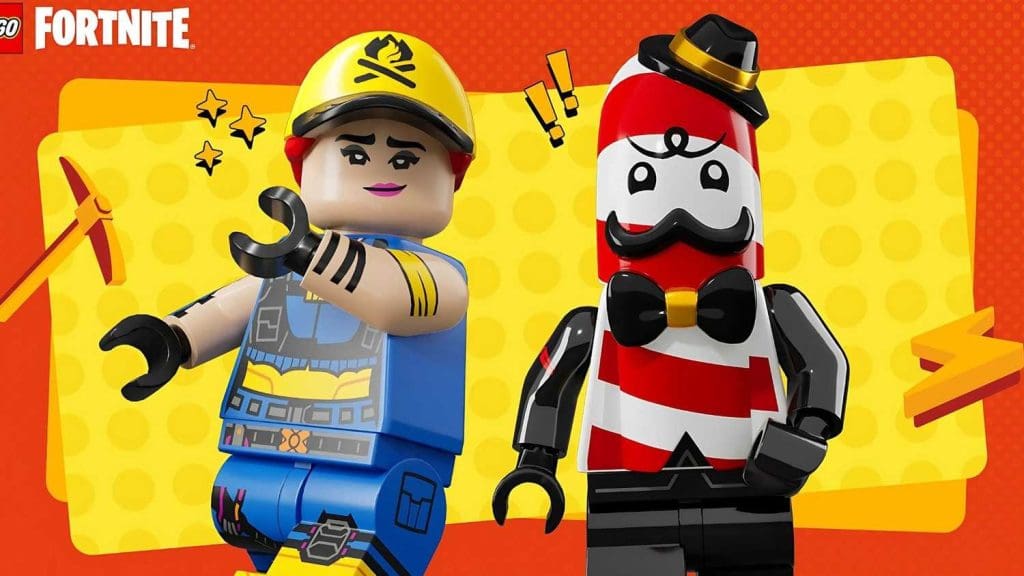
Fortnite players have the chance to unlock two free skins, including the festive Candy Cane Skin, Mr. Dappermint and Chord Kahele, as part of the game’s December 10 update. Learn how to claim them before the deadline.

What’s New in Fortnite?

The December 10 update introduces exciting rewards for players. Epic Games is offering two skins—Mr. Dappermint, a candy-cane-themed skin, and Chord Kahele. These skins come amidst other updates, such as new game modes and the rebranded Lego Fortnite Odyssey.

How to Unlock the Candy Cane Skin

To claim Mr. Dappermint for free, players need to link their Fortnite account with their LEGO account. If you’re new to LEGO Fortnite, linking your accounts also unlocks the Explorer Emilie skin as a bonus.

Chord Kahele Skin Details

Unlocking the Chord Kahele skin requires downloading Fortnite on a mobile device and earning XP through gameplay by February 21. Unfortunately, this option is not available for iOS users outside the EU due to platform restrictions.

More Free Rewards

Epic Games has been generous with free cosmetics, from the Juice WRLD skin to event-based rewards like Marvel Rivals gliders. With Winterfest just around the corner, fans can expect more opportunities for freebies.

Make sure to connect your accounts and start earning XP to claim these festive skins today!

How to Link LEGO Insider to Fortnite for Free Skins

0

Unlock exclusive Fortnite rewards by linking your LEGO Insider and Epic Games accounts. Starting December 11, 2024, claim the Candy Cane Skin and other exclusive items, including the Mr. Dappermint and Explorer Emilie skins. Here’s how to connect your accounts effortlessly.

Fortnite Candy Cane Skin
  1. Create or Access Your LEGO Insider Account
    Head to the LEGO Insider official website to sign up or log in. If you’re already a LEGO member, use your existing credentials.
  2. Log Into Your Epic Games Account
    Access your Epic Games account via the official website. If you’ve forgotten your credentials, reset your password to regain access.
  3. Connect LEGO to Epic Games
    Navigate to the Apps and Accounts section of your Epic Games profile. Select the LEGO Account box and click “Connect.” Authorize the connection when redirected to the LEGO site.
  4. Confirm the Link
    After granting permission, you’ll be redirected to Epic Games. Your accounts should now be linked successfully.
  5. Optional: Update Your LEGO Insider Profile
    If you want to update your LEGO account name, visit the LEGO profile page. Note that changes are limited to system-generated names.

What Skins Will You Receive?

Players linking their accounts for the first time will receive two exclusive Fortnite skins:

  • Explorer Emilie Skin
  • Mr. Dappermint Skin

Each skin comes with dual styles: a Battle Royale variant and a LEGO mode variant that automatically switches depending on gameplay mode.

When Will You Get the Skins?

Once your accounts are successfully linked, the skins will appear immediately in your locker. If you already linked your accounts before this update, simply log into Fortnite to receive Mr. Dappermint.

By following these steps, players can enhance their Fortnite experience while showing off unique styles like the Candy Cane Skin. Check out the official Fortnite updates page for more exciting collaborations and rewards.

Best Class in Path of Exile 2: Top Picks and Tips

0

As Path of Exile 2 captivates players with its expansive gameplay, the debate over the best Path of Exile class heats up. From tanky defenders to agile mages, here’s a breakdown of the top choices for mastering Wraeclast in this immersive sequel.

The Top Classes to Choose in Path of Exile 2

1. POE Witch Class: A Beginner’s Powerhouse

The POE Witch class is an excellent choice for beginners and veterans alike. With powerful minion abilities, it allows players to maintain safety and deliver devastating attacks from a distance. While slow to level, the Witch shines in its ceiling potential, making it indispensable in group settings, especially during boss battles.

2. Sorceress: Mobility Meets AoE Power

For those who value agility and crowd control, the POE Sorceress guide is essential. This class levels quickly and offers exceptional area-of-effect attacks, making it ideal for all skill levels. Minimal investment is required, and the class’s consistency ensures it remains a popular pick for solo and party play.

3. Ranger: Precision with a Price

Intermediate players gravitate toward the Ranger for its high skill ceiling. This class excels in ranged combat and boasts the fastest leveling from 70–100. However, its gear dependency and challenging early-game experience make it a better choice for seasoned players who can endure the grind.

4. Templar: The Unyielding Tank

For those who prefer tanking and team support, the Templar is unbeatable. Simple mechanics and exceptional durability make it the backbone of any party. While its damage output is modest, its ability to protect allies during tough boss battles earns it a spot among the top Path of Exile 2 classes.

5. Monk: A High-Risk, High-Reward Choice

If you love a challenge, the Monk offers a dynamic playstyle blending melee and ranged attacks. It’s ideal for players who enjoy a ninja-like approach, weaving through attacks. The class demands expertise but rewards perseverance with unmatched end-game dominance.

Choosing the Right Class for You

Whether you’re a beginner seeking POE beginner tips or an experienced player looking for a challenge, these top classes cater to various playstyles. The Witch and Sorceress are great for ease of play, while the Monk and Ranger are perfect for thrill-seekers. If teamwork and resilience are your focus, the Templar stands out as a must-pick.

For more insights into the success of Path of Exile 2, check out how it’s already breaking records as Steam’s most played game.

Fortnite V33.10 Downtime Schedule: First-Person Mode, Brick Life, and Updates

0

Fortnite’s V33.10 update brings first-person mode, LEGO Brick Life, and key Chapter 6 changes. Scheduled downtime starts at 4 AM ET on December 10, introducing fresh modes and weapons to redefine the battle royale experience.

Major Highlights of the V33.10 Update

First-Person Mode Finally Arrives

Epic Games answers the call with a first-person perspective, long-requested by fans. While not yet integrated into Battle Royale, the new Ballistic Mode offers a tactical, team-based gameplay experience. Inspired by games like Rainbow Six Siege, this mode encourages strategy and stealth, setting the stage for a potential full first-person Battle Royale.

Weapon Balancing and Updates

Big changes are coming to the armory!

  • The Void Oni Mask has been nerfed, reducing teleport distance.
  • Buffs for the Oni Shotgun and Surgefire SMG ensure weaponry remains competitive.
    Leakers like HYPEX hint at the unvaulting of fan favorites like the Ranger AR, Quad Launcher, and Shield Bubble, spicing up gameplay with nostalgic weapon choices.

LEGO Brick Life Expansion

Building on the success of LEGO Fortnite, Brick Life introduces an open-world simulation in a vibrant LEGO city. Players can craft virtual careers, design homes, and socialize in dynamic, playful environments. A refreshed LEGO Pass also debuts, with exclusive cosmetics and builds for subscribers.

For a nostalgic touch, the Storm King returns, delivering challenging encounters and powerful rewards, further diversifying the LEGO Brick Life mode.

Scheduled Downtime and What to Expect

Downtime for the V33.10 update begins at 4 AM ET on December 10. Players are advised to wrap up games by 3 AM ET as matchmaking will be disabled. The update promises significant enhancements to keep Fortnite engaging.

Fortnite continues to evolve with innovative updates like Ballistic and Brick Life, attracting a diverse audience. For more on Fortnite collaborations, including the recent Stephen A. Smith Fortnite skin, explore this feature.

Stay tuned for Winterfest updates and exciting in-game changes this season.

Esports World Cup 2025: Confirmed Games Lineup

0

The Esports World Cup 2025 is set to take place in Riyadh, Saudi Arabia, from June to August 2025. This prestigious tournament will feature the largest prize pool in competitive gaming and include Call of Duty Black Ops 6, Honor of Kings, DOTA 2, and other globally acclaimed titles.

Expanding the World of Esports

The Esports World Cup is recognized as one of the most prominent events in the gaming industry. It evolved from the Gamers8 Festival and is co-hosted by ESL FaceIt. With a history of offering massive prize pools, the 2025 event promises to be groundbreaking, building upon the success of its 2024 edition.

Star Games to Watch

The 2025 gaming events boast a stellar lineup across multiple platforms and genres:

  • Call of Duty Black Ops 6: This latest release is set to dominate the PvP scene with its adrenaline-packed multiplayer battles.
  • Honor of Kings: The world’s most popular mobile MOBA brings its signature 5v5 gameplay to the global stage.
  • DOTA 2: With its intricate strategies and loyal fanbase, it continues to be a pillar in the competitive gaming world.

Mobile Games on the Rise

Titles like Free Fire and Honor of Kings highlight the growing influence of mobile gaming in professional esports. Their inclusion in the World Cup signals a shift toward broader accessibility in competitive gaming.

Fighting and Strategy Genres Thrive

Street Fighter 6, a staple in fighting games, and Tom Clancy’s Rainbow Six Siege, a tactical shooter, will also headline events, showcasing the diversity of games in the competition.

Explore Counter-Strike 2’s return to the Esports World Cup to see how classic franchises are reshaping their competitive legacy.

With 25 games in total, further announcements are expected in the coming weeks. The blend of classic titles and rising stars sets a promising stage for one of esports’ most exciting years yet.

VALORANT Night Market December 2024: Dates, Deals, and Details

0

The much-anticipated VALORANT Night Market is back! From December 16, 2024, to January 7, 2025, players worldwide can score incredible discounts on exclusive VALORANT skins during this limited-time VALORANT December event.

What Is the VALORANT Night Market?

The VALORANT Night Market is a recurring in-game event that offers discounted weapon and knife skins. For Episode 9 Act III, the Night Market lasts 22 days, providing players access to six randomized skin offers with discounts ranging from 10% to 49%.

How to Access the Night Market?

Players can locate the Night Market icon—a diamond-shaped card—on the top-right of their home screen. Clicking on it reveals six cards, each hiding a skin offer. Once clicked, the offer becomes permanent until the event ends.

Key Features of Episode 9 Act III Night Market:

  • Discounts: Randomized discounts up to 49% on eligible skins.
  • Guaranteed Premium Offers: Players will receive at least two Premium or knife skin options.
  • Exclusions: Ultra and Exclusive skins, as well as certain high-tier knives like the Reaver Karambit, are excluded.

For a deep dive into VALORANT’s upcoming content, explore the VALORANT Patch 9.11 details featuring changes to popular agents.

Why This Event Matters

The Night Market not only offers a chance to grab beloved skins at a bargain but also teases future game updates. Players might catch glimpses of new maps, agents, or thematic designs while enjoying the seasonal discounts.

Stephen A. Smith Seeks Fortnite Skin Collaboration

0

Stephen A. Smith, renowned ESPN commentator and sports journalist, has made waves in the gaming world by expressing his desire for a dedicated Fortnite skin. The unexpected request has sparked enthusiasm across the gaming and sports community.

The Iconic Commentator Joins the Fortnite Conversation

Stephen A. Smith, celebrated for his sharp wit and unfiltered sports commentary, entered the gaming sphere on December 10, 2024. Responding to a fan query about Fortnite’s OG map, Smith boldly declared Tilted Towers as his preferred landing spot, citing its vibrant action and central location. Shortly after, he followed up with a tweet tagging @FortniteGame: “I want a skin,” which amassed over 36,000 likes within hours.

Esports Collaborations and Fan Reactions

This move aligns with Fortnite’s rich history of esports collaborations and pop culture integrations, featuring celebrities like Travis Scott and Shaquille O’Neal. Fans have rallied behind Smith’s request, with some even proposing AI-generated mock-ups of the potential skin. One user quipped they’d spend $20 on the skin, while another joked about how intimidating Smith’s in-game avatar could be.

Fortnite’s Growing Appeal in Gaming and Sports

Fortnite’s OG mode release on December 6 has reignited interest in the game, making Smith’s engagement particularly timely. As Fortnite celebrities continue to influence its evolution, Smith’s entry could pave the way for greater integration between traditional sports and gaming.

While Fortnite developers have yet to respond, fans are optimistic. Could a Stephen A. Smith skin become a reality? Check out more on the intersection of gaming and sports in our coverage of Winterfest 2024 collaborations.

When Does the 2024 League of Legends Season End? Official Date & Rewards

0

When does the LoL 2024 season end? The LoL 2024 season is set to wrap up on Tuesday, January 7, 2025, marking the end of League of Legends Split 3, as confirmed by Riot Games‘ Lead Gameplay Designer, Matt “Riot Phroxzon” Leung-Harrison.

Key Details on the LoL 2024 Season

What is League of Legends Split 3?

Split 3 is the final competitive phase of the LoL 2024 season. It began on September 25, 2024, alongside Patch 14.19, resetting ranks and offering players another chance to climb the ladder.

LoL Ranked Rewards 2024

As the season concludes, players can earn an array of rewards based on their rankings:

  • Victorious skin (Master Yi is the chosen champion).
  • Chromas for higher ranks.
  • Exclusive icons emotes, and splash borders for those completing all splits.

Notably, the Victorious Skin Master Yi follows a tradition of celebrating high-ranking players. Riot keeps its announcements on rewards strategic, to maintain active participation across all splits.

Riot Games Updates for 2025

The end of the season paves the way for new features in the upcoming season, including:

  • Tier 3 boots, enhance gameplay dynamics.
  • The debut of Atakhan, a new epic monster.
  • Nexus respawning turrets, adding strategic layers to matches.

The LoL 2024 season promises a grand conclusion, with rewards and changes setting the stage for an even more engaging 2025 season. Prepare to climb, compete, and collect your victories!

How To Hide Account Level in Valorant?

0

Whether you want to conceal your total playtime from other players or just wish to avoid in-game toxicity, learning how to hide your account level in Valorant can help you maintain privacy and enjoy a more relaxed gameplay experience.

Toxicity isn’t a new thing in Valorant, with players often choosing to weaponize your account level against you to undermine your skill or target you with harassment based on your perceived experience. This is where hiding your account level can come into clutch.

Hiding your Valorant level not only prevents others from tracking your total playtime but also allows you to play freely without the fear of judgment.

Ready to find out how to hide your account level in Valorant? We have you covered.

How To Hide Your Valorant Level

How To Hide Account Level in Valorant

Hiding your Valorant level is extremely easy and takes no more than a few seconds once you know how to do it.

Here’s how you can hide your Valorant account level:

  • Launch Valorant.
  • Go to the ‘Collections’ tab.
  • Go to ‘Player Cards’.
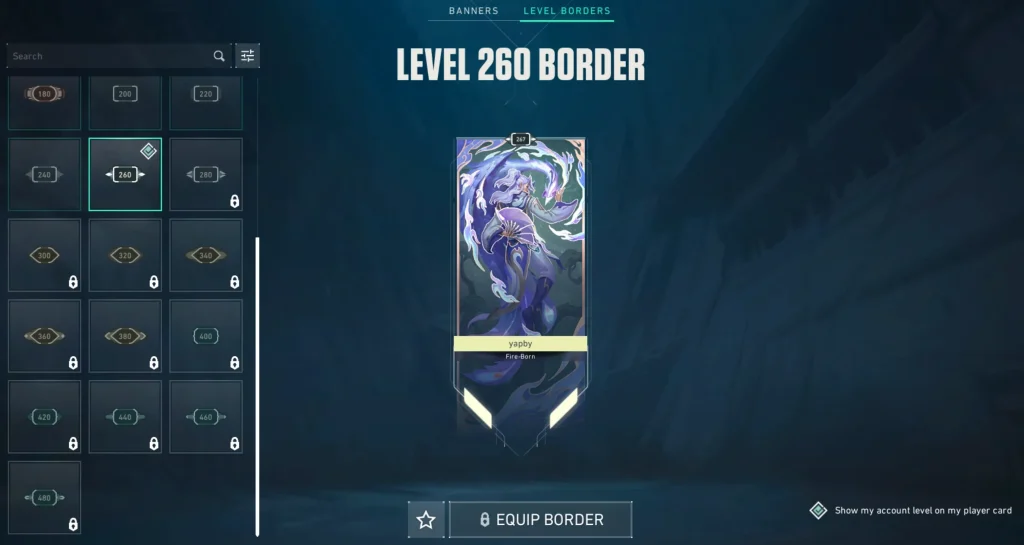
  • Click on ‘Level Borders’.
  • At the bottom-right corner of your screen, uncheck the box that reads “Show my account level on my player card.”

And that’s it! Once you follow these steps, other players you queue into will no longer be able to see your account level in-game.

Note that players who are friends with you or any player who is in your party can still see your account level by checking out your player profile.

Valorant Voice Chat Ban: Reasons & How To Check

0

If you’ve been unable to use the voice chat in Valorant, chances are you may have received a voice ban. Getting a voice chat ban in Valorant not only prevents you from using your microphone in-game but can also render you unable to send text chats when playing the game.

However, being unable to use your microphone in Valorant doesn’t necessarily mean you’ve been banned from voice chat. If you can’t use voice chat in Valorant, it could also be due to microphone issues, incorrect input settings, or game-related bugs.

Luckily, there are a number of ways to easily identify whether you’ve received a voice chat ban in Valorant.

Valorant Voice Chat Ban: How To Check

Valorant Voice Chat Ban

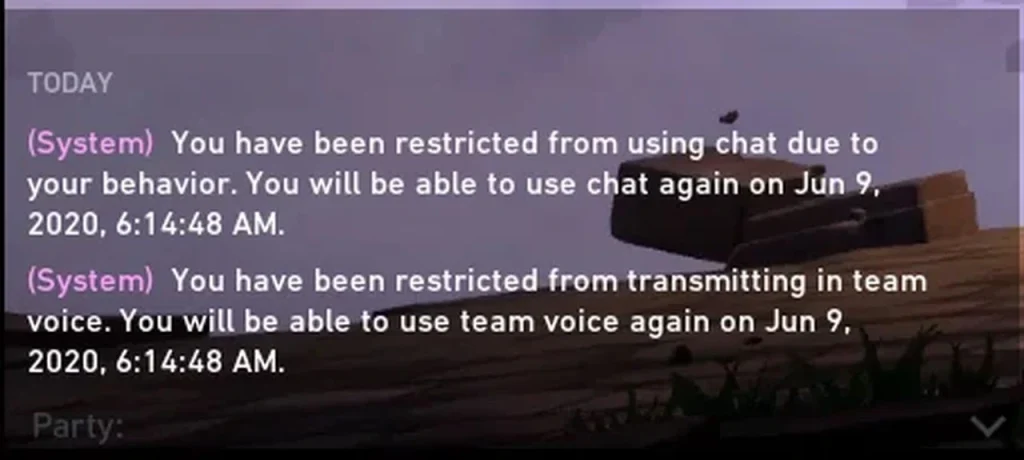
When you receive a voice chat ban in Valorant, you’ll see a pop-up at the center of your screen informing you of your ban, similar to the notifications for dodging games or going AFK. It will include the duration of your voice chat ban along with the exact time of its expiration.

Additionally, you’ll also see a system message appear in your chat box stating: “You have been restricted from using chat due to your behavior.” The message will also show you the duration of your ban.

Lastly, you’ll find yourself being unable to queue for ranked games if you have an active comms ban.

Valorant Voice Chat Ban: Reasons

While there are a lot of reasons that can trigger a voice chat ban in Valorant, here are some of the most common ones, as confirmed by Riot:

  • Insulting, threatening, harassing, or offensive language.
  • Abusive language targeted at players based on their performance or otherwise.
  • Any kind of discrimination or hate speech. This includes targeting a player’s race, ethnicity, religion, ability, sexual orientation, or gender identity.

What To Do If You Receive a Voice Chat Ban in Valorant

If you’ve received a voice chat ban in Valorant, your best bet would be to wait it out. If you feel like your ban isn’t justified, you can try reaching out to Riot Games support.