Wednesday, July 8, 2026
Home Blog Page 981

How To Pre Register For COD Warzone Mobile

0

COD Mobile Warzone Pre Register: The goal of Warzone Mobile is to bring the exhilarating gameplay of the popular BR game to mobile devices. The same Call of Duty combat that gamers are familiar with and love will be featured in the game alongside a variety of Operators, weapons, and locales.

The makers are accepting pre-registrations for the mobile game’s 2023 international release, despite the lack of information. The following is an explanation of the pre-registration process for Warzone Mobile on both Android and iOS.

How to pre-register for COD Warzone Mobile on Android

The pre-registration process for Warzone Mobile on Android couldn’t be easier; just follow the steps provided.

  • Open the Google Play Store on your phone. 
  • Make sure you’re signed in to your Google Account.
  • Search for ‘Warzone Mobile’.
  • Hit the “Pre-Register” Button.

How to pre-register for COD Warzone Mobile on iPhone iPad iOS

If you own an iOS device, pre-registering for Warzone Mobile couldn’t be simpler than the methods outlined here.

  • Open the App Store on your iPhone. 
  • Make sure you’re signed in to your Apple ID.
  • Search for ‘Warzone Mobile’.
  • Hit the “Pre-Register” Button.

Following the aforementioned steps, you will be alerted as soon as the iOS version of Warzone Mobile becomes available. This indicates that you’ll have access to it as soon as it becomes available on the App Store, whenever that may be.

All Warzone Mobile pre-order rewards

Warzone Mobile’s pre-order prizes were revealed after 25 million pre-registrations. The following is a list of everything that comes with a pre-order of Warzone Mobile:

  • “Ghost — Condemned” Operator Skin“Prince of Hell” X12 Weapon Blueprint
  • “Archfiend” M4 Weapon Blueprint
  • “Dark Familiar” Emblem
  • “Foe’s Flame” Vinyl

That’s everything you need to know about pre-ordering Warzone Mobile on Android and iOS. Make sure you pay a visit to our Warzone website for all of the most recent news and stuff pertaining to guides.

For more updates on COD Warzone Mobile, make sure to follow TalkEsport on Google News.
Need For Speed Unbound Unlimited Money Glitch Explained

0

Need for Speed Unbound is one of the best games around and what makes it so different from the previous iteration is that it takes the best from every iteration of the game that came before. NFS Unbound manages to stick to the core DNA of NFS and improve upon the fundaments to bring it to par with some modern-day rivals like Forza Horizon. 

NFS Unbound has managed to isolate the strength of Need for Speed games and cover its weaknesses with them. Overall, the game has proven to be highly lucrative and fans are falling in love with it once again. It builds upon the plethora of customization options and a variety of cars from previous titles and takes it to the next level which is complemented by stunning visuals. 

The game is stunning in almost every area however there are several bugs and glitches that make the game an interesting one. Most notably, the unlimited money glitch has raised quite a few eyebrows and in this article, we explore what it is and how players can abuse it. 

How To Use The Unlimited Money Glitch In NFS Unbound?

Once you are in the garage, look for the Weekly Calender under the Play option. Every Saturday, you get to take part in the Qualifiers Race where rewards come in cash and cars, however, there is a way to redeem that money thereby rendering it unlimited.

Make sure to win three different rances to trigger the glitch. Once you have your 3rd race win on the board, the game will take you to the reward cutscene. Exactly when you are moving out of the reward’s cutscene, make sure to quit the game before the next cut scene appears.

When you start the game after doing so, you will notice that the money is credited to your in-game wallet and at the same time you get to race again and get that money. Repeating this process can be time-consuming and boring but the reward is highly lucrative.

FIFA 23 Team of the Year: Predictions and Release Date

0

FIFA 23 Team of the Year or TOTY is undoubtedly one of the biggest promos of the FIFA franchise. The developers release special cards with massive upgrades as a part of the promotion. In this article, we are going to discuss everything you need to know about FIFA 23 TOTY.

In the FIFA 23 TOTY promotion, players get unique cards in recognition of their accomplishments in 2022. The promo has a number of contenders for the actual Team of the Year, and FIFA gamers may choose their starting lineup. These votes are then used to choose the squad.

FIFA 23 TOTY Release Date

The promo is hyped up and EA hasn’t released any official date yet. However, we think the FIFA 23 TOTY promo will be released around 16th January 2023 and it will go live around 20th January 2023.

FIFA 23 TOTY Prediction

Let’s take a look at the predicted XI of FIFA 23 TOTY:

  • GK: Manuel Neuer
  • RB: Joao Cancelo
  • CB: Marquinhos
  • CB: Virgil Van Dijk
  • LB: Theo Hernandez
  • CM: Kevin De Bruyne
  • CM: Luka Modric
  • CM: Jude Bellingham
  • RW: Lionel Messi
  • ST: Kylian Mbappe
  • LW: Vinicius Jr

For more exclusive esports and gaming content, please follow TalkEsport on Google News.

How To Fix Valorant 0.1 kbps Download Stuck?

0

Valorant Download Stuck at 0.1 KB: Some Valorant updates become stuck at 0.1KB during download, and no matter how long you leave the launcher open, the download will not continue. Check Riot Games’ Twitter or Support page to verify whether their servers are down before attempting any repairs.

For those of you whose Valorant downloads have stalled at 0.1 KB, here’s how to get them moving again.

Navigate to the official Twitter account for Riot Games Support. If there are any problems with the servers, a tweet will be sent out.

Whether you experience difficulty, you may also visit the official support website to see if any maintenance is planned.

Here’s what to do if the servers are up and you’re having trouble:

Fix 1 : Restart the Download

  • Quit the launcher.
  • Open your Task Manager by pressing CTRL + ALT + DELETE.
  • Search for Riot Vanguard and other processes starting with “Riot”.
  • Right-click on all of the Riot processes and click “End Process”.
  • Start the download again

Fix 2 : Make changes to DNS

Internet-connected devices are identified by their IP addresses. DNS servers minimize the need to learn IP addresses.

It’s possible that Valorant’s download will be stalled at 0.1 KB due to network troubles. Consider making a DNS change on your computer or router to see if that resolves the issue.

The configuration page of your router can be accessed after logging in. Keep everything else the same, but configure your primary and secondary DNS to any of the following:

  • 1.1.1.1
  • 1.0.0.1
  • 8.8.8.8
  • 4.2.2.2

If nothing else helps, try restarting your computer. Or you may contact your Internet Service Provider.

If you still need help, file a ticket to Riot Games and describe your issue in detail.

For more updates on Valorant, make sure to follow TalkEsport on Google News.
Valorant not Updating? Here’s How To Fix It

0

Valorant is among the most played online shooting games, which has gathered thousands of players across the globe. It is among the most streamed games on Twitch.

However, recently, some players aren’t able to update their Valorant, even though they have reliable internet. There have been reports that the update takes too long.

If you’re in the same boatas you, please read on to learn the reason why Valorant isn’t updating and what you can do to resolve it.

Here’s Reason Why Your Valorant not Updating

The most frequently encountered problems that prevent you update your Valorant can be due to a glitch in Riot Vanguard or small bugs that is present in the game, problems with the internet.

  • Minor bugs
  • Unstable internet connection
  • Outdated Windows and Graphics drivers
  • Valorant does not have administrator rights
  • Background apps taking bandwidth
  • Firewall blocking Valorant
  • Problems with Riot Vanguard

Whatever the reason we’ll look into fixing the problem so that your Valorant is able to update quickly.

Repairing the problem can be simple to fix as one or two or three. Start by restarting your computer or router for a quick solution.

You can then investigate the causes and determine the best solution. In the same way, if restarting your computer didn’t solve your issue It is recommended to look at the next fixes.

How To Fix Valorant Not Updating:

  • Update Windows and Graphics Driver
  • Updating Graphics Driver
  • Run Valorant as Administrator
  • Close Background Apps
  • Allow Valorant Through Firewall
  • Reinstall Riot Vanguard

It’s also possible the latest version of the game contains a bug that prevents you from being able to upgrade the game. If this is the situation, your only option would be to hold off until a more recent update to be released with a fix for the issue.

Guide to download BGMI In India Using Darksquad APK

0


BGMI 
was the most grossing mobile BR title in the country but according to our sources, the game has been banned in the country. Check out how you can download BGMI now after the game is banned using the Darksquad APK.

Darksquad is one of the websites that allows players to download the game even after BGMI is blocked in the country. By using the links given below, you can access your own accounts once again and download the game.

HOW TO DOWNLOAD BGMI IN INDIA AFTER BAN

Players interested in playing BGMI in India even after the ban have a good news as the servers are not taken down yet, which means that one who downloads the game can access their account and play easily.

Follow these simple steps to download BGMI:

  • Click here to navigate to Darksquad for downloading BGMI.
  • Click on the download button to download the OBB and APK files.
  • Install and enjoy BGMI on your devices.

Enable the “Install from other sources” toggle from your phone settings to quickly download the game and enjoy it on your phone even after the ban. Players can download the files from links given below:

Make sure to place the files in correct place so that the game runs without any errors. If you face any problems in the installation, simply download the game once again.

Also Read | Why was HasanAbi banned from Twitch?

Red Bull Home Ground 3 Valorant: Teams, Schedule And All Details

0

Several renowned VCT-partnered teams will debut at the Red Bull Home Ground 3 Valorant tournament. 

In addition, non-European teams will participate in Red Bull Home Ground for the first time. Three partnered American teams, Cloud9, 100 Thieves, and KRÜ Esports will compete. 

Next year’s EMEA-sponsored teams, including Team Liquid, Team Vitality, Team Heretics, and FUT Esports, will also be on display at the event.

What is Red Bull Home Ground 3?

A professional Valorant competition will be hosted at Victoria Warehouse in Manchester, England. 

There are ten teams total, five from Europe, the Middle East, and Africa and three from the Americas competing for US$100,000.

Red Bull Home Ground 3 schedule and results

From December 9-12, the tournament will be held. The first two days will consist of the group stage, while the latter four will be dedicated to the playoffs.

Every day, the tournament will kick off with matches beginning at 3:00 p.m. GMT (7:00 a.m. PT; 11:00 p.m. GMT+8; 7:00 a.m. PT).

Teams competing in Red Bull Home Ground 3:

TEAMREGION
Team LiquidEMEA
Team HereticsEMEA
Team VitalityEMEA
FUT EsportsEMEA
FOKUS ClanEMEA
Cloud9Americas
100 ThievesAmericas
KRÜ EsportsAmericas

Group stage standings

Group A

STANDINGTEAMRECORD (W-L)
1stTBDTBD
2ndTBDTBD
3rdTBDTBD
4thTBDTBD

Group B

STANDINGTEAMRECORD (W-L)
1stTBDTBD
2ndTBDTBD
3rdTBDTBD
4thTBDTBD

Playoffs

December 10

Quarterfinals

TEAMSCHEDULETEAM
TBD11:00 p.m. GMT+8 | 7:00 a.m. PT | 3:00 p.m. GMTTBD

December 11

Quarterfinals

TEAMSCHEDULETEAM
TBD2:00 a.m. GMT+8 | December 10, 10:00 a.m. PT | December 10, 6:00 p.m. GMTTBD

Semifinals 

TEAMSCHEDULETEAM
TBD8:00 p.m. GMT+8 | 4:00 a.m. PT | 12:00 p.m. GMTTBD
TBD11:00 p.m. GMT+8 | 7:00 a.m. PT | 3:00 p.m. GMTTBD

December 12

Grand final

TEAMSCHEDULETEAM
TBD2:00 a.m. GMT+8 | December 11, 10:00 a.m. PT | December 11, 6:00 p.m. GMTTBD

Two groups of four teams each were formed from the eight participants. The clubs who place bottom in their brackets will be eliminated from contention.

The playoffs for the remaining six clubs will be in a single-elimination format.

Except for the championship game, all matches will be played in the best-of-three series.

Red Bull Home Ground 3 prize pool

STANDINGTEAMPRIZE MONEY
1stUS$50,000
2ndUS$20,000
3rd-4thUS$10,000
3rd-4thUS$10,000
5th-6thUS$3,000
5th-6thUS$3,000
7th-8thUS$2,000
7th-8thUS$2,000

Where to watch Red Bull Home Ground 3?

The tournament will be streamed live on Red Bull’s official Twitch and YouTube channels.

For more coverage on Red Bull Home Ground 3, make sure to follow TalkEsport on Google News

How To Find A Player To Duel For The TCG Quest In Genshin Impact

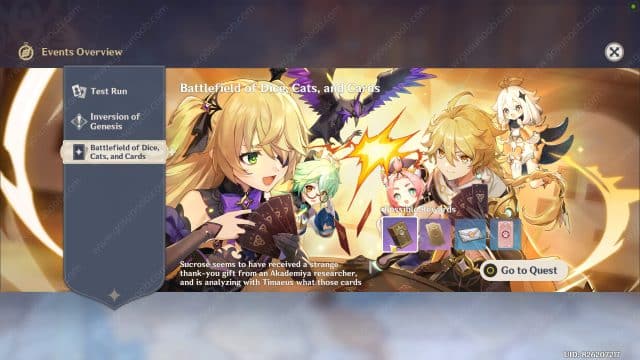
Find Players and Have a Duel Genshin Impact: With an uncanny resemblance to Gwent from Witcher 3, the latest Genish Impact update brings a card game under the event called The Battlefield of Dice, Cats, and Cards.

Players will have to engage in a duel with other players. The hard part here is to find an opponent to play against. Gamers are finding it difficult to find a single opponent let alone play it three times.

Find a Player and Have a Duel in Genshin Impact

Before you go all out looking for players to engage in a duel with, you must know how to find players in a proper manner and do it.

When you are about to start this mission, make sure you have collected the Casket of Tomes from Margaret. This is a new gadget introduced in the game along with the latest event update that aids in the events that follow.

This device allows you to set up your card deck and at the same time, it helps you locate if there is a player ready to engage in a battle somewhere close, which makes this a highly crucial item for the ongoing event. It lies along with other items in the inventory which makes it easy to find.

Head over to your inventory and under the gadgets tab, you will find your shiny new Casket of Tomes that Margaret gave you. Select it from there and look for the “Search for Players” option and it will automatically help you find a duel to complete the missions.

Once it has detected the players, look through the map to find the closest one, make your way to said player and engage with them. It is up to you to convince him to a duel and if they agree, all that is left is for you to take him on and win in order to progress further into the event.

Thank you for reading, For more exclusive esports and gaming content, please follow us on Google News.

How to download BGMI In India After Ban

0

BGMI was the biggest battle royale game in India before it was banned. The reason for this action is similar to why PUBG Mobile was banned in the country. Due to this reason, the game is taken down from official stores but here is how you can download it.

The ban was put into action a few months ago as BGMI was removed from Google Play as well as Apple App Store. TalkEsport was the first to break the news of BGMI ban in India and Krafton being in contact with the officials to resolve this issue. A report by Reuters soon confirmed it and mentioned that the game was banned under IT Act Section 69(A).

If you are looking to download the game despite the ban, use the links given below to download the latest BGMI application and enjoy the game.

HOW TO DOWNLOAD BGMI IN INDIA AFTER BAN

Players interested in playing BGMI in India even after the ban have a good news as the servers are not taken down yet, which means that one who downloads the game can access their account and play easily.

Follow these simple steps to download BGMI:

  • Click here to navigate to a website for downloading BGMI.
  • Click on the “Latest Version” button to download the game.
  • Install and enjoy BGMI on your devices.

Enable the “Install from other sources” toggle from your phone settings to quickly download the game and enjoy it on your phone even after the ban.

Also Read | Twitch Streamer Melih Kalkan Passes Away At Age 14

PUBG Mobile KR Tap Tap APK + OBB Download December 2022

0

PUBG Mobile (KR) is the localized version of PUBG Mobile that is currently available in Korea and Japan. This game has a lot of localized content for the users and their access is limited for global users. Here are steps through which you can download PUBG Mobile KR.

PUBG Mobile KR was quite popular in India as well when PUBG Mobile was just banned in the country and the players realized that the game is much smoother on this version of the application.

The game is only available on the Korean and Japanese app store at the moment. In order for one to play the game, you must follow the steps below:

  • Download the APK and OBB from one of the links given here.
  • Install the APK file. Make sure that you have gone to settings and allowed sources from unkown sources (There is an option in safety and privacy settings).
  • After installation, rename the obb file to ‘main.14350.com.pubg.krmobile.obb’ and move the file to Android/OBB/com.pubg.krmobile.

PUBG MOBILE KR VERSION DOWNLOAD

  • Download PUBG Mobile Kr Version – TapTap

Players that want to download the PUBG Mobile KR latest version should first download the TapTap application from the link given above and then ultimately use it to download PUBG Mobile KR.

Make sure to enable “Download and Install from other sources” option from your phone settings to enjoy a smooth installation experience.

Also Read | How To Get Deku Fortnite Skin: My Hero Academia Sskin