BGMI Air’s open beta went live on the Google Play Store at 10am IST on 25 November, and by lunchtime X was full of posts claiming that the lighter version of Battlegrounds Mobile India lags badly and pushes ads at players. We installed it the same morning and played a full Classic match on Erangel to see how much of that holds up. Across roughly 14 minutes of recorded play, the ping readout never moved from 20ms, not a single ad appeared, and the game let us drop into a 100-player match without forcing any extra download first.
One phone and one match cannot settle the question for every device, of course, and Air makes some visible trade-offs to stay this small. To put the numbers in context, we then installed the main BGMI on the same phone, signed in with the same account and played it too. Below is everything we found, set against what KRAFTON has confirmed so far and what other early testers are reporting.
Ping Stayed at 20ms for the Whole Erangel Match
The lag complaints were the main reason we wanted to test Air ourselves, so we kept an eye on the network readout in the bottom corner of the screen throughout. From the plane and the drop towards Georgopol, through a buggy ride across the map, to a firefight in which we knocked down an enemy, it read 20ms every time we checked, on Wi-Fi and on the India server. Going back through the recording afterwards, we found no rubber-banding and no frozen frames either.
Smoothness held up just as well. Our screen recording averaged about 58 frames per second over the session, which suggests the game was running close to 60 FPS for most of the match. A screen recorder is not a proper frame counter, so treat that figure as a strong hint rather than a benchmark. It is also worth saying that our test phone runs the main game too, which means this result tells you little about how Air behaves on a 2GB budget handset, the kind of device it was actually built for. That test is next on our list.
Not a Single Ad in 14 Minutes, Lobby Included
The ad worry appears to trace back to an Instagram story from the creator LetsGrow about irrelevant ads playing while the lobby sat idle, according to the esports account Esports360 (@Esports360igc). Esports360 then tried it in both BGMI and BGMI Air, leaving each game idle in the lobby for five to six minutes, and reported that no ad appeared in either.
Our session lines up with that. We spent time in the lobby, opened the Download Center, waited through matchmaking on the spawn island and played the match out, and at no point did a video or banner ad show up. Live service games can switch features on from the server whenever the developer chooses, so that could change before or after launch, but on the evidence so far the ad claims look unproven.
A 0.98GB Install, and a 216.2MB Lobby You Don’t Have to Download
Storage is where Air really separates itself from the main game. According to Digit, the open beta’s initial download on Android is 0.98GB, compared with roughly 1.5GB for regular BGMI. KRAFTON’s own Instagram post puts the minimum hardware at 1.5GB of RAM and an Adreno 306 GPU, while the Play Store listing asks for Android 5 or above.
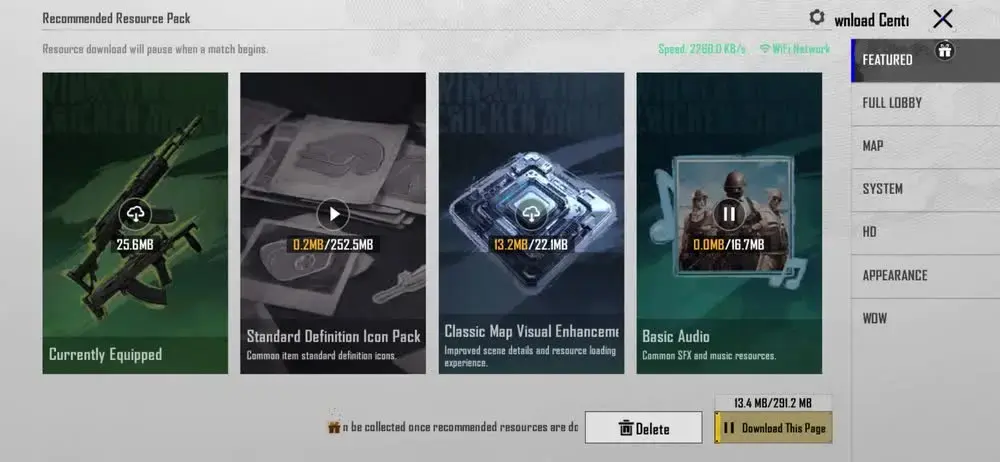
Inside the game, most of that saving comes from a Download Center that splits the extras into optional packs. The Full Lobby pack, which restores the complete lobby with its social hub, perks and customisation screens, weighs 216.2MB, and we had downloaded just 0.2MB of it when we started our match. Alongside it sits a separate 291.2MB Recommended Resource Pack, made up of a Standard Definition Icon Pack (252.5MB), Classic map visual enhancements (22.1MB) and Basic Audio (16.7MB).
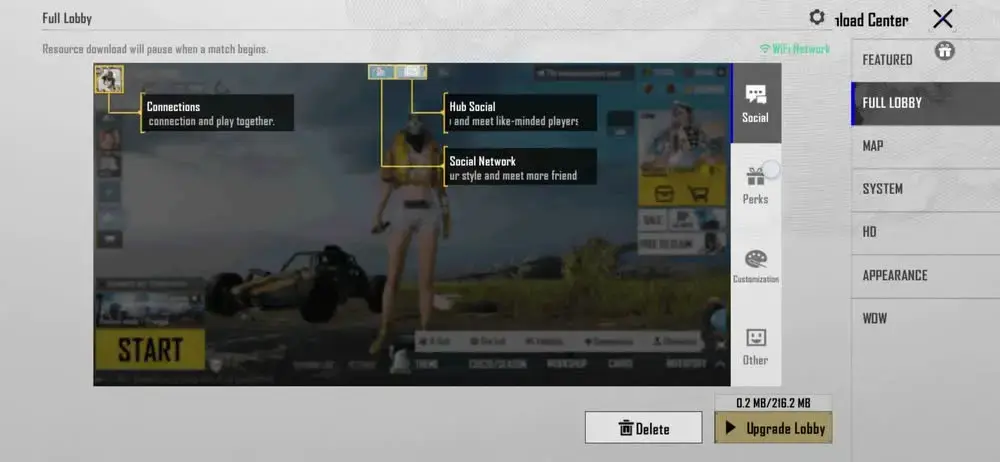
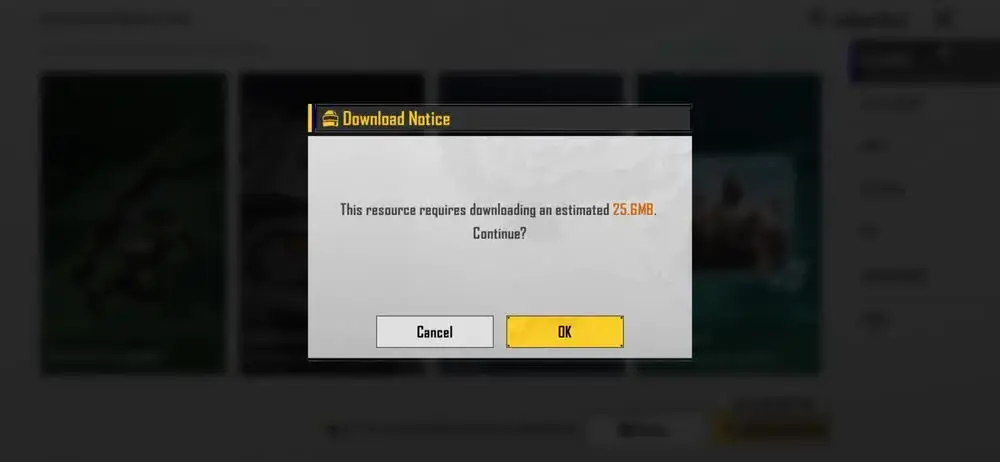
That behaviour fits the promise of no forced packages before the first match, which KRAFTON made ahead of launch, as Digit reported. When we tapped an item that needed new files, the game asked before fetching anything, with a notice that the resource required an estimated 25.6MB and a choice to continue or cancel. We chose to grab about 39MB of extras over Wi-Fi at a reported 2,260KB/s, and the Download Center also notes that any download pauses on its own once a match begins.
Air Exclusive Graphics, and the 90 FPS Question
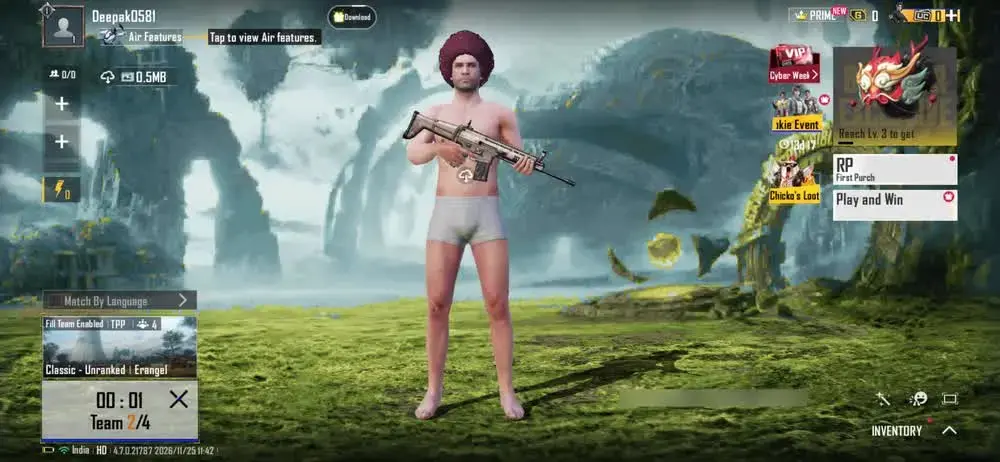
Air also ships with a graphics preset of its own. For the whole match, the corner of the HUD showed Air Exclusive, and the lobby carries a dedicated Air Features button that explains the approach. In a screenshot of that screen shared on X by TechiBoy (@techiboy96), it promises strict control over file size with content downloaded as needed, a clean and minimal lobby with lightweight resources, and three graphics choices: Air Exclusive, which is marked as a beta, Super Smooth and Power Saving.
High refresh rates are the bigger open question. TechiBoy says 90 FPS and 120 FPS gameplay still requires the main BGMI, and the Free Press Journal reported the same limit. Air’s settings menu does list higher frame rate options, as our BGMI Air FPS guide explains, with the top two tied to supported devices. We did not test a 90Hz or 120Hz phone, so if high refresh play matters to you, the main game remains the safer choice until KRAFTON clarifies.
Same Phone, Same Account: BGMI Wanted 2.4GB Before We Could Play
The clearest difference showed up before either game reached a match. On first launch, the main BGMI asked us to choose a resource pack before anything else, either a Low-spec pack of 1,478.9MB or an HD pack of 2,399.2MB, and warned us not to close the game until the download finished. We picked HD, and at the 5 to 8MB/s our connection managed, it took roughly six minutes before the lobby opened. Air, by contrast, went straight into its tutorial, asked for one quick restart after a small update, and then let us start a match with almost nothing extra downloaded.
The lobbies tell a similar story. In BGMI, our character appeared in its outfit with a pet companion and the usual event panels around it, while in Air the same account loaded in a plain default look, which fits TechiBoy’s report that cosmetics currently use placeholders. Neither lobby showed us an ad.
40 FPS in BGMI, 60 FPS in Air on the Same Phone
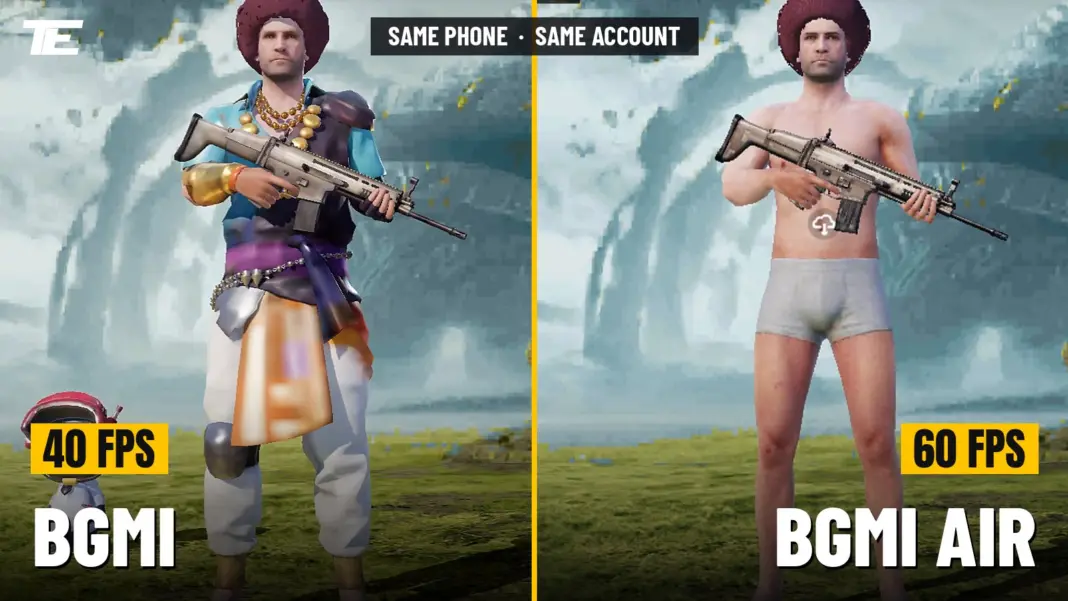
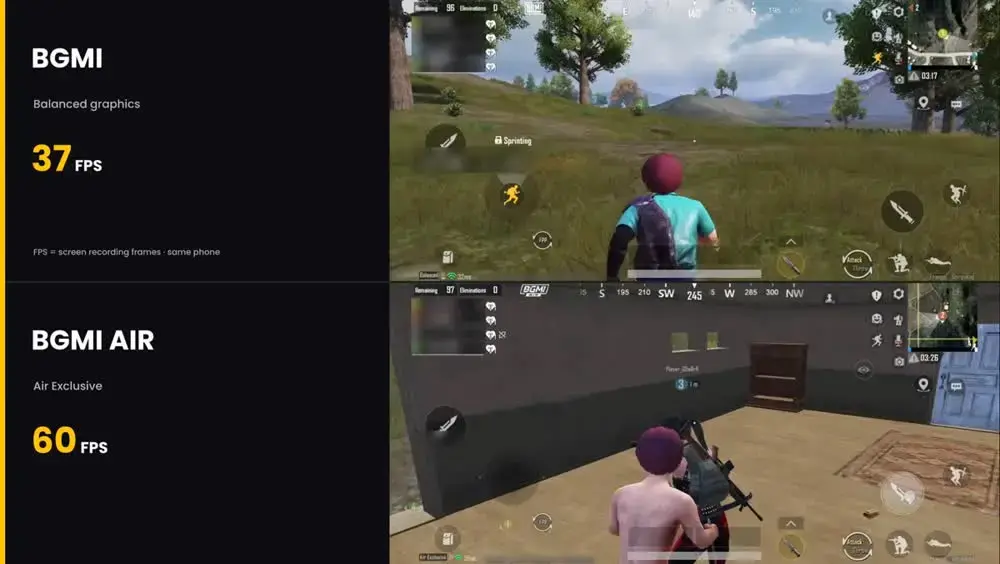
The frame rate gap was the biggest surprise of the day. Counting the frames our screen recorder captured each second, the main game held at about 40 FPS for almost the entire match on its default Balanced graphics setting, while Air sat at about 60 FPS on its default Air Exclusive preset. We left both games exactly as they installed, without changing a single setting. Air did dip to around 40 FPS during the plane ride and parachute drop, but it climbed back to 60 once we landed. Ping sat mostly at 28ms in BGMI, with brief spikes to 36ms and 44ms, against a steady 20ms in Air, although ping depends as much on the network at that moment as on the game itself.
Two caveats are worth keeping in mind. A screen recorder is not a true frame counter, and BGMI may well run faster on this phone if you turn its graphics down yourself. Even so, on default settings Air delivered the smoother match straight out of the box, and from a distance the greenery, buildings and vehicles looked much the same in both, with Air’s textures only turning noticeably soft up close.
BGMI Air vs BGMI: The Numbers Side by Side
For anyone deciding which version to keep on their phone, here is how the two compare on what has been confirmed or reported so far, together with what we saw in our own session.
| BGMI Air (open beta) | BGMI | |
|---|---|---|
| Initial download on Android | 0.98GB | About 1.5GB |
| Forced pack on first launch (our test) | None | 1,478.9MB Low-spec or 2,399.2MB HD |
| Frame rate in our match | About 60 FPS (default Air Exclusive) | About 40 FPS (default Balanced) |
| Ping in our match | A steady 20ms | Mostly 28ms, brief spikes to 44ms |
| RAM | 1.5GB minimum | At least 2GB recommended |
| 90 and 120 FPS | Not available, according to early testers | Available on supported phones |
| Lobby | Lightweight, with a 216.2MB Full Lobby pack as an option | Full lobby |
| Account | Same BGMI ID, no transfer needed | Your existing account |
| Playing with friends | Cross-play with BGMI | Cross-play with BGMI Air |
Where BGMI Air Still Feels Like a Beta
Air saves space by holding assets back, and you can see it. With the Full Lobby pack skipped, the lobby backdrop looked noticeably soft and blocky in places, and TechiBoy reports that outfits, gun skins and car skins currently use placeholder items. The first launch also walks every player through a tutorial before the lobby opens, which BGMI veterans will want to tap through quickly.
There is a gentle nudge to download more, too. A line at the bottom of the Recommended Resource Pack page says some rewards can only be collected once the recommended resources are in place, so players who want everything will still end up pulling in a few hundred megabytes over time.
None of this touched the match itself. Matchmaking took seconds, Erangel loaded without stutters, and the familiar rhythm of drop, loot, drive and fight felt the same as it does in the main game. The build we played was version 4.7.0.21787, with KRAFTON’s Ban Pan Security System 3.0 running its scan on the loading screen.
Our Take Before the 10 December Launch
On the strength of one full match in each game, BGMI Air is in better shape than the noise on X suggests. Ping stayed flat, ads never showed up, the small install let us play first and download later, and on our phone it ran smoother than the main game. The trade is a plainer lobby and, by most accounts, no high refresh support, which matters far less on the entry-level phones Air is aimed at.
The full game launches in India on 10 December on Android and iOS, according to Digit, after passing 14 million pre-registrations on Google Play, and you can log in with your existing BGMI ID. If you want to try it now, our step-by-step guide to the open beta download covers the Play Store route, and every update lands on our BGMI Air page. Our Hindi video puts both games side by side, and a budget-phone test is next.