Home Blog Page 336

How to Play 1v1 in CS2?

1v1 is something CS2 players often turn to when settling arguments, but the game itself does not offer any dedicated game mode that allows players to do so. While seasoned players know all the workarounds, newbies will have a more difficult time finding out how they can set up 1v1s with their friends.

As mentioned before, CS2 offers no direct methods to set up 1v1; there are a few workarounds. In this article, we will discuss every possible way you can set up a 1v1 with a friend and settle your argument then and there.

How to Play 1v1 in CS2?

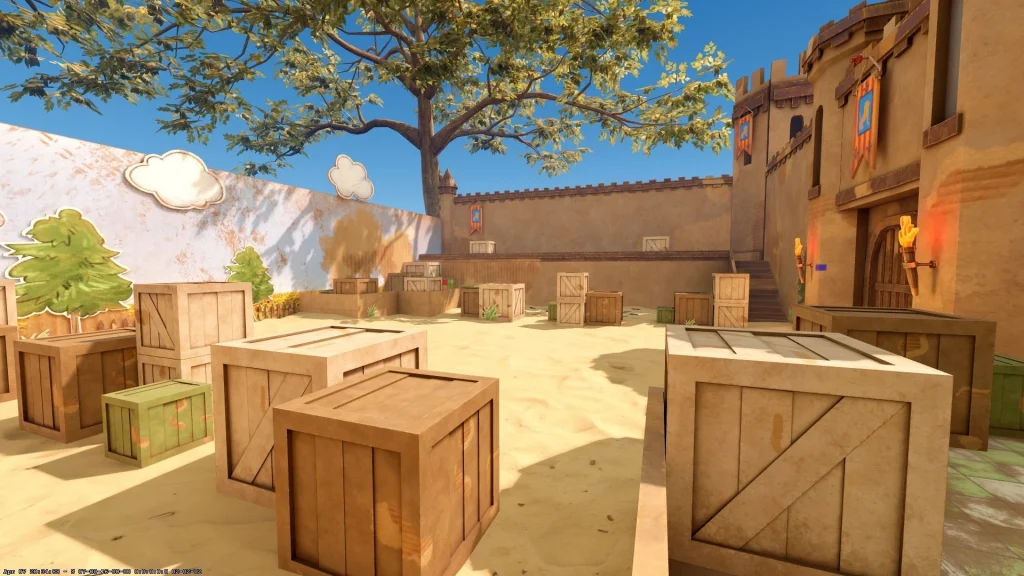
Head over to the Counter-Strike Workshops, where you can find a plethora of maps developed for 1v1 matches. These maps are smaller, uniform, and offer a fair ground for both players to have the best conditions for a 1v1.
How to Play 1v1 in CS2

These maps are typically less graphics-heavy and can run fairly well on most low-end systems, but there is a major drawback. One of the players must be the one hosting the server, and the other one should be joining, which will make the networking conditions unfavorable for the latter unless the match is being hosted on a LAN server.

To set up a 1v1 in a workshop map, follow the steps mentioned below:

  • Download a Map from the CS Workshop.
  • Pick a 1v1 map to your liking and download it.
  • Invite your friend to your lobby and start the map.

Community Maps are a great way to enjoy 1v1 matches, but there are a couple of caveats to it. Not every region has 1v1 community servers within an acceptable ping, and even if there are said servers, it is hard to find empty ones so that you and your buddy can enjoy your 1v1 in peace.

To set up 1v1 in a community server, follow the steps mentioned below:

  • Head over to the Community Map browser.
  • Type ‘1v1’ in the Search Box.
  • Look for a server with the best ping and preferably with no players.
  • Join and share the IP with your friend. (For IP, enter “status” in the console)

If you want to set up your own server, follow these steps:

  • Launch CS2
  • Click on ‘Play’.
  • Head over to ‘Matchmaking’ > ‘Private Matchmaking’.
  • Click on ‘Share Code’.
  • Send the code to your friends.
  • Ask your friends to click on the ‘Manually Enter a Code’ button from the left-hand side menu of ‘Private Matchmaking’ and paste your code. 
  • Once your friends are in the lobby, hit ‘Go’.

These are the most common ways of setting up 1v1s in CS2. While they may not be ideal solutions, there is little outside of this that you can do. 3rd party websites also offer 1v1 maps, but that is a topic for another article.

How Long Does It Take to Get to Level 20 in Valorant?

0

If you’re new to Valorant, you may have noticed that you need to reach level 20 to be able to play ranked in the Riot Games shooter. Naturally, this leads many new players to wonder, “How long does it take to get to level 20 in Valorant?”

While there’s obviously no fixed answer to this question, as the amount of AP (Account Points) depends on your overall playtime alongside a bunch of other factors, there are still some solid estimates that you should keep in mind if you’re looking to get to level 20 in Valorant.

With that being said, if you’re just starting with the game, let’s check out how long it will likely take you to hit that level 20 mark.

How Long Does It Really Take to Reach Level 20 in Valorant

A good rule of thumb is that regular players typically take around two weeks to reach level 20 in Valorant and unlock the game’s ranked mode.

Now, let’s take a look at how the Account leveling system works in Valorant.

To level up your Valorant account, you need to get 5,000 AP per level, which equates to 95,000 total AP to hit level 20 (starting from level 1).

You get 1 AP for every 6 seconds you spend in a game and an additional 50 AP if you win. On top of that, you also get 1000 AP for your first win of the day.

By playing 3-4 Unrated games daily and maintaining a 50% win rate, you can expect to reach level 20 in about two weeks, provided you snag at least one win each day for that 1000 AP bonus.

You can also try to speed up the process by playing more games each day, but since there’s no additional AP bonus for extra wins, this approach is inefficient and can also get quite tedious.

That’s everything you need to know about how long it takes to level 20 in Valorant.

How to Watch Demo in CS2?

Counter-Strike 2 has dramatically enhanced the demo-watch experience over its predecessor, turning what was previously a maddening feature into a highly effective tool for player development and analysis. No matter whether you are watching your own play, learning from pro matches, or producing content, becoming proficient with the demo system is crucial to anyone serious about CS2.

Demos are in-game recordings that record all actions from matches in .dem format, from which you can replay them from the perspective of any player. Unlike regular screen recordings, demos give you total freedom to see what each player was doing at any given time, from any angle. This makes them extremely useful for detecting mistakes, following enemy behavior patterns, learning tactics, and even finding cheaters.​

How to Watch Demo in CS2?

The easiest method of viewing your recent matches is directly through CS2’s internal interface. Go to the “Watch Matches and Tournaments” tab at the top left of the CS2 main menu. Here, you can look at your previous 8 matches in Premier, Competitive, and Wingman modes.​​

Sadly, CS2 only keeps these 8 latest matches, so download demos shortly after playing if you wish to save them. When you’ve discovered the match you’d like to watch, tap the green “Download” button, bottom right. Once downloaded, the demo will be in the “Downloads” tab at the top, where you can view it from the beginning or skip to certain rounds by clicking on them in the interface.

Note: Download your demos as soon as possible after playing to prevent loss of access.

Marvel Rivals Announces PvE Zombie Mode: Release Date & Details Revealed

NetEase has answered the prayers of many in the Marvel Rivals community by announcing a brand-new PvE Zombie mode for its hero shooter.

The new Marvel Rivals Zombies game mode was announced shortly after the game’s October 16 update. For the uninitiated, the latest Marvel Rivals update surprise-dropped a new in-game voice changer feature that lets players tweak how they sound in voice chat without having to rely on third-party software, adding an extra layer of fun to team comms.

The announcement video for the Marvel Zombies mode, which was dropped in collaboration with Marvel Animation, revealed the first looks at the new game mode while also confirming its release date.

Marvel Rivals Zombie Mode Release Date

As already confirmed by NetEase, the Marvel Zombies game mode will officially be added to Marvel Rivals with the game’s next update, which is set to hit the live servers on October 23, 2025.

Alongside adding the new PvE game mode, the update is also expected to bring additional rewards and cosmetics for players to enjoy.

Marvel Rivals Zombie Mode Details Revealed

Marvel Rivals Executive Producer Danny Koo and Head of Streaming, Television, and Animation at Marvel Studios, Brad Winderbaum, disclosed the details of the new Marvel Rivals Zombie game mode in their latest announcement video.

“In this Marvel Zombies-inspired mode, you get to play as Thor, Blade, Magik, Jeff, and The Punisher, taking on endless waves of zombies,” Koo said when explaining this new PvE mode coming to Marvel Rivals. “You’ll have to survive the horde, go toe-to-toe with Zombie Namor and The Queen of the Dead as bosses, and fight to save the world from getting totally zombified.”

The heroes in this mode have been slightly reworked from their original versions, each featuring unique abilities designed to help them survive the zombie hordes.

Lastly, the developers also offered fans a sneak peek at the Marvel Rivals PvE Zombie mode, available to watch in the official announcement video.

Kuben Leaves ENCE

Following a mutual agreement between both parties, the Polish coach Jakub “⁠Kuben⁠” Gurczyński has decided to part ways following the termination of his contract, leaving the up-and-coming ENCE line-up without a coach, which puts the roster on a path for a new direction moving forward.

Since August 2024, Kuben has spent over a year on the bench with Niclas “⁠enkay J⁠” Krumhorn taking over the coaching duties from him. While it wasn’t clear why Kuben stepped down at the time, with speculation suggesting the team’s failure to make it to the Major, having spent a little less than a year in the role.

ENCE did not achieve anything out of the ordinary in recent times with Kuben⁠ , with his best placement in a tournament being the playoffs spot qualification in IEM Katowice 2024, despite coming into the event as an underdog. Kuben wasn’t presented with blank cheques to buy stars, but one would argue he fared well with the piece he had on his plate.

Kuben has not confirmed where he is headed, but with a solid history in tier-1 CS, several teams would be lucky to have a coach like him. Only time will tell if he continues his coaching career. With the season nearing its conclusion, he might find a plethora of offers before the start of the 2026 season.

How to Get Jason Voorhees Skin in Fortnite?

0

The legendary Crystal Lake slasher has landed in Fortnite during the Fortnitemares 2025 Halloween celebration, and players have a few different methods to acquire this frightening skin in their locker. Regardless of whether you’re looking to compete for early access for free or buy the complete package at launch, this full guide explains everything you need to know about getting the Jason Voorhees skin.​

The easiest way to obtain Jason Voorhees is by buying him directly from the Fortnite Item Shop. The skin officially came out on Friday, October 17, 2025, at 8 PM ET (00:00 UTC on October 18 for players outside of America and Europe). The Item Shop refreshes at the same moment around the world, with times adjusted for each region.​​

Jason Voorhees Bundle Pricing

Jason Voorhees Bundle

The entire Jason Voorhees package is 2,200 V-Bucks and contains seven themed items based on the Friday the 13th franchise:

  • Jason Voorhees Outfit – 1,500 V-Bucks if bought separately
  • Crystal Lake Life Preserver Back Bling – Lets you draw the machete and axe while wearing
  • Jason’s Blade Kit Pickaxe – 800 V-Bucks each if bought separately; has three styles (Machete only, Axe only, or both at the same time)​
  • Friday Emote – 500 V-Bucks if bought separately
  • Machete Paddle Emote – 500 V-Bucks each​
  • Vengeance Seeker Wrap – 300 V-Bucks separately; damage-reactive design​
  • The Final Fish Loading Screen​

Buying the bundle will save you around 1,100 V-Bucks if you were to shop for each item separately. The Jason skin itself has no other variants but sports his new “Jason Universe” redesign with the classic hockey mask.​

How to Purchase Jason Voorhees Skin in Fortnite?

Should you not have sufficient V-Bucks, you can buy them with several options:

  • In-game Store: Go to the V-Bucks tab in Fortnite and choose your preferred value
  • Platform Stores: Buy through PlayStation Store, Xbox Store, or Microsoft Store
  • Gift Cards: Purchase prepaid Fortnite gift cards in stores and redeem them within Fortnite

Current V-Bucks prices (as of 2025):

  • 1,000 V-Bucks: $7.99 USD
  • 2,800 V-Bucks: $19.99 USD
  • 5,000 V-Bucks: $31.99 USD
  • 13,500 V-Bucks: $79.99 USD

Fortnite also includes an “exact amount needed” feature that lets you buy exactly the V-Bucks needed for a particular item, which can save you money on unwanted leftovers.

Competitive players had a chance with the Jason Haunted Cup to get the Jason Voorhees skin for free one day before its Item Shop availability. This special tournament occurred on Thursday, October 16, 2025.

How to Register for Fortnite Jason Haunted Cup?

0

The Jason Haunted Cup provides Fortnite players with a unique chance to get the legendary Jason Voorhees skin for free by participating in a temporary Duos Reload tournament. This one-day competitive tournament, which will occur on October 16, 2025, awards the top-ranked teams with advanced access to one of Fortnitemares 2025‘s most highly anticipated cosmetic packs. Whether you are a professional player or a weekend warrior in search of special prizes, this is your detailed guide to signing up and playing in the Jason Haunted Cup.

The Jason Haunted Cup is a competitive four-hour tournament in the Duos Reload format. This action-packed game mode is played on the 40-player Nitemare Island map, where losing teammates can automatically respawn as long as at least one squad member is still alive. The tournament permits a maximum of 10 matches per duo in the course of the session, with points given according to placement and eliminations.​

The event occurs in all seven competitive Fortnite regions – North America East, North America Central, North America West, Europe, Brazil, Middle East, Asia, and Oceania, each with specific start times. You can look to the in-game Compete tab to find the exact tournament schedule for your region.​

Fortnite Jason Haunted Cup Eligibility Requirements

Fortnite Jason Haunted Cup

Before signing up, you will need to meet a number of requirements that are obligatory to join the Jason Haunted Cup:

  • Age Requirement: To play in Fortnite tournaments, players have to be at least 13 years old (or the majority age in your nation if older). Players between 13 and 17 years old need parental or legal guardian consent to play.​
  • Two-Factor Authentication (2FA): Two-Factor Authentication on your Epic Games account is required for all Fortnite competitive play.
  • Account Level: Your Epic Games account should be level 50 or higher. This is your overall account level across all seasons, not your seasonal level. You can find your account level by opening the Career tab within the Fortnite lobby. Your account level will be shown in the bottom left.
  • Duo Partner: Because this is a Duos tournament, you need to have a partner to play with. You will not be able to use the random fill option for tournaments, so arrange with a trusted partner before the tournament starts. If your partner drops out of the tournament halfway through, you can’t change to another teammate.
  • Regional Lock: Your account needs to be locked into one region in order to participate. Select your region wisely, as you are not allowed to compete in more than one region in the same tournament.​

How to Register for Fortnite Jason Haunted Cup?

After you’ve confirmed that you fulfill all the eligibility criteria, proceed with these steps to register for the Jason Haunted Cup:

  • Step 1: Open Fortnite and Go to the Compete Tab
    • Open Fortnite on your chosen platform (PC, console, or phone) and choose the Compete option from the main lobby menu. This tab displays all available tournaments and competitive matches.​
  • Step 2: Find the Jason Haunted Cup
    • Scroll through the active tournament list in the Compete tab until you see the Jason Haunted Cup. The tournament will be prominently labeled with its start date of October 16, 2025, and will display a tournament card with relevant information.​​
  • Step 3: Check Tournament Details
  • Step 4: Register Your Duo Team
    • After going through the information, click the Register or Join button to join the tournament. Ensure your duo partner is online and present at your party when you register. Both players should fulfill all the eligibility criteria for the team to play effectively.
  • Step 5: Accept Tournament Terms
    • You’ll be asked to agree to the official terms and conditions of the tournament. Read these through and click Continue or Accept to register your confirmation.​
  • Step 6: Confirm Registration
    • Once you accept the terms, you should be sent a confirmation that your duo is registered in the Jason Haunted Cup. The tournament will be listed in your Compete section as an active event on October 16, 2025.

The Jason Haunted Cup is a rare chance to win one of Fortnitemares 2025’s most sought-after skins without using V-Bucks. By being in the running, signing up correctly, and winning the cup, you can get special rewards and have a Halloween party in full Friday the 13th style. Good luck to you and your duo!

Marvel Rivals Adds In-Game Voice Changer With Latest Update

The latest Marvel Rivals update has brought a new ‘Voice Changer’ feature to the game that lets players manipulate their voice chat experience amid the heat of battle.

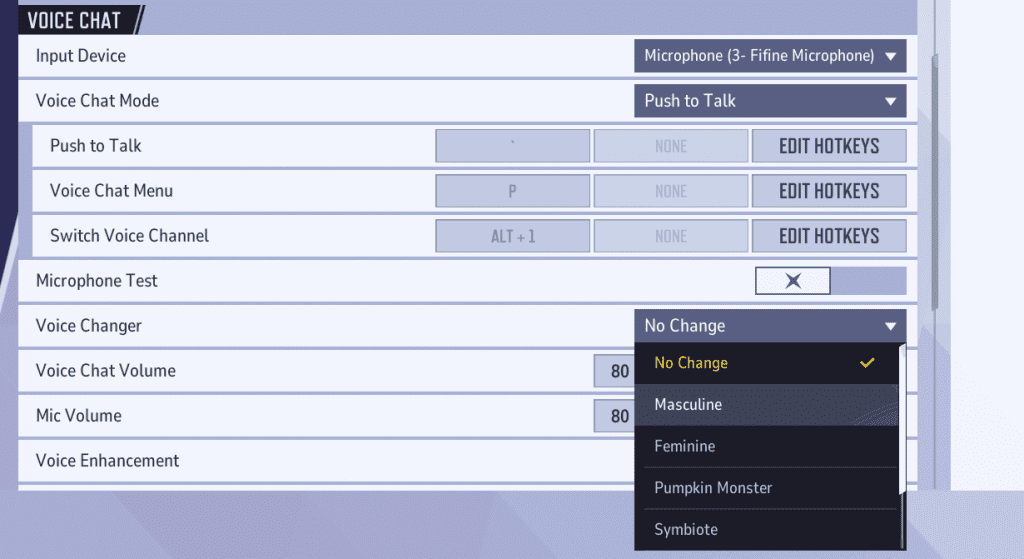
The new in-game voice changer feature, introduced to the NetEase hero shooter with its October 16 update, allows players to modify their voice to sound like a Pumpkin Monster, a Symbiote, or choose from several other options in addition to the standard masculine and feminine voices.

Previously, players had to rely on third-party software to be able to change their voices when trying to communicate via the in-game voice chat. With this update, anyone can now experiment with a range of fun voice options directly in-game without requiring any extra setup.

How To Use Marvel Rivals Voice Changer?

To access the voice changer in Marvel Rivals, players must first update their game to the latest version and head over to the Settings page after launching the title.

From there, under the ‘Voice Chat’ section, you’ll be able to select the ‘Voice Changer’ drop-down to switch to your preferred voice.

Once you’ve selected a voice, you can also adjust the intensity of the voice changer. Higher intensity levels will make your voice sound more distorted, while lower ones will keep it closer to your natural tone. Players are encouraged to experiment with this setting to find their ideal balance.

That’s everything you need to know about how to use the new voice changer feature in Marvel Rivals.

Riot Games Reportedly Developing a New Game Set in the Valorant Universe

Riot Games, the developers behind prominent esports titles like League of Legends and Valorant, is reportedly working on a new game based on the Valorant IP.

While not much is known about this mysterious Riot Games title at the time of writing, multiple job listings from the company for an ‘unpublished R&D product’ suggest that the project is still in its early development stages.

As per a report from The Game Post, one of the job listings originally mentioned “Experience creating characters for the FPS genre. Experience working on a highly recognizable, stylized game. Experience working with modern game engines such as Unity, Unreal, or proprietary technologies. Familiarity with the Valorant IP.”

This, along with several other listings, strongly indicates that the upcoming project could be an FPS title set in the Valorant universe.

Riot Games hasn’t confirmed any details about the new title as of yet, but recent leaks from reputable leaker ‘PlayerIGN’ point toward it being an MMOFPS or an extraction shooter. The leaks also feature a screenshot that’s believed to be from the unannounced game.

Image Credit: PlayerIGN

Note that the new game in question isn’t to be confused with Valorant Mobile, which has already been released in China in August 2025. This unannounced title is likely an entirely new game that will feature characters from the Valorant universe.

Regardless, fans will undoubtedly be keeping a close eye on any future updates from Riot Games, eager to see how the devs expand the ever-growing world of Valorant.

FUT Eliminates FaZe from CS Asia Championships 2025

FUT is through to the playoffs of the CS Asia Championships 2025 by pulling a rabbit out of a hat, beating FaZe Clan with a 2-1 scoreline. What can only be described as a shocker, CIS organization will be walking away with the most impressive win in their history.

VETO

  • FaZe removed Overpass
  • FUT removed Inferno
  • FaZe picked Ancient
  • FUT picked Mirage
  • FUT removed Train
  • FaZe removed Nuke
  • Dust2 was left over

Map 1: Ancient; Pick: FaZe; Winner: FUT

A disastrous start for FaZe saw them manage no more than 3 rounds of the first half as FUT pulled ahead with a massive lead before switching sides. Winning the final two rounds of the first half, FaZe brought the possibility of a comeback back on the table. The second half showcased a much tighter affair where FaZe remained largely dominant, putting themselves in a position to push the game to OT, but winning the final round of regulation, FUT closed the map with a 13-11 scoreline. 25 kills to his name, frozeN put himself ahead of everyone on the server, but even such a performance couldn’t bring the map for FaZe Clan.

Map 2: Mirage; Pick: FUT; Winner: FaZe

A 5-0 start for FaZe shows them pushing back FUT after a disastrous opening map, but that momentum got quickly shut down as FUT pulled up with 6 rounds in a row, with FaZe managing the final round of the half to level the scoreline. FUT found themselves in an early lead after winning the pistol, but FaZe Clan T side pulled in a plethora of rounds to make up for the deficit. FUT managed to find themselves in a position to push the game to OT, but FaZe put them down in the final round of Mirage. 23 kills yet again from frozeN made sure the FaZe get a chance at the playoffs as the game went to the 3rd map.

Map 3: Dust2; Pick: Decider; Winner: FUT

A 3-0 start for FUT got levelled with FaZe winning the gun rounds, upon which both teams traded rounds till FaZe edged out a narrow lead of 2 rounds and closed their offense with a 7-5 lead. The FUT offense started with a bang, and FaZe could do nothing to contain it. Putting together multiple streaks of rounds, FUT slowly built their way up to the finish line, and while FaZe did manage to win rounds, they were few and far between as FUT closed the map with a 13-10 scoreline.

A shocking exit for FaZe, who otherwise were the favourites to win the tournament, especially after their recent show of form at the ESL Pro League Season 22. The addition of a new player will take time, but for them to lose to lesser-known opposition is shocking for the community as a whole. If FaZe wants to make this team work, time is of the essence, especially with the Major coming up, but only time will tell how they fare.