Thursday, January 1, 2026
Home Blog Page 224

Steam Winter Sale 2024: 15 Must Play Games

0

Steam has kicked off its highly anticipated Winter Sale for 2024, offering gamers a chance to snag incredible deals on a variety of titles. From beloved classics to exciting new releases, this sale features some of the best discounts we’ve seen all year.

Key Takeaways

  • It Takes Two – $8: A co-op adventure game that won Game of the Year.
  • Chivalry 2 – $9.99: A chaotic medieval battle game with innovative melee combat.
  • Ghostrunner 2 – $9.99: A high-speed platformer with intense action and motorcycle gameplay.
  • Tiny Tina’s Wonderlands – $12: A fantasy spin on the Borderlands formula.
  • Dredge – $12.50: A unique blend of fishing, horror, and adventure.
  • Cocoon – $12.50: A platform puzzler from the creators of Limbo and Inside.
  • Cult of the Lamb – $12.50: A rogue-lite game with town management elements.
  • Dead Space – $15: A remastered horror classic with enhanced graphics and gameplay.
  • Blasphemous 2 – $15: A Metroidvania with dark themes and epic battles.
  • Total War: Warhammer 2 – $16: A highly acclaimed strategy game with massive battles.
  • Resident Evil Village – $16: A gripping horror game with immersive storytelling.
  • Sifu – $16: A martial arts beat ’em up with roguelike elements.
  • Lords of the Fallen – $24: A unique take on the Souls genre with innovative gameplay.
  • Octopath Traveler 2 – $30: An RPG with a blend of 2D and 3D elements.
  • The Last of Us Part 1 – $30: A critically acclaimed action-adventure game.
  • Elden Ring – $35.99: A masterpiece of gameplay and storytelling.

It Takes Two: A Co-Op Adventure Like No Other

It Takes Two is a game that has captured the hearts of many, winning the prestigious Game of the Year award. Priced at just $8, this co-op adventure allows players to control Cody and May, who are transformed into puppets. Together, they embark on a fantastical journey filled with unique mechanics and mini-games that require teamwork to navigate.

Chivalry 2: Medieval Mayhem

For fans of chaotic medieval battles, Chivalry 2 offers an exhilarating experience at $9.99. This sequel expands on the original’s success, featuring larger battlefields and more weapons. The directional melee combat sets a new standard for the genre, making it a must-play for fans of multiplayer action.

Ghostrunner 2: High-Speed Action

Ghostrunner 2, available for $9.99, takes the intense platforming of its predecessor and elevates it with new features. Players can expect open-ended level designs, larger boss fights, and even motorcycle gameplay, making it a thrilling experience for action fans.

Tiny Tina’s Wonderlands: A Fantasy Adventure

At $12Tiny Tina’s Wonderlands combines the beloved Borderlands formula with high fantasy elements. Players can customize their characters across six different classes, ensuring a unique gameplay experience filled with procedurally generated weapons.

Dredge: Fishing Meets Horror

Dredge is a unique indie title that blends fishing with horror and adventure. Priced at $12.50, players navigate strange waters, uncovering unsettling mysteries as they fish and explore. With over 30,000 positive reviews, it’s a game that has resonated with many.

Cocoon: A Puzzler’s Delight

For fans of platform puzzlers, Cocoon is a must-try at $12.50. Known for its interconnected gameplay, players teleport between various orb worlds, solving intriguing puzzles without overwhelming complexity.

Cult of the Lamb: A Cult Classic

Cult of the Lamb combines rogue-lite combat with town management, all wrapped in a quirky cult theme. At $12.50, this game offers tight gameplay and a unique blend of genres that keeps players engaged.

Dead Space: A Horror Masterpiece

The remastered version of Dead Space is available for $15. This classic horror game has been revitalized with enhanced graphics and gameplay mechanics, making it a perfect time to experience the terrifying atmosphere of the original.

Blasphemous 2: Dark Metroidvania

Blasphemous 2, priced at $15, continues the story of the Penitent One. With new weapons and abilities, this Metroidvania offers a rich exploration experience for fans of dark themes and epic battles.

Total War: Warhammer 2: Strategy at Its Best

Total War: Warhammer 2 is a highly acclaimed strategy game available for $16. With massive real-time battles and a detailed world, it’s a great entry point for fans of the Warhammer universe.

Resident Evil Village: A Gripping Experience

At $16Resident Evil Village brings players back into the horror genre with its immersive storytelling and memorable characters. Even those who typically shy away from horror may find themselves captivated by this title.

Sifu: Martial Arts Action

Sifu, available for $16, is a martial arts beat ’em up that offers a unique roguelike twist. Players can access stronger abilities upon death, adding depth to the gameplay and multiple endings based on player choices.

Lords of the Fallen: A Unique Souls Experience

For $24Lords of the Fallen offers a fresh take on the Souls genre. Utilizing Unreal Engine 5, this game features dual worlds and innovative gameplay mechanics that set it apart from other titles in the genre.

Octopath Traveler 2: An RPG Journey

Octopath Traveler 2 is an RPG that blends 2D and 3D elements, available for $30. With eight unique travelers and a day-night cycle affecting gameplay, it’s a rich experience for RPG fans.

The Last of Us Part 1: A Story of Survival

At $30The Last of Us Part 1 is a gripping action-adventure game that follows Joel and Ellie in a post-apocalyptic world. Its intense gameplay and emotional storytelling have garnered critical acclaim.

Elden Ring: A Modern Classic

Finally, Elden Ring is available for $35.99, tying its historical low. This game has redefined the Souls genre, offering accessibility without sacrificing the challenge that fans love.

The Steam Winter Sale 2024 presents an incredible opportunity to grab these must-play titles at their lowest prices ever. Whether you’re into co-op adventures, horror, or RPGs, there’s something for everyone in this sale. Don’t miss out on these fantastic deals!

How to Add Mods to Marvel Rivals (EASY)

0

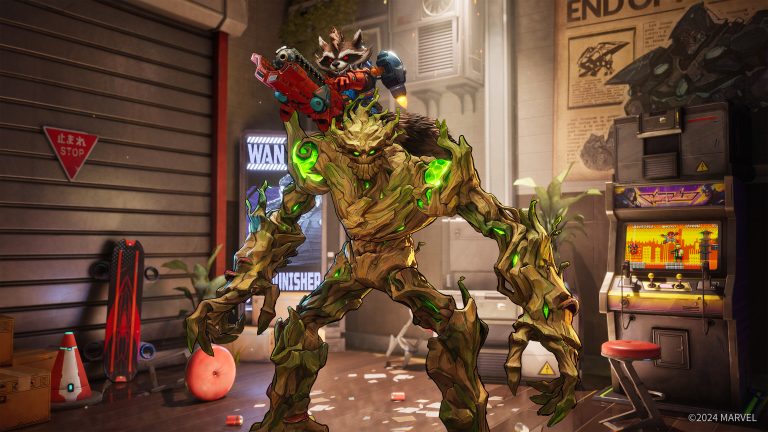
In the vibrant world of gaming, modding has become a popular way to enhance the experience. In this guide, we’ll explore how to easily add mods to Marvel Rivals, allowing you to customize your gameplay with exciting new skins and features. However, it’s essential to proceed with caution, as modding can lead to account bans in online multiplayer settings.

Key Takeaways

  • Modding Risks: Understand the potential for account bans due to anti-cheat systems.
  • Choosing Mods: Use trusted sources like Nexus Mods for downloading.
  • Installation Steps: Follow a straightforward process to install mods.
  • Community Engagement: Share your modding experiences and ideas with the community.

Understanding Modding Risks

Before diving into the modding process, it’s crucial to acknowledge the risks involved. Marvel Rivals is an online multiplayer game with anti-cheat measures in place. While some mods, like custom skins, may seem harmless, others can provide unfair advantages, such as invisibility. Always take responsibility for your actions and be aware of the consequences of modding.

Finding The Right Mod

The first step in modding your game is to find the mod you want to download. A popular choice among players is Nexus Mods, known for its reliability. For this tutorial, we’ll use the Black Suit Spider-Man mod as an example. Here’s how to find and download it:

  1. Visit the Nexus Mods website.
  2. Search for the Black Suit Spider-Man mod.
  3. Navigate to the Files tab.
  4. Click on Download and select the slow download option (this is free).

Extracting The Mod Files

Once the mod is downloaded, it will typically be in a compressed format (like .zip or .rar). To access the files, you’ll need to extract them:

  • Use extraction software like 7-Zip or WinRAR.
  • After extraction, keep the mod files handy for the next steps.

Installing The Mod

Now that you have the mod files ready, it’s time to install them into your game. Follow these steps:

  1. Open Steam and locate Marvel Rivals in your library.
  2. Right-click on the game and select Manage > Browse Local Files.
  3. Navigate to the following path: Marvel Game > Marvel > Content > Packs.
  4. If there isn’t a Packs folder, create one.
  5. Drag the extracted mod file into the Packs folder.

That’s it! You’ve successfully installed the mod. When you launch Marvel Rivals, you should see the Black Suit Spider-Man in action, complete with the iconic white logo.

Exploring More Mods

As the modding community grows, more exciting mods will continue to emerge, enhancing your gaming experience.

Community Engagement

As you explore the world of modding, consider sharing your experiences with the community. Engage with fellow players by:

  • Commenting on mod ideas and suggestions.
  • Sharing your favorite mods and gameplay moments.
  • Participating in discussions about future updates and seasonal events.

Modding Marvel Rivals can significantly enhance your gaming experience, allowing for personalized gameplay. However, always remember the risks involved and proceed with caution. Enjoy the creativity that modding brings, and don’t hesitate to share your thoughts and ideas with the community. Happy gaming!

Top 10 Best Mods For Marvel Rivals!

0

Marvel Rivals has gained attention for its exciting gameplay and diverse characters. This guide lists the top 10 mods that enhance the game with visual updates and fresh features.

Key Takeaways

  • Unique character skins and transformations
  • Enhanced gameplay experience
  • Easy installation for all mods

1. CJ as Winter Soldier

Replace the Winter Soldier with CJ from Grand Theft Auto: San Andreas. Play as Carl Johnson and bring a unique twist to battles.

2. Carnage Reskin for Venom

Turn Venom into Carnage with this red-themed skin. The mod offers a sleek and intimidating look.

3. Star-Lord Unmasked

Remove Star-Lord’s mask for a fresh appearance. This mod adds a personal touch to the character.

4. Spider-Woman Transformation

Transform Spider-Man into Spider-Woman. The mod updates animations and outfits for a new style.

5. Wolverine Alternative Color (Cyan)

Add a cyan color variant for Wolverine. This skin refreshes the character’s look while keeping his signature moves.

6. Akatsuki Themed Cloak and Dagger

Redesign Cloak and Dagger with Akatsuki-themed outfits. Customize their looks for a bold appearance.

7. Jeff the Land Shark Transformation

Meet Jeff, now transformed into a dog! This quirky mod adds a fun twist to the character, making him a delightful companion in your adventures.

8. Galaxy Groot Skin

Turn Jeff the Land Shark into a dog. This mod adds humor and charm to your gameplay.

9. Symbiote Spider-Man

Add a dark and edgy style to Spider-Man with this Symbiote skin. Perfect for fans of intense designs.

10. Marvel Rivals Xuans

Introduce new characters called Xuans. These variants provide more gameplay options and skills.

These mods improve Marvel Rivals with visual upgrades and character diversity. Stay tuned for our step-by-step guide on installing these mods.

Also Read:

Garena Free Fire MAX Redeem Codes Released for December 24, 2024

Garena Free Fire MAX has released its latest redeem codes for December 24, 2024, offering players a chance to claim exclusive in-game rewards such as skins, weapons, and diamonds. This popular battle royale game continues to captivate its audience with enhanced graphics and gameplay features, making it a favourite among mobile gamers.

Key Takeaways

  • Redeem codes available for a limited time, typically 12 to 18 hours.
  • Players can claim exclusive rewards including skins, weapons, and emotes.
  • Codes are limited to 500 players per day to ensure fairness.

What Is Garena Free Fire MAX?

Garena Free Fire MAX is an enhanced version of the original Garena Free Fire, a free-to-play battle royale game that has gained immense popularity since its launch in 2017. The MAX version offers improved graphics, larger maps, and a more immersive gameplay experience, attracting millions of players worldwide.

How To Redeem The Codes

Free Fire Max Reward Redemption Centre Image

To redeem the codes, players need to follow these simple steps:

  1. Visit the official redemption website: Garena Free Fire Rewards.
  2. Log in using your Facebook, Google, Twitter, or VK account.
  3. Enter the redeem code in the provided text box.
  4. Click on the confirm button to proceed.
  5. Check your in-game mail section to collect your rewards.

Redeem Codes For December 24, 2024

Here are the redeem codes available today along with their rewards:

Redeem CodeReward Description
FFPSTXV5FRDMPushpa Emote – Hargiz Jhukega Nahi Plus Gloo Wall – Fire Hai Main
FXK2NDY5QSMXYellow Poker MP40 Flashing Spade
VY2KFXT9FQNCGolden Grace Shotgun
XF4SWKCH6KY4LOL Emote
YFW2Y7NQFV9SCobra MP40 Skin + 1450 Tokens
FFPSYKMXTP2HPushpa Bundle + Glue Wall Skin
XF4SWKCH6KY4LOL Emote
FFX9QS2GWT7CEmote Royale – Slippery Throne, Hip Twists, Fancy Hands
FY9MFW7KFSNNCobra Bundle
FW2KQX9MFFPSPushpa Voice Pack
FFW4FST9FQY2Bunny Warrior Bundle
FTY7FGN4XKHCLegendary Frostfire Polar Bundle
WFYCTK2MYNCKDestiny Guardian XM8 Evo Gun skin
VY2KFXT9FQNCGolden Grace Shotgun
FC4XSKWQFX9YMystic Aura Bundle

Important Notes For Players

  • Players must link their game accounts to Facebook, Google, Twitter, or VK to redeem the codes; guest accounts are not eligible.
  • Each code can only be used once, and they are valid for a limited time, typically expiring after 24 hours.
  • It is advisable to redeem the codes as soon as possible to avoid missing out on the rewards.

Garena Free Fire MAX continues to engage its players with exciting redeem codes that enhance the gaming experience.

Play BGMI Online Without Downloading – Step-by-Step Guide

0

Playing BGMI Online without downloading is now possible using cloud gaming services. With increasing demand for quick and accessible gaming experiences, platforms like GeForce NOW, Google Stadia, Amazon Luna, and JioGamesCloud offer seamless streaming options. This guide explains how to play BGMI (Battlegrounds Mobile India) without installing it, leveraging modern technology to deliver an uninterrupted gaming experience.

Cloud Gaming Platforms for BGMI Online

  1. GeForce NOW
    • Known for robust performance and wide compatibility.
  2. Google Stadia
    • Ideal for console-like gameplay; requires a Stadia controller.
  3. Amazon Luna
    • Offers multiple subscription plans to suit different budgets.
  4. JioGamesCloud
    • Popular in India; optimized for mobile games like BGMI.

Pro Tip: Before choosing a service, verify if BGMI is available in their game library, as availability may vary based on region.

Step-by-Step: How to Play BGMI Without Downloading

  1. Select a Cloud Gaming Service
    • Sign up and subscribe to any of the above platforms.
  2. Install the Cloud Gaming App
    • Download and set up the service’s app on your device (PC, Mac, Android, iOS).
  3. Check Compatibility
    • Ensure your device and internet speed meet the platform’s requirements (minimum 25 Mbps).
  4. Log In and Search for BGMI
    • Access the platform’s game library and locate BGMI.
  5. Start Streaming
    • Use a controller if required and begin playing BGMI online directly via the cloud.

Key Considerations for Cloud Gaming

  • Internet Speed: At least 25 Mbps for smooth gameplay.
  • Latency Issues: Expect minor input lag, especially in fast-paced matches.
  • Subscription Fees: Most platforms charge monthly fees, so factor in the cost.
  • Regional Restrictions: BGMI availability may differ based on geographic location.

Pro Tip: To reduce latency, connect to a 5 GHz Wi

Why Play BGMI Online Without Downloading?

  1. Save Storage Space: No need to allocate large memory for downloads.
  2. Device Flexibility: Play on any compatible device, including lower-end models.
  3. Instant Access: Skip installation times and updates.

Final Note: Cloud gaming provides an innovative way to enjoy BGMI Online, but users must ensure stable internet connectivity and evaluate costs associated with subscription plans.

Related Reads:

Ropz Set To Join Vitality CS2 Roster: Reports

0

Counter-Strike 2 veteran Robin “Ropz” Kool is set to join the Vitality roster after his successful two-year stint with FaZe Clan, according to a recent report from HLTV.

As per the report, Ropz’s contract with FaZe has come to an end, and he has already reached an agreement on personal terms with the French organization. The transfer is expected to be finalized in the near future.

Ropz will likely replace rifler Lotan “⁠Spinx⁠” Giladi in the new Vitality roster. As confirmed by the org’s head coach, Rémy “⁠XTQZZZ⁠” Quoniam, in August 2024, Giladi had been asked to explore his options prior to the summer break.

Ropz had a commendable run with FaZe Clan since he joined its CS2 roster in January 2022, winning the PGL Major Antwerp in the same year and securing second-place finishes in Shanghai and Copenhagen.

Should his transfer take place, the new Vitality CS2 roster will include the following players:

  • Dan “apEX” Madesclaire
  • Mathieu “ZywOo” Herbaut
  • Shahar “flameZ” Shushan
  • William “mezii” Merriman
  • Robin “Ropz” Kool

CS2 Hide HUD Console Command Explained

The hide HUD command in Counter-Strike 2 is an extremely useful tool that lets you remove the heads-up display from your screen when you’re trying to take a screenshot of your favorite weapon skin or trying to capture a cinematic highlight.

But what exactly is the console command for hiding HUD, and how do you use it in-game?

In this article, we will check out how to hide your CS2 HUD using the developer console.

How To Hide HUD in CS2?

If you’re looking to hide your HUD in CS2, the first thing you need to know is that you cant remove your HUD if you’re in an official server.

This is due to the fact that hiding HUD in CS2 requires a server that has cheats enabled.

Luckily, CS2 enables players to set up their own servers without any hassle. Once you have your server set up, you can enable cheats and hide HUD in CS2.

CS2 Hide HUD Console Command

CS2 Hide HUD Console Command Explained

As mentioned earlier, you have to enable cheats in your server to hide your CS2 HUD. To do so, launch your server and enter “sv_cheats true” in your developer console.

Now that you’ve enabled cheats, all you need to do to hide your CS2 HUD is enter “cl_drawhud false” in your console.

That’s it! Your HUD will now completely disappear, allowing you to take clean screenshots of your favorite weapon skins or create the cinematic montage you’ve been planning.

If you want to restore your HUD, simply enter “cl_drawhud true” in your console, and this will bring it back instantly. Enjoy your creative endeavors in CS2!

Unlock Santa Snoop Dogg Skin for Free in Fortnite – Step-by-Step Guide

0

Fortnite’s Winterfest 2024 is bringing festive excitement, including the chance to unlock the Santa Snoop Dogg Fortnite skin entirely for free. This exclusive holiday outfit arrives as part of Fortnite’s Christmas-themed event, and players can claim it by following a few simple steps.

Unlocking the Santa Snoop Dogg Skin

The Santa Snoop Dogg skin will be available as a free gift inside the Winterfest cabin but will only appear starting December 25, 2024 (Christmas Day).

Steps to Claim the Skin:

  1. Access the Winterfest Cabin – Visit the cabin in Fortnite’s holiday-themed section.
  2. Locate the Present – The skin is inside a small, gold-wrapped gift box with a red bow located between two piles of presents, resting on a red rug in front of the TV.
  3. Open the Gift on December 25 – Make sure to open this specific gift using your daily present allocation.

Pro Tip: Missed Christmas Day? Don’t worry! The present remains available until January 7, 2025, when Winterfest ends, allowing you to claim it later.

Additional Winterfest Rewards

Beyond the Santa Snoop Dogg skin, players can complete the look with:

  • That’s Cold Jack Back Bling – An icy-themed accessory.
  • Snoop’s Holladizzle Bass – A bass-inspired item matching the holiday vibe.

Both items are also hidden in other Winterfest presents, so be sure to explore the cabin daily for extra surprises.

Key Takeaways

  • Event Duration: December 25, 2024 – January 7, 2025.
  • Exclusive Skin: Santa Snoop Dogg, along with festive accessories.
  • Access Requirements: Simply log in and claim the present during the Winterfest event.

How to Get Santa Snoop Dogg Skin for Free in Fortnite

Santa Snoop Dogg skin Fortnite

Fortnite’s Winterfest 2024 is here, and it’s bringing holiday cheer—and free rewards. Among the highlights? A Santa Snoop Dogg skin, ready to add some serious swagger to your locker. Even better, it won’t cost you a dime.

How to Unlock the Santa Snoop Dogg Skin

Let’s cut to the chase—you can snag the Santa Snoop Dogg skin as a free gift inside Fortnite’s Winterfest cabin. The catch? You’ll need to wait until December 25th (yep, Christmas Day) before it shows up.

Step-by-Step Guide:

  1. Head to the Winterfest Cabin. Once you’re in, check out the presents.
  2. Find the Gold Box. Look for a small square gift wrapped in gold paper with a red bow. It’ll pop up on the red rug in front of the TV, nestled between the other presents.
  3. Open it on Christmas Day. Use your daily present to unlock the Santa Snoop Dogg skin.

Missed Christmas? No sweat. You’ve got until January 7, 2025, to grab it.

Complete the Look

If you’re aiming for the full festive flex, there’s more to collect:

  • That’s Cold Jack Back Bling – An icy, stylish add-on.
  • Snoop’s Holladizzle Bass – A bass-shaped item that keeps the holiday vibes going.

Both items are tucked away in other Winterfest gifts, so make sure to log in and unwrap everything before the event ends.

Why You Shouldn’t Miss This

The Santa Snoop Dogg Fortnite skin is not just a fun addition—it’s free. Whether you’re a longtime fan of Snoop or just want to deck out your character in holiday gear, this is one gift worth grabbing.

Quick Recap

  • Available December 25, 2024—free for all players.
  • Located in a gold-wrapped present in the Winterfest cabin.
  • Claimable until January 7, 2025.

So mark your calendars, set a reminder, and don’t miss out on this Snoop Dogg Christmas outfit. It’s the perfect way to celebrate the season—Fortnite style.

How to Get Santa Shaq Skin in Fortnite – Price, Bundle & Cosmetics

0

Fortnite’s Winterfest 2024 is in full swing, and players are excited about the arrival of a festive new skin—Santa Shaq. Inspired by the iconic basketball star Shaquille O’Neal, this holiday-themed cosmetic joins the game as part of Fortnite’s Chapter 6, offering fans a chance to deck out their avatars in seasonal style.

The Santa Shaq skin is now available in the Item Shop, featuring exclusive accessories and bundles that bring a festive flair to the Battle Royale experience. Here’s everything you need to know about adding this limited-time skin to your collection.

Santa Shaq Skin Release Date

The Santa Shaq skin launched on December 23, 2024, and will remain in the Item Shop until December 31, 2024. This limited availability makes it a must-grab item for Fortnite enthusiasts and collectors of holiday skins in Fortnite.

How to Get the Santa Shaq Skin

Players can purchase the Santa Shaq skin directly from the Fortnite Item Shop for 1,500 V-Bucks. This price includes the Santa Shaqpack Back Bling, complementing the festive outfit.

Santa Shaq Skin in Fortnite

Alternatively, those looking for a more complete set can opt for the Santa Shaq Bundle, priced at 2,000 V-Bucks. The bundle not only includes the Santa Shaq skin but also comes with additional themed cosmetics.

Bundle Breakdown

  • Santa Shaq Outfit + Shaqpack Back Bling1,500 V-Bucks
  • Hittin’ Mittens Pickaxe800 V-Bucks
  • Nice List Emote400 V-Bucks
  • Shaq Wrapped Weapon Wrap500 V-Bucks
  • Santa Shaq Full Bundle2,000 V-Bucks

Customization Options

The Santa Shaq skin includes a LEGO style, adding extra versatility for those who love to mix and match cosmetics. Whether purchased individually or as part of the Santa Shaq Bundle, players can expect customization options to make their character stand out during Winterfest.

Why Get the Santa Shaq Skin?

  1. Limited-Time Availability – Only available until December 31, 2024.
  2. Exclusive Bundle Savings – Get multiple cosmetics for a lower total price.
  3. Festive Appeal – Perfect for celebrating the holidays in style.
  4. Customization Options – Includes special styles like LEGO-themed designs.

The Santa Shaq skin is one of Fortnite’s Winterfest 2024 highlights, offering a fun and festive way to celebrate the holidays. Whether you grab just the outfit or go for the Santa Shaq Bundle, it’s a standout addition to your Fortnite cosmetics collection.

Don’t miss out—grab your Santa Shaq skin before it rotates out of the shop on December 31, 2024!

Best BGMI sensitivity codes for 2025

0

If you’re into BGMI, you know how crucial the right sensitivity settings can be. It’s all about getting that perfect balance for aiming and movement. In 2025, some new sensitivity codes have emerged as game-changers. Whether you’re a seasoned player or just starting, these settings might just give you the edge you’re looking for. Let’s dive into the best BGMI sensitivity codes that could make a difference in your gameplay.

What Are BGMI Sensitivity Codes?

BGMI sensitivity codes are unique numeric sequences that represent specific in-game sensitivity settings. Each of these code stores the following sensitivity settings:

  • Camera Sensitivity
  • ADS Sensitivity
  • Gyroscope Sensitivity

Instead of manually adjusting sensitivity settings, you can use these codes to instantly replicate someone else’s sensitivity, to get a reference to start with.

Top Sensitivity Codes to Use in BGMI

Here are some of the best Gyroscope sensitivity codes:

  • 7307-1085-6780-4282-435
  • 7238-4185-8644-7904-942

Here is one of the best non-Gyroscope sensitivity codes:

  • 6983-8762-7023-5848-120

Note that these sensitivity settings might not work for everyone, and hence, players must use these as a start point or reference point to create their own tailored sensitivity settings.

How to Use BGMI Sensitivity Codes

Follow the below given steps to use BGMI Sensitivity Codes:

  1. Copy the desired sensitivity code.
  2. Open the Sensitivity Settings menu in BGMI.
  3. Look for the input bar to paste the code.
  4. Paste the code into the input bar
  5. Check if the code is correct and click the Preview button.
  6. Test the configuration in-game and make minor adjustments if needed.

Stay ahead in the world of esports with the TalkEsport app! Download now to get instant access to the latest news, live points tables, comprehensive esports calendars, and live streams of your favorite tournaments. Don’t miss out—get the app today!