Genshin Impact is the newest talk of the town. The open-world RPG by miHoYo has garnered the praise from millions of fans worldwide in only a few weeks since its official release on 28th September 2020.
Besides the main storyline, the game also boasts side quests that give rewards on completion, and the quest for Nameless Treasure is one of them. Let’s dive into the Genshin Impact Treasure Location.
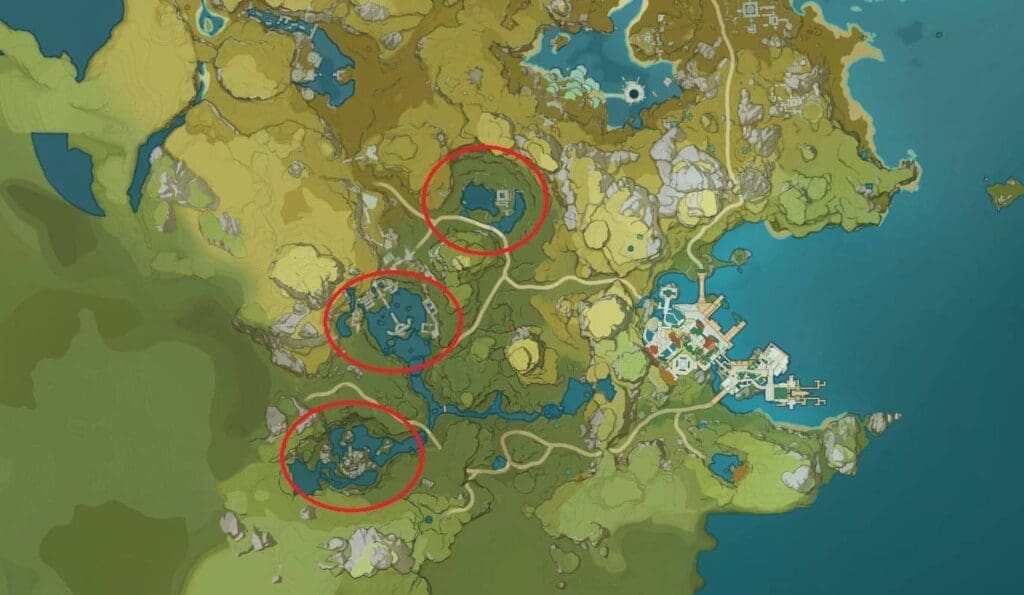
To complete the quests and get the treasures, players have to visit three different locations namely Dunyu Ruins, Lingju Pass, and Qingxu Pool in any order.
Once you are done collecting all the nameless treasures, you have to visit Liyue at night-time and speak with Linglang next to the souvenir shop and hand him the treasures.
After you give her the nameless treasures, you will receive XP, primogems, and gold as a reward for completing the quest.
If you can’t find Linlang in Liyue, it’s likely that you’re visiting there in the day-time, since she only appears at night.
Did you find out the Genshin Impact Treasure Location? Let us know in the comment section below.
In the era of online gaming, you can see numerous games going down. Sometimes it is for server maintenance, sometimes it happens for a bug or too many players to handle for the server. miHoYo’s open-world online RPG game is not an exception. Yea I’m talking about Genshin Impact. Is Genshin Impact down?
Genshin Impact is an online RPG game. Therefore, you can’t play it while its servers are down. If you are a GI player, you need to wait till the maintenance period is over or the bug is fixed. Although the game never faced too long server downtime, it still depends on the issue.
How to check if Genshin Impact is down or not?
First of all, you can check Genshin Impact’s official Twitter account for any outage information.
Check out if the PSN, iOS, or Android servers are facing issues or not.
Check out if your internet connection is the main culprit or not.
Sometimes, bugs can cause such error. If it is for a bug, then you need to wait till miHoYo launches a bug fix.
Genshin Impact’s server never got down for more than a few hours. Therefore, you need to wait a few hours to play the game. If the error persists for more than a few hours, you can contact GI support for more information.
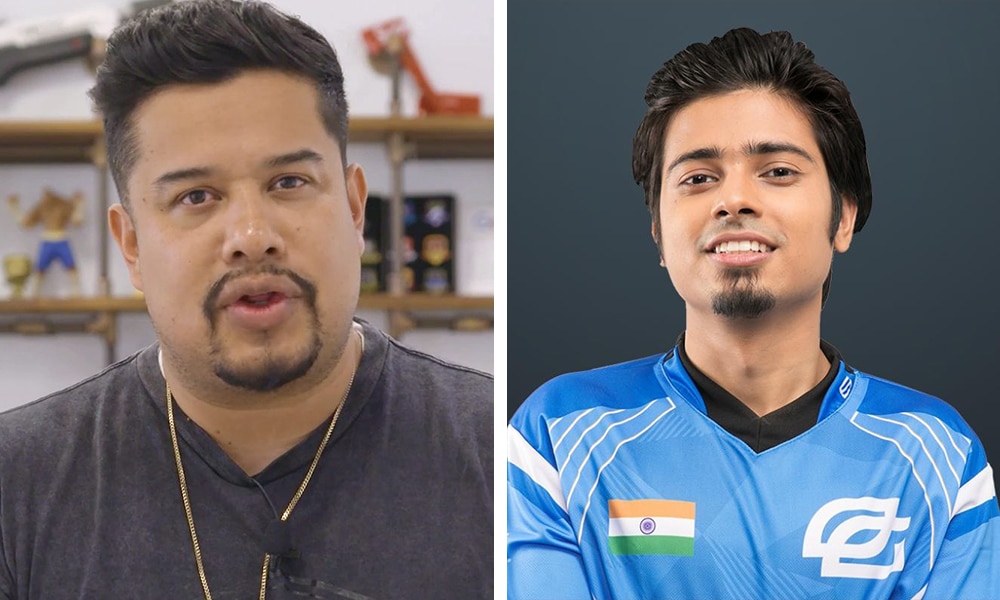
After almost two years since the incident, OpTic Gaming CEO Hector “H3CZ” Rodriguez has opened up about the cheating scandal of Nikhil “Forsaken” Kumawat that took place in October 2018.
Forsaken was publicly caught cheating during the finals of ZOWIE eXTREMESLAND 2018 by the tournament admins. He and his former team who constituted the CSGO roster of OpTic India were disqualified from the tournament. It was later found out that Forsaken had used the same cheats during the ESL India Premiership 2018 Fall Finals, which resulted in a 5-year ban being handed to him from the ESIC.
In a recent podcast, the CEO of OpTic Gaming revealed his thoughts on the incident, and he certainly isn’t happy about it.
“When we went and scouted in India, and obviously it turned out into a shit show because of that fking cheater Forsaken, or whatever the fk his name is, to put on that brand and to fng do that like he is lucky that I wasn’t fug there,” the 40-year-old said. “If we were in Mexico, I’d approach him in a f**king different way in a situation like that.”
“I’ll tell you what, that was a missed opportunity because we had an opportunity to truly create an awesome show. You know, ‘America’s Got Talent’ but for Call of Duty esports to simplify it,” Hecz continued. “But I think that opportunity will present itself at some point or another.”
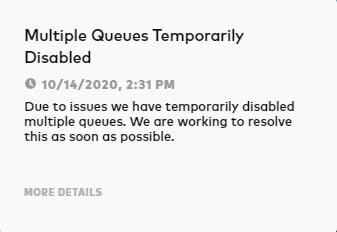
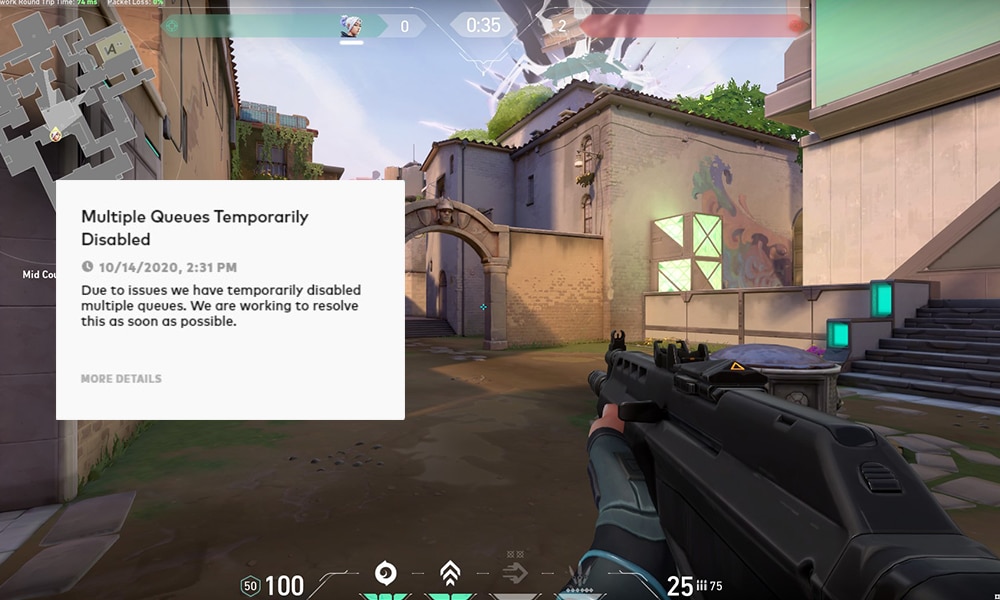
Players across South-East Asia, NA, and adjoining regions have been reporting the servers being down for Valorant. Valorant players are being shown “Party Not Ready”. When attempting to queue for a game mode, players are instead greeted with the message “Multiple queues temporarily disabled.”
In the error message, it says that the servers are down due to “issues” but without elaboration on what the issue is. Regardless, it shouldn’t be long before the servers are back up and running.
Riot has said that they’re “working to resolve this as soon as possible,” which is also reassuring for fans waiting to play the competitive shooter.
Till the servers are fixed, there’s really nothing else you can do besides waiting for Riot to put them back up.
Yesterday, the devs had mentioned about an audio bug happening on all maps as a result of the Act 3 update. There’s a good chance that this issue is linked with that as well. The audio bug caused Riot to temporarily make Valorant matchmaking down across all servers till it gets fixed. Are you also facing the same Valorant Party Not Ready error? Let us know in the comment section below.
Players across South-East Asia and adjoining regions have been reporting the servers being down for Valorant. When attempting to queue for a game mode, players are instead greeted with the message “Multiple queues temporarily disabled.”
In the error message, it says that the servers are down due to “issues” but without elaboration on what the issue is. Regardless, it shouldn’t be long before the servers are back up and running.
Riot has said that they’re “working to resolve this as soon as possible,” which is also reassuring for fans waiting to play the competitive shooter.
Till the servers are fixed, there’s really nothing else you can do besides waiting for Riot to put them back up.
Yesterday, the devs had mentioned about an audio bug happening on all maps as a result of the Act 3 update. There’s a good chance that this issue is linked with that as well. The audio bug caused Riot to temporarily make Valorant matchmaking down across all servers till it gets fixed.
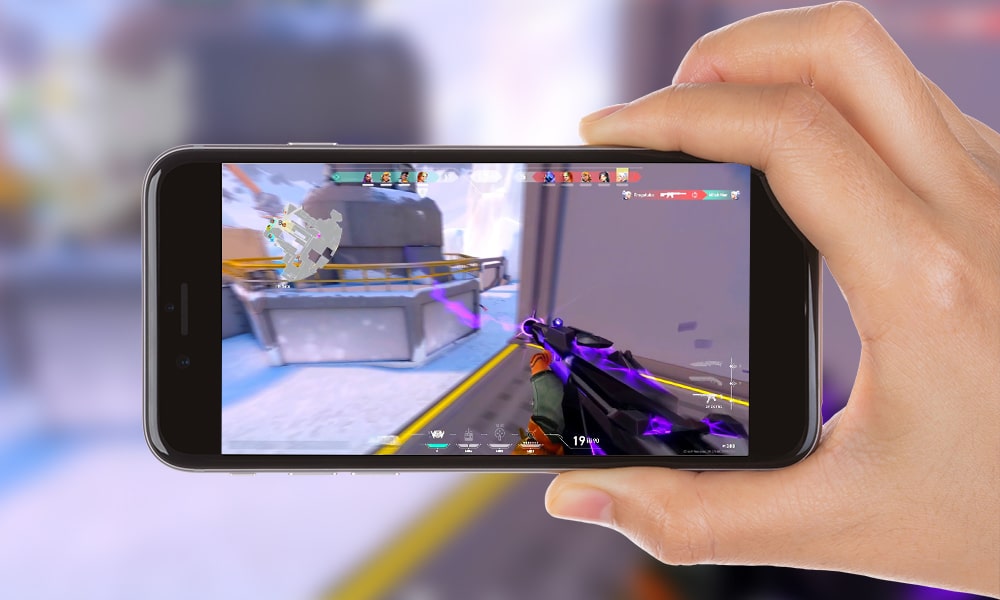
The major Act 3 update is finally here for Riot’s competitive shooter Valorant, and it brings with it a number of new changes to the game. However, apart from the apparent changes in the patch logs, there seems to be another aspect that Riot has continued working on – a mobile version for Valorant.
Dataminers have dug up strings suggesting the Valorant Mobile version currently being in works. Valorant Leaks on Twitter has shared a list of strings yesterday that include settings for the mobile version of the title.
While there have been previous leaks hinting towards a possible mobile version for Valorant in the future, a list of this many mobile settings for the game seems to be confirming the speculation behind a mobile release in near future.
In fact, Riot themselves had informed fans that they’d be working on a mobile version for their title while keeping improvements on the PC version as their first priority.
The leaked strings include typical settings for any mobile game like horizontal and vertical sensitivities, ability buttons, walking/running buttons, full-screen controls, or multi-touch filtering.
No official date on when the Valorant Mobile version comes out is confirmed as of yet, and considering it’s still early in its development phase, it may take quite some time for Riot to fully release it for phones. Details on whether cross-platform gameplay will be possible are also unavailable right now.
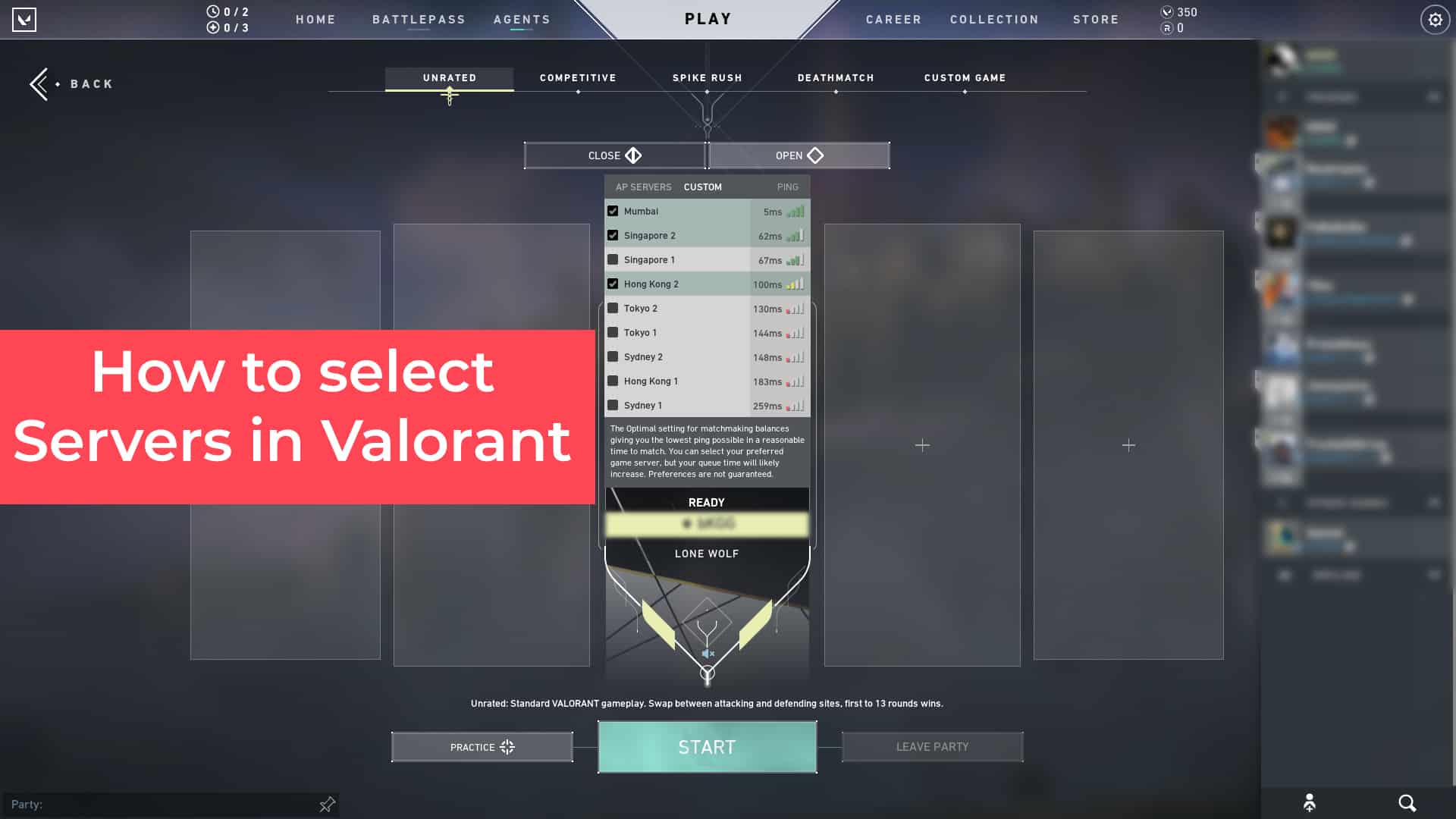
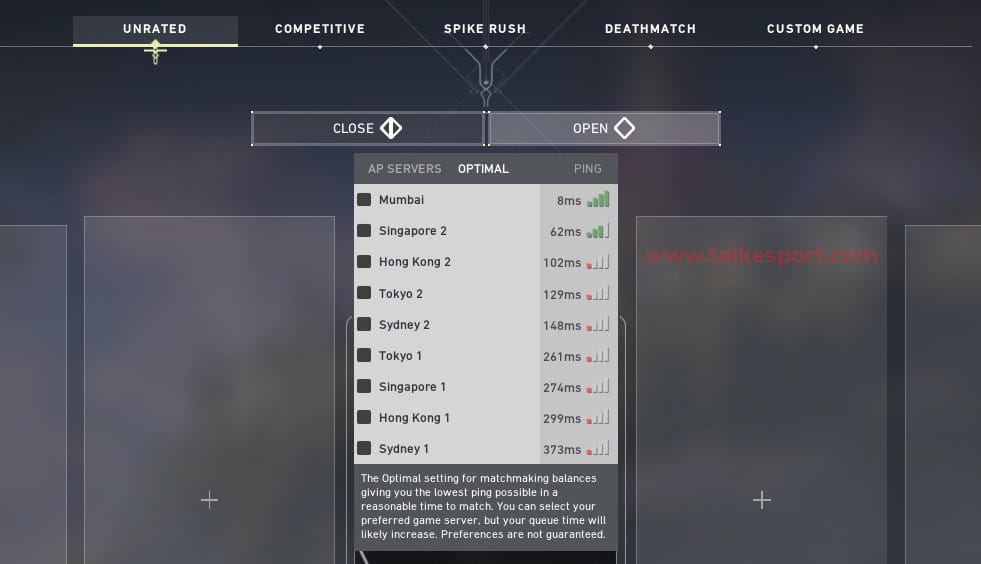
Alongside other huge changes, Valorant Act 3 has brought with it the ‘Server Selection’ feature which allows players to select their preferred servers before queuing for a game. While it doesn’t guarantee you’ll be placed in the server you want, it increases the odds of that happening significantly. Wondering how you use the newly implemented feature? Let’s check it out.
To select your preferred server in Valorant, all you need to do is follow the steps below:
Open Valorant
Go to ‘PLAY’
Select your preferred game mode (You can select servers in any mode.)
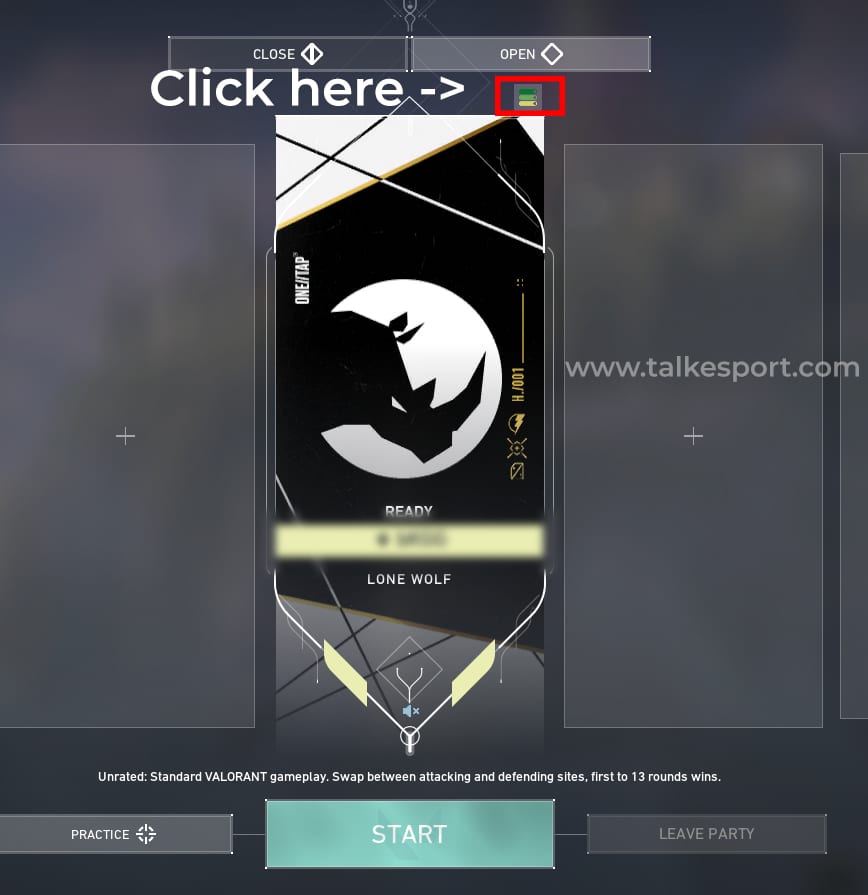
Hover your mouse over the small icon above your player card and below ‘Open’.
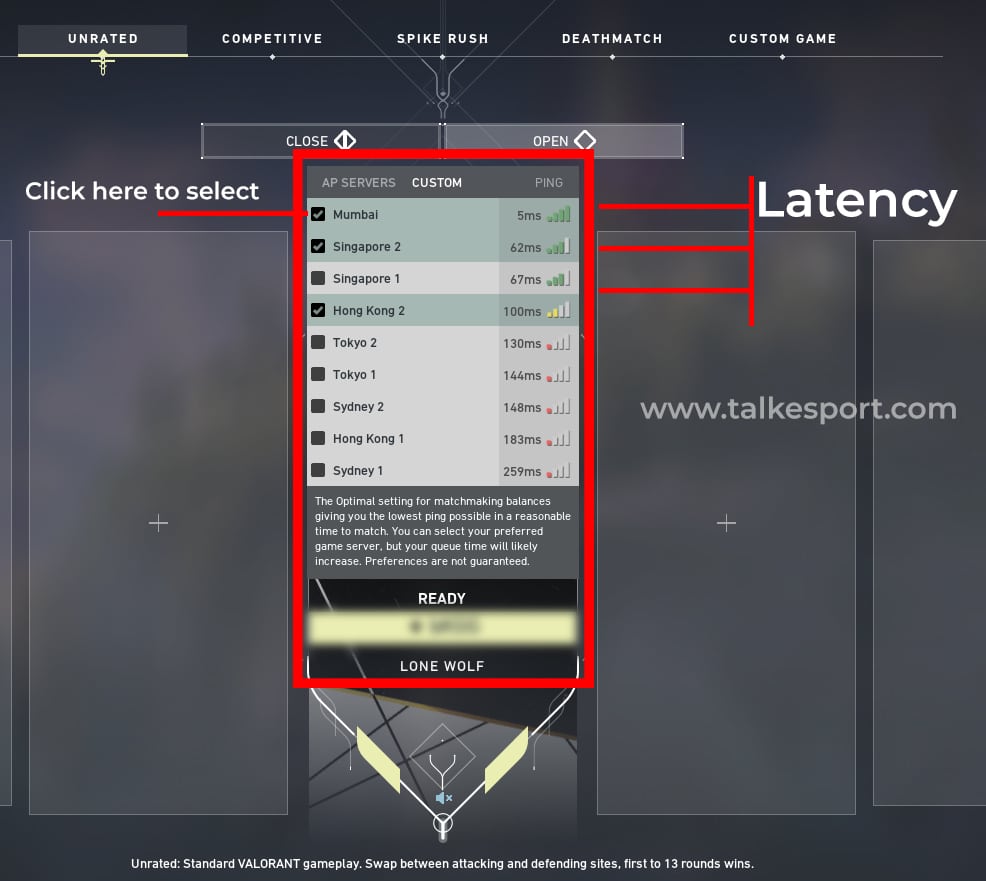
You’ll see a list of servers and your latencies to them.
Select one to three preferred servers to queue in.
Hover your mouse over the small icon above your player card and below ‘Open’.You’ll see a list of servers and your latencies to them. / Select one of them to queue in.
That’s it! Now you can choose whichever server you want and enjoy the shooter in low latencies. If your nearby server is giving you high pings, switch to some other server with better routing, regardless of its distance from you.
In case you’re curious about what else has arrived in this major update, read below –
ICEBOX
Icebox is the new snow-themed map which is introduced to the game through patch 1.10. However, the map won’t be available to play in ranked for the next two weeks, but players are free to try out the map on unrated, deathmatch, or spike rush modes.
“Each Icebox site is a complex combat space that features plenty of cover and verticality,” the devs said when describing the new map. “This map emphasizes skirmishes, sharp aim, and adaptive play. There’s also a zipline that amplifies the feeling of quick action and verticality.”
Competitive Updates
These changes have already been revealed by Riot in the last episode of dev diaries. The competitive revamp will include:
Players can select their preferred servers before queuing for a game, increasing the chance to get those servers by a significant margin.
Rank disparity for parties will be capped at 3 tiers from 6.
Immortal plus ranked changes will only be affected by wins, losses, and the round difference between the teams instead of individual performance.
Deathmatch Updates
The deathmatch game mode will undergo a lot of changes.
Total players have been increased from 10 to 14.
Players will generally be spawned in safer locations.
The periodic location pulse has been removed and players will only receive a pulse at respawn.
Time limit increased from 6 minutes to 9.
Required kill count changed from 30 to 40.
Weapons automatically reload after every kill, with the exception of Ares and Odin which get only 30 bullets back.
XP gain increased from 500 to 900 XP.
READ OFFICIAL VALORANT 1.10 PATCH NOTES HERE –
MAP UPDATES
NEW MAP: ICEBOX
Early in the patch, players queuing for Unrated will more often get placed on Icebox
Ascenders (Ropes) / Ziplines
Acceleration adjusted to prevent sudden shifts in direction (this was added last patch but wasn’t in the patch notes because well, you might start asking about ziplines)
Added weapon tagging when shot while on Ascenders
These changes are intended to make players that are using Ascenders and Ziplines less evasive during combat.
ASCENT, BIND
Vision Cones accuracy improved for Ascent, Bind
Haven, Split may also be updated in this patch
COMPETITIVE UPDATES
Competitive Act II will end with Patch 1.10 and roll into the start of Act III. This means progress towards your Act Rank for Act II will be saved and you’ll be put back into placement matches for Act III.
Competitive players will receive their Act Rank Badge for Act II and can start making progress on their badge for Act III. The center of your Act Rank Badge is your ninth best ranked win, but you’ll also be able to see your highest rank achieved at the top of the badge.The badge displays only for Competitive games and is displayed on the player card in: Competitive lobbies, map load, in-game combat report, and End-of-Game: MVP.
You can now select your preferred server(s), increasing the chance you will play on a server you want
Rank disparity for parties capped at 3 tiers (from 6).
We have also tightened our competitive matchmaking to reduce skill disparity.
Immortal+ ranked changes will only be impacted by winning and losing and the decisiveness of the game outcome (how many rounds won or lost by) and not factor individual performance into the calculation
We’ll be testing and monitoring this change in Act III for potential future implementation in all ranks.
[Editor’s Note: Remember! Act III’s new map, Icebox, has been disabled for Competitive until the next patch to give us time to fix any bugs or issues that may arise before enabling it for ranked play.]
MODE UPDATES
DEATHMATCH
Increased player count 10 >>> 14 players
Updated spawning algorithm to encourage safer spawns
Now that we’ve fixed some tech on the backend, we can support up to 14 players without compromising on our commitment to 128 tick-rate servers. With 10 players, you’d sometimes have to run 10 or 15 seconds to even find a fight, which can really kill your flow. Sometimes you’d also spawn way too close to enemies. This was because we had to artificially increase spawn density because of the low player count. Now that the player count has increased, we’ve re-tuned our spawning algorithm to try and give more consistently safer spawns.
Removed periodic location pulse, and you’ll now only receive a pulse right when you respawn
Now that there are 14 players on the map, the pulse feels completely unnecessary. We’re keeping a single pulse for players right when they respawn so that they can help get their bearings and find a quick fight without getting caught off guard.
Increased match length, first to 40 kills (was 30), time limit upped to 9 minutes (was 6)
We felt like the match length was a little too short to get into a real groove, especially now with more players, so we’re bumping the duration and kill limit up a bit.
Kill Reloads: On every kill, players get an automatic, immediate full reload of their active weapon (Ares & Odin get 30 bullets back)
It already felt a little frustrating to have to reload in Deathmatch, and now that player count is higher, reloading feels like even more of a deathwish.
XP gain increased from 500 to 900 XP
Honestly, 500 XP felt a little low for Deathmatch. We’re bumping this up to 900 to account for the increased match length with some extra on top.
QUALITY OF LIFE
The Battlepass now has upgrade Variants for the Surge skin line, including the free track Surge Sheriff
Minimap performance increased
Tournament mode enabled custom games can now fit up to 12 observers
Requested guns can now be sold back to the shop, doing so will refund the player who fulfilled the request
Observer can now hold walk when in freecam mode to reduce speed (fast and slow speed can be configured in settings menu)
In-world pings are now team-colored for observers
Reyna and Phoenix ult timers correctly update for observers
The keybind text in the current spectate target widget has been removed for observers
Flashed indicator for observers has been updated with new art
Crosshair setting added that allows crosshair colors to be locked to team color for observers
Players no longer get stuck trying to descend vent ropes while walking (leaving A-Tower)
Added new modifier keybind for observers to jump straight to freecam when jumping to a player (left shift by default)
Plant/defuse progress UI is now always visible to observers, and includes which player is taking the action
Observer player no longer see player-specific hud indicators (e.g. taking damage indicator) when in freecam
Ability timers now work for dead / spectating players & observers (e.g. reyna & phoenix ult durations)
SOCIAL UPDATES
Players will now be able to add and view friend notes. Notes from League of Legends will transfer over to VALORANT as well. Players will be able to edit these notes from VALORANT
Social panel will now pause sorting for a short time while you’re interacting with it
BUG FIXES
Fixed a Shooting Range bug in the plant/defuse module in the shooting range where players couldn’t buy abilities
Various Shooting Range UI bug fixes in the plant/defuse module, including incorrect text in the buy phase announcement, also adding a halfway tick to the defuse progress bar
Fixed a bug where other players’ messages would be forcefully filtered out of chat after you sent a message
Fixed a bug where the text box would not fade away in game
Valorant Act 3 is live, and it has brought with it a bunch of changes to the competitive shooter. The update includes a new map ‘Icebox’, revamped competitive and deathmatch modes, a refreshed Battle Pass with a new rewards’ line, and new Valorant Indian servers.
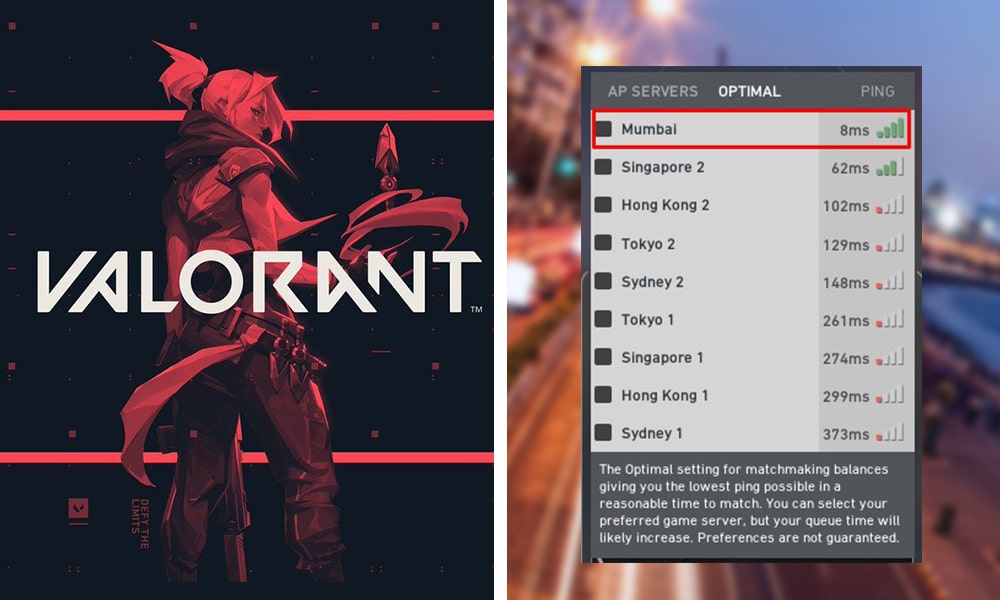
Besides Indian fans, Valorant players from Bangladesh, Nepal, Bhutan, Maldives, and Sri Lanka will automatically be matched in the Valorant Indian servers. Players from Pakistan will, however, be matched in the Middle East. But they can always use the newly implemented feature to select India as their preferred server when experiencing high latencies in the Middle East.
Riot has also confirmed that no ID or Account transfer is needed to play in the new servers. For instance, if your account was linked to the European region, you’ll still be able to play in Bahrain servers without losing any account data whatsoever.
VALORANT Mumbai game servers will go live on the 14th of Oct 2020 and will be part of our SEA shard. Players in IN, SL, BD, NP, BH & ML will get connected to the new Mum servers and players in PK will be playing on the new Bahrain server. No account or ID transfer needed. GLHF!
— VALORANT // India & South Asia (@playVALORANTsa) October 13, 2020
The much-anticipated Valorant Act 3 is finally here, and the patch notes of 1.10 have been revealed by Riot in a blog post released yesterday. The update includes the new map ‘Icebox’, several changes to the competitive system, and revamps to the deathmatch game mode alongside the usual bug fixes and quality of life improvements.
ICEBOX
Icebox is the new snow-themed map which is introduced to the game through patch 1.10. However, the map won’t be available to play in ranked for the next two weeks, but players are free to try out the map on unrated, deathmatch, or spike rush modes.
“Each Icebox site is a complex combat space that features plenty of cover and verticality,” the devs said when describing the new map. “This map emphasizes skirmishes, sharp aim, and adaptive play. There’s also a zipline that amplifies the feeling of quick action and verticality.”
Competitive Updates
These changes have already been revealed by Riot in the last episode of dev diaries. The competitive revamp will include:
Players can select their preferred servers before queuing for a game, increasing the chance to get those servers by a significant margin.
Rank disparity for parties will be capped at 3 tiers from 6.
Immortal plus ranked changes will only be affected by wins, losses, and the round difference between the teams instead of individual performance.
Deathmatch Updates
The deathmatch game mode will undergo a lot of changes.
Total players have been increased from 10 to 14.
Players will generally be spawned in safer locations.
The periodic location pulse has been removed and players will only receive a pulse at respawn.
Time limit increased from 6 minutes to 9.
Required kill count changed from 30 to 40.
Weapons automatically reload after every kill, with the exception of Ares and Odin which get only 30 bullets back.
XP gain increased from 500 to 900 XP.
READ OFFICIAL VALORANT 1.10 PATCH NOTES HERE –
MAP UPDATES
NEW MAP: ICEBOX
Early in the patch, players queuing for Unrated will more often get placed on Icebox
Ascenders (Ropes) / Ziplines
Acceleration adjusted to prevent sudden shifts in direction (this was added last patch but wasn’t in the patch notes because well, you might start asking about ziplines)
Added weapon tagging when shot while on Ascenders
These changes are intended to make players that are using Ascenders and Ziplines less evasive during combat.
ASCENT, BIND
Vision Cones accuracy improved for Ascent, Bind
Haven, Split may also be updated in this patch
COMPETITIVE UPDATES
Competitive Act II will end with Patch 1.10 and roll into the start of Act III. This means progress towards your Act Rank for Act II will be saved and you’ll be put back into placement matches for Act III.
Competitive players will receive their Act Rank Badge for Act II and can start making progress on their badge for Act III. The center of your Act Rank Badge is your ninth best ranked win, but you’ll also be able to see your highest rank achieved at the top of the badge.The badge displays only for Competitive games and is displayed on the player card in: Competitive lobbies, map load, in-game combat report, and End-of-Game: MVP.
You can now select your preferred server(s), increasing the chance you will play on a server you want
Rank disparity for parties capped at 3 tiers (from 6).
We have also tightened our competitive matchmaking to reduce skill disparity.
Immortal+ ranked changes will only be impacted by winning and losing and the decisiveness of the game outcome (how many rounds won or lost by) and not factor individual performance into the calculation
We’ll be testing and monitoring this change in Act III for potential future implementation in all ranks.
[Editor’s Note: Remember! Act III’s new map, Icebox, has been disabled for Competitive until the next patch to give us time to fix any bugs or issues that may arise before enabling it for ranked play.]
MODE UPDATES
DEATHMATCH
Increased player count 10 >>> 14 players
Updated spawning algorithm to encourage safer spawns
Now that we’ve fixed some tech on the backend, we can support up to 14 players without compromising on our commitment to 128 tick-rate servers. With 10 players, you’d sometimes have to run 10 or 15 seconds to even find a fight, which can really kill your flow. Sometimes you’d also spawn way too close to enemies. This was because we had to artificially increase spawn density because of the low player count. Now that the player count has increased, we’ve re-tuned our spawning algorithm to try and give more consistently safer spawns.
Removed periodic location pulse, and you’ll now only receive a pulse right when you respawn
Now that there are 14 players on the map, the pulse feels completely unnecessary. We’re keeping a single pulse for players right when they respawn so that they can help get their bearings and find a quick fight without getting caught off guard.
Increased match length, first to 40 kills (was 30), time limit upped to 9 minutes (was 6)
We felt like the match length was a little too short to get into a real groove, especially now with more players, so we’re bumping the duration and kill limit up a bit.
Kill Reloads: On every kill, players get an automatic, immediate full reload of their active weapon (Ares & Odin get 30 bullets back)
It already felt a little frustrating to have to reload in Deathmatch, and now that player count is higher, reloading feels like even more of a deathwish.
XP gain increased from 500 to 900 XP
Honestly, 500 XP felt a little low for Deathmatch. We’re bumping this up to 900 to account for the increased match length with some extra on top.
QUALITY OF LIFE
The Battlepass now has upgrade Variants for the Surge skin line, including the free track Surge Sheriff
Minimap performance increased
Tournament mode enabled custom games can now fit up to 12 observers
Requested guns can now be sold back to the shop, doing so will refund the player who fulfilled the request
Observer can now hold walk when in freecam mode to reduce speed (fast and slow speed can be configured in settings menu)
In-world pings are now team-colored for observers
Reyna and Phoenix ult timers correctly update for observers
The keybind text in the current spectate target widget has been removed for observers
Flashed indicator for observers has been updated with new art
Crosshair setting added that allows crosshair colors to be locked to team color for observers
Players no longer get stuck trying to descend vent ropes while walking (leaving A-Tower)
Added new modifier keybind for observers to jump straight to freecam when jumping to a player (left shift by default)
Plant/defuse progress UI is now always visible to observers, and includes which player is taking the action
Observer player no longer see player-specific hud indicators (e.g. taking damage indicator) when in freecam
Ability timers now work for dead / spectating players & observers (e.g. reyna & phoenix ult durations)
SOCIAL UPDATES
Players will now be able to add and view friend notes. Notes from League of Legends will transfer over to VALORANT as well. Players will be able to edit these notes from VALORANT
Social panel will now pause sorting for a short time while you’re interacting with it
BUG FIXES
Fixed a Shooting Range bug in the plant/defuse module in the shooting range where players couldn’t buy abilities
Various Shooting Range UI bug fixes in the plant/defuse module, including incorrect text in the buy phase announcement, also adding a halfway tick to the defuse progress bar
Fixed a bug where other players’ messages would be forcefully filtered out of chat after you sent a message
Fixed a bug where the text box would not fade away in game
Valorant is facing issues that won’t allow players to purchase any items in-game. This Valorant Purchase Failed Error includes VP, skins, and Battle pass. The game has acknowledged this issue and is working on a possible fix. Until then, you can try common troubleshoots to make sure it’s not from your side.
We're aware of issues with purchasing not working in NA/LATAM/BR regions—working on a fix, hopefully soon.
Valorant has some exquisite line of skins that are too hard to resist. If you are one of the cosmetic fanatics who love the skins but are not able to buy them because Valorant Purchase failed error, rest assured because it can be fixed. Valorant has enjoyed popularity right from its beta stages hence it runs into problems quite frequently.
For a game with a huge player base, it is a hard task to keep a close watch to provide an almost perfect experience for each player. Some errors are bound to happen for such a game that works on a large scale. There are some issues that can be considered as major ones and are noticed and fixed very easily but sometimes errors slip through the cracks and surface for limited individuals.
Those who want to purchase VP for buying skins and battle pass are unable to do so in LATAM, NA, and BR regions. To fix this error, you can try the following very basic solutions:
Close your Valorant application and try restarting for a few times.
Restart your PC and check if the issue is resolved.
Uninstall and Reinstall the Valorant application from its official website.
If these steps don’t work, try the following methods:
Reinstall Valorant Vanguard
Make sure Valorant is whitelisted in your computer firewall settings.
Finally, if the issue still doesn’t get solved, simply head to the Riot games site and file a Ticket. Doing so will make the developers aware of your issue and quick actions will be taken to fix it. Before taking that step, we recommend you to wait for some hours as the game has confirmed this issue and hence a small patch can soon be pushed to fix this issue. Even if you cannot buy the battle pass right now, you can simply win one by participating in our Valorant Act 3 Giveaway. Check this out to know more.