Free Fire ping can make gunfights feel delayed, cause players to teleport, and make movement less responsive. Jio and Airtel users can reduce these issues by improving their mobile signal, using the right network mode, closing background apps, and avoiding unstable connections. A low ping does not depend only on internet speed. Server distance, network routing, signal strength, and congestion can also affect latency. In this guide, we explain how to reduce Free Fire ping on Jio and Airtel, including 4G and 5G settings, APN checks, phone settings, and fixes for sudden ping spikes.
How to Reduce Free Fire Ping on Jio and Airtel
To reduce Free Fire ping on Jio and Airtel, start with the basics. Use a stable 4G or 5G connection, keep your phone software updated, and play from a location with strong network reception.
Free Fire developer Garena has previously explained that high ping can come from the way players connect to game servers. The game operates servers across different regions, and shared server infrastructure can sometimes contribute to higher latency.
Your internet speed also does not tell the full story. Ping measures the response time between your device and the game server. A fast connection can still have high ping if the route to the server is unstable.
1. Switch to 5G When the Signal Is Stable
5G can provide lower latency and better network performance when it has strong coverage in your area.
Jio says True 5G is designed to provide low-latency connectivity and supports gaming use cases. Jio also recommends using the latest phone software and selecting 5G as the preferred network on compatible devices.
Airtel also recommends enabling 5G through the preferred network settings on compatible smartphones. The company says users should check 5G availability in their area and keep their device software updated.
On Android, the setting is usually found under:
Settings > SIM/Mobile Network > Preferred Network Type > 5G
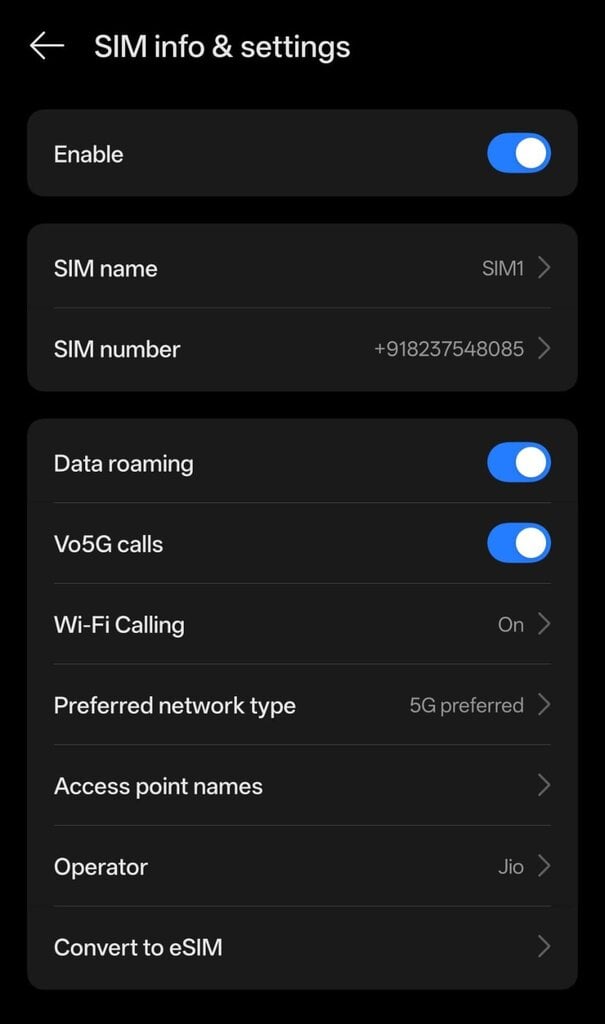
The exact menu can differ between phone brands.
Do not force 5G if the signal keeps switching between 4G and 5G. An unstable connection can cause ping spikes during a match.
2. Check Your Jio APN Settings
Incorrect APN settings can cause mobile data problems.
Jio’s official support page recommends resetting APN settings to default or creating an APN with the name and APN set to JioNet.
On Android, try:
- Open Settings.
- Go to Mobile Network.
- Open Access Point Names.
- Select Reset to default.
- Restart mobile data.
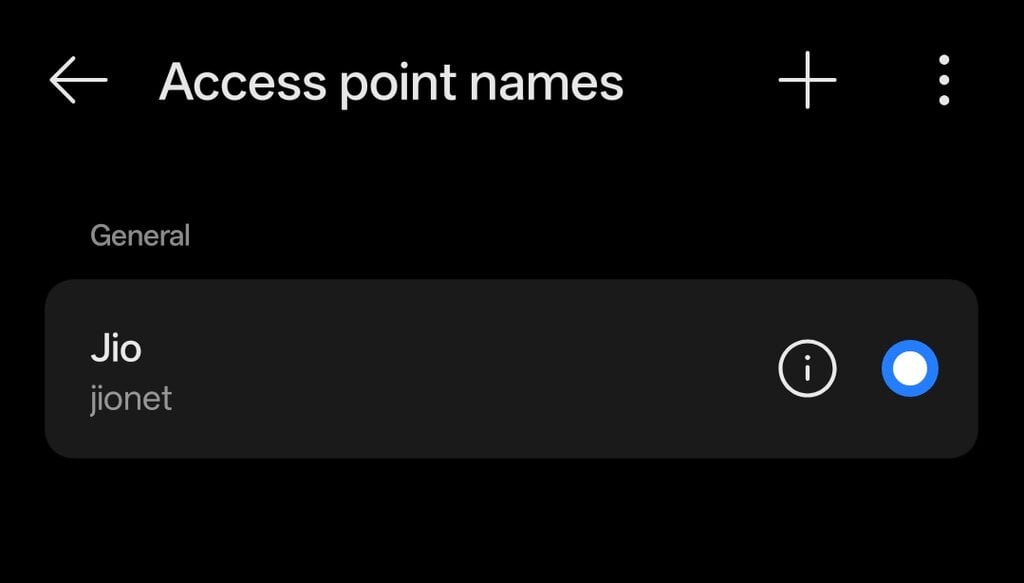
If you need to create the APN manually, Jio’s official instructions specify JioNet as the APN.
Avoid copying random APN configurations from social media. They may not improve Free Fire ping.
3. Keep Airtel’s Network Settings Correct
Airtel users should first make sure the phone is connected to the correct preferred network.
Airtel recommends selecting 5G on compatible devices and checking whether 5G coverage is available in the area. It also recommends keeping the phone software updated.
Go to:
Settings > Mobile Network > Airtel SIM > Preferred Network Type
Select 5G/4G/3G/2G Auto if your phone provides this option.
If 5G is unstable at your location, test Free Fire on 4G. The connection with the lowest and most consistent ping is more useful than simply choosing 5G.
4. Turn Off Background Downloads
Background activity can compete with Free Fire for bandwidth.
Before starting a match, close apps that may use mobile data. This includes:
- YouTube
- Google Photos
- Play Store
- App Store
- Cloud backup services
- Large file downloads
Also pause system or app updates while playing.
This will not magically lower the server latency of Free Fire. It can reduce local network congestion and prevent sudden ping spikes.
5. Use a Strong Mobile Signal
Signal strength has a direct effect on the stability of your mobile connection.
If you are inside a room with weak reception, try moving closer to a window or an open area. Avoid playing from locations where your phone constantly changes between network bands.
A stable 4G connection can perform better than a weak 5G signal.
You can test both connections by entering a Free Fire training area and checking whether the ping stays stable for several minutes.
6. Restart Your Phone Before Playing
A simple restart can fix temporary mobile network problems.
Restart the phone if you notice that Free Fire suddenly has high ping despite having a normally strong connection.
You can also turn Airplane Mode on for around 10 seconds and then turn it off. This forces the phone to reconnect to the mobile network.
Do not repeatedly toggle network settings during a match. Make these changes before launching the game.
7. Avoid VPNs When You Have High Ping
A VPN does not automatically reduce Free Fire ping.
Your connection may travel through an additional server before reaching the game server. This can increase latency.
Some VPN services may improve routing in specific situations. That depends on the location and network path. For most players, testing the normal Jio or Airtel connection first is the better approach.
Avoid apps that promise to reduce Free Fire ping to a fixed number with one tap.
8. Disable Battery Saver While Playing
Battery-saving modes can restrict background activity and network behavior on some smartphones.
If your phone aggressively limits Free Fire, disable Battery Saver before playing.
You can also check the game’s battery settings and allow Free Fire to operate without aggressive background restrictions.
The exact options depend on the Android phone manufacturer.
9. Keep Free Fire Updated
Garena regularly releases updates for Free Fire.
The official Free Fire website currently lists OB55 among its recent patch notes.
Install game updates from the official app store when available. An outdated game version can also create compatibility or connection problems after server-side changes.
10. Clear Temporary Network Problems
If Free Fire suddenly starts showing high ping, try this order:
| Step | What to Do |
|---|---|
| 1 | Close Free Fire |
| 2 | Turn Airplane Mode on |
| 3 | Wait around 10 seconds |
| 4 | Turn Airplane Mode off |
| 5 | Check 4G/5G signal |
| 6 | Restart the phone if needed |
| 7 | Reopen Free Fire |
This helps rule out a temporary mobile network problem before changing advanced settings.
Jio vs Airtel for Free Fire Ping
There is no single network that will provide the lowest Free Fire ping for every player.
Latency depends on your location, signal quality, network congestion, and the route between your mobile network and the game server.
Jio states that its True 5G network supports low-latency connectivity for gaming. Airtel also markets 5G for gaming and has highlighted low-latency performance in its network testing.
The best way to compare them is to test both SIMs from the same location at the same time.
| Factor | Jio | Airtel |
|---|---|---|
| 4G gaming | Depends on local coverage | Depends on local coverage |
| 5G gaming | True 5G available in supported areas | 5G available in supported areas |
| APN | JioNet | Use the carrier-provided/default configuration |
| Best setting | Stable 4G/5G | Stable 4G/5G |
| Main factor | Local signal and routing | Local signal and routing |
What Ping Is Good for Free Fire?
There is no universal ping number that guarantees smooth gameplay.
As a general gaming reference, a lower and more stable ping is preferable. Sudden jumps are often more noticeable than a small difference between two stable ping values.
For example, a connection that stays around 30-50 ms can feel more consistent than one that moves between 30 ms and 150 ms.
Your actual experience also depends on the Free Fire server and your network route.
How to Fix Free Fire Ping Spikes on Jio and Airtel
If your Free Fire ping keeps jumping, check these settings first:
- Move to an area with stronger signal.
- Test 4G instead of 5G.
- Test 5G if your 4G connection is congested.
- Close background apps.
- Stop downloads and updates.
- Restart the phone.
- Reset incorrect APN settings.
- Disable VPNs.
- Turn off Battery Saver.
- Update Free Fire.
- Update your phone software.
If the ping remains high after these steps, the issue may be related to network congestion or the route to the game server. Changing phone settings cannot always fix server-side or routing problems.
Also read: Free Fire High Ping Fix: Best APN and DNS Settings for India
Reducing Free Fire ping on Jio and Airtel is mainly about getting a stable connection. Start by testing 4G and 5G from the same location. Keep the stronger and more consistent connection for gaming.
Jio officially recommends JioNet for its APN configuration, while Airtel recommends using compatible 5G settings and checking local coverage.
Avoid random APN files and ping-booster apps. They are not guaranteed to improve latency.
If your ping suddenly becomes high, restart the connection first. Then test the game again before making major changes to your phone.