Home Blog Page 913

BGMS Season 2 Launch Week Day 1 Recap

0

The action-packed journey of the Battlegrounds Mobile India Masters Series (BGMS) Season 2 unfolded with the commencement of Launch Week Day 1. The first two matches of the day witnessed riveting clashes between teams from Group A and Group B, while the last match was played between Group A and Group C. 

In the opening battles, Team Revenant Esports claimed the first chicken dinner, while the ever-popular Team Godlike secured victory in the second match. Not to be outdone, Team Soul showcased their prowess by emerging triumphant on the challenging terrain of Miramar during the third map. Here is the recap of all three matches of BGMS Season 2 Launch Week Day 1.

Match 1 – Erangel: Group A vs Group B

Revenant Esports demonstrated an incredible performance in the first match ofBGMS Season 2 Launch Week. In a nail-biting final circle showdown, Nishant “Apollo” from Revenant Esports showcased remarkable skills in a 1v1 battle against OR Esports’ Manraj “MAX” Kohli, ultimately securing the team’s triumph. The victory earned them 27 crucial points, with a well-balanced blend of finish and position points. 

Match 2 – Sanhok: Group A vs Group B

The second match on Sanhok, Team GodLike showed a dominant performance to emerge as the winners. A spectacular 11 finishes propelled them to the forefront of the competition. The match’s Most Wicked Player, Rudra “Spower” B, solidified their lead with an impressive 6 finishes. A Winner Winner Chicken Dinner added to their impressive tally, amassing a total of 27 points.

Match 3 – Miramar: Group A vs Group C

Miramar witnessed Team Soul’s entry into the battlefield in the third match, and they swiftly claimed victory. With 13 finishes under their belt, Team Soul showcased their experience and consistency as one of India’s top teams. Their single match performance spoke volumes, securing them a chicken dinner and an impressive 28 points. 

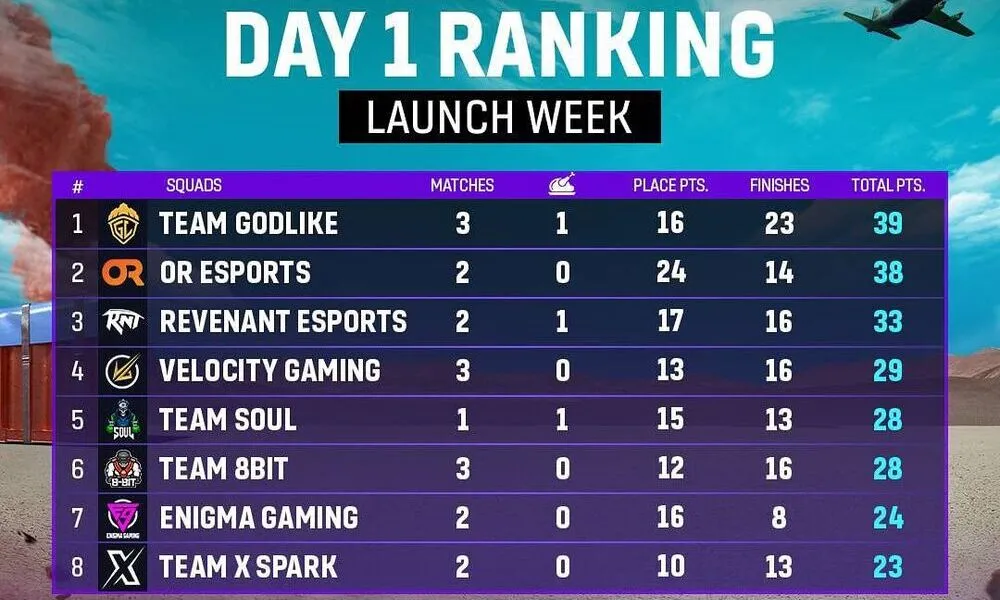
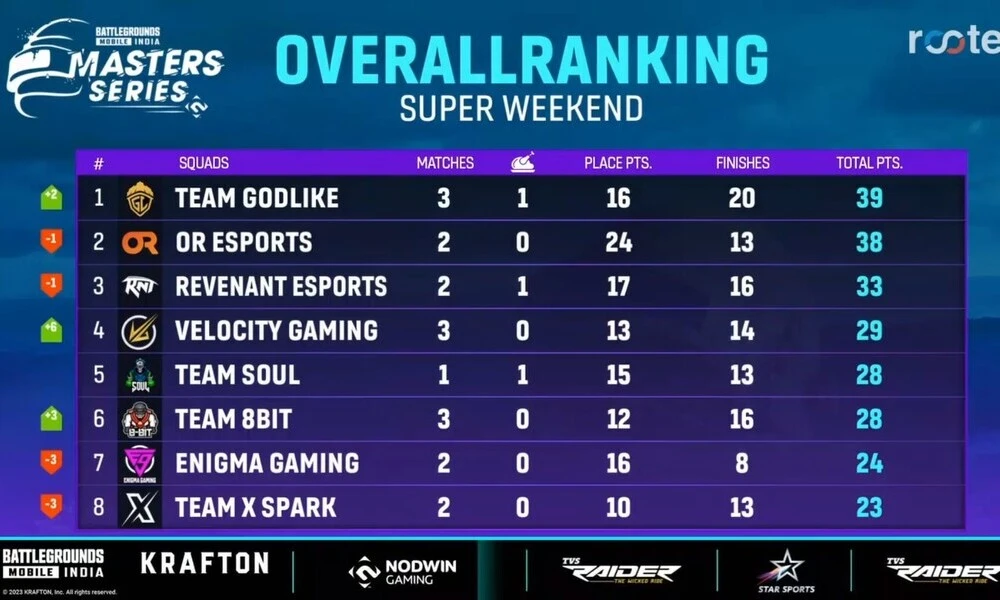
As the curtains fell on Day 1 of the BGMS Season 2 Launch Week, the leaderboard saw a dynamic shuffle. Godlike Esports emerged as table-toppers, riding high with 39 points from 3 matches. The closely trailing OR Esports, with 38 points from 2 matches, showcased their determination to compete at the highest level. Revenant Esports held a solid third place, accumulating 33 points from 2 matches, emphasizing their early consistency.
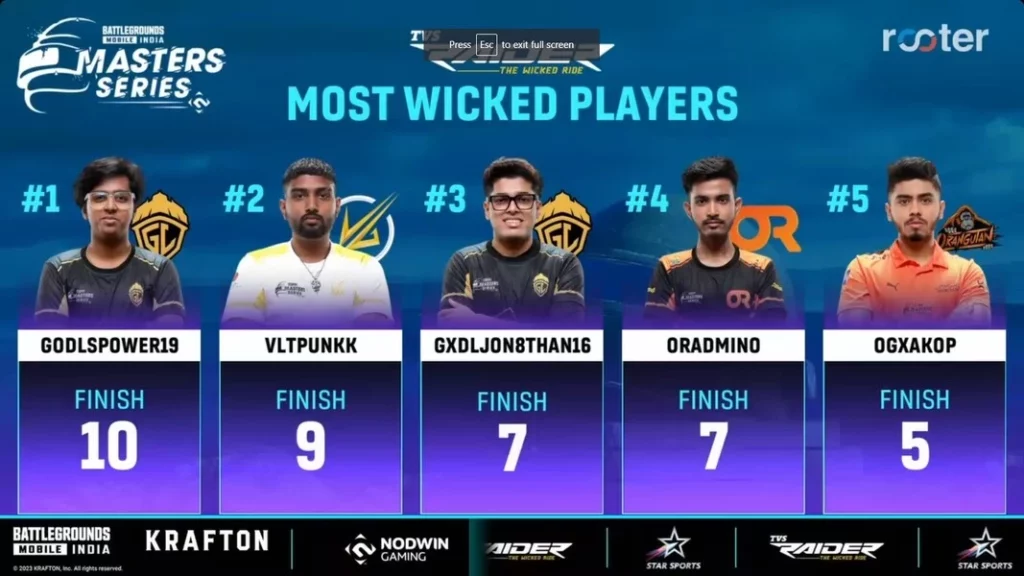
BGMS Season 2 Launch Week Day 1: Most Wicked Players

The Most Wicked Players ranking of the day showcased outstanding individual performances, with Spower leading the pack with an impressive 10 finishes. Velocity Gaming’s Ashutosh “Punkk” Singh followed closely with 9 finishes, leaving a significant impact on the matches. Meanwhile, Jonathan “JONATHAN” Amaral and OR Esports’ Admino secured 7 finishes each, contributing significantly to their respective teams’ success. Orangutan’s Ankit “AK” Shukla comes in fifth place with 5 finishes. 
Stay updated with the latest news in gaming and esports by signing up for early access to TalkEsport’s Mobile App. Follow us on Twitter and Google News to ensure you never miss the exciting updates.
How to Type in All Chat Valorant?

0

In the fast-paced world of competitive shooters, the thread that binds victory often lies in effective communication. For players immersed in the realm of Valorant, the significance of this connection cannot be overstated. While voice chat emerges as the dominant mode of interaction, not all players wield a microphone of quality, if at all. This brings to light the importance of mastering text communication within Valorant. Furthermore, the ability to broadcast messages to all players via all chat is a valuable skill. The process, fortunately, is straightforward and hassle-free.

How to Type in All Chat Valorant?

To seamlessly immerse yourself in all chat conversations in Valorant, the process is as simple as pressing and holding the Shift key while simultaneously tapping the Enter key. Alternatively, a different method involves hitting the Enter key, followed by typing “/all” before formulating the core of your message. The beauty lies in the fact that regardless of the path you choose, your message will effortlessly reach every participant locked in the ongoing match.

Arguably, the most intuitive maneuver to initiate all chat within Valorant is by executing the Shift+Enter combination. Yet, don’t disregard the power of chat modifiers. By prefacing your message with “/all,” you can make your words universally accessible. However, if the need arises, you can also employ “/party” to direct your message exclusively to fellow party members.

For those acquainted with other offerings from Riot Games, this communication structure will strike a familiar chord. The chat system in League of Legends mirrors that of Valorant, with the Enter key serving as a gateway to general conversations and Shift+Enter facilitating all chat. While the foundation remains the same, it’s worth noting that League of Legends boasts additional chat commands that have yet to integrate into the Valorant landscape.

Mastery over all chat in Valorant can be distilled to a simple keystroke combination: Shift and Enter, a gateway to a world of collective communication. Alternatively, a dash of vintage flair can be infused by appending “/all” to your message. Yet, a word of caution is warranted – straying into excessive banter territory might unfurl consequences beyond expectation.

Stay updated with the latest news in gaming and esports by signing up for early access to TalkEsport’s Mobile App. Follow us on Twitter and Google News to ensure you never miss the exciting updates.

FAQ

    Is voice chat the only means of communication in Valorant?

    No, text chat provides an essential alternative for players without access to a microphone.

    Can I send private messages to my team members during a match?

    Absolutely, using “/party” before your message ensures it’s exclusively seen by your party members.

    Are there more chat commands in Valorant’s future?

    While the existing system draws from Riot Games’ other titles, the addition of new chat commands remains uncertain.

    Does the League of Legends chat system mirror Valorant’s?

    Yes, both games share a similar chat foundation, but League of Legends incorporates some unique commands.

    Why should I be cautious with all chat banter?

    Engaging in excessive banter may lead to unforeseen consequences and disrupt gameplay dynamics.

    How Much Did I Spend on Valorant?

    0

    Microtransactions have evolved into a cornerstone of revenue generation within the gaming sphere. The realm of VALORANT, the captivating creation of Riot Games, stands no exception to this trend. Although VALORANT is widely touted as a cost-free adventure, the allure of microtransactions has invited players to probe deeper into the tangible expenses associated. The allure of diverse skin bundles, particularly the exquisite collection for in-game knives, often steers players towards contemplation of their in-game expenditures.

    In the vast expanse of VALORANT, players confront a pivotal choice – to partake in the virtual escapade devoid of financial investment or to immerse themselves in the microtransactions offered. The latter route involves the exchange of tangible currencies – whether dollars, euros, pounds, yen, or rupees – for Valorant Points (VP). These VP serve as the gateway to acquiring the latest coveted skin bundles or unlocking intriguing characters. VALORANT extends the autonomy to players, allowing them to decide if they wish to delve into these virtual financial transactions.

    The allure of customizable skins, each a potential expression of individuality within the virtual universe, is undeniable. As the abundance of skin bundles, especially the extravagant variety designed for knives, beckons players, a contemplative evaluation of their in-game expenditures becomes a natural progression.

    How Much Did I Spend on Valorant?

    VALORANT graciously aids those who embark on the path of virtual consumerism by providing a user-friendly method to unearth their purchase history. The process unfolds as follows:

    • Fire up your preferred search engine.
    • Find your way to Riot’s dedicated purchase history page.
    • Securely log into your account.
    • Return to the same page and engage the “Get my Purchase History” option.
    • Peruse the scrollable history to gain insights into your in-game expenditures.

    Navigating your purchase history is a breeze on Riot’s official platform. The conspicuous crimson button, boldly inscribed with “Get my Purchase History,” materializes as your portal to this treasure trove of financial data. A mere click on this button ushers you into a realm where a comprehensive transaction history awaits, painting a vivid picture of your virtual shopping endeavors.

    Within the hallowed halls of your purchase history, each transaction divulges crucial insights. Transaction dates, Valorant Points (VP) expended, and the elected payment method emerge as prominent facets. This transparency casts a spotlight on players’ in-game financial deliberations, empowering them with a profound understanding of their virtual fiscal landscape.

    In this intricate dance between player and virtual goods, a scenario of buyer’s remorse occasionally arises. VALORANT rises to the occasion with a refund provision, subject to specific terms. Should a VP purchase remain untouched, players retain the prerogative to solicit a cash refund within a span of 90 days post-transaction. Yet, a salient caveat exists: certain items fall outside the refundable realm. These encompass character contract levels, battle passes, weapon skins, Radianite points, and bundles.

    Stay updated with the latest news in gaming and esports by signing up for early access to TalkEsport’s Mobile App. Follow us on Twitter and Google News to ensure you never miss the exciting updates.

    Who are the biggest esports teams in Pennsylvania?

    0

    With esports teams popping up all over the country, it’s no surprise to see professional gaming being taken more seriously now than ever before. When it comes to high-level competitive gaming, 

    it’s important to take stock of the rising teams across the country to have a better sense of who’s who. That’s why today, we’re focusing on the top five biggest esports teams from the state of Pennsylvania.

    Esports in general have been getting more and more popular lately, not just in Pennsylvania but worldwide as well. Whether it’s due to PA sports betting or the thrill of watching high-octane tournaments, esports seem to be here to stay, just like the five big teams in this list.

    And if you’re interested in placing a wager and making the experience of watching the competitions unfold that much more engaging, then you might consider betting on the esports matches online. 

    1. The Pittsburgh Knights

    Founded in 2015, the Pittsburgh Knights have been around longer than most esports teams. With a strong focus on community, the Knights have been organizing meetups and tournaments in their city for years, with prize pools and lots of engagement with newcomers to the esports scene.

    In addition to their big presence in real life, the Pittsburgh Knights also have a very active social media presence, making them very easy to follow and get updates on. They regularly post across YouTube, Instagram, Twitter and their official website. They even have a podcast where they discuss developments in the world of gaming and esports.

    When it comes to games, the Pittsburgh Knights have a strong focus on Mortal Kombat 11, Rocket League and Madden 22, though Tom Clancy’s Rainbow Six Siege is their primary and biggest game, and has their largest roster.

    2. Nerd Street

    Nerd Street is definitely one of the largest esports teams you can find in Pennsylvania, and has been for some time. The members of Nerd Street have competed in a wide variety of high-stakes tournaments, including EVO. They’ve also won many prize pools in a variety of games.

    Though Philadelphia, Pennsylvania is where their headquarters are, they also have venues in several other states, including New Jersey, Missouri, Colorado and California.

    Though Valorant is their primary game and what they’re best known for across the country, Nerd Street also competes in a wide variety of other esports titles. You can expect to find the members of this esports group competing in Fortnite, League of Legends, Overwatch 2, Splatoon 3, Tekken 7 and many more.

    3. HU Storm

    One of Pennsylvania’s largest esports teams is actually an official school steam organized by Harrisburg University. The HU Storm is one of America’s largest and most successful collegiate esports teams. This makes them important trailblazers in the world of esports from several angles, including legitimizing the domain of professional, competitive gaming in the eyes of the rest of the world.

    HU Storm even offers scholarships to prospective esports gamers who submit an application and are deemed suitable to join the team. Keep in mind that Storm primarily practices for and competes in League of Legends, Overwatch and Rocket League.

    One of the most notable aspects of HU Storm is their annual Harrisburg Esports Tournament, which offers a prize pool of $50,000 USD.

    4. Penn Manor Esports

    Colleges and universities aren’t the only kinds of institutions in Pennsylvania that have been bitten by the esports bug. The state is home to some of the largest and most successful high schools with esports teams, with Penn Manor being one of the most notable.

    Best known for being some of the fiercest Rocket League players in the state, the players of Penn Manor are considered some of the most promising underdogs in the game. While Pennsylvania in general is known for its love of Rocket League, Penn Manor takes that love to an entirely new level.

    5. The Susquehanna Soniqs

    One of the largest esports teams in all of Pennsylvania’s history has to be the Susquehanna Soniqs, or the Soniqs for short. This team made major news a couple of years ago when they won over a million dollars at a major PUBG tournament. This helped put the world of Pennsylvania esports in the global spotlight even more than it already was.

    The Soniqs are best known for their North American League Champions team competing in Rainbow Six Siege and their famous esports coach, Joe “Jobro” Reyes. With major sponsorships under their name, they’ve competed successfully in Rocket League, PUBG and Rainbow Six Siege on numerous occasions, making them a force to be reckoned with.

    Dr Disrespect to Host an Exclusive Commentary Stream for IEM Cologne 2023 CSGO Tournament

    The popular content creator and streamer ‘Dr Disrespect’ has announced that he will be hosting a commentary stream for the IEM Cologne CSGO tournament.

    Dr Disrespect is widely renowned in the esports community as one of the biggest streamers on the internet. The 41-year-old is a variety streamer and regularly streams a bunch of different games on his YouTube channel. However, his recent announcement was far from expected within the CSGO player base.

    Dr Disrespect has been remarkably involved with the CSGO community in recent days. During his recent livestreams, he has enthusiastically unboxed hundreds of CSGO cases and has also managed to unbox a rare knife valued at around $20,000. 

    Dr Disrespect announced the special IEM Cologne 2023 commentary stream in a minute-long trailer posted on his official Twitter handle. “Tomorrow should be fun,” the caption reads.

    Which Games Will Dr Disrespect Stream?

    Here are the remaining games in the IEM Cologne 2023 CSGO tournament that Dr Disrespect can potentially cover:

    • Team Vitality vs. Cloud9 (4th August)
    • Heroic vs. Astralis (4th August)
    • ENCE vs. TBD (5th August)
    • G2 Esports vs. TBD (5th August)
    • Grand Final (6th August)

    CSGO fans will undoubtedly be looking forward to witnessing the unique commentary that Dr Disrespect brings to one of the biggest CSGO tournaments of the year.

    Stay updated with the latest news in gaming and esports by signing up for early access to TalkEsport’s Mobile App. Follow us on Twitter and Google News to ensure you never miss the exciting updates.

    Global Esports Eliminated from BGIS 2023: The Grind

    0

    In an unexpected twist, the Battlegrounds Mobile India (BGMI) roster of Global Esports faced an unanticipated setback in the journey of Battlegrounds Mobile India Series (BGIS) 2023: The Grind. The team’s debut tournament took an unforeseen turn as they failed to advance to the following stage of BGIS 2023: The Grind.

    The BGIS 2023: The Grind, which serves as an official qualification event for Invited teams for the main BGIS 2023 tournament, witnessed the entry of Global Esports’ new roster in BGMI esports. With hopes high and expectations soaring, the team entered the battlefield with their eyes set on securing a coveted position among the top contenders. However, the journey proved to be tougher than anticipated.

    Facing intense competition from seasoned rivals, Global Esports navigated their way through BGIS 2023: The Grind, Round 2, Week 1. To advance to the following stage, Global Esports had to rank in the top eight positions in the group. As the matches unfolded, it became evident that the road to victory would be challenging. After six rigorous matches on different maps, the team’s performance placed them in the 11th position overall, falling short of the top 8 positions required for advancement.

    Global Esports’ Performance in BGIS 2023: The Grind Round 2 Week 1

    Match 1 – Erangel:

    In the first match, Global Esports failed to secure a higher rank, but put forth an incredible gameplay. The team secured only one placement point, but picked up 10 finishes before getting eliminated. With a placement point and a total of 11 points, they showcased a promising start, leaving fans hopeful for what lay ahead.

    Match 2 – Miramar:

    In the second match on Miramar, Global Esports demonstrated a mediocre performance, where it again secured only one placement point. However, before getting eliminated, the team picked up four finishes. After the second match, Global Esports ranked 9th on the overall leaderboard with 2 placement points and 14 finishes – total 16 points.

    Match 3 – Sanhok:

    Stepping into the terrain of Sanhok, Global Esports roared back with determination. Securing 6 placement points and 3 finishes, they climbed to the 8th position on the leaderboard with a total of 25 points – 17 finishes and 8 placement points.

    Match 4 – Vikendi:

    Global Esports demonstrated a passive performance on Vikendi. In contrast to their performance in previous matches, the team finished in 5th position and only managed to secure one finish. Adding seven points to the overall leaderboard, Global Esports accumulated 32 points – 14 placement points and 18 finish points. 

    Match 5 – Miramar:

    The fifth match on Miramar saw Global Esports gaining back their aggression. However, they again failed to attain a higher rank. With 2 placement points and 8 finishes, the team accumulated 10 points from the fifth match. With overall 16 placement points and 26 finish points, Global Esports accumulated 42 points.

    Match 6 – Erangel:

    The last match was of paramount importance for Global Esports as it was a do or die situation for the team. Unfortunately, the team’s performance in this crucial match didn’t yield a single point. The team got eliminated from the match with zero finishes and zero placement points.

    What’s Next for Global Esports in BGIS 2023

    Due to their mediocre performance in the last match, Global Esports’ rank on the overall leaderboard dropped to 11th position. As the team could not secure a rank in top six, it was eliminated from the tournament.

    With their elimination from The Grind, Global Esports now faces the arduous task of making their way through in-game qualifiers. This path demands renewed determination, strategic recalibration, and unwavering teamwork to secure their spot among the elite competitors.

    Stay updated with the latest news in gaming and esports by signing up for early access to TalkEsport’s Mobile App. Follow us on Twitter and Google News to ensure you never miss the exciting updates.
    How to contact Epic Games support regarding Fortnite?

    0

    Are you one of the millions of Fortnite players encountering obstacles while attempting to connect with Epic Games support? Fret not, for amid the expansive player base and a constant influx of support requests, there’s a clear path to swift solutions. Learn how to seamlessly engage with Epic Games support for Fortnite in 2023.

    Navigating through bugs within Fortnite Battle Royale becomes a breeze. Upon encountering a bug, a solution is merely a few clicks away. Simply access the game’s main menu and select “Settings.” From there, delve into the “Reporting/Feedback” section, leading you to the option to “Report a Bug.” This process, designed with user ease in mind, ensures that issues are promptly addressed.

    How to contact Epic Games support regarding Fortnite?

    When confronting issues surpassing bug reports, a direct line of communication with Epic Games awaits. The following steps will guide you:

    Step 1: Initiating Contact

    Visit the official support website of the developer. Locate your specific video game in need of assistance.

    Step 2: Navigating to Fortnite

    Within the list of available video games, choose Fortnite, the focus of your inquiry.

    Step 3: Specifying Your Query

    Find the topic aligning with your concern, be it account access or troubleshooting V-Bucks card redemption.

    Step 4: Exploring Before Contact

    Before directly engaging Epic Games support, explore left-side options to see if your issue has a pre-existing resolution. If not, proceed.

    Step 5: Direct Initiation

    At the page’s bottom, spot and click the “Contact Us” button after scrolling through suggested topics. This click instantly directs your query to Epic Games’ support team.

    Step 6: Sharing Essentials

    Provide your in-game name and email address, which Epic Games will use for responses, as the final pre-submission step.

    Step 7: In-Depth Explanation

    Utilize the text box to intricately detail your issue. Enhance clarity with relevant screenshots. By offering comprehensive information, Epic Games can tailor precise resolutions.

    FAQ

    Is contacting Epic Games support time-consuming?

    Not at all. With the streamlined process in place, you can swiftly reach out and receive timely assistance.

    What if my problem isn’t covered by the listed topics?

    The comprehensive range of topics ensures that most issues are addressed. If not, proceed with direct contact.

    Can I alter my provided information after submitting a query?

    Unfortunately, post-submission changes aren’t feasible. Hence, ensure accurate details beforehand.

    Is sharing screenshots vital?

    While not mandatory, screenshots significantly aid in clarifying intricate problems, and expediting solutions.

    Are there alternative methods to contact support?

    The outlined approach ensures the most efficient interaction, but alternative methods might be available on the website.

    Stay updated with the latest news in gaming and esports by signing up for early access to TalkEsport’s Mobile App. Follow us on Twitter and Google News to ensure you never miss the exciting updates.

    How to Merge Fortnite Accounts in 2023?

    0

    In the dynamic realm of Fortnite, a question lingers: Can you merge Fortnite accounts in 2023? For ardent gamers aiming to harmonize their V-Bucks, coveted skins, and meticulously earned game progress across a spectrum of Epic Games Accounts, the pull of account merging remains robust. Once viable on platforms spanning PC, PS5, PS4, Xbox, Switch, iPhone, and Android, the query emerges – does the concept of account merging endure in 2023? Get ready to uncover vital insights.

    How to Merge Fortnite Accounts in 2023?

    At present, the possibility of consolidating your distinct Fortnite accounts, each brimming with exclusive in-game treasures, has, alas, been discontinued. The year 2023 marks the end of this once-promising venture.

    Across the expanses of PC, PS5, PS4, Xbox, Switch, iPhone, and Android platforms, the option to merge accounts tantalizingly eludes us. The once-thriving notion of merging Epic Games Accounts, fostering unity throughout diverse facets of your gaming odyssey, has now become a relic of the past.

    Contemplating the realm of Fortnite account merging unveils a history that thrived until May 2019. During this period, enthusiasts could seamlessly blend their accounts into a solitary Epic Games Account, acting as a conduit for progress across all game versions. However, this feature has undergone a transformation since then.

    Pondering the revival of Fortnite account merging is an exercise in realism. The ebb and flow of the gaming sphere, coupled with the influx of new participants, moderate the possibility of this feature’s return. Novice players embarking on their Fortnite journey don’t require merging, while seasoned counterparts ideally completed the account amalgamation long before now.

    Regrettably, those who hesitated to merge accounts during its heyday now find their aspirations dashed. The window for account merging has closed permanently, underscoring the importance of seizing opportunities.

    FAQ

    Is merging Fortnite accounts still possible in 2023?

    Unfortunately, no. The option to merge accounts ceased to exist in 2023.

    Could I merge accounts across different platforms previously?

    Yes, account merging was viable across PC, PS5, PS4, Xbox, Switch, iPhone, and Android until May 2019.

    Why did Fortnite account merging cease?

    With shifting dynamics and a surge of new players, the need for account merging waned.

    Can veteran players still merge their accounts?

    No, even veteran players can no longer merge their accounts.

    Are there any alternatives for combining progress across Epic Games Accounts?

    Unfortunately, as of 2023, no alternatives exist for amalgamating progress across multiple Epic Games Accounts.

    Stay updated with the latest news in gaming and esports by signing up for early access to TalkEsport’s Mobile App. Follow us on Twitter and Google News to ensure you never miss the exciting updates.

    How to Change Your Fortnite Name?

    0

    Are you feeling the itch for a new persona in the expansive realm of Fortnite? It’s not uncommon for players to seek a fresh identity, much like trying on a new outfit. Whether your once-beloved alias has lost its charm or you’ve encountered a gaming avatar that resonates better, the desire for change is real. The great news? Modifying your Fortnite name isn’t just a fleeting thought—it’s an achievable reality. Yet, as with most things, there’s a twist: the cost might vary based on your chosen gaming platform.

    How to Change Your Fortnite Name?

    PC: If your battlefield of choice is the PC, rejoice in the simplicity and cost-effectiveness of name changes. Your Fortnite name mirrors the identity linked to your Epic Games account. To dive into this transformation, log into your Epic Games account on their website. Within the ‘Account’ menu, locate your Display Name in the upper-right corner of the screen. A visit to the ‘General’ tab will unveil your Display Name, and a simple click of the edit button grants you the power to mold your username as you see fit. Keep in mind that this change extends to your other Epic Games multiplayer ventures, like Rocket League.

    Nintendo Switch and Mobile Devices: The journey remains equally effortless for those wielding a Nintendo Switch or engaging in mobile Fortnite battles. By logging into the Fortnite website using your Nintendo Switch credentials, your Display Name shape-shifts upon your triumphant return to Fortnite on the Switch. The same seamless shift applies to mobile gamers.

    PlayStation: Transitioning your Fortnite name on the PlayStation platform demands a more substantial investment, yet it’s a reachable objective. Your Fortnite identity is woven into your PlayStation Network account, necessitating a tweak at this foundational level. Be prepared for an update in other multiplayer arenas linked to PlayStation Network. To embark on this transformation, traverse the PlayStation Network website and execute a login. Within this realm, locate the ‘My PlayStation’ button beside your existing display name. Navigating through ‘Profile’ and ‘Edit Profile’ leads to the ‘Edit’ button for your current Online ID. Following this trail initiates the evolution towards your desired PlayStation Network Display Name. Be mindful of the cost: a transformation of your PlayStation Network ID rings in at approximately £7.99, though this fee reduces for PlayStation Plus members.

    Xbox: Similar to the PlayStation journey, altering your Fortnite name on Xbox entails a parallel narrative. Your Display Name finds its roots in your Xbox Live account, meaning any changes ripple across your Xbox multiplayer realm. Begin the transformation by selecting your profile from the upper-left corner of the screen, leading you to ‘My Profile’ and the ‘Customize Profile’ option. A firm press of ‘A’ on your Display Name starts the change. However, bear in mind that altering your Xbox Live Gamertag involves a recurring cost of roughly £7.99, regardless of subscription status.

    Fortnite Name Change Cost Considerations

    When delving into the world of Fortnite name transformations, cost considerations come to the forefront. Altering your PlayStation Network ID requires an investment of approximately £7.99 unless you’re a revered PlayStation Plus member, which reduces the fee to a mere £3.99. Xbox Live Gamertag alterations consistently demand around £7.99, regardless of your subscription status.

    Stay updated with the latest news in gaming and esports by signing up for early access to TalkEsport’s Mobile App. Follow us on Twitter and Google News to ensure you never miss the exciting updates.

    Twitch Bans Promotion of CSGO Skin Gambling Sites

    CSGO skin gambling streams have always constituted a big part of Twitch, with CSGO streamers often being affiliated with third-party skin gambling websites and promoting these sites on the platform. However, a recent addition to Twitch’s Community Guidelines might indicate that the streaming platform is intending to crack down on CSGO skin gambling content.

    While gambling has always been a breach of Twitch’s ToS, it was rarely enforced on CSGO skin gambling content and streamers. A recent update to the Twitch Community Guidelines has shed some further light on the subject, clearly stating that CSGO skin gambling promotions aren’t allowed on the platform.

    Under the section regarding prohibited gambling content in the Twitch Community Guidelines, an FAQ question reads:

    Q) Is sponsorship of skins gambling, such as for CSGO skins, allowed on Twitch?

    • A) No, promotion or sponsorship of skins gambling is prohibited under our policy

    You can check out the full FAQ on prohibited gambling content below:

    In a recent statement, Twitch said to Dexerto, “There’s been renewed interest in CSGO gambling broadly, so we’ve added clarifying language to our FAQ to make clear that promotion/sponsorship is not allowed on our service.”

    Should this ruling be strictly enforced on Twitch, it would be affecting hundreds of streamers on the platform as a huge chunk of CSGO content creators on Twitch are sponsored by skin gambling websites. According to popular CSGO YouTuber HOUNGOUNGAGNE, approximately 75% of the leading 300 CS:GO streamers on Twitch reportedly have sponsors related to skin gambling.

    As previously mentioned, skin gambling is also in violation of Twitch’s previous Terms of Service. However, with Twitch’s recent efforts to clarify its stance, the extent of strict enforcement of this rule on the platform remains to be seen.

    Stay updated with the latest news in gaming and esports by signing up for early access to TalkEsport’s Mobile App. Follow us on Twitter and Google News to ensure you never miss the exciting updates.