Tuesday, June 23, 2026
Home Blog Page 823

Teams Stranded After Major Transportation Blunder at VCL South Asia Split 2

Following the upper bracket match at the VCL South Asia Split 2 between Orangutan and Aster Army on June 8, a miscommunication between the event organizer and the teams resulted in both teams being stranded on the streets for several hours.

According to a report via Dexerto.com, Recent allegations surfacing on the internet indicate that the aforementioned miscommunication resulted in the teams not being provided with transportation back home by Nodwin Gaming, the event organizers.

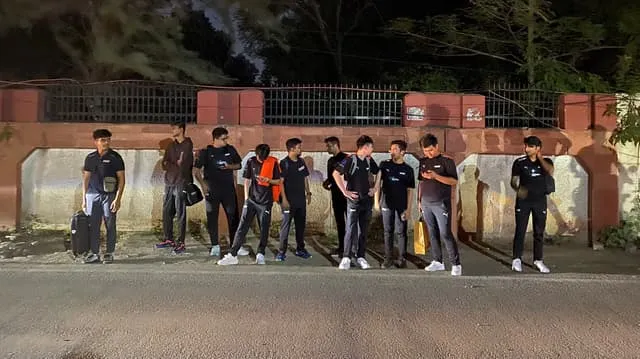
Orangutan’s brand manager, Palak Jain, Tweeted out a picture of the team stranded on the street at night, captioned, “please send a bus Nodwin Gaming.”

Aster Army coach Vandelak replied to her Tweet, stating that they were left stranded by the organizers as well.

The members of Orangutan resorted to squeezing eight individuals into a tuk-tuk as a means to make their way back home. One of their players, ‘azys,’ captured a video of this situation and shared it on Twitter.

Vandelak from Aster Army also posted a video showcasing his unconventional mode of transportation, where he was seen riding on a tractor to make his way back.

The VCL South Asia tournament is currently underway as the teams stand on the brink of the grand finals of the event. The winners of the tournament will represent the region in the upcoming VCT Pacific Ascension.
Stay updated with the latest news in gaming and esports by signing up for early access to TalkEsport’s Mobile App. Follow us on Twitter and Google News to ensure you never miss the exciting updates.


When Will Fortnite Servers Go Up?

0

Fortnite enthusiasts around the world are eagerly anticipating the launch of Chapter 4 Season 3. With the game’s servers temporarily offline in preparation for the upcoming update, players may be wondering about the timeline for their return to the action-packed island. Rest assured, the scheduled downtime is a necessary step for Epic Games to apply the highly anticipated Chapter 4 Season 3 patch, introducing a myriad of captivating changes and additions to the game.

Following the conclusion of Chapter 4 Season 2, Fortnite is currently undergoing scheduled downtime. During this period, Epic Games takes the opportunity to make the necessary updates and adjustments for the upcoming Chapter 4 Season 3. Players can look forward to a plethora of new weapons, a visually stunning jungle-themed island, and an enticing battle pass filled with exciting rewards and challenges. However, patience is required as the Fortnite servers must first be brought back online for players to fully experience all the new content.

When Will Fortnite Servers Go Up?

Although Epic Games prefers to keep players in suspense, historical patterns suggest that Fortnite will likely become playable again between 4 AM – 7 AM PT / 7 AM – 10 AM ET on June 9. It is important to note that this timeframe is an estimation based on our experience covering previous Fortnite seasons and is subject to change due to various factors.

The process of applying patches and updates can sometimes result in unexpected delays. While Epic Games strives to launch Chapter 4 Season 3 as early as possible, unforeseen obstacles may arise. Additionally, recent Fortnite seasons have introduced a queue system to manage the influx of players and prevent server overload.

Although this season’s launch falls on a weekday, potentially reducing server congestion compared to recent Sunday launches, it is advisable to remain patient if you find yourself in a queue. Rest assured that your turn will come, and soon enough, you’ll find yourself back in the game, ready for action.

Stay updated with the latest news in gaming and esports by signing up for early access to TalkEsport’s Mobile App. Follow us on Twitter and Google News to ensure you never miss the exciting updates.
How to Fix Fortnite Servers Not Responding?

0

Are you a dedicated Fortnite fan who has encountered the frustrating error message “Fortnite servers not responding” while attempting to play or access your account? This issue can prevent you from fully enjoying the game’s features but don’t worry. In this article, we’ll explore several potential fixes to help you overcome this problem and get back into action.

Fortnite has transcended its status as a mere video game and has become a cultural phenomenon. Its influence can be seen in various aspects of music, fashion, art, and entertainment. The game’s collaborations with popular franchises like Marvel, Star Wars, and Stranger Things have captured the imagination of audiences worldwide.

Furthermore, Fortnite has even hosted virtual concerts featuring renowned artists such as Marshmello, Travis Scott, and Ariana Grande. It has given rise to numerous memes, viral dances, and merchandise that have left an indelible mark on popular culture.

How to Fix Fortnite Servers Not Responding?

When faced with the “Fortnite servers not responding” error, it’s important to approach the problem systematically. Here are some steps you can take to address the issue and get back to enjoying the game:

Checking the Game Servers

The first step is to ensure that the Fortnite servers are functioning properly. Occasionally, server maintenance or updates can lead to temporary disruptions. To check the status of the servers, follow these simple steps:

  • Launch any web browser.
  • Go to the official Epic Games Status page.
  • Look for any reported issues or notifications.

Verifying Your Internet Connection

An unstable or faulty internet connection can often be the cause of the “Fortnite servers not responding” error. Before exploring other solutions, it’s crucial to rule out any internet-related issues. Follow these steps:

  • Open a web browser.
  • Visit Speedtest or any reliable internet speed testing website.
  • Click on the “Go” button to initiate the test.
  • Wait for the results to display.
  • Analyze the results for any abnormalities, such as slow speeds or high latency.

If you notice any problems with your internet connection, reach out to your Internet Service Provider (ISP) and inform them of the issue.

Restarting Your Router

Routers, like any other technological device, can experience occasional glitches that affect internet connectivity. Restarting your router can often resolve such issues. Perform the following steps to restart your router:

  • Power off your router.
  • Unplug it from the power source and leave it unplugged for 10 to 30 seconds.
  • Plug the router back in and power it on.

This simple step can often rectify connectivity problems associated with the “Fortnite not responding” error.

Restarting Your Gaming Console or Computer

Similar to restarting your router, rebooting your gaming console or computer can help resolve any background processes or game-related issues that may be causing the “Fortnite servers not responding” error. Follow these guidelines:

  • Close any obstructive programs or game-related processes running in the background.
  • Restart your gaming console or computer.

By taking these steps, you can ensure a fresh start and eliminate any potential issues that might hinder your Fortnite gaming experience.

Stay updated with the latest news in gaming and esports by signing up for early access to TalkEsport’s Mobile App. Follow us on Twitter and Google News to ensure you never miss the exciting updates.
Twitch’s Content Guidelines Spark Controversy: All Changes Explained

Twitch, the Amazon-owned live-streaming platform, recently updated its branded content guidelines, sparking controversy among its community of streamers. The changes will require streamers to disclose all sponsored content and limit the use of certain types of branded content.

While Twitch claims that the changes are meant to promote transparency and authenticity, many streamers are concerned about the impact on their ability to earn a living from their content.

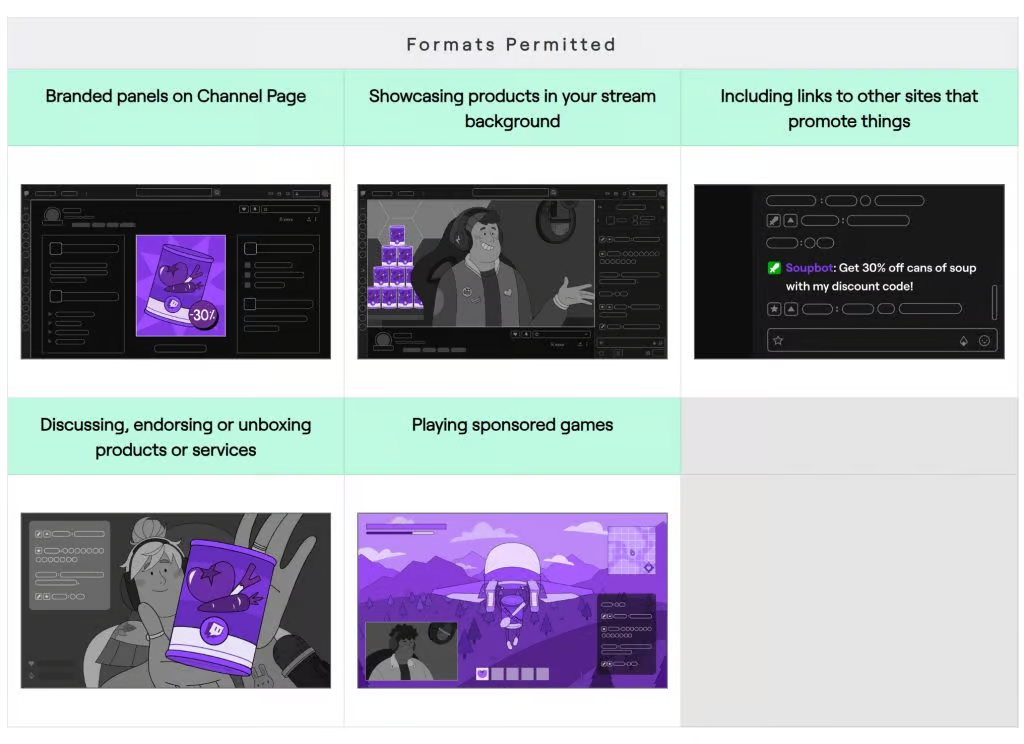
What is allowed?

  • Branded window on your Channel Page
  • Promoting products in your stream.
  • Playing sponsored games.
  • Endorsing services.
  • Using links to promote products/services.

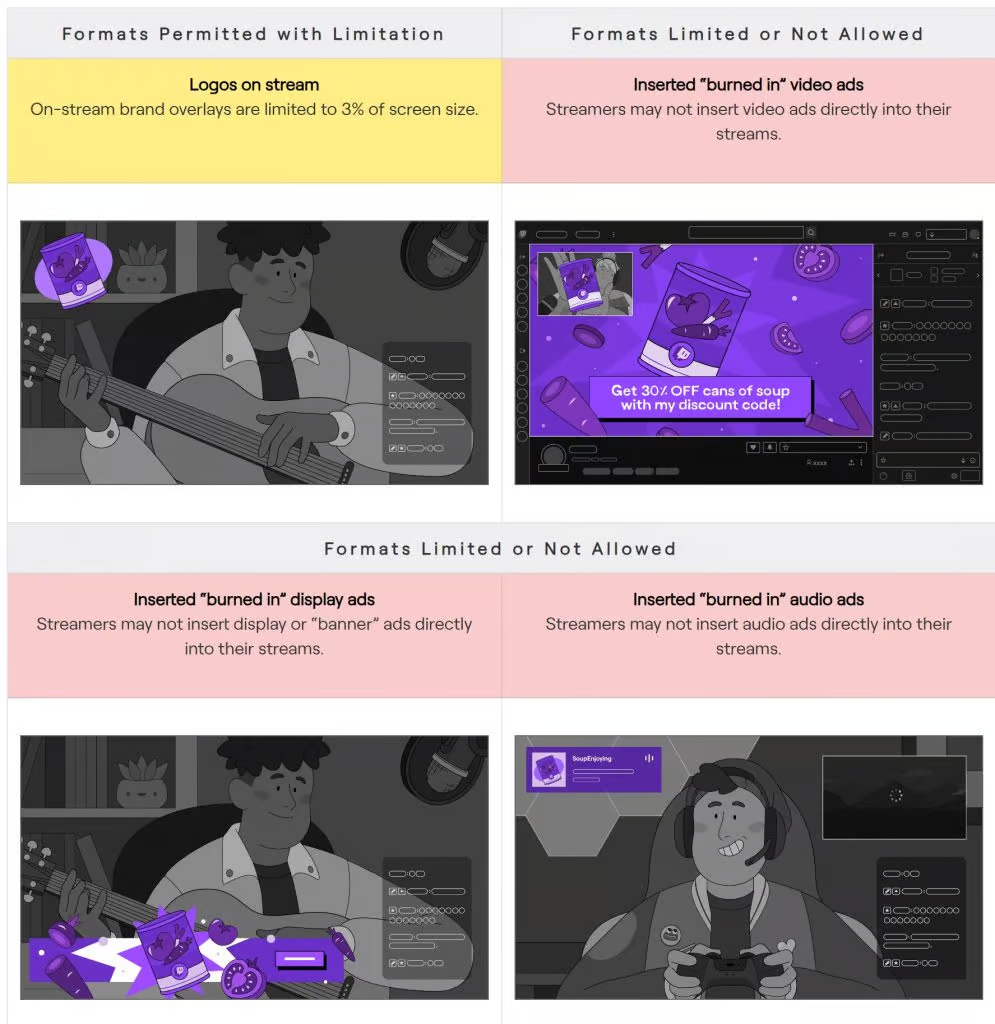
With said guidelines, streamers won’t enjoy the same freedom they once had regarding branded content given the new guidelines will restrict several aspects of brand promotion including the specific dimensions of sponsored logos displayed during streams and broader limitations such as the prohibition of banner ads and pre-recorded video ads on Twitch.

The Changes Explained

Under the new guidelines, streamers must disclose all sponsored content using Twitch’s built-in disclosure tool or by including a clear and conspicuous disclosure in their stream title or chat. Additionally, streamers are limited in their use of certain types of branded content, including pre-roll ads, mid-roll ads, and sponsorships that require viewers to take specific actions, such as following a brand on social media or visiting a website.

By requiring streamers to disclose all sponsored content and limiting the use of certain types of branded content, Twitch hopes to ensure that viewers are aware of when they are being marketed to and that streamers are not misleading their audiences.

What is not allowed?

  • On-stream brand windows cannot be over 3% of the player window.
  • Streamers cannot play video ads directly into their streams.
  • Streamers cannot display ‘banner’ ads directly in the player window.
  • Streamers cannot play audio ads directly in their streams.

CEO Apologizes as Twitch scrapes guidelines

The heavy backlash was addressed by the CEO stating“Let me just go straight to the point. For those who don’t know, we recently released this branded content policy. I won’t go through all the details.”

“This created confusion and frustration, and we apologize for that. We do not intend to limit streamers’

“We missed the mark with the policy language and will rewrite the guidelines to be clearer. Thank you for sharing your concerns, and we appreciate the feedback. We’ll notify the community once we have updated the language.”

Streamer Backlash

Despite Twitch’s intentions, many streamers have expressed concern about the impact of these changes on their ability to earn a living from their content. Some streamers have argued that the new guidelines are too restrictive and will make it harder for them to secure sponsorships and partnerships.

Others have criticized Twitch for not providing enough guidance on how to comply with the new rules. In response to the backlash, Twitch has stated that it is open to feedback and will continue to work with its community of streamers to improve its branded content guidelines. However, it remains to be seen whether these changes will have a significant impact on the platform’s ecosystem of content creators and advertisers.

Stay updated with the latest news in gaming and esports by signing up for early access to TalkEsport’s Mobile App. Follow us on Twitter and Google News to ensure you never miss the exciting updates.
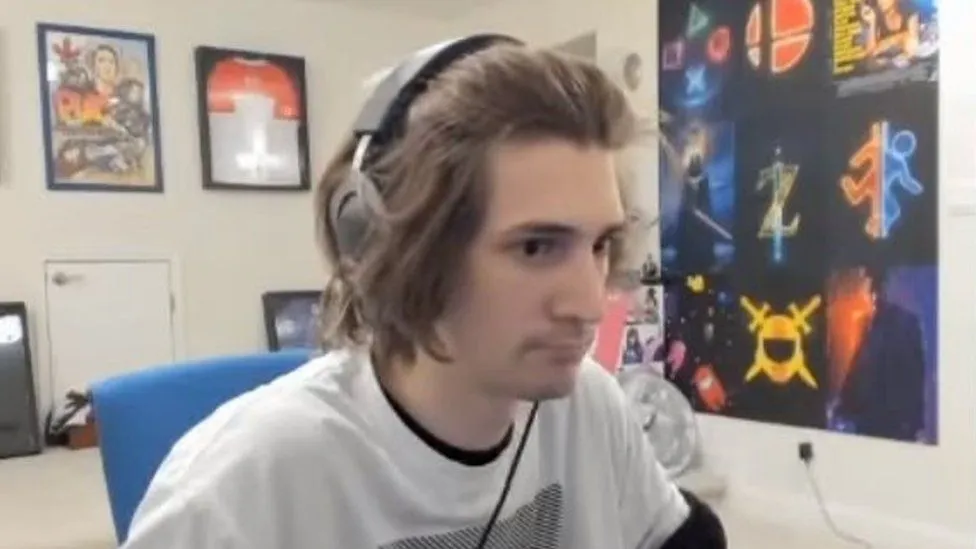
xQc’s Home Raided by Police Again

Popular Twitch streamer xQc, whose real name is Félix Lengyel, recently expressed his frustration on stream after police officers showed up at his home for the second time on June 8th, 2023.

The streamer expressed his frustration with the situation, stating that it was not only a waste of resources but expressed concern over the potential implications of a false police report. This happened for the second time within 24 hours given the police were at his doorstep just the night before.

xQc said during his last stream “Dude, the police are at my other f*ckin’ house again,” he said. “I don’t give a f*ck. I’m not doing anything. I don’t care what happens anymore. I don’t give a f*ck anymore.”

However, this incident has given birth to a whole new school of thought. Adept, who broke up with xQc quite some time ago posted pictures suggesting she is with xQc while showing off her wedding ring.

Further, xQc implied that said former partner might have taken away old pictures of him stating “My mom sent me 5 pictures every holiday pretty much, I kept them in one spot. after a while, it amounted to like 50 pictures. I left them under the phone cabinet. All gone, wiped clean”.

While no one has any clear idea of what’s going on, we have a plethora of theories floating around. Unless either one of them opens up and explains the situation, fans are finding it difficult to reach a conclusion.

Stay updated with the latest news in gaming and esports by signing up for early access to TalkEsport’s Mobile App. Follow us on Twitter and Google News to ensure you never miss the exciting updates.
Valorant Pros Pledge Donations For Each Shorty Kill at Masters Tokyo To Honor Twisten

0

The Valorant community was left in shock and disbelief when the news of Karel “Twisten” Ašenbrener’s untimely passing surfaced on the internet on June 6, 2023. While the exact cause of the death of the 19-year-old has not been disclosed, it is believed to be a result of suicide.

A day after the incident, VCT commentator and analyst Ryan “RyanCentral” Horton suggested that the Valorant community should continue Twisten’s “€25 for a shorty kill for charity” pledge at international events in honor of the former Vitality star. For the uninitiated, VCT LOCK//IN saw Twisten donating €25 ($27) for every shorty kill during the event.

Following this, several notable members from the Valorant community joined in and pledged the same promise as Twisten for the upcoming VCT Masters Tokyo.

“I love this idea, count me in,” Team Liquid ex-coach Connor “Sliggy” Blomfield said. “I will be donating €25 for every Shorty kill at Masters Tokyo and again at Champions to a Mental Health Charity.”

Shopify Rebellion player Anthony ‘vanity’ Malaspina also joined in on the cause, saying that he’d continue the pledge for Masters as well as Champions 2023. “Anyone who uses the shorty is a friend of mine, so I’ll join Sliggy with this $25 USD to a mental health charity for every Shorty kill in Tokyo and Champions.” 

CEO of M80, Marco Mereu, revealed that his organization would generously contribute $100 for every Shorty kill in the Ascension, Masters, and Champions tournaments.

Valorant fans are certain to keep their eyes peeled for all the shorty kills during the highly anticipated VCT Masters Tokyo, which is set to kick off on June 11th.

Stay updated with the latest news in gaming and esports by signing up for early access to TalkEsport’s Mobile App. Follow us on Twitter and Google News to ensure you never miss the exciting updates.
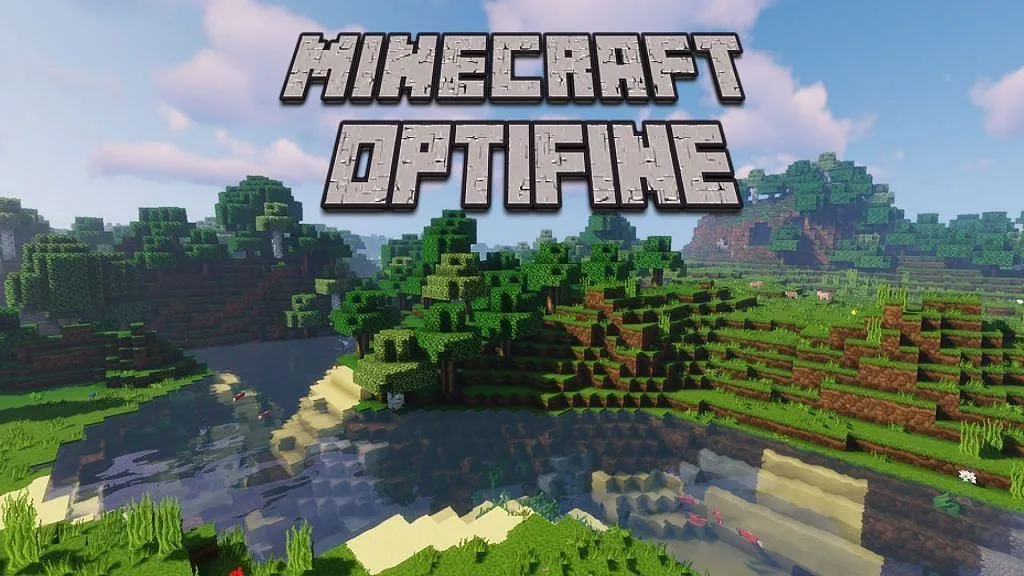
How to Download and Install OptiFine In Minecraft 1.20

0

The Minecraft 1.20 Trails and Tales update has brought exciting additions and beneficial changes to the game. With the introduction of new building blocks like bamboo wood and cherry wood, players now have even more opportunities to create stunning custom structures. Additionally, the inclusion of new mobs such as camels and the Sniffer mob adds a fresh sense of exploration and adventure. However, if you’re experiencing low FPS or seeking additional video settings, this article is here to help. We’ll guide you through the process of downloading and installing OptiFine in Minecraft 1.20, one of the best optimization mods available.

Requirements for Installing OptiFine in Minecraft 1.20

Before diving into the installation process, there are a few prerequisites you need to fulfill. Although OptiFine doesn’t demand high-end hardware components, you must ensure the following programs are installed:

  1. Minecraft Java Edition: OptiFine is compatible only with the Java Edition and not the Bedrock Edition.
  2. Java 17: Download and install Java 17, a separate software required to run OptiFine. You’ll find the installation process explained in step 7 below.
  3. Jarfix: Install Jarfix to ensure seamless execution of OptiFine. Step 20 covers the installation process for Jarfix.

As OptiFine is regularly updated to align with the latest Minecraft releases, you can rely on its compatibility with Minecraft 1.20. Now, let’s proceed to the step-by-step guide on downloading and installing OptiFine.

How to Get OptiFine Mod for Minecraft 1.20

  1. Download OptiFine:
    • Visit the official OptiFine download page through the provided link. If OptiFine for 1.20 is fully released, skip to the next step. Otherwise, click the “Preview versions” button under Minecraft 1.20.Locate the Download button next to OptiFine HD U I5 pre3.Wait for a few seconds and then click the Skip button in the top right corner to bypass the ads.Finally, click the Download button to save the file, which can be found in your Downloads folder.
    Note: If you haven’t installed Java 17, refer to step 20 before proceeding.
  2. Download and Install Java 17:
    • Access the official Java website using the provided link. Click the “Download Java” button, followed by another “Download Java” button. Wait for the download to complete.Open the downloaded file and click the Install button. Once the installation is successful, close the window when prompted.Next, visit the Java downloads page on the Oracle website using the provided link.Choose JDK 17 and select Windows (if applicable), then download the x64 Installer. Wait for the download to finish, open the installer, and proceed by clicking the Next button multiple times. You may choose a different destination folder if desired. Allow the installer to complete the installation process. When a window pops up confirming the successful installation, click the Close button.
    Congratulations! You have now successfully installed Java. To proceed, we’ll need to install Jarfix, unless you have it already (in which case, skip to step 23).
  3. Install Jarfix:
    • Follow the provided link to access the Jarfix download page.Click on the jarfix.exe download link.Locate the downloaded file in your downloads folder and double-click it.Click OK to close the window.
    Excellent! You have now installed both Java and Jarfix. Let’s shift our focus back to the OptiFine installation process.
  4. Install OptiFine:
    • Open the OptiFine file from your downloads folder. Ensure that Minecraft and the Minecraft Launcher are closed beforehand.
    • Click on the Install button. You can modify the destination folder if desired.
    • Wait for the installation to complete, and then click the OK button.
    • Launch the Minecraft Launcher, select Minecraft 1.20 OptiFine, and click Play to load the mod.
  5. Utilizing OptiFine in Minecraft 1.20:
    • Congratulations! You have successfully downloaded and installed OptiFine. Now, it’s time to optimize your video settings using this fantastic mod. Follow the steps below:While in your Minecraft 1.20 seed, pause the game.Click on the Options button.Select Video Settings.Explore the plethora of available options and customize them to suit your preferences.
    Fantastic! Now you can enjoy Minecraft 1.20 with enhanced video settings and improved performance, thanks to OptiFine. Don’t forget to explore the best shaders available for Minecraft, and if you’re using a low-end PC, check out our article on the best Minecraft shaders specifically designed for such systems. We’re eager to hear your thoughts on OptiFine and how it has transformed your gameplay. Share your experiences in the comments below!

What Is OptiFine?

In brief, OptiFine is a popular optimization mod that enhances the performance, visual appeal, and configuration options of Minecraft 1.20 and other versions. By utilizing OptiFine, players can achieve smoother gameplay with improved FPS and enjoy various customization settings. This mod offers full support for HD textures and shaders, a convenient zoom feature, dynamic lights, enhanced environmental elements like grass, snow, and water, connected textures for glass and other blocks, as well as the ability to modify in-game fog, among many other features.

You may have come across Minecraft players zooming in videos or witnessing breathtaking terrains and builds with shaders. Now, with OptiFine, you too can experience the same level of immersion and visual splendor.

Start optimizing your Minecraft experience today with OptiFine and unlock a world of endless possibilities!

Stay updated with the latest news in gaming and esports by signing up for early access to TalkEsport’s Mobile App. Follow us on Twitter and Google News to ensure you never miss the exciting updates.
Minecraft Bedrock Comes to Chromebooks: All You Need To Know

0

Mojang has unveiled the highly anticipated Minecraft Bedrock Edition for Chromebooks, opening up a whole new world of possibilities for gamers. Microsoft’s recent announcement showcased an early access version with exciting features like cross-device play, the Marketplace, and the ability to explore Minecraft Realms. After extensive bug fixes and gameplay optimizations, the Minecraft 1.20 update is now available, granting all Chromebook users access to this immersive gaming experience.

To access Minecraft on your Chromebook, head to the Google Play Store. Microsoft has made it convenient for users by directly integrating the game into the store, bypassing the need for a Linux container. Please note that the official version of Minecraft comes at a price of $19.99. However, this purchase allows you to enjoy both the Chromebook and Android versions of the game. If you already own the Android version, you can upgrade to the Chromebook version for a fee of $13. Alternatively, you can choose to acquire the Android version alone for $6.99.

Minecraft Bedrock Hardware and Software Requirements

Before diving into the Minecraft world, ensure that your Chromebook meets the necessary hardware and software specifications. Your device should be running ChromeOS 111 or a later version, accompanied by a minimum of 4GB of RAM. Furthermore, your Chromebook must be powered by Intel Celeron N4500, Intel i3-7130U, Mediatek MT8183, Qualcomm SC7180, AMD Ryzen 3 3250C, or superior processors to ensure optimal performance. Fortunately, most Chromebooks released within the past 4-5 years should be compatible with Minecraft without encountering any issues.

It’s essential to be aware that school-issued Chromebooks are unable to run the official version of Minecraft due to the Play Store requirement. However, fret not! Chromebook users can still enjoy Minecraft: Java Edition using the Linux container. Additionally, classic Minecraft can be played directly in your browser. While this may be disappointing news for some, it’s worth exploring the available alternatives to experience the Minecraft universe on your Chromebook.

Exciting New Features in the Minecraft 1.20 Update

With this release, Mojang brings forth a plethora of exciting features through the Minecraft 1.20 update. Immerse yourself in the stunning Cherry Blossom biome, encounter new mobs like the Sniffer and Camel, and delve into the much-awaited archeology system. Personalization takes center stage as you can now customize your armor, enhancing both your aesthetics and gameplay.

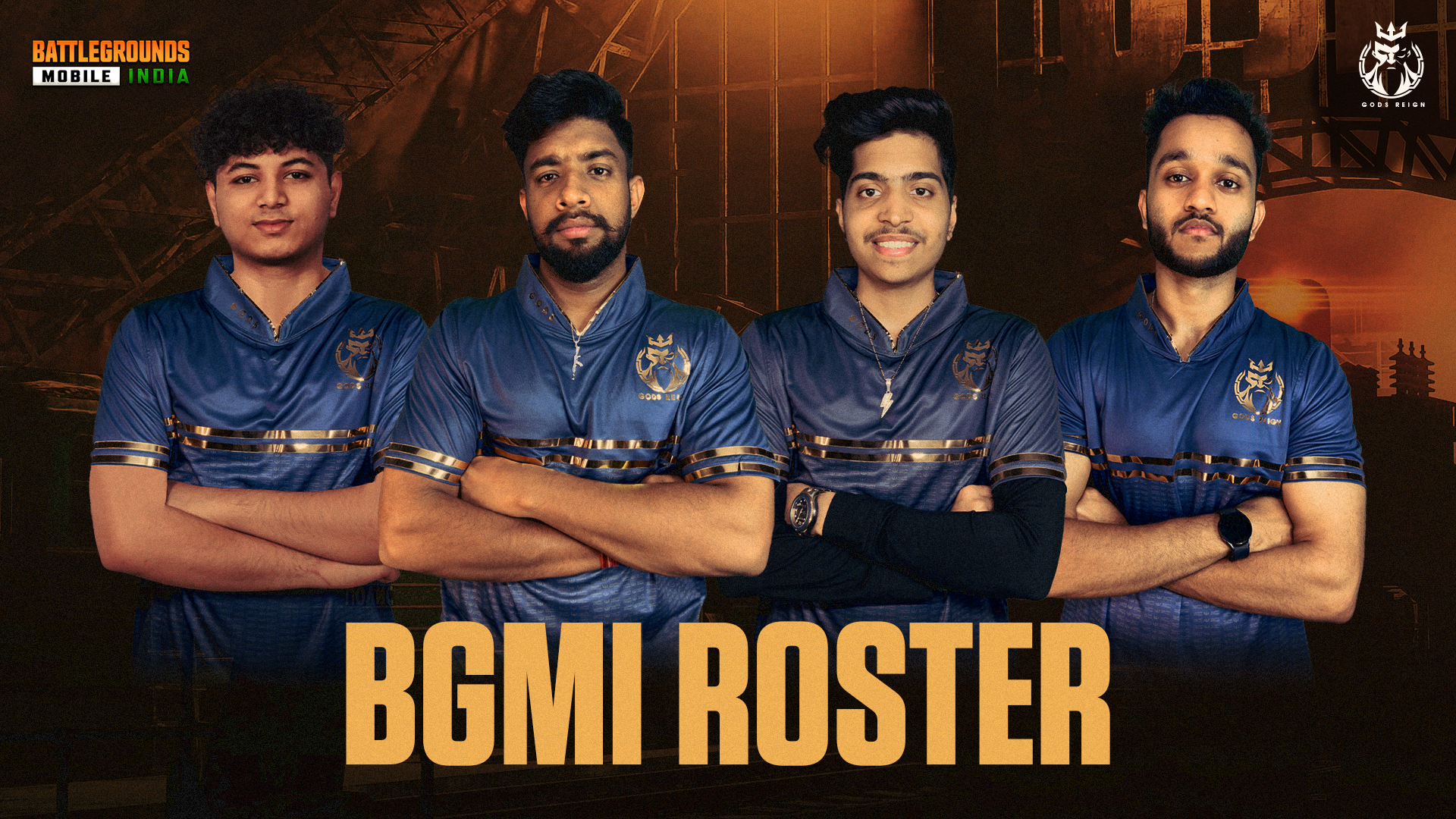
Gods Reign Unveils Star-Studded BGMI Squad

Gods Reign, an esteemed Indian Esports organization with a rich history, made its foray into the world of PUBG Mobile in mid-2018. Today, they have made a significant announcement by officially signing the former TSM BGMI players and former Chemin Esports athlete, Robin, to their squad. While rumors about their new lineup had been circulating, Gods Reign took to their social media accounts on June 9 to provide the much-awaited confirmation.

In an exciting reveal, Gods Reign introduced their new team through a captivating 128-second video shared across their social media pages. The video carried a powerful message, “We all make choices in life, but in the end, our choices make us. Introducing Gods Reign BGMI Roster, Let the game begin.”

Gods Reign BGMI Players:

The Gods Reign BGMI squad comprises four talented individuals who have already made a name for themselves in the Esports realm:

  1. Harsha “AquaNox” Rao
  2. Hamza “Blaze” Khozema
  3. Shubham “Ninja” Ranjan
  4. Robin Singh Shekhawat

Each of these players possesses unique abilities and has demonstrated their prowess both individually and as a team in various tournaments. Notably, they previously competed together under the team name Six Two Eight. TSM recognized their talent and signed them in mid-2021, with Robin assuming the role of coach while the other three joined as professional esports players.

During their time with TSM, the squad achieved their first significant victory in December 2021 when they emerged triumphant in the Skyesports Mobile Open. Additionally, they secured an impressive runner-up position in the 2021 BGIS, marking a major milestone for the team.

The Gods Reign BGMI squad showcased an exceptional performance at the Nodwin All Stars Invitational 2022, claiming the top spot. Ninja and AquaNox have received numerous individual accolades for their exceptional gameplay, while Blaze and Robin have consistently demonstrated their skills on multiple occasions.

With the acquisition of this highly reputed squad, Gods Reign aims to establish dominance in the BGMI scene. Despite being one of the oldest PUBG Mobile teams in India, they had not secured notable titles from 2018 to 2020. However, the organization has also made a mark in other games, such as CS:GO and Valorant.

The star-studded lineup of Gods Reign is gearing up for their first major challenge in the Skyesports Champions Series, a prestigious tournament boasting a massive prize pool of ₹25,00,000. The team will compete in the Semifinals phase, where 24 squads will clash for 16 coveted Grand Finale slots. This grand event kicks off on June 9 and concludes on June 18.

In a recent tournament, the Nodwin BGMI Pro Scrims, with a prize pool of ₹8,00,000, Gods Reign secured an admirable fourth position, narrowly missing out on clinching the championship. The talented athletes mentioned above now set their sights on replicating their stellar performance in the upcoming BGIS 2023, building upon the success of the inaugural edition of the event.

Stay updated with the latest news in gaming and esports by signing up for early access to TalkEsport’s Mobile App. Follow us on Twitter and Google News to ensure you never miss the exciting updates.
What is Valorant Hot Mic Bug?

The Valorant community has recently been buzzing with amusement over a newly discovered bug in the game. This bug, which is being called the ‘hot mic bug’ by the community, has managed to simultaneously disrupt friendships while also igniting fits of uncontrollable laughter among Valorant players worldwide.

In case you haven’t encountered this bug in your games yet, the hot mic bug in Valorant makes you unintentionally eavesdrop on your teammates’ conversations that are happening outside of the game.

How Does The Valorant Hot Mic Bug Work?

Usually, in Valorant, players rely on a designated push-to-talk (PTT) key [default: V] to communicate with their teammates through the game’s voice chat. However, this new hot mic bug has been causing players’ microphones to inexplicably switch on by default. To put it simply, once you press your PTT key, you’ll have to press it again to turn your microphone off.

In the heat of battle, it can be quite difficult to notice that your mic is toggled on by default, which is why this hot mic glitch has managed to take the community by surprise, leading to unintended and often hilarious consequences during gameplay.

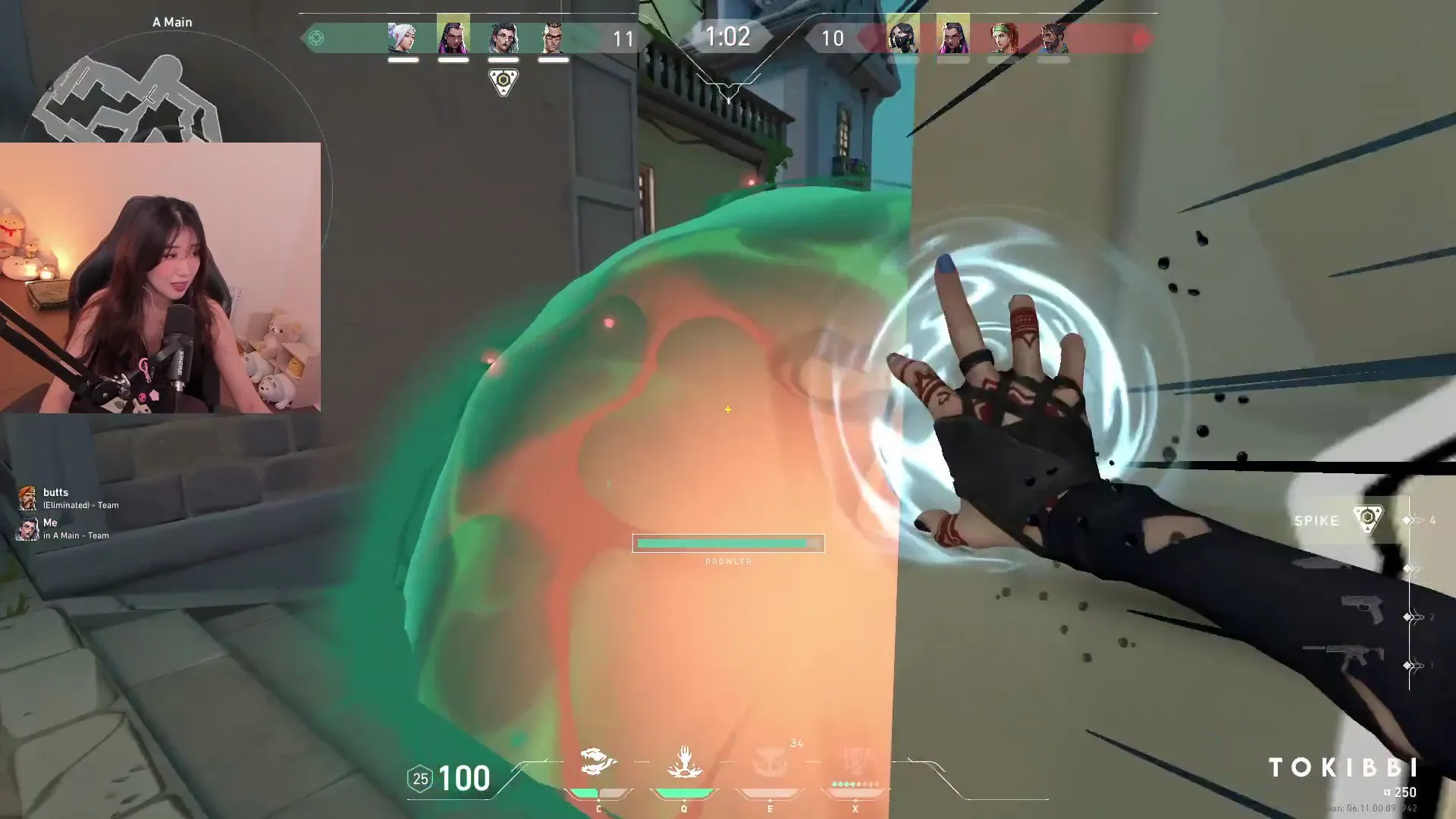
Over the past few days, there have been several instances of prominent Valorant streamers encountering the hot mic bug. Twitch streamer ‘tokibbi’ has shared one of her clips where she faced the hot mic bug on her Twitter handle. In the clip, we can see her talk about her haircut to her Twitch chat without knowing that her teammates were also able to hear her conversation.

When her teammates pointed out that she was on mic, she attempted to cover up the situation by claiming that she was talking to her sister on Facetime.

While a significant number of Valorant players have been urging Riot to address and resolve this issue, there is also a segment of the community that holds contrasting opinions due to the sheer hilarity brought about by this glitch.

“The Valorant hot mic should be a feature to be honest,” popular Valorant streamer and content creator WestJett said in a Tweet. “Helps you realize who the two face motherf***ers are. I got more respect for the toxic and proud types than the nerds who just shit talk with their duo in call.”

At the time of writing, Riot Games hasn’t shipped a fix for the hot mic bug in Valorant.

Stay updated with the latest news in gaming and esports by signing up for early access to TalkEsport’s Mobile App. Follow us on Twitter and Google News to ensure you never miss the exciting updates.