Tuesday, January 20, 2026
Home Blog Page 309

Demon Soul Simulator Codes for October 2024

0

No anime fan gamer can afford to pass on the experience of playing Demon Soul Simulator. With inspiration sourced from the globally celebrated Demon Slayer series, this game takes the players on an adventurous ride demon hunting and harvesting their souls so that they can ascend into a great world.

All you need is a handful of Epic Chests and some pieces of Zenitsu to unlock your inner slayer by these codes.

Demon Soul Simulator Codes for October 2024

  • bugfix0913: 10 Epic Chests
  • 7a2yioak: 10 Epic Chests
  • boxevent: 10 Epic Chests

How to Redeem Demon Soul Simulator Codes?

After you have a working valid code, proceed to the steps listed below to redeem your prizes:

  • Open the Game: Launch Demon Soul Simulator on your Roblox device.
  • Find the Chest: Go to the map world to spot the chest with “Codes.” Write Down the Code: Type in the current code in the text box.
  • Enjoy the Rewards: Click on the “OK” button to claim your Epic Chests and Zenitsu pieces.

Furia Shocks FaZe Clan at IEM Rio

Furia has caused a massive upset by taking down FaZe Clan in a best-of-one series to open up their IEM Rio campaign, heading to the upper brackets while taking down one of the biggest names in the scene.

VETO

  • FURIA removed Anubis
  • FaZe removed Vertigo
  • FaZe removed Nuke
  • FURIA removed Mirage
  • FURIA removed Ancient
  • FaZe removed Inferno
  • Dust2 was left over

Map 1: Decider; Winner: Furia

Furia on the T side, had complete control over the momentum of the map as they kicked things off with a pistol round win. FaZe won the first gun round but Furia took no time to hit back. A bit of back and forth saw an evenly matched T side by the Brazilians while FaZe underperformed to settle for a 6-6 first half.

Furia on their defense read FaZe liked a book to put together a streak of rounds till they reached map point. Faze put up little resistance including the one round which they won right on the edge of map point but lost the following one as Furia walked away with a 13-7 victory.

KSCERATO with 22 kills and 1.79 IR managed caused the biggest upset on day one of IEM Rio.

As Furia progresses further in the tournament, they face Mouz next while FaZe in the lower bracket will take on paiN to keep their tournament dreams alive.

Push-Up Training Simulator Codes for October 2024

0

But why leave the comfort of your couch to build those muscles? Well, just check out this new game on Roblox called Push-Up Training Simulator. Pump up your character through all those virtual push-ups you would do and, throughout that process, earn some strength and damage potions.

Ready to power up your workout? Here are the active Push-Up Training Simulator codes for October 2024:

  • LIKE100K
  • LIKE14K
  • RELEASE
  • NEW

Note: Codes do come and go. Better to redeem the codes as soon as you have them.

How to Redeem Push-Up Training Simulator Codes?

Push-Up Training Simulator
  • Open Push-Up Training Simulator.
  • Press the gear icon on the left at the top.
  • Enter any available valid code in the text field.
  • Click Redeem to apply.

So, what are you waiting for? Let’s start pushing up and level up your character in Roblox.

DRX Removes ‘BuZz’, Benches ‘Foxy9’ & ‘BeYN From Valorant Roster

0

APAC Valorant giant DRX has announced the removal of Yu “BuZz” Byung-chul from their roster, while also benching Jung “Foxy9” Jae-sung and Kang “BeYN” Ha-bin.

The departure of BuZz from the DRX Valorant squad was announced through a farewell video posted on the official X handle of DRX on October 6th.

A follow-up announcement from DRX further confirms that Foxy9 and BeYN have been allowed to “seek new opportunities as restricted free agents.”

Shortly after the announcement, BuZz took to his X account to express his interest in finding a team and said that he was open to exploring offers. Foxy9 has also voiced his intent to join a new team as a restricted free agent

With VCT Pacific team announcements expected to start rolling out tomorrow, the VALORANT community is eagerly awaiting to see where the former Vision Strikers stars will end up.

Top 7 Best Vandal Skins in Valorant of All Time

0

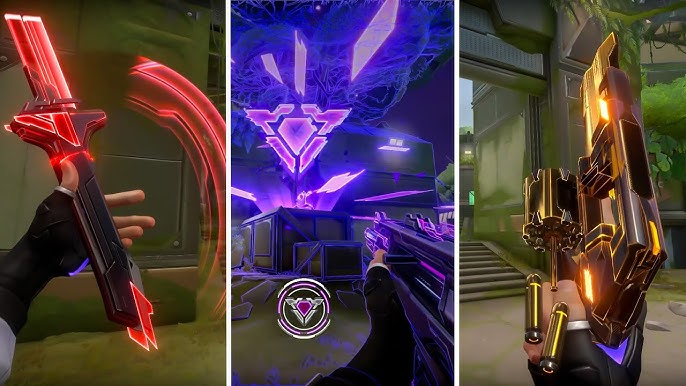
Vandal is the most effective weapon in Valorant and is favored by many professionals in a general buying situation. Its damage and accuracy have always proved to be reliable but its challenging recoil control makes it a weapon choice for only skilled players.  

While the default Vandal may not be that exciting, players always prefer to change things up by equipping some of the best skins that Valorant has made specifically for this weapon. Here are some of the best Vandal skins that players prefer over 30+ Vandal skins to date.

7.  Aemondir Skin

Aemondir Skin has recently sparked interest among players and is especially preferred by players with a calm approach for only headshots. The bundle is in the premium tier and costs a whopping 7,100 VP. The Vandal alone however only costs 1,775 VP. It also has three variants and can be upgraded up to three levels.

6. Glitchpop Vandal

The Glitchpop bundle has launched twice in Valorant and the second time around came the Vandal for the bundle set. The bundle has a flashy-neon-styled theme and is favoured for its calm sound and unique design style. The bundle is priced at 8,700 VP. The gun itself is priced at 2,175 VP and can be upgraded up to 4 levels with radiant points.

5. Singularity Vandal

The recently released singularity 2.0 bundle’s favorite pick is loved all over the world. The 2.0 bundle features a ghost, Vandal, and a butterfly knife. While the entire bundle costs 6,700 VP, the gun is priced at 2175 VP which is incredible pricing for how beautiful the skin looks. When purchasing Valorant Points, you can compare prices between the in-game store and websites like Rooter Shop to find the lowest price.

4. Prelude to Chaos Vandal

Prelude to Chaos Vandal is the most demanded weapon skin in the game, with it being an all-time favourite among all players. The power core design style of the gun makes it stand out from the rest with multiple colors offered as well. The weapon once again is fairly priced at 2175 VP.

3. Kuronami Vandal

The Kuronami Collection took the entire community by storm. Everyone loved what Valorant did with Oni but wasn’t quite impressed with its Vandal variant. But Kuronami steps it up. The elegant and precise look, fueled with a water-type finisher makes the bundle a major bang for what it’s worth.

2. Reaver Vandal

Reaver is the all-time favourite weapon of all Valorant fans across all ranks. The sleek dark look of the skin and an elegant finishing sound make it absolutely worth it.

The fact that it’s easily recurring in the market and also has a great chance of being a part of your night market.

1. 2021 Champion Vandal

If you’re eyeing for this Vandal, then you may have to give that dream up. This limited-time exclusive Vandal is still repped as the best Vandal in the champion series. Its exclusivity makes it more special compared to all the vandal skins. The Finisher audio is also deemed to be the best compared to the others Valorant has produced. 

Can’t Find the Valorant Night Market? Here’s How to find it!

Sometimes, VALORANT has an event called Night Market in which you can buy your desired weapon skins at steep discounts. Think of it as such, as a Black Friday or Halloween deal. Players should not check whether their favorite skin line is in the store or not using the Night Market tab because the event is not available for extended hours. I’ve put all the info you need to verify and learn how to check out the Night Market right here if you are not sure how.

How to get to Valorant’s Night market?

It’s easy to check your night market; just follow these few easy steps. 

  • Open VALORANT on your console or computer.
  • In the upper right corner of the screen, click the icon for the Night Market. (For your convenience, we’ve also indicated its precise location in the figure below.)
  • Lastly, click the card to view the offerings and buy the skins that most appeal to you.

But, why can’t I find the Night market in Valorant?

Valorant Night Market

I think one of the things that prevent you from going to the Night Market in VALORANT is the event’s climax. As it appears, it is a timed event, which is true that it will not be in the game forever which is a thing with game updates. Considering the launch of previous games in the series, the Night Market returns to set every few months.

If you cannot anymore find the Night Market symbol on the main map, it is most likely that the event is already over. Be sure to know the date of the upcoming VALORANT Night Market.

But to ensure that you do not miss it there’s always the official X VALORANT account which always gives information on events coming up. However, to inform you when it is out, stay connected with your gaming friends as well.

But, in case you can’t see the Night market even if it is available to everyone else within the game, your stretched resolution might be the problem. In case it is still unclear, the resolution of your window can also be affected along with your aspect ratio, causing certain elements of your screen to not be visible or disappear. To resolve this issue, just switch to a 16:9 compliant resolution and the market should be visible again!

For more such guides like this in Valorant, stay tuned to this space.

How to Fix the “Vanguard Out of Compliance” Error in Valorant?

Many grating inaccuracies exist in VALORANT, but one of them is “This Build of Vanguard is Out of Compliance”. For the record, Vanguard is VALORANT’s kernel-level anti-cheat software, but this detail may have slipped your attention. The “This Build of Vanguard is Out of Compliance” error is most probable if Vanguard is not operating right for one or another reason. However, the game does not point out how one can solve it and so we provide below some easy solutions.

What causes this “Vanguard is out of compliance” error in Valorant?

Riot Games said that players are required to turn on Secure Boot and Trusted Platform Module (TPM) in the BIOSes of their systems to use Vanguard – an anti-cheat system in VALORANT. When the first of these functionalities is disabled or not activated, the players are presented with the message “this Build of Vanguard is Out of Compliance” if they try to boot into the game. Those who are still running Windows 10 are unlikely to face this issue, or its impact is not as much compared to those running Windows 11.

Here’s how to fix the “This build of Vanguard is out of compliance” error

Vanguard Out of Compliance

Firstly, enable TPM

To rectify this error, there is no other way but to allow Secure Boot and Trusted Platform Module (TPM) security features in the system BIOSES. Remember that BIOS is a part of your system and selecting the wrong option can delete every created setting, that’s why proceed carefully. If you are a novice when it comes to adjusting BIOS settings, exercise a fair amount of care and make sure to watch enough youtube tutorials before you get to changing these settings. 

Check the VGC Service

If the first method didn’t quite work out for you, do not worry. We’ve got you covered with the following steps: 

  • Type ‘services’ in the search bar and look for the results at the top.
  • Look for the service named ‘VGC’, right-click to go into ‘Properties,’ and change the startup type to ‘Automatic.’
  • Click ‘Apply’ and ‘OK,’ restart your PC, and get an anxiety attack waiting for the fix to work! 

Last option: Repair Game files

Lost or damaged files and parts are among the most common sources of this kind of issue. As a matter of consolation, it is not necessary to download all the data again. However, those essential files can also be replaced by just scanning the entire folder through Riot’s Client under the Repair option. If you’re unclear, just go through these steps:

  • Click on Riot’s client and find your profile
  • Select the Valorant tab from the list
  • Click on the Repair button

And Voila! Any of these methods should hopefully fix your issue. For more such guides and how-to’s on Esports, stay tuned to Talkesport.

Age of Empires Mobile Release Date Revealed

Age of Empires Mobile, which was rumored some time ago, is now rolling out to mobile platforms. The new game will be developed by World’s Edge and TiMi Studios, so lovers of Age of Empires’ deep, detailed strategy experience on smartphones will be able to enjoy.

Age of Empires Mobile Release date

Age of Empires Mobile can be downloaded beginning 17th, October 2024. Many fans all over the globe have been anxious and waiting for this particular day thinking that it would be a massive shift to mobile gaming.

Age of Empires is a well-known real-time strategy boasting its official edition for smartphones, which is called Age of Empires smartphone. Because of its historically oriented scenarios, tense strategy, and focus on the franchise in Empire Building, the original game series, which fans love, is what the makers try to save. Thus, to keep the game looking good on a smaller screen, this update provides a great deal of added features.

But, is Age of Empires on mobile?

Age of Empires Mobile

Age of Empires Mobile was designed right from the ground up to be a fun social experience. Single-player modes gameplay, features, and specifics will be borrowed from the familiar Age of Empires series. Immersive medieval kingdom with bright characters, huge cities, and unique civilizations – in which people can build and develop their empires.

With great palaces; powerful arms; and thousands of enemies to duel with you in the PVP games, it is an incredible game. That, and how they move through the environment and the weather, or having real-time micro control over several squads, do that even further.

Other historical characters like Darius the Great, John of Arc, Saladin….Barbarossa, Hammurabi, among others, are also provided on the game’s roster to command their armies.

Here is how to pre-register for Age of Empires on mobile

If you want to know more about the game and play a brand new Age of Empires on your phone, you can pre-register right now on the App Store for iOS and Google Play for Android. Moreover, the pre-registered players will receive notifications and bonuses in the game. Visit the website, or, if you want to be an active member of our community, join our Instagram discussions here.

New CS2 Skin Reaches $8,700 USD Buy Orders Before Even Hitting the Market

The CS2 Armory Pass update introduced a wide range of new cosmetics to the competitive shooter, with some being rarer than others. However, the hefty price tags on some of the rarest skins in the Armory Pass have certainly stunned CS2 skin collectors worldwide.

One of the newest skins introduced in the Armory Pass update is the M4A1-S Fade. This fresh addition to the Fade family is a part of the ‘The Sport & Field Collection’, one of the three new skin collections that the Armory Pass has brought to CS2.

As officially confirmed by Valve, any cosmetic redeemed through the Armory Pass will not be tradable for 7 days. Despite this restriction, the M4A1-S Fade already seems to be attracting substantial buy orders on third-party marketplaces.

Taking a quick glance at BUFF163, one of the most popular third-party markets for CS2 skins, we can see that the highest buy order for the Factory New variant of the M4A1-S Fade is at a whopping $8681.34 USD.

The hefty price tag on the M4A1-S Fade is likely due to its high rarity. For the uninitiated, the M4 Fade is a ‘Covert’ grade skin from ‘The Sport & Field Collection,’ making it exceptionally rare to obtain, especially in a Factory New variant.

However, a portion of the community still remains skeptical about the future of this skin, with some players claiming that the price of this skin will plummet rapidly as time progresses.

For the time being, the long-term value of the M4A1-S Fade remains uncertain. As with many high-demand skins, only time will tell whether it maintains its status or sees a decline in price. As of yet, it proudly stands as one of the most sought-after cosmetics in CS2.

Valorant Voice Chat Not Working: How To Fix

0

Voice chat is undoubtedly a crucial part of playing any tactical shooter, and Valorant, being one of the most popular FPS titles on the internet, is no exception.

While most modern shooters have radio commands or automatic Agent callouts to help players relay information to their teammates, they aren’t nearly as effective as the voice chat feature. Giving out comms to your teammates via voice chat is absolutely necessary if you’re looking to climb the ranks and compete in the highest levels of play.

However, at times, you might find that your Valorant voice chat is not working properly. This can not only disrupt you from passing out useful information to your team, but it can also prevent you from hearing your team’s callouts, leaving you more susceptible to flanks.

Luckily, in the majority of cases, the voice chat not working issue in Valorant is caused by bugs or minor technical problems that can be easily fixed by following the proper procedure.

If you’re finding yourself encountering this issue, we have you covered. Here’s everything you need to know about your Valorant voice chat not working and how to fix it.

How To Fix Valorant Voice Chat Not Working

Before you try to fix your voice chat not working in Valorant, you have to try and find out the source of the problem.

Valorant Voice Chat Disabled

First, check if you’re able to hear your teammates’ comms via voice chat. If you can’t hear your teammates, chances are that your voice in the game is disabled.

To enable voice chat in Valorant, go to ‘Settings’, navigate to the ‘Audio’ tab and under ‘Voice Chat’, ensure that your ‘Team Voice Chat’ and ‘Party Voice Chat’ are enabled.

Valorant Voice Chat Not Working

Once done, you have to select your input device correctly. From the same page, select the microphone that you’re currently using and adjust your mic volume and sensitivity.


Lastly, you can do a quick loopback test to make sure that your microphone is working properly.

Setting the Right Recording Device

If you are unable to use voice chat in Valorant, there’s also a good chance that your Windows recording device isn’t set up properly.

To fix this, close Valorant, and from your desktop, right-click the sound icon in the taskbar. Select ‘Sounds’, go to the ‘Recording’ tab, choose the microphone that you’re using, and hit ‘Set Default.’

To see if your microphone is working properly, you can try speaking into the mic and double-checking if the green bar is moving.

Valorant Voice Chat Not Working

Common Microphone Problems in Valorant

If you are still encountering problems, you have to look out for some common microphone issues that players face:

  • Make sure that your microphone is properly plugged into your PC.
  • Make sure that you have not pressed the mute button in your microphone.
  • Download the latest audio drivers for your headset.
  • Grant Valorant the necessary permissions to use your microphone by heading to Settings > Privacy > Microphone.

Reinstalling Valorant

If everything else fails, then your best bet is to uninstall Valorant and reinstall a fresh copy of the game from the official Riot Games website.

If you’ve followed the aforementioned steps correctly, then the problem of your voice chat not working in Valorant should be fixed.