The highly anticipated Fortnite update 40.30 is now live, and it has brought with it a ton of fresh new content to the battle royale.
While the newest Fortnite update isn’t nearly as big as the last major update we saw, it does introduce a series of new Star Wars-themed cosmetics to the Epic Games title alongside other changes.
Without further ado, let’s check out everything you need to know about the Fortnite version 40.30 update.
Fortnite Update 40.30 Release Date
The Fortnite update 40.30 is already live, and it kicked off following three hours of scheduled maintenance starting April 30, 2026, at 4 am ET.
Fortnite Update 40.30 Highlights
The highlights of the Fortnite version 40.30 update include the following:
New Weapons:Cube Splitter SMG&Reforged Infinity Blade
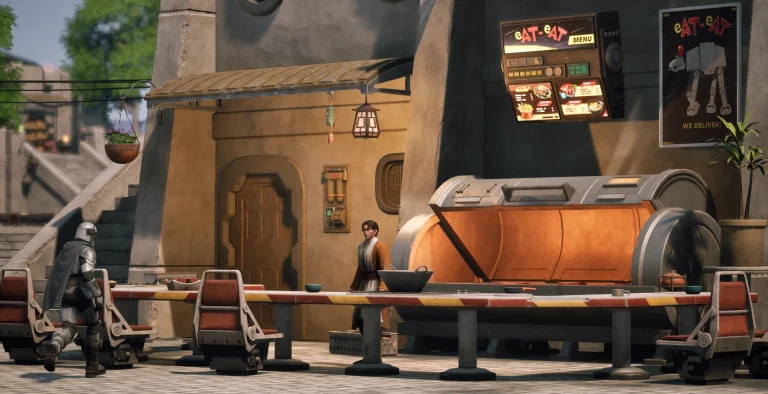
Star Wars Clone WarsSkins
Map Change:New Elite Landmark
Oathbound Items Return to Fortnite Blitz
Custom Match Customizations
New Weekly Quests
Additionally, following the incredible success of the Peter Griffin Fortnite skin, a new Animated Wives Bundle has also been added to the game files with the Fortnite 40.30 Update. This new bundle features a Lois Griffin skin alongside a Linda Belcher skin.
That’s everything you need to know about the Fortnite 40.30 update. Since the update is already live, fans can download the new Fortnite version and hop into the game right away!
NetEase officially shipped out the second major update of Marvel Rivals Season 7.5 earlier today, and it has introduced a bunch of exciting new content to the hero shooter.
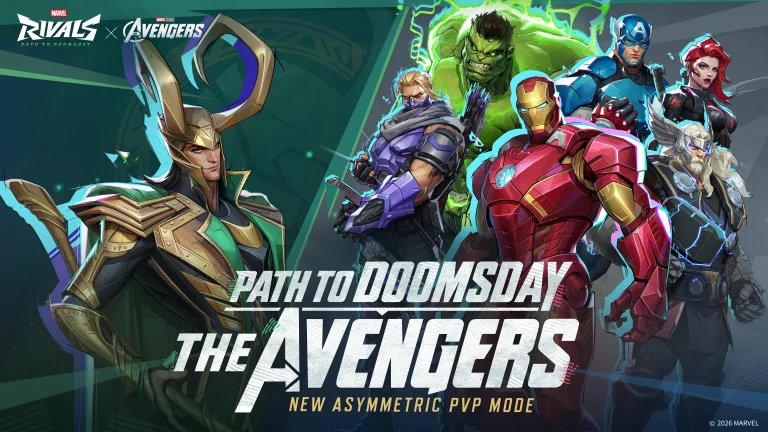
The highlights of the Marvel Rivals April 30 update include a brand-new 1v6 PvP mode based on Avengers: Doomsday, Times Square events, a series of free rewards, and more cosmetics for your favorite heroes.
The Marvel Rivals Version 20260430 update is already live, and fans can tune into the title right away to enjoy all the new content that it has brought with it.
Without further ado, let’s take a look at everything you need to know about the Marvel Rivals April 30 update before you hop on the game and check out the changes.
Marvel Rivals April 30 Update: Patch Notes
NetEase has already revealed the detailed patch notes for the Marvel Rivals April 30 update. Be sure to check out all the changes included in the latest update below:
All-New Content
The Avengers Cinematic Crossover
All-New Mode – Path to Doomsday: The Avengers
Chapter 1 of the Path to Doomsday is here, marking the launch of a brand-new The Avengers crossover mode! The epic showdown between the Avengers and Loki is about to erupt. Justice or Mischief? Choose your side and relive the battle where the Avengers assembled!
Event Period: April 30th, 2026, 09:00:00 to May 28th, 2026, 09:00:00 (UTC)
Times Square: Relive Marvel Studios’ The Avengers
1. Marvel Studios’ The Avengers: Battle of New York Highlights Screening
Head over to the viewing area in Times Square to watch iconic clips from Marvel Studios’ The Avengers! Watch the screening continuously for two minutes to unlock the exclusive Gallery Card: The Avengers.
Event Period: April 30th, 2026, 19:00:00 to May 29th, 2026, 03:00:00 (UTC)
Say ‘Assemble’! Visit the iconic scene photo walls outside the Avengers’ Gift Shop in Times Square. Take a group photo with the NPCs there to instantly earn 100 Units!
Event Period: April 30th, 2026, 09:00:00 to May 28th, 2026, 09:00:00 (UTC)
New In Store
1. Elsa Bloodstone – Bloody Butler Bundle 2. Iron Man – The Avengers Bundle 3. Loki – The Avengers Bundle 4. Bloody Butler Emoji Bundle 5. Bloody Butler Chroma Marine Maid/Pastel Polisher and Ultimate Ability VFX 6. Loki Emote – Kneel! 7. Captain America Emote – Avengers Assemble! 8. Adam Warlock – Cosmic Warlock Ultimate Ability VFX
Available From: May 1st, 2026, at 2:00:00 (UTC)
9. Team Lobby – Original Avengers
Available From: April 30th, 2026, at 09:00:00 (UTC)
Event: Chrono-Rush
The Chrono-Rush event is back for two weeks! Play matches and rack up Chrono Tokens, with no cap on how many points you can earn! The more you play, the more you get!
Event Duration: April 30th, 2026, 09:00:00 to May 15th, 2026, 09:00:00 (UTC)
We’ve added an exclusive Emote for the Kingpin Dethroned Trophy! Any player who earns this prestigious item in Blood Hunt mode will automatically unlock this unique Emote. The Emote can be used anywhere, whenever you have this accessory equipped.
Fixes and Optimizations
Heroes
1. Black Cat’s Double-Dipping Dilemma: Fixed a rare issue where landing a grapple on an enemy with Turn of Fortune could unintentionally bypass restrictions, allowing both the Claw Whip and Phantom Pursuit from her Fortune’s Favor ability to trigger and take effect simultaneously. Even the world’s most talented cat burglar can’t pull off a heist of that magnitude at the exact same time! Her luck has now been rebalanced.
Blood Hunt
1. Moon Knight’s Full Moon Math: Fixed a bug where the Full Moon Spin Enhancement Gear Extended Effect couldn’t quite wrap its head around Khonshu’s complicated demands, causing the upper and lower limits of its Cooldown Reduction to display incorrectly and miscalculating its Rating score. The Fist of Khonshu’s calculations are now as sharp as his crescent darts!
Valve dropped a CS2 update around 630 MB on April 30, 2026 @ 3:16 AM IST. Previously, the developers introduced the Cache remake. This time, it is all about bug fixes. The 5.1 GB Cache update came with several bugs. This update fixes a lot of them.
Without wasting time, let’s check out the patch notes.
Release Notes for today are up, focusing on Cache and a speculative fix for recent audio issues: https://t.co/HDBhRCy5XH
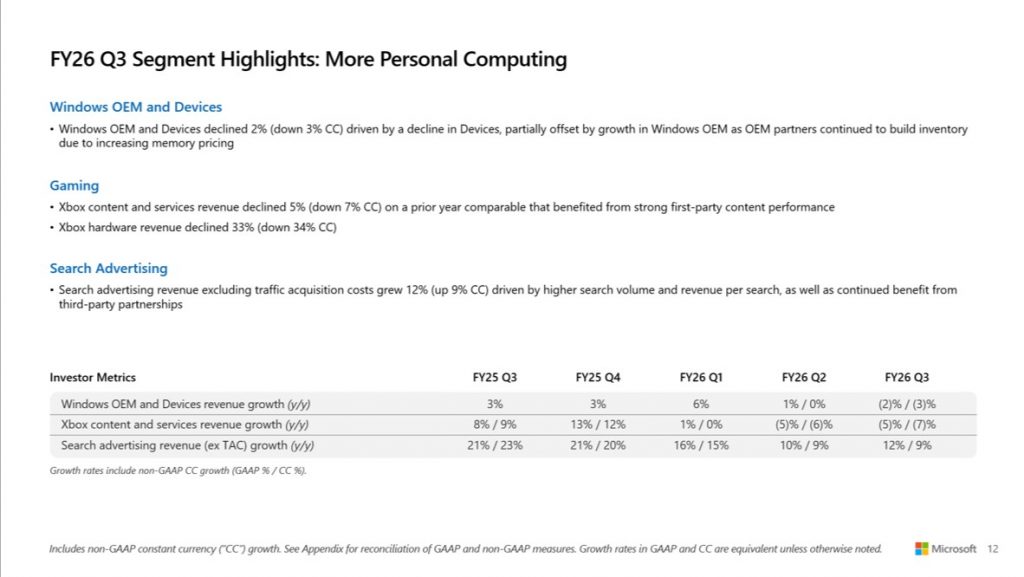
Xbox is having a rough fiscal year. Microsoft’s Q3 FY2026 earnings, covering January to March 2026, confirm what analysts had already anticipated: Xbox revenue fell across every major category, while the rest of Microsoft posted record numbers.
Key Takeaways
Microsoft total revenue hit $82.9 billion in Q3 FY2026, up 18% year-over-year
Xbox hardware revenue dropped 33% year-over-year
Xbox content and services revenue fell 5% year-over-year (7% in constant currency)
Total gaming revenue came in at $5,341 million, down 7% from $5,721 million in Q3 FY25
Azure grew 40%, and Microsoft’s AI business crossed a $37 billion annual revenue run rate
Xbox Hardware Revenue Drops 33% Year-Over-Year
Microsoft’s Q3 FY2026 earnings release shows Xbox hardware revenue fell 33% compared to the same quarter last year. That is a steep drop for a segment that has been underperforming for several quarters now.
This is not a one-quarter blip. In Q2 FY2026, Xbox hardware revenue had already fallen 32% year-over-year. The consecutive declines point to weakening consumer demand for Xbox consoles in the current hardware cycle.
The More Personal Computing segment, which houses Xbox alongside Windows and search, brought in $13.2 billion. That is down 1% year-over-year, or 3% in constant currency. Lower hardware sales across Devices and Gaming pulled the segment down, with search advertising revenue growth offering only partial offset.
Xbox Content and Services Also Decline
Beyond hardware, Xbox content and services revenue fell 5% year-over-year. In constant currency terms, the drop was 7%.
Microsoft attributed the decline to a tough comparison period. The same quarter in the previous fiscal year benefited from strong first-party game releases, which inflated the baseline. This was an expected result. Microsoft CFO Amy Hood had guided for a mid-to-high single-digit decline in total gaming revenue for Q3 FY2026, and a mid-single-digit fall specifically in content and services.
The actual numbers came in at the lower end of that range, which means the decline was not worse than forecast.
It is worth noting that the recently announced Xbox Game Pass Ultimate price cut to $22.99 per month was not yet in effect during this reporting period, which covers January through March 2026. The price change, announced in April 2026, will show up in Q4 FY2026 numbers instead.
Total Gaming Revenue: $5.34 Billion, Down 7%
Microsoft’s total gaming revenue for the quarter was $5,341 million. That compares to $5,721 million in Q3 FY2025, a fall of roughly $380 million or 7%.
For context, gaming is reported under the More Personal Computing segment. It is not broken out as its own business unit in Microsoft’s financials. This means Xbox results move alongside Windows OEM, device sales, and search advertising, all of which also shifted this quarter.
This is the third consecutive quarter where Xbox has posted a year-over-year decline across both hardware and services.
Microsoft Overall Posts Record Results
While Xbox struggled, Microsoft as a whole delivered its strongest quarterly results to date.
Total company revenue reached $82.9 billion, up 18% year-over-year. Operating income was $38.4 billion, up 20%. Net income came in at $31.8 billion on a GAAP basis, up 23%. Diluted earnings per share were $4.27, also up 23%.
Microsoft Cloud revenue reached $54.5 billion, up 29%. Azure and other cloud services grew 40%. Microsoft’s AI business crossed a $37 billion annual revenue run rate, which Satya Nadella called out as representing 123% growth year-over-year.
CFO Amy Hood said the company “delivered results that exceeded expectations across revenue, operating income, and earnings per share.” The quarter’s overall performance was driven by cloud and AI demand rather than consumer hardware or gaming.
Microsoft also returned $10.2 billion to shareholders through dividends and share repurchases during the quarter.
A Segment Under Pressure
The Xbox hardware decline reflects a broader reality in the gaming console market. Physical hardware sales across the industry have been slowing as the current console generation matures. Microsoft has increasingly shifted its focus toward subscription-based gaming through Xbox Game Pass, but even that segment faces headwinds when there are fewer major first-party releases to drive sign-ups.
According to the official Form 10-Q SEC filing, the Q3 gaming revenue decline was primarily driven by the content and services comparison issue and continued weakness in hardware.
Looking ahead, Microsoft has not provided specific guidance for Q4 FY2026 in this press release. The company says forward-looking information will be shared during the earnings conference call, held at 2:30 PM Pacific Time on April 29, 2026.
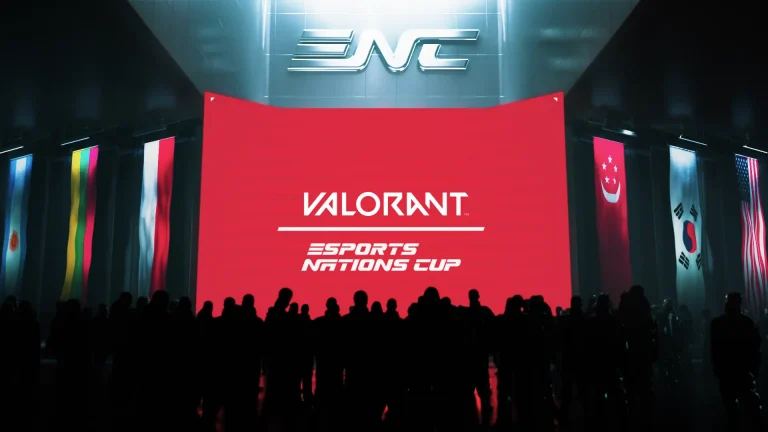
The Esports Nations Cup 2026 has revealed its VALORANT coaching lineup. Over 730 coaches have been officially approved across 100+ nations, kicking off the player registration phase for one of the biggest national-team tournaments in esports history.
Here is the complete list of confirmed head coaches for the ENC 2026 VALORANT tournament, organized by region.
What Is the ENC 2026 VALORANT Tournament?
The Esports Nations Cup 2026 is a multi-game national team event hosted in Riyadh, Saudi Arabia. It runs from November 2 to November 29, 2026. VALORANT’s main tournament takes place during the second week, from November 8 to 15.
A total of 32 national teams will compete. The prize pool for VALORANT stands at $1,500,000.
The event is organized by the Esports World Cup Foundation (EWCF), the same body that runs the Esports World Cup. It is the first edition of the ENC series, announced at the New Global Sport Conference in August 2025.
How Qualification Works
Of the 32 spots available, teams reach the finals through three paths:
16 direct invites based on the VALORANT National Team Rankings
14 spots from seven continental qualifiers (two per qualifier)
2 wildcard spots (details not yet confirmed)
The VALORANT National Team Rankings use VCT results. Points are shared equally among all club members who played. A nation’s ranking adds up the points of the top five players on its submitted roster. The cutoff date for the national ranking is June 21, 2026.
Roster and Eligibility Rules
Each national roster includes five players and up to two substitutes. All players must hold the nationality of the country they represent. Coaches do not have this restriction and can come from any nationality.
One key club limitation applies: no more than three members of a team, including substitutes, can come from the same esports organization.
Coaches were required to submit their names by April 7, 2026. Player rosters have a deadline extended to May 10, 2026.
ENC 2026 VALORANT Head Coaches: Africa
Country
Head Coach
Cameroon
“Overlord”
Cote d’Ivoire
“Kiro”
Djibouti
“Zahra”
Egypt
Ahmed “ZE1SH” Sheikh
Ghana
“Castor”
Kenya
TBD
Malawi
“wombat”
Nigeria
“Allen Walker”
Senegal
“Kiréne”
South Africa
“Fury”
ENC 2026 VALORANT Head Coaches: Americas
Country
Head Coach
Argentina
Gonzalo “Romanilly” Manzano
Bahamas
“Pyro”
Canada
Dakota “Stunner” MacLeod
Chile
Álvaro “WKN” Bustos
Colombia
Johan “StepheeN” Rodriguez
Costa Rica
Wilfried Zaha
Dominican Republic
“Foss1l”
Guatemala
“Poper”
Honduras
“Ecxilon”
Mexico
Jorge “Atom” Noriega
Paraguay
Iván “Inthra” Argüello
Peru
Giancarlo “giaNco” Arróspide
United States
Josh “JoshRT” Lee
Uruguay
Nicolás “Near” Gonzalez
ENC 2026 VALORANT Head Coaches: Asia
Country
Head Coach
Bahrain
“ALOOY”
Bangladesh
“scorezy”
Brunei Darussalam
“Simon”
Indonesia
Baskoro “roseaufy” Putra
Japan
Kakeru “Vorz” Ikarashi
Jordan
Amjad “BABABEAST” Al-Belbiese
Kazakhstan
Sultan “sultan” Akbay
Kuwait
Essa “ZiFE” Alshammeri
Kyrgyzstan
Harry “zelo” Davies
Lebanon
David “Dav1” Miljanić
Malaysia
Hoc Wah “Fayde” Chong
Mongolia
Enkh-Orgil “Orgil” Batjargal
Morocco
Martin “Ewok” van der Walt
Oman
Sha “ZesBeeW” Mohtar
Pakistan
Ayesha “Skel” Samman
Philippines
Jose “Rbtx” Jamir
Saudi Arabia
Andreas “Andreas” Nielsen
Singapore
Benedict “Benkai” Tan
Syrian Arab Republic
“Prometheus”
Thailand
Piyangoon “MYM” Kitisin
Turkmenistan
“aufina”
Uzbekistan
“Rusty”
Vietnam
Phan “Kawa” Anh Huy
Singapore’s entry stands out. Benedict “Benkai” Tan is a well-known professional VALORANT player who has competed at the highest level in the Pacific region.
ENC 2026 VALORANT Head Coaches: Europe
Country
Head Coach
Austria
Iljas “Matrixx” Amagow
Azerbaijan
“Holly”
Belgium
Xander “XanderKast” Martens
Bulgaria
Dimitar “itopata” Staev
Croatia
“Gaudarzz”
Czechia
Václav Jan “Vašek” Stezka
Denmark
Casper “Desmo” Rasmussen
Finland
Jiri “KUNDIKUNDI” Honkala
France
Vincent “Happy” Schopenhauer
Georgia
“Deny”
Germany
Navid “Kapio” Javadi
Greece
Ilias “iLka” Kaskanetas
Hungary
Viktor “victorsoN” Kovács
Iceland
“Axel”
Ireland
mike.D
Israel
Yaniv “nightmareK” Schreiber
Italy
Simone “simoz” Giovannini
Latvia
“PTJj”
Lithuania
Laurynas “Nbs” Kisielius
Moldova
“FELLY”
Netherlands
Milan “Milan” de Meij
Norway
Pål Ari “PUMA” Puma-Bø
Poland
Daniel “yaotziN” Roczniak
Portugal
Miguel “Bati” Batista
Romania
“Albala”
Serbia
Pavle “pakko” Kostić
Slovakia
“Landry”
Slovenia
Kris “KHorror” Horvat
Spain
Manuel “thinkii” Martínez
Sweden
Erik “d00mbr0s” Sandgren
Switzerland
“holden”
Türkiye
Mert “KEY” Çelebi (Head Coach) / Berke “Vlad” Kantürk (Coach)
Ukraine
Ivan “Johnta” Shevtsov
United Kingdom
Neil “neilzinho” Finlay
Türkiye is the only nation to list two coaching staff members in this announcement.
ENC 2026 VALORANT Head Coaches: Oceania
Country
Head Coach
Australia
Chris “Elmapuddy” Tebbit
Guam
“Swehts”
New Zealand
Yifang “Yifang” Chen
What Happens Next
Player rosters must be submitted by May 10, 2026. After that, over 100,000 qualifier participants from 100 nations will compete across seven regional qualifiers for the remaining spots in Riyadh.
The ENC 2026 VALORANT tournament runs November 8 to 15 in Riyadh. With $1.5 million on the line and 32 nations competing, it is the largest country-based VALORANT competition ever held.
FAQ
When does the ENC 2026 VALORANT tournament take place? The VALORANT main event runs from November 8 to 15, 2026, in Riyadh, Saudi Arabia.
How many teams compete in ENC 2026 VALORANT? 32 national teams compete. 16 receive direct invites, 14 qualify through continental qualifiers, and 2 enter through wildcards.
Can a VALORANT coach have a different nationality? Yes. ENC 2026 coaches are not required to hold the nationality of the country they represent. This rule applies to players only.
What is the prize pool for ENC 2026 VALORANT? The prize pool for the VALORANT tournament at ENC 2026 is $1,500,000.
Who is the head coach for Singapore at ENC 2026? Benedict “Benkai” Tan has been appointed as Singapore’s head coach for VALORANT at ENC 2026.
When is the player roster deadline for ENC 2026 VALORANT? The deadline has been extended to May 10, 2026.
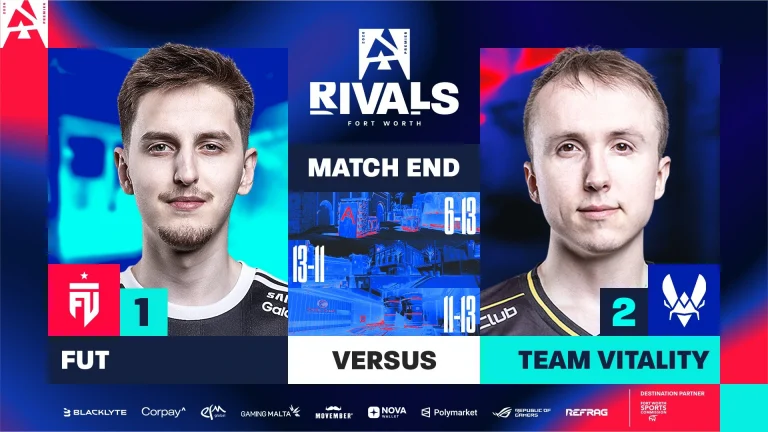
Vitality has taken down FUT with a 2-1 scoreline to kick off the BLAST Rivals Season 1 2026 with a win. Both teams won their map picks in a thrilling series, as FUT, playing with their coach, struggled to keep up.
Starting on their stronger side, Vitality got off to a solid start on the defense as FUT struggled to get going. As they lacked firepower, their offense suffered against Vitality, leading to no more than 3 rounds before switching sides. Getting on the board with a force buy conversion, Vitality had little work to put in after securing the massive lead to start the map. FUT continues to struggle to win the map with a 13-6 scoreline. FUT failing to back up dem0n gave way for meizii to drop a masterclass worth 1.81 IR.
Map 2: Dust2; Pick: Vitality; Winner: FUT
Following a total blowout, FUT shocked Vitality by giving a solid fight on the defense, where Vitality were supposed to have a field day. As Vitality managed to hold on, FUT levelled the first half with a 6-6 scoreline. FUT took the lead in the second half off the back of their pistol round conversion before Vitality started mounting rounds, as the better part of the half. However, FUT edged out in the final round to secure a 13-11 scoreline.
Map 3: Anubis; Pick: Decider; Winner: Vitality
Losing the pistol round, Vitality hit the board with their force buy, setting the tone for a half that saw FUT fail to win a single round. Vitality closed out the first half with an 11-1 dominant scoreline. A comeback by FUT saw them pull 11 rounds to start the second half before Vitality secured the 2 rounds they needed to close out the half with a 13-X scoreline as they secured their first win of the BLAST Rivals Season 1.
Heavy favorites coming into the match-up saw Vitality get pushed to an unexpected degree by FUT, which led to a close match, especially in the second and third maps. As Vitality reaches the next round, it will be interesting to see how far FUT goes without a key player.
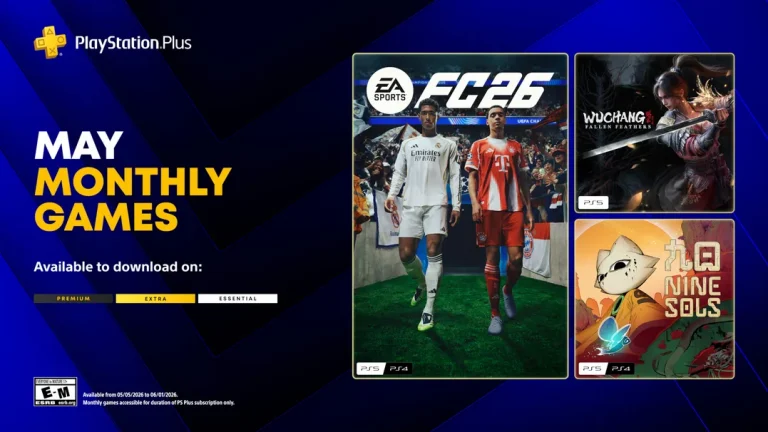
Sony has confirmed the three free games coming to PlayStation Plus Essential in May 2026. All three titles go live on Tuesday, May 5, and remain available to claim until midnight on June 1.
The lineup replaces April’s batch, which included Lords of the Fallen, Sword Art Online: Fractured Daydream, and Tomb Raider I-III Remastered. April’s games are claimable until Monday, May 4.
What Games Are Free on PS Plus in May 2026?
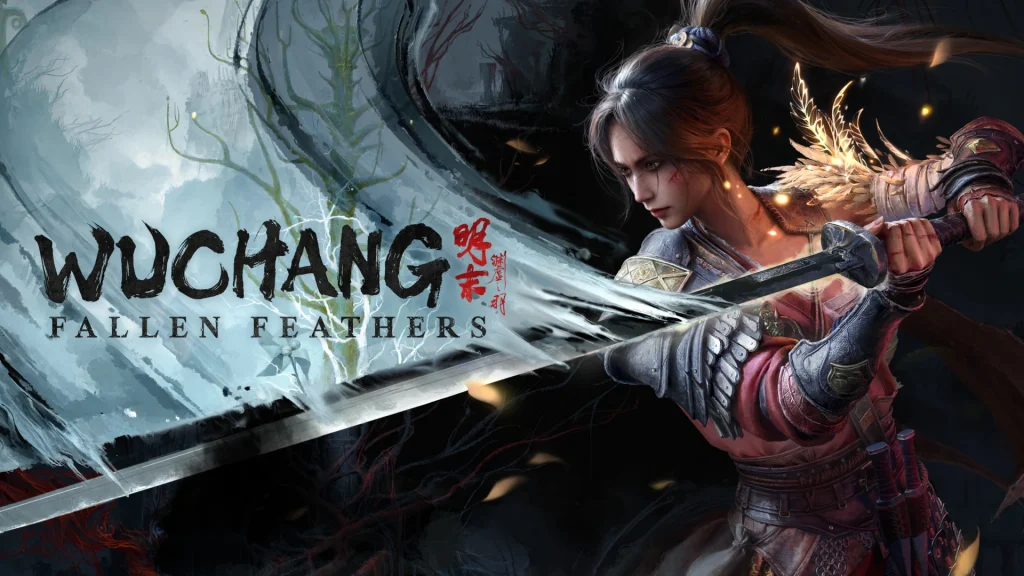
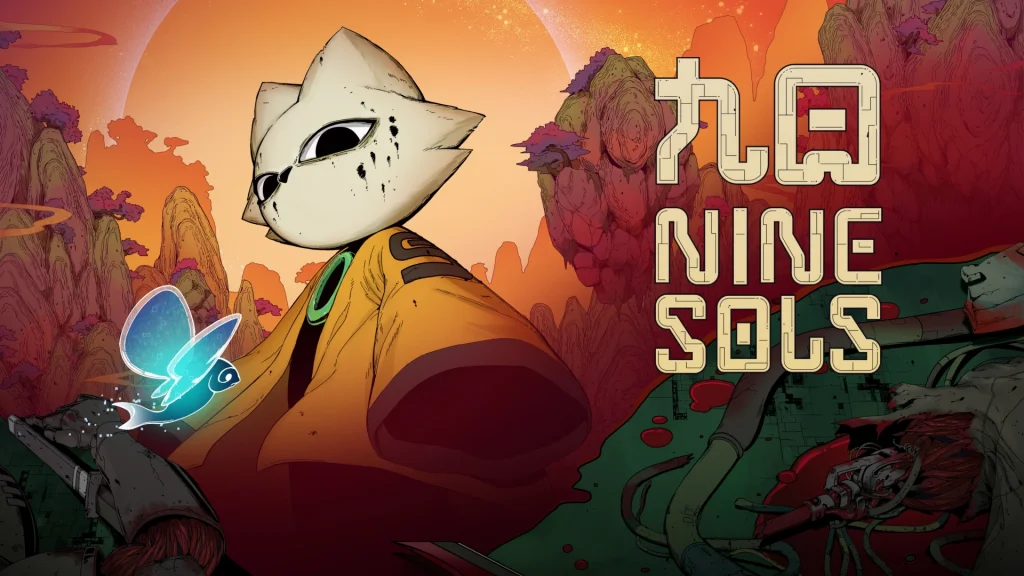
The three games joining PS Plus Essential in May are EA Sports FC 26, Wuchang: Fallen Feathers, and Nine Sols. All three are playable on PS5. EA Sports FC 26 and Nine Sols are also available on PS4. Wuchang: Fallen Feathers is PS5 only.
Unlike Extra and Premium tier games, Essential monthly games are yours to keep as long as you have an active PS Plus membership. They stay in your library and remain accessible from your console at any time.
EA Sports FC 26 (PS5, PS4)
EA Sports FC 26 features over 20,000 players across more than 750 clubs and national teams, spread across 120+ stadiums and 35+ leagues. The game includes two gameplay presets: Authentic Gameplay and Competitive Gameplay. Football Ultimate Team returns with live events, tournaments, and updated Rivals and Champs modes.
As a bonus, PS Plus members will also receive an EA Sports FC 26 PlayStation Plus Icons Pack that can be redeemed while the game is part of the subscription.
Push Square reviewed the game at launch and gave it a 7/10, noting it should appeal to a wide audience.
Wuchang: Fallen Feathers (PS5)
Wuchang: Fallen Feathers is a soulslike action RPG set during the final years of China’s Ming Dynasty. Players control Wuchang, a female pirate warrior who wakes up with no memory. The world is overrun by warring factions and a condition called Feathering, which causes people to mutate into monsters. Wuchang is herself affected by Feathering and must explore a connected open world, learn skills from defeated enemies, and uncover the source of the chaos.
The game launched less than a year ago, which makes its arrival on PS Plus somewhat early. At launch, Push Square gave it a 6/10. The review noted that while the gameplay was solid, the game had performance issues at release. Post-launch patches addressed some of these, though the current state of those fixes is not fully clear.
Nine Sols (PS5, PS4)
Nine Sols is a hand-drawn 2D action-platformer built around deflection-based combat, drawing comparisons to Sekiro: Shadows Die Twice. Players take on bosses using precise timing and explore a world once ruled by an ancient alien race called the Elders.
Push Square called it “a brutal but excellent Metroidvania,” adding: the atmosphere is strong, the combat is rewarding, and the story blends mysticism with science fiction.
When Do April’s PS Plus Games Expire?
April’s three free games, Lords of the Fallen (PS5), Sword Art Online: Fractured Daydream (PS5), and Tomb Raider I-III Remastered (PS5, PS4), are available to claim until Monday night, May 4. Anyone who has not yet added them to their library should do so before Tuesday.
Following years of anticipation in the CS2 community, Valve has finally added the iconic Counter-Strike map Cache to its competitive shooter in an update earlier today.
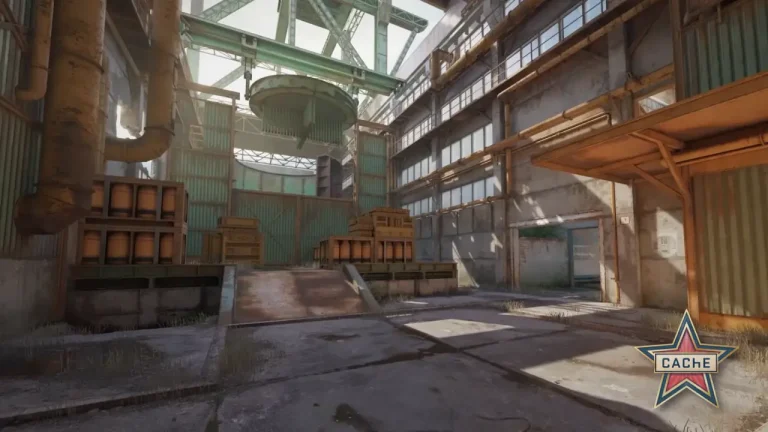
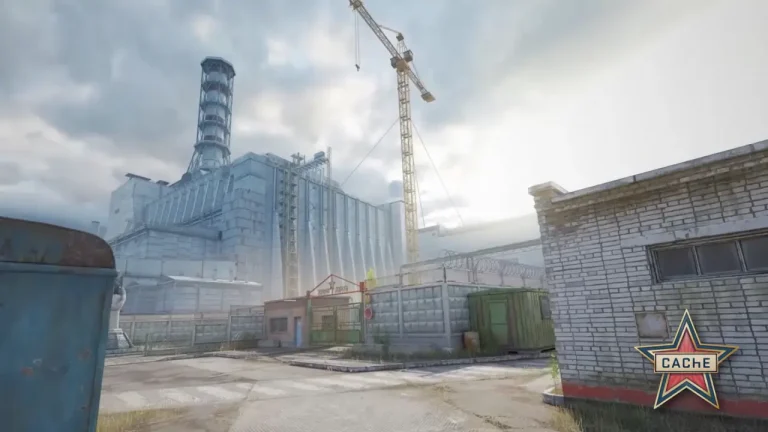
The latest CS2 update introduced a brand-new, reworked version of Cache to the game. This new version differs significantly from FMPONE’s original iteration of the map. While it stays true to the overall structure of FMPONE’s creation, Valve’s Cache rework adds a complete visual overhaul to the map alongside a plethora of other changes.
Interestingly, the new Cache in CS2 also reportedly features much smoother performance and higher overall FPS in-game compared to the original version. As per “ThourCS,” the new Cache delivers roughly a 22.5% increase in average FPS compared to FMPONE’s version.
I benchmarked both FMPONE’s and Valve’s Remake of Cache in an offline scenario. I walked the same path on both maps and the FPS difference is massive.
In Valve’s remake, the Avg. FPS is 22.5% higher and the 1% lows are 31.9% better than in FMPONE’s version. 🫡 pic.twitter.com/HbVUB6VPYc
Unfortunately, Cache is not available to play in the Premier map pool of CS2 at the time of writing. For the same reason, newer players may find it confusing to figure out how to play Cache in CS2.
How to Play Cache in CS2 in 2026
While Cache is not available to play in Premier queues as of yet, CS2 players are still able to try out the map in Competitive, Casual, Deathmatch, and other game modes ahead of its addition to the Premier map pool.
Here’s how you can play Cache in CS2 right now:
Queue for Cache from the Competitive maps list.
Queue for ‘Active Duty Delta’ on Casual or Deathmatch.
Type ‘map de_cache’ in your console to start a game with bots. (Type ‘bot_kick’ in console afterwards if you want to explore the map)
Cache is expected to enter the Premier map rotation alongside the CS2 Premier Season 5 update in late June or early July 2026. Once it’s added, players can also look forward to a new Cache Collection, featuring fresh skins that the community is already excited about.
Take-Two Interactive CEO Strauss Zelnick confirmed on Tuesday that Rockstar Games has looked into doing more with L.A. Noire, the 2011 detective game that has not had a new entry in over a decade.
Zelnick made the comments at iicon, a new gaming industry event in Las Vegas organized by the Entertainment Software Association (ESA), the same body that previously ran E3. He was interviewed on stage by Variety’s Jenny Maas.
What Zelnick Actually Said
When asked directly whether Rockstar had looked at doing more with L.A. Noire, Zelnick’s answer was a straightforward “yes.” That reply reportedly caught the interviewer off guard.
He followed that up quickly with a broader statement on Take-Two’s approach to older franchises:
Broadly, we’re looking at doing something in the future with all of our intellectual property. There’s nothing to announce on L.A. Noire specifically, and if there were, it would be Rockstar announcing it, not me. But in any case, with regard to our legacy IP, the teams are always looking at what we have and we’re always thinking about it. The question is, at any given time, do we have a team that’s passionate about working on that?
So no sequel is confirmed. What Zelnick did confirm is that the IP is not off the table.
L.A. Noire originally launched in 2011, developed by the now-defunct Team Bondi. Players controlled Cole Phelps, a detective working through cases in 1940s Los Angeles. The game received a remaster in 2017 for modern consoles and a separate VR release.
Team Bondi’s founder, Brendan McNamara, later set up a studio called Video Games Deluxe, staffed partly by former L.A. Noire developers. That studio handled the 2017 re-release for Rockstar. In 2024, Rockstar acquired Video Games Deluxe and rebranded it as Rockstar Australia. The game also became part of the GTA+ subscription service in 2024.
That acquisition is worth noting. Rockstar now owns the studio with the most L.A. Noire experience outside of the original team.
Earlier today, Valve officially dropped Cache into the competitive map pool of CS2, bringing an end to months of teasers and years of anticipation from the community surrounding the return of one of Counter-Strike’s most iconic maps.
While remaining structurally faithful to FMPONE’s original version of Cache, Valve’s new Cache remake brings a complete visual overhaul to the map, modernizing its look for CS2 but also seemingly contributing to smoother performance and higher FPS in-game.
According to a report from “ThourCS,” Valve’s Cache remake delivers significantly better performance compared to FMPONE’s original version.
As noted by the prominent CS2 content creator and dataminer, the new Cache delivers roughly a 22.5% increase in average FPS, while 1% lows are up by 31.9% compared to FMPONE’s version. These results were recorded by walking the exact same path on both versions of the map.
I benchmarked both FMPONE’s and Valve’s Remake of Cache in an offline scenario. I walked the same path on both maps and the FPS difference is massive.
In Valve’s remake, the Avg. FPS is 22.5% higher and the 1% lows are 31.9% better than in FMPONE’s version. 🫡 pic.twitter.com/HbVUB6VPYc
Note that ThourCS was running a high-end rig equipped with a 9800X3D and RTX 5070 at the time of testing this, so the difference on low and mid-tier PCs might not be as drastic.
Regardless, this huge boost in the map’s performance should still be a big win for the CS2 community. Not only does the return of a fan-favorite map bring back a wave of nostalgia, but it also comes with a smoother, more optimized experience that should benefit players across the board.
At the time of writing, Cache isn’t a part of the Premier map pool, but fans are free to try out the new map in Casual, Competitive, Deathmatch, and other game modes.