Home Blog Page 1837

Call of Duty: Warzone season 6 update goes live Worldwide with a Subway system and a Bat pet

0

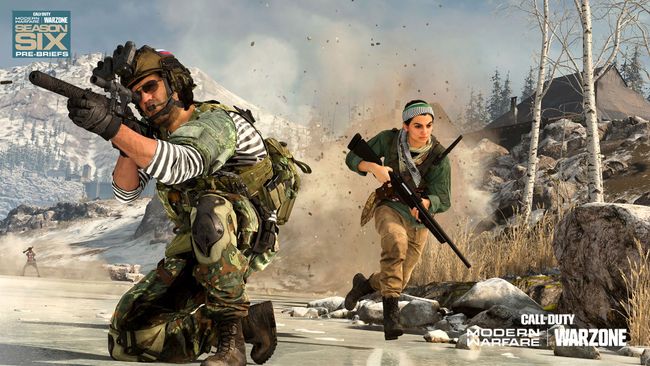
The much-awaited Call of Duty: Warzone and Modern Warfare’s season 6 update has finally arrived worldwide and this time around it brings some big gameplay changes, from adding a totally new fast travel system to new weapons and balance changes, the latest is season is loaded with enough content to keep players busy till the release of the upcoming Call Of Duty: Black Ops Cold War.

  1. The New Subway System –

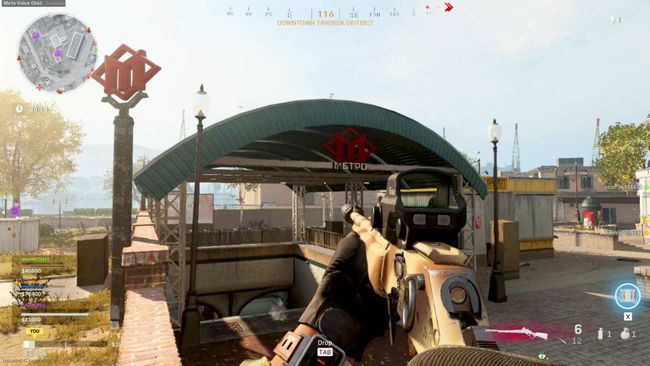
As of Season 6, Verdansk will have a total of seven metro stations with trains going in both directions for players to travel between the Airport, Lozoff Pass, Verdansk Center, Downtown, Barakett Shopping District, Versansk Train Station, and Torsk Bloc. Each station will have loot and gear inside plus there would be a quick getaway ladder to move from platform to street quickly.

The train will be free-to-use and move only when there isn’t any fighting onboard, or between the platform and the carriages. Also, the trains won’t stop at a station if it’s outside the circle.

  1. New Game Mode

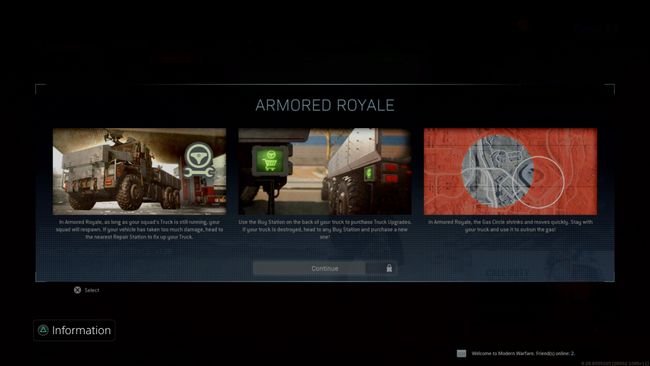
A new game mode based around a team of four dropped into Verdansk with an armored Cargo Truck, loaded with a turret and heavy armor plating. The truck also acts as a personal buy station to upgrade armor, add heat resistant barrels and deploy trophy systems. Squad members can respawn until their truck is still in one piece, but once the squad truck is totaled the ability respawn is disabled. The last squad standing wins, regardless of whether their truck is still in one piece or destroyed.

  1. Battle Pass System

The Season 6 Battle Pass system is “one of the most unique collections”. It starts with 20 Tiers of free content available for all players within Modern Warfare and Warzone and costs a few hundred Call of Duty Points that can be put towards a Battle Pass or Store bundle purchase.
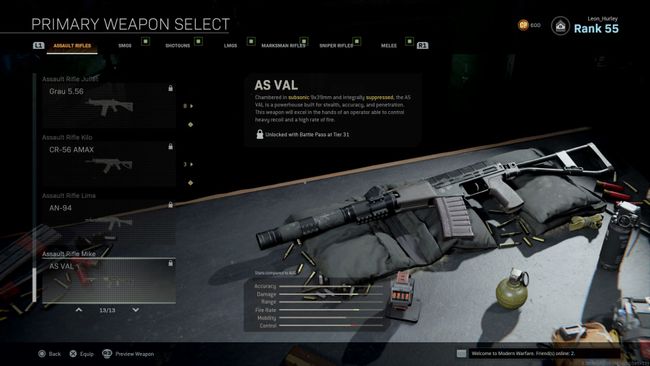
The battle pass comes with 2 new useable weapons – AS Val silenced assault rifle and SP-R 208 bolt action marksman rifle. The SP-R 208 marksman rifle unlocks at Tier 15 and trades incredibly high damage accuracy and range against low fire rate, mobility, and control. The AS Val on the other hand unlocks at Tier 31 and comes with a built-in suppressor and a high fire rate for big damage and mobility.

  1. Two new Operators

This season Modern Warfare’s Farah and Nikolai will join the warzone as new operators. Farah is an instant unlock at Tier 0 on the battle pass and comes with some additional skins to unlock by completing her operator missions. Nikolai on the other hand unlocks at Tier 100. He also comes with an additional skin which can be obtained by completing his operator missions as well.

  1. A Pet and that’s a BAT!

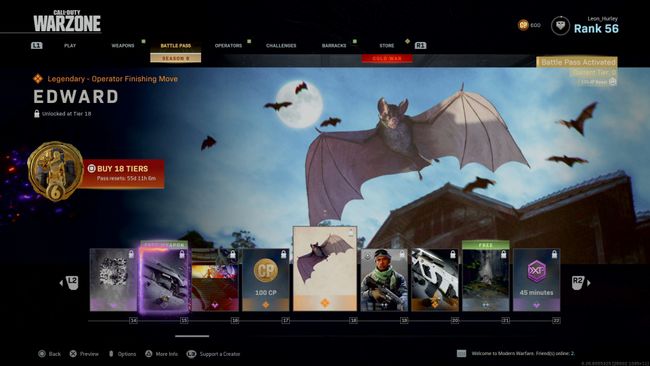
With Halloween right around the corner, developers for the first time have added a pet bat named Edward. Edward is an adorable furry little bat that can be unlocked at Tier 18 on the battle pass. But don’t judge him by his adorable looks as Edward will literally eat the eyes out of your enemies as a legendary Operator Finishing Move.

  1. Nvidia Reflex is now available

Nvidia’s latest Reflex feature set is now available in Call of Duty: Modern Warfare, including Warzone. Nvidia Reflex is a tech that offers to deliver latency improvements in GPU-intensive gaming scenarios on GeForce GTX 900 and higher NVIDIA graphics cards. NVIDIA Reflex helps in minimizing the input lag by 17% in some scenarios making the game more responsive and fluid.

Just like the previous updates, the Warzone season 6 update is a big download and might take some time-

  • PlayStation 4: 19.3 GB
  • Xbox One: 22.66 GB
  • PC: 57 GB (Modern Warfare owners) and 25.5 GB (Warzone only owners)
Valorant Gravitational Uranium Neuroblaster (G.U.N) skin bundle VFX revealed

0

Riot Games has announced a new skin bundle for their competitive shooter Valorant, and fans are loving the designs!

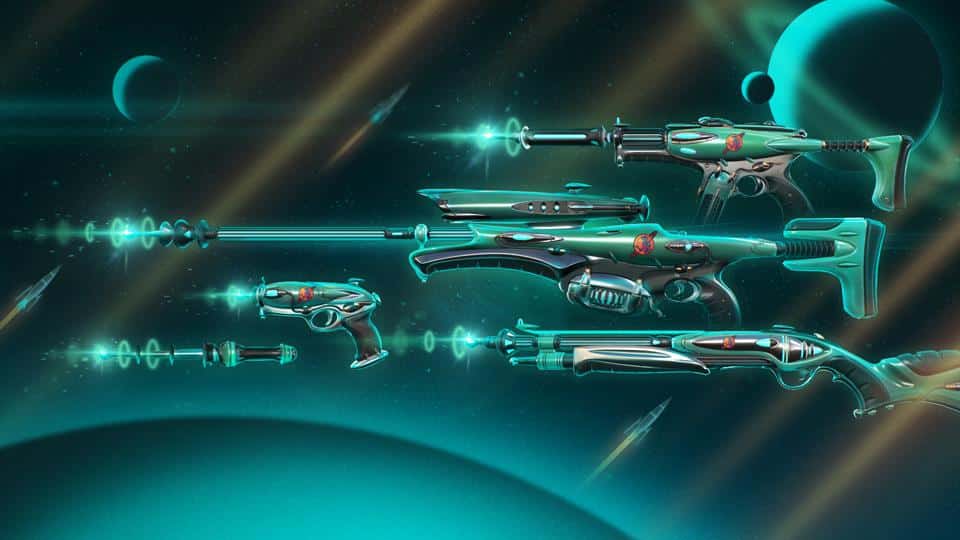
The Gravitational Uranium Neuroblaster (GUN) bundle, which is inspired by works of authors like Frank Herbert, Isaac Asimov, Arthur Charles Clarke, and the Strugatsky brothers, will feature skins for the Classic, Bucky, Operator, Spectre, and a melee weapon.

Considering the previous skin collections presented by Riot, the GUN bundle is a unique take on Valorant skin designs that make them appear straight out of a sci-fi movie. The skins will consist of three separate color variants.

The price of the full bundle including five skins and a gun buddy hasn’t been specified by Riot as of yet. Each skin in the bundle will cost 1,775 Valorant points, which is just under $20.

All G.U.N weapon skins

Classic

This image has an empty alt attribute; its file name is classic-skin-1.jpg

Knife

This image has an empty alt attribute; its file name is melee-skin-1.jpg

Bucky

This image has an empty alt attribute; its file name is bucky-skin-1.jpg

Operator

This image has an empty alt attribute; its file name is operator-skin-1.jpg

Spectre

This image has an empty alt attribute; its file name is spectre-skin-1.jpg

Gun Buddy

This image has an empty alt attribute; its file name is gun-buddy-skin-1.jpg

Recommended: Fix Valorant ‘No Internet Found’ Error

ScoutOP’s YouTube account recovered after it was compromised last week

0

The famous Indian gaming YouTuber and PUBG Mobile Pro, Scout, has finally received his channel back. Scout’s Youtube channel was hacked a few days ago and within a time period of four days, his channel is retrieved.

Scout is a PUBG Mobile professional player and lately has been soaring eagle in terms of success. His popularity, influence, and respect are immense in India, and having lost one of the faces of Indian Gaming YouTubers for a short period, his fans were disheartened. Finally, he makes a comeback and will possibly stream soon.

Scout kept his community updated about the channel from his Twitter handle. In a thread, he explains any updates that were made by the hackers on his own channel and how the hacker is “too smart” to use the attached Google Drive images as the Desktop wallpaper to seem legit.

Two videos were uploaded on his channel in the duration of four days. The videos were related to some cracked software and to seem legit, hackers used his Google Drive images as wallpapers. The videos are taken down as the account is retrieved. Scout expressed his happiness in a Tweet and finally, we can see him streaming in the next few days.

How to get a blank or invisible name in Among Us on mobile

0

Among us is one of the best casual games to play right now with your friends. Not only it makes you into a mini lawyer to defend your stances, the imposter role is always a tricky one and fun to play around. With this being said, there are many who want to stand out of the crowd by doing something unique. You can buy some skins or pets to do so or simply put a unique enough nickname. One of the best ways to do so is to keep your name entirely blank. Yes, it is possible to do so, just follow these simple steps and you are good to go.

Among us gained its popularity thanks to the streamers who made it so fun to watch. While there are some of the best streamers on Twitch to watch and learn from, the celebrities are also trying their hand on this game. As a result, the game has seen a drastic rise in its player base, rising from bare minimum to 60 million in a short period of time.

Owing to all these factors, you are bound to come across players that may share or closely resemble your nickname. To avoid that and still have a catchy nickname, you can simply put it to blank and let your fellow crewmates be surprised. Here is how to do it:

  • Visit the Compart website. to get the Hangul Filler U+3194 Unicode character.
  • Copy the character given in quotation (“) marks.
  • Open Among Us app and enter the Online mode.
  • Now paste the copied character. Although the copied character is pasted, it seems as if the name bar is blank.
  • Enter the game and you will see your name is now turned blank.

Following these simple steps, you can surprise your crewmates and friends.

Also Read: 6 Among Us name tricks you should know

How to get a nuke in COD Mobile

Call of Duty: Mobile has been developed as a blend of all the Call of Duty franchise games. As a result, the game offers almost every menu that is available in the previous editions, including the infamous nuke strikes. The game has an insane pool of weapons, utilities, skills, and scorestreaks to sustain you through personalized combinations or load-outs in each match but nuke takes it all to the next level.

Nuke is an ability that once unlocked, can wipe every single enemy on the map in Call of Duty: Mobile. It sounds very alluring but is equally difficult to get your hands on. Nuke potentially wins the games and finishes the job in style. So the question is, how to activate a nuke strike.

Activating nuke requires two steps, both of them are equally important but the difficulty level is strikingly opposite. The first step is very easy and almost everybody has already completed it but the second step is where things start to get more interesting. Here are the two steps required to activate the nuke bomb:

  • Step One: Make sure your account has reached Level 20.
  • Step Two: Maintain a kill streak of 20 kills without dying to activate the nuke.

The first step is a piece of cake for everybody. Those who have been playing for a long time don’t need to even look at their account level as it already must be above 20. The game requires you to be at least a level 8 to be able to enter a ranked matchmaking lobby. So, if you have played the game at least for fifteen days, you are good to go.

The second step is where things get tricky. You have to maintain a kills streak of 20 to be able to activate the nuke. While it may sound easy and is fairly easy in the mobile version than any other COD PC version, it’s not a piece of cake. You have to be completely accurate with your aim and positioning. If you get trapped in a situation where you can’t come out alive, you can forget about activating the nuke strike.

Credits: Activision

We recommend you plan your kills with respect to each map, hold some positions, and move as soon as you get the kills. Use your scorestreak to rack up even more kills. Use perfect weapons according to your maps to have even a slight upper hand and aim perfectly onto your enemies. After you get a 20 kill streak, you will directly see a pop-up to activate the nuke. Once you click on it, a briefcase computer will be opened, and at the end of which, the entire map will be nuked obliterating all the enemies on that map.

Credits: Activision

The nuke bomb works differently in Call of Duty: Mobile. Once used, the enemies would be killed and the match was won on PC but in its mobile version, it only kills the enemies, giving you five kills. It is still annoying to get nuked so be ready to dominate your opponents by nuking them, following the steps given above.

Also read: How to join a custom room in COD: Mobile

Valorant Patch Notes 1.09 Update: Jett and Reyna ultimates nerfed

0

Patch notes of Valorant 1.09 were revealed by Riot Games earlier today, and it brings in some significant changes to the competitive shooter. 

Apart from the huge Operator nerf which was heavily requested by fans for several months, Valorant patch 1.09 also introduced changes for 5 agents in the game. While the four of the agents witnessed minor fixes, Jett was the one who was nerfed the most.

However, the nerfs that the South Korean agent received were limited to her ultimate – Blade Storm, and more specifically, its burst fire mode. Not only has the damage output of the burst fire reduced, but its fire rate has also received a hit. On top of that, it will no longer be able to kill armored enemies with a single hit.

Here are the changes to Jett’s Blade Storm as mentioned in the patch notes:

  • The time between two consecutive burst fire uses has been increased from 0.33 seconds to 0.45 seconds.
  • Daggers thrown in the burst will now have a damage reduction with distance traveled. The reduction will start at 12 meters and drops steadily upto 35 points of damage at maximum distance.
  • The headshot multiplier on Burst Fire reduced from 3x to 2x, which means a headshot will only be able to tag an enemy for 100 instead of finishing them off.

The devs have said that the nerfs to the burst fire mode was mainly due to the fact that it was too much effective at longer distances. From now on, players will be much better off throwing single knives in mid-long range fights instead of burst firing.

Reyna‘s nerf on her ultimate was also quite significant. The fire rate bonus during her ‘Empress’ has been drastically reduced from 25% to 15%

This change was primarily due to the increased effectiveness of Reyna’s ult when combined with SMGs or heavies. The other aspects of her ultimate are unhindered, so ‘Empress’ is still useful and probably one of the strongest ultimates in the game.

10 Things CSGO Pros Do Differently

Do you practice Sprays and Flick Shots in CSGO a lot and still suck at CSGO? We’ve got your back. Apart from sprays and flicks, there are a lot of other things you need to know to reach The Global Elite. Here are 10 must-know things to become a pro at CSGO.

1. Bomb Planting Time

Many people don’t know how much it needs to plant the C4 and because of that they can’t plant the C4 in time and lose rounds in matchmaking. Well, the C4 takes exactly 3.2 seconds to be planted. Never plant the bomb once the timer crossed the 00:04 mark. Keep that in mind and don’t make such a mistake in your next game.

2. Avoid Pressing “W” in Corners

This is basically a movement tip. Avoid pressing “W” while taking corner-peeks. Only press “A” or “D” while peeking corners because it improves your first-bullet accuracy. With pressing both “W” & “A” or “W” & “D” your accuracy will get worse. Therefore, if you want to peek a corner and one-tap your enemy instantly, you need to remember this tip.

3. Get the Knife in your Hand to Move Faster

Always remember, you will reach your fastest speed with the knife or the C4 in your hand. Other weapons will reduce the movement speed. The speed actually depends on the weapon. From next time, don’t run with the Negev at spawn.

4. You can Buy more than 4 Grenades

Although you get 4 grenade slots, you can buy more than 4 nades. However, it is kind of map-based. Wondering how? Well, you can buy 4 nades and then use a smoke or flash lineup from near the spawn and then go to the spawn again within 15 seconds to buy the extra flash or HE grenade. Use this tip wisely in your next match.

5. You can Hold the BOT

When someone leaves in your team, you get a BOT on your side. Anyhow, the BOT starts going wherever it wants to go once the round starts. You can stop and hold the BOT at spawn. Once the round starts, ask your teammate to say “Hold this Position” from the radio message and answer with “Affirmative”. You can do the vice versa as well. These radio commands will definitely stop the BOT and it will hold somewhere near the spawn. Once someone in your team dies, he can take control of the BOT by pressing “E”. It was a simple but useful trick.

6. Don’t Buy Kevlar + Helmet in CT Side

If you watch CSGO Pro matches, you have already noticed it. It’s only CT sided tip. If your T-sided opponents are going to have a full-buy round, don’t buy Kevlar + Helmet. Why though? Kevlar + Helmet costs $1000 while only Kevlar costs $650. You just get the Helmet with the extra $350. However, it has no use while they are having 5 AK-47 because AK-47 will anyway kill you with one bullet in the head even if you have a Helmet. If your opponents are going to have an eco-round, then you can go for the Kevlar + Helmet. A great way to save money for the next round.

7. Smoke the Bomb while Planting or Defusing

It’s as simple as it seems. Whether you are on T-side or CT-side, always try to smoke the bomb. If you are on T-side and you think there might be an enemy hidden anywhere near the site, then smoke the site and start planting the bomb inside the smoke. Also, if you are on CT-side and going for a retake, you can smoke the bomb and start defusing like a ninja. This trick is good for lower rank players, although, sometimes it works on higher ranks as well. Try it out in your next match.

8. If you Peek from Right, you get the Advantage

Whenever you peek, your player model gets bigger from the left side. Therefore, if you are peeking left corners, your enemy gets an advantage to see and kill you first. Although, it’s really a tiny advantage, enemies with great reaction-time can hit you early.

9. Chickens can Reveal your Location

Yea! It’s true. If you go in front of a chicken and jump or fire or use the knife, the chicken will run from that location. Therefore, if an enemy notices that, he can easily know where you are. Chickens are kind of messy in CSGO.

10. Tip for Lurker

When you reload, you leave the magazine at that location. What else? The magazine stays for around 15 seconds. Therefore, if a lurker notices the magazine, he will know that you are not too far from the location. Hence, reload when you really need it!

Verdict

Try out all these tips and tricks in your next CSGO match and play like a pro. Also, share it with your teammates and let us know which one did you like most in the comment section below.

If you want to practice these CSGO pro tricks in a practice server, check out our guide to make an ideal practice server for you.

Valorant Patch Notes 1.09 Update: Operator nerfed heavily in latest update

0

After months of fans complaining about how broken the Operator in Valorant is, Riot Games has finally decided to hit the sniper rifle with some heavy nerfs.

Valorant patch 1.09 has delivered a plethora of new changes to the game, including agent adjustments, weapon accuracy changes, competitive and social changes, bug fixes, and the much-anticipated Operator nerf.

While players have been asking for the Operator to get nerfed for a while now, however, some fans have already started to feel that the Operator nerfs in patch 1.09 are a little too brutal.

Here are the changes the weapon saw in the latest patch:

  1. The price of the Operator has been increased from 4500 to 5000.
  2. Scoped movement speed has been reduced from 76% to 72%
  3. Weapon dead zone from becoming inaccurate has been increased to 30% movement speed from 15% which implies that the weapon will become inaccurate sooner, and become accurate later when stopping.
  4. Firing-rate has been reduced quite a bit from .75 to .6
  5. Instant equip time has been increased from 0.3 to 0.5.
  6. Leg shot damage has been reduced from 127 to 120.

Some of these changes are surely welcome by the community, but some seem to be reducing its effectiveness in combat quite harshly. The changes were primarily directed to reducing the Operator’s synergy with Jett‘s incredible mobility, which was proving to be incredibly difficult to deal with in higher ranks.

What do you think of these Operator nerfs? Try them out in-game and let others know through the comments below.

VALORANT Patch 1.09: Full notes and updates

0

Riot has finally shipped out the much-anticipated patch 1.09 for their competitive shooter Valorant, and Riot has made it worth the wait. From Operator and Jett nerfs to Viper buffs, patch 1.09 has everything the fans could have asked for from the devs. There are also a bunch of changes to the weapon accuracies and competitive, as well as adjustments to five of the agents.

AGENT UPDATES

OMEN

Paranoia

  • Updated projectile VFX to better represent its hitbox, especially when it is traveling towards your POV
jett-banner.png

JETT

Blade Storm (Burst Fire)

  • The time between consecutive Burst Fire use has increased from 0.33 seconds >>> 0.45 seconds
  • Daggers thrown in Burst now have a damage falloff that begins at 12 meters and drops steadily (to 35 damage) at max falloff
  • Headshot multiplier on Burst Fire reduced from 3x >>> 2x
viper-banner.png

VIPER

Fuel

  • Viper now starts the round at 100 fuel (previously 50)

Snake Bite

  • Vulnerable debuff applied from Snake Bite now lingers for 2 seconds after leaving Viper’s acid

Viper’s Pit

  • Move speed doubled while casting
  • Viper now fast equips her weapon after casting, re-equip times vary per gun—but on average will reduce her weapon down time by .4 seconds
reyna-banner.png

REYNA

Empress

  • Fire rate bonus decreased from 25% >>> 15%
brimstone-banner.png

Stim Beacon

  • Fire rate bonus increased from 10% >>> 15%

WEAPON UPDATES

Operator

  • Increased price from 4500 >>> 5000
  • Decreased scoped movement speed from 76% >>> 72%
  • Adjusted weapon deadzone from becoming inaccurate at 30% movement speed >>> 15% (become inaccurate sooner, become accurate later when stopping)
  • Firing rate reduced from .75 >>> .6
  • Instant equip time adjusted from 0.3 >>> 0.5 (instant equip plays after tapping orb, bomb defuse/plant tap, Jett Cloud Burst, and Phoenix Curveball)
  • Leg shot damage decreased from 127 >>> 120

All Weapons

  • Jump land inaccuracy state changed from gradual >>> binary
  • Jump land inaccuracy duration increased from .2 >>> .225
  • Jump land inaccuracy value increased from 5.0 >>> 7.0 (more inaccurate for .225s after a land)

COMPETITIVE UPDATES

  • During this patch, the chances of being in an hour+ queue should be notably reduced
    • This is already a very rare occurrence, but it can happen more often for high rank players—especially in premade groups. We are also doing some tuning behind the scenes to keep high rank matches found after long queue times reasonably balanced and fair.

SOCIAL UPDATES

  • Riot ID Reviews
    • Players that have been reported for inappropriate Riot IDs will now be reviewed automatically after the match has ended. If their name is flagged as inappropriate, they will be forced to change their Riot ID the next time they log in to the Riot Client.
  • Removed Multi-line Breaks in Chat
    • Some sneaky people were impersonating system messages to troll others into quitting a match. Enough!
  • Changes to party push to talk settings will now take effect immediately
  • The chat window can now be pinned to stay open across menus
  • Social Panel Sorting Logic
    • Sorting algorithm for the social panel has been updated to make it more intuitive for players as they interact with it.

BUG FIXES

  • Fixed issue where Sova’s hitbox was incorrect while using his Owl Drone
  • Fixed bug where Omen’s glowing eyes weren’t properly removed when he cancelled his ult
  • Fixed a bug where Custom Game preferences would be wiped after navigating away from the Custom Game lobby

UPDATE: Valorant Agent Operator Nerfed Heavily

From the patch notes it’s clear that the Riot devs are actively listening to the community and implementing changes that are certain to meet the fans expectations. Are you satisfied with this update, or there is something else you wanted? Be sure to let us know on the comments below.

What is the spectator bug in CSGO?

Unless you’ve been living under a rock over the past few months, chances are that you’re already aware of the infamous ‘spectator bug’ that has made it to the headlines on multiple occasions recently and is the reason behind the bans of several renowned CSGO coaches in the professional scene.

What is the spectator bug?

The spectator bug allowed coaches of CSGO teams to be stuck as a spectator in certain parts of the map while a match was underway, providing them with full vision around the area. Coaches abusing the bug could gain information on the enemy team’s whereabouts, economy, and tactics which would otherwise be unobtainable.

Needless to say, this bug could easily give players of one team an unfair advantage against the other. Coaches from big organisations were accused of abusing the bug on one or more occasions, which led to an elaborate investigation by the ESIC.

Consequences

Coaches who abused the bug didn’t go off unpunished. On September 1st, ESL announced that they were temporarily banning “dead”, “HUNDEN”, and “MechanoGun”, who are the coaches of MiBR, Heroic, and GamerLegion respectively for abusing the bug in tournament games.

But the wave of bans was just starting back then. On September 4th, the Esports Integrity Commission (ESIC) launched investigations into the abuse of the spectator bug in CSGO and worked alongside Michal Slowinski, the discoverer of this exploit, to hunt down coaches who abused the bug in professional games. Few weeks after the announcement, on September 28th, the ESIC issued bans 37 CSGO coaches who were found to have abused the bug in the past.

What’s even more shocking is the fact that according to ESIC, only 20% of the investigation has been concluded till now, which means, there are possibly a lot more bans to come. ESIC claimed that they’ll publish a detailed report towards the end of October to close the investigation.

Here’s a list of all the coaches banned in the investigation as of yet (Source: HLTV)

Sr. NoNameDuration
1Slaava “⁠Twista⁠” Räsänen 15.75 months
2Peter “⁠casle⁠” Sørensen 10 months
3Rodrigo “⁠dinamo⁠” Haro10 months
4Arno “⁠ArnoZ1K4⁠” Junior10 months
5Allan “⁠Rejin⁠” Petersen 19.8 months
6Eliomar “glou” Hernandez10 months
7Arthur “⁠prd⁠” Resende10 months
8Alexey “⁠NooK⁠” Kozlovskiy7.5 months
9Henrique “⁠rikz⁠” Waku10 months
10Alessandro “⁠Apoka⁠” Marcucci 5.4 months
11Aleksandr “⁠zoneR⁠” Bogatiryev36 months
12Germán “hellpa” Morath10 months
13Egor “fuRy^” Morin7.5 months
14Aset “⁠Solaar⁠” Sembiyev10 months
15Nicolai “⁠HUNDEN⁠” Petersen8 months
16Ricardo “⁠dead⁠” Sinigaglia6.5 months
17Nicholas “⁠guerri⁠” Nogueira4 months
18Faruk “⁠pita⁠” Pita 10 months
19Erik “⁠AKIMOV⁠” Akimov 7.5 months
20Ivan “⁠F_1N⁠” Kochugov8.75 months
21Bruno “⁠ellllll⁠” Ono10 months 
22Pedro “⁠peu⁠” Lopes5 months
23Robert “⁠RobbaN⁠” Dahlström5.5 months
24Mariusz “⁠Loord⁠” Cybulski6 months
25Anton “⁠ToH1o⁠” Georgiev10 months
26Andrey “⁠Andi⁠” Prokhorov10 months
27Milan “⁠pepik⁠” Gellebra 10 months
28Morgan “⁠B1GGY⁠” Madour7.5 months
29Christian “⁠chrille⁠” Lindberg10 months
30Sergey “⁠starix⁠” Ischuk10 months
31Alexander “⁠ave⁠” Holdt6 months
32Jasmeet “⁠RoSeY⁠” Gill10 months
33Sergey “⁠lmbt⁠” Bezhanov7.5 months
34Henrik “⁠FeTiSh⁠” Christensen3.75 months
35Mikołaj “⁠miNirox⁠” Michałków 3.75 months
36Nikolay “⁠pNshr⁠” Paunin3.75 months
37Casper “⁠ruggah⁠” Due3.75 months