As for gaming, iPhone 17e appears to be one of the most powerful “budget” iPhones Apple has designed so far, largely due to the fact that it shares the same A19 chip and display as the mainline iPhone 17 series. This, along with the overall positioning and early benchmarking results for the chip itself, indicates that it will be more than happy with the latest big-name mobile and AAA-type games.
Apple itself has confirmed that the iPhone 17e features the latest-generation Apple A19 chip, which features a 3 nm process, a quicker 6-core CPU, and a new GPU with hardware-accelerated ray tracing, as well as “console-level gaming on the go.” In the mainline iPhone 17, which also features the same chip, it has been shown that the A19 achieves some 3,701/9,460 in Geekbench single/multi-core tests, as well as 130.97 frames per second in the 3DMark Wild Life Unlimited test, which puts it firmly into flagship territory for mobile gaming.
The iPhone 17e sports this processor with a 6.1-inch OLED display and Dynamic Island, and the iPhone 17 with the A19 processor might come with one less GPU core compared to the regular iPhone 17, which would mean that the device would be slightly lower on the GPU front, though the architectural improvements would still be the same. In the case of games such as BGMI, COD Mobile, and MLBB, the processor and GPU features would be more important than the missing core.
Since the iPhone 17e has just been announced, the gaming performance has been based on the regular iPhone 17, which sports the same processor. According to the gaming experience, the gaming experience has been quite good, with the GPU having enough power and cooling systems that do not allow the device to overheat, though the battery might drain slightly more compared to the competition. In the case of the iPhone 17, the device has been found to be able to run demanding games at 30-60 frames per second with stable frame pacing, assuming that the game has been optimized for the latest Apple processor.
However, for high refresh rate gamers, this device will not be a good choice as the display is capped at 60Hz. Even though FPS games are more stable on iPhone, the unavailability of a 120Hz display might be the deal-breaker for pro gamers. What’s your opinion on the new iPhone 17e? Will you use it for gaming? Let us know in the comments below.
Astralis has bagged their second win of the ESL Pro League Season 23 Stage 1, beating HEROIC with a 2-0 scoreline. Having lost their starman, the new Astralis lineup is slowly finding its footing. Two convincing performances in a row to kick off the event make fans want to believe in the organisation once again.
Starting the map with a pistol conversion, Astralis kicked the series off with a solid defense in Dust2, leading to HEROIC fighting for rounds and only managing 4 before closing out the half. Winning the first 3 rounds, Astralis extended their lead to 11-4 before HEROIC started hitting their shots on the defense. Step by step, the young roster roped in rounds and cornered Astralis as they pushed the game to overtime, making the Danes choke hard. Following a disastrous second half, Astralis found their footing, winning two rounds inthe first half of OT and roping in two more to close out the first map with a 16-13 win. New addition phzy dropping 28 kills as an AWPer made Astralis edge out their opponents to take an early lead in the series.
Map 2: Overpass; Pick: Astralis; Winner: Astralis
Another pistol conversion, another 3-0 start set Astralis afoot towards their second win of the event. Heroic, having suffered a tough defeat, levelled the scoreline with the first gun round before both teams shared the remaining rounds to close the half with a levelled scoreline. Switching sides with a 6-6 scoreline, Astralis on the defense, converted the pistol round, making it 4/4 for the series. Astralis slowly made their way to series point with HEROIC threatening at times, but an unconvincing performance on the offense made the final half of the series a cakewalk for the Danes. Solid team effort from Astralis to secure their second win of the event, and they are in a prime position to make it to the next round of play.
HEROIC’s young roster is showing promise, but they can’t seem to close out the games espeically in LAN, where the price of experience always pays dividend and against IGL’s like HooXi, inexperience can cost dearly. As they continue to grow as a team, ESL Pro League can be a perfect stage for them to gain experience for the coming events, but it is upto them to convert the experience into fruitful performance.
The matchups for the next round of the Valorant Masters Santiago 2026 Swiss stage have been redrawn by Riot Games after it was revealed that the initial placements on the live draw show were incorrect.
Leo Faria, Global Head of Valorant Esports, revealed that the 1-0 and 0-1 pairings had been incorrectly drawn and would need to be reset, a decision announced just hours after teams had already begun preparing for their originally scheduled opponents.
“We made a mistake on today’s draw on stage during the live broadcast,” Faria said in an X post. “The second team was placed in the wrong position, which cascaded throughout the rest of the draw, leading to all other teams being placed incorrectly.”
“This is unfortunate since over three hours have gone past, and teams have wasted precious prep time. But we have to do what’s right, so we’re getting coaches together at the hotel and will redo the draw. We’ll film it and share the full video on socials. More details shortly.”
Ok folks. We made a mistake on today’s draw on stage during the live broadcast. The second team was placed in the wrong position, which cascaded throughout the rest of the draw, leading to all other teams being placed incorrectly.
Professional players, prominent coaches, and the general Valorant community alike have expressed their frustration with the situation in the replies of the aforementioned thread.
“Maybe I’m a minority here, but this is too late, Leo, to make this call,” PRX Assistant Coach Ashton “Wendler” Wendler said. “Yeah its a mistake, but this is a BIG jump this late when we literally prep tomorrow.”
Maybe im a minority here but this is too late leo to make this call
Yeah its a mistake but this is a BIG jump this late when we literally prep tomorrow
The much-awaited Honor of Kings is officially arriving in India, and players are actively searching for details about the Honor of Kings APK download. With the launch date now confirmed, here’s everything you need to know about HOK Download, official links, and important safety guidelines.
Honor of Kings India Release Date
Honor of Kings India will officially release on March 11. Once the game goes live, players will be able to complete their Honor of Kings Download directly from official platforms. Those who pre-register will receive a reminder on launch day and can log in to claim exclusive launch rewards.
If you are searching for Honor of Kings Apk, note that the full Apk will only be available after the official launch. Avoid websites claiming to provide earlyHOK APK download access before March 11.
Honor of Kings APK Download India – Official Link
The official Apk will be available starting March 11 through:
Google Play Store
Apple App Store
Official website (if a direct Apk option is provided)
Players looking for Honor of Kings Download options should always use verified platforms. Downloading Honor of Kings Apk files from unofficial or third-party sites can pose security risks.
Many websites may claim to offer Apk files before release. However, downloading the APK from third-party sources can:
Expose your device to malware
Install modified or fake versions
Lead to account suspension
Compromise personal data
For a safe and secure HOK India experience, wait until March 11 and download the game only from official sources.
With Honor of Kings launching on March 11 in India and pre-registration already live, players can prepare for one of the biggest mobile MOBA launches in the country. Complete your registration now and wait for the official Apk download to become available on launch day.
PUBG Mobile 4.3 update release date has finally been confirmed after days of confusion among players. The new update was earlier expected to arrive on 11 March, but the developers have now officially announced that the new 4.3 update will roll out on 12 March 2026. This small shift has clarified the PUBG Mobile new update date and ended speculation around the PUBG Mobile next update.
The community had been actively tracking the release date, especially after multiple leaks and early reports suggested a different schedule. Now that the announcement is official, players can prepare for the update without any confusion.
PUBG Mobile 4.3 update release date officially confirmed
The PUBG Mobile 4.3 update release date is now locked for March 12. While the change is just one day, many players were waiting for the PUBG Mobile new update based on earlier expectations. The developers likely adjusted the PUBG Mobile new update date to ensure a smoother global rollout.
Major updates like the 4.3 require stable servers and proper optimization for both Android and iOS devices. Millions of players download the patch at the same time, so even a minor technical issue can cause delays. That is why the PUBG Mobile next update was slightly rescheduled.
The new update brings fresh content and gameplay improvements. This PUBG Mobile new update is expected to introduce a new themed mode, exciting gameplay features, and overall performance enhancements.
Here’s what players can look forward to:
A new racing mode for faster and more dynamic gameplay
A new weapon added to the game
Bug fixes and gameplay improvements
Better performance and smoother experience
These features make the PUBG Mobile next update highly anticipated. The developers aim to deliver better stability and more engaging content with this PUBG Mobile new update.
The PUBG Mobile 4.3 update is set release on March 12. Although the update was earlier expected sooner, the confirmed date gives players clarity.
BATTLEGROUNDS MOBILE INDIA (BGMI) is set to introduce Vehicle Specialization, a mobility-focused gameplay update that transforms vehicles from basic transport tools into strategic combat assets. With Nitro boosts, reduced fuel consumption, improved durability, and a new Customize feature, this update signals a significant shift in how rotations and positioning could shape every match.
Here’s everything you need to know about the upcoming BGMI Vehicle Specialization update and how it may impact both casual and competitive play.
What Is Vehicle Specialization in BGMI?
Vehicle Specialization is a new system designed to enhance in-match mobility through passive vehicle buffs. Rather than introducing a permanent tuning system or garage-style modifications, BGMI is implementing temporary in-match upgrades that add tactical depth without altering the core battle royale formula.
The system is expected to introduce:
Reduced fuel consumption for longer rotations
Increased vehicle durability for survivability in open zones
Nitro boosts for short speed bursts
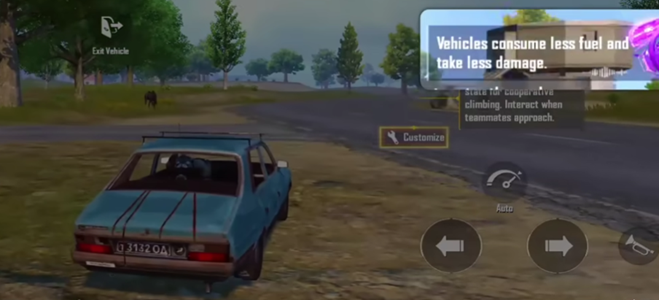
A new Customize button for activating themed upgrades
Instead of vehicles serving solely as transportation, squads will now need to think strategically about how and when to deploy these mobility advantages.
How Nitro Boost and Fuel Buffs Change Gameplay
The addition of Nitro boosts fundamentally alters mid-game pacing. Faster rotations mean teams can reposition aggressively, contest compounds earlier, or escape disadvantageous fights with greater efficiency.
Fuel efficiency improvements reduce one of the most common rotation risks, running out of fuel during long-zone shifts. Meanwhile, enhanced durability increases survivability during open-road transitions, particularly in high-pressure circles.
Together, these buffs encourage proactive movement. Teams that treat vehicles as tactical assets rather than escape tools may gain significant macro advantages.
The New Customize Button Explained
Alongside Vehicle Specialization, BGMI is introducing a Customize button that appears when entering certain vehicles. This feature allows players to activate temporary themed upgrades tied to the update’s specialization system.
These are not permanent modifications. Instead, they are situational enhancements that reward quick decision-making and strategic timing during live matches.
The system reinforces adaptability, allowing squads to adjust mobility tactics dynamically depending on circle placement, enemy positioning, and resource availability.
Strategic Impact on Competitive BGMI
In competitive lobbies, rotations often determine match outcomes. With Vehicle Specialization, mobility becomes a controllable variable rather than a static mechanic.
Faster zone entries could allow teams to secure prime real estate earlier. Improved durability may reduce vulnerability during transitional phases. Nitro bursts may create new entry or disengagement opportunities during late-game chaos.
This shift introduces layered strategy without disrupting the fundamental battle royale experience. Instead of altering gunplay or loot mechanics, BGMI is enhancing movement strategy, a safer but meaningful innovation.
A Shift Toward Class-Based Mechanics?
Vehicle Specialization also reflects a broader design philosophy seen in modern multiplayer titles, incremental class-based mechanics layered onto existing systems.
Rather than redefining BGMI’s identity, the update integrates mobility advantages into core gameplay, blending risk, speed, and tactical control.
It signals a growing emphasis on dynamic decision-making within matches, rewarding players who understand positioning as much as shooting accuracy.
When Is the Update Coming?
While an exact deployment date has not yet been officially confirmed, Vehicle Specialization is expected to roll out soon as part of BGMI’s latest gameplay update cycle.
Players should monitor official BGMI channels for patch notes and in-game announcements.
Final Thoughts
The BGMI Vehicle Specialization update could redefine how squads approach rotations, positioning, and survivability. By introducing Nitro boosts, fuel efficiency, durability buffs, and a tactical Customize interface, BGMI is elevating vehicles from simple transport tools to strategic assets.
If executed correctly, this mobility-focused shift could deepen gameplay without compromising the competitive integrity of the battle royale format.
BGMI’s roads may soon become just as important as its gunfights.
NODWIN Gaming, in partnership with Riot Games, has officially set the stage for VALORANT Challengers South Asia (VCSA) 2026, with registrations for Split 1 entering their final days ahead of the broadcast launch. The upcoming season marks the beginning of another high-stakes chapter in South Asia’s premier Tier-2 VALORANT circuit, the official pathway to the VCT ecosystem.
With the broadcast phase scheduled to begin on March 16, teams across India, Bangladesh, Sri Lanka, Nepal, Bhutan, Afghanistan, and the Maldives have until March 4, 2026, to register for Split 1.
The tournament will stream live on the NODWIN Gaming and VALORANT Esports South Asia YouTube channels, bringing fans closer to the region’s rising and established talent as the race toward the VCT Last Chance Qualifier (LCQ) begins.
VCSA 2026 Format: Multi-Stage Pathway to Regional Supremacy
The 2026 edition of VALORANT Challengers South Asia introduces a refined competitive structure designed to elevate regional standards while maintaining open access for emerging teams.
The season will unfold across Open Qualifiers, two competitive Splits, Promotion & Relegation, and a culminating Grand Final that crowns South Asia’s champions.
Key Dates – Split 1
Registration Window: Until March 4, 2026
Open Qualifiers: March 7 – March 11, 2026
Split 1 Broadcast Begins: March 16, 2026
Split 1 Playoffs: April 8 – 9, 2026
Eligibility requirements include a minimum rank of Immortal 1 and above (V25 Act 6), with Premier Team seeding determined by performance across V25 Acts 4, 5, and 6.
Open Qualifiers: The Gateway to Split 1
The competitive journey begins with a high-intensity open circuit that serves as the foundation of VCSA’s talent pipeline.
The Open Qualifiers will follow a single-elimination Best-of-Three format, with the top 10 teams advancing to the OQ Playoffs.
The OQ Playoffs then transition into a double-elimination bracket, also played in Best-of-Three format, where the top five teams will qualify for Split 1.
Additionally, the top three teams from VCSA 2025 receive direct invitations into Split 1, ensuring continuity and competitive balance.
Split 1: Eight Teams, One Objective
Split 1 will feature eight teams in total — five from the Open Qualifier Playoffs and three direct invites.
The format follows a single round-robin structure, played in Best-of-Three matches across 14 match days, totaling 28 matches.
At the conclusion of Split 1:
The top six teams advance to Split 2
The bottom two teams move to Promotion & Relegation
This structure reinforces performance-based progression, ensuring sustained competition across both splits.
Split 2 and the Road to Champions
Split 2 will once again feature eight teams competing in a single round-robin format.
The top four teams will advance to the Playoff Stage, where a single-elimination bracket will determine the 2026 VALORANT Challengers South Asia champions. Matches will be played in Best-of-Three format, culminating in a Best-of-Five Grand Final.
The stakes extend beyond regional pride, as VCSA remains the official pathway for teams aspiring to reach the VCT ecosystem.
Game Changers South Asia 2026 Returns
Running alongside the main circuit, Game Changers South Asia 2026 continues Riot Games’ commitment to inclusivity within the competitive ecosystem.
The format will feature two competitive splits with open qualifiers, with the winner of Split 2 advancing to the Game Changers Pacific Stage.
This parallel circuit further strengthens South Asia’s representation on the international stage.
Building on a Record-Breaking 2025 Season
The 2026 season arrives on the back of a landmark year for South Asian VALORANT.
In 2025, Velocity Gaming secured the VCT Ascension Pacific slot following a dominant 3–1 victory over S8UL at the Ascension Qualifiers LAN. The season recorded over 12 million total views and peaked at more than 50,000 concurrent viewers, establishing VCSA as one of the most-watched VALORANT tournaments in the region. The competitive bar has been raised significantly heading into 2026.
Gautam Virk, Co-Founder & CEO of NODWIN Gaming, emphasized the importance of the circuit’s structured pathway:
“As we head into the broadcast phase of VCSA 2026, the excitement across the ecosystem is palpable. This circuit represents the pinnacle of competitive VALORANT in South Asia, and our structured pathway ensures that every team from open qualifiers to grand finalists earns their position through performance.”
Sukamal Pegu, Head of Esports India and South Asia at Riot Games, highlighted the circuit’s defining role in the region:
“Competing in VCSA continues to be one of the most defining experiences for teams in South Asia. With the new season underway and the clear path connecting Tier-2 to Tier-1 already announced, we’re excited to see both established rosters and emerging contenders raise the bar even higher.”
The Road to VCSA 2026 Begins
With registrations closing on March 4 and the Open Qualifiers kicking off on March 7, the road to VALORANT Challengers South Asia 2026 is officially underway. For aspiring teams across South Asia, this remains the clearest pathway to elevate from regional competition to international prominence within the VCT ecosystem.
The next chapter of South Asian VALORANT starts now.
Most betting markets are made on stable rules. League of Legends is not. Riot is constantly updating the game and the company has a calendar for planned patches. Riot’s League of Legends Support page explains a 2026 patch schedule with patches usually releasing on a Wednesday (Pacific Time) that have a typical name format (year.patch-number) and have a caveat that dates are subject to change. The practical translation of this is pretty straightforward: If you’re betting LoL like it’s football – in which totals do not move quickly – then you’re playing the wrong game.
For bettors, patch cycles are most relevant for two types of lines: totals (kills, towers, sometimes duration of the game), objective (first dragon dead, first Baron dead, total dragons dead, and so forth), depending on what book you are betting on, including all you need to know about bet365 if that’s where you’re placing those totals or objective wagers.
Why totals respond quickly after patches
At least in LoL, totals are the shadow of strategy. Patches can change the game in terms of meta and alter how often matches are fought, how fast matches last, and which areas of the map are important. A damage increase can make cautious lanes more into constant skirmishes; defensive itemisation can make early fights more into low kill lane trades; jungle changes can make early invades and contesting more aggressive; and systemic incentives can make teams want to trade objectives rather than fight.
The important thing about this is that totals do not move due to “vibes.” They move because in the patches the payoffs of aggression, risk and scaling change.
This is why for the first week or two after a patch one may see a misleading figure. Teams are still learning. Some will overfight because the patch is implying fighting while others will avoid fighting until they understand the new breakpoints. If you’re betting totals, you’re not betting just on how strong a particular team is, but on what style these teams will go into under this patch.
Objective markets are not about identity, but incentives
One of the common rookie mistakes is to assume that objective markets are a constant characteristic of a team: “this team always gets first dragon.” But “first dragon” is only meaningful in the context of what the meta rewards.
Patches can change this relative value between early dragons and tempo goals such as Herald, or the safety and speed of picking up neutral monsters. Even if a team is historically good at controlling dragons they may change priorities if the patch changes to make early tower pressure more valuable, or if the draught is in favour of lane dominance and plate taking over river fights.
Objective betting is therefore an incentives puzzle. If the patch rewards early stacking, early dragons will be contested by teams more aggressively. If the patch gives lane tempo and turret damage rewards teams can exchange dragons away for plates and towers. The same team can look “different” without changing players because the incentives changed.
Competitive patch vs live server patch: verify the version
Another reality: professional competition doesn’t always jibe immediately with the live patch. Leagues can fall behind the latest patch or lock a patch for the integrity of the competition. That means “Patch X changed jungling”, is only of any use if your match is actually played on Patch X.
The safest habit to have before betting is to check which patch the competition is playing that matchday. This avoids one of the most common mistakes in betting; wagering as if the newest patch is live in pro play when it isn’t.
What this means in particular for bettors of Bet365
Bet365 has markets for esports and does so as well as major sportsbooks, they may offer the opportunity to do in-play wagers where the odds change as the state of the map changes. In patch-driven environments in-play can be a confirmation tool rather than something that causes temptation: you can watch to see if the teams are actually playing the patch style you expect before deciding whether you’re going to commit to totals or objective lines.
Draught your first real signal. If both teams choose to have early skirmish champions and prioritise lanes, it favours higher early-action expectations. If draughts are scaling heavy with waveclear totals may compress even though the game runs for longer. Then the first 8-10 minutes confirm whether those draughts translate into the behaviour that you’re betting on: invades, river contests, early dives, or quiet lanes and objective trades.
Bottom line
Patches shift LoL Totals and Objectives markets because they alter incentives. Riot’s heavy patch cadence means bettors need to consider “version context” in their handicap. If you disregard patch time and the competitive version, you’re often playing yesterday’s game.
If you’re looking to buy the Battle Pass in Marvel Rivals or the premium passes for most in-game events, then you’ll need to stock up on some Lattice.
For the uninitiated, Lattice is a premium currency in Marvel Rivals that is generally obtained through purchasing it directly using real money from the in-game store.
With NetEase constantly rolling out new events featuring premium passes and gorgeous Battle Pass skins, players are looking for legitimate ways to get free Lattice in Marvel Rivals.
But can you get free Lattice in Marvel Rivals?
In this article, we’ll go through all the methods that you can use to obtain Lattice in the popular NetEase hero shooter.
How to Get Lattice in Marvel Rivals
The first and easiest method of obtaining Lattice in Marvel Rivals, as mentioned earlier, is to purchase them directly from the in-game store.
Players have the option to buy Marvel Rivals Lattice in one of the following packages:
100 Lattice – $0.99 USD
500 Lattice – $4.99 USD
1,000 Lattice – $9.99 USD
2,180 Lattice – $19.99 USD
5,680 Lattice – $49.99 USD
11,680 Lattice – $99.99 USD
Luckily, players who don’t necessarily want to pay for this currency also have the option to get Lattice by simply playing the game.
Every season, players can earn 200 Lattice per seasonfor free by finishing the Marvel Rivals Battle Pass. In addition to the free Lattice, you’ll also be able to obtain tons of free Units, which is another currency in Marvel Rivals that is used to purchase skins and other cosmetics.
That’s everything you need to know about how to get Lattice in Marvel Rivals.
In early 2026, two contrasting voices from within the gaming ecosystem captured the industry’s shifting reality.
In one widely shared post, an esports professional candidly described unpaid contracts, companies shutting down operations, and being undercut on rates. The tone was not dramatic, but reflective. Stability, once assumed, had quietly disappeared. For many operating within competitive esports, 2026 has become one of the most financially uncertain periods in recent memory.
In another post that circulated with equal velocity, a gaming creator celebrated extraordinary financial success, crediting content creation and agency partnerships for enabling a lifestyle marked by luxury vehicles and high-value brand collaborations.
The juxtaposition was striking.
Totally on the same page with this and have felt more the way you describe than not. Diversified & stable income is a must.
On one side stood experienced industry professionals grappling with contraction. On the other, a new class of creator-led enterprises scaling rapidly in wealth and visibility. These narratives are not anomalies. They reflect a structural divergence unfolding across esports and the broader gaming economy.
The contrast between these realities does not represent personal success or failure. It signals an economic imbalance.
Esports appears to be fragmenting into two parallel financial models operating under the same cultural umbrella. The first is the competitive ecosystem, where operational costs remain high, sponsorship budgets are tightening, and profitability has become a pressing concern. The second is an attention-driven creator economy, where algorithmic visibility and engagement metrics translate efficiently into monetization.
The financial trajectories of these two segments have begun to decouple.
The Structural Correction and Its Uneven Impact
Over the past decade, esports growth was propelled by capital inflows, franchise investments, rising player salaries, and ambitious global expansion strategies. That expansion phase is now widely recognized as unsustainable in its earlier form.
As profitability replaced growth as the primary metric, several established organizations reduced operations or exited entirely. Sponsorship models shifted from long-term ecosystem bets to performance-driven marketing allocations. Media rights optimism cooled. Operational discipline became unavoidable.
However, the contraction has not affected all segments equally.
While competitive organizations absorb financial recalibration, algorithm-optimized creators and agency-backed personalities continue to command significant brand budgets. The rise of structured creator agencies has introduced professionalized monetization frameworks, allowing digital personalities to focus solely on production while commerce is handled through systematic negotiation, analytics reporting, and cross-platform expansion.
This professionalization is not inherently problematic. In many ways, it represents industry maturation. Creators who once lacked commercial literacy now operate within structured business models that extract value efficiently from digital reach.
The tension emerges because this efficiency scales faster than competitive infrastructure.
Sponsorship Consolidation and the Dominance of Attention Metrics
Sponsorship remains the central revenue driver in esports. Yet brand behavior has evolved.
Rather than distributing investments broadly across competitive ecosystems, companies increasingly concentrate budgets on entities capable of delivering immediate visibility at scale. Elite tournaments and marquee influencers secure larger deals, while mid-tier teams and research-focused content creators struggle to compete for the same capital.
At the center of this shift lies the dominance of surface-level metrics. Total views, impressions, follower growth, and engagement spikes are easily reportable and visually compelling. They fit neatly into marketing dashboards.
However, such metrics do not necessarily reflect audience loyalty, purchasing intent, or long-term brand recall. The quality of viewership, demographic depth, retention rates, conversion behavior, is far more difficult to quantify and therefore often undervalued in allocation decisions.
As capital optimizes for measurable reach, ecosystem incentives adjust accordingly.
Competitive Credibility Versus Algorithmic Visibility
Esports historically derived legitimacy from competitive achievement. Structured leagues, championships, coaching systems, and sustained excellence formed the backbone of its identity.
In contrast, the attention economy rewards immediacy. Content optimized for virality, controversy, or lifestyle display can scale rapidly irrespective of competitive participation or subject-matter depth.
This shift has introduced a cultural tension.
Individuals without meaningful involvement in structured competition increasingly occupy visible positions within brand summits, policy forums, and industry discussions. Meanwhile, competitive professionals with deep expertise often confront diminishing financial stability.
The issue is not personal ambition. It is representational alignment.
If visibility alone becomes the primary determinant of influence, esports risks diluting the competitive foundation that originally distinguished it from general entertainment content.
The Corporate Turn of Influence
A defining characteristic of the period between 2023 and 2026 is the corporatization of digital influence. Creator agencies now function as structured commercial intermediaries, packaging talent into scalable marketing products. Campaign materials emphasize audience penetration, platform performance, and digital footprint over domain authority.
This evolution has delivered operational clarity and commercial discipline. Yet it has also shifted the incentive structure of the ecosystem.
Early esports was community-driven and competition-centric. The present phase prioritizes monetizable visibility. Financial success increasingly correlates with audience scale rather than contribution to competitive development or infrastructural growth. For smaller teams, analysts, and research-oriented creators producing high-quality content, the structural disadvantage is evident. Depth does not scale as quickly as spectacle.
Corporate behavior alone does not drive this transformation. Audience consumption patterns shape capital allocation. Platforms amplify content that maximizes engagement and watch time. Brands invest where attention aggregates. Creators optimize output according to algorithmic performance indicators.
When audiences consistently reward sensational formats over analytical depth, market incentives reinforce that preference. Economic flows mirror collective behavior. The ecosystem responds to what is consumed.
A Transitional Phase, Not a Collapse
Despite visible distortions, it would be inaccurate to characterize esports as collapsing. Global audiences remain substantial. Major international events continue to attract institutional backing. Hardware manufacturers and endemic sponsors maintain long-term commitments.
What appears to be unfolding is a bifurcation rather than a breakdown. One segment of esports grapples with sustainability and financial recalibration. Another thrives within a creator-driven entertainment model optimized for digital scale.
Whether these models converge or drift further apart will shape the industry’s next chapter.
Long-Term Value and Realignment
Digital industries that undergo attention-driven expansion often eventually recalibrate around durable value metrics. Platform algorithms evolve. Advertising efficiency becomes more scrutinized. Short-term virality proves cyclical.
Over time, ecosystems tend to reward credibility, community trust, measurable conversion value, structured governance, and financial discipline.
If esports is entering a maturity phase, capital allocation may increasingly differentiate between transient visibility and sustained engagement. The distinction between surface-level metrics and substantive audience impact may become more consequential.
Drawing the Line
Esports in 2026 stands at a structural inflection point.
Established competitive institutions face economic pressure. Segments of the creator economy scale rapidly through structured monetization and algorithmic leverage. The imbalance has prompted legitimate questions about sustainability, representation, and identity.
Yet this moment may represent recalibration rather than decline.
The future of esports will not hinge solely on views or virality. It will depend on how effectively the industry balances competitive legitimacy with digital visibility, and whether capital begins to distinguish between scale and substance.