Epic Games Store has been giving away free games every week since it launched in 2018. The idea was simple: bring players to the store, let them grab a free title, and hope they browse and buy something while they are there. It did not work out that way.
Two former Epic employees with knowledge of store operations told Bloomberg that users would frequently log onto the store for free game promotions before bouncing back to Steam. The free games brought traffic. They just did not bring paying customers.
What Former Employees Said
Epic Games Store vice president and general manager Steve Allison said the storefront is only “marginally profitable.” The former employees told Bloomberg the free games program was being taken advantage of and hurting the company’s bottom line.
PC players spent $1.16 billion on the store in 2025, but $400 million of that came from third-party games. The profit margins on those sales are thin. Epic takes only 12% from third-party game sales, compared to Steam’s 30%. That was supposed to attract developers. Instead, Allison told Polygon the low profit margin on third-party games, combined with fees paid to developers for the weekly free game program, left the store only marginally profitable.
Why the Store Struggled to Compete
The Epic Games Store launched in 2018 as a rival to Steam. Tim Sweeney openly criticized Steam’s 30% commission, positioning Epic as a better option for developers and publishers. According to reports, that strategy did not work as expected.
The store also launched without the features users expected. A shopping cart and user reviews were unavailable when the store launched, drawing criticism from gamers.
One of Epic’s biggest miscalculations may have been assuming Steam leads the PC gaming market only because of its large number of developers, discounts, or offers. For many users, Steam is also a community platform, which is one of the main reasons it holds such a strong position in the market.
Other initiatives, including Epic’s mobile store and tools for users to create their own games, also fell short of internal expectations, according to eight current and former employees who spoke with Bloomberg. Epic regularly released products before employees felt they would resonate with consumers.
With rumours floating of a roster change, the Falcons have secured a stunning win, beating 3DMAX with a 2-0 scoreline in a match that could have easily gone the other way. From a poor start to a solid close, the Falcons have started their IEM Rio Campaign with a bang.
Winning the pistol on the defense, the Falcons got steamrolled by 3DMAX as the French side hit the board by converting their force buy. A defense in shambles, saw 3DMAX secure 9 rounds in a row before the final 3 rounds went to the Falcons, giving them a leg to stand on to kick off the second half. What many considered to be a game almost over, the Falcons managed to cut the scoreline close. As they started with a solid momentum on the offense, the Falcons not only managed to level the scoreline, but they also completed the stunning comeback by losing not more than a single round. From losing with a 9-3 scoreline, the Falcons overturned the game with a 13-10 scoreline as Kyosuke spearheaded the offense with 19 kills to his name.
Map 2: Ancient; Pick: Falcons; Winner: Falcons
5-0 start for Falcons put them on the path to victory, following a stunning comeback in Map 1. As 3DMAX secured their first and only map in the defense, the Falcons wiped the floor with their defense, allowing the Falcons to close the half. Without letting the game go out of hand, the Falcons made quick work of them on their defense to win the map with a 13-1 scoreline.
3DMAX were solid and only lost to the stunning individual brilliance of Falcons, and as they get off to a poor start, they are known to build slowly into events. If they manage to overcome this loss, teams should look out for them.
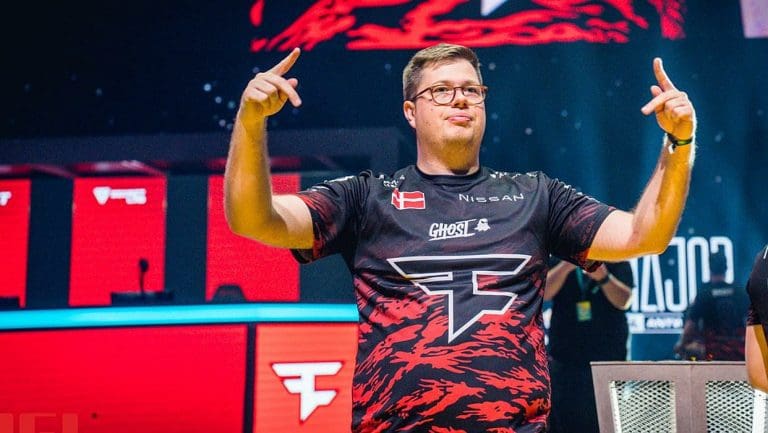
According to recent reports from multiple sources, Finn “karrigan” Andersen is all set to join Team Falcons in the near future.
The story was initially broken by French insider Sebastien “KRL” Perez, with HLTV later corroborating the report.
The news comes just a week after FaZe’s disappointing finish at the HLC Belgrade PRO, rendering the organization unable to qualify for the IEM Cologne 2026. This marked the first time since the org’s entry into the competitive Counter-Strike scene that it was unable to qualify for a CS2 major.
“I think it’s the first time where I have to consider where I am, in myself, in my life,” Karrigan said in an interview. “These results are by far [below] what I accept as a leader of this team, as a player who’s been in FaZe for a long time, so I understand.”
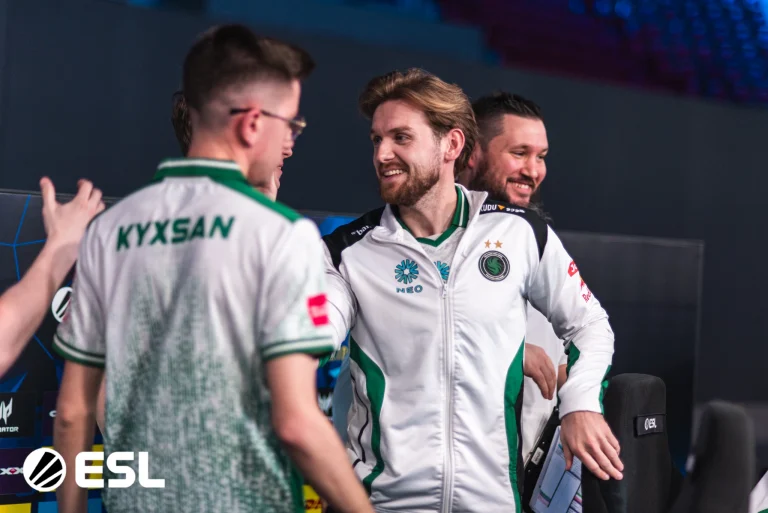
Karrigan is expected to join the Falcons CS2 roster after the conclusion of IEM Rio 2026. The Danish IGL will likely replace the team’s current leader, Damjan “kyxsan” Stoilkovski.
Should this move go through, it will see Karrigan reuniting with former FaZe teammate Nikola “NiKo” Kovač for the first time in over seven years.
Here’s what the updated Falcons roster would look like following this signing:
FMPONE, the creator behind Cache, one of the most iconic Counter-Strike maps of all time, has revealed a brand-new CS2 map that he has worked on, garnering the attention of players throughout the world who have eagerly been looking forward to his next project.
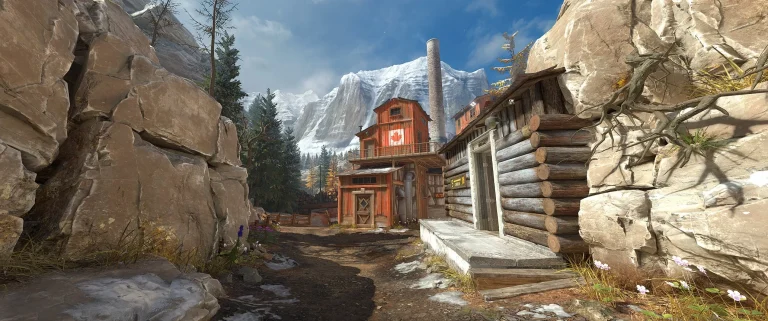
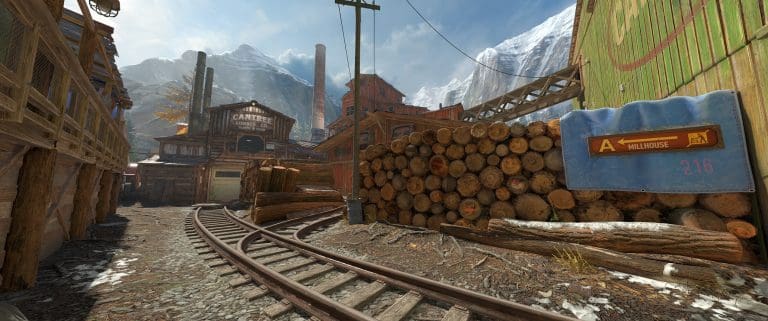
FMPONE’s latest map, Splinter, is a bomb-defusal map that is set deep in the Canadian Rockies. According to the map description, the Terrorists are tasked with demolishing a mining and logging operation in the wilderness, while the CTs have to stop them from doing so.
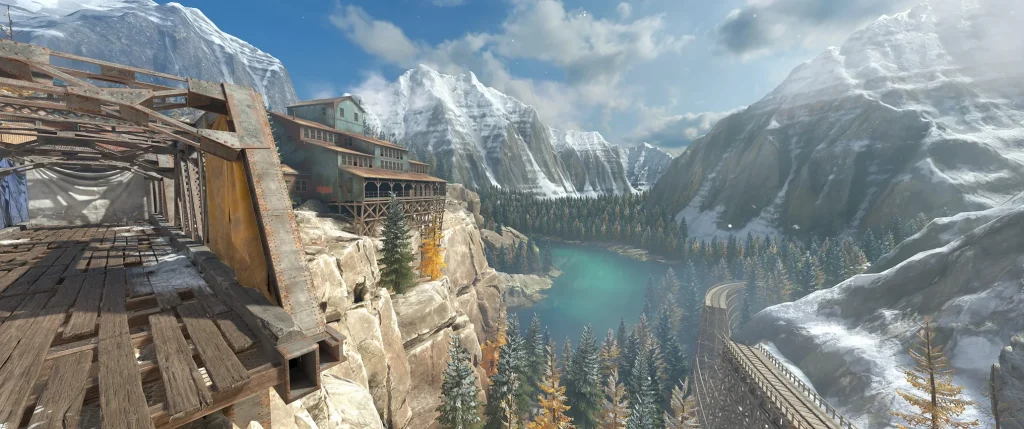
The map features some jaw-dropping visuals, gorgeous sceneries, and an interesting level design providing ample room for tactical play from both teams.
New CS2 Map Splinter Details Revealed
The Splinter CS2 map is currently available to download from the Steam Workshop. Its large file size of over 2 GBs could be due to the rigorous attention to detail that FMPONE has put into the map, alongside its overall map scale and stunning environments.
Splinter was first posted on the Steam Workshop on March 24, 2026, and has been updated 12 times since then, with the last update taking place on April 12.
Fans can check out some screenshots from Splinter below:
Is Splinter Being Added to the Official CS2 Map Pool?
At the time of writing, Valve has not confirmed the addition of Splinter to the official map pool of CS2.
However, based on the fact that it is created by one of the most legendary map devs of all time, combined with the overall quality of the map, we wouldn’t be surprised if Splinter gets added to the Active Duty map pool at some point in the future.
It’s also worth noting that Splinter may be added to CS2 as part of its next Operation. For the uninitiated, recent leaks suggest that Valve is already preparing to release the first CS2 Operation. This would give Valve the perfect opportunity to incorporate Splinter into the CS2 map pool as part of an Operation Mission to test the waters before a full-fledged introduction to the Active Duty map pool.
Valve Corporation is currently facing a series of legal challenges across multiple jurisdictions, with the most significant being a £656 million class-action lawsuit in the United Kingdom that directly targets the commercial structure of its Steam platform.
The case, which represents up to 14 million UK consumers, alleges that Valve has used its dominant position in the PC gaming distribution market to impose pricing and commission structures that limit competition and result in higher prices for users. The lawsuit has been approved to proceed, marking a critical development in what could become a landmark case for digital marketplace regulation.
While this case alone carries substantial implications, it forms part of a broader pattern of legal scrutiny surrounding Valve’s operations, including ongoing disputes related to content licensing and platform responsibility.
UK Class-Action Targets Pricing and Distribution Practices
The UK lawsuit focuses on two key aspects of Valve’s business model. The first is the commission structure applied to game sales on Steam, which can reach up to 30 percent depending on revenue tiers. The second relates to contractual conditions that, according to the claimants, restrict publishers from offering lower prices on competing platforms.
The argument presented in the case is that these mechanisms reduce competitive pricing pressure across the market. By maintaining price parity and controlling distribution visibility, Steam is alleged to influence retail pricing beyond its own platform.
The case is being pursued under UK competition law, which evaluates whether a dominant market position has been used in a manner that restricts fair competition. Approval to proceed does not indicate a verdict, but it confirms that the claims meet the threshold required for judicial examination.
In addition to the UK lawsuit, Valve is also facing legal proceedings initiated by PRS for Music, a UK-based rights management organisation. As previously reported by TalkEsport, the claim alleges that Valve distributed games containing copyrighted music without securing the appropriate “communication to the public” licences.
This case differs in nature from the competition-focused lawsuit, as it addresses compliance with copyright and licensing frameworks rather than market dominance. However, it introduces another layer of regulatory risk by questioning whether Steam’s distribution model aligns with established intellectual property requirements.
Separately, Valve has also responded to allegations in the United States linking its platform to third-party gambling activities. In that matter, the company has denied any involvement and has stated that it has taken action to prevent misuse of Steam services. While this issue is distinct from both competition and licensing disputes, it contributes to the overall regulatory attention surrounding the platform.
Structural Position of Steam Under Review
Steam occupies a central role in the PC gaming ecosystem, functioning not only as a storefront but also as a distribution, update, and community infrastructure layer. Its scale and integration across multiple aspects of the user experience have contributed to its market leadership.
The UK lawsuit is significant because it does not focus on a single feature or policy. Instead, it examines whether the underlying structure of Steam’s commercial model, including commissions and pricing controls, operates in a manner consistent with competition law.
This represents a shift from earlier disputes in the industry, which often focused on specific platform practices. The current case evaluates the broader relationship between platform dominance and market outcomes.
Valve’s situation aligns with a wider trend of increased regulatory scrutiny across digital platforms. Technology companies operating large-scale marketplaces have faced similar challenges in recent years, particularly in relation to commissions, pricing controls, and ecosystem lock-in.
Legal actions involving companies such as Apple and Google have established precedents in evaluating how platform operators interact with developers and consumers. The inclusion of Valve in this broader pattern indicates that PC gaming distribution is now subject to similar regulatory considerations.
Implications for Platform Economics
The outcome of the UK case may influence how digital distribution platforms structure their commercial agreements with developers and publishers. Changes to commission rates, pricing policies, or distribution terms could have downstream effects on both pricing strategies and platform sustainability.
It is important to note that digital platforms provide a range of services beyond transaction processing, including hosting, updates, security, and community features. Any adjustments to revenue models would need to account for these operational components.
At this stage, no conclusions can be drawn regarding the outcome of the case. However, the progression of the lawsuit indicates that regulatory authorities are prepared to examine these issues in detail. Valve is not facing a single isolated legal challenge, but a set of cases that collectively examine different aspects of its platform operations, including competition, licensing, and compliance. The UK class-action lawsuit represents the most direct challenge to Steam’s commercial model and will likely serve as a reference point for future discussions around digital marketplace regulation in gaming.
As proceedings continue, the case is expected to contribute to a broader reassessment of how large-scale gaming platforms operate within evolving legal and regulatory frameworks.
FMPONE is back with a new map, and this time it takes Counter-Strike 2 somewhere it has never been before.
Shawn “FMPONE” Snelling, the creator of the legendary Cache map, released a new work for Counter-Strike 2 on April 12, 2026. Its name is de_splinter, and it is already available for free download on the Steam Workshop.
The release follows a short teaser posted on April 11. A 14-second teaser video was shared on X on Saturday, explicitly signaling an April 12 release.
Where de_splinter Is Set
As per FMPONE, the new map is based on Lake Moraine and the Canadian Rockies. The teaser footage shows an industrial setting that features a sawmill and mountain terrain.
Set in an abandoned lumber yard, de_splinter is a standard bomb defusal map. Visually, it embraces a warm autumnal color scheme, dominated by greens and oranges, with a snowy mountain backdrop that makes the environment pop.
This setting is a clear departure from the urban and desert environments that dominate most Counter-Strike maps. The Canadian Rockies reference gives the map a distinct outdoor industrial feel that stands apart from the rest of the pool.
A Modern Remake of de_Coaline
de_splinter is a modern reinterpretation of the classic de_Coaline. FMPONE has relied on vertical spaces and narrow corners in the design.
The map layout is fairly compact, with interiors and exteriors connected by tight corners. Both bombsites open up nicely and are by far the most open areas of the map.
For players who have never encountered de_Coaline, it was a sawmill-themed map from Counter-Strike’s earlier years. de_splinter builds on that original concept using Source 2 tools, bringing the setting into the modern era.
How It Looks in Source 2
The visuals in de_splinter utilize the Source 2 engine with high-fidelity textures and environmental lighting in the indoor workshop areas.
Despite the high level of detail, character visibility does not suffer, which makes it viable for competitive play. Performance at this early stage is described as rocky, which was also a criticism of FMPONE’s CS2 Cache version.
The trade-off between visual quality and performance is a known issue in community maps at early release. FMPONE is expected to iterate based on player feedback and telemetry, as he has done with past projects.
This Is FMPONE’s First Independent Release Since Selling Cache
The release of de_splinter carries extra context because of what happened to FMPONE’s previous project.
Valve reached out to purchase Cache on day one of its CS2 release. FMPONE confirmed the purchase, noting the map “is in great hands now.”
Cache is now undergoing optimization and changes with Valve for a potential return to Counter-Strike 2’s Active Duty map pool. de_splinter is positioned as a standalone community release, independent from Valve’s pipeline.
That distinction matters. de_splinter is fully FMPONE’s own project at this stage. Whether it follows a similar path to Valve involvement depends entirely on how the community responds.
Valve previously had Thera, another of FMPONE’s CS2 maps, in the community pool, so a similar outcome for de_splinter is not out of the question.
What Comes After de_splinter
In reply to a comment on his teaser post, FMPONE confirmed he will release one more map, de_Vegas, before transitioning his focus to developing indie games.
What is de_splinter in CS2? de_splinter is a new community map for Counter-Strike 2 created by FMPONE. It is set in a sawmill located in the Canadian Rockies and is a modern remake of the classic map de_Coaline. It released on April 12, 2026, via the Steam Workshop.
Who made de_splinter? de_splinter was made by Shawn “FMPONE” Snelling, the same creator behind Cache, Thera, and several other well-known Counter-Strike maps.
Is de_splinter free to download? Yes. de_splinter is available as a free download on the Steam Workshop.
What map is de_splinter based on? de_splinter is a modern reimagining of de_Coaline, a classic Counter-Strike map with a sawmill setting.
Will de_splinter be added to CS2 Active Duty? There is no official confirmation from Valve. It launched as a standalone community map. FMPONE’s earlier map Thera was added to the CS2 community pool, which suggests a similar path is possible for de_splinter.
What is FMPONE making after de_splinter? FMPONE has confirmed that de_Vegas will be his next map before he moves on to indie game development.
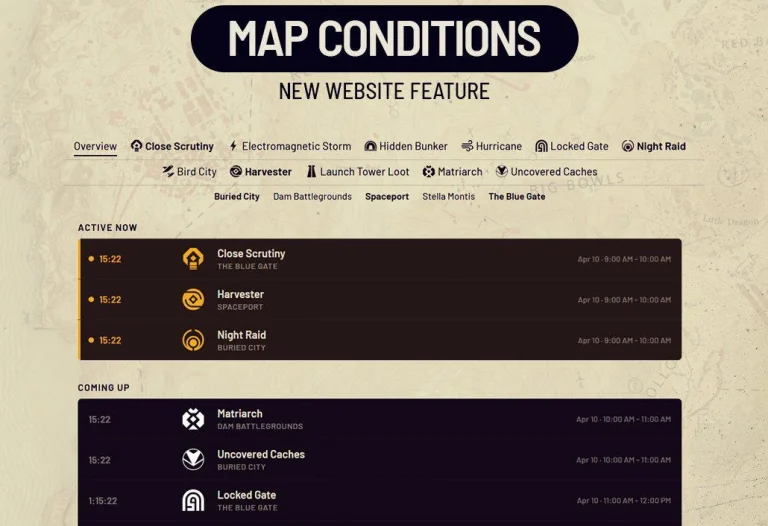
Embark Studios has published a map conditions tracker on the Arc Raiders website. Players can now check which condition is currently active on a map and see the full schedule ahead of time.
The tracker is a simple table that shows what is coming next in the Arc Raiders rotation. It runs around 20 hours into the future, with the rotation changing every hour on the hour.
A section on the Arc Raiders website lets players see the current condition of each map along with the schedule. A filter by maps is also available.
In Arc Raiders, various conditions are periodically active on the maps. Fans built their own tracking website before Embark released an official one. The studio has now responded with a tool of its own.
What Map Conditions Are
There are currently 11 map conditions in rotation for Arc Raiders, split into Minor and Major categories. Each has unique effects that change gameplay. Some conditions are exclusive to specific maps.
All five maps in Arc Raiders are always accessible. What are the conditions on each map? Each map runs on its own independent hourly schedule set by Embark. Events start on the hour and last around 60 minutes. When one ends, the map returns to Standard Patrol until the next scheduled event.
Playing during a Major Map Condition doubles all Trial points. Major conditions include Night Raid, EM Storm, Cold Snap, and Hidden Bunker.
The map conditions tracker is tied to the recent in-game High Gain Antenna project. Later this month, Arc Raiders is set to receive its biggest update yet, with Embark adding a new map, a large-scale ARC enemy, new quests, a fresh Raider Deck, and more.
Team Ice King has completed Act 1 of the Fortnite Showdown Rivalries event. That win unlocked the Ice King Vault keycard and added it to the loot pool. If you want to grab what’s inside, here’s exactly how to do it.
What Is the Ice King Vault?
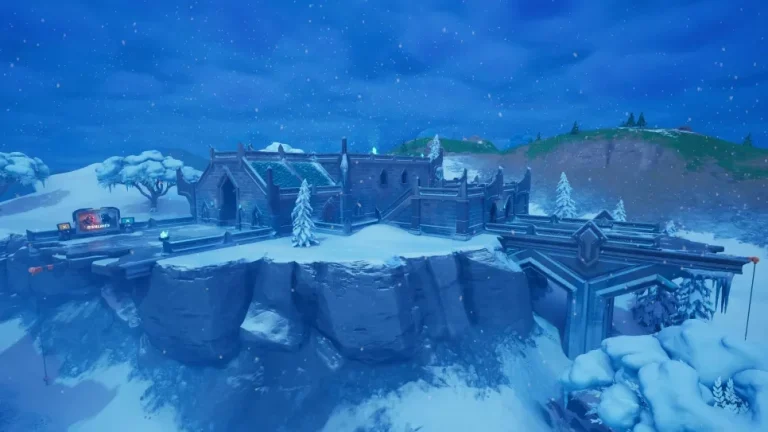
Fortnite Chapter 7 Season 2 launched with three vaults spread across the map. The Ice King Vault sits inside Frigid Fortress, one of the new POIs added this season. Both the Frigid Fortress vault and the Seven Compound vault were locked at launch, with both set to unlock once players earned enough Rival Victories for their respective teams.
Team Ice King has now emerged victorious in Act 1 of the Fortnite Showdown Rivalries, and this last unlock of the Rivalries milestones has added the Ice King Vault keycard to the loot pool.
Where to Find the Ice King Vault Keycard
This vault works differently from past seasons. Unlike previous seasons, you do not have to defeat a Fortnite boss to get the Ice King Vault keycard.
The Ice King’s Vault Key is a Legendary item that spawns in one of the small ruins scattered around the outskirts of Frigid Fortress, with several possible spawn locations. There are multiple possible spawn spots, so check all the towers near the main castle POI. If it’s not in one spot, check the next tower nearby.
The most reliable spot: head to a structure located southwest of Frigid Fortress. You can find it to the west of the destroyed bridge at the POI. Jump in through the upper-level window and look in the corner to find the keycard.
How to Open the Ice King Vault
Once you have the keycard, follow these steps:
Head to the southern part of Frigid Fortress and enter the southernmost building.
Look for a distinct floor pattern that resembles a hidden door.
Walk up to the door and press the Interact button. On the controller, that is Square on PlayStation or X on Xbox. On PC, press E.
Use the zipline to descend into the vault safely.
The vault holds Epic and regular chests, Slurp Barrels, and Ammo Crates. Players can find several guaranteed Rare Chests and Slurp Barrels inside. That’s enough to set up a strong late-game push.
Keep an eye on your surroundings as you approach Frigid Fortress, since it is one of the best drop locations in Fortnite Chapter 7 Season 2 right now. Other players will be heading there for the same reason. Clear the area before you commit to unlocking the vault.
On April 12, 2026, Jonathan Jude Amaral, widely known in the Indian BGMI community as the “Universal 7,” officially launched Team Apex Gaming, his new esports organisation. The announcement video, titled “It’s Time to Rise | TAGonTOP”, was released across his channels on the reveal date. The organisation’s social handle is blackheartontop, and the accompanying hashtag that spread across the community immediately was #TAGonTOP.
The launch marks the most significant player movement in Indian BGMI history: the game’s most recognisable face going from franchise player to team founder.
What Jonathan Said in the Announcement Video
The announcement video is personal. Jonathan does not open with a logo reveal. He opens with where he came from.
In the video, Jonathan speaks about starting from humble beginnings, about getting his first phone and how that early push built his drive. He describes his journey as a series of levels: Level 1 was the beginning, Level 2 was making his first wins and working hard, training, learning. Level 3, he says, was reaching the top, making his father proud, buying him his dream car, and then buying his own.
He says: “I came from humble beginnings. People who know me know the story of how I got my first phone. How that early push built a drive. But that was just Level 1. From there to my first win in the game. Nothing was easy. I worked hard, trained, learned. I think I did justice to Level 2.”
He then explains why going further was necessary, not for himself alone, but for the community. “A whole community that has given me so much, to represent them globally, I had to grow more.”
The video ends with the Team Apex Gaming reveal and a direct statement: “Team Apex Gaming is here to be on top. To be more for the community. To change how the entire industry works. So start tagging your friends and let them know, we are coming. It’s another mountain to climb, another victory that looks like hacking, and I drive to make sure we can always proudly say: on top.”
How It Got Here: GodLike, BGIS, and a Long Time Coming
Jonathan joined GodLike Esports in August 2021, arriving as part of the former TSM roster alongside Neyoo, ZGOD, ClutchGod, and Ghatak. Over more than four years, he became the face of the organisation and one of the most recognised players in the history of Indian mobile esports.
GodLike co-owner Kronten confirmed Jonathan’s departure on April 7, 2026, stating: “Jonny wanted to move forward in life, he wanted to do something different. He has made this decision for the past three to four months. He shared his future plans with me during the BGIS 2026.” Kronten also mentioned that the organisation would not be making a farewell post.
The exit had been building since BGIS 2026. During the Survival Stage in Hyderabad, Jonathan was benched for strategic reasons for the first time in his career. GodLike captain Manya clarified the decision was purely strategic. Jonathan confirmed on stream that he made the benching decision with the team’s best interest in mind, putting the squad ahead of his own position.
GodLike topped the Survival Stage standings with the lineup of Manya, Admino, Spower, and Godz. But at the Grand Finals in Chennai, which ran March 27 to 29, the team finished 5th. Jonathan had 31 finishes in 18 matches during the finals, the highest fragger on his team.
After the tournament, Jonathan posted on Instagram that fans would see “very new changes and crazy things for the future.” That was the first public signal. Within days, he confirmed on a livestream that he was leaving GodLike and building something new.
The Organisation Before the Reveal: BlackHeartOnTop
Before the April 12 launch, Jonathan quietly activated the Instagram page blackheartontop. What happened next was telling.
The page reached 150,000 followers in record time within the esports space, even before the official announcement of the organisation on April 12. The milestone came before any roster, branding, or full details were revealed.
That number, achieved with nothing more than a page name and the community’s knowledge that it belonged to Jonathan, shows what kind of pull he carries. No other esports organisation in India has achieved that kind of pre-launch traction.
The Partnership Behind the Organisation
Multiple community sources and esports journalists reported that Jonathan registered a company called Amaral Esports Pvt Ltd. He is reportedly partnering with Soham Rathod, the popular content creator known as SSR Vlogs, and at least one other co-founder to build the organisation from scratch.
Reported plans include building the competitive roster around Gunjan Thakur, known as Jelly, who was most recently with True Rippers. Jonathan and Jelly have played together before, and community reports suggest they are being reunited under the Team Apex Gaming banner. Additional names linked to the roster by community sources include Omega, Slug, Ninjaboi, and Knight, though none of these have been confirmed officially as of this writing.
The partnership with SSR Vlogs brings a content creation dimension to the organisation that goes beyond pure competitive play, which lines up with Jonathan’s stated goal of building something larger than just a team.
What This Means for BGMI Esports
Jonathan leaving GodLike is not just a roster move. It is a structural shift in how the Indian BGMI scene is organised.
The BGMI transfer window opened on April 1, 2026, and is expected to stay open for approximately 30 days. Krafton India introduced the structured transfer window in October 2025, modeled after traditional sports. It gives teams two defined windows per year to sign, release, or trade players, with rosters locking for six months after each window closes.
The next major competition on the calendar is BMPS 2026, the Battlegrounds Mobile Pro Series. Team Apex Gaming needs to register its roster through the Krafton India Esports dashboard and complete the verification process before the window closes to compete.
Jonathan entering as an owner changes things beyond the competitive side. Any team built around him carries immediate sponsor interest, viewer numbers, and community buy-in from day one. The “Jonny Army” is one of the most loyal fanbases in Indian esports, and that fanbase now follows an entirely new organisation.
For more context on the BGMI transfer window and what other moves are happening across the scene, see the BGMI Transfer Window April 2026 breakdown on TalkEsport. For Jonathan’s full journey at GodLike before the exit, the BGIS 2026 debrief on TalkEsport covers everything from the benching decision to the post-finals message that started it all.
TalkEsport does not independently verify rumours surrounding Team Apex Gaming and Jonathan Gaming’s new organisation; the information presented is based solely on what is publicly available online.
FAQ
What is Jonathan’s new organisation called? Jonathan Gaming’s new organisation is called Team Apex Gaming. The social handle is blackheartontop, and the launch hashtag is #TAGonTOP.
When was Team Apex Gaming announced? The official announcement was made on April 12, 2026, through a video titled “It’s Time to Rise | TAGonTOP.”
Why did Jonathan leave GodLike Esports? Jonathan confirmed on livestream that he wanted to move forward and build something of his own. GodLike co-owner Kronten stated Jonathan had been planning the move for three to four months before it was announced.
Who are Jonathan’s co-founders in Team Apex Gaming? Jonathan is reportedly partnering with Soham Rathod, the content creator known as SSR Vlogs, along with at least one other co-founder.
Who will play for Team Apex Gaming? Jonathan will play as the main assaulter. Gunjan Thakur, known as Jelly, is reported by community sources to be joining the roster. Other names linked include Omega, Slug, Ninjaboi, and Knight. No roster has been officially confirmed as of this writing.
How did Jonathan’s Instagram page BlackHeartOnTop grow before the launch? The page reached 150,000 followers before the official April 12 reveal, setting a record within the Indian esports space for pre-launch growth.
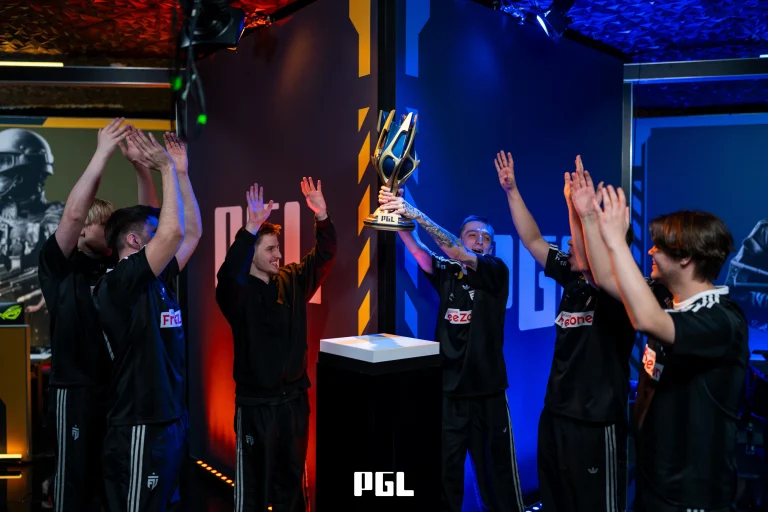
In a breathtaking Grand Finals in Bucharest, FUT Esports has claimed its first-ever Tier 1 Grand Finals by taking down Astralis with a 3-1 scoreline and shocking the Counter-Strike 2 community with their triumph.
A perfect run in the Grand Finals saw FUT post a dominant performance that Astralis failed to keep up with, especially in the first two maps. Having lost the 3rd one, FUT went to secure the 4th map with yet another one-sided scoreline to seal the deal in Bucharest.
Coming into the Grand Finals with a fairly young and inexperienced squad who were seemingly unburdened by enormous pressure, unlike Astralis, who were touted as the best team in the tournament, with all the top sides choosing to skip this event.
Despite coming into the event as an underdog, FUT improved with every passing map and match. Having secured impressive wins against PARIVISION and The MongolZ, fans started believing that this roster might have the potential to go all the way despite the lack of experience and pedigree.
Proving the doubters wrong, FUT not only dominated a more experienced side, but they also outsmarted Astralis, whose performances in the event were marked by their deep technical preparation for every match.
With $400,000 to their name, FUT will bring home the first trophy in the history of their organization, and along with it, mark a new era as they will be considered as strong contenders next to the likes of Vitality, FURIA, and Falcons. Only time can tell how this squad will fare as they mature as a team, but as of today, they are the champions of a prestigious CS2 tournament.