Home Blog Page 1828

Best Settings for Among Us

0

Among us has become a global phenomenon with millions of players enjoying this game. The game was developed in 2018 but picked up in popularity with streamers introducing it to their audience.

Among us is not the game with intense graphics but still has enough potential that its own servers cannot handle the game’s popularity. A fraction of the reason behind its popularity is the customization options that the game provides.

A host can alter almost all the parameters that the game has to offer. With this feature, the game has a big capacity to provide an exclusive experience to its players. While some parameters like the number of imposters cannot be altered to the maximum, other smaller parameters like player speed and vision can be heavily altered.

With so many options available, players get confused about how to adjust your settings. To reduce this confusion let’s discuss what each parameter does and there is an ideal set of parameters provided at the end of the guide for you to quickly dive into the game and try the new settings.

While an ideal set is provided, it is highly recommended that you play around with the settings after understanding what they do to create more entertaining game lobbies and enjoy this game to the fullest.

Number of players:

This is a no-brainer to discuss. Among us gives the most enjoyable experience when the lobby is full of 10 players. Having maximum players is the best possible choice but the game can still be enjoyed with a bare minimum of 7-8 players.

Number of imposters:

Always keep the number of imposters to a maximum of 2, more than that would ruin the game with faster kills and sabotage, and having only a single imposter makes the game easy. Opt the single imposter setting only when the players are less than 7, which is also the default setting in-game.

Confirm ejects:

You should always keep this setting turned off. What this does is that, if you have kept it on, it will display a message if someone was imposer or not at the end of every confirmed ejection. If kept off, the message will alter from “__ was/was not an imposter” to “__ was ejected”, which makes the game more thrilling and enjoyable.

If you are new to this game, keep this settings on until you learn the game but it is highly recommended to turn it off.

Cooldown settings:

There are two parts to these settings, one being emergency meeting cooldown and the other killing cooldown. Essentially a cooldown refers to the timeframe in which one cannot execute that specific act. Here it is important to choose the settings wisely. If you want to have a challenging game, you can keep the kill cooldown less and emergency cooldown more, but it is highly recommended to keep it exactly opposite.

Consider this scenario, the last three crewmates are remaining with one imposter among them. The imposter will easily kill one of the members and win the game before an emergency meeting is called, just because the emergency cooldown was more than the kill cooldown.

So, the recommended timeframe for cooldown is to keep emergency cooldown at the 20s and kill cooldown to 22.5s. This small gap can be crucial in some situations and keeping it less or more than this just makes it biased for either side.

Number of Emergency meetings:

The name itself suggests the task. You should opt for a maximum of 2 emergency meets because more than that will lead to meeting spams while there is already a meeting called each time a body is found.

Discussion and voting time settings:

Discussion time refers to the amount of time given to discuss before voting time begins in an emergency meeting. It is highly recommended to keep this time at least 15s and then increase the voting time to 75 seconds. This gives enough time for discussions and you can also reduce these timers to have speedy gameplay.

Player speed settings:

Keep it at 1.25× to have a moderate game because normal 1× speed takes too much time to complete the tasks for crewmates. You can spice things up and keep the speeds to much higher rates to complete Among Us in a speedrun.

Crewmates and imposter vision settings:

This can be considered as the most important setting in Among us. The vision settings alter the field of vision for the crewmates and imposters. Ideally, the vision settings should be lesser for crewmates and more than the doubled value for the imposters.

To maintain the thrill in the game, vision settings are very important. If you reduce the vision to 0.5× for crewmates and 1.25-1.5× for the imposters, it gives the perfect advantage to imposters and keeps the game competitive. It helps imposters to plan their kills and sabotage different areas wisely, and the crewmates can get trapped efficiently. As the crewmates mostly move in bulk, isolating and killing are very hard and hence, this setting gives a slight advantage to the imposters.

Kill Distance

Keep these settings to short, which makes it hard for imposters to land a confirm kill and gives crewmates the ability to run away from the suspected players and call emergency meetings.

Tasks:

Keeping these settings to default is ideal but if you want to increase the duration of the game, increase the amount of short, common, and long tasks.

Ideal Settings:

So far we have discussed each and every setting in detail and here is a summarised format to easily alter the settings in one go:

  • Map: Any
  • # of Impostors — 2 Impostors
  • Confirm Ejects — Off
  • # of Emergency Meetings — 1-2
  • Emergency Cooldown — 20 seconds
  • Discussion Time — 15 seconds
  • Voting Time — 75 seconds
  • Player Speed — 1.25x
  • Crewmate Vision — 0.5x
  • Impostor Vision — 1.25 or 1.5x
  • Kill Cooldown — 22.5 seconds
  • Kill Distance — Short
  • Visual Tasks — Off
  • # of Common Tasks — 2
  • # of Long Tasks — 1
  • # of Short Tasks — 2-5

Now that you have perfect settings, be ready to jump into Among Us and have fun. Let us know if these settings worked out for you.

Also Read: How to get blank or invisible name in Among Us mobile version.

Riot Teases Potential New Snow And Ice Themed Map Coming To Valorant In Act 3

0

Once again, Riot has teased fans with a mysterious message for the fans to decode. The video released by Riot through a tweet seems to be teasing an upcoming map which may arrive alongside Act 3.

However, unlike the previous teases, there isn’t much “decoding” to be done in this tweet. The video seems to hint towards a snowy landscape followed by the word “five” written in Russian appearing at the end.

This has led fans to believe that the next Valorant update might bring with it a snow-themed map set in Russia. The “five” may stand for the map being the fifth map in the series, with the first four being Split, Bind, Haven, and Ascent.

Previously, on October 2nd, Riot had left another one of these cryptic tweets which seemed to tease the same upcoming map. The picture, which was much harder to decode, consisted of phrases from multiple languages which combinedly said,

“Bring a coat

Forget 

Weapon

It is cold

over there”

This may have been a reference to the same winter-themed map which can be added to the game in Act 3.

However, fans won’t have to wait much longer to find out what Riot has in store for them, with the Act 3 of the shooter being only a few days away. The release of Act 3 is scheduled to be on October 13th, as confirmed by Riot.

Xyp9x Resumes Practicing With Astralis, To Return In BLAST Premier Fall Series

Following a four-month-long break, Danish CSGO pro ‘Xyp9x’ is finally back in action.

The 25-year-old has already started practicing with the Astralis squad, but won’t be participating in the active roster of the team before late October.

His squadmates were sure to give him a warm welcome to the team. “Looking forward to going into tournaments with the clutch master,” Nicolai ‘dev1ce’ Reedtz said in a tweet.

Xyp9x will miss the upcoming DreamHack Open Fall 2020 but was selected by coach Danny ‘zonic⁠’ Sørensen to be a part of the Astralis roster in the BLAST Premier Fall Series, which is set to begin from October 29th.

While the rest of the lineup for BLAST Premier Fall hasn’t been specified by Astralis as of yet, the much-anticipated return of Xyp9x to the squad after such a long break is certain to be met with excitement from fans of the Danish organization.

Riot regulates ranked games per ranking in latest Valorant Act 3 battlepass

0

The hype for the upcoming Act 3 of Riot’s competitive shooter Valorant is increasing as its release date draws near. The new Act, which is scheduled to arrive on October 13th, will bring a number of new changes to the competitive atmosphere of the game, as confirmed by the devs in an episode of ‘Dev Diaries’.

The prime change that the competitive mode in the shooter will undergo is the restriction of ranked queue from six ranks to only three. For instance, if you’re ranked Diamond 3 in the game, you’ll only be matched against people whose ranks range from Platinum 3 to Immortal 3.

Also Read | Valorant Indian Servers: Release Date

This can be a problem if you’re planning to play with your friends with a high rank difference, and Riot has promised that they’re developing a workaround for this.

Another new aspect of Act 3 will be the freedom of players to choose servers. Before queuing for a match, players will be given the ability to choose their preferred server. However, Riot couldn’t guarantee that players would always be matched at their preferred servers if there’s a low count of players queuing for that server at a given time.

Also Read | How to change region in Valorant

Besides these changes, Riot has also left a number of hints over the past few weeks to indicate the possibility of a new agent and even a new map being added to Valorant in Act 3. While no official confirmation has been made by Riot as of yet, fans are eager to find out who this new agent might be.

Valorant Act 3 tightens restrictions on ranked queue, allows players to choose servers

0

The hype for the upcoming Act 3 of Riot’s competitive shooter Valorant is increasing as its release date draws near. The new Act, which is scheduled to arrive on October 13th, will bring a number of new changes to the competitive atmosphere of the game, as confirmed by the devs in an episode of ‘Dev Diaries’.

The prime change that the competitive mode in the shooter will undergo is the restriction of the ranked queue from six ranks to only three. For instance, if you’re ranked Diamond 3 in the game, you’ll only be matched against people whose ranks range from Platinum 3 to Immortal 3.

Also Read | Valorant Indian Servers: Release Date

This can be a problem if you’re planning to play with your friends with a high-rank difference, and Riot has promised that they’re developing a workaround for this.

Another new aspect of Act 3 will be the freedom of players to choose servers. Before queuing for a match, players will be given the ability to choose their preferred server. However, Riot couldn’t guarantee that players would always be matched at their preferred servers if there’s a low count of players queuing for that server at a given time.

Also Read | How to change region in Valorant

Besides these changes, Riot has also left a number of hints over the past few weeks to indicate the possibility of a new agent and even a new map being added to Valorant in Act 3. While no official confirmation has been made by Riot as of yet, fans are eager to find out who this new agent might be.

Free Fire Halloween Update: Everything you need to know

The spooky October is here and the Halloween-themed events are getting popped up everywhere. Free Fire has entered the fray and there are lots of exciting things that are coming into the game. Starting with a completely sinister get-up to the game, there are themed skins, events, and costumes to come till the end of this month.

Free Fire Halloween Event

The main theme of this event is going to be based on the spooky vibes that come with Halloween. The game will get a shady yet fantastic main screen that will just match the sinister look of the other skins mentioned further.

This event will still somewhere from 10th to 15th October and will end on 30th October. The peak day of this event is said to be on 26th October where various special prices can be revealed. During this event, players will have to collect tokens in the form of penguin lollipop, bat lollipop, and ghost lollipop. The tokens can be collected by simple tasks like daily logins, playing a specific amount of matches, and grabbing certain amounts of kills. Tokens will be further used to redeem rewards and as per leaks, the rewards will comprise an exclusive parachute and backpack skin.

Halloween modes

The game modes with zombie themes can return to Free Fire during this event. These time-limited modes are mainly played for fun and can even be used to assign missions for the event mentioned above. The Zombie mode and Night mode are leaked to return to this game.

Also Read: How to install Free Fire on PC and Laptop

Free Fire Halloween Skins:

The following skins are leaked to be included in the game during the event. The following list includes the names and images of skins that can most likely come into the game during the event.

1. XM8 Incubator

Free Fire Halloween
Credits: FF Dataminer

2. Halloween sets

Free Fire Halloween set
Credits: FF Dataminer

3. Surfboard

Free Fire Halloween surfboard
Credits: FF Dataminer

4. Backpack

Credits: FF Dataminer

5. Helmet and Pan

Credits: FF Dataminer

6. Pet skin

Free Fire Halloween pet skin
Credits: FF Dataminer

Here is all the leaked information we have right now, about the upcoming Halloween event. Be ready with your spooky hats on and enter the battlefields in style.

Why are Valorant skins so expensive

0

Skins or in-game cosmetics have become a center of attraction for most modern-day multiplayer titles. Valorant skins are no exception. Not only do they provide players with means to spice their game up in a variety of ways, but they also act as a major monetization method for video game companies to make money off their games.

If you’re a fan of Riot’s new competitive shooter Valorant, then you’re no stranger to the concept of gun skins. Plenty of skin bundles are readily available for purchase in Valorant’s in-game shop at any given time, with price tags ranging from below $40 to almost $100. This has led to several outbreaks in the Valorant community from fans who got furious at Riot for placing a $100 price tag on a bundle that can’t be resold.

If you’re questioning the decision of Riot to put hefty price tags on weapon skins, take a few moments to think on the subject. Valorant is a free-to-play title, and the developers put in a constant stream of effort into maintaining the game to its highest standards. Selling in-game cosmetics in the form of weapon skins is the major form of monetization in Valorant.

Besides, unlike other games, Valorant skins come with a bunch of additional features like skin leveling, gun variants, animations, and special effects, which can further justify the heavy price tags behind them.

However, you have no reason to worry if you can’t afford to spend a lot of money on skins. The skins are purely for cosmetic purposes and have zero impact on the game’s mechanics or your performance. On the contrary, players have previously complained about some specific skin variants being too “distracting” due to all the visual effects surrounding it.

CSGO Ranking System – Explained

Valve has been criticized a lot over ranking system in CS:GO, which still accordingly isn’t yet cleared off with doubts. The way ranking system works, how do you rank-up, get de-ranked and how does the system filters your rank changes accordingly in Match-Making system. In this guide below, I’ll truly by means will try to make you people understand on how Counter Strike: Global Offensive: Ranking System works.

To be very honest, I was earlier myself confused over how these ranking system works in CS:GO, being a Counter Strike: 1.6 player for more than a decade, it was quite hard to adapt that Professionalism in CS:GO was determined by ranks and not by gameplay and vice-versa, if you are really good at the game, why would your rank be at diminished state? This, kind of viciously getting revolve around.

In this aide, I will attempt my best to clarify how positioning functions in CSGO and what you require to build your rank. Remember that all that I portray is focused around my individual involvement with incalculable alt accounts and smurfs; as it were I don’t have any official reference for my cases, which is a bit different, as I had CS:GO since the very begining for review purposes but I started to play it regularly after couple of years, so the account was on held to a good friend who is Counter Strike: Global Offensive professional player.

Neednot to mention the Pro player thing, but it really changed the way I should have understood the ranking system, as I played my first Match-making with ‘Distinguished Master Gurdian’. Okay, okay, not much into what happend and what not. Lets explore a bit of more on how actually the Ranking system works.

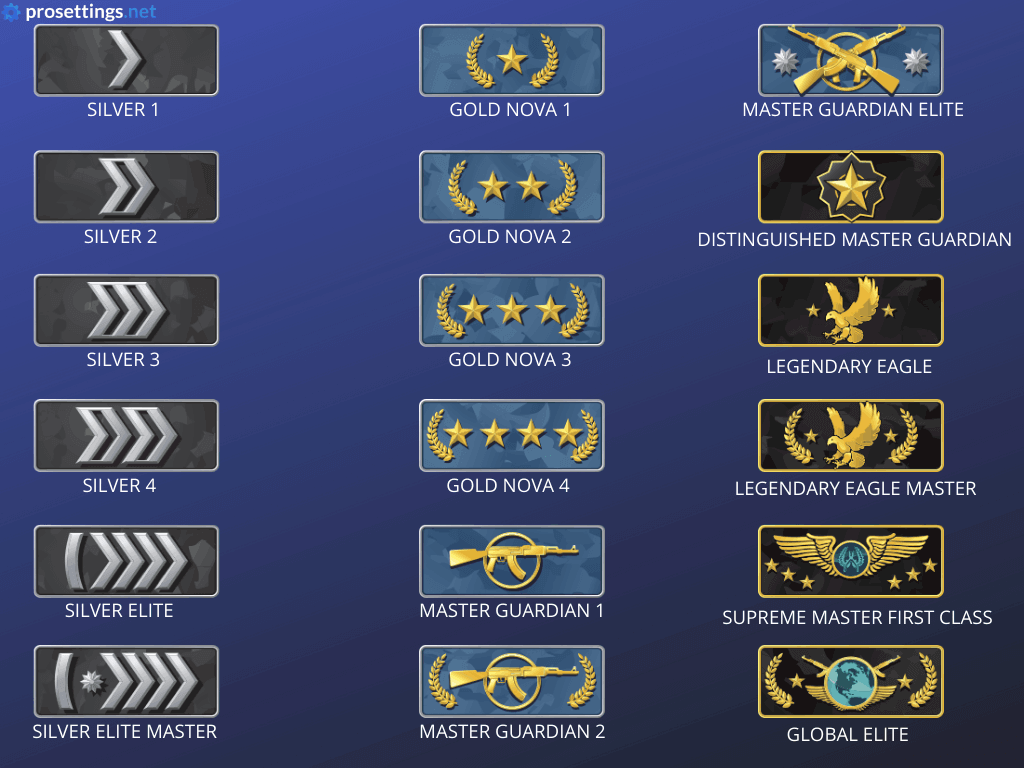
The Ranking System

  • Silver I
  • Silver II
  • Silver III
  • Silver IV
  • Silver Elite
  • Silver Elite Master Gold Nova I
  • Gold Nova II
  • Gold Nova III
  • Gold Nova Master
  • Master Guardian I
  • Master Guardian II Master Guardian Elite
  • Distinguished Master Guardian
  • Legendary Eagle
  • Legendary Eagle Master
  • Supreme Master First Class
  • The Global Elite  

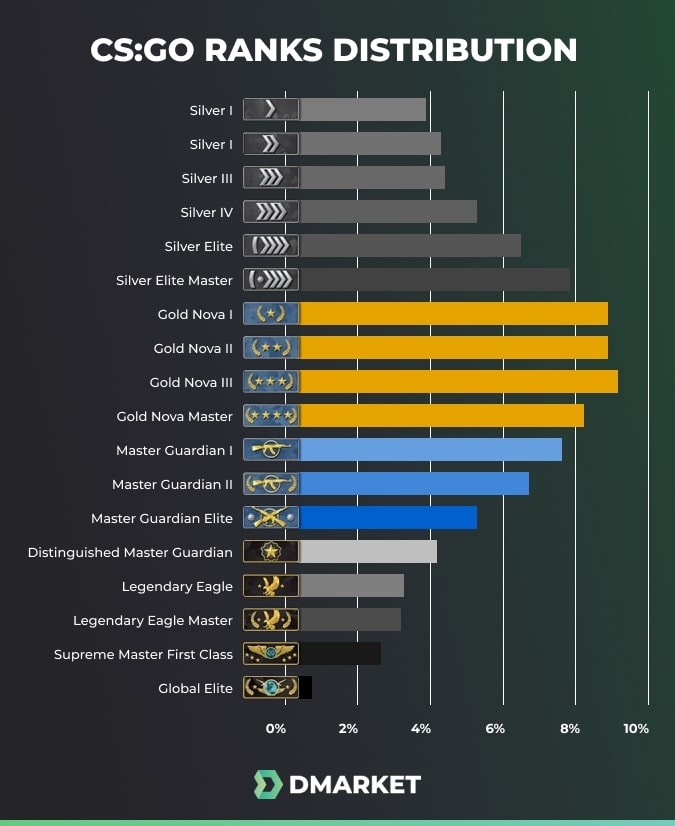
CSGO Rank Distribution 2020

Knowing Elo Points System

Each Ranks covers an apparently extensive variety of Elo Points. Case in point, 2 players with the same Rank might not have the same units of Elo Points. A player near to advancement would clearly have more Elo Points than one near to downgrade, despite the fact that both have the same Skill Group (Rank). An aptitude gathering is more like a tag on a certain scope of Elo Points.

One other thing worth specifying is the way that the Elo Point reach considered for choosing a player’s Skill Group is NOT relative. What this sentence means is that for instance if players with Elo Rating of 1000-1500 are viewed as MGE, when a player with 1450 Points picks up 51 more focuses, he will development to DMG however he WILL get downgraded once again to MGE in the event that he loses literally the same 51 focuses in the following recreations.

I clarified this on the grounds that an alternate aide guaranteed that the apparently slider utilized for choosing positions gets “reset” on every advancement and/or downgrade which I accept is false. The reason its uncommon to derank on a misfortune instantly in the wake of picking up a rank is on the grounds that its unrealistic to lose enough indicates cause it NOT on account of the focuses are reset.

MVP does NOT produce Elo Points out of slender air, it just concedes a bigger offer of the won focuses.

In the event that the player with most Elo Points scores the MVP, he will might get a greater number of focuses than alternate players on the grounds that everything relies on upon the setup of the group and the amount of focuses every player has.

In any case as a rule, scoring a MVP will have an enormous effect on the amount of focuses a player gets for a Round Win.

The Beginner Phase

In a specific end goal to accomplish a higher rank after position matches, you must win the early matches. For example, winning the initial 3 matches in a row and getting the 10 wins with 4 aggregate loses will provide for you a higher rank than losing the initial 3 matches in column and getting the 10 wins with 4 aggregate loses.

Here’s an illustration, when a Silver IV solo lines, he will dependably find matches with close expertise aggregates on both sides (cordial and foes). A Silver IV can NEVER be matched even against a solitary Mg2 on the foe group. Notwithstanding, in the event that he lines with an Eagle it will be conceivable.

When you’re in position matches, this farthest point is fundamentally evacuated and you will be coercively matched with individuals of significantly higher/lower rank on both sides and therefore increase/lose considerably more Elo Points.

After you get 10 wins, you will demonstrate your expertise gathering and whatever is left of the matches will be played out ordinarily.

Factors affecting Ranks / Elo Points

There are two and ONLY two factors that can affect a player’s Elo Points (either gain or loss). The first and foremost is Round Win/Loss; You and other players on your Team will always lose points if a round is Lost. How much point each player loses depends on how much points they had in the beginning. A player with more points would lose more than a player with less points in case a round is lost. It is impossible to gain Elo Points on Round Loss and lose Elo Points on Round Win. The second important factor is MVP;  The player with most MVP will most likely gain more Elo Points than others.

So what affects your rank (points gained or lost) in a nutshell is:

  • Current Elo Points (rank)
  • Round Win/Loss
  • MVPs Gained

Rank Upgrade / Downgrade

It’s yet controversial in the observation of the mass community, however, if you have read the explanation of Elo points above, you are likely to be lighter head now. But for the readers who are still unclear, we still have a point to discuss.

Elo Points are directly in proportion to Ranks. For instance, if you are winning rounds and matches with certainity and you are playing average, likely chances are you get more Elo points. More Elo points means you get the much closer to upgrade, even if you loose a match but you have played extra-ordinarily well, chances are you get more Elo Points. And as stated above, MVP’s also lead you to get more Elo’s.

Similarly, the inverse side of the Rank System works pretty much well. The Uprade system will have the exact methodology with inverse after-affects, which accumulates the losses of rounds and not the whole map.

Tie / Draw, Surrender, Kick, & Abandon Functionality

A tied match or a draw would not have any noteworthy or unique contrast contrasted with a win or misfortune on the grounds that its all focused around Round results. Both an advancement and downgrade is extremely conceivable when a Draw happens. In the event that each of the 10 players surrender before the amusement begins, no focuses with be exchanged.

A player who leaves a match will keep any progressions to his Elo Points until the focuses round he takes off. Case in point if a player loses the initial 3 Rounds of the match and fury stops, he will just lose the focuses for those 3 rounds and how his Team performs a while later won’t influence that single person whatsoever.

Same is connected in the event that he wins a few adjusts and detaches for any reason. The completed diversion will at present appear as misfortune ever, the additional rounds won or lost at all have no impact on his Elo Points.

The effect of Kick is the same as a standard leave, the primary qualification it that it won’t open the decision to Vote Surrender. So if a Team votes off an individual player, they will simply lose the inclination of keeping their current concentrates through a surrender.

Contradictory Rank Upgrade / Downgrade

There are numerous cases of Ranking-Up on a Game Loss and Deranking on a Game Win, some are with screenshots and/or even features. So one may inquire as to whether its conceivable. Scientifically talking, it is conceivable to derank on Game Win and/or rank-up on a Game Loss which is greatly unlikely and uncommon.

In view of how Elo Rating functions in CSGO, it is feasible for an individual player to speculatively pick up enough focuses through Round Wins so as to disregard all the misfortune and development to the following Skill Group.

In any case, the expertise bunch contrast must be extremely inconceivable (i.e. he must be matched against players of higher expertise assembles on adversary group and players of lower or same ability aggregate on agreeable group) and he likewise needs to score most or possibly the majority of the Mvps. All things considered, if his group loses nearly (14:16 i.e.) and he is VERY near to propelling to the following Skill Group, he may have the capacity to get advanced.

If its not too much trouble remember that it is just difficult to addition focuses on ROUND Loss, however it is numerically conceivable to win enough adjusts to increase focuses while even now losing the Best-of-30 Round diversion.

Smurfs & Boosters

Obverse categories, Smurfs belong to the category of the High-skilled players (Not ranks) playing with Low-level accounts to let them help leveling them up or playing on Low-level accounts to boost them up. For Instance, a player of MG2 or above playing with Silvers on the same lobby might help the Silver to rank-up delicately and pretty quickly.

The other side of the story, Boosters (I dont like them personally), are sort of leechers who desire to get their ranks boosted without struggling or investing time and skills. They choose the path of ‘Hackers’ by getting to play with them and win some matches to rank-up.


FAQs

My colleague won 10 games and they are MG1, I won 50 I am still Gold Nova II. Why?

Basically, the more wins you have the harder it will be for you to Gain/Lose Elo Points. In other words, your rank gets closer to your true skill as you play more and more games. A player with 20 wins is able to rank-up and/or de-rank A LOT faster than one with +100 wins because of this.

Please bear in mind that it both affects gaining AND losing Elo Points, so even though you might rank-up slower if you win, you also de-rank slower if you lose.

Can Unranked Play with Silver Ranks?

Yes. To get your first you have to play 10 unranked matches, with silver or other unranked players.

On Which Level Do You Get a Service Medal in CSGO?

Service medal appears after reaching the 40’s level.

Does Getting Kicked in CSGO Affect Your Rank?

Yes, it doesn’t matter if you win or lose, your rank will be affected by the result even if the team kicks you.

How Does CSGO Ranking Work?

You increase your rank when you win ranking matches. If you lose – your rank will be decreased.

How Do You Rank Up in CSGO?

Win your competitive matches to up your rank in CSGO.

How Many Ranks Are in CSGO?

There are 18 CSGO comp ranks (CSGO MMR) – Matchmaking Rank. And there are 40 experience levels, as well.

What is ELO in CSGO?

CSGO ELO, it’s your current CSGO rank.

What Is Global Elite in CSGO?

Global Elite is the highest rank in CSGO.

CSGO Ranking System has lots of practical uses, but still, it is also full of emotions and will give players an additional reason to rejoice at their in-game progress.


Source:  RetriButioN’s Guide on Steampowered.com // www.counter-strike.net

Valorant Indian Servers: Everything You Need To Know

0

Since the dawn of Riot’s tactical shooter Valorant, players from South Asia were left with no other option than to play the game with considerably high pings due to the nearest official servers being located in South-East Asia.

This went against Riot’s initial promise of letting players enjoy the game at latencies as low as 35 ms, which led many players from South Asia and the Middle East to quit Valorant due to their pings being too high. However, it appears like the days of high latencies are numbered, as Indian and Middle Eastern Valorant servers may be nearer than you think.

The initial announcement of Indian Valorant servers came within two days of the official release of the game. “Riot Games is highly committed to providing the India and rest of the South Asia region with excellent gaming experience,” Sukamal Pegu, Valorant Publishing Head of South Asia, said in a statement. “While you’ll be joining the worldwide launch on June 2, the official servers which will support the Middle East & South Asia will come later in the year.”

Also Read | How to change region in Valorant

Months later, on September 15th, data miners found out strings in the game files which directly hinted to Indian and Middle Eastern servers being in works. The set of strings and URLs found by the data miner included, “Frankfurt, Mexico City, Santiago, Sao Paulo, Seoul, Singapore, Sydney, Tokyo, US East (N. Virginia), US West (N. California), Bahrain, Mumbai.”

From the leaks, it appeared like the servers for India and the Middle East would be situated in Mumbai and Bahrain respectively.

Only a few weeks after the strings were uncovered, Indian Valorant players started experiencing extremely low latencies when playing custom games which were highly unusual. 

The devs later confirmed that they were running “small scale tests” on Indian servers which caused the ping fluctuations. “We’re basically making sure our connections and routing with main ISPs are working correctly,” a Riot dev said on Reddit. “Today’s showed some player isp’s routing people through Singapore and then back to Mumbai, for example–not great for the ping. We’re getting closer and will have a firm live date soon.”

With the Act 3 of Riot’s shooter coming this October 13th, there’s a high probability that Indian Valorant servers will go live alongside it. The upcoming servers being introduced to Mumbai will provide players across South Asia with low pings and consequently a better gameplay experience.

Also Read | VALORANT Act 3 – what to expect from the next Battlepass


Latest News –

Ultracup CSGO: All Types of Scams on Steam

A new type of steam scam that involves the use of a Phishing site asking users to cast votes for their friend’s CSGO team to get invited for the tournament. This type of scam has been making rounds since 2018, but since last month i.e. September this type of scam has become more common and has easily tricked many innocent Steam users in losing access to their account.

How does it work?

  1. You will receive a message from a friend on your list asking you to “vote for his/her csgo team”  on a site called ultracup(dot)fun such as they can get invited to a $30,000 CSGO Tournament called Ultracup Tournament/League. 
  1. As soon as you click on the link, you will be redirected to a site that on the first will appear genuine as they won’t be asking any login info other than a user name.
  1. But as soon as you visit the site, a script starts in the background which will run malicious code and allow scammers to inject a virus on your PC to gain remote access over it.
  1. Once the scammers gain access to the PC, they hijack the Steam account and trade away the items in inventory and further perform other malicious activities such as messaging others on your friend list.

To make it look legitimate, the site also contains a fake chat screen running on the left-hand side of the page and a vote share screen in middle with the names of random teams. Furthermore, the site will be plastered with the names of the sponsors like G2A, Bitskin, Kinguin, and FaceIt.

Other scam types to look out for-

PayPal Scams.

Quick switching

Steam wallet scam.

Software scams.

Impersonating scams.

Fake gambling site

Misleading tradelinks

Verifying items

Item buying/selling scams.

 Steam’s official guidelines and Stance on scam items-

  1. Account Security
  2. Recommended Trading Practices
  3. Steam Item Restoration Policy

Additional Security measures to follow-

  1. Enable Steam Guard two-factor authentication
  2. Never click on any link however genuine it might look
  3. Use an anti-virus program with internet security and firewall protection
  4. Always keep anti-virus, browsers, window, etc. updated
  5. Avoid logging in to Steam on insecure or shared computers
  6. Never save login credentials in a text file.