

Wednesday, December 17, 2025
GuidesHow to use Digital Vibrance with Valorant

How to use Digital Vibrance with Valorant

-

Do you want to play Valorant with a nice and eye-catching look? Nvidia’s Digital Vibrance is here to make your next Valorant game more vibrant.

Using Nvidia Digital Vibrance you can make Valorant’s colors more vibrant than they naturally are. If you configure it properly, the visibility of your enemies on your screen will be more crisp and clear. Once you start spotting your enemies easily in Valorant, your reaction time will get better and you will perform way better than you are doing now. Numerous pro players and streamers use it enhance their performance.

How to use Nvidia Digital Vibrance with Valorant
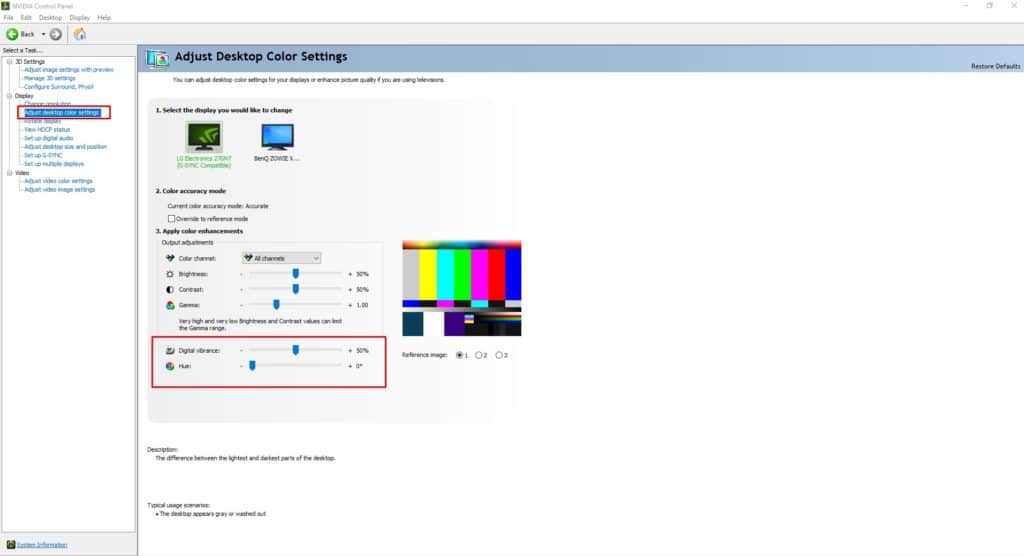
digital vibrance valorant
Valorant Digital Vibrance
  • Right click on your desktop and click on Nvidia Control Panel.
  • On the left side under Display you will find out the Adjust Desktop Color Settings.
  • Click on that and you will see the Digital Vibrance control panel.
  • Increase the Digital Vibrance slider according to you.

Recommended | Amazon Prime Gaming Members Will Get 10 Free Radianite Points In Valorant

Aritra Patra
Aritra Patra
Aritra leads the editorial charge at TalkEsport. Away from the keyboard and deadlines, you can find him playing CS2, Valorant, and occasionally EA FC.

Other Originals

Is Sophie Rain Coming to Fortnite

Fan leaks claim Sophie Rain joins Fortnite's Icon Series, but it's just a viral concept she loved. Community divides as Leah Ray opposes it for kids, with no official word from Epic.

How to Get Fossilized Lightning in Arc Raiders

Fossilized Lightning is Arc Raiders' rare epic nature item spawning only at lightning strike sites during raids. This guide covers exact farming methods, inventory tips, and crafting uses to help you stockpile efficiently.

Where to Find Candle Holders in Arc Raiders

Candle Holders are uncommon Residential loot needed for Stage 2 of Arc Raiders’ Flickering Flames project, and they can be tricky to track down. This guide breaks down the best Cold Snap routes, high‑density apartment blocks, and safe farming spots so you can secure all three Candle Holders without wasting raids.

Marvel Rivals Failed to Connect to Steam Error Code 5: How to Fix?

Marvel Rivals players face the frustrating "Failed to Connect to Steam Error Code 5" during login. Common causes include network issues, corrupted files, or server downtime. Quick troubleshooting like verifying integrity and firewall tweaks resolves it for most users.

From the Editor's Desk

Minu Lee Outlines Krafton’s India Strategy: Investment, Localization, and Growth

Since 2021, Krafton has invested more than $200 million in India, making the country one of its biggest global...

Upcoming BGMI Tournament To Offer India a Direct Slot at PMGC 2025 – Sources

According to sources familiar with Krafton’s esports roadmap, India may soon be handed a direct path to the world...

Must read

Free Fire Redeem Code 22 June 2021

Garena has released some redeem codes for Free Fire...

How to Get Best Aim in Valorant: Aim Settings

Whether you're playing a competitive or casual game, it's...
- Advertisement -

You might also likeRELATED
Recommended to you