Thursday, January 1, 2026
Home Blog Page 217

How to get cheap VALORANT Points

0

VALORANT, the popular game by Riot Games, has a thriving in-game economy. The currency, VALORANT Points (VP), is a key part of this system.

Players often purchase VP with real money to unlock skins, battle passes, and other items. But, these points can be expensive.

So, how can you get cheap valorant points? Is it even possible to find valorant points cheap?

This guide will provide you with legitimate methods to save money while purchasing VP. We’ll explore tips, tricks, and strategies to help you get the most out of your gaming budget.

Understanding VALORANT Points

VALORANT Points (VP) are the premium currency in the game. They allow players to buy various in-game items.

Skins, battle passes, and other special items can be acquired using VP. These enhance the gaming experience.

To obtain VP, players typically spend real money. This is the most common method.

However, acquiring VP can become costly over time. Thus, finding ways to get cheap VP is beneficial for regular players.

Official Promotions and Sales

Riot Games often runs promotions that offer VP discounts. These are legitimate ways to obtain cheap valorant points.

Keep an eye on official announcements for upcoming sales. This can save you a significant amount on purchases.

To stay informed, consider these methods:

  • Sign up for Riot Games’ newsletters
  • Follow official VALORANT social media accounts
  • Check the in-game store regularly for deals

Participating in Tournaments and Contests

Many official VALORANT tournaments and contests award VALORANT Points as prizes. By joining these, you could earn VP without spending any money.

Research upcoming events and sign up to participate. Winning or placing in these contests can provide significant savings on VP purchases.

Leveraging Regional Pricing Differences

Regional pricing differences can be a great way to get cheap VALORANT Points. Some regions offer VP at lower costs due to currency conversion rates or economic factors.

By understanding these pricing strategies, you could save money on your VP purchases. Always ensure such practices comply with the game’s terms and conditions.

Buying in Bulk for Better Value

Purchasing VALORANT Points in larger quantities can often provide better value. Bulk purchases usually offer more VP per dollar spent.

Consider waiting until you can afford a larger VP purchase. This method maximizes your spending efficiency without needing frequent transactions.

Authorized Retailer Gift Cards and Digital Wallet Promotions

Using gift cards from authorized retailers is a reliable way to buy cheap VALORANT Points. These cards often come with promotional offers.

Digital wallet promotions can also reduce your costs. They sometimes provide discounts or cashback deals that make VP more affordable.

Here’s how you can benefit from these methods:

  • Buy gift cards during sales or promotions.
  • Use digital wallets offering discounts or rewards.
  • Check for cashback opportunities with certain payment methods.

Social Media and Gaming Communities

Social media platforms are treasure troves of information for VALORANT deals. Follow official accounts for announcements about sales or promotions.

Gaming communities are equally valuable. Engage with players who often share insights on finding cheap vp. These communities are rich resources for time-sensitive discounts.

Credit Card Rewards and Gaming Memberships

Some credit cards offer cashback on gaming purchases. These rewards can be applied to buy valorant points cheap.

Moreover, gaming memberships sometimes include discounts on in-game purchases. Utilize these benefits to save on cheap VP.

Conclusion: Prioritizing Security and Legitimacy

Securing cheap Valorant Points is appealing, but always prioritize safety. Make sure you’re buying through official sources to avoid scams.

Unauthorized ways can lead to account bans. Stay informed about deals, and always prioritize secure and legitimate channels for acquiring VP.

How to Optimize CPU and GPU Performance in CS2 for Higher FPS

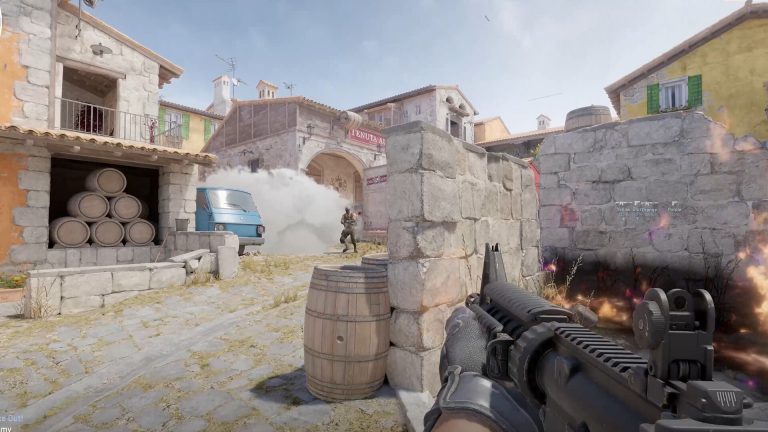
Counter-Strike 2 (CS2) players often face performance issues, such as low FPS and stuttering. Improving CPU and GPU performance can create smoother gameplay and reduce lag. This guide explains simple steps to boost FPS in CS2, adjust graphics settings, and update drivers for better performance.

How to Check Whether You’re CPU or GPU-Limited

Before diving into settings adjustments, determine whether your system is CPU or GPU-limited:

  1. Launch CS2 in offline mode and select any map.
  2. Open the console (' key) and enter: cl_showfps 2.
  3. Go to Video Settings and disable FSR (FidelityFX Super Resolution).
  4. Play a test round with bots, noting your FPS.
  5. Change FSR to Performance mode and replay the round.
  6. FPS Increase: If FPS improves, your system is GPU-limited.
  7. No Change in FPS: Your system is CPU-limited.

Optimizing Graphics Settings for GPU-Limited Systems

If your system struggles with graphics processing, lowering settings can provide a noticeable FPS boost in CS2:

  • Boost Player Contrast: Enabled
  • V-Sync: Disabled
  • Global Shadow Quality: Low
  • Model/Texture Detail: Low
  • Texture Filtering: Disabled
  • Shader Detail: Low
  • Particle Detail: Low
  • Ambient Occlusion: Low
  • HDR (High Dynamic Range): Performance
  • FSR (FidelityFX): Performance
  • NVIDIA Reflex Low Latency: On + Boost

This configuration prioritizes performance over visuals, providing smoother gameplay even on low-end systems.

Dealing with CPU-Limited Systems

For CPU-bound setups, graphics settings adjustments offer minimal improvements. Instead, focus on:

  1. Processor Upgrades: Consider upgrading to a faster processor.
  2. Close Background Processes: Shut down unnecessary applications to free up CPU resources.
  3. Enable High-Performance Mode: In Windows, set the Power Plan to High Performance via Control Panel > Power Options.

System-Wide Optimizations for FPS Boost in CS2

1. Update Windows and Drivers

  • Windows 11 Upgrade: Benchmarks reveal an FPS increase of 10-20 frames when switching from Windows 10 (22H2) to Windows 11 (23H2).
  • GPU Driver Updates: Ensure your Nvidia or AMD graphics drivers are up-to-date for the latest performance enhancements.

2. Optimize Windows Settings

  • Disable Game DVR and Xbox Game Bar: These can slow performance.
  • Turn Off Background Apps: Go to Settings > Privacy > Background Apps and disable unnecessary programs.
  • Adjust Virtual Memory: Increase paging file size to match system RAM for smoother performance.

3. Overclocking CPU and GPU (Advanced Users)

Overclocking can extract additional performance from your hardware but should be approached cautiously to avoid overheating and hardware damage. Use tools like MSI Afterburner for GPUs and Intel XTU for CPUs.

Additional Tips for Smooth Gameplay

  • Custom Launch Options: Add the following parameters in CS2 launch settings via Steam:-novid -high -threads <number of cores> -nojoy -fullscreen
  • Clear Shader Cache: Occasionally clear the shader cache to prevent stuttering caused by outdated files.
  • Network Optimization: Use a wired connection for more stable online play.

Improving CPU and GPU performance in CS2 requires identifying hardware limits, adjusting settings, and updating drivers. Players can fix low FPS issues by lowering graphics settings, closing background tasks, and enabling Windows performance modes. Following these steps ensures smoother gameplay and faster response times in CS2.

Free Fire MAX Redeem Codes Today (31st December, 2024): Get Free Rewards!

Free Fire MAX, the renowned battle royale game, continues to captivate gamers worldwide with its intense gameplay and vast array of in-game rewards. One of the most sought-after features in the game are the Free Fire MAX redeem codes, which grant players access to exclusive items and goodies without spending any money.

Free Fire MAX redeem codes are special combinations of characters that, when entered correctly, provide players with various rewards such as weapon skins, character outfits, and in-game currency. While these codes are not released frequently, stumbling upon a working code can significantly enhance the gaming experience.

All New Free Fire MAX Redeem Codes for Today 31st December 2024

Here are some redeem codes redeem codes you can use to get free items in the game today 31st December 2024:

  • 590XATDKPVRG28N
  • 2W9FVBM36O5QGTK
  • WOPLMFJ4NTDHR3V
  • 4PAS6TQ87CXMLNV
  • NRD8L6Y7M4E29U1
  • CT6P42J7GRH50Y8
  • YW2B64F7V8DHJM5
  • VQRB39SHXW10IM8
  • BMD8FUSQO4ZGINA
  • O74JF9YC6HXKGDU
  • AJEBVGL3ZYTKNUS
  • 68SZRP57IY4T2AH
  • V8CI2B3TL6QYXG7

HOW TO Free Fire MAX REDEEM CODES TODAY

Redeeming codes in FF MAX is a quick and straightforward process. Follow these steps to claim your rewards:

  1. Navigate to the official Free Fire MAX redemption website
  2. Sign in using your account credentials. Ensure that you have a valid account linked to either Facebook, Google, VK, or Huawei.
  3. Enter the Redeem Code: Input the redeem code into the provided field and click on the “Confirm” button.
  4. Collect Your Rewards: Once the code is successfully redeemed, the rewards will be sent directly to your in-game mailbox. Launch Free Fire MAX and claim your items from the mailbox.

Tips for Using Redeem Codes in Free Fire MAX

  • Timely Redemption: Redeem codes have expiration dates, so it’s essential to use them promptly to avoid missing out on rewards.
  • Regional Restrictions: Some codes may be region-specific and may not work if you are in a different region. If a code doesn’t work, try using another one.
  • Single Use: Most codes can only be redeemed once per account, so ensure you enter the code correctly the first time.

Free Fire MAX redeem codes tend to expire very soon and hence, make sure to use them as soon as you can. Some of them can be region restricted and if you find one like that, simply move on to the next one as region restricted codes cannot be used in other areas.

Stay ahead in the world of esports with the TalkEsport app! Download now to get instant access to the latest news, live points tables, comprehensive esports calendars, and live streams of your favorite tournaments. Don’t miss out—get the app today

How to Get Iron Man Armor Model 42 Skin in Marvel Rivals

0

Marvel Rivals offers a free Iron Man Armor Model 42 skin. This black-and-gold suit is based on Iron Man’s design from the 2012 Marvel Now! comics. Players can unlock it using a redeem code.

This guide explains the steps to claim the skin, highlights its design and lists other free rewards available in Marvel Rivals.

Steps to Redeem the Armor Model 42 Skin

  1. Open the Game Settings
    • Launch Marvel Rivals and go to the Settings Menu.
  2. Find the Bundle Code Section
    • Look for the ‘Bundle Code’ option.
  3. Enter the Code
    • Type this code: nwarh4k3xqy (case-sensitive).
  4. Confirm and Equip the Skin
    • Submit the code and check your inventory.
    • Equip the skin under the Cosmetics Menu.

Note: The code expires on March 5, 2025. Claim it before the deadline.

Features of Iron Man Armor Model 42 Skin

Iron Man Armor Model 42 Skin in Marvel Rivals

The Armor Model 42 skin is based on Iron Man’s black-and-gold suit from the Marvel Now! comic series.

  • Design Highlights: Futuristic aesthetics with sleek gold and black plating.
  • Inspiration: Reflects Tony Stark’s advanced engineering style and comic-book origins.
  • Exclusive Availability: Free to all players during the promotional period.

This design not only resonates with comic fans but also stands out in Marvel Rivals’ fast-paced gameplay.

Design Features of the Armor Model 42 Skin

The Armor Model 42 skin has a sleek black-and-gold design inspired by Iron Man’s look in the Marvel Now! comics.

  • Modern Look – Features advanced plating and sharp angles.
  • Comic Accuracy – Matches the original color scheme from 2012.
  • Unique Style – Stands out in matches, making Iron Man more visually striking.

Other Free Rewards in Marvel Rivals

1. Magneto Will of Galacta Costume

  • Available through Twitch Drops.
  • Watch selected Twitch streams to earn the skin.

2. Season 0 Battle Pass

  • Includes free cosmetics and in-game bonuses.
  • Unlock rewards by playing matches and completing challenges.

3. Twitch Drop Waves

  • Rewards come in two phases.
  • Track Twitch event schedules to claim all items.

Why Claim the Armor Model 42 Skin?

The Iron Man Armor Model 42 skin adds variety to character customization. It gives players a chance to use a design based on Iron Man’s popular comic appearance.

Marvel Rivals offers more free rewards through Twitch Drops and the Season 0 Battle Pass, allowing players to expand their collection of cosmetics and skins.

Players can unlock the Iron Man Armor Model 42 skin in Marvel Rivals by entering the code nwarh4k3xqy before March 5, 2025.

Additional rewards, such as the Magneto Will of Galacta costume, are available through Twitch Drops. Players should also complete the Season 0 Battle Pass for more free items.

Claim these rewards and upgrade your Marvel Rivals experience today!

All Free Games in the Epic Games Store Holiday Sale 2024 [Updated Daily]

0

The Epic Games Store Holiday Sale 2024 features free games available daily. Players can claim one title each day for 24 hours and keep it forever. This event highlights popular titles and new releases, offering something for all types of gamers.

This guide lists all the free games and provides details about the Epic Games Store deals and holiday discounts.

Epic Games Store Free Games List

DayGame TitleStart Date & TimeEnd Date & Time
1Vampire Survivors (2022)Dec. 19, 10 AM CTDec. 20, 9:59 AM CT
2Astrea: Six Sided Oracles (2023)Dec. 20, 10 AM CTDec. 21, 9:59 AM CT
3TerraTech (2018)Dec. 21, 10 AM CTDec. 22, 9:59 AM CT
4Wizard of Legend (2018)Dec. 22, 10 AM CTDec. 23, 9:59 AM CT
5Dark and Darker – Legendary StatusDec. 23, 10 AM CTDec. 24, 9:59 AM CT
6Dredge (2023)Dec. 24, 10 AM CTDec. 25, 9:59 AM CT
7Control (2019)Dec. 25, 10 AM CTDec. 26, 9:59 AM CT
8Ghostrunner 2 (2023)Dec. 26, 10 AM CTDec. 27, 9:59 AM CT
9Hot Wheels Unleashed (2021)Dec. 27, 10 AM CTDec. 28, 9:59 AM CT
10Kill Knight (2024)Dec. 28, 10 AM CTDec. 29, 9:59 AM CT
11Orcs Must Die! 3 (2024)Dec. 29, 10 AM CTDec. 30, 9:59 AM CT
12[REDACTED]Dec. 30, 10 AM CTDec. 31, 9:59 AM CT

Highlighted Games

Vampire Survivors (Day 1)
Vampire Survivors

A roguelike shooter that challenges players to survive waves of enemies. It offers quick gameplay and retro graphics, appealing to fans of action-packed experiences.

Control (Day 7)
Control

An action-adventure game with supernatural abilities. Players explore a secretive agency and fight mysterious threats using telekinesis and powerful weapons.

Ghostrunner 2 (Day 8)
Ghostrunner 2

A sci-fi action game with parkour mechanics. It includes fast combat and puzzle-solving, providing intense gameplay for action enthusiasts.

Hot Wheels Unleashed (Day 9)
Hot Wheels Unleashed

A racing game that lets players build tracks and race friends in multiplayer mode. It’s perfect for fans of racing and customization.

How to Claim Free Games

  1. Sign in – Log in or create an Epic Games Store account.
  2. Visit the Store – Go to the Free Games Section on the Epic Games website or app.
  3. Add to Library – Select the free game of the day and click “Get.”
  4. Download and Play – The game is now permanently available in your library.

Benefits of Epic Games Store Holiday Sale

  • Daily Free Games – Add a new game to your library every day.
  • Discounted Deals – Save money on top titles with holiday sales.
  • Easy Access – Games remain in your account once claimed.
  • Wide Variety – Enjoy action, racing, RPGs, and more genres.

The Epic Games Store Holiday Sale 2024 gives players a chance to expand their libraries with free games and special discounts. Claim games daily and check for updates to stay informed.

Enjoy the PC game giveaways, explore the Epic Games Store free games list, and take advantage of holiday gaming discounts. Start building your collection today!

Pokimane Weighs In on Hawk Tuah Girl’s Memecoin Scandal and Lawsuit Fallout

0

Popular Twitch streamer Pokimane has commented on the controversy surrounding Haliey Welch, also known as the “Hawk Tuah girl,” and her failed cryptocurrency, Hawk Coin. The project collapsed, leading to a lawsuit and debates about influencer accountability in promoting financial products.

Pokimane stressed the need for influencers to take responsibility when endorsing investments, especially if they lack expertise. This article breaks down the collapse of Hawk Coin, the lawsuit, and Pokimane’s views on influencer responsibility.

Hawk Coin’s Rise and Rapid Collapse

In December, Haliey Welch launched Hawk Coin, a memecoin designed to capitalize on her viral popularity. The coin’s value dropped sharply after its release, sparking criticism.

YouTuber Coffeezilla investigated the project, revealing allegations of insider trading and over $1 million in fees collected by Welch’s team. Meanwhile, investors faced substantial losses.

The backlash led to a lawsuit against Welch’s team, although Welch was not directly named in the filing. Welch later vowed to uncover the truth and hold those responsible accountable.

Pokimane Highlights Influencer Accountability

Speaking on her Sweet n Sour podcast, Pokimane addressed Welch’s involvement. She suggested Welch may have been misled by more experienced partners but still emphasized her role in promoting the project without fully understanding it.

Pokimane

“She probably didn’t know what she was getting into,” Pokimane said. “But to some extent, she is also responsible because she promoted this thing that wound up losing people a lot of money.”

Pokimane’s remarks resonated with viewers, sparking discussions about influencers endorsing financial products without proper knowledge.

Haliey Welch’s Response and Future Plans

After the lawsuit, Welch briefly disappeared from social media. She later returned, announcing plans to continue her podcast, Talk Tuah with Haliey Welch, and clear her name.

While Welch’s team insists she aims to rebuild trust, some critics, including streamer Asmongold, believe her career may not recover. Welch’s ability to regain credibility depends on her transparency and efforts to clarify her role in the failed project.

Hawk Coin’s failure highlights the risks of influencers promoting financial products without proper oversight. Pokimane’s critique points to the need for influencers to prioritize accountability and credibility over profit.

As lawsuits proceed and Welch works to repair her reputation, the case raises broader questions about influencer-led crypto ventures. Stronger regulations and better education for influencers could help prevent similar incidents in the future.

For influencers, the message is simple: promoting investments without proper understanding can lead to lasting damage—for both their audience and their reputation.

How to Get Rare Jellie Outfit in Fortnite?

0

The Jellie skin is making a return in January 2025, featuring a new Color Splash variant. This skin will be available through a limited-time promotion, making it easier for players to unlock this fun character.

The Jellie skin debuted in Chapter 2, Season 1, and became popular for its quirky look. It has seen two variants over time:

  • Tropical Jellie
  • Lumi Jellie

The Color Splash variant marks the first new update for this skin in years.

How to Unlock Color Splash Jellie?

To get the new Color Splash Jellie skin, players need to redeem a V-Bucks card during the promo period.

Promo Details:

  • Dates: January 13, 2025 – February 16, 2025
  • Where: Redeem a V-Bucks card online.
  • Bonus: Unlock the Color Splash Jellie skin for free.

Important Notes:

  • One Color Splash Jellie skin is allowed per the Fortnite account.
  • Only V-Bucks cards redeemed during the promo period will qualify. If you already have a card, wait until January 13 to redeem it.

Promo Leak Details

A Reddit user, IntroductionFresh724, spotted the promo early at Walmart, revealing an ad ahead of schedule. This leak has given Fortnite fans a preview of the upcoming promotion.

The Jellie skin joins other fan favorites recently brought back, including:

  • Master Chief, with the rare Matte Black variant for Xbox players.
  • Other popular skins rotate back into the Item Shop.

This promotion is perfect for players with V-Bucks cards from the holidays.

How to Participate in PUBG Mobile Metro Royale Radiation Zone Rally and Win Rewards

0

The PUBG Mobile Metro Royale Radiation Zone Rally is a limited-time event running until January 7, 2025. Players can join by sharing highlights from their Radiation Zone gameplay to win free UC.

This event gives players a chance to showcase skills, earn rewards, and compete with others. Participants must follow simple steps to enter the challenge and improve their chances of winning.

Event Details

  • Duration: Until January 7, 2025.
  • Goal: Record gameplay highlights in the Radiation Zone and upload them on social media.
  • Reward: Win up to 1200 UC for free.

How to Participate

  1. Record Gameplay: Capture interesting or exciting moments in the Radiation Zone.
  2. Upload Content: Post the video or screenshot on social media platforms.
  3. Use Hashtags: Include #PUBGMOBILE, #MetroRoyale, #RadiationZoneRally, #Sweepstakes in your caption.
  4. Add UID: Mention your PUBG Mobile User ID (UID) in the post.

Note: Submitting creative and entertaining content increases the chances of winning.

Rules and Guidelines

  • Winners: 30 participants will be selected after the event ends.
  • Multiple Entries: Players can submit multiple entries, but only one win is allowed per participant.
  • Fair Play: Using multiple accounts or stolen content leads to disqualification.
  • Winner Announcements: PUBG Mobile will announce winners on its official social media pages.

Tips to Win Rewards

  1. Highlight Action-Packed Moments: Capture thrilling battles, surprising victories, or unique strategies.
  2. Focus on Creativity: Funny or dramatic content often grabs attention.
  3. Use Clear Hashtags: Ensure hashtags are spelled correctly to avoid disqualification.
  4. Promote Your Post: Ask friends to like, comment, and share your content for better engagement.

Why Participate?

  • Free UC Rewards: Winning UC helps buy skins, outfits, and premium features.
  • Showcase Skills: Highlight achievements and gameplay strategies.
  • Community Recognition: Gain visibility within the PUBG Mobile community.

The Metro Royale Radiation Zone Rally offers players an exciting way to earn free UC and demonstrate their abilities. Follow the steps, share engaging content, and stay updated with winner announcements after January 7, 2025.

Marvel Rivals Season 1: Leaked Game Modes and Exciting Features Revealed

0

Marvel Rivals Season 1 is expected to introduce new game modes, expanding its multiplayer gameplay options. The season, developed by NetEase Games, may arrive in January 2025. Leaks suggest multiple modes, including Arms Race Deathmatch, Capture The Flag, Escort Mode, and Sniper Team Deathmatch. These updates aim to provide fast-paced, strategic, and varied gameplay experiences.

Leaked Game Modes in Marvel Rivals Season 1

1. Arms Race Deathmatch

Players start with basic weapons and unlock stronger ones after each kill. The mode rewards skill and quick eliminations.

2. Capture The Flag

Teams aim to grab the opponent’s flag and return it to their base while defending their own. Success depends on teamwork and defense strategies.

3. Escort Mode

Players work together to move a payload across checkpoints while opponents try to stop them. This mode focuses on defense and timed attacks.

4. Sniper Team Deathmatch

Teams use sniper rifles in battles where precision matters most. Characters may have oversized heads, adding humor and making targets easier to hit.

5. Mystery Hero Mode

Players receive random heroes for short matches. This mode encourages adaptability and quick decision-making.

6. Deathmatch and Free Fight Modes

These modes emphasize direct combat without abilities. They provide straightforward fights, ideal for practice and competitive matches.

Additional Updates and Features

Marvel Rivals Season 1 could roll out these modes in phases. Some may release at launch, while others might arrive later through updates. New skins, events, and balance adjustments are also expected.

NetEase Games may use community feedback to refine gameplay after release, ensuring continued improvements.

Marvel Rivals Season 1 will likely add exciting modes, including Arms Race Deathmatch, Capture The Flag, and Escort Mode. These updates focus on competitive and cooperative play, appealing to a wide range of players. Fans can expect more updates as the launch date approaches.

How to Get the Doughberman Skin in Fortnite – Price, Availability, and Tips

0

The Doughberman skin in Fortnite has gained popularity for its bread-inspired design. Released in Chapter 6, Season 1, with update v33.11, it stands out as a fun addition to Fortnite cosmetics. This outfit includes a LEGO Style, making it compatible with LEGO Fortnite mode.

This guide explains how to unlock the Doughberman skin, its price, and availability in the Fortnite Item Shop during Winterfest. Whether you want the full Doughberman Bundle or individual items, we cover everything you need to know.

What Is the Doughberman Skin in Fortnite?

The Doughberman skin features a creative bread-themed design, adding humor and flair to Fortnite. It is part of the Pure Bread Set and appeals to players who enjoy quirky outfits.

Its LEGO Style allows players to use it in LEGO Fortnite mode, combining exploration and building features. This makes it versatile for various gameplay styles.

How to Get the Doughberman Skin in Fortnite

Availability in the Fortnite Item Shop

The Doughberman skin is available in the Fortnite Item Shop under the Winterfest Tab. Players can buy it as part of a bundle or choose individual items based on their V-Bucks budget.

Doughberman Bundle Contents

The Doughberman Bundle costs 1,600 V-Bucks and includes:

  • Doughberman Outfit (with LEGO Style)
  • Bun Buds Back Bling
  • Pankiri Pickaxe
  • Bunderful! Animated Wrap
  • Honeybun Bass (Bass)

Individual Pricing for Items

Players can buy items separately:

  • Doughberman Outfit + LEGO Style800 V-Bucks
  • Honeybun Bass (Bass)800 V-Bucks
  • Pankiri Pickaxe500 V-Bucks
  • Bunderful! Animated Wrap500 V-Bucks
  • Bun Buds Back Bling400 V-Bucks

How Long Will Doughberman Be Available?

The Doughberman skin will stay in the Item Shop until January 3, 2025, at 8 PM ET. Players should act quickly, as it may not return soon after leaving the shop.

Though it’s not an exclusive item, future availability depends on shop rotations, so grabbing it during Winterfest is the safest option.

Why Should You Buy the Doughberman Skin?

  • Unique Design – The bread-themed look adds humor and style.
  • LEGO Compatibility – Works as a LEGO Fortnite skin for creative modes.
  • Bundle Options – Buy the full set or pick specific items to match your budget.
  • Winterfest Theme – Matches the festive holiday vibe in Fortnite.

The Doughberman skin in Fortnite stands out as a fun and unique cosmetic. Its LEGO compatibility, affordable pricing, and Winterfest availability make it a top pick for collectors.

Whether you want the full Doughberman Bundle or just select pieces, the shop offers flexible options. Be sure to purchase it before January 3, 2025, to avoid missing out.