Home Blog Page 101

New CS2 Bug Lets Players Throw Grenades Through Walls

Counter-Strike 2 players have discovered a new game-breaking bug that lets you throw grenades through walls.

The bug in question can be replicated on any map in the game, but only in specific spots. Upon executing it successfully, youโ€™ll be able to throw grenades, molotovs, and other utility through walls and cause serious damage to players on the other side.

CS2 Grenade Bug

The latest CS2 grenade bug abuses the crouch-jump mechanic in the game to send grenades flying through walls. When timed properly, youโ€™ll be able to see your grenade disappear inside the wall and wreak havoc on the other side.

This bug only works in places where the ceiling is low enough for you to be able to hit it when crouch-jumping and throwing your grenade. The vents on Nuke are perhaps one of the most prominent spots where players have been abusing the bug, but there are other popular spots across most maps in the current rotation.

Needless to say, itโ€™s strongly advised for players to refrain from abusing this bug in ranked games since it can get your account banned. If you find someone using it in your games, be sure to report them to Valve.

CS2 players have urged Valve to fix this issue at the earliest for the sake of the shooterโ€™s competitive integrity.

BGMI Lag & Ping Fix: Reduce 100ms+ Ping, Packet Loss and Stutters

0

BGMI Lag & Ping Fix can make a major difference when your ping suddenly jumps above 100ms, enemies teleport around the map, shots register late, or the game freezes for a moment during fights. High ping is usually linked to network conditions, while random stutters can also come from FPS drops, overheating, background apps or device performance. In this guide, we explain how to reduce BGMI ping, fix packet loss, improve Wi-Fi or mobile data stability, and stop random stutters. These steps can help you identify whether the problem is your internet connection, device or BGMI itself.

BGMI Lag & Ping Fix: Reduce High Ping and Stutters

The first step in any BGMI Lag & Ping Fix is finding out whether you have a network problem or an FPS problem. High ping affects how quickly your actions reach the game server and how quickly you receive information back. Stutters, on the other hand, can happen even when your ping is normal because the phone is struggling to maintain consistent performance.

If your ping stays around 20-60ms and suddenly jumps to 100ms, 200ms or higher, focus on your internet connection. If the ping remains stable but the game freezes, drops frames or feels choppy, focus on graphics, temperature and device performance.

KRAFTON has also continued to improve BGMI’s performance and download systems through updates. For example, the official BGMI 4.3 patch notes mention download performance optimization for lobby and inventory resources.

1. Restart Your Phone and Router

A simple restart can sometimes solve temporary connection problems.

Restart your phone before starting a serious ranked session. If you’re playing on Wi-Fi, restart the router as well. Google recommends restarting both the Android device and wireless router when troubleshooting connection problems.

For a router restart, switch it off, wait around 30 seconds and turn it back on. Give the connection enough time to reconnect before launching BGMI.

2. Use a Stable Wi-Fi Connection

A fast internet connection does not always mean a stable gaming connection. Wi-Fi interference, distance from the router and network congestion can cause ping spikes and packet loss.

If possible, play closer to your router. A 5 GHz Wi-Fi network can be useful when your device and router support it and you are reasonably close to the router. If the signal is weak because of distance or walls, a 2.4 GHz connection may sometimes provide better coverage.

Avoid playing ranked matches while several devices are downloading large files or streaming high-resolution video on the same connection.

3. Test Mobile Data Against Wi-Fi

If your Wi-Fi connection is giving you 100ms+ ping, switch to mobile data for a test match. If mobile data produces a much more stable connection, the problem is probably related to your Wi-Fi network or ISP rather than your phone.

Android’s official troubleshooting guidance also recommends switching between Wi-Fi and mobile data when diagnosing connection problems.

Likewise, if mobile data performs badly while Wi-Fi is stable, check your cellular signal and carrier connection.

4. Stop Background Downloads and Streaming

Background activity can consume bandwidth while you are playing BGMI.

Before starting the game, pause large downloads, cloud backups, app updates and video streams. Also check whether another person on the same Wi-Fi network is downloading or streaming heavily.

On iPhone, Low Data Mode can reduce background network activity, including automatic downloads and Background App Refresh.

You do not necessarily need to enable Low Data Mode permanently, but reducing unnecessary background activity can help when your connection is congested.

5. Do Not Rely on Random DNS Apps for Ping

Changing DNS servers is often recommended as a universal BGMI high ping fix, but DNS does not magically reduce the latency of every game connection.

DNS mainly helps your device resolve domain names. It does not automatically provide a shorter or faster route to the BGMI game server.

Android recommends keeping Private DNS enabled by default, while allowing users to change its configuration under network settings.

If changing DNS does not improve your actual in-match ping, switch back to a reliable configuration instead of continuously experimenting with DNS apps.

6. Choose the Right BGMI Graphics Settings

Not every lag problem is caused by ping.

If your game freezes when multiple players appear, during vehicle fights or when entering crowded areas, you may be experiencing an FPS or rendering problem.

For a BGMI stutter fix, try:

  • Use Smooth graphics if your phone struggles with higher settings.
  • Select the highest stable FPS option your device supports.
  • Reduce unnecessary visual effects if your device offers those options.
  • Avoid using maximum graphics simply because your phone supports them.
  • Restart BGMI after making major graphics changes.

KRAFTON’s official guidance notes that 90 FPS is available only on supported devices and can be selected through the game’s Graphics & Audio settings when the option is available.

A stable 60 FPS experience is generally better than constantly fluctuating between higher and lower frame rates.

7. Keep Your Phone Cool

Heat can cause performance problems during long gaming sessions.

If BGMI starts smoothly but becomes choppy after 20-30 minutes, temperature may be part of the problem. Remove thick cases while gaming if they trap heat, avoid playing under direct sunlight and give the phone a short break when it becomes unusually hot.

Do not place the phone in a freezer or use extreme cooling methods. Sudden temperature changes can damage the device.

8. Close Unnecessary Apps

Background apps can consume memory, CPU resources and network bandwidth.

Before launching BGMI, close apps that are actively using resources, especially video streaming, downloads and screen-recording tools you do not need.

Android’s official troubleshooting guidance recommends closing apps that are not being used when dealing with device slowness.

However, constantly force-closing every app is not necessary. Focus on apps that are actually consuming significant resources.

9. Turn Off VPNs and Unnecessary Network Tools

A VPN can sometimes increase latency because your connection is routed through an additional server.

If you are using a VPN, gaming booster, proxy or network-routing application, disable it temporarily and compare your ping in BGMI.

If the ping improves without the VPN, the extra routing was likely contributing to the problem.

10. Keep BGMI and Your Phone Updated

Install official BGMI updates and keep your phone’s operating system updated.

Game updates can include performance improvements, bug fixes and resource optimizations. KRAFTON regularly publishes BGMI patch notes detailing gameplay, system and performance-related changes.

If the problem started immediately after a BGMI update and affects many players, it may also be a game-side issue rather than something you can fix through your phone settings.

11. Check Whether It Is Packet Loss or Ping

Ping and packet loss are related, but they are not the same.

Ping measures how long data takes to travel between your device and the server and back. A higher number means more delay.

Packet loss happens when some data packets fail to reach their destination. This can cause enemies to teleport, delayed movement, shots to feel inconsistent and sudden connection freezes.

If your ping looks normal but your character or enemies suddenly stop and then jump forward, packet loss or connection instability may be involved.

Try another Wi-Fi network or mobile data connection. If the issue disappears, your original network is the first place to investigate.

12. When Nothing Works, Check for a BGMI-Side Problem

If your phone works normally in other online games and apps but BGMI suddenly develops severe lag, do not immediately change every setting on your device.

Check whether the problem happens across different networks and with different game modes. If several players are reporting similar issues at the same time, the problem may be related to BGMI’s servers or network routing.

KRAFTON also provides in-game customer support for players facing issues. Its official guidance has previously asked players experiencing errors to provide reproduction steps and device information through the in-game Customer Service option.

Best Quick BGMI Lag Fix Checklist

If you want the fastest possible solution, try these steps in order:

  1. Restart your phone.
  2. Restart your Wi-Fi router.
  3. Test Wi-Fi against mobile data.
  4. Move closer to the router.
  5. Stop downloads and streaming on the network.
  6. Disable VPNs and unnecessary network tools.
  7. Lower BGMI graphics if you are getting FPS drops.
  8. Keep the phone cool.
  9. Close resource-heavy background apps.
  10. Update BGMI and your phone software.
  11. Test another network to identify packet loss.
  12. Contact BGMI support if the issue continues across multiple connections.

BGMI Lag & Ping Fix: Final Verdict

The best BGMI Lag & Ping Fix depends on what is actually causing the problem. A 100ms+ ping spike usually requires you to investigate Wi-Fi, mobile data, network congestion or routing. Random stutters are more likely to involve FPS instability, overheating, background processes or graphics settings.

Start with the simple fixes first: restart the phone and router, test another network, stop background downloads and use stable graphics settings. If the problem remains across multiple networks and devices, it may be a BGMI-side issue that requires an official fix rather than another DNS or gaming-booster app.

Also read: How to Improve Aim in BGMI: 10 Pro Tips

FAQs

Why is my BGMI ping suddenly 100ms+?
BGMI ping can increase because of network congestion, weak Wi-Fi, poor mobile signal, ISP routing or server-side issues. Test another network to determine whether the problem is local.

Does changing DNS reduce BGMI ping?
Not necessarily. DNS can affect name resolution, but changing DNS does not guarantee lower in-match latency because game traffic still depends on the route to the game server.

How do I fix BGMI packet loss?
Restart your router, move closer to the Wi-Fi source, stop heavy downloads, test another network and compare the results. If packet loss only happens on one connection, contact your ISP or carrier.

Why does BGMI stutter even when my ping is low?
Low ping does not guarantee smooth FPS. Stutters can come from overheating, unstable frame rates, high graphics settings, background apps or device limitations.

Is 5 GHz Wi-Fi better for BGMI?
5 GHz can offer higher speeds and less congestion than 2.4 GHz in some environments, but its range is shorter. The best option depends on your distance from the router and local interference.
Revenant XSpark Announces Lenovo Legion as Official Jersey Partner

0

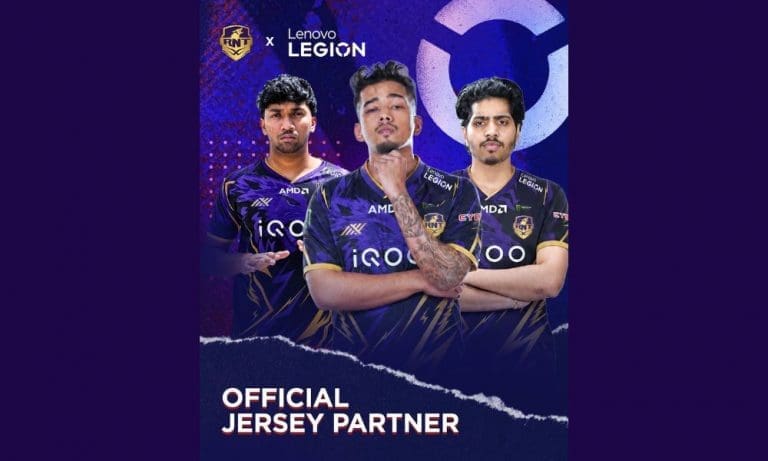
Revenant XSpark has announced Lenovo Legion as its official jersey partner. The organisation revealed the partnership through an Instagram post on August 2, 2026, with the caption “It’s time we Reach our Impossible” alongside the hashtags #Lenovo, #LenovoLegion, #ReachYourImpossible, and #WolvenSpark. The new jersey features a dark purple base with the Lenovo Legion branding prominently placed across the chest and shoulders of the RNTX roster.

Revenant XSpark x Lenovo Legion: What We Know

The partnership makes Lenovo Legion the official jersey partner of Revenant XSpark. This means Lenovo Legion branding will appear on the organisation’s jerseys across all competitive titles and content appearances going forward.

The announcement image features RNTX players wearing the new purple jersey with the Lenovo Legion logo on the front alongside existing sponsors iQOO, AMD, and EYE7. The jersey also carries the RNTX wolf logo and the WolvenSpark identity the organisation adopted when it unveiled its new branding in April 2026.

The timing of this deal is not accidental. Revenant XSpark is currently competing at the Esports World Cup 2026 in Paris across multiple titles, including the Honor of Kings World Cup 2026, where the team qualified directly for the Group Stage. The organisation also has rosters in BGMI, Free Fire MAX, Mobile Legends, Brawl Stars, and VALORANT.

Why Lenovo Legion

Lenovo Legion is one of the biggest names in gaming hardware. The brand is also the official PC and gaming hardware partner of the Esports World Cup 2026, providing Legion desktop PCs and monitors for competitions, training areas, broadcast studios, and festival zones across the seven-week Paris event.

An RNTX jersey partner deal gives Lenovo Legion direct visibility on one of India’s most active esports rosters at the exact moment both parties are present at the same international event. For Revenant XSpark, having a global gaming hardware brand on the jersey adds commercial weight alongside existing partners iQOO, AMD, and EYE7.

Community response to the announcement was immediate. One of the top comments on the Instagram post noted: “Apart from RNTX, no organization in India has this many sponsors.”

Revenant XSpark’s Growing Partner Portfolio

Lenovo Legion joins an existing list of commercial partners for Revenant XSpark:

PartnerCategory
iQOOMobile devices
AMDHardware / Processing
EYE7Eyewear
Lenovo LegionGaming hardware (Jersey Partner)

Revenant XSpark has built one of the largest sponsor portfolios of any Indian esports organisation. The organisation was formed in late 2024 through the merger of Revenant Esports and Team XSpark, with Scout (Tanmay Singh) as brand ambassador and co-owner. Since then, the organisation has expanded aggressively across titles and partnerships.

BLAST Bounty Malta Semi-Finals Recap

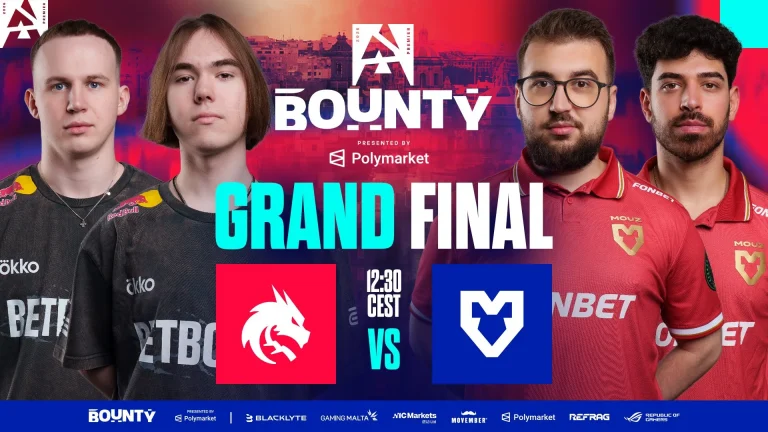
The BLAST Bounty grand final is set. Spirit booked their place following a close 2-1 win over FaZe in the day’s first semi-final, surviving a Cache comeback from their opponents before closing it out on Anubis. MOUZ secured back-to-back maps following a loss in the opening one, securing their place in the Grand Finals against Spirit.

Spirit survive a scare from FaZe

Spirit opened on their own pick, Dust2, and never let FaZe into the game. Danil “donk” Kryshkovets set the tone early with a dominant performance as Spirit closed it out 13-6 without much resistance. Despite keeping up, FaZe’s mid rounds suffered, with Spirit keeping control of the game with superior mid rounds

FaZe hit back on Cache, the one map where their lineup has looked untouchable over the past three months, and made it count. Jason “JBOEN” Boe Nielsen led the fightback, and FaZe took the map 13-9 to force a decider despite a poor start. With Cache being a new map, FaZe’s gamble paid off in ways they would have expected, as we saw them take the series to the final map.

Anubis went the distance. Spirit’s structure held up better in the closing rounds, and they closed out the series 13-11 to book their spot in the grand final, their third at this event. While FaZe lost, they managed to give Spirit a tough fight in a match many expected to be a total blowout. FaZe’s new lineup is starting to produce results, and this match is a testament to that.

Astralis and MOUZ close out the bracket

Astralis took the opener on their own pick, Ancient, 13-6, in what can be said as their most dominant performance against MOUZ in a long time. The early lead in the series gave Astralis the comfort zone, but they failed to build on it, leading to two disastrous maps as a consequence.

MOUZ responded with two back-to-back 13-9 wins as Astralis failed to get going, which goes to show how Astralis are just not ready to take on the teams at the highest level of the game. Giving a tough fight in the second map, Astralis were outclassed in the 3rd map as MOUZ’s new lineup has continued in the footsteps of the previous one.

With the Grand Final set, we will see MOUZ take on Spirit, with no clear favorites given that both teams have been showing shaky form. One can argue MOUZ’s recent form gives them the edge, but it is really anybody’s Grand Final to take.

Deadlock Dataminers Reveal New PvE Game Mode, Cosmetics, and Hideout Expansions in Future Update

Last night, the highly anticipated Deadlock matchmaking update went live, bringing an all-new ranked mode to the game alongside a series of changes to the gameโ€™s matchmaking system.

While the July 30 Deadlock update itself was packed with a bunch of exciting changes, recent leaks from various dataminers reveal that Valve might still have big plans for the hero shooter.

Following the Deadlock matchmaking update, dataminers have managed to dig up game files and shed light on a ton of upcoming content, including a brand-new PvE game mode, cosmetics, and expansions to the hideout.

Hereโ€™s everything you need to know about the latest wave of Deadlock leaks.

Deadlock Leaks Reveal New PvE Mode, Cosmetics, and Hideout Expansions

The biggest highlight of the recent Deadlock leaks is a brand-new PvE game mode thatโ€™s likely coming to the Valve title in the near future.

After the last Deadlock update, dataminers have found mentions of a new menu button for something that might be related to an actual PvE game mode. The console command in question, โ€œCitadelStartPVEBotMatch,โ€ currently does nothing when used.

Then thereโ€™s the much-anticipated cosmetics system. Leaks suggest that a โ€œWardrobeโ€ functionality is likely to come to the Hideout in a future update, and itโ€™s already present in the game files.

In addition to these Wardrobe cosmetics, mentions of โ€œemotesโ€ have also been found in the game files.

Lastly, a new โ€œBarโ€ area has been added to the game files, which is expected to be a part of an expanded Hideout section. A number of models for this new area are already finished and can be found in the files. However, the bar itself remains inaccessible at the time of writing.

Fortnite DMA Cheat Seller Banned After Epic Games Lawsuit

Fortnite DMA cheat seller UHyper808 has been permanently banned from the game after Epic Games took legal action against them. Epic confirmed the news through its official Newsroom account on X on July 31, 2026, saying the seller had been promoting DMA software that gave players an unfair advantage. UHyper808 has been linked to Blurred.gg, a site that sells DMA cheat tools for Fortnite and other games. Following the legal action, the seller posted a public apology admitting fault.

Here is what happened, why DMA cheats are treated differently, and how this fits into Epic’s wider fight against cheating.

Fortnite DMA Cheat Seller Ban: What Epic Games Did

Epic Games Newsroom announced the action in a post on X, stating that legal steps were taken against the player for promoting DMA software and that they are now barred from selling cheats going forward. The seller, known as UHyper808, was tied to Blurred.gg, a website that offers DMA cheat tools for Fortnite among other titles.

Epic has not shared the full scope of the legal case. The company’s statement focused on two outcomes: the player is banned from Fortnite, and they can no longer sell cheating software in the future.

UHyper808’s Public Apology

After the legal action, UHyper808 posted a written apology to the Fortnite community. In the statement, the seller acknowledged working with Blurred.gg and selling cheating software, and confirmed they broke Epic’s rules. The apology also confirmed the permanent ban from Fortnite and that they had ended their involvement with Blurred.gg.

Public apologies like this have become common in Epic’s enforcement pattern. Players caught cheating or helping others cheat have repeatedly closed out their cases by posting similar statements.

Why DMA Cheats Are Harder to Detect

DMA cheats work differently from standard software hacks. Instead of running entirely on the player’s own PC, the cheat connects through a second computer linked to the gaming system. That secondary device reads the game’s memory directly and powers features such as aimbots and wallhacks.

Because the process happens outside the main system, Fortnite’s built-in anti-cheat tools have a harder time catching it. This is why DMA software is treated as a bigger threat than typical cheats, even with Easy Anti-Cheat’s kernel-level protection running alongside Fortnite’s other detection systems.

Epic states that breaking its rules leads to a ban at minimum, and can also mean legal consequences along with the loss of any money made from the violation.

New Anti-Cheat Requirements for Tournaments

Epic has also been tightening the technical side of anti-cheat. Since February 19, 2026, the company has required PC players in Fortnite tournaments to enable three security features: Secure Boot, TPM, and IOMMU. IOMMU is the one most relevant to DMA cheats, since it limits how outside hardware can access a computer’s memory. Epic says most players on Windows 11-compatible PCs already meet these requirements or can turn them on without new hardware.

Epic Games has not detailed further legal steps in the UHyper808 case. The company says it continues to fix exploits quickly, make its systems harder to reverse-engineer, and use data and machine learning to flag suspicious behavior. In-game player reports remain a key part of how Epic catches and bans cheaters, including sellers like UHyper808.

PUBG Mobile World Cup Winners (2024-2026): Complete PMWC Champions List

The PUBG Mobile World Cup (PMWC) is one of the biggest international tournaments in PUBG Mobile esports. Introduced in 2024 as part of the Esports World Cup, the tournament brings together the best teams from around the world to compete for multi-million-dollar prize pools and the prestigious world title. Every year, teams qualify through their regional leagues and battle across multiple stages before reaching the Grand Finals.

Since its debut, PMWC has crowned champions from Brazil and Myanmar, while the 2026 edition is set to continue the legacy with 32 of the world’s best teams competing in Paris, France. Here’s a look at the PMWC winners list.

PMWC winners list

SeasonWinnerRunner-upLocationPrize Pool
PMWC 2024Alpha7 EsportsREJECTRiyadh, Saudi Arabia$3,050,000
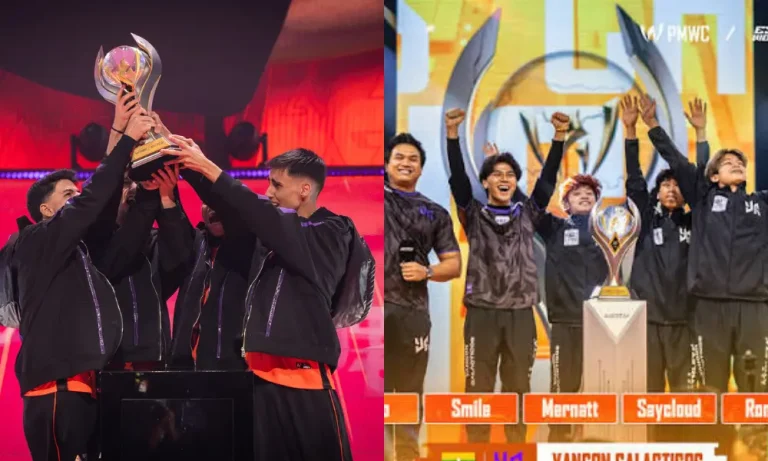
PMWC 2025Yangon GalacticosWeibo GamingRiyadh, Saudi Arabia$3,050,000
PMWC 2026TBDTBDParis, France$3,025,000

PUBG Mobile World Cup 2024

Winner: Alpha7 Esports

The inaugural PUBG Mobile World Cup 2024 was held in Riyadh, Saudi Arabia, as part of the Esports World Cup. A total of 28 teams competed through the Group Stage, Survival Stage, and Grand Finals for a prize pool of $3.05 million.

Brazilian powerhouse Alpha7 Esports created history by becoming the first-ever PMWC champions. The team defeated Japan’s REJECT in the Grand Finals and also secured an additional regional slot for the PUBG Mobile Global Championship (PMGC) 2024 after winning the tournament.

Alpha7’s victory established Brazil as one of the strongest regions in PUBG Mobile esports and made the organization the first name on the PMWC trophy.

Read More: PMWC 2026 Prize Pool Distribution Explained: How $3 Million Is Split Across All Stages

PUBG Mobile World Cup 2025

Winner: Yangon Galacticos

The PUBG Mobile World Cup 2025 returned to Riyadh with a $3.05 million prize pool. Unlike the inaugural edition, 24 teams competed for the championship after qualifying through their respective regional leagues.

The tournament also marked India’s return to the global PUBG Mobile esports scene after several years, with teams qualifying through the BGMI Pro Series (BMPS).

Myanmar’s Yangon Galacticos delivered a dominant performance throughout the event to lift the trophy. The team defeated China’s Weibo Gaming in the Grand Finals and became the second-ever PMWC champions.

Their victory further strengthened Southeast Asia’s reputation as one of the most competitive PUBG Mobile regions.

PUBG Mobile World Cup 2026

The PUBG Mobile World Cup 2026 will be held from August 6 to August 16 in Paris, France, making it the first PMWC hosted outside Saudi Arabia.

This year’s tournament features 32 teams, the highest in PMWC history, competing for a $3.025 million prize pool. Teams from major regions, including China, South Korea, Japan, Southeast Asia, Europe, the Americas, and India, will battle for the championship.

Indian fans will closely follow GodLike Esports and Orangutan, who qualified through BMPS 2026 and will represent the country on the international stage.

The winner of PMWC 2026 will join Alpha7 Esports and Yangon Galacticos in the tournament’s growing list of champions.

PUBG Mobile World Cup winners overview

YearChampionRunner-upTeamsHost City
2024Alpha7 EsportsREJECT28Riyadh
2025Yangon GalacticosWeibo Gaming24Riyadh
2026TBDTBD32Paris

The PUBG Mobile World Cup has quickly become one of the biggest tournaments in mobile esports. With a growing number of participating teams and millions of dollars on the line, every edition continues to raise the level of international competition. As the 2026 season gets underway, fans will be eager to see which team adds its name to the prestigious list of PMWC champions.

BGMI 4.6 Update Release Date in September 2026? Check Details

The BGMI 4.6 update is expected to be the next major update for Battlegrounds Mobile India after the recently released 4.5 version. While KRAFTON India has not officially announced the release date, previous updates suggest that BGMI usually receives the same content shortly after the global PUBG Mobile update. Since the PUBG Mobile 4.6 Beta is already live and the testing phase will continue until late August, Indian players can expect the BGMI 4.6 update to arrive in early September 2026. Here’s everything we know so far about the BGMI 4.6 update release date and more.

BGMI 4.6 update release date (Expected)

BGMI follows PUBG Mobile’s update cycle with a delay of around 7 to 10 days. Looking at the previous updates, the pattern has remained almost the same.

PUBG Mobile UpdateRelease DateBGMI UpdateRelease DateGap
PUBG Mobile 4.1November 6, 2025BGMI 4.1November 13, 20257 Days
PUBG Mobile 4.2January 7, 2026BGMI 4.2January 15, 20268 Days
PUBG Mobile 4.3March 12, 2026BGMI 4.3March 19, 20267 Days
PUBG Mobile 4.4May 12, 2026BGMI 4.4May 20, 20268 Days
PUBG Mobile 4.5July 9, 2026BGMI 4.5July 16, 20267 Days

Based on this trend, if the PUBG Mobile 4.6 update launches during the last week of August 2026, the BGMI 4.6 update is likely to release 7 to 10 days later, which points to the first week of September 2026.

KRAFTON India has not confirmed the official release date yet, so this timeline is based on the game’s previous update schedule.

Read More: PUBG Mobile 4.6 Update Beta: Date, How to Download, Link, and More Details

What can players expect in the BGMI 4.6 update?

The 4.6 update is expected to include almost all the content introduced in the PUBG Mobile 4.6 version. Based on the ongoing beta, players can expect:

  • A new themed mode for Erangel
  • Classic Mode gameplay improvements
  • World of Wonder updates
  • Metro Royale improvements
  • New events and rewards
  • Gameplay optimizations and bug fixes

KRAFTON India may also add some India-exclusive events and rewards when the update goes live.

PUBG Mobile Beta gives a preview

The PUBG Mobile 4.6 Beta is currently being tested in four phases, allowing selected players to try new features before the official release. Any bugs reported during the beta will be fixed before the update arrives in both PUBG Mobile and BGMI.

As more beta phases roll out, additional features are expected to be revealed.

Although the official announcement is still pending, the BGMI 4.6 update is expected to follow PUBG Mobile’s release pattern once again. If PUBG Mobile receives the 4.6 update by the end of August, BGMI players can likely expect the update during the first week of September 2026. Until then, players can keep an eye on the PUBG Mobile beta, which offers the first look at many of the features coming to BGMI.

PUBG Mobile 4.6 Update Release Date: Expected Timeline, Beta Schedule, and More

The PUBG Mobile 4.6 update is expected to be the next major update for the game after the recently released 4.5 version. Tencent Games has already started rolling out the PUBG Mobile 4.6 Beta in multiple testing phases, giving selected players a chance to try the upcoming content before the official launch. While the developers have not confirmed the release date yet, the current beta schedule suggests that the global update could arrive by the end of August 2026 or in the first week of September. Here’s everything we know so far about the PUBG Mobile 4.6 update release date and beta timeline.

Official PUBG Mobile 4.6 Update Release Date Revealed: Check Here

PUBG Mobile 4.6 update release date (Expected)

PUBG Mobile follows a regular update cycle, releasing a major version roughly every two months. The previous updates followed this schedule:

UpdateRelease Month
PUBG Mobile 4.3March 2026
PUBG Mobile 4.4May 2026
PUBG Mobile 4.5July 2026
PUBG Mobile 4.6Expected August/September 2026

The PUBG Mobile 4.6 Beta calendar confirms that the testing period will continue until August 23, 2026 through four different beta phases.

If Tencent completes bug fixes on schedule, players can expect the PUBG Mobile 4.6 update to release during the last week of August 2026. However, if additional testing is required, the update could be delayed until the first week of September 2026.

PUBG Mobile 4.6 Beta timeline

The official beta schedule includes four testing phases:

  • Beta 1: July 30 โ€“ August 5
  • Beta 2: August 6 โ€“ August 12
  • Beta 3: August 13 โ€“ August 20
  • Beta 4: August 21 โ€“ August 23

The first beta mainly focuses on stability testing, while the later phases gradually introduce new gameplay features, themed mode updates, World of Wonder improvements, Classic Mode changes, and Metro Royale updates.

Read More: PUBG Mobile 4.6 Update Beta: Date, How to Download, Link, and More Details

What to expect in the PUBG Mobile 4.6 update

Tencent has not officially revealed all the features yet, but based on the beta roadmap, players can expect:

  • A brand-new themed mode for Erangel
  • Classic Mode gameplay improvements
  • World of Wonder updates
  • Metro Royale improvements
  • Bug fixes and performance optimizations
  • More content to be revealed during the later beta phases

More features are expected to appear as Beta 2, Beta 3, and Beta 4 become available.

Although Tencent has not announced an official release date, the PUBG Mobile 4.6 update is expected to launch shortly after the beta testing ends. If everything goes as planned, players can expect the update in the last week of August 2026, while a release in the first week of September remains possible if the developers need extra time to polish the update.

Clash of Cards Event in Clash of Clans: Dates, Rewards, and More

0

The Clash of Cards event is now live in Clash of Clans, running from August 1 to August 31 as the centerpiece of the game’s 14th Clashiversary season. The brand-new event type is open to all players at Town Hall 3 and above, letting you collect troop cards, trade duplicates with clanmates, and earn exclusive rewards, including a one-of-a-kind decoration. Alongside the event, 3 new Crafted Defenses, Cake-A-Pult, Hero Hunter, and Hot Candle, arrived on August 1. Here is everything you need to know, including dates, rewards, and how each defense works.

Clash of Cards Event Release Date, Rewards, and How It Works

The Clash of Cards event began on August 1, 2026, and will stay live until August 31, 2026. It is part of the Clash-A-Rama: The Awesome Quest season, which celebrates 14 years of Clash of Clans.

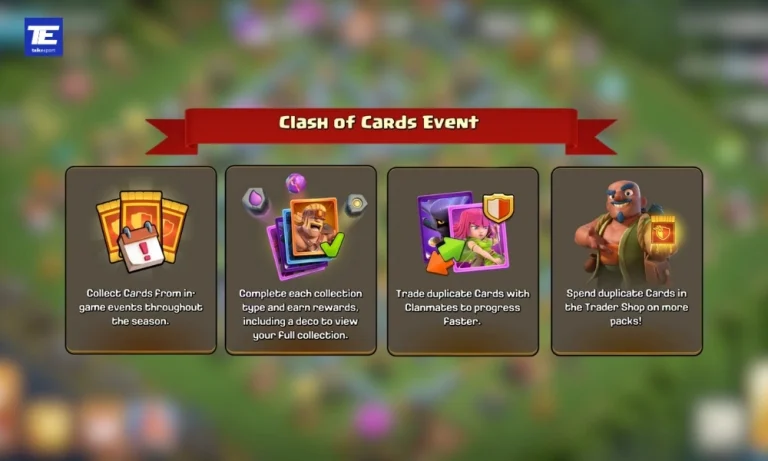
The concept is simple. You unlock troop cards from battles and in-game events, then fill out your collection to claim rewards, including a unique Clash of Cards decoration for your village.

Duplicates are not wasted either. You can trade duplicate cards with your clanmates directly in Clan Chat, or spend them at the Trader Shop to buy Booster Packs if a specific card refuses to drop for you.

One deadline matters most: you can collect your rewards until September 2 at 08:00 AM UTC. Complete your collection well before that cutoff so nothing goes unclaimed. Supercell has also confirmed the return of the Clashiversary Cake obstacle, and recommends saving at least one in your village.

DetailInformation
Event NameClash of Cards
DurationAugust 1 – August 31, 2026
EligibilityTown Hall 3 and above
How to Get CardsBattles, events, trading, Booster Packs
TradingDuplicate cards via Clan Chat
Booster PacksTrader Shop (bought with duplicates)
Exclusive RewardClash of Cards decoration
Reward Claim DeadlineSeptember 2, 08:00 AM UTC

How to Trade Cards and Get Booster Packs

Duplicate cards are not wasted in this event. You can trade duplicates with your clanmates directly in Clan Chat, making this one of the few Clash of Clans events built around clan cooperation rather than solo grinding.

If trading does not fill the gaps, there is a backup. You can spend duplicate cards at the Trader Shop to buy Booster Packs, giving you fresh pulls whenever a specific card refuses to drop.

Active clans will have a clear advantage here. The more clanmates participating, the larger the trading pool, so coordinate in Clan Chat early and let everyone know which cards you still need.

Also read: Clash of Clans New TH11+ Clashiversary Defenses: All 3 New Crafted Defenses Explained

More Ways to Earn Cards This Season

Card sources expand mid-season. The Awesome Medal Event, running from August 12 to 31, lets you collect Card Tokens in Home Village battles, earn Quest Medals to spend at the Trader Shop, and pick up additional Card Packs. If your collection is incomplete by mid-August, this is the best window to close it out.

Supercell has also confirmed the return of the Clashiversary Cake obstacle, and recommends saving at least one in your village as a permanent keepsake from the anniversary season.

As Supercell put it in its announcement, this event comes with no mana curve and no Standard rotation, just Barbarians and bragging rights, a playful jab at traditional card games.