Genshin Impact lovers are quite hyped with Childe. Childe is one of the Fatui’s Eleven Fatui Harbingers who went to Liyue to head the subsidizing for the city’s funds. He was first found in the second Closed beta test however was not accessible as a playable character. Basically, he initially shows up inside Act 1 of Chapter 1.
Childe’s Profile
Childe has short, uneven orange hair and blue eyes. He wears a veil pulled out of the way of his head. He likewise wears a battered red scarf. Childe wears a dim coat, dim jeans, and dark boots. His coat is open on one side to uncover a belt with his hydro vision joined.
Childe’s Personality
Childe portrays himself as “sort of a miscreant, however not here to give the Traveler any difficulty”. He is by all accounts well-intentioned and bright and has expressed that while he’s an individual from the Fatui he isn’t a devotee of La Signora. He hops in to spare the Traveler and Paimon after the pair is going to be gotten by gatekeepers, and offers the Traveler guidance on where to go straight away.
Childe’s Ability
Attribute: Hydro
Weapon: Bow
Type: ???
Skill: Stance Change (allows him to type ranged or close and his ultimate attack changes depending on his fighting style)
Constellation: ???
Which ability of Childe do you like most in Genshin Impact? Let us know in the comment section below.
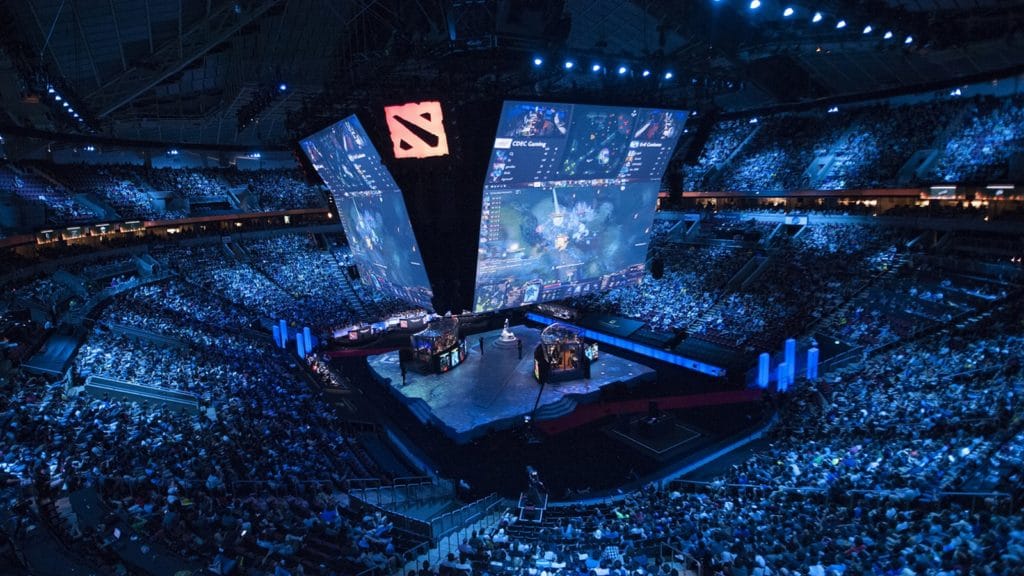
According to reports from multiple sources, Valve has declined to host the biggest esports tournament in the world – The International 10 – in Shanghai, China after an offer from Perfect World and the Shanghai Government.
Soon after Dota 2 caster Kyle Freedman’s post on Medium where he expressed his dissatisfaction with Valve’s handling of the pro Dota 2 scene went viral, it was translated by Team Aster CEO Zhili Guo and published in the Chinese platform Weibo. It didn’t long for the post to gain traction on Weibo, and further criticism started flowing against Valve from the Chinese player base.
Following the incident, Perfect World reportedly got in talks with Valve to organize TI10 in Shanghai, China, to which the latter declined.
Zhou “Haitao” Lingxiang, co-founder of Imba TV released a statement confirming the same, “From April to May, Perfect World CEO Hong Xiao reached out to Valve and asked if Valve is willing to move The International 2020 to Shanghai, and the Shanghai government expressed full support for the event. However, Valve refused this proposal,” Lingxiang claimed on his Weibo.
Pan “RURU” Jie, CEO of LGD, also confirmed the news of the Shanghai government inviting Valve to host the upcoming TI in China. ”The Shanghai government was willing to support The International 2020 at the same level as the 2020 League of Legends World Championship,” Jie said.
The International has continued holding its place as the tournament with the largest prize pool in esports history for many years in a row, with the total prize money of TI10 surpassing the mark of $40 Million only ten minutes before the conclusion of this year’s Battle Pass.
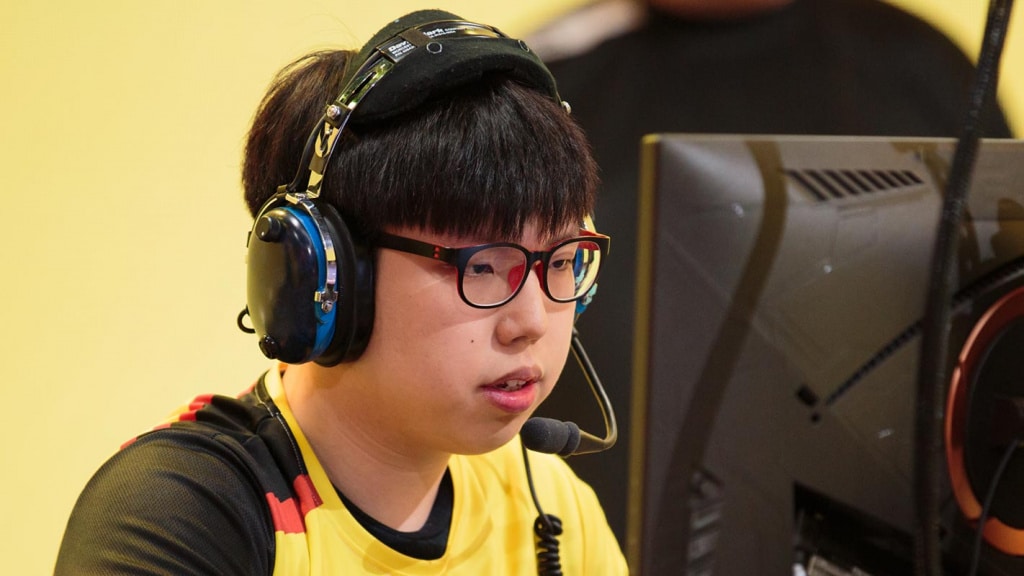
T1 has rounded off their Valorant roster South Korean Overwatch prodigy, Jung-woo ‘Sayaplayer’ Ha.
Sayaplayer, known for his unrivaled aiming prowess will enter this new phase of his esports career under a new nickname “Spyder”. The Korean locks the final spot in T1’s Valorant roster and is the only player without a Counter-Strike background. He will be joining a squad filled with veterans of North American Counter Strike armed with knowledge and experience of top tier FPS.
Spyder was let go by Florida Mayhem shortly before announcing his future plans that lie with T1 and Valorant. He was picked up by the Florida Mayhem after impressive showings in lower leagues. In only a matter of time, he found his footing with the side and made a place for himself as the team switched into a complete Korean roster right before the 2020 season of OWL. His stint with the OWL side was enough to convince the world of his crisp aim, which he hopes to bring into Valorant.
Division Rivals has been an important part of the FIFA Ultimate Team ever since its introduction to the game. It falls second in the priority list for players after FUT Champions and servers as a warmup. What about the Fifa 21 Division Rivals release date? Let’s check it out.
In Division Rivals, players of similar divisions are pitted against each other. The winner is rewarded with coins and points which help in qualification. Every week a player is allotted 30 games which give and take away points upon winning and losing respectively but coins are awarded regardless of the result.
Earned points will let players move up the ladder in terms of Divisions and rewards get more compelling as they move up. Reaching Division 1 is a sweet feeling for every fan. Players are awarded Player Packs along with coins at the end of the week and its quality depends on the Divison the player holds by the weekend.
Division Rivals and FUT Champions rewards are expected to be released at 4 A.M ET(13:30 IST). Where players will receive 3 options in a large sum of coins, Tradable and Untradable Packs.
Like every previous FUT installment, in Fifa 21 the rewards will improve as the player reaches higher divisions. The rewards are a boon for non-P2P players, as they are likely to receive decent players which they can use in their teams or can sell them to get a suitable player that fits right in.
The lumpsum coins are also quite a considerable option as it is less of a gamble considering the other two. One can barely go wrong with guaranteed finance as if you are not lucky enough to grab a decent gold player which either fits or sells for pennies on dollars, you would be better off with the coins which at least ensure some transfer funds.
Counter-Strike:Global Offensive is a team game that requires complex thinking and good communication between allies. If you’re not actively giving out callouts during a game, you’re playing it wrong. To be able to communicate effectively in-game without wasting any time, you have to learn callouts of all the Counter-Strike maps, and what better map to start than Dust 2, which is perhaps the most iconic map in all of CS history.
Here’s a detailed list of callouts in Dust 2 which you need to know and remember for the rest of your life, with a map following it.
Take your time to memorize the map and the callouts for the different areas, and make sure you know the finer differences like ‘T Ramp’ or ‘T plat’ when communicating to your team.
During intense situations, every second you spend remembering a callout can prove to be disastrous for your team. So make sure you have every single one of these callouts printed in your memory before you hop onto your next competitive game of Dust 2.
Image ~ TOBYSCS
A Short
The walkway that connects mid to the A bombsite. It’s typically used by Ts to rush on eco/pistol rounds, or to split A with another group of Ts pincering the site from A Long.
T Spawn
The side of the map where the Terrorist side spawns. A small section of T spawn offers a view down mid to mid doors, giving Ts the chance to see which CTs cross over to B.
T Ramp
This is the ramp that leads down from T Spawn to outside B Tunnels. The term genuinly refers to the ramp section only, rather than the raised platform, which is called T Platform.
T Plat
This is the raised platform that leads from T Spawn to outside B Tunnels. It features several stacks of bricks that can be used to watch B Tunnels from a strong position. T Plat borders T Ramp.
Outside Tunnels
The area just outside of B Tunnels when approaching them from T Spawn. This is quite a broad, open area, so this callout covers quite a bit of space.
Upper B Tunnels
This is one of two sections of B Tunnels. It begins at the entrance to B Tunnels from T Spawn, and extends to the chokepoint that leads to the B bombsite.
Lower B Tunnels
This is one of two sections of B Tunnels. It begins at the stairs leading down from Upper Tunnels into the corridor that connects the Tunnels to mid, and ends at the archway into mid.
Close
A loose callout, but this is generally what the left corner as you exit B Tunnels onto the B site as a Terrorist is referred to. It’s a very close angle that, if left unchecked by the Terrorists, can be very deadly.
B Closet
This is the corner of B Site where the car is located, to the right of Tunnels as you exit them or to the left of B doors.
B Car
This is the car on B site to the right of Tunnels Exit and to the left of B doors if you enter from mid. This callout is only used if there’s a player directly behind the car – if they’re in the corner next to car then that is typically called Closet instead.
Fence
This is the fenced off wall on B Site that can provide a hiding spot invisible to the Ts until they have moved from Tunnels onto B site.
B Plat
This is the elevated area of the B bombsite next to where the bomb can be planted, and is directly opposite the exit of B Tunnels.
Back Plat
This is the backend of B Plat. It has a seperate callout name as when you’re on the bombsite you won’t be able to see the back of B Plat, so this is used when a player is tucked right into the edge of the area.
Big Box
This is the big box that resembles the Xbox in mid, that sits on B site. It is between B Plat and the bombsite.
Double Stack
This callout refers to the two boxes that are stacked on top of each other in the middle of the B bombsite. These are not to be confused with the boxes that lead to B Window.
B Default Plant
Where the bomb is most commonly planted on the B Site. It hugs the brick wall, is just below B Window, and on the side of B Doors.
B Window
This is the hole in the brick wall on the B site, that has several boxes serving as a platform to reach it as its raised off the ground. It’s a common position to use when defending the B bombiste and retaking it.
B Back Site
This is the back of the B bombsite, as if you were looking at it from the Tunnels Exit. It typically refers to the area behind all of the boxes on B, and borders with B Plat.
B Doors
The double doors that lead into B from CT Mid.
B Boxes
This callout refers to the boxes between CT Mid and B Doors. They are often used as a vantage point to watch players attempting to come from mid to B.
Scaffolding
This is the scaffolding (building materials) just outside B, on the side of B Window. They can be walked on to give a favorable angle to watch mid to B pushes from.
CT Mid
This area refers to the space between B Site, Mid and CT Spawn. This area is behind mid doors, and sits next to CT Spawn.
Mid Doors
The double doors in Mid.
Close Mid Doors
The corner to the right of Mid Doors if you were going through them from Mid to CT Spawn. It is commonly called Hiko after the North American pro player pulled off an insane shot from the position.
Xbox
The box in Mid, by the doors, that can be used to gain access onto Catwalk and A Short. It is opposite the exit from Lower B Tunnels.
Mid
The middle area of the map, that extends from Mid Doors to the top of Mid. Generally the area of Mid that slopes is what will be called as “Mid”.
Palm
The now-telephone mast that sits near the top of mid next to Catwalk, where there was once a Palm Tree.
Right Side Mid
The indented area of Mid that is on the right if you’re looking from Mid Doors up towards T spawn. It has this callout as typically only CTs will be calling it, so therefore it is correct for their viewpoint.
Top Mid
The top of Mid if you’re looking from Mid Doors up towards T Spawn. This connects Suicide with Mid.
Suicide
The pit that is used to jump down from T Spawn and run straight to Top Mid. It is directly opposite Mid Doors, and earned its name from being perilous at times to jump into due to potential AWPers.
Outside Long
This is the open space outside of Long Doors on the T Spawn side of the map. It connects T Spawn to Long Doors and A Long.
Long Doors
This area defines the two sets of Double Doors that lead from Outside Long to A Long.
Blue
This is the large, blue shipping crate that stands opposite A Long Doors.
Side Pit
This is the area of ground that is between Pit and A Long Doors. The differentiation between this area and Pit is when the ground starts to slope downwards, and the small brick wall before the Pit area.
Pit
The sloped-down area that is outside of Long Doors and at the end of A Long. It faces opposite to the A Site but is a decline, so players can be in Pit but hidden from A Site.
Pit Plat
The platform to the right of Pit if you’re looking at it from the bottom of pit. It allows for some good sniping angles onto the A site.
A Long
This is the space of ground that connects Long Doors and Pit to the A Bombsite. It is a long narrow stretch of ground.
Long Corner
The corner of the closest building to Long Doors. It is a very common place for CTs to hold against pushes at A Long.
A Car
The car that is tucked away to the right side of A Long if you’re approaching from Pit. It can be used to watch A Short or A Long, and this call covers the general area around the car.
A Cross
This is the open area that seperates A Long from A Site. It is wildly exposed to every angle – Site, CT Spawn, Short – which is why it’s called “Cross.”
A Ramp
The ramp that leads upwards from A Cross to the A Bombsite.
A Default Plant
The default plant spot on A. It is on the edge of the raised platform, as close to A Long as possible to provide the best visibiltiy from every angle to attack any CTs defusing.
Barrels
The set of barrels that sit behind A Site, near the mesh fencing.
Goose
The enclosed section behind A Site and Barrels that has the image of a goose spraypainted onto it.
Elevator
One of the corners of the A Site Platform, closest to the side of CT Spawn. It earned its callout as it’s a common position for CTs to boost teammates up onto the bombsite when retaking.
Short Boost
The set of dumpsters right outside of CT Spawn on the A side. These can be used to boost CTs onto A Short faster than running there gets them.
A Platform
The platform that the A bombsite is placed on. This is quick a broad callout, but generally refers to the area between the A Bombsite itself and A Short.
A Ninja
A hidey-hole behind a stack of boxes on the A Short side of A that can be used to Ninja defuse by the CTs if the Ts all come from A Long and don’t clear the position.
Stairs
The set of stairs that connect Catwalk with A Short.
Catwalk
The walkway on the side of Mid that leads onto A Short and the A Bombsite. Generally this callout is defined by the start of the Catwalk at the top of Mid up until Short Stairs, where it transitions into A Short.
CT Spawn
This is the location (technically under short) that the Counter-Terrorist team spawn within.
Prepare to drop into the Crossplay Beta with this guide that includes redemption instructions for Early Access and pre-load info.
During the beta, experience signature Black Ops combat across traditional 6v6 modes, 12v12 Combined Arms, and a brand-new 40-player mode, Fireteam: Dirty Bomb. The Beta will feature a selection of the game’s Multiplayer maps set in distinct global locations during the Cold War. Players can progress and rank up in the Beta-specific levelling system where loadout items, including new weapons, Field Upgrades, and Scorestreaks can be unlocked by earning XP.
The Black Ops Cold War Open Beta will be free on Xbox One, with players who pre-ordered digitally gaining early access.
Read on for details on pre-loading, downloading, and what’s included in the Black Ops Cold War Beta:
Time to Play: Crossplay Beta Weekend
The Crossplay Beta Weekend is scheduled to run from 10 a.m. PDT on Thursday, October 15 to 10 a.m. PDT on Monday, October 19. As a complete connected experience, Crossplay will be active allowing you to party up with friends and the greater community, no matter what they play on. Follow @CallofDuty and @Treyarch for ‘live now’ announcements and any updates to the schedule.
Check out the below for more information on when to gain access over the weekend:
Xbox Early Access: Those who pre-ordered the game digitally for Xbox One, Xbox Series X or Xbox Series S can begin playing the Beta on Thursday, October 15 and on Friday, October 16. Xbox Live Gold is required for Xbox One players.
Xbox Open Beta: The rest of the weekend, from Saturday, October 17 to Monday, October 19, is accessible to Xbox players regardless of pre-order status. Now, everyone in the Call of Duty community can hop on and play together.
What’s Inside the Beta
The Call of Duty: Black Ops Cold War Beta will feature a mix of maps, modes, and playlists. Similar to past Betas, the Black Ops Cold War Beta will also include a progression system where players can earn XP in order to unlock new content.
Expect frequent updates and surprises to take place within the Beta across both weekends and stay tuned to official Call of Duty and Treyarch channels for specific details.
Visit the Cold War landing site to get detailed information on the game, Beta, and specific Beta Multiplayer intel like game modes and Loadouts.
Earn an SMG Weapon Blueprint for Reaching Level 10
Players who reach Level 10 within the Beta will receive an SMG Weapon Blueprint at the launch of Black Ops Cold War.
A Weapon Blueprint is a variant of a weapon family within the game, complete with its own unique name and cosmetic differences. Weapon Blueprints may also come pre-equipped with attachments, allowing you to use them on that specific weapon without needing to level it up to unlock those attachments organically. These attachments can be swapped out in favor of other attachments earned by levelling up the weapon normally.
Access the Beta & Pre-load Information
Digital pre-order customers will be entitled to early access (Thursday and Friday) through their account on which they purchased the game. All other players can still access the open portion of the Beta (Saturday through Monday) for free.
Search for the Beta from the Xbox Store and follow the prompts to download. Beta pre-load starts on October 13 at 8 a.m. PDT for digital pre-order customers and will unlock the Beta to play on October 15 at 10 a.m. PDT. The Beta will be available to download for free for all other players starting October 17 at 10 a.m. PDT.
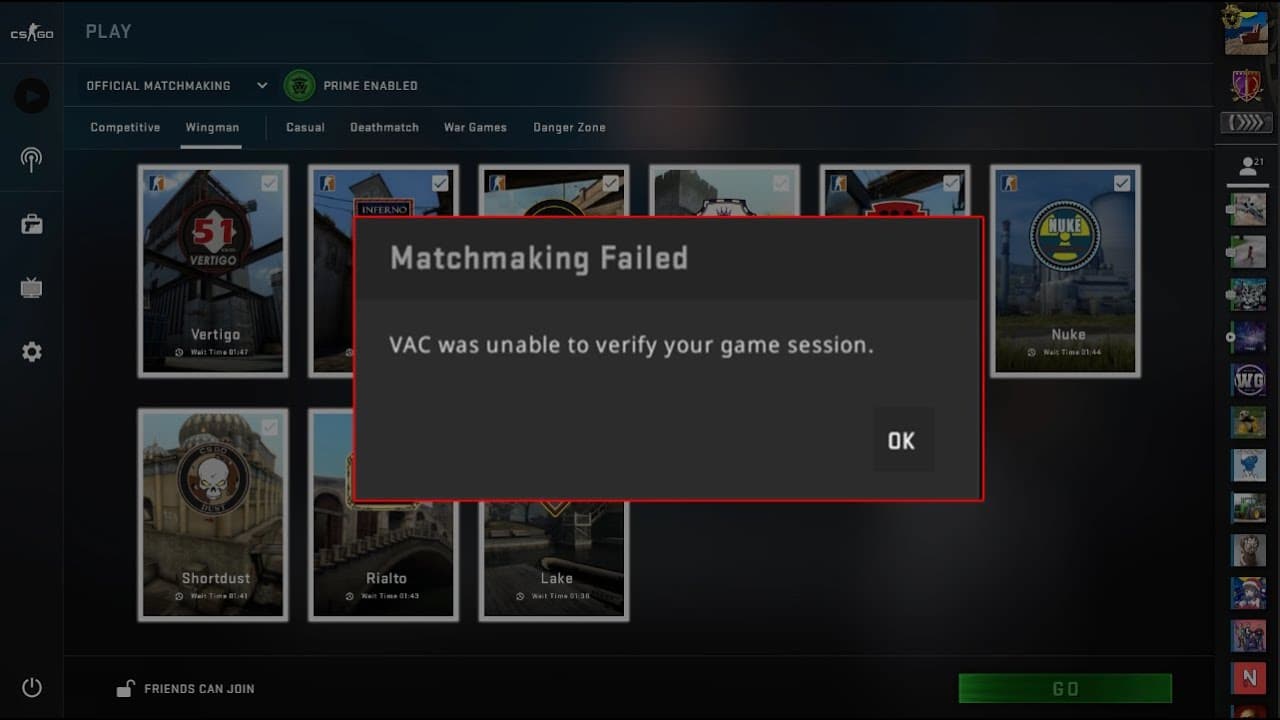
Valve’s competitive shooter CSGO has encountered a lot of bugs over the years, but not one of them has come even remotely close to annoying the players as much as this error did. Yes, I’m talking about the infamous which has been haunting players for a very long time.
The ‘VAC was unable to verify your game session‘ error is perhaps the most annoying error in CSGO which prevents the player from joining any matches, be it casual, competitive, or even community servers. Restarting your game rarely fixes the issue, and you’re left wondering what you can do to get rid of this monster.
If you’re reading this, chances are that you’ve probably already tried everything in your mind and the nasty bug still won’t succumb to your valiant efforts. Don’t worry, we have you covered. Here are some tips which you can use right now to make the bug disappear and rank up in peace.
Restart Steam Client: You may have already restarted your CSGO, but this error won’t leave you that easily. To fix it, you need to restart your entire Steam client. To do so, first, exit CSGO. Click on steam, then on the top left go to Steam, and exit (or log out). Relaunch the Steam client, then launch CSGO. Your problem is magically fixed. But on the off chance it isn’t, read on.
Restart Your PC: If restarting Steam didn’t fix the issue, restarting your PC might. You probably know how to do that, so let’s not waste time by stating here.
Verify Game Files: There’s a chance that something might be corrupted in your game files. To find the problem, go to your steal library, right click on CSGO, then go to verify local files. Once done verifying, your game will automatically redownload corrupted files and restore the game to its original state.
Reinstall CSGO: Your absolute last resort. Reinstalling the game is almost certain to fix your problem. First, uninstall the game from the control panel or from Steam. Then go to the Steam store and download your fresh copy of CSGO.
Once fixed, you’ll be able to run CSGO smoothly like before and join servers at will. However, it’s not rare for this bug to return in the future. In case that happens, you can just try these steps once again and it’ll be fixed in no time.
Valorant is a competitive shooter by Riot that requires intense teamwork and proper communication skills to get to the top levels of the game, which is simply not possible unless you have a functioning microphone that works properly in-game.
In case you have a good microphone that refuses to work when you enter a game of Valorant, the problem might be lying elsewhere. Let’s take a look at the possible reasons behind the issue of Valorant voice chat not working and ways to fix it.
Reasons and Fixes to Valorant Voice Chat Not Working
Some obvious reasons why your microphone is not working properly in-game include the mic not being properly plugged in, your Valorant settings being misconfigured, or your windows not detecting the mic automatically.
To fix any of those problems, simply follow these steps:
1) Check if your microphone works. Plug it in your PC or Phone and run a simple voice test to see if it is in good condition. If you use a splitter, make sure the microphone wire isn’t torn.
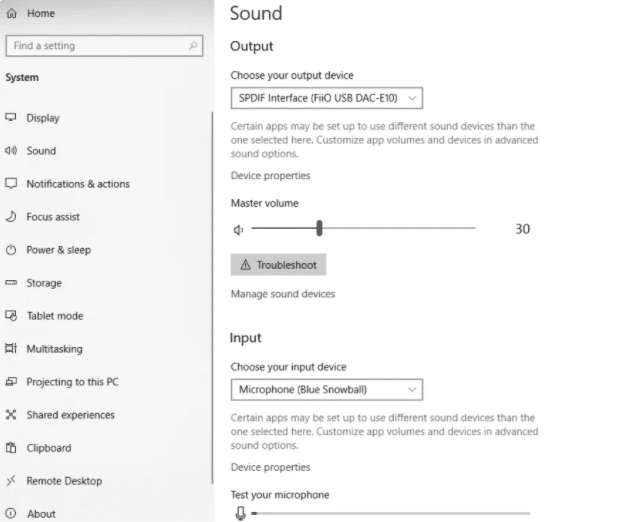
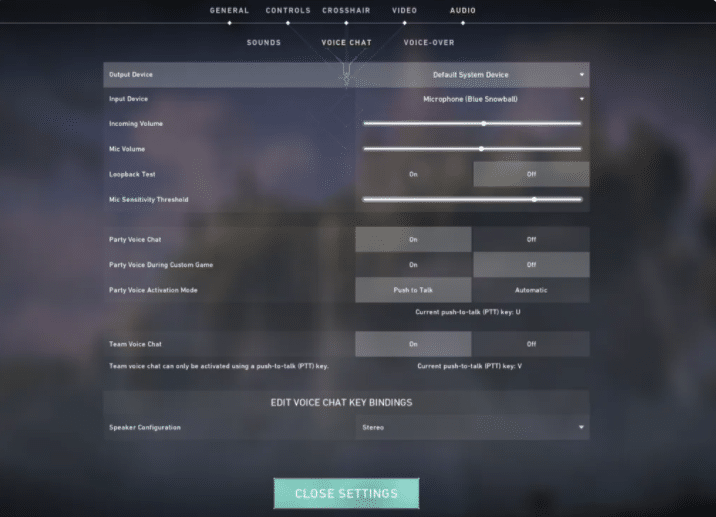
2) Right-click on the volume icon at the bottom right of your taskbar, click on ‘Sounds’, go to ‘Recording’ and make sure you have the correct mic selected as default. Once done, try talking in the mic and see if the green bar adjoining the default microphone goes up.
3) Launch Valorant, and go to the settings menu from the top right. Navigate to ‘Audio’ and select ‘VOICE CHAT’. Double-check the voice settings to see if everything is correctly configured.
Your problem should be fixed once you follow these simple steps. If it still persists, chances are that your microphone is the root of the issue and you should consider replacing it.
Noble Esports is making some big news in its South Asian operations, mainly in India. Starting with signing of a new PUBG Mobile roster in the country, they moved on to Valorant and now, they take a twelve year old pro under their regime.
Noble Esports announced that they signed the professional PUBG Mobile player Spower as their PUBG Mobile content creator and player. Spower is a 12-year-old pro who made his debut in the scene last year and has been making a name for himself since then. Earlier, he played for Initiative Esports and then represented prominent Indian Mobile Esports organization named 8bit.
Spower alongside other prominent faces of PUBG Mobile.
Noble signing SPower makes him the youngest Indian esports athelete to represent an international organisation. He is a well-known figure in PUBG Mobile community and has about 68,000 subscribers on his YouTube channel. Noble expressed its high expectations from this young player in a social media announcement post.
This announcement comes in an odd timing when PUBG Mobile remains banned in India. The esports organisations revolving around PUBG Mobile are taking a step back after the ban imposition and yet, Noble Esports makes a bold move to bring a young talent under its umbrella.
This move can be considered as a calculated risk as content creation is not affected by the game ban and Spower can potentially move on to a new game if PUBG Mobile remains banned. There are no new details about the future of PUBG Mobile and hence, the future of Noble Esports content creator lineup and the way in which the creators will evolve is not clear for now.
Free Fire is finally ready to launch its latest character named “K” or Captain Booyah. The character was made as a collaborative effort between Free Fire and American Dj KSHMR. The collaboration was announced with an exclusive song and music video, which will be launched tomorrow.
Free Fire has more than 25 characters with various unique active and passive abilities to each of them. The most famous character in-game right now is Dj Alok and now, K can be seen as a potential rival to that character which offers a lot more sustainability potential to the crewmates in-game.
Free Fire Captian Booyah Details:
Captain Booyah or K is a new character that will resemble KSHMR in Free Fire. Although the character has similar looks like the DJ, the abilities it brings in-game are tremendous. This character will be the third real-life resembling character after Dj Alok and Bollywood star Hritik Roshan based Jai.
Screengrab via 5 Star Gaming YT
Captain Booyah or K has two different abilities. Mainly characters have either an active or a passive ability but this character will have the combination of these two. Captain Booyah is depicted as a “professor and juijitsu expert” by the game. It has two abilities:
Passive: The character gets 2 EP per two seconds or 1 EP/sec which gives an EP boost to the character. Normally a character has 200 EP but K has an additional 50 EP.
Active: As the players gather EP when it reaches the mark of 150, an active toggle switch can activate the ability. Once the skill is activated, “K” is surrounded by a red-colored circle and regenerates HP for himself and his allies.
The character is not available in-game for now and will be available in a few days. Captain Booyah will be available with an entire bundle and players can unlock the character and its skin after purchasing and upgrading the character.
Along with the character, an exclusive song “One More Round” by KSHMR will be released on 15th October in Free Fire. A new music video was also announced which can be expected to be released in the upcoming days.