

Do you want to play Valorant with a nice and eye-catching look? Nvidia’s Digital Vibrance is here to make your next Valorant game more vibrant.
Using Nvidia Digital Vibrance you can make Valorant’s colors more vibrant than they naturally are. If you configure it properly, the visibility of your enemies on your screen will be more crisp and clear. Once you start spotting your enemies easily in Valorant, your reaction time will get better and you will perform way better than you are doing now. Numerous pro players and streamers use it enhance their performance.
How to use Nvidia Digital Vibrance with Valorant
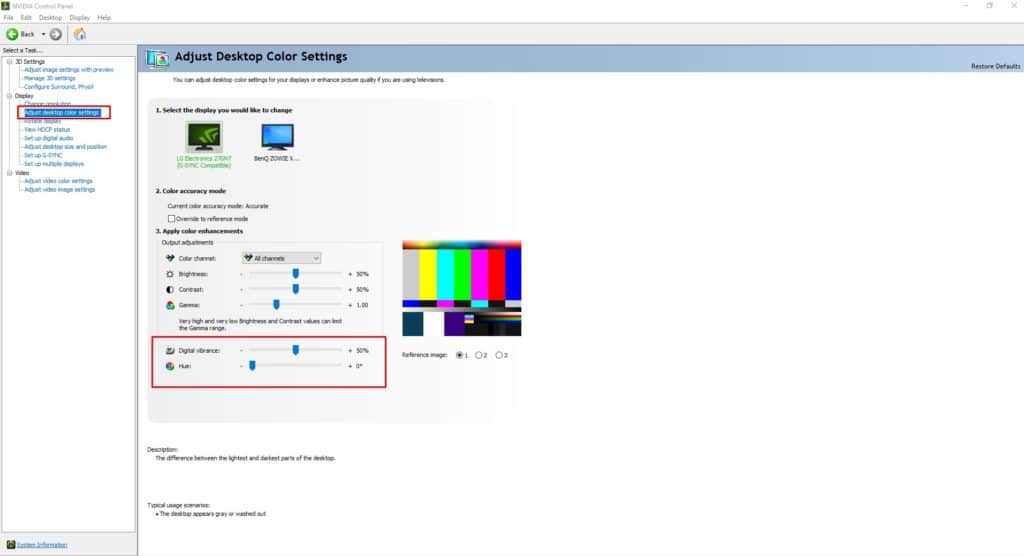
- Right click on your desktop and click on Nvidia Control Panel.
- On the left side under Display you will find out the Adjust Desktop Color Settings.
- Click on that and you will see the Digital Vibrance control panel.
- Increase the Digital Vibrance slider according to you.
Recommended | Amazon Prime Gaming Members Will Get 10 Free Radianite Points In Valorant


