

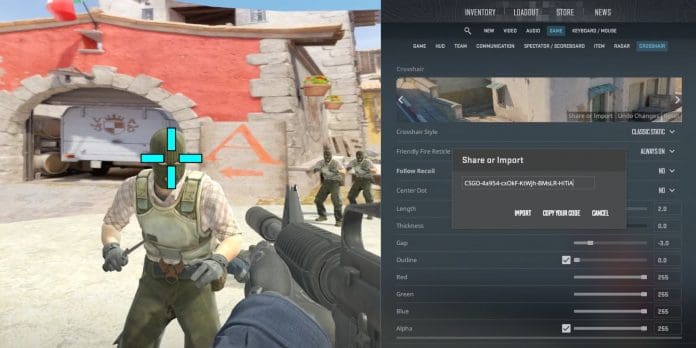

Every Counter-Strike 2 player has experienced that frustrating moment: you see the enemy first, your crosshair is on their head, you fire—and somehow miss. Before you blame lag, hitreg, or your mouse, there’s something else worth examining: your crosshair settings.
While most players spend hours in aim trainers and deathmatch servers grinding their mechanics, few take the time to optimize the one thing they stare at for every second of gameplay. The crosshair isn’t just a visual preference—it’s a precision instrument that directly impacts your performance.
The Science Behind Crosshair Design
Your crosshair serves two critical functions in CS2. First, it provides a focal point for your eyes during target acquisition. Second, it gives you spatial feedback about where your bullets will land. When either of these functions is compromised by poor settings, your gameplay suffers regardless of your raw mechanical skill.
Research in visual perception shows that the human eye naturally gravitates toward high-contrast elements in a scene. A crosshair that blends into the environment or competes with visual clutter forces your brain to work harder to locate your aim point. This cognitive load translates directly into slower reaction times and reduced accuracy under pressure.
Professional players understand this relationship intimately. Watch any match on HLTV and you’ll notice that virtually no pro uses the default crosshair settings that ship with CS2. Each player fine-tunes their crosshair for maximum visibility across all map surfaces and lighting conditions.
What the Pros Actually Use
Examining professional crosshair configurations reveals some interesting patterns. While preferences vary significantly between players, certain trends emerge consistently across the competitive scene.
Most professionals favor static crosshairs over dynamic ones. The logic here is straightforward: a crosshair that expands during movement or firing introduces visual noise without providing useful information to an experienced player. After thousands of hours, pros have internalized spray patterns and movement accuracy—they don’t need their crosshair to remind them.
Gap settings tend to cluster in the small-to-medium range. A crosshair gap of negative two through positive two pixels is typical among top-tier players—s1mple, widely considered the best player in CS history, uses a gap of negative three. This range provides enough central visibility to see exactly where you’re aiming while maintaining a clear reference point for fine adjustments.
Color choices lean toward high visibility options. Cyan, green, and yellow dominate professional configurations because these colors provide strong contrast against the predominantly brown, gray, and orange environments in competitive maps like Mirage, Inferno, and Ancient.
For players looking to experiment with proven professional configurations, resources like CS2Flow’s pro crosshair database offer one-click copying of settings used by top competitors. Rather than guessing at values, you can start with a tournament-tested baseline and adjust from there.
The Psychology of Crosshair Confidence
There’s a psychological dimension to crosshair optimization that often goes undiscussed. When you genuinely believe your crosshair accurately represents where your bullets will land, you commit to fights differently. Hesitation kills in Counter-Strike, and a crosshair you don’t trust breeds hesitation.
This confidence factor explains why players sometimes see immediate improvement after switching crosshairs, even when the mechanical differences are minimal. The placebo effect is real in competitive gaming—if you believe a crosshair works better for you, your brain commits more fully to the aim, and your performance often follows.
The key is finding settings that feel invisible. Your crosshair should require zero conscious attention during a firefight. If you ever catch yourself looking at your crosshair rather than through it, something needs adjustment.
Common Mistakes Players Make
Several crosshair configuration errors plague players at every skill level.
The first mistake is using settings that are too thick or too large. A chunky crosshair might feel substantial, but it obscures targets at medium and long range. When your crosshair covers more of an enemy’s head than the head itself, you’re handicapping your precision.
Another frequent error is ignoring the outline feature. A thin black outline around your crosshair dramatically improves visibility on bright surfaces like Overpass’s highway or Ancient’s temple without adding visual clutter. Players who skip this setting often struggle with visibility inconsistency across different maps.
Using a dot that’s too prominent causes problems as well. While a center dot can help with one-taps, a dot that’s too large obscures the exact pixel you’re aiming at. If you use a dot, keep it at one pixel with moderate transparency.
Finally, many players neglect to disable the alpha-based crosshair smoothing that CS2 enables by default. This smoothing can create subtle rendering inconsistencies that affect the crosshair’s perceived position, particularly at high frame rates. If you’re still struggling with visual clarity, it may be worth revisiting your settings for maximum FPS to ensure your system isn’t the bottleneck.
Finding Your Personal Settings
Discovering your optimal crosshair requires systematic experimentation rather than random changes. Start by establishing a baseline using a professional player’s settings that match your general playstyle. AWPers tend toward smaller, less obtrusive crosshairs since they scope for most engagements. Riflers often prefer slightly larger crosshairs that remain visible during spray transfers.
From your baseline, adjust one variable at a time. Spend at least a full play session with each configuration before evaluating. Snap judgments about crosshair effectiveness are unreliable—you need time for the new settings to feel natural before assessing their impact on your gameplay.
Pay attention to specific scenarios where your crosshair causes problems. Do you lose it against white walls? Increase thickness or add an outline. Does it obscure targets at range? Reduce size and gap. Is it distracting during spray transfers? Try removing the dot or reducing line length.
Document configurations that feel promising. CS2’s share code system makes this easy—generate a code for any crosshair you want to revisit later.
The Diminishing Returns of Optimization
While crosshair optimization genuinely impacts performance, there’s a point where additional tweaking yields negligible benefits. Once you’ve found settings that provide consistent visibility without obscuring targets, further adjustments produce marginal improvements at best.
The goal isn’t to find the mathematically perfect crosshair—such a thing doesn’t exist. Player preferences, playstyles, monitor characteristics, and visual processing differences mean optimal settings vary between individuals. The goal is to remove your crosshair as a limiting factor in your gameplay.
Once your crosshair is no longer actively hurting your performance, your time is better spent on positioning, utility usage, game sense, and the countless other skills that separate good players from great ones. Your crosshair is a foundation, not a ceiling.
Quick Reference: Optimal Crosshair Settings
- Style: Static (no expansion on movement or fire)
- Gap: Between -3 and +2 pixels
- Color: Cyan, green, or yellow for maximum visibility
- Outline: Thin black outline (thickness 1)
- Dot: Off or 1 pixel with moderate transparency
- Thickness: 1 or 2 pixels to avoid obscuring targets
Conclusion
Your crosshair is arguably the most personal aspect of your CS2 configuration. It sits at the center of your screen for every moment of gameplay, mediating your interaction with the game world. Taking time to optimize this fundamental element pays dividends across every firefight, every spray transfer, and every clutch situation.
Start with proven professional settings, adjust systematically based on your experience, and resist the urge to change configurations reactively after bad games. A thoughtfully configured crosshair won’t transform you into a professional player overnight—but a poorly configured one might be silently sabotaging the skills you already have.
What crosshair settings have worked best for you? The debate between dot versus no-dot alone has divided players for years.
