

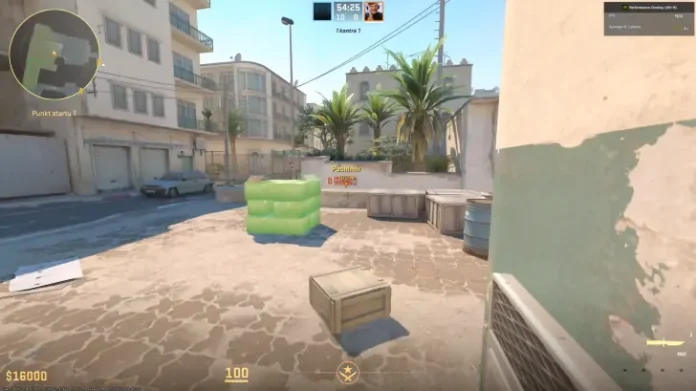

Prop Hunt is back, and it works in Counter-Strike 2. If you have been watching ohnePixel’s recent streams and wondering how he is playing hide-and-seek as a chicken on Inferno, this is the guide you need. CS2 Prop Hunt is not an official Valve game mode. It runs through community workshop maps and custom servers, and setting it up takes about two minutes.
This guide covers both methods: workshop maps with friends, and public community servers with strangers.
What is Prop Hunt in CS2?
Prop Hunt is a hide-and-seek game mode where one team disguises as random in-game objects (boxes, barrels, chickens, fire extinguishers) and hides around the map, while the other team hunts them down. The concept started in Garry’s Mod years ago and has since appeared in Call of Duty, Team Fortress 2, and now Counter-Strike 2.
The rules are simple. Props get 30 seconds to find a hiding spot. Seekers then have five minutes to find and destroy every prop. If even one prop survives, the prop team wins. Props are assigned a random object at the start of each round and can re-roll up to three times by typing !r or !reroll in chat. Props can also move around mid-round, so getting spotted is not an automatic death sentence if you react fast enough.
One detail that matters more than it sounds: your prop automatically aligns to the ground surface, making it harder for seekers to spot you based on tilt angle alone. Good prop players learn which objects naturally exist on each map and position themselves accordingly. A barrel next to other barrels is invisible. A barrel in the middle of A site is suspicious.
Method 1: Steam Workshop maps (play with friends)
This is the easiest way to get started and what most streamers use.
Step 1. Open Steam and go to the CS2 Steam Workshop. Search for “Prophunt” or “Prop Hunt.”
Step 2. Subscribe to a Prop Hunt map. The most popular one right now is Prophunt Inferno by Angel, which uses cs_script to run the entire game mode within a single workshop map. Other options include Prophunt Mirage and Prophunt Vertigo.
Step 3. Launch Counter-Strike 2. Click Play, then select Workshop Maps.
Step 4. Find the Prop Hunt map you subscribed to and select it.
Step 5. Invite your friends to the lobby before starting. Prop Hunt does not work with bots, so you need real players.
Step 6. Hit GO. The game mode loads automatically with all the Prop Hunt rules built in.
One tip: if you are playing as a prop, enable thirdperson view through the console (sv_cheats 1, then thirdperson). It makes hiding much easier because you can actually see what your prop looks like and how it fits into the environment.
Method 2: Community servers (play with strangers)
If you do not have enough friends online or want to drop into a full lobby, community servers are the way to go.
Step 1. Open CS2 and click Play.
Step 2. Select Community Server Browser (next to the Workshop Maps tab).
Step 3. In the search bar, type “prop hunt” or “prophunt” to filter results.
Step 4. Pick a server with decent ping and player count. Most active Prop Hunt servers are based in Europe and Asia.
Step 5. Click Connect and you are in.
You can also use external server browsers like CS2Browser or SteamBrowser to find Prop Hunt servers. These sites let you filter by game mode, region, and player count, which is useful when the in-game browser returns limited results.
Two community servers that get mentioned frequently by players: EXG CS2 Prop Hunt (based in Asia) and Edgeb.ug (based in the Netherlands).
Useful commands and tips
Once you are in a Prop Hunt game, these commands and tricks will help:
!r or !reroll re-rolls your assigned prop up to three times per round. Use this if you get a massive object that is impossible to hide.
!whistle plays a taunt sound, which seekers can hear. Some servers force periodic whistles to give seekers a chance, but you can also use it voluntarily to taunt.
!config (on Prophunt Inferno specifically) opens a settings menu where the host can toggle game mode options like round time, seeker spawn delay, and whistle frequency.
sv_cheats 1 followed by thirdperson lets you see your prop from a third-person camera. Not required, but it makes positioning much more intuitive.
For hiding strategy: learn which objects belong on each map. Inferno has a lot of wooden crates, barrels, and small boxes. If you are a crate, sit next to other crates. If you get something unusual like a fire hydrant, find a corner where it would not look completely out of place. Movement is your enemy while seekers are nearby, but your friend when you need to reposition after being almost spotted.
For seeking strategy: shoot anything that looks slightly off. Check corners, check behind doors, and pay attention to prop shadows. Experienced prop players sit in plain sight disguised as objects that already exist on the map, so trained map knowledge helps more than raw aim.
Why Prop Hunt is blowing up again
Prop Hunt has existed in some form across multiple games for over a decade. The reason it is trending in CS2 right now comes down to a few things. Workshop support in CS2 has matured significantly since Valve re-added community maps in late 2023. Map creators like Angel have built fully functional game modes using cs_script that would not have been possible a year ago. And streamers like ohnePixel playing it to thousands of viewers introduces the mode to people who never tried it in Garry’s Mod or Call of Duty.
There is also a simpler reason. CS2’s official modes are all competitive or semi-competitive. There is no casual, silly, zero-stakes mode built into the game. Prop Hunt provides that. You do not need to warm up. You do not need to worry about your rating. You just need to hide behind a barrel and try not to laugh when a seeker walks past you.
Frequently asked questions
How do you play Prop Hunt in CS2?
Subscribe to a Prop Hunt workshop map (like Prophunt Inferno) through the Steam Workshop, launch CS2, go to Play then Workshop Maps, select the map, invite friends, and start. You can also join public Prop Hunt games through the Community Server Browser.
Is Prop Hunt an official CS2 game mode?
No. Prop Hunt runs entirely through community-made workshop maps and custom servers. Valve has not added it as an official mode.
Can you play CS2 Prop Hunt solo or with bots?
No. Prop Hunt requires real players. Bots do not support the game mode. You need at least a few friends or need to join a community server with active players.
What is the best Prop Hunt map in CS2?
Prophunt Inferno by Angel is currently the most popular and polished option. It uses cs_script for full game mode functionality including prop selection, re-rolls, taunts, and seeker timers. Prophunt Mirage and Prophunt Vertigo are also available.
What does the !reroll command do in Prop Hunt?
Typing !r or !reroll in chat re-rolls your randomly assigned prop. You can re-roll up to three times per round if you get an object that is too large or too obvious to hide.
Why is ohnePixel playing Prop Hunt?
ohnePixel, one of the biggest CS2 streamers on Twitch, has been playing Prop Hunt on stream as a break from competitive content. The streams have introduced the game mode to a wider audience and driven a spike in search interest for CS2 Prop Hunt guides.
