


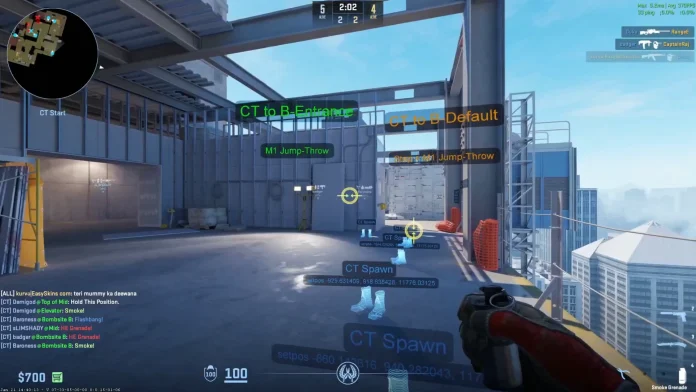
Among the plethora of new content that the CS2 Premier Season 4 update has brought to the competitive shooter, the addition of workshop guides for Casual and Retake modes might just take the cake for most casual players.
For the uninitiated, this newly added CS2 feature lets players view and execute lineups for smokes, flashes, nades, and other utility on the fly by simply picking out guides from the Steam Workshop. Since it’s restricted to Casual and Retake modes, it also avoids impacting the game’s competitive integrity.
Not all players have the time to dedicate hundreds of hours to studying YouTube guides for smoke lineups across every map, making this new CS2 feature a welcome addition among the casual player base.
How to Use the New Workshop Guides in CS2 Casual & Retake
Activating workshop guides in CS2 when playing Casual or Retake game modes is extremely simple and takes no more than a few seconds.
Once you load into a game, all you need to do is press the ‘Esc’ key on your keyboard and select your preferred guide from the top-left menu on your screen. If you don’t see any guides listed, then you’ll need to browse the Steam Workshop and pick from the hundreds of guides available to download.
Once the download finishes and the workshop guide is activated, all of the included utility lineups will appear in real time as you move across the map.
Note that you’ll only see lineups for the piece of utility you currently have equipped (for example, smoke lineups will appear on the map only when you’re holding a smoke grenade).
That’s everything you need to know about the new workshop guides feature for CS2 Casual and Retake game modes.
