

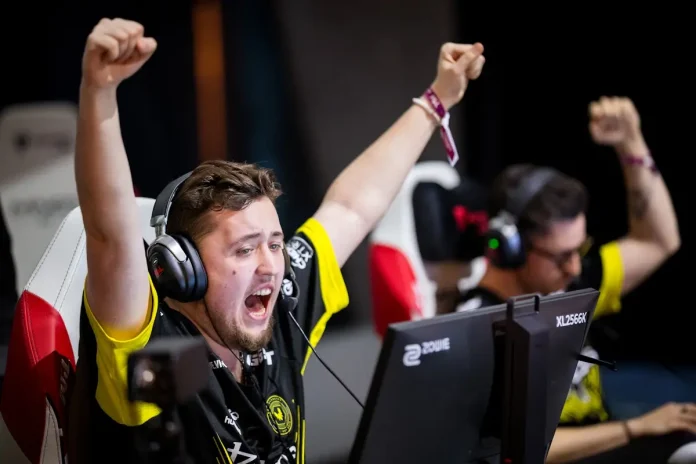

Team Vitality’s dominance at StarLadder Budapest has done more than secure back-to-back CS2 Major titles. It has reshaped how competitive players approach their setups. Across FACEIT, Premier, and high-ELO matchmaking in the US and UK, players are rebuilding their configs to mirror the precision, clarity, and consistency shown by Team Vitality.
While raw skill cannot be copied, optimal settings can reduce friction, improve visibility, and create a more predictable competitive environment. Here is a deep breakdown of how mezii, ZywOo, and apEX configure Counter-Strike 2, and why their setups work so well for serious ranked play heading into 2026.
mezii CS2 Settings: Precision Rifling Built for Control
As Vitality’s grand final MVP, mezii delivered one of the cleanest rifling performances seen in CS2 so far. His setup prioritises visual clarity and stable mouse control, especially in stretched resolutions that exaggerate enemy models.
Mouse & Sensitivity
- DPI: 400
- Sensitivity: 2.2
- eDPI: 880
This range strikes a balance between micro-adjustments for rifle sprays and fast crosshair placement during close-range duels, making it ideal for aggressive CT anchoring and entry support roles.
Resolution & Display
- Resolution: 1280×1024
- Aspect Ratio: 5:4 Stretched
- Display Mode: Fullscreen
- Brightness: 100%
The 5:4 stretched format enlarges character models horizontally, improving target acquisition in fast peeks common in US and UK FACEIT servers.
Video & Graphics Settings
| Setting | Value |
| Boost Player Contrast | Enabled |
| V-Sync | Disabled |
| NVIDIA Reflex Low Latency | Disabled |
| MSAA | 8× |
| Global Shadow Quality | High |
| Model / Texture Detail | Medium |
| Texture Filtering | Anisotropic 8× |
| Shader Detail | Low |
| Particle Detail | Low |
| Ambient Occlusion | Disabled |
| Max FPS | Unlimited |
This configuration keeps shadows readable for information gathering while cutting visual noise elsewhere to maintain stable frame pacing.
Gear & PC Setup
- GPU: RTX 4090-class
- CPU: Intel i9 / Ryzen 9 tier
- RAM: 32GB
- Monitor: ZOWIE XL2546K (240Hz)
- Mouse: Logitech G Pro X Superlight
ZywOo CS2 Settings: AWP Dominance Through Stability
ZywOo remains Counter-Strike’s gold standard for AWP consistency. His CS2 settings emphasise smooth tracking, minimal input latency, and maximum visual reliability during long-range engagements.
Mouse & Sensitivity
- DPI: 400
- Sensitivity: 2.0
- eDPI: 800
This slightly lower sensitivity compared to riflers allows finer control on scoped flicks without sacrificing responsiveness.
Resolution & Display
- Resolution: 1280×960
- Aspect Ratio: 4:3 Stretched
This is a classic AWP resolution, offering an optimal balance between visibility and peripheral awareness.
Video & Graphics Settings
| Setting | Value |
| NVIDIA Reflex Low Latency | Enabled |
| MSAA | 4× |
| Global Shadow Quality | High |
| Dynamic Shadows | All |
| Texture Filtering | Anisotropic 16× |
| Shader Detail | Low |
| Ambient Occlusion | Disabled |
| Max FPS | Unlimited |
Dynamic shadows are particularly important for AWPers, as they provide early positional cues when holding angles on maps like Mirage and Inferno.
Monitor & NVIDIA Tweaks
- Monitor: ZOWIE XL2546K
- Black eQ: 12
- Color Vibrance: 20
- NVIDIA Control Panel:
- Power Management: Prefer Maximum Performance
- Low Latency Mode: Ultra
- Shader Cache: On
Hardware
- GPU: RTX 40-series
- RAM: 32GB
- Storage: NVMe SSD
- Mouse: Pulsar Xlite V3
apEX CS2 Settings: Clarity for Calling and Utility Control
As Vitality’s in-game leader, apEX prioritises readability over aesthetics. His settings are built to maximise information intake during executes, rotations, and late-round decision making.
Mouse & Sensitivity
- DPI: 400
- Sensitivity: 2.5
- eDPI: 1000
A higher sensitivity supports rapid camera movement while juggling utility usage and positional awareness.
Resolution & Display
- Resolution: 1024×768
- Aspect Ratio: 4:3 Stretched
This low resolution improves frame consistency and enlarges HUD elements, helping with quick reads during chaotic rounds.
Video & Graphics Settings
| Setting | Value |
| Boost Player Contrast | Disabled |
| NVIDIA Reflex Low Latency | Enabled |
| MSAA | 2× |
| Global Shadow Quality | High |
| Model / Texture Detail | Low |
| Texture Filtering | Anisotropic 16× |
| Shader Detail | Low |
| Particle Detail | Low |
| Ambient Occlusion | Medium |
Monitor Configuration
- Monitor: ZOWIE XL2546K
- Brightness: 100
- Black eQ: 15
- Color Vibrance: 14
- DyAc: Premium
PC Build
- GPU: RTX 4090-class
- CPU: High-clock Intel / AMD flagship
- RAM: 32GB DDR5
- Keyboard: Mechanical, low-latency switches
Why Vitality’s Settings Work for US and UK Ranked Play
Vitality’s setups share three common principles that translate well to competitive matchmaking:
- Stretched resolutions to improve enemy visibility in fast peeks.
- High FPS prioritization over visual fidelity to maintain consistent aim.
- Minimal visual clutter, ensuring utility, shadows, and movement cues stand out.
For US and UK players grinding Premier or FACEIT in 2026, these configurations reduce unpredictability and help replicate a LAN-like environment online.
Vitality’s success is not built on settings alone, but their approach to optimisation reflects a deeper competitive philosophy. Every visual and hardware choice serves a purpose, whether it is rifling precision, AWP stability, or information clarity for leadership.
If you are serious about climbing ranks in CS2, copying these settings will not make you ZywOo or mezii overnight. What they will do is remove unnecessary friction, letting mechanics and decision-making take centre stage, exactly where elite Counter-Strike is decided.
