


The latest Marvel Rivals update has brought a new ‘Voice Changer’ feature to the game that lets players manipulate their voice chat experience amid the heat of battle.
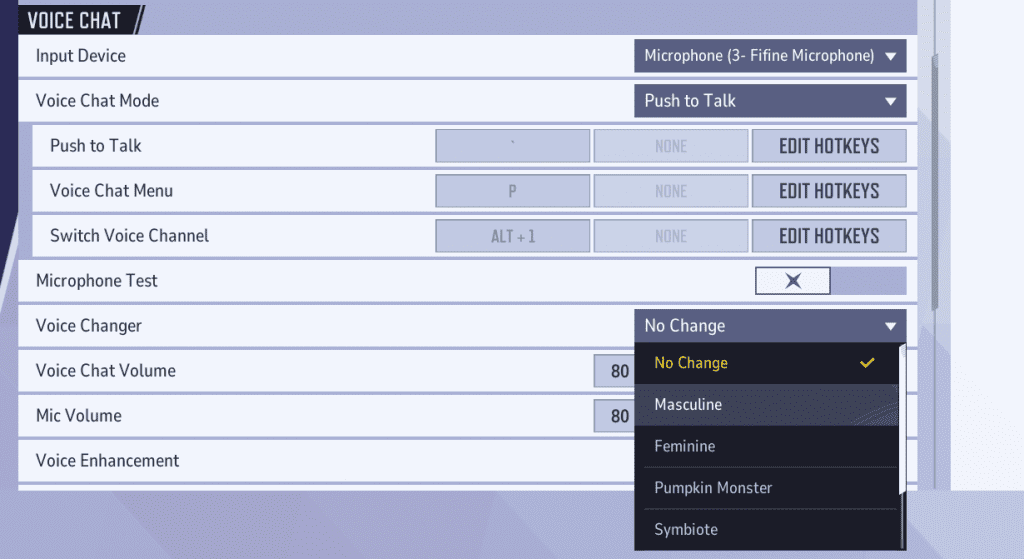
The new in-game voice changer feature, introduced to the NetEase hero shooter with its October 16 update, allows players to modify their voice to sound like a Pumpkin Monster, a Symbiote, or choose from several other options in addition to the standard masculine and feminine voices.
Previously, players had to rely on third-party software to be able to change their voices when trying to communicate via the in-game voice chat. With this update, anyone can now experiment with a range of fun voice options directly in-game without requiring any extra setup.
How To Use Marvel Rivals Voice Changer?
To access the voice changer in Marvel Rivals, players must first update their game to the latest version and head over to the Settings page after launching the title.
From there, under the ‘Voice Chat’ section, you’ll be able to select the ‘Voice Changer’ drop-down to switch to your preferred voice.
Once you’ve selected a voice, you can also adjust the intensity of the voice changer. Higher intensity levels will make your voice sound more distorted, while lower ones will keep it closer to your natural tone. Players are encouraged to experiment with this setting to find their ideal balance.
That’s everything you need to know about how to use the new voice changer feature in Marvel Rivals.

