

The infamous Valorant black screen on startup issue is one of the most common problems that players run into when trying to play the Riot Games competitive shooter. Encountering the dreaded black screen in Valorant can be incredibly frustrating, whether it pops up on startup or randomly during a match.
Not only does the Valorant black screen error completely prevent you from playing the game, but it can also be quite tricky to fix if you don’t know what you’re doing.
Luckily, there are a number of effective methods that you can use to fix the Valorant black screen on startup error.
In this article, we’re gonna go through everything you need to know about how to fix black screens in Valorant.
How To Fix Valorant Black Screen On Startup
Below, we’ve listed all the steps that you need to follow to fix the Valorant black screen on startup error:
- Restart Riot Client: The first thing you should do upon encountering a black screen on startup in Valorant is to close the game entirely and restart your Riot Client. Once done, relaunch Valorant and, in many cases, the issue will be resolved.
- Update Graphics Drivers: Outdated graphics drivers are also a common culprit behind the black screen errors in Valorant. Make sure to install any pending updates that you might have on your graphics drivers and restart your PC before launching Valorant.
- Switch Display Modes: If you’re facing a black screen on launching Valorant, your monitor might be unable to display the game’s native resolution. To fix this, press ALT + ENTER on your keyboard after launching Valorant and see if the issue is resolved. If so, you have to manually set the resolution from the Valorant settings page to one that is supported by your monitor.
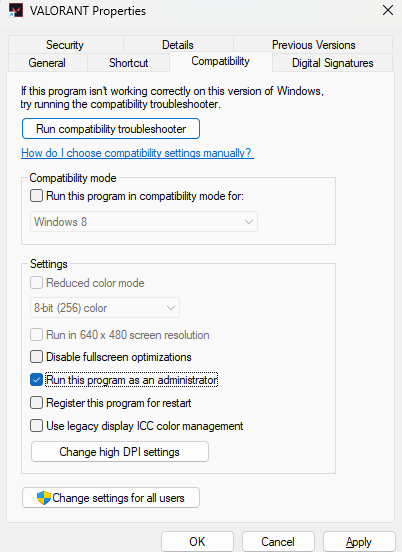
- Run Valorant in Admin Mode: Running Valorant as an administrator is sometimes an effective solution to the black screen on startup issue. To run Valorant as an admin, right-click the Valorant icon on your desktop and click on ‘Properties.’ From there, go to the ‘Compatibility’ tab and check ‘Run this program as an administrator.’ Now hit ‘Apply’ and ‘OK’ before launching Valorant.
- Reinstall Valorant: If none of the methods listed above seem to work for you, your best bet would be to uninstall Valorant and install a fresh copy. In many cases, reinstalling Valorant should likely be enough to fix the black screen on startup error.
That’s everything you need to know about how to fix a black screen in Valorant. If the problem persists for you even after following these steps, be sure to contact Riot support and let them know about your issue.

